BootMGR is missing - windows 7 (after trying the common solutions)

don green

New member
Local time
5:44 PM
Messages
11
Hello, I'm using windows 7, 64 bit.
after a big mistake of trying to use an old version of partition magic and let her do some "bug fix" - my comp can't load windows.

I am writing this message after 9 hours of reading forums, trying many things..

I am opening a new thread for a probably known problem because i have already tried everything i have found: bootsect, bootrec, startup recovery several times.

I really don't know what kind of details is important because while trying to fix it i saw many errors and messages so just ask and i will write everything that is needed.

I will tell you that first the problem that the startup recovery has found was: boot configuration is corrupt (error 0x490). after a few solutions (?) it now shows: system volume on disk is corrupt (error 0x3).

note: I cant even install windows again. first he didnt recognized my harddrive - only a small partition of 102mb (what is it?) or he found a win7 installation but he wrote that the partition size is 0mb.

should i try to rebuild the MGR again?
Is my winPE disk can help here?

I will appreciate any advice!
 

My Computer My Computer

OS
Windows 7 Home Premium 64bit
and if it's not the right forum just tell me where to post it or how to move this message. thanks!
 

My Computer My Computer

OS
Windows 7 Home Premium 64bit
Hello, I'm using windows 7, 64 bit.
after a big mistake of trying to use an old version of partition magic and let her do some "bug fix" - my comp can't load windows.

I am writing this message after 9 hours of reading forums, trying many things..

I am opening a new thread for a probably known problem because i have already tried everything i have found: bootsect, bootrec, startup recovery several times.

I really don't know what kind of details is important because while trying to fix it i saw many errors and messages so just ask and i will write everything that is needed.

I will tell you that first the problem that the startup recovery has found was: boot configuration is corrupt (error 0x490). after a few solutions (?) it now shows: system volume on disk is corrupt (error 0x3).

note: I cant even install windows again. first he didnt recognized my harddrive - only a small partition of 102mb (what is it?) or he found a win7 installation but he wrote that the partition size is 0mb.

should i try to rebuild the MGR again?
Is my winPE disk can help here?

I will appreciate any advice!

From the content of your post, it appears you don't have any issue with a reinstall. Therefore, I would suggest you visit the following link;

http://www.sevenforums.com/tutorials/3413-repair-install.html

HTH
 

My Computer My Computer

Computer type
PC/Desktop
Computer Manufacturer/Model Number
Custom Built
OS
Windows 7 Professional x64
CPU
Intel i5 quad processor
Motherboard
DP67BG
Memory
16 GB
Graphics Card(s)
Radeon HD 5770
Sound Card
Realtek High Definition Audio
Monitor(s) Displays
Samsung SyncMaster
Screen Resolution
1920X1080
Hard Drives
WD 2TB (SATA Internal)
WD 1TB (USB External)
PSU
Corsair GS800
Case
Tower (Generic)
Cooling
3 Internal Fans
Keyboard
MS Wireless
Mouse
MS Optical Wired
Internet Speed
54 mbps
Antivirus
Emsisoft
Browser
IE-Version 9, Palemoon-Version 24.2.0
What "bugs" were you trying to fix in partitioning by using incompatible Partition Magic? As long as it didn't fail during resizing scrambling the data then it should be reparable.

You can run Startup Repair - Run up to 3 Separate Times which will test all parameters and make the necessary repairs, however if you don't first confirm that the 100mb System Reserved partition (preferred if you have it) or C is Partition Marked Active it will not repair.

You can use free Partition Wizard bootable CD to Set Active partition -Partition Wizard Video Help while seeing a map of what you're doing. In that case I'd also run Partition Wizard Rebuild MBR - Video Help which may fix it outright, but if not then run the 3 Startup Repairs from Win7 disk or REpair CD.

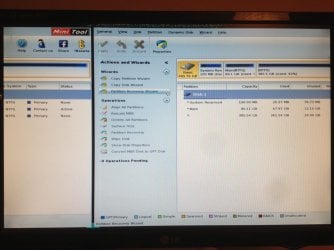
If you'll also post back a camera snap of the PW drive map and listings we can help you better.

If all else fails then everything that can possibly be done for Troubleshooting Windows 7 Failure to Start is in the tutorial leading up to if necessary rescuiing any files to run Recovery or do the superior Clean Reinstall - Factory OEM Windows 7
 
hi, thanks:
Sir George - i think i cant. because first, i cant load windows and when i am trying to reinstall or custom reinstall - when i need to choose the partition to install in - it doesnt recognized my installation or the volume of my HDD.

gregrocker - the thing i was trying to fix is my usb flash drive. for some reason i thought that partition magic can help me. the point is that i never succeeded to load the program because first partition magic couldnt load because it was incompatible. after i loaded it on XP enviroment (option on the file preferences) it did tried to load and then find some errors on my disk and asked to fix them. i thousht it was my usb flash drive and that's why i approved it..
and as you said, I also think\hope it's reparable.

about the 3 time startup repair: I am trying to do it. i manged to set my 100 mb partition as active with the COMMAND PROMPT turitorial and not with the wizard.
 

My Computer My Computer

OS
Windows 7 Home Premium 64bit
How can I know which partition should be ACTIVE?
A. when it was the 100mb and the comp tried to start it showed windows boot manager - \boot\bcd) and the startup repair shows: No os files found on disk
B. and when it was partition 2 it shows: BootMGR is missing press ctrl+alt+del.. and startup repair shows system volume on disk is corrupt.

so now i am stuck on situation B that i described.

How can i solve the problem that when i press repair my computer and the it scans for windows installations - it founds nothing??


if it is relevant - i did this procedure as one of the attemps:
--------------------------------------
bcdedit /export C:\BCD_Backup
c:
cd boot
attrib bcd -s -h -r
ren c:\boot\bcd bcd.old
bootrec /RebuildBcd
-----------------------
 

My Computer My Computer

OS
Windows 7 Home Premium 64bit
We have to assume that if you have the 100mb System Reserved partition then unless you changed the boot partition to C it is still meant to be booting Win7. So if it won't repair after running three separate Startup Repairs with reboots, you can move the Active flag to C to try 3 more times with reboots.

If this fails then everything else that can be done is compiled in Troubleshooting Windows 7 Failure to Start.
There is a step to try if no installation is found to repair, by running the Bootrec.exe tool in the Windows Recovery Environment to troubleshoot and repair startup issues in Windows . Sometimes these commands run manually will force the repair utility to see Win7.

If not then write the latest official ISO to flash stick or burn to CD from Steps 1 and 2 of Clean Reinstall - Factory OEM Windows 7, boot the installer to if necessary rescue your files using Copy & Paste - in Windows Recovery Console then delete all partitions using the drive options shown in Steps 7 and 8 of Clean Install Windows 7, create new partition(s) as you desire and reinstall.

If the installer will not boot try wiping the HD first with Diskpart Clean Command from the installer's Command Line. You should also be running all repair commands and repairs themselves from the disk.
 
OK

and by btw - this is the snapshot of PW. and when the 80gb is active (i did it before i saw your message) i tried rebuild mbr option. didn't help..
 

Attachments

  • PW Photo.JPG
    PW Photo.JPG
    173.8 KB · Views: 1

My Computer My Computer

OS
Windows 7 Home Premium 64bit
OK, I will try to.. I will let you know about the results.. thank you
 

My Computer My Computer

OS
Windows 7 Home Premium 64bit
Hi,
eventually I found an old image of my disk and used it for recovery.
than I used startup repair for creating the Boot manager.

thank U!
 

My Computer My Computer

OS
Windows 7 Home Premium 64bit
Back
Top