Downgrading from windows 7 gone wrong (bootmgr is missing)

IFTN

New member
Local time
12:22 AM
Messages
20
Downgrading from windows 10 gone wrong (bootmgr is missing)

Hi all. So I was trying to deinstall windows 10 and install windows 7 of my Asus Vivobook S300C using this guide.

Everything worked fine until the "IMMEDIATELY Click Out On Top X, TERMINATE Installation Process and REBOOT." step. At this point I restarted the computer and continued through the installation process to the point where I was supposed be able to click "INSTALL NOW". Here I got the message

"A required CD/DVD drive device driver is missing. If you have a driver floppy disk, CD, DVD, or USB flash drive, please insert it now. Note: If the Windows installation media is in the CD/DVD drive, you can safely remove it for this step." <Browse> <OK> <Cancel>.

After a bit of googling I found this site which suggested the problem might be caused by the fact I was using a USB 3.0 port. I indeed was using a USB3.0 port so I turned off the computer and put the USB drive in a 2.0 port instead. However, now when I turn on the computer I get the message "BOOTMGR is missing. Press Ctrl+Alt+Delete to restart". When I go into Bios the USB stick isn't even there in the boot options anymore (just the hard drive of the laptop).

I tried making a new bootable USB stick but still get the same problem. Any ideas as to why this could be?

Thanks in advance!
 
Last edited:

My Computer

Computer type
Laptop
Computer Manufacturer/Model Number
Lenovo ThinkPad Edge E540
OS
Windows 7 Professional x64
CPU
i5-4210M
Memory
4GB
Graphics Card(s)
Shared Intel
Hard Drives
500GB HDD
Antivirus
Avast
Browser
Chrome
go to the bios then set your boot order..
IF DETECTED THEN DO THIS

1.Load Windows through any drive USB or DISC
2.Click Repair your Computer
3.Find the O.S. you want to repair
4. Go to System Recovery Options then click COMMAND PROMPT
5.Type in Command Prompt this Bootrec /RebuildBcd

IF STILL SAYING
"A required CD/DVD drive device driver is missing. If you have a driver floppy disk, CD, DVD, or USB flash drive, please insert it now. Note: If the Windows installation media is in the CD/DVD drive, you can safely remove it for this step." <Browse> <OK> <Cancel>.

TRY RE-DOWNLOADING YOUR ISO THEN USE RUFUS OR WINDOWS USB/DVD Download Tool
 

My Computer

Computer type
PC/Desktop
Computer Manufacturer/Model Number
Custom-Built
OS
Windows 7 Ultimate x86
CPU
AMD Sempron 140 2.7ghz
Motherboard
Biostar N61PC-M2S
Memory
2GB DDR2 PC400
Graphics Card(s)
NVIDIA Geforce 6150SE / NFORCE 430 Integrated Graphics
Sound Card
Realtek High Definition Audio
Monitor(s) Displays
1
Screen Resolution
1280x1536
Hard Drives
Seagate Baracudda 7200rpm 500GB IDE
PSU
Generic 500W
Case
Generic Cheap
Cooling
Cooler Master Sickle for Processor Heatsink : OFFICIAL AMD
Keyboard
PS/2 Powerlogic
Mouse
Rapoo Wireless Mouse
Internet Speed
8mbps Cable Internet
Antivirus
COMODO Cloud
Browser
Chrome
Hi, thanks for the response but the USB doesn't even show up in the boot order anymore. I tried making a new bootable USB (with rufus) but still doesn't show up (which is weird because it did at the first try). And the laptop has no CD drive.
 

My Computer

Computer type
Laptop
Computer Manufacturer/Model Number
Lenovo ThinkPad Edge E540
OS
Windows 7 Professional x64
CPU
i5-4210M
Memory
4GB
Graphics Card(s)
Shared Intel
Hard Drives
500GB HDD
Antivirus
Avast
Browser
Chrome
Witch OS came with the laptop, Win 7, 8 or 10?
Witch OS was on the laptop before win 10, Win 7 or 8?
You where trying to roll back from Win 10 to Win 7 or you are trying to do a clean install?
Where did you get the Win 7 Pro disk?
Did you change any BIOS settings?

- First of all, the link you have followed is 4 years old and is for a Legacy MBR.
- Your Laptop is 2 years old, and has a UEFI BIOS, not a Legacy MBR.
- Win 7 installation disk doesn't have USB 3 drivers, so it ask for CD/DVD drive device driver. You must use USB 2 or provide the USB 3 drivers.
- Secure boot isn't compatible with Win 7. You must disable it on BIOS (Boot menu).
- What configuration is on CSM on BIOS (Boot menu)?

Give me the information I asked and I'll try to guide you.
 
Last edited:

My Computers

System One System Two

  • Computer type
    PC/Desktop
    Computer Manufacturer/Model Number
    custom build
    OS
    Windows 7 HP 64
    CPU
    i5 6600K - 800MHz to 4200MHz
    Motherboard
    GA-Z170-HD3P
    Memory
    4+4G GSkill DDR4 3000
    Graphics Card(s)
    IG - Intel 530
    Monitor(s) Displays
    Samsung 226BW
    Screen Resolution
    1680x1050
    Hard Drives
    (1) -1 SM951 – 128GB M.2 AHCI PCIe SSD drive for Windows 7 and Lubuntu
    (2) -1 WD SATA 3 - 1T for Data
    (3) -1 WD SATA 3 - 1T for backup
    PSU
    Thermaltake 450W TR2 gold
    Keyboard
    Old and good Chicony mechanical keyboard
    Mouse
    Logitech mX performance - 9 buttons (had to disable some)
    Internet Speed
    500Mb/s
    Browser
    Firefox 64
    Other Info
    TinyWall firewall
  • Computer type
    Laptop
    System Manufacturer/Model Number
    Asus Q550LF
    OS
    Windows 7 Pro
    CPU
    i7-4500U 800MHz to 3.0GHz
    Motherboard
    Asus Q550LF
    Memory
    (4+4)G DDR3 1600
    Graphics Card(s)
    IG intel 4400 + NVIDIA GeForce GT 745M
    Sound Card
    Realtek
    Monitor(s) Displays
    LG Display LP156WF4-SPH1
    Screen Resolution
    1920 x 1080
    Hard Drives
    BX500 120G SSD for Windows and programs +
    1T HDD for data
    Internet Speed
    500 Mb/s
    Browser
    Firefox
    Other Info
    TinyWall firewall
Witch OS came with the laptop, Win 7, 8 or 10? 8
Witch OS was on the laptop before win 10, Win 7 or 8? 10
You where trying to roll back from Win 10 to Win 7 or you are trying to do a clean install? Clean install
Where did you get the Win 7 Pro disk? Got the iso from the windows site
Did you change any BIOS settings? No (other than boot order)

Thanks for your help!
 

My Computer

Computer type
Laptop
Computer Manufacturer/Model Number
Lenovo ThinkPad Edge E540
OS
Windows 7 Professional x64
CPU
i5-4210M
Memory
4GB
Graphics Card(s)
Shared Intel
Hard Drives
500GB HDD
Antivirus
Avast
Browser
Chrome
First of all, you have to change some BIOS settings so it will be compatible with Win 7.
- Download the User guide https://download.lenovo.com/ibmdl/pub/pc/pccbbs/mobiles_pdf/e440_e540_ug_en.pdf
- On page 135 (119) USB - Set USB 3.0 Mode = Disabled (enable AFTER win 7 installation)
- On page 138 (122) SATA Controller Mode = AHCI
- On page 140 (124) Security Chip = Inactive
- On page 142 (126) Secure boot - Set Secure boot = Disabled
- On page 142 (126) Secure boot - Set Platform Mode = User Mode
- On page 143 (127) Secure boot - Set Secure Boot Mode = Standard Mode
- On page 144 (128) UEFI/Legacy Boot - set UEFI Only + UEFI First + CSM Support = yes
- On page 144 (128) Boot Device List F12 Option = Enabled
- On page 144 (128) Boot Order Lock = Disabled

- Disconnect all other drives - Very important
- Boot with your Win 7 64 bits installation disk on UEFI mode
- Select custom (advanced) - drive options - delete all partitions - create new. Windows will create the necessary partitions and install.
Clean Install Windows 7

To save time on the updates:
MS releases SP2 for Windows 7

For drivers an documentation Laptops-and-netbooks :: ThinkPad-Edge-laptops :: ThinkPad-Edge-E540 - Lenovo Support
 

My Computers

System One System Two

  • Computer type
    PC/Desktop
    Computer Manufacturer/Model Number
    custom build
    OS
    Windows 7 HP 64
    CPU
    i5 6600K - 800MHz to 4200MHz
    Motherboard
    GA-Z170-HD3P
    Memory
    4+4G GSkill DDR4 3000
    Graphics Card(s)
    IG - Intel 530
    Monitor(s) Displays
    Samsung 226BW
    Screen Resolution
    1680x1050
    Hard Drives
    (1) -1 SM951 – 128GB M.2 AHCI PCIe SSD drive for Windows 7 and Lubuntu
    (2) -1 WD SATA 3 - 1T for Data
    (3) -1 WD SATA 3 - 1T for backup
    PSU
    Thermaltake 450W TR2 gold
    Keyboard
    Old and good Chicony mechanical keyboard
    Mouse
    Logitech mX performance - 9 buttons (had to disable some)
    Internet Speed
    500Mb/s
    Browser
    Firefox 64
    Other Info
    TinyWall firewall
  • Computer type
    Laptop
    System Manufacturer/Model Number
    Asus Q550LF
    OS
    Windows 7 Pro
    CPU
    i7-4500U 800MHz to 3.0GHz
    Motherboard
    Asus Q550LF
    Memory
    (4+4)G DDR3 1600
    Graphics Card(s)
    IG intel 4400 + NVIDIA GeForce GT 745M
    Sound Card
    Realtek
    Monitor(s) Displays
    LG Display LP156WF4-SPH1
    Screen Resolution
    1920 x 1080
    Hard Drives
    BX500 120G SSD for Windows and programs +
    1T HDD for data
    Internet Speed
    500 Mb/s
    Browser
    Firefox
    Other Info
    TinyWall firewall
Hi! Thanks very much for your answer, but that's for the wrong laptop! I'm working with an Asus Vivobook S300C - I can't even find half the options you're talking about :(
 

My Computer

Computer type
Laptop
Computer Manufacturer/Model Number
Lenovo ThinkPad Edge E540
OS
Windows 7 Professional x64
CPU
i5-4210M
Memory
4GB
Graphics Card(s)
Shared Intel
Hard Drives
500GB HDD
Antivirus
Avast
Browser
Chrome
Sorry, my mistake.
Start over.
- You must place the USB Flash disk on a USB 2.0. Win 7 Installation disk doesn't have USB 3 drivers.
- How did you installed the Win 7 Installation into the USB Flash disk? (witch tool you used?)
- With version you are trying to install, 32 or 64 bits?
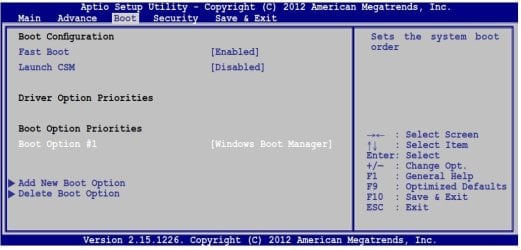
- Win 7 isn't compatible with Secure Boot. It must be disabled. And CSM must be enabled.
- Disable Fast Boot
 

Attachments

  • A_boot.JPG
    A_boot.JPG
    77.8 KB · Views: 7

My Computers

System One System Two

  • Computer type
    PC/Desktop
    Computer Manufacturer/Model Number
    custom build
    OS
    Windows 7 HP 64
    CPU
    i5 6600K - 800MHz to 4200MHz
    Motherboard
    GA-Z170-HD3P
    Memory
    4+4G GSkill DDR4 3000
    Graphics Card(s)
    IG - Intel 530
    Monitor(s) Displays
    Samsung 226BW
    Screen Resolution
    1680x1050
    Hard Drives
    (1) -1 SM951 – 128GB M.2 AHCI PCIe SSD drive for Windows 7 and Lubuntu
    (2) -1 WD SATA 3 - 1T for Data
    (3) -1 WD SATA 3 - 1T for backup
    PSU
    Thermaltake 450W TR2 gold
    Keyboard
    Old and good Chicony mechanical keyboard
    Mouse
    Logitech mX performance - 9 buttons (had to disable some)
    Internet Speed
    500Mb/s
    Browser
    Firefox 64
    Other Info
    TinyWall firewall
  • Computer type
    Laptop
    System Manufacturer/Model Number
    Asus Q550LF
    OS
    Windows 7 Pro
    CPU
    i7-4500U 800MHz to 3.0GHz
    Motherboard
    Asus Q550LF
    Memory
    (4+4)G DDR3 1600
    Graphics Card(s)
    IG intel 4400 + NVIDIA GeForce GT 745M
    Sound Card
    Realtek
    Monitor(s) Displays
    LG Display LP156WF4-SPH1
    Screen Resolution
    1920 x 1080
    Hard Drives
    BX500 120G SSD for Windows and programs +
    1T HDD for data
    Internet Speed
    500 Mb/s
    Browser
    Firefox
    Other Info
    TinyWall firewall
From what I know every OEM laptop come with a Recovery Partition I think you can use that to reinstalll Windows...
 

My Computer

Computer type
PC/Desktop
Computer Manufacturer/Model Number
Custom-Built
OS
Windows 7 Ultimate x86
CPU
AMD Sempron 140 2.7ghz
Motherboard
Biostar N61PC-M2S
Memory
2GB DDR2 PC400
Graphics Card(s)
NVIDIA Geforce 6150SE / NFORCE 430 Integrated Graphics
Sound Card
Realtek High Definition Audio
Monitor(s) Displays
1
Screen Resolution
1280x1536
Hard Drives
Seagate Baracudda 7200rpm 500GB IDE
PSU
Generic 500W
Case
Generic Cheap
Cooling
Cooler Master Sickle for Processor Heatsink : OFFICIAL AMD
Keyboard
PS/2 Powerlogic
Mouse
Rapoo Wireless Mouse
Internet Speed
8mbps Cable Internet
Antivirus
COMODO Cloud
Browser
Chrome
Sorry, my mistake.
Start over.
- You must place the USB Flash disk on a USB 2.0. Win 7 Installation disk doesn't have USB 3 drivers.
- How did you installed the Win 7 Installation into the USB Flash disk? (witch tool you used?)
- With version you are trying to install, 32 or 64 bits?
- Win 7 isn't compatible with Secure Boot. It must be disabled. And CSM must be enabled.
- Disable Fast Boot

I'm using Rufus to make the USB stick. 64 Bits. Already had Secure Boot disabled and CSM enabled. I can't find the option for fast boot though?

EDIT: My screen looks almost the same as yours, the only difference being that I have version 2.15.1226 and apparently fastboot doesn't show up
 

My Computer

Computer type
Laptop
Computer Manufacturer/Model Number
Lenovo ThinkPad Edge E540
OS
Windows 7 Professional x64
CPU
i5-4210M
Memory
4GB
Graphics Card(s)
Shared Intel
Hard Drives
500GB HDD
Antivirus
Avast
Browser
Chrome
From what I know every OEM laptop come with a Recovery Partition I think you can use that to reinstalll Windows...

Okay, any hints on how to do that?
 

My Computer

Computer type
Laptop
Computer Manufacturer/Model Number
Lenovo ThinkPad Edge E540
OS
Windows 7 Professional x64
CPU
i5-4210M
Memory
4GB
Graphics Card(s)
Shared Intel
Hard Drives
500GB HDD
Antivirus
Avast
Browser
Chrome
At this point I'm also willing to give up on the idea of Windows 7 and just re-install Windows 8 (or windows 10 if possible?). If I now put a Windows 8/10 iso on the USB stick do you think that would work without problem?
 

My Computer

Computer type
Laptop
Computer Manufacturer/Model Number
Lenovo ThinkPad Edge E540
OS
Windows 7 Professional x64
CPU
i5-4210M
Memory
4GB
Graphics Card(s)
Shared Intel
Hard Drives
500GB HDD
Antivirus
Avast
Browser
Chrome
If you have the Win 8 COA key, yes.

You have two choices:
- Install your Win 8 with the installation disk you have.
- Download Win 10 iso from here: Download Windows 10 You don't need a key (just skip), It will activate as you already had it installed in the past.

To start from scratch (clean all disk)
Boot with your Win (8 or 10) installation disk. Go to install - advanced - delete all partitions - create new (windows will create the necessary partitions) and install on the big one.

Clean Install Windows 7
 
Last edited:

My Computers

System One System Two

  • Computer type
    PC/Desktop
    Computer Manufacturer/Model Number
    custom build
    OS
    Windows 7 HP 64
    CPU
    i5 6600K - 800MHz to 4200MHz
    Motherboard
    GA-Z170-HD3P
    Memory
    4+4G GSkill DDR4 3000
    Graphics Card(s)
    IG - Intel 530
    Monitor(s) Displays
    Samsung 226BW
    Screen Resolution
    1680x1050
    Hard Drives
    (1) -1 SM951 – 128GB M.2 AHCI PCIe SSD drive for Windows 7 and Lubuntu
    (2) -1 WD SATA 3 - 1T for Data
    (3) -1 WD SATA 3 - 1T for backup
    PSU
    Thermaltake 450W TR2 gold
    Keyboard
    Old and good Chicony mechanical keyboard
    Mouse
    Logitech mX performance - 9 buttons (had to disable some)
    Internet Speed
    500Mb/s
    Browser
    Firefox 64
    Other Info
    TinyWall firewall
  • Computer type
    Laptop
    System Manufacturer/Model Number
    Asus Q550LF
    OS
    Windows 7 Pro
    CPU
    i7-4500U 800MHz to 3.0GHz
    Motherboard
    Asus Q550LF
    Memory
    (4+4)G DDR3 1600
    Graphics Card(s)
    IG intel 4400 + NVIDIA GeForce GT 745M
    Sound Card
    Realtek
    Monitor(s) Displays
    LG Display LP156WF4-SPH1
    Screen Resolution
    1920 x 1080
    Hard Drives
    BX500 120G SSD for Windows and programs +
    1T HDD for data
    Internet Speed
    500 Mb/s
    Browser
    Firefox
    Other Info
    TinyWall firewall
From what I know every OEM laptop come with a Recovery Partition I think you can use that to reinstalll Windows...

Okay, any hints on how to do that?

Press F9 repeatedly during startup...


Make sure you didnt modify any partitions because it may remove the recovery partition..
 

My Computer

Computer type
PC/Desktop
Computer Manufacturer/Model Number
Custom-Built
OS
Windows 7 Ultimate x86
CPU
AMD Sempron 140 2.7ghz
Motherboard
Biostar N61PC-M2S
Memory
2GB DDR2 PC400
Graphics Card(s)
NVIDIA Geforce 6150SE / NFORCE 430 Integrated Graphics
Sound Card
Realtek High Definition Audio
Monitor(s) Displays
1
Screen Resolution
1280x1536
Hard Drives
Seagate Baracudda 7200rpm 500GB IDE
PSU
Generic 500W
Case
Generic Cheap
Cooling
Cooler Master Sickle for Processor Heatsink : OFFICIAL AMD
Keyboard
PS/2 Powerlogic
Mouse
Rapoo Wireless Mouse
Internet Speed
8mbps Cable Internet
Antivirus
COMODO Cloud
Browser
Chrome
Hi,
Go to Security and Advanced and see if you see a OS Type listing
That would need to be set at Other OS not uefi
This update caused quite a few issues make sure it is not installed
After installing Microsoft Update KB3133977 for Windows 7, some users may encounter a "Secure Boot Violation" , which makes the system fail to boot into the operating system.

Also since you used Rufus
It will show a few listings to boot to
Do not use the uefi listing to boot to just boot to the simple flash device listing that will be the legacy installer.
Downgrade Windows 8 to Windows 7
 

My Computer

Computer type
PC/Desktop
Computer Manufacturer/Model Number
Custom assembled by me :}
OS
Win-7-Pro64bit 7-H-Prem-64bit
CPU
i7-5930K 2nd i9-9940x both water blocked VRM's too
Motherboard
ASUS SABERTOOTH X99 2nd ASUS x299 Apex
Memory
Trident-z 3200C14 2nd Trident-z 3600C16
Graphics Card(s)
EVGA 1080ti ftw3 2nd Titan Xp both water blocked
Sound Card
Built-in Realtek
Monitor(s) Displays
1-AOC G2460PG 24"G-Sync 144Hz/ 2nd 1-ASUS VG248QE 24" 144Hz
Screen Resolution
1920 x 1080 144Hz
Hard Drives
2-Samsung M.2 Evo & Evo Plus
2-Samsung 850 EVO 500GB SSD's/ 3-2.5 W.D. Black 1tb-&3-1tb/3-3.5 WD Black 1tb hdd's
PSU
EVGA SuperNOVA 1000-P2 2nd 1200-P2
Case
2-Corsair Obsidian Series 450D Black ATX Mid Tower
Cooling
Custom water loops
Keyboard
Logitech G710+/ 2nd Logitech G910
Mouse
2-RedDragon M901 Perdition 16400 dpi Gaming mouse = wired
Internet Speed
Comcast Ping 19ms 89.31mbps download speed 6.12mbps upload
Antivirus
Malwarebytes Pro/ Superantispyware Pro
Browser
FireFox & Pale moon
Other Info
2nd ASUS X299 Apex/Intel i9-9940x with Custom water loop/7H-Prem-x64/Corsair 450D case/Ram Trident-z 3600C16 4x8gb / Samsung970Evo plus 500gb SSD/Dual ssd EZ swap evo/PSU EVGA SuperNova 1200w-P2 80+Platinum/GPU Titan Xp /8-ML-140 on push-pull on 2-280GTX rads
Back
Top