
DNS Addressing - How to Change in Windows 7

Introduction

   Information
This tutorial is to guide you, the user, in changing your DNS address to (hopefully) a better alternative. OpenDNS, one of said alternatives, will be used as our main example but there are many others out there. Now while OpenDNS is great, it isn't for everyone: The best way to find the best one for you is to consult the link in the tutorial for a list of alternatives and choose the best (testing one yourself first hand here is key).

OpenDNS is a free, powerful, and easy to use DNS alternative best suited for people in the US and London areas.

Here is a direct quote from their site:
OpenDNS is the leading provider of free security and infrastructure services that make the Internet safer through integrated Web content filtering, anti-phishing and DNS. OpenDNS services enable consumers and network administrators to secure their networks from online threats, reduce costs and enforce Internet-use policies. OpenDNS is used today by millions of users and organizations around the world.
Now the question that you may ask is how this may benefit you? Well the default DNS server provided by ISPs tend to be slower than OpenDNS because of promotional offers included in said servers or the ISP doesn't have a good quality server to begin with (would Verizon please stand up?). This means that by using OpenDNS not only will your surfing be generally faster but any promotional offers that said ISP might try to spam you with or any phishing attacks will be blocked. To summarize, OpenDNS provides an all around better web experience PLUS its free so why not give it a try?;) Now with all good stories there are two sides. With the advantages that I have described, there are disadvantages. Now while I could myself describe what these are, I felt that a fellow member by the name of Charles Kane did it better than I could have with his scenario given. Please read this quote given and all credit goes to him for this part:

1. Anyone can use OpenDNS safely.
2. Free optional registration with OpenDNS enables the control panel which allows you to use preset content filtering, whitelisting and blacklisting of websites.
3. OpenDNS claims surfing speed and stability improvements. Speed may be enhanced with the centralized caching of internet addresses. The benefits of this claim should be weighed against your location (OpenDNS has 8 servers in the US and one in London with one planned for Hong Kong), the quality of your own ISPs caching, and particularly whether your ISP is using any particular servers to provide improved speeds in the seving of content.

As an example, for an Australian, the OpenDNS resolvers are at least 12 hops away (roughly 200ms) and the local server a maximum 4 hops (about 40ms) so the benefits may be reduced. Speed improvements for sites cached by your ISPs servers, especially common sites, are likely to be insignificant as network latency dominates DNS resolution time. The Pacific Ocean is the problem.

High quality ISPs (such as many of those in Australia), especially those that provide additional benefits such as Akamai delivered content delivered from servers within the local network will also be a major consideration. Akamai delivered content may be particularly important with streaming video and audio and big downloads (including Microsoft Download and Microsoft Update).

OpenDNS may give the greatest benefits if you are with a crappy ISP, relatively close to OpenDNS servers, if you want the benefits of their user control panel (filtering), or mainly access addresses unlikely to be cached by your ISP. OpenDNS server provision in North America makes OpenDNS particularly attractive for North American users.
Now to setup OpenDNS (or your other alternative) is rather easy and can be accomplished in less than a couple of minutes...

   Tip
You may also elect to sign up for an account at their website. It is also free and you will able to customize web site filtering and ad management....quite a handy control panel for your internet browsing experience (especially businesses that need content control).

   Tip
If you feel that OpenDNS is not for you than please consult this comprehensive list PortForward.com - Free Help Setting up Your Router or Firewall to find one near you! Just replace the numbers given here with the numbers given for your DNS server of choice from that page or anywhere else; these steps still apply.


Here's How: 1. Open the Control Panel.

2. Open up Network and Internet and go to the Network and Sharing Center. pic1.png
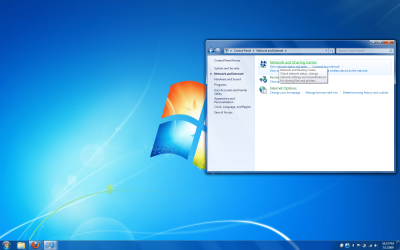
3. Click on Change adapter settings on the left hand panel. pic2.png
4. This will bring up a list of adapters present on your computer. Most people will have a Local Area Connection while laptop users will add a Wireless Network Connection and possibly a Bluetooth Network Connection...go ahead and right click on Local Area Connection and click on Properties.
NOTE: These steps do not change if you are modifying the Wireless Network Connection instead pic3.png
5. If prompted by UAC, click on Yes.

6. Highlight Internet Protocol Version 4 (TCP/IPv4) and click on properties. pic4.png
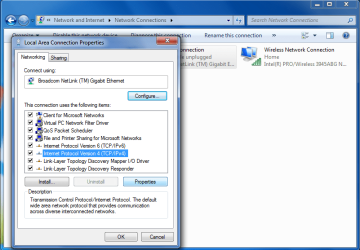
7. In the properties window you will see a few radio boxes with both of them saying Obtain an IP/DNS Address Automatically....we will leave the IP address alone and will change the Obtain DNS....to use the following: In the Preferred DNS server boxes enter this sequence: 208.67.222.222

In the Alternate DNS server boxes enter this sequence: 208.67.220.220
pic5.png
8. Check the validate settings upon exit (Optional) check box, click OK, and then Close to finish. (See screenshot above)

9. Windows will check your settings (if you checked the option above) and you will be finished! Now start surfing to feel the effects of a quicker and more secure browsing experience!
   Tip
For more info on OpenDNS don't hesitate to ask here or visit their website at OpenDNS | Providing A Safer And Faster Internet

   Tip
If you happen to be managing a network under a router, this tip will save you some time. If you change the router's DNS settings instead of each computer on the network than as long as each computer is set to Obtain a DNS Address Automatically, your choice of a DNS server will be applied to all the computers. Please consult the manual of your router or their respective website to do this.


Hope it helps,
Chris
 
Last edited by a moderator:

My Computer My Computer

At a glance

Windows 8.1 Pro RTM x64Intel Core-i5-3570K 4-core @ 3.4GHz (Ivy Brid...4 x 4GB DDR3-1600 Corsair Vengeance CMZ8GX3M2...MSI GeForce GTX770 Gaming OC 2GB
Computer type
PC/Desktop
Computer Manufacturer/Model Number
Dwarf Dwf/11/2012 r09/2013
OS
Windows 8.1 Pro RTM x64
CPU
Intel Core-i5-3570K 4-core @ 3.4GHz (Ivy Bridge) (OC 4.4GHz)
Motherboard
ASRock Z77 Extreme4-M
Memory
4 x 4GB DDR3-1600 Corsair Vengeance CMZ8GX3M2A1600C9B (16GB)
Graphics Card(s)
MSI GeForce GTX770 Gaming OC 2GB
Sound Card
Realtek High Definition on board solution (ALC 898)
Monitor(s) Displays
ViewSonic VA1912w Widescreen (VGA)
Screen Resolution
1440x900
Hard Drives
OCZ Agility 3 SSD 120GB SATA III x2 (RAID 0)
Samsung HD501LJ 500GB SATA II x2
Hitachi HDS721010CLA332 1TB SATA II
Iomega 1.5TB Ext USB 2.0
WD 2.0TB Ext USB 3.0
PSU
XFX Pro Series 850W Semi-Modular
Case
Gigabyte IF233
Cooling
1 x 120mm Front Inlet 1 x 120mm Rear Exhaust
Keyboard
Microsoft Comfort Curve Keyboard 3000 (USB)
Mouse
Microsoft Comfort Mouse 3000 for Business (USB)
Internet Speed
NetGear DG834Gv3 ADSL Modem/Router (Ethernet) ~4.0 Mb/s (O2)
Antivirus
Avast! 8.0.1497
Browser
IE 11
Other Info
Optical Drive: HL-DT-ST BD-RE BH10LS30 SATA Bluray
Lexmark S305 Printer/Scanner/Copier (USB)
WEI Score: 8.1/8.1/8.5/8.5/8.25
Asus Eee PC 1011PX Netbook (Windows 7 x86 Starter)
Here's an alternative benchmarking utility - testing now. GRC's|DNS Nameserver Performance Benchmark

Works OK. I ran the test whilst having 2 IE8 tabs and Outlook 2007 open. For best results, no other application that has access to the Internet should be running.
 

My Computer My Computer

At a glance

Windows 8.1 Pro RTM x64Intel Core-i5-3570K 4-core @ 3.4GHz (Ivy Brid...4 x 4GB DDR3-1600 Corsair Vengeance CMZ8GX3M2...MSI GeForce GTX770 Gaming OC 2GB
Computer type
PC/Desktop
Computer Manufacturer/Model Number
Dwarf Dwf/11/2012 r09/2013
OS
Windows 8.1 Pro RTM x64
CPU
Intel Core-i5-3570K 4-core @ 3.4GHz (Ivy Bridge) (OC 4.4GHz)
Motherboard
ASRock Z77 Extreme4-M
Memory
4 x 4GB DDR3-1600 Corsair Vengeance CMZ8GX3M2A1600C9B (16GB)
Graphics Card(s)
MSI GeForce GTX770 Gaming OC 2GB
Sound Card
Realtek High Definition on board solution (ALC 898)
Monitor(s) Displays
ViewSonic VA1912w Widescreen (VGA)
Screen Resolution
1440x900
Hard Drives
OCZ Agility 3 SSD 120GB SATA III x2 (RAID 0)
Samsung HD501LJ 500GB SATA II x2
Hitachi HDS721010CLA332 1TB SATA II
Iomega 1.5TB Ext USB 2.0
WD 2.0TB Ext USB 3.0
PSU
XFX Pro Series 850W Semi-Modular
Case
Gigabyte IF233
Cooling
1 x 120mm Front Inlet 1 x 120mm Rear Exhaust
Keyboard
Microsoft Comfort Curve Keyboard 3000 (USB)
Mouse
Microsoft Comfort Mouse 3000 for Business (USB)
Internet Speed
NetGear DG834Gv3 ADSL Modem/Router (Ethernet) ~4.0 Mb/s (O2)
Antivirus
Avast! 8.0.1497
Browser
IE 11
Other Info
Optical Drive: HL-DT-ST BD-RE BH10LS30 SATA Bluray
Lexmark S305 Printer/Scanner/Copier (USB)
WEI Score: 8.1/8.1/8.5/8.5/8.25
Asus Eee PC 1011PX Netbook (Windows 7 x86 Starter)
Thanks Dwarf - The Steve Gibson one is the one I used to use - but it completely evaded my memory :o

and I'd filed it in network tools not internet tools in my tool-kit
 

My Computers My Computers

  • At a glance

    Windows 11 Pro x64 [Latest Release and Releas...Ryzen 9 5950X, 3.8 - 5.2 MHz64GB [2 x 32GB] DDR4 3200MHz4GB NVIDIA GEFORCE GTX 1650 Ti
    Computer type
    PC/Desktop
    Computer Manufacturer/Model Number
    ChillBlast - Custom to my design
    OS
    Windows 11 Pro x64 [Latest Release and Release Preview]
    CPU
    Ryzen 9 5950X, 3.8 - 5.2 MHz
    Motherboard
    Asus Prime X570-Pro
    Memory
    64GB [2 x 32GB] DDR4 3200MHz
    Graphics Card(s)
    4GB NVIDIA GEFORCE GTX 1650 Ti
    Sound Card
    On-board SPDIF to 5.1 System + HDMI [5.1 system]
    Monitor(s) Displays
    32" UHD 32 Bit HDR Monitor + 43" UHD 4K 32Bit HDR TV
    Screen Resolution
    2 x 3840 x 2160 @60Hz
    Hard Drives
    1TB M2 SSD OS, 500GB Fast Access SSD, 2 x 8TB Data + Various Externals from 1TB to 4TB, 10TB NAS
    PSU
    NZXT C750 80 PLUS Gold 750W Modular PSU
    Case
    Workstation Case [Matt Black]
    Cooling
    NZXT Kraken X63 280mm CPU Cooler +2x Quiet Case fans
    Keyboard
    Logitech Wireless MX Keys & K400 + others
    Mouse
    Logitech Wireless MX Master 3S
    Internet Speed
    920 MB Down 50 MB Up
    Antivirus
    BitDefender Total Security Pro
    Browser
    Chrome (always run latest Non-Beta)
    Other Info
    Also run ...
    Laptop - Quad 8GB - Windows 10 Pro x64
    Nexus 7 Android tablet x2
    Samsung 10.2" tablet
    Blackview TAB 8 4G Android Tablet c/w Keyboard
    Wacom Intuos Pro Medium Pen Pad
    Wacom Intuos Pro Small Pen Pad
    Wacom Expresskeys Remote
    Loopdeck+ Graphics Controller
    Shuttle Pro v2 Control
  • At a glance

    Windows 11 Pro x64 Latest RPIntel I7 10750H 5.0GHz32GB [2x16GB] DDR4 2933 MHznVidia GTX1650Ti 4 GB GDDR6
    Computer type
    Laptop
    System Manufacturer/Model Number
    Dell XPS 17 10750H
    OS
    Windows 11 Pro x64 Latest RP
    CPU
    Intel I7 10750H 5.0GHz
    Motherboard
    Dell XPS
    Memory
    32GB [2x16GB] DDR4 2933 MHz
    Graphics Card(s)
    nVidia GTX1650Ti 4 GB GDDR6
    Sound Card
    Stock [Realtek] 4 Speaker
    Monitor(s) Displays
    17" IPS UHD+ Infinity Edge Touchscreen
    Screen Resolution
    3840 x 2400
    Hard Drives
    2TB M2 NVMe, 4TB External + various 500GB & 1TB External NVMe (also have access to spinner HDD from
    PSU
    Stock
    Case
    Stock XPS Aluminium & Carbon Fibre
    Cooling
    Stock - Active Fan Control
    Keyboard
    Backlit + Various Logitech
    Mouse
    Stock Track Pad + Logitech MX Trackball
    Internet Speed
    72 MB Down 18MB Up
    Browser
    Chrome
    Other Info
    Also run ...
    Laptop - Quad 8GB - Windows 10 Pro x64
    Nexus 7 Android tablet x2
    10.2" tablet
    Sony Z3 Android Smartphone
    Wacom Intuos Pro Medium Pen Pad
    Wacom Intuos Pro Small Pen Pad
    Wacom Expresskeys Remote
    Loopdeck+ Graphics Controller
    Shuttle Pro v2 Control Pad
    10TB NAS
It has the advantage of showing the addresses of all the DNS servers that it is querying, so you can update yours to the most responsive ones.
 

My Computer My Computer

At a glance

Windows 8.1 Pro RTM x64Intel Core-i5-3570K 4-core @ 3.4GHz (Ivy Brid...4 x 4GB DDR3-1600 Corsair Vengeance CMZ8GX3M2...MSI GeForce GTX770 Gaming OC 2GB
Computer type
PC/Desktop
Computer Manufacturer/Model Number
Dwarf Dwf/11/2012 r09/2013
OS
Windows 8.1 Pro RTM x64
CPU
Intel Core-i5-3570K 4-core @ 3.4GHz (Ivy Bridge) (OC 4.4GHz)
Motherboard
ASRock Z77 Extreme4-M
Memory
4 x 4GB DDR3-1600 Corsair Vengeance CMZ8GX3M2A1600C9B (16GB)
Graphics Card(s)
MSI GeForce GTX770 Gaming OC 2GB
Sound Card
Realtek High Definition on board solution (ALC 898)
Monitor(s) Displays
ViewSonic VA1912w Widescreen (VGA)
Screen Resolution
1440x900
Hard Drives
OCZ Agility 3 SSD 120GB SATA III x2 (RAID 0)
Samsung HD501LJ 500GB SATA II x2
Hitachi HDS721010CLA332 1TB SATA II
Iomega 1.5TB Ext USB 2.0
WD 2.0TB Ext USB 3.0
PSU
XFX Pro Series 850W Semi-Modular
Case
Gigabyte IF233
Cooling
1 x 120mm Front Inlet 1 x 120mm Rear Exhaust
Keyboard
Microsoft Comfort Curve Keyboard 3000 (USB)
Mouse
Microsoft Comfort Mouse 3000 for Business (USB)
Internet Speed
NetGear DG834Gv3 ADSL Modem/Router (Ethernet) ~4.0 Mb/s (O2)
Antivirus
Avast! 8.0.1497
Browser
IE 11
Other Info
Optical Drive: HL-DT-ST BD-RE BH10LS30 SATA Bluray
Lexmark S305 Printer/Scanner/Copier (USB)
WEI Score: 8.1/8.1/8.5/8.5/8.25
Asus Eee PC 1011PX Netbook (Windows 7 x86 Starter)

My Computer My Computer

At a glance

Windows 7 Ultimate SP1 64- bitIntel Core i7-3770K @3.50ghzKingston Technology 16GB (2x 8GB) 2133MHz DDR...EVGA GTX 670 4gb SC
Computer type
PC/Desktop
Computer Manufacturer/Model Number
Home Built
OS
Windows 7 Ultimate SP1 64- bit
CPU
Intel Core i7-3770K @3.50ghz
Motherboard
EVGA Z77 FTW
Memory
Kingston Technology 16GB (2x 8GB) 2133MHz DDR3 Non-ECC
Graphics Card(s)
EVGA GTX 670 4gb SC
Sound Card
Nil
Monitor(s) Displays
Samsung 22"
Screen Resolution
1920 x 1080 60hz
Hard Drives
OCZ Vertex 4 SSD 128GB
SAMSUNG Spinpoint F3 HD502HJ 500GB 7200 RPM
PSU
Enermax Platinax EPM1000EWT Special OC Edition
Case
Cooler Master HAF Full Tower nVIDIA Edition
Cooling
CoolerMaster Hyper 212 Plus
Keyboard
HP Wireless Keyboard
Mouse
Corsair Vengeance M90
Internet Speed
20 Mb
Other Info
ASUS DRW-24B1ST/BLK/B/AS Black SATA 24X DVD Burner
I have Verizon VIOS & yep in helps my computer to surf faster
 

My Computer My Computer

At a glance

Windows 7 64 bit2300 Mhz clock speed - AMD Phenom 9650 Quad-Core2048+2048+2048+2048;DIMM Unknown SynchronousATI Radeon HD 3200 Graphics
Computer Manufacturer/Model Number
NC684AA-ABA a6750y HP-Pavilion
OS
Windows 7 64 bit
CPU
2300 Mhz clock speed - AMD Phenom 9650 Quad-Core
Motherboard
Phoenix Technologies, LTD )Phoenix - Award WorkstationBIOS v
Memory
2048+2048+2048+2048;DIMM Unknown Synchronous
Graphics Card(s)
ATI Radeon HD 3200 Graphics
Monitor(s) Displays
HP w2007 Wide LCD Monitor
Screen Resolution
1680 x 1050 pixels
Hard Drives
700 G + 1T ext.Drive
Cooling
heat sinks + fans
Keyboard
Enhanced Multimedia PS/2 Keyboard
Mouse
HID-compliant mouse
Internet Speed
20000 mbps dwn 5000 up verizon Fios
Other Info
only medium skills....just a hack
Changing to OpenDns was a lifesaver for me. My new Dell Studio XPS 8100 would not consistently access the internet via our Kyocera KR-2 router, though an older Dell we have running XP would, and so would our Toshiba Notebook and our Acer netbook. The new Dell worked OK directly connected to the DSL modem, though. Now, using OpenDns, the connection via the router is rock-solid. Many thanks!
 

My Computer My Computer

At a glance

Windows Home Premium 64bitIntel(R) Core(TM) i5 CPU = [email protected] GHz8 GB
Computer Manufacturer/Model Number
Dell Studio XPS 8100
OS
Windows Home Premium 64bit
CPU
Intel(R) Core(TM) i5 CPU = [email protected] GHz
Memory
8 GB
Thank you,Nice!
 

My Computer My Computer

At a glance

Windows 7 Ultimate x64AMD Athlon II X2 250 3.00GHz6GB Ram DDR3ATI HD 4600 1GB
OS
Windows 7 Ultimate x64
CPU
AMD Athlon II X2 250 3.00GHz
Motherboard
Gigabyte Ltd. Ga-790XT -USB3
Memory
6GB Ram DDR3
Graphics Card(s)
ATI HD 4600 1GB
Sound Card
Realtek HD Audio
Monitor(s) Displays
LG L192WS
Screen Resolution
1440 x 900
Keyboard
Genius
Mouse
Genius
Internet Speed
8MB Download 1MB Upload
33.5% Faster than my current DNS server now using Pipex 4gig server got to say if this true what a find great little program thank for that, much appreciated
 

My Computer My Computer

At a glance

windows 7 64bit sp1I7 2700K @3.5GHzCorsair 16GB PC3-12800 1600 MHz (4x4GB)ATI Radeon HD 6450 - 1 GB - (XFX) - Silent - ...
Computer type
PC/Desktop
OS
windows 7 64bit sp1
CPU
I7 2700K @3.5GHz
Motherboard
GA-Z68XP-UD3P
Memory
Corsair 16GB PC3-12800 1600 MHz (4x4GB)
Graphics Card(s)
ATI Radeon HD 6450 - 1 GB - (XFX) - Silent - (PCI-E)
Sound Card
none
Monitor(s) Displays
lg 23"
Hard Drives
90GB Corsair Force Series 3 SATA 6Gb/s SSD 1 TB Seagate ST31000524AS Barracuda SATA-III 7200RPM and 3tb seagate
PSU
Corsair 600W (CMPSU-600CX)
Case
Cooler Master Sileo 500 - Silent
Antivirus
mcafee
33.5% Faster than my current DNS server now using Pipex 4gig server got to say if this true what a find great little program thank for that, much appreciated
had to change it back for now some pages on various sites not opening
 

My Computer My Computer

At a glance

windows 7 64bit sp1I7 2700K @3.5GHzCorsair 16GB PC3-12800 1600 MHz (4x4GB)ATI Radeon HD 6450 - 1 GB - (XFX) - Silent - ...
Computer type
PC/Desktop
OS
windows 7 64bit sp1
CPU
I7 2700K @3.5GHz
Motherboard
GA-Z68XP-UD3P
Memory
Corsair 16GB PC3-12800 1600 MHz (4x4GB)
Graphics Card(s)
ATI Radeon HD 6450 - 1 GB - (XFX) - Silent - (PCI-E)
Sound Card
none
Monitor(s) Displays
lg 23"
Hard Drives
90GB Corsair Force Series 3 SATA 6Gb/s SSD 1 TB Seagate ST31000524AS Barracuda SATA-III 7200RPM and 3tb seagate
PSU
Corsair 600W (CMPSU-600CX)
Case
Cooler Master Sileo 500 - Silent
Antivirus
mcafee
A massive thank you!!
For the last 2 days I have had DNS errors and more and more websites were being affected I just completed a system backup to start restoring my computer back to 'new' when I stumbled upon your simple solution to fix my errors!
Thanks so much you saved me hours of work.

Just curious as to why this DNS error happened in the first place? Everything has been fine for years..
 

My Computer My Computer

At a glance

win7 64bit
OS
win7 64bit
Wow, this tutorial was way more helpful than what the cretins at OpenDNS sent as removal instructions, it was driving me insane. This tutorial was short, concise and right to the point. I did in 2 minutes what was taking me hours to understand in that damned OpenDNS website, thank you so much. :D
 

My Computer My Computer

At a glance

Windows 7 Home Premium x64
OS
Windows 7 Home Premium x64
DNS Benchmark

Dns Benchmark By steve Gibson is a really great tool to help fint the optimal, fastest dns for your system. it is also completely free. i was using google's public DNS but found that covansys was much, much faster. i would say that this worth looking into:D.

GRC's | DNS Nameserver Performance Benchmark  
 

My Computer My Computer

At a glance

windows 7 professional 64 bitAMD phenom 9750 quad core 2.4 GHz
OS
windows 7 professional 64 bit
CPU
AMD phenom 9750 quad core 2.4 GHz
tutorial

i tried but for me the ip is stated incorect
 

My Computer My Computer

At a glance

64
Computer type
Laptop
Computer Manufacturer/Model Number
packard
OS
64
Hello Lilith, and welcome to Seven Forums.

Could you please provide some more details and screenshots about the issue you are having to better help us help you? :)
 

My Computer My Computer

At a glance

64-bit Windows 11 Pro for WorkstationsIntel i7-8700K OC'd to 5 GHz64 GB (4x16GB) G.SKILL TridentZ RGB DDR4 3600...ASUS ROG-STRIX-GTX1080TI-O11G-GAMING
Computer type
PC/Desktop
Computer Manufacturer/Model Number
Self built custom
OS
64-bit Windows 11 Pro for Workstations
CPU
Intel i7-8700K OC'd to 5 GHz
Motherboard
ASUS ROG Maximus XI Formula Z390
Memory
64 GB (4x16GB) G.SKILL TridentZ RGB DDR4 3600 MHz
Graphics Card(s)
ASUS ROG-STRIX-GTX1080TI-O11G-GAMING
Sound Card
Integrated
Monitor(s) Displays
2 x Samsung Odyssey G7 27"
Screen Resolution
2560x1440
Hard Drives
1TB Samsung 990 PRO M.2,
4TB Samsung 990 PRO PRO M.2,
TerraMaster F8 SSD Plus NAS
PSU
Seasonic Prime Titanium 850W
Case
Thermaltake Core P3
Cooling
Corsair Hydro H115i
Keyboard
Logitech wireless K800
Mouse
Logitech MX Master 4
Internet Speed
2 Gb/s Download and 100 Mb/s Upload
Antivirus
Malwarebyte Anti-Malware Premium
Browser
Google Chrome
Other Info
Logitech Z625 speaker system,
Logitech BRIO 4K Pro webcam,
HP Color LaserJet Pro MFP M477fdn,
APC SMART-UPS RT 1000 XL - SURT1000XLI,
Galaxy S23 Plus phone
Hey, nice tutorial, but, I've changed my DNS to OpenDNS several weeks ago. It still runs fine until this evening. I don't know why, I can't access some of popular websites. Some of them are Twitter, Facebook, YouTube, and even I can't access to Yahoo!. Why this is happen? After checking again, my DNS has get back to default automatically. I changed it again to OpenDNS, but still nothing.

Oh yeah, when trying to access Twitter, it says "This Connection is Untrusted" and technical details says: "Certificate is only valid for *.opendns.com , opendns.com .

But about the YouTube and Yahoo!, and Facebook, it says Error 403. What should I do?

Please, I need some help from some advanced users here.
 

My Computer My Computer

At a glance

Windows 7 Home Premium 32bitIntel Core i3-2328M2 GB RAMIntel HD Graphics 3000
Computer type
Laptop
Computer Manufacturer/Model Number
HP
OS
Windows 7 Home Premium 32bit
CPU
Intel Core i3-2328M
Memory
2 GB RAM
Graphics Card(s)
Intel HD Graphics 3000
Hard Drives
500 GB
Internet Speed
About 200 KB/s
Antivirus
Microsoft Security Essentials
Browser
Mozilla Firefox
Hey, nice tutorial, but, I've changed my DNS to OpenDNS several weeks ago. It still runs fine until this evening. I don't know why, I can't access some of popular websites. Some of them are Twitter, Facebook, YouTube, and even I can't access to Yahoo!. Why this is happen? After checking again, my DNS has get back to default automatically. I changed it again to OpenDNS, but still nothing.

Oh yeah, when trying to access Twitter, it says "This Connection is Untrusted" and technical details says: "Certificate is only valid for *.opendns.com , opendns.com .

But about the YouTube and Yahoo!, and Facebook, it says Error 403. What should I do?

Please, I need some help from some advanced users here.

What DNS servers were used? I can run a lookup on the sites and see if it provides a valid IP address. Have you tried to temporarily change to Google's Public DNS servers? If the issue still occurs then you may have an application issue. What browser are you using?

Google's DNS servers:

https://developers.google.com/speed/public-dns/docs/using

8.8.8.8

8.8.4.4

Josh :)
 
Last edited by a moderator:

My Computer My Computer

At a glance

Windows 7 Professional x64 SP1 ; Windows Serv...Intel Core i5 2400 @ 3.10GHz8.0GB DDR3 @ 665MHz (2GBx4)AMD Radeon HD 6870
Computer type
PC/Desktop
Computer Manufacturer/Model Number
Custom Built
OS
Windows 7 Professional x64 SP1 ; Windows Server 2012 R2 Standard
CPU
Intel Core i5 2400 @ 3.10GHz
Motherboard
Foxconn H67MP-S/-V/H67MP
Memory
8.0GB DDR3 @ 665MHz (2GBx4)
Graphics Card(s)
AMD Radeon HD 6870
Sound Card
Realtek High Definition Audio
Monitor(s) Displays
AOC 2243W & SMB1930NW
Screen Resolution
1440x900 & 1920x1080
Hard Drives
977GB Seagate ST31000524AS ATA Drive (SATA)
250GB WD iSCSI attached Drive
PSU
750W Gaming PSU
Case
Novatech Night
Cooling
Fan
Keyboard
Dell Standard PS/2 Keyboard
Mouse
R.A.T 07 Gaming Mouse
Internet Speed
Download: 10 Mbps Ping: 30ms Upload: 0.81 Mbps
Browser
Google Chrome
Other Info
Optiarc DVD RW AD-5260S ATA Device
DNS changes

Thank you for comprehensive and easy to follow instructions. I opened them on my tablet and used them on my laptop. When I opened Google Chrome and went back to websites I had problems with only minutes before.. Magic..all connecting and quickly too. 😀
 

My Computer My Computer

At a glance

Windows 7 Starter 32 bit
Computer type
Laptop
Computer Manufacturer/Model Number
Acer
OS
Windows 7 Starter 32 bit
Hi, i know about enabling dhcp to use the following dns pref server. But nslookup command, produce unknown server. Is there any fix. Is it only for server OS and not for regular windows 7 OS machines
 

My Computer My Computer

At a glance

Microsoft Windows 7 Ultimate 64-bit 7601 Mult...Intel(R) Core(TM)2 Duo CPU E7200 @ 2.53GHz4.00 GBNVIDIA GeForce 210
Computer type
PC/Desktop
Computer Manufacturer/Model Number
custom build
OS
Microsoft Windows 7 Ultimate 64-bit 7601 Multiprocessor Free Service Pack 1
CPU
Intel(R) Core(TM)2 Duo CPU E7200 @ 2.53GHz
Motherboard
To be filled by O.E.M. To be filled by O.E.M.
Memory
4.00 GB
Graphics Card(s)
NVIDIA GeForce 210
Sound Card
(1) NVIDIA High Definition Audio (2) Realtek High Definiti
Screen Resolution
1920 x 1080 x 32 bits (4294967296 colors) @ 60 Hz
Hard Drives
ST3500312CS ATA Device
Back
Top