high CPU temperatures;upto 100 degrees celsius

aaryan

New member
Local time
9:16 PM
Messages
18
My laptop suffered a hard drive crash last week. I got the HD replaced
earlier it was a toshiba 500gb 5400rpm HD now it is a HGST 750gb 7200rpm.
after i setup the whole laptop properly with all the drivers and all the softwares including basic utilities, anitvirus etc. the fan seems to be running all the time and specially when browsing using chrome it begins to sound very loud which it doesnt used to earlier(before the hard disk crash).

Now to check the CPU temperatures, i downloaded SPECCY.
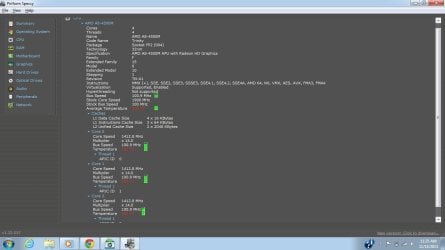
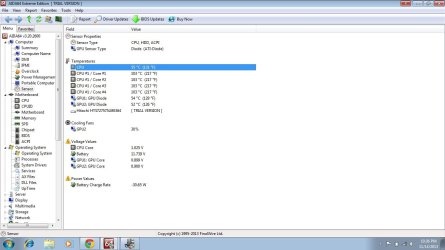
To my surprise, the MOBOs temperature is way below the normal(thanks to indian winters :P ) but at the same time the CPU temp(all the 4 cores) is showing me 100 degrees celsius, though the base of my laptop is not even close to warm. Even the GPU cores are at normal temperatures.

I have attached two screenshot of SPECCY, indicating high core temps and high bus speed as well and the other showing way too normal temperatures for the MOBO.
I need suggestions whether SPECCY is showing incorrect measurements(which it usually doesnt) or there is some other problem which i should worry about.


configuration:
windows 7 home basic 64 bit
AMD A-8 4500 M
4GB single channel DDR3 RAM
HP184A single socket FT1 motherboard
512MB ATI AMD Radeon HD 7640G + 7670M Dual Graphics (HP)
1024MB ATI AMD Radeon HD 7670M (HP)
 

Attachments
  • temp.jpg
    temp.jpg
    58 KB · Views: 11
  • temp2.jpg
    temp2.jpg
    69.7 KB · Views: 10

My Computer My Computer

At a glance

Windows 7 home basic 64bitAMD4 gbAMD radeon HD 7640G, AMD radeon HD 7670M
Computer type
Laptop
Computer Manufacturer/Model Number
HP
OS
Windows 7 home basic 64bit
CPU
AMD
Motherboard
HP
Memory
4 gb
Graphics Card(s)
AMD radeon HD 7640G, AMD radeon HD 7670M
Hard Drives
hitachi 750gb 7200rpm
Antivirus
ESET smart security 7
Browser
google chrome
Could be that the heatsink was knocked off the processor when the drive was replaced.
 

My Computer My Computer

At a glance

Windows 7 Pro-x64i7-2600 3.4GHz - 3.8GHz Turbo8Gb - 2x4GB, Muskin 991770 PC3-1333Integrated Intel HD 2000
Computer type
PC/Desktop
Computer Manufacturer/Model Number
Built 2/11/2011
OS
Windows 7 Pro-x64
CPU
i7-2600 3.4GHz - 3.8GHz Turbo
Motherboard
Intel DH67BL-B3
Memory
8Gb - 2x4GB, Muskin 991770 PC3-1333
Graphics Card(s)
Integrated Intel HD 2000
Sound Card
Integrated Intel 10.1 HD, RealTek ALC892
Monitor(s) Displays
Asus LCD VH222H, Haier HL24XSL2a
Screen Resolution
1920x1080, 1920x1080
Hard Drives
Crucial SSD C300-128Gb,
Western Digital WD5002AALX - 500Gb,
Western Digital WD7501AALS - 750Gb
PSU
Seasonic 650W 80+ Gold Modular
Case
Rosewill Defender
Cooling
Stock CPU, Four 120mm case fans, PCH fan added
Keyboard
Logitech EX100 Y-RBH94 Wireless
Mouse
Logitech EX100 M-RCE95 Wireless
Internet Speed
3.0/1.5 Mbs
Antivirus
Microsoft Security Essentials
Browser
Microsoft Internet Explorer 11
Other Info
Antec Veris Premier-Multimedia IR Station,
Cyber Accoustics-3602 Speakers,
AFT XM-5U Card Reader,
Hauppauge TV-HVR-2250,
Sony LX300 USB Turntable
Went to the hp service centre..they applied the heat sink pasting again! But didnt work..
Still elevated core temperatures :-(
Now only one option left, reinstalling the os! :-(
 

My Computer My Computer

At a glance

Windows 7 home basic 64bitAMD4 gbAMD radeon HD 7640G, AMD radeon HD 7670M
Computer type
Laptop
Computer Manufacturer/Model Number
HP
OS
Windows 7 home basic 64bit
CPU
AMD
Motherboard
HP
Memory
4 gb
Graphics Card(s)
AMD radeon HD 7640G, AMD radeon HD 7670M
Hard Drives
hitachi 750gb 7200rpm
Antivirus
ESET smart security 7
Browser
google chrome
reinstalled the OS. still the CPU temperatures are elevated.
this means that this is not a problem caused by wrong drivers installed.
 

My Computer My Computer

At a glance

Windows 7 home basic 64bitAMD4 gbAMD radeon HD 7640G, AMD radeon HD 7670M
Computer type
Laptop
Computer Manufacturer/Model Number
HP
OS
Windows 7 home basic 64bit
CPU
AMD
Motherboard
HP
Memory
4 gb
Graphics Card(s)
AMD radeon HD 7640G, AMD radeon HD 7670M
Hard Drives
hitachi 750gb 7200rpm
Antivirus
ESET smart security 7
Browser
google chrome
There is a reason that they put 5400RPM drives into laptops - it's heat. You can solve the problem by replacing this 7200RPM HDD with a SSD - that is how I solved the heat problem in one of my laptops.
 

My Computer My Computer

At a glance

Vista, Windows7, Mint Mate, Zorin, Windows 8from 1.6GHz Duo to i7
Computer Manufacturer/Model Number
HP, Dell, Gateway, Toshiba - 4 laptops and 2 desktops
OS
Vista, Windows7, Mint Mate, Zorin, Windows 8
CPU
from 1.6GHz Duo to i7
Monitor(s) Displays
2x HP w2207
Hard Drives
5x HDD, 7x SSD, 12x Externals
Keyboard
with trackball - no mices
Mouse
Trackball mice
Internet Speed
DSL 6000
hey WHS are you sure that replacing the 5400 rpm HD with a 7200rpm will increase the heat??
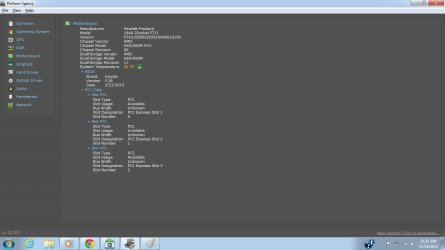
i downloaded AIDA64 to monitor the stats! and i got really confused!
can you explain the sensor temperatures?
 

Attachments

  • Untitled.jpg
    Untitled.jpg
    86 KB · Views: 11

My Computer My Computer

At a glance

Windows 7 home basic 64bitAMD4 gbAMD radeon HD 7640G, AMD radeon HD 7670M
Computer type
Laptop
Computer Manufacturer/Model Number
HP
OS
Windows 7 home basic 64bit
CPU
AMD
Motherboard
HP
Memory
4 gb
Graphics Card(s)
AMD radeon HD 7640G, AMD radeon HD 7670M
Hard Drives
hitachi 750gb 7200rpm
Antivirus
ESET smart security 7
Browser
google chrome
AMD has bugs with HWMonitor. Use Core Temp or Speed Fan to see the correct temperature values. It should be around 45 - 55 °C
 

My Computer My Computer

At a glance

Windows 7 Professional x64 SP1Intel® Pentium® 4 @ 2.26 GHz, Intel Core i7-2...512MB Dual channel DDR SDRAM @ 400MHz 2.5-3-3...Intel 82865G, Nvidia GeForce 520M Graphics
Computer type
Laptop
Computer Manufacturer/Model Number
Dell Optiplex SX270, Lenovo Z470
OS
Windows 7 Professional x64 SP1
CPU
Intel® Pentium® 4 @ 2.26 GHz, Intel Core i7-2670QM @ 2.20 GH
Motherboard
Dell, Lenovo
Memory
512MB Dual channel DDR SDRAM @ 400MHz 2.5-3-3-7, 8 GB DDR3
Graphics Card(s)
Intel 82865G, Nvidia GeForce 520M Graphics
Sound Card
SoundMax Integrated Audio, Integrated HD Audio
Monitor(s) Displays
LG W1952
Screen Resolution
1440x900, 1366 x 768
Hard Drives
40 GB 2.5" IDE 4200 RPM HDD, 500 GB 5400 RPM Sata 1.5 + 32 GB SSD
PSU
Dell 145 Watt, Lenovo 120 Watt Power Adapter
Case
Optiplex SX270 Small Form Factor, Laptop
Cooling
Dell Proprietary Air Cooling, Stock laptop cooling
Keyboard
Dell SK-8125 USB Keyboard
Mouse
Dell PS/2 2 button ball mouse with wheel scroll
Internet Speed
300 Mbit down / 20 Mbps up Time Warner Cable
Antivirus
MSE, Malwarebytes Scanner
Browser
Internet (Aizawa) Explorer 11
Other Info
Running Windows Server 2012 Datacenter on a virtual machine to run Metro Apps.
I don't think that those very high CPU temperatures are valid. I would think that the CPU would shut down long before such temperatures were reached. Unfortunately there are no firm standards in place for reading CPU temperatures with software. The end result is that some combinations of software and hardware will produce invalid readings.
 

My Computer My Computer

At a glance

Windows 7 Pro 64 bitXeon W35208 GBNvidia Geforce 210
Computer type
PC/Desktop
Computer Manufacturer/Model Number
HP
OS
Windows 7 Pro 64 bit
CPU
Xeon W3520
Memory
8 GB
Graphics Card(s)
Nvidia Geforce 210
LMiller7 thanks for such a positive reply, indicating these results to be invalid.
but are you so sure? that multiple softwares will provide invalid results ?
ive tried 4-5 softwares all of them are showing elevated temperatures for the cores.
 

My Computer My Computer

At a glance

Windows 7 home basic 64bitAMD4 gbAMD radeon HD 7640G, AMD radeon HD 7670M
Computer type
Laptop
Computer Manufacturer/Model Number
HP
OS
Windows 7 home basic 64bit
CPU
AMD
Motherboard
HP
Memory
4 gb
Graphics Card(s)
AMD radeon HD 7640G, AMD radeon HD 7670M
Hard Drives
hitachi 750gb 7200rpm
Antivirus
ESET smart security 7
Browser
google chrome
I think you have a heat problem and it comes from the disk. I have seen that before.
 

My Computer My Computer

At a glance

Vista, Windows7, Mint Mate, Zorin, Windows 8from 1.6GHz Duo to i7
Computer Manufacturer/Model Number
HP, Dell, Gateway, Toshiba - 4 laptops and 2 desktops
OS
Vista, Windows7, Mint Mate, Zorin, Windows 8
CPU
from 1.6GHz Duo to i7
Monitor(s) Displays
2x HP w2207
Hard Drives
5x HDD, 7x SSD, 12x Externals
Keyboard
with trackball - no mices
Mouse
Trackball mice
Internet Speed
DSL 6000
My guess would be WHS is right. But one thing you could do is try Core Temp. If your AMD processor is anything like my Phenom I then the temp reading cannot be taken at face value. Supposedly what matters is not the degrees c but the difference between that reading and T-JMax. They seem to want to make it rocket science. :)

edit: I'm not an overclocker. So I'd bet on WHS. :)
 

My Computer My Computer

At a glance

Windows 7 32 bitAMD 5200+ dual core2 GBNVidia GeForce 6150SE 128 MB
Computer Manufacturer/Model Number
HP Media Center
OS
Windows 7 32 bit
CPU
AMD 5200+ dual core
Memory
2 GB
Graphics Card(s)
NVidia GeForce 6150SE 128 MB
Monitor(s) Displays
CRT
Screen Resolution
1280x1024
Hard Drives
500 GB Sata internal :

SIIG USB 3.0 docking stations w/WD Caviar Black 6 Gb/s drives
Keyboard
PS/2
Mouse
PS/2 Wheel Mouse
Other Info
SIIG USB 3.0 PCIexpress card.
then i should test it with a 5400rpm one...will get back to the post after trying that
 

My Computer My Computer

At a glance

Windows 7 home basic 64bitAMD4 gbAMD radeon HD 7640G, AMD radeon HD 7670M
Computer type
Laptop
Computer Manufacturer/Model Number
HP
OS
Windows 7 home basic 64bit
CPU
AMD
Motherboard
HP
Memory
4 gb
Graphics Card(s)
AMD radeon HD 7640G, AMD radeon HD 7670M
Hard Drives
hitachi 750gb 7200rpm
Antivirus
ESET smart security 7
Browser
google chrome
i just want to confirm onto the readings shown by these 3rd party applications.
and this confirmation can be done by cross checking it with the BIOS temperature readings.
unfortunately, insyde BIOS F.26 doesnt show temperature readings :S
ohhh god i feel so cursed :'(
 

My Computer My Computer

At a glance

Windows 7 home basic 64bitAMD4 gbAMD radeon HD 7640G, AMD radeon HD 7670M
Computer type
Laptop
Computer Manufacturer/Model Number
HP
OS
Windows 7 home basic 64bit
CPU
AMD
Motherboard
HP
Memory
4 gb
Graphics Card(s)
AMD radeon HD 7640G, AMD radeon HD 7670M
Hard Drives
hitachi 750gb 7200rpm
Antivirus
ESET smart security 7
Browser
google chrome
from my opinion! i do not want to rely onto these 3rd part applications like coretemp speedfan speccy etc.
because there are ought to be some discrepancies when there is AMD :|
so im going to contact HP tmrw! going to ask them a method on how to monitor CPU temperature! if they give me a valid method!il move forward in this direction!
otherwise on monday! im going to get the 7200 rpm HDD replaced with the OLD one(means the HDD with the same specs as earlier), and then will see if it does any good!

if anybody wants to give some any other sugesstion! please do it ASAP! :(
 

My Computer My Computer

At a glance

Windows 7 home basic 64bitAMD4 gbAMD radeon HD 7640G, AMD radeon HD 7670M
Computer type
Laptop
Computer Manufacturer/Model Number
HP
OS
Windows 7 home basic 64bit
CPU
AMD
Motherboard
HP
Memory
4 gb
Graphics Card(s)
AMD radeon HD 7640G, AMD radeon HD 7670M
Hard Drives
hitachi 750gb 7200rpm
Antivirus
ESET smart security 7
Browser
google chrome
LMiller7 thanks for such a positive reply, indicating these results to be invalid.
but are you so sure? that multiple softwares will provide invalid results ?
ive tried 4-5 softwares all of them are showing elevated temperatures for the cores.

I never meant to imply that your temperatures are normal, only that the current readings are not valid. You probably do have a heat problem. Hard drives don't normally produce a great deal of heat, but with the confined space and limited ventilation of a laptop it doesn't take much to cause a problem.
 

My Computer My Computer

At a glance

Windows 7 Pro 64 bitXeon W35208 GBNvidia Geforce 210
Computer type
PC/Desktop
Computer Manufacturer/Model Number
HP
OS
Windows 7 Pro 64 bit
CPU
Xeon W3520
Memory
8 GB
Graphics Card(s)
Nvidia Geforce 210
lmiller, even i dont say the temperatures are normal.
they are nowhere near to normal! but i was feeling content after you pointed out that, these values can be invalid.
regarding the ventilation, i need not comment and you need not doubt on it! got the best ventilation and with these readings the laptop fan is blowing out cool wind! i am confused.. that if the processor would be at such high temps then the fan would have been blowing hot winds and that too at very high speed, but the fan seems to be idling plus the base of the laptop is cool! i pretty think that these values can be invalid! that is why i want the BIOS temperature reading! because that would be the true legitimate ones! but i have insyde f.26 bios that doesnt show/hidden the menus for temperature reading! :(
i've contacted HP for suggesting a method to monitor the temperatures. Again repeating, i dont want to rely on these 3rd party appliactions!
thanks for replying! :)
 

My Computer My Computer

At a glance

Windows 7 home basic 64bitAMD4 gbAMD radeon HD 7640G, AMD radeon HD 7670M
Computer type
Laptop
Computer Manufacturer/Model Number
HP
OS
Windows 7 home basic 64bit
CPU
AMD
Motherboard
HP
Memory
4 gb
Graphics Card(s)
AMD radeon HD 7640G, AMD radeon HD 7670M
Hard Drives
hitachi 750gb 7200rpm
Antivirus
ESET smart security 7
Browser
google chrome
I've never seen a disk heat the CPU. If a drive is getting hot enough to affect the cabinet temperatures, it's probably hot enough to shutdown. Do those temps show that high right after startup? What does the BIOS have for temps? Having too much paste between the CPU and heat sink is worse than having none.
 

My Computer My Computer

At a glance

Windows 7 Pro-x64i7-2600 3.4GHz - 3.8GHz Turbo8Gb - 2x4GB, Muskin 991770 PC3-1333Integrated Intel HD 2000
Computer type
PC/Desktop
Computer Manufacturer/Model Number
Built 2/11/2011
OS
Windows 7 Pro-x64
CPU
i7-2600 3.4GHz - 3.8GHz Turbo
Motherboard
Intel DH67BL-B3
Memory
8Gb - 2x4GB, Muskin 991770 PC3-1333
Graphics Card(s)
Integrated Intel HD 2000
Sound Card
Integrated Intel 10.1 HD, RealTek ALC892
Monitor(s) Displays
Asus LCD VH222H, Haier HL24XSL2a
Screen Resolution
1920x1080, 1920x1080
Hard Drives
Crucial SSD C300-128Gb,
Western Digital WD5002AALX - 500Gb,
Western Digital WD7501AALS - 750Gb
PSU
Seasonic 650W 80+ Gold Modular
Case
Rosewill Defender
Cooling
Stock CPU, Four 120mm case fans, PCH fan added
Keyboard
Logitech EX100 Y-RBH94 Wireless
Mouse
Logitech EX100 M-RCE95 Wireless
Internet Speed
3.0/1.5 Mbs
Antivirus
Microsoft Security Essentials
Browser
Microsoft Internet Explorer 11
Other Info
Antec Veris Premier-Multimedia IR Station,
Cyber Accoustics-3602 Speakers,
AFT XM-5U Card Reader,
Hauppauge TV-HVR-2250,
Sony LX300 USB Turntable
They may have made changes at AMD but I think the whole point of using the difference you get when subtracting the reading of a program like Core Temp or another, from T-JMax, is because AMD doesn't want to just put out a straight forward number. Probably so you won't overclock it with confidence. It's kind of strange. Like having a speedometer on a car that doesn't show the real speed in MPH or KPH but gives a coefficient you have to plug into a formula using the secret number in the car's computer. It's kind of silly seemingly. :)
 

My Computer My Computer

At a glance

Windows 7 32 bitAMD 5200+ dual core2 GBNVidia GeForce 6150SE 128 MB
Computer Manufacturer/Model Number
HP Media Center
OS
Windows 7 32 bit
CPU
AMD 5200+ dual core
Memory
2 GB
Graphics Card(s)
NVidia GeForce 6150SE 128 MB
Monitor(s) Displays
CRT
Screen Resolution
1280x1024
Hard Drives
500 GB Sata internal :

SIIG USB 3.0 docking stations w/WD Caviar Black 6 Gb/s drives
Keyboard
PS/2
Mouse
PS/2 Wheel Mouse
Other Info
SIIG USB 3.0 PCIexpress card.
CARWIZ, im thinking just the same! and yes its right after startup and if such high temps were there, machine should have switched off on its own. and ive got the worst BIOS INSYDE! that doesnt show the CPU temperatures! and im not confident enough to MOD it, lappy may get bricked! :S suggest some other method to monitor the temps, which can show valid values!

MILES AHEAD..im sorry to disappoint you, but im not relying onto the third party tools!
 

My Computer My Computer

At a glance

Windows 7 home basic 64bitAMD4 gbAMD radeon HD 7640G, AMD radeon HD 7670M
Computer type
Laptop
Computer Manufacturer/Model Number
HP
OS
Windows 7 home basic 64bit
CPU
AMD
Motherboard
HP
Memory
4 gb
Graphics Card(s)
AMD radeon HD 7640G, AMD radeon HD 7670M
Hard Drives
hitachi 750gb 7200rpm
Antivirus
ESET smart security 7
Browser
google chrome
If you are running more than one monitor, they can get confused and even crash the CPU. The better monitors will convert AMD's DT to relative temperature. The fact that the board temps, which are straight sensors, reflect more sensible numbers leads me to believe the monitor is faulty.

Have you tried HWiNFO? HWiNFO, HWiNFO32/64 - Download
 

My Computer My Computer

At a glance

Windows 7 Pro-x64i7-2600 3.4GHz - 3.8GHz Turbo8Gb - 2x4GB, Muskin 991770 PC3-1333Integrated Intel HD 2000
Computer type
PC/Desktop
Computer Manufacturer/Model Number
Built 2/11/2011
OS
Windows 7 Pro-x64
CPU
i7-2600 3.4GHz - 3.8GHz Turbo
Motherboard
Intel DH67BL-B3
Memory
8Gb - 2x4GB, Muskin 991770 PC3-1333
Graphics Card(s)
Integrated Intel HD 2000
Sound Card
Integrated Intel 10.1 HD, RealTek ALC892
Monitor(s) Displays
Asus LCD VH222H, Haier HL24XSL2a
Screen Resolution
1920x1080, 1920x1080
Hard Drives
Crucial SSD C300-128Gb,
Western Digital WD5002AALX - 500Gb,
Western Digital WD7501AALS - 750Gb
PSU
Seasonic 650W 80+ Gold Modular
Case
Rosewill Defender
Cooling
Stock CPU, Four 120mm case fans, PCH fan added
Keyboard
Logitech EX100 Y-RBH94 Wireless
Mouse
Logitech EX100 M-RCE95 Wireless
Internet Speed
3.0/1.5 Mbs
Antivirus
Microsoft Security Essentials
Browser
Microsoft Internet Explorer 11
Other Info
Antec Veris Premier-Multimedia IR Station,
Cyber Accoustics-3602 Speakers,
AFT XM-5U Card Reader,
Hauppauge TV-HVR-2250,
Sony LX300 USB Turntable
Back
Top