Combofix Detects McAfee After Uninstallation

JOSHSKORN

New member
Member
VIP
Local time
8:05 AM
Messages
121
My mother has a HP G72 laptop. Her McAfee has expired and I'd like to get her on something else. From the Control Panel, I have uninstalled everything from McAfee, and Combofix still seems to think McAfee is installed.

I've tried the McAfee removal tool (MCPR), yes I ran it as Administrator from the actual Administrator account. No luck.

I've deleted every registry key I could find on McAfee, except for a few which do not allow me to do so, which I find strange since I'm under the Administrator account. I was unable to change permissions successfully to be able to delete these keys. I have nothing under C:\Program Files (or C:\Program Files 32) pertaining to McAfee.

I was able to install Microsoft Security Essentials, however when clicking it, it just opens and then closes immediately. This is why I decided to give ComboFix a try after some Googling. I went ahead and made ComboFix continue, and 3 lines came up, all related to McAfee with the product IDs. I tried searching the registry for these keys, but no luck.

Any help?
 

My Computer My Computer

Computer Manufacturer/Model Number
N/A
OS
Windows 7 Ultimate 64-bit
CPU
E6750 OC'd ~ 2.9 Mhz
Motherboard
P5N-E
Memory
DDR2 800 MHz 4GB
Graphics Card(s)
GTX 460 SE 1GB
Sound Card
Realtek Audio (Onboard sound)
Hard Drives
Seagate 500 GB HD
PSU
750 watt

My Computer My Computer

Computer type
Laptop
Computer Manufacturer/Model Number
Employer provided Dell Latitude
OS
W7 Pro SP1 64bit
CPU
i7
Memory
8GB
Graphics Card(s)
Intel HD Graphics
Hard Drives
crappy SSD
Antivirus
Employer mandated Symantec Endpoint Protection
Browser
Pale Moon 64bit, IE11 64bit & Chrome 64bit
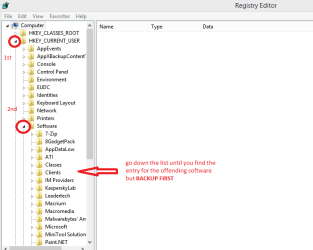
Josh just a suggestion and you have to make the final decision - what I do sometimes with the stubborn ones is go to regedit hit the HKEY for both the LOCAL MACHINE and USER lists open them out > go to Software > open them out and it should have an entry in there that you can right click on and delete. See my pic

Now BEFORE you do anything like this please back up the registry to do that you need to open regedit go to and click on File > export to Documents. I always do this after installing anyway it is a safe way of saving the reg from getting mucked up and then not being recoverable.
 

Attachments

  • REG1.PNG
    REG1.PNG
    12.3 KB · Views: 2

My Computer My Computer

Computer type
PC/Desktop
Computer Manufacturer/Model Number
Own build (new) Desk1 / Asus ROG Win 7 / Desk2 1st build
OS
Desk1 7 Home Prem / Desk2 10 Pro / Main lap Asus ROG 10 Pro 2 laptop Toshiba 7 Pro Asus P2520 7 & 10
CPU
Desk1 i5 3750K / Laptop i7 GTX 860M / Desk2 i5 2500
Motherboard
Desk1 Asus P877-V / Desk2 Gigabyte H67 UD3H / Laptop ?
Memory
Desk1 8GB (1866) / Desk2 16GB (1333) / Laptop 8Gb DDR3
Graphics Card(s)
Desk 1& 2NVidia GTX 650 & Laptops on board Intel
Sound Card
Desk 1 & 2 -XONAR DG Realtek High Def audio Laptop
Monitor(s) Displays
Desk 1 Benq HD 2450 / Desk2 Philips 24" / Laptop 17.5"
Screen Resolution
1920x1080 D1 & D2 & Laptop 1
Hard Drives
Desk1 Samsung 120GB 830 SSD
Asus ROG 256GB 850 Pro SSD
Desk2 Samsung 840 256 SSD
Toshiba 120GB EVO
PSU
Desk 1 Corsair HX 1050/ Laptop ? / Desk 2 Corsair HX 650
Case
Desk 1 Cooler HAF XM ? Toshiba laptop / Desk2 Coolermaster
Cooling
Fans on all Desk1 -2 Desk2 - all Coolermasters 5 Laptop ?
Keyboard
Desk 1 MS Sidewinder X6 Desk 2 MS Sidewinder X 4
Mouse
Desk 1&2 - Gigabyte MS 900 gamer - laptop - Logitec wireless
Internet Speed
ADSL2+
Other Info
One other Desktop (tester) and spare Toshba laptop both with SSD's
Running Kaspersky 2016 ISS on all machines config'd identically
Logitec audio stereo systems on each machine (x3)
Canon MG5250MFC
Router/modem TP-Link running WPA2SK
Please attach the Combofix .txt file ... look here --->C:\ComboScan\Supplementary.txt
so I can see your results.
 

My Computer My Computer

Computer type
PC/Desktop
Computer Manufacturer/Model Number
Bruce ... somewhere in his 40's
OS
Windows 7 Ultimate 32bit SP1
CPU
Intel(R) Core(TM)2 Quad CPU @ 2.40GHz, 2400 MHz
Motherboard
INTEL/D975XBX2
Memory
4 GB
Graphics Card(s)
ATI Radeon HD 2600 Pro
Monitor(s) Displays
Samsung SyncMaster 914v
Screen Resolution
1280 x 1024
Hard Drives
2/500GB each ... ST3500630AS ATA Device.
One is not connected
PSU
Rocketfish 700 W
Case
G.Skill Gigabyte Chassis
Keyboard
Standard PS/2 Keyboard
Mouse
Microsoft PS/2 Mouse
Internet Speed
DSL
Antivirus
Avira Internet Security
Browser
IE 11
Other Info
ATI HDMI Audio
Josh just a suggestion and you have to make the final decision - what I do sometimes with the stubborn ones is go to regedit hit the HKEY for both the LOCAL MACHINE and USER lists open them out > go to Software > open them out and it should have an entry in there that you can right click on and delete. See my pic

I saw nothing there pertaining to McAfee

Please attach the Combofix .txt file ... look here --->C:\ComboScan\Supplementary.txt
so I can see your results.

This is strange. I just reran combofix today and it didn't detect McAfee. The only thing I can think of which I did differently between today and my last scan last night was installed Malwarebytes and ran part of a full scan, which detected something not having to do with McAfee. I ended the scan because I didn't know if it would actually finish overnight or just halt when the system goes into sleep mode. I haven't changed any Power settings on the laptop, they are factory default.

Sorry for not appropriately naming the files.

Log1 - Last night's scan
Log - Today's scan

If you compare the two, immediately, you will see keys at the top of Log1.txt, which do not appear in Log.txt.

Again, what I'm looking to do is install MSE. I can't get the Security Center to open properly. I changed the Service startup type to Automatic. It still doesn't launch.
 

Attachments

My Computer My Computer

Computer Manufacturer/Model Number
N/A
OS
Windows 7 Ultimate 64-bit
CPU
E6750 OC'd ~ 2.9 Mhz
Motherboard
P5N-E
Memory
DDR2 800 MHz 4GB
Graphics Card(s)
GTX 460 SE 1GB
Sound Card
Realtek Audio (Onboard sound)
Hard Drives
Seagate 500 GB HD
PSU
750 watt

My Computer My Computer

Computer type
PC/Desktop
Computer Manufacturer/Model Number
Bruce ... somewhere in his 40's
OS
Windows 7 Ultimate 32bit SP1
CPU
Intel(R) Core(TM)2 Quad CPU @ 2.40GHz, 2400 MHz
Motherboard
INTEL/D975XBX2
Memory
4 GB
Graphics Card(s)
ATI Radeon HD 2600 Pro
Monitor(s) Displays
Samsung SyncMaster 914v
Screen Resolution
1280 x 1024
Hard Drives
2/500GB each ... ST3500630AS ATA Device.
One is not connected
PSU
Rocketfish 700 W
Case
G.Skill Gigabyte Chassis
Keyboard
Standard PS/2 Keyboard
Mouse
Microsoft PS/2 Mouse
Internet Speed
DSL
Antivirus
Avira Internet Security
Browser
IE 11
Other Info
ATI HDMI Audio
Jacee could this have just been down to a simple reboot after running the Combo??
 

My Computer My Computer

Computer type
PC/Desktop
Computer Manufacturer/Model Number
Own build (new) Desk1 / Asus ROG Win 7 / Desk2 1st build
OS
Desk1 7 Home Prem / Desk2 10 Pro / Main lap Asus ROG 10 Pro 2 laptop Toshiba 7 Pro Asus P2520 7 & 10
CPU
Desk1 i5 3750K / Laptop i7 GTX 860M / Desk2 i5 2500
Motherboard
Desk1 Asus P877-V / Desk2 Gigabyte H67 UD3H / Laptop ?
Memory
Desk1 8GB (1866) / Desk2 16GB (1333) / Laptop 8Gb DDR3
Graphics Card(s)
Desk 1& 2NVidia GTX 650 & Laptops on board Intel
Sound Card
Desk 1 & 2 -XONAR DG Realtek High Def audio Laptop
Monitor(s) Displays
Desk 1 Benq HD 2450 / Desk2 Philips 24" / Laptop 17.5"
Screen Resolution
1920x1080 D1 & D2 & Laptop 1
Hard Drives
Desk1 Samsung 120GB 830 SSD
Asus ROG 256GB 850 Pro SSD
Desk2 Samsung 840 256 SSD
Toshiba 120GB EVO
PSU
Desk 1 Corsair HX 1050/ Laptop ? / Desk 2 Corsair HX 650
Case
Desk 1 Cooler HAF XM ? Toshiba laptop / Desk2 Coolermaster
Cooling
Fans on all Desk1 -2 Desk2 - all Coolermasters 5 Laptop ?
Keyboard
Desk 1 MS Sidewinder X6 Desk 2 MS Sidewinder X 4
Mouse
Desk 1&2 - Gigabyte MS 900 gamer - laptop - Logitec wireless
Internet Speed
ADSL2+
Other Info
One other Desktop (tester) and spare Toshba laptop both with SSD's
Running Kaspersky 2016 ISS on all machines config'd identically
Logitec audio stereo systems on each machine (x3)
Canon MG5250MFC
Router/modem TP-Link running WPA2SK
I don't think McAfee was totally uninstalled before the first Combofix download was run. ;)
 

My Computer My Computer

Computer type
PC/Desktop
Computer Manufacturer/Model Number
Bruce ... somewhere in his 40's
OS
Windows 7 Ultimate 32bit SP1
CPU
Intel(R) Core(TM)2 Quad CPU @ 2.40GHz, 2400 MHz
Motherboard
INTEL/D975XBX2
Memory
4 GB
Graphics Card(s)
ATI Radeon HD 2600 Pro
Monitor(s) Displays
Samsung SyncMaster 914v
Screen Resolution
1280 x 1024
Hard Drives
2/500GB each ... ST3500630AS ATA Device.
One is not connected
PSU
Rocketfish 700 W
Case
G.Skill Gigabyte Chassis
Keyboard
Standard PS/2 Keyboard
Mouse
Microsoft PS/2 Mouse
Internet Speed
DSL
Antivirus
Avira Internet Security
Browser
IE 11
Other Info
ATI HDMI Audio

My Computer My Computer

Computer type
PC/Desktop
Computer Manufacturer/Model Number
Own build (new) Desk1 / Asus ROG Win 7 / Desk2 1st build
OS
Desk1 7 Home Prem / Desk2 10 Pro / Main lap Asus ROG 10 Pro 2 laptop Toshiba 7 Pro Asus P2520 7 & 10
CPU
Desk1 i5 3750K / Laptop i7 GTX 860M / Desk2 i5 2500
Motherboard
Desk1 Asus P877-V / Desk2 Gigabyte H67 UD3H / Laptop ?
Memory
Desk1 8GB (1866) / Desk2 16GB (1333) / Laptop 8Gb DDR3
Graphics Card(s)
Desk 1& 2NVidia GTX 650 & Laptops on board Intel
Sound Card
Desk 1 & 2 -XONAR DG Realtek High Def audio Laptop
Monitor(s) Displays
Desk 1 Benq HD 2450 / Desk2 Philips 24" / Laptop 17.5"
Screen Resolution
1920x1080 D1 & D2 & Laptop 1
Hard Drives
Desk1 Samsung 120GB 830 SSD
Asus ROG 256GB 850 Pro SSD
Desk2 Samsung 840 256 SSD
Toshiba 120GB EVO
PSU
Desk 1 Corsair HX 1050/ Laptop ? / Desk 2 Corsair HX 650
Case
Desk 1 Cooler HAF XM ? Toshiba laptop / Desk2 Coolermaster
Cooling
Fans on all Desk1 -2 Desk2 - all Coolermasters 5 Laptop ?
Keyboard
Desk 1 MS Sidewinder X6 Desk 2 MS Sidewinder X 4
Mouse
Desk 1&2 - Gigabyte MS 900 gamer - laptop - Logitec wireless
Internet Speed
ADSL2+
Other Info
One other Desktop (tester) and spare Toshba laptop both with SSD's
Running Kaspersky 2016 ISS on all machines config'd identically
Logitec audio stereo systems on each machine (x3)
Canon MG5250MFC
Router/modem TP-Link running WPA2SK
McAfee is gone.
Let's see what Security Check shows ...

Download Security Check by screen317 from here http://screen317.spywareinfoforum.org/SecurityCheck.exe or here http://screen317.spywareinfoforum.org/
Save it to your Desktop.
Double click SecurityCheck.exe and follow the onscreen instructions inside of the black box.
A Notepad document should open automatically called checkup.txt.
Please post the contents of that document.

I read the log. It said something about Security Center not running. I knew this. I can't get Security Center running. The service is start to run Automatically.

I tried installing Microsoft Security Essentials, again and I got the same problem. MSE would open for a split second and then close. It literally flashed on the screen and that's it.

Do you think I need to do a Repair Install? I've also tried reinstalling Security Center with a .reg file, no luck.

Edit
Could there be something installed by HP, found in the Programs list that I can uninstall which would prevent Security Center from running? Again, this is a G72-262NR laptop.
 

Attachments

Last edited:

My Computer My Computer

Computer Manufacturer/Model Number
N/A
OS
Windows 7 Ultimate 64-bit
CPU
E6750 OC'd ~ 2.9 Mhz
Motherboard
P5N-E
Memory
DDR2 800 MHz 4GB
Graphics Card(s)
GTX 460 SE 1GB
Sound Card
Realtek Audio (Onboard sound)
Hard Drives
Seagate 500 GB HD
PSU
750 watt
I was also looking at System Restore. The laptop I'm working with doesn't even save restore points when accessing System Restore via Start>All Programs>Accessories>System Tools

Sounds like something on this HP laptop is suppressing certain Windows features from being enabled, for instance, System Restore and Security Center. But, how do I fix this? It seems that this HP laptop only wants McAfee installed and I want to change over to something else.
 

My Computer My Computer

Computer Manufacturer/Model Number
N/A
OS
Windows 7 Ultimate 64-bit
CPU
E6750 OC'd ~ 2.9 Mhz
Motherboard
P5N-E
Memory
DDR2 800 MHz 4GB
Graphics Card(s)
GTX 460 SE 1GB
Sound Card
Realtek Audio (Onboard sound)
Hard Drives
Seagate 500 GB HD
PSU
750 watt
McAfee is gone.
Let's see what Security Check shows ...

Download Security Check by screen317 from here http://screen317.spywareinfoforum.org/SecurityCheck.exe or here http://screen317.spywareinfoforum.org/
Save it to your Desktop.
Double click SecurityCheck.exe and follow the onscreen instructions inside of the black box.
A Notepad document should open automatically called checkup.txt.
Please post the contents of that document.

I read the log. It said something about Security Center not running. I knew this. I can't get Security Center running. The service is start to run Automatically.

I tried installing Microsoft Security Essentials, again and I got the same problem. MSE would open for a split second and then close. It literally flashed on the screen and that's it.

Do you think I need to do a Repair Install? I've also tried reinstalling Security Center with a .reg file, no luck.

Edit
Could there be something installed by HP, found in the Programs list that I can uninstall which would prevent Security Center from running? Again, this is a G72-262NR laptop.
Hmm what you are referring to is what we call bloatware and it is extremely annoying that machines are loaded with this crap.
Three ways I would approach it Josh
1. You can remove the HP stuff piece by piece

2. You can this http://www.sevenforums.com/tutorials/219487-clean-reinstall-factory-oem-windows-7-a.html but you will need to backup ALL of the data you want first or get a new hard drive and clone the original. Then do the tutorial on the original drive.
Sounds complicated but is not really.

3. Get a new hard drive - say a SSD if you can afford one and an OEM version of Windows 7 and install that. This would be my own personal choice only because I can afford it though.
 

My Computer My Computer

Computer type
PC/Desktop
Computer Manufacturer/Model Number
Own build (new) Desk1 / Asus ROG Win 7 / Desk2 1st build
OS
Desk1 7 Home Prem / Desk2 10 Pro / Main lap Asus ROG 10 Pro 2 laptop Toshiba 7 Pro Asus P2520 7 & 10
CPU
Desk1 i5 3750K / Laptop i7 GTX 860M / Desk2 i5 2500
Motherboard
Desk1 Asus P877-V / Desk2 Gigabyte H67 UD3H / Laptop ?
Memory
Desk1 8GB (1866) / Desk2 16GB (1333) / Laptop 8Gb DDR3
Graphics Card(s)
Desk 1& 2NVidia GTX 650 & Laptops on board Intel
Sound Card
Desk 1 & 2 -XONAR DG Realtek High Def audio Laptop
Monitor(s) Displays
Desk 1 Benq HD 2450 / Desk2 Philips 24" / Laptop 17.5"
Screen Resolution
1920x1080 D1 & D2 & Laptop 1
Hard Drives
Desk1 Samsung 120GB 830 SSD
Asus ROG 256GB 850 Pro SSD
Desk2 Samsung 840 256 SSD
Toshiba 120GB EVO
PSU
Desk 1 Corsair HX 1050/ Laptop ? / Desk 2 Corsair HX 650
Case
Desk 1 Cooler HAF XM ? Toshiba laptop / Desk2 Coolermaster
Cooling
Fans on all Desk1 -2 Desk2 - all Coolermasters 5 Laptop ?
Keyboard
Desk 1 MS Sidewinder X6 Desk 2 MS Sidewinder X 4
Mouse
Desk 1&2 - Gigabyte MS 900 gamer - laptop - Logitec wireless
Internet Speed
ADSL2+
Other Info
One other Desktop (tester) and spare Toshba laptop both with SSD's
Running Kaspersky 2016 ISS on all machines config'd identically
Logitec audio stereo systems on each machine (x3)
Canon MG5250MFC
Router/modem TP-Link running WPA2SK
Hmm what you are referring to is what we call bloatware and it is extremely annoying that machines are loaded with this crap.
Three ways I would approach it Josh
1. You can remove the HP stuff piece by piece

2. You can this http://www.sevenforums.com/tutorials/219487-clean-reinstall-factory-oem-windows-7-a.html but you will need to backup ALL of the data you want first or get a new hard drive and clone the original. Then do the tutorial on the original drive.
Sounds complicated but is not really.

3. Get a new hard drive - say a SSD if you can afford one and an OEM version of Windows 7 and install that. This would be my own personal choice only because I can afford it though.

Would a repair install work as well? If I understand the concept of Clean Install, that would mean wiping the drive and reinstalling EVERYTHING on the computer.
 

My Computer My Computer

Computer Manufacturer/Model Number
N/A
OS
Windows 7 Ultimate 64-bit
CPU
E6750 OC'd ~ 2.9 Mhz
Motherboard
P5N-E
Memory
DDR2 800 MHz 4GB
Graphics Card(s)
GTX 460 SE 1GB
Sound Card
Realtek Audio (Onboard sound)
Hard Drives
Seagate 500 GB HD
PSU
750 watt
Download DDS from one of these links:
DDS.com
DDS.pif
  • Disable any script blocking protection
  • Double click the dds icon to run the tool.
  • When done, DDS will open two (2) logs:
    1. DDS.txt
    2. Attach.txt <--- will be minimized in the task tray
  • Save both reports to your desktop.
Include the contents of both logs in your next post.
The scan will instruct you to post Attach.txt as an attachment.
 

My Computer My Computer

Computer type
PC/Desktop
Computer Manufacturer/Model Number
Bruce ... somewhere in his 40's
OS
Windows 7 Ultimate 32bit SP1
CPU
Intel(R) Core(TM)2 Quad CPU @ 2.40GHz, 2400 MHz
Motherboard
INTEL/D975XBX2
Memory
4 GB
Graphics Card(s)
ATI Radeon HD 2600 Pro
Monitor(s) Displays
Samsung SyncMaster 914v
Screen Resolution
1280 x 1024
Hard Drives
2/500GB each ... ST3500630AS ATA Device.
One is not connected
PSU
Rocketfish 700 W
Case
G.Skill Gigabyte Chassis
Keyboard
Standard PS/2 Keyboard
Mouse
Microsoft PS/2 Mouse
Internet Speed
DSL
Antivirus
Avira Internet Security
Browser
IE 11
Other Info
ATI HDMI Audio
Download DDS from one of these links:
DDS.com

DDS.pif
  • Disable any script blocking protection
  • Double click the dds icon to run the tool.
  • When done, DDS will open two (2) logs:
    1. DDS.txt
    2. Attach.txt <--- will be minimized in the task tray
  • Save both reports to your desktop.
Include the contents of both logs in your next post.
The scan will instruct you to post Attach.txt as an attachment.

What is DDS and what does it do? Never heard of it.

See attached. The popup afterwards said attached.txt must be zipped but I did not think that was necessary.
 

Attachments

My Computer My Computer

Computer Manufacturer/Model Number
N/A
OS
Windows 7 Ultimate 64-bit
CPU
E6750 OC'd ~ 2.9 Mhz
Motherboard
P5N-E
Memory
DDR2 800 MHz 4GB
Graphics Card(s)
GTX 460 SE 1GB
Sound Card
Realtek Audio (Onboard sound)
Hard Drives
Seagate 500 GB HD
PSU
750 watt
I still haven't had this problem resolved. I'm still unable to load Security Center and successfully be able to run another Anti-virus application. Again, MSE installs just fine, but when trying to open it, will flash to the screen and then close. Also, I've tried changing the Security Center service to Automatic and it somehow changes itself back to Disabled. Any help?
 

My Computer My Computer

Computer Manufacturer/Model Number
N/A
OS
Windows 7 Ultimate 64-bit
CPU
E6750 OC'd ~ 2.9 Mhz
Motherboard
P5N-E
Memory
DDR2 800 MHz 4GB
Graphics Card(s)
GTX 460 SE 1GB
Sound Card
Realtek Audio (Onboard sound)
Hard Drives
Seagate 500 GB HD
PSU
750 watt
My 2 cents again Jacee would it be possible for the McAfee to still be in the registry as I have had to in the past go into regedit and the two HKEYs LOCAL_ MACHINE and USER > Software and check for left overs of the really stubborn stuff even after running the removal tools - Norton (Symnatec) & AVG being a prime examples in my experience as still have entries left over??

If Josh could just have a look and get rid of them would it make any difference??
 

My Computer My Computer

Computer type
PC/Desktop
Computer Manufacturer/Model Number
Own build (new) Desk1 / Asus ROG Win 7 / Desk2 1st build
OS
Desk1 7 Home Prem / Desk2 10 Pro / Main lap Asus ROG 10 Pro 2 laptop Toshiba 7 Pro Asus P2520 7 & 10
CPU
Desk1 i5 3750K / Laptop i7 GTX 860M / Desk2 i5 2500
Motherboard
Desk1 Asus P877-V / Desk2 Gigabyte H67 UD3H / Laptop ?
Memory
Desk1 8GB (1866) / Desk2 16GB (1333) / Laptop 8Gb DDR3
Graphics Card(s)
Desk 1& 2NVidia GTX 650 & Laptops on board Intel
Sound Card
Desk 1 & 2 -XONAR DG Realtek High Def audio Laptop
Monitor(s) Displays
Desk 1 Benq HD 2450 / Desk2 Philips 24" / Laptop 17.5"
Screen Resolution
1920x1080 D1 & D2 & Laptop 1
Hard Drives
Desk1 Samsung 120GB 830 SSD
Asus ROG 256GB 850 Pro SSD
Desk2 Samsung 840 256 SSD
Toshiba 120GB EVO
PSU
Desk 1 Corsair HX 1050/ Laptop ? / Desk 2 Corsair HX 650
Case
Desk 1 Cooler HAF XM ? Toshiba laptop / Desk2 Coolermaster
Cooling
Fans on all Desk1 -2 Desk2 - all Coolermasters 5 Laptop ?
Keyboard
Desk 1 MS Sidewinder X6 Desk 2 MS Sidewinder X 4
Mouse
Desk 1&2 - Gigabyte MS 900 gamer - laptop - Logitec wireless
Internet Speed
ADSL2+
Other Info
One other Desktop (tester) and spare Toshba laptop both with SSD's
Running Kaspersky 2016 ISS on all machines config'd identically
Logitec audio stereo systems on each machine (x3)
Canon MG5250MFC
Router/modem TP-Link running WPA2SK
My 2 cents again Jacee would it be possible for the McAfee to still be in the registry as I have had to in the past go into regedit and the two HKEYs LOCAL_ MACHINE and USER > Software and check for left overs of the really stubborn stuff even after running the removal tools - Norton (Symnatec) & AVG being a prime examples in my experience as still have entries left over??

If Josh could just have a look and get rid of them would it make any difference??

I've already done that. I did actually rerun combofix and McAfee was no longer detected...but something is still up, considering I can't get MSE to function at all.

I also ran a full scan on Malwarebytes...that has nothing to do with registry, though.
 

My Computer My Computer

Computer Manufacturer/Model Number
N/A
OS
Windows 7 Ultimate 64-bit
CPU
E6750 OC'd ~ 2.9 Mhz
Motherboard
P5N-E
Memory
DDR2 800 MHz 4GB
Graphics Card(s)
GTX 460 SE 1GB
Sound Card
Realtek Audio (Onboard sound)
Hard Drives
Seagate 500 GB HD
PSU
750 watt

My Computer My Computer

Computer type
PC/Desktop
Computer Manufacturer/Model Number
Own build (new) Desk1 / Asus ROG Win 7 / Desk2 1st build
OS
Desk1 7 Home Prem / Desk2 10 Pro / Main lap Asus ROG 10 Pro 2 laptop Toshiba 7 Pro Asus P2520 7 & 10
CPU
Desk1 i5 3750K / Laptop i7 GTX 860M / Desk2 i5 2500
Motherboard
Desk1 Asus P877-V / Desk2 Gigabyte H67 UD3H / Laptop ?
Memory
Desk1 8GB (1866) / Desk2 16GB (1333) / Laptop 8Gb DDR3
Graphics Card(s)
Desk 1& 2NVidia GTX 650 & Laptops on board Intel
Sound Card
Desk 1 & 2 -XONAR DG Realtek High Def audio Laptop
Monitor(s) Displays
Desk 1 Benq HD 2450 / Desk2 Philips 24" / Laptop 17.5"
Screen Resolution
1920x1080 D1 & D2 & Laptop 1
Hard Drives
Desk1 Samsung 120GB 830 SSD
Asus ROG 256GB 850 Pro SSD
Desk2 Samsung 840 256 SSD
Toshiba 120GB EVO
PSU
Desk 1 Corsair HX 1050/ Laptop ? / Desk 2 Corsair HX 650
Case
Desk 1 Cooler HAF XM ? Toshiba laptop / Desk2 Coolermaster
Cooling
Fans on all Desk1 -2 Desk2 - all Coolermasters 5 Laptop ?
Keyboard
Desk 1 MS Sidewinder X6 Desk 2 MS Sidewinder X 4
Mouse
Desk 1&2 - Gigabyte MS 900 gamer - laptop - Logitec wireless
Internet Speed
ADSL2+
Other Info
One other Desktop (tester) and spare Toshba laptop both with SSD's
Running Kaspersky 2016 ISS on all machines config'd identically
Logitec audio stereo systems on each machine (x3)
Canon MG5250MFC
Router/modem TP-Link running WPA2SK

I don't think any of that will do anything. What if I just uninstalled a program called HP Setup? Could that be preventing Security Center from loading?
 

My Computer My Computer

Computer Manufacturer/Model Number
N/A
OS
Windows 7 Ultimate 64-bit
CPU
E6750 OC'd ~ 2.9 Mhz
Motherboard
P5N-E
Memory
DDR2 800 MHz 4GB
Graphics Card(s)
GTX 460 SE 1GB
Sound Card
Realtek Audio (Onboard sound)
Hard Drives
Seagate 500 GB HD
PSU
750 watt
Back
Top