
Internet Explorer has stopped working ( IE 9beta )after uninstallation

darbras

New member
Local time
3:32 PM
Messages
16
Hello all ,

I installed internet explorer 9 beta, and then performed the updates.
After reboot my pc crashed a lot: blue screens...
Thinking that the problem commes from internet explorer 9 beta, I uninstalled it as recommended.

But after reboot, I have always the following message: Internet Explorer has stopped working
( in french Internet explorer a céssé de fonctionner )

What's is strange is...i feel that internet explorer is always present .


I tried to reinstall IE 8, I get the meesage like this, a recent version is already installed.
The same error is obtained,when i try to reinstall IE 9 beta.

Any help would be appreciated,
Thank you,

Sorry for by bad english
 

My Computer My Computer

At a glance

Windows 7 Ultimate / Windows XP SP3
OS
Windows 7 Ultimate / Windows XP SP3

My Computer My Computer

At a glance

Windows 8.1 Pro x64Intel Core i5-2500K @ 3.30GHz - S11558GB Corsair DDR3 XMS3, PC3-12800NVIDIA GeForce GTX 650
Computer type
PC/Desktop
Computer Manufacturer/Model Number
Self Built
OS
Windows 8.1 Pro x64
CPU
Intel Core i5-2500K @ 3.30GHz - S1155
Motherboard
Asus P8P67 LE Rev3, Intel P67, S115
Memory
8GB Corsair DDR3 XMS3, PC3-12800
Graphics Card(s)
NVIDIA GeForce GTX 650
Sound Card
On-Board
Monitor(s) Displays
3 x 24" {Extended Display}
Screen Resolution
1920 x 1080
Hard Drives
300GB Seagate Barracuda 7200
PSU
550W Coolermaster GX550
Case
Silverstone Precision PS04B
Cooling
Stock
Keyboard
Logitech K120
Mouse
World of Warcraft Cataclysm MMO Gaming Mouse
Internet Speed
80 MB
Antivirus
MSE / Windows Defender
Browser
Chrome
Hi,

Hi,

I would try doing a system restore back to before you installed IE9

How to - http://www.sevenforums.com/tutorials...m-restore.html

Hope this helps.
Wow !
Thank you for the quick answer !
I'll do it, and I will let you know.
**EDIT**
Just to add to that... your English is good
smile.gif
Thank you :o ;)

Best Regards,
 

My Computer My Computer

At a glance

Windows 7 Ultimate / Windows XP SP3
OS
Windows 7 Ultimate / Windows XP SP3
No problem, there is a lot of people at the forum who love to help :)
 

My Computer My Computer

At a glance

Windows 8.1 Pro x64Intel Core i5-2500K @ 3.30GHz - S11558GB Corsair DDR3 XMS3, PC3-12800NVIDIA GeForce GTX 650
Computer type
PC/Desktop
Computer Manufacturer/Model Number
Self Built
OS
Windows 8.1 Pro x64
CPU
Intel Core i5-2500K @ 3.30GHz - S1155
Motherboard
Asus P8P67 LE Rev3, Intel P67, S115
Memory
8GB Corsair DDR3 XMS3, PC3-12800
Graphics Card(s)
NVIDIA GeForce GTX 650
Sound Card
On-Board
Monitor(s) Displays
3 x 24" {Extended Display}
Screen Resolution
1920 x 1080
Hard Drives
300GB Seagate Barracuda 7200
PSU
550W Coolermaster GX550
Case
Silverstone Precision PS04B
Cooling
Stock
Keyboard
Logitech K120
Mouse
World of Warcraft Cataclysm MMO Gaming Mouse
Internet Speed
80 MB
Antivirus
MSE / Windows Defender
Browser
Chrome
Hi,

Sorry, i can't do it, I didn't create previously a Restore point !

Regards,
 

My Computer My Computer

At a glance

Windows 7 Ultimate / Windows XP SP3
OS
Windows 7 Ultimate / Windows XP SP3
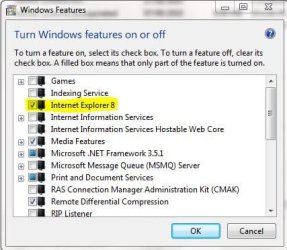
When you get to the below screen, tick the highlighted box...

do you get anything to restore to then?

Capture.JPG

Regards,
JDobbsy1987
 

My Computer My Computer

At a glance

Windows 8.1 Pro x64Intel Core i5-2500K @ 3.30GHz - S11558GB Corsair DDR3 XMS3, PC3-12800NVIDIA GeForce GTX 650
Computer type
PC/Desktop
Computer Manufacturer/Model Number
Self Built
OS
Windows 8.1 Pro x64
CPU
Intel Core i5-2500K @ 3.30GHz - S1155
Motherboard
Asus P8P67 LE Rev3, Intel P67, S115
Memory
8GB Corsair DDR3 XMS3, PC3-12800
Graphics Card(s)
NVIDIA GeForce GTX 650
Sound Card
On-Board
Monitor(s) Displays
3 x 24" {Extended Display}
Screen Resolution
1920 x 1080
Hard Drives
300GB Seagate Barracuda 7200
PSU
550W Coolermaster GX550
Case
Silverstone Precision PS04B
Cooling
Stock
Keyboard
Logitech K120
Mouse
World of Warcraft Cataclysm MMO Gaming Mouse
Internet Speed
80 MB
Antivirus
MSE / Windows Defender
Browser
Chrome
Hi,

No,
I have the following message :
2s608ow.jpg
 

My Computer My Computer

At a glance

Windows 7 Ultimate / Windows XP SP3
OS
Windows 7 Ultimate / Windows XP SP3
In that case...

If you click start and the search for 'uninstall a program' then click on uninstall a program in the list.

On the left click 'Turn windows features on or off' and see if Internet Explorer 8 is ticked?
If not then tick it and click ok, this should then install that feature.

Capture.JPG

Regards,
JDobbsy1987
 

My Computer My Computer

At a glance

Windows 8.1 Pro x64Intel Core i5-2500K @ 3.30GHz - S11558GB Corsair DDR3 XMS3, PC3-12800NVIDIA GeForce GTX 650
Computer type
PC/Desktop
Computer Manufacturer/Model Number
Self Built
OS
Windows 8.1 Pro x64
CPU
Intel Core i5-2500K @ 3.30GHz - S1155
Motherboard
Asus P8P67 LE Rev3, Intel P67, S115
Memory
8GB Corsair DDR3 XMS3, PC3-12800
Graphics Card(s)
NVIDIA GeForce GTX 650
Sound Card
On-Board
Monitor(s) Displays
3 x 24" {Extended Display}
Screen Resolution
1920 x 1080
Hard Drives
300GB Seagate Barracuda 7200
PSU
550W Coolermaster GX550
Case
Silverstone Precision PS04B
Cooling
Stock
Keyboard
Logitech K120
Mouse
World of Warcraft Cataclysm MMO Gaming Mouse
Internet Speed
80 MB
Antivirus
MSE / Windows Defender
Browser
Chrome
Hello JDobbsy1987, hello all,

I'm sorry for the delay, i lost my connection.

I did what you asked but,The "Windows Features" dialog box is empty.

Regards,
 

My Computer My Computer

At a glance

Windows 7 Ultimate / Windows XP SP3
OS
Windows 7 Ultimate / Windows XP SP3
Hello JDobbsy1987, hello all,

I'm sorry for the delay, i lost my connection.

I did what you asked but,The "Windows Features" dialog box is empty.

Regards,

This is strange...

When you click the 'Turn windows features on or off' option it does normally appear blank for a little while, how long did you leave it for after click 'Turn windows features on or off'?

Regards,
JDobbsy1987
 

My Computer My Computer

At a glance

Windows 8.1 Pro x64Intel Core i5-2500K @ 3.30GHz - S11558GB Corsair DDR3 XMS3, PC3-12800NVIDIA GeForce GTX 650
Computer type
PC/Desktop
Computer Manufacturer/Model Number
Self Built
OS
Windows 8.1 Pro x64
CPU
Intel Core i5-2500K @ 3.30GHz - S1155
Motherboard
Asus P8P67 LE Rev3, Intel P67, S115
Memory
8GB Corsair DDR3 XMS3, PC3-12800
Graphics Card(s)
NVIDIA GeForce GTX 650
Sound Card
On-Board
Monitor(s) Displays
3 x 24" {Extended Display}
Screen Resolution
1920 x 1080
Hard Drives
300GB Seagate Barracuda 7200
PSU
550W Coolermaster GX550
Case
Silverstone Precision PS04B
Cooling
Stock
Keyboard
Logitech K120
Mouse
World of Warcraft Cataclysm MMO Gaming Mouse
Internet Speed
80 MB
Antivirus
MSE / Windows Defender
Browser
Chrome
Hi
This is strange...

When you click the 'Turn windows features on or off' option it does normally appear blank for a little while, how long did you leave it for after click 'Turn windows features on or off'?

Regards,
JDobbsy1987
Much time At the beginning, a message asks me to wait, then the box appears, but it's empty
kf5hs3.jpg
Regards,
 

My Computer My Computer

At a glance

Windows 7 Ultimate / Windows XP SP3
OS
Windows 7 Ultimate / Windows XP SP3

My Computer My Computer

At a glance

Windows 8.1 Pro x64Intel Core i5-2500K @ 3.30GHz - S11558GB Corsair DDR3 XMS3, PC3-12800NVIDIA GeForce GTX 650
Computer type
PC/Desktop
Computer Manufacturer/Model Number
Self Built
OS
Windows 8.1 Pro x64
CPU
Intel Core i5-2500K @ 3.30GHz - S1155
Motherboard
Asus P8P67 LE Rev3, Intel P67, S115
Memory
8GB Corsair DDR3 XMS3, PC3-12800
Graphics Card(s)
NVIDIA GeForce GTX 650
Sound Card
On-Board
Monitor(s) Displays
3 x 24" {Extended Display}
Screen Resolution
1920 x 1080
Hard Drives
300GB Seagate Barracuda 7200
PSU
550W Coolermaster GX550
Case
Silverstone Precision PS04B
Cooling
Stock
Keyboard
Logitech K120
Mouse
World of Warcraft Cataclysm MMO Gaming Mouse
Internet Speed
80 MB
Antivirus
MSE / Windows Defender
Browser
Chrome
Have you managed to sort Internet explorer now or is that still an issue?

Regards,
JDobbsy1987
 

My Computer My Computer

At a glance

Windows 8.1 Pro x64Intel Core i5-2500K @ 3.30GHz - S11558GB Corsair DDR3 XMS3, PC3-12800NVIDIA GeForce GTX 650
Computer type
PC/Desktop
Computer Manufacturer/Model Number
Self Built
OS
Windows 8.1 Pro x64
CPU
Intel Core i5-2500K @ 3.30GHz - S1155
Motherboard
Asus P8P67 LE Rev3, Intel P67, S115
Memory
8GB Corsair DDR3 XMS3, PC3-12800
Graphics Card(s)
NVIDIA GeForce GTX 650
Sound Card
On-Board
Monitor(s) Displays
3 x 24" {Extended Display}
Screen Resolution
1920 x 1080
Hard Drives
300GB Seagate Barracuda 7200
PSU
550W Coolermaster GX550
Case
Silverstone Precision PS04B
Cooling
Stock
Keyboard
Logitech K120
Mouse
World of Warcraft Cataclysm MMO Gaming Mouse
Internet Speed
80 MB
Antivirus
MSE / Windows Defender
Browser
Chrome
Hi, It's OK ! The Windows Features dialog box appears again ( fixed by System Update Readiness Tool )
2vadyio.jpg
Internet Explorer 8 was not ticked. I check,i wait, nothing happens, I open again The Windows Features dialog box,internet explorer 8 remain not ticked. I check,i restart, wait, open again The Windows Features dialog box, the checkbox ( iE8) is still blank Regards,
 

My Computer My Computer

At a glance

Windows 7 Ultimate / Windows XP SP3
OS
Windows 7 Ultimate / Windows XP SP3
Back
Top