How can I minimize a Window to the bottom Taskbar separately?

atikovi

New member
Member
VIP
Local time
12:49 PM
Messages
103
Starting to convert from XP to 7 and want to keep as much of the XP style as possible. Already changed 7 to the classic format. If I minimize a Window, how can I get it to become a rectangular bar in the bottom task bar like in XP? I could have 4 or 5 of these bars down there and maximize them with one click in XP. Now I see in 7 that they are all in one single button on the bottom left so I have to click on the button, then click again on the Window I want. And I never know what is running unless I click that button. Starting to dislike 7. ARRGGH!
 

My Computer My Computer

Computer type
PC/Desktop
OS
W7P64
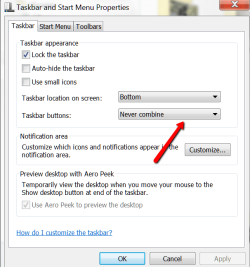
That's the way it is in 7. If you had not tampered with the system, you would see all windows open by just hovering over the icon in the taskbar and you can open that window by clicking right there.

But you can get someting similar to XP if you make this setting.
 

Attachments

  • 2013-11-28_1924.png
    2013-11-28_1924.png
    20.6 KB · Views: 21

My Computer My Computer

Computer Manufacturer/Model Number
HP, Dell, Gateway, Toshiba - 4 laptops and 2 desktops
OS
Vista, Windows7, Mint Mate, Zorin, Windows 8
CPU
from 1.6GHz Duo to i7
Monitor(s) Displays
2x HP w2207
Hard Drives
5x HDD, 7x SSD, 12x Externals
Keyboard
with trackball - no mices
Mouse
Trackball mice
Internet Speed
DSL 6000
If you hover the mouse over the minimised icons in the task bar, they will show up just above the task bar so you can select the one you want.
If you have say, 4 Excel spreadsheets minimised & you hover the mouse over them it will show them either in a row or a column.
I find it very easy & once you get used to it, it will become second nature.
Persevere with Windows 7 it is very much better operating system than XP.
 

My Computer My Computer

Computer type
PC/Desktop
Computer Manufacturer/Model Number
Self built using existing case
OS
Windows 7 Home Premium 64 bit sp1
CPU
Intel i5 3570 3.4Ghz Ivy Bridge SKT 1155 quad core
Motherboard
Gigabyte Z77-HD3 SKT 1155 2xSata 3, 4x USB 3.0
Memory
G-Skill Rip Jaws 16Gb (8x2) DDR3 -1600 PC3 12800 CL 10 red
Graphics Card(s)
Gigabyte NVIDIA GT610 1Gb DDR3 810/1200 PCI-E 2.0 Silent
Sound Card
NVIDIA High Definition & Realtech High Definition Audio
Monitor(s) Displays
2 x Philips 226V4L 16:9 aspect ratio
Screen Resolution
1920 x 1080 HD
Hard Drives
Samsung 840 Pro 256gb SSD, SATA 3.
Hitachi Touro Portable 1tb, USB 3.0 HDD used for image b/ups.
PSU
Corsair VS450
Case
Codeng
Cooling
PSU fan & CPU fan
Keyboard
Logitech
Mouse
Logitech Wireless trackball M570
Internet Speed
Wireless 3G. 3mg down & 550kb up.
Antivirus
Bitdefender Internet Security 2020
Browser
Opera (Current Version) & Firefox
Other Info
MS Office 2013 Pro. Davis weather station software. MGE Nova 600 avr UPS.
Persevere with Windows 7 it is very much better operating system than XP
Absolutely.
 

My Computer My Computer

Computer Manufacturer/Model Number
HP, Dell, Gateway, Toshiba - 4 laptops and 2 desktops
OS
Vista, Windows7, Mint Mate, Zorin, Windows 8
CPU
from 1.6GHz Duo to i7
Monitor(s) Displays
2x HP w2207
Hard Drives
5x HDD, 7x SSD, 12x Externals
Keyboard
with trackball - no mices
Mouse
Trackball mice
Internet Speed
DSL 6000
If you hover the mouse over the minimised icons in the task bar, they will show up just above the task bar so you can select the one you want.
If you have say, 4 Excel spreadsheets minimised & you hover the mouse over them it will show them either in a row or a column.
I find it very easy & once you get used to it, it will become second nature.
Persevere with Windows 7 it is very much better operating system than XP.

Thanks for tips. Yes I can see them when I hover the mouse over it but in XP I can see them right there all the time. I never really liked or used tabs much in XP but guess I will have to get used them now. Just saw I could have them on a separate row but at the top of the screen so that's better than nothing.

Now how can I open a new additional internet Window when I already have a few running? If I click on the Home button, it will replace a Window I have open. In XP I had an Explorer button in the task bar that would open a new window.
 

My Computer My Computer

Computer type
PC/Desktop
OS
W7P64
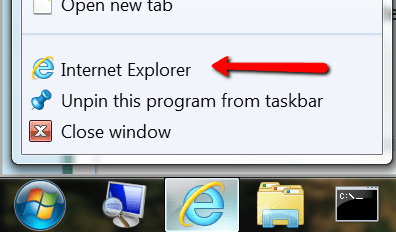
You get a new internet window when you right click on the IE icon and click on 'Internet Explorer'

2013-11-28_1954.png

Did you see the setting in post #2.
 

My Computer My Computer

Computer Manufacturer/Model Number
HP, Dell, Gateway, Toshiba - 4 laptops and 2 desktops
OS
Vista, Windows7, Mint Mate, Zorin, Windows 8
CPU
from 1.6GHz Duo to i7
Monitor(s) Displays
2x HP w2207
Hard Drives
5x HDD, 7x SSD, 12x Externals
Keyboard
with trackball - no mices
Mouse
Trackball mice
Internet Speed
DSL 6000
Back
Top