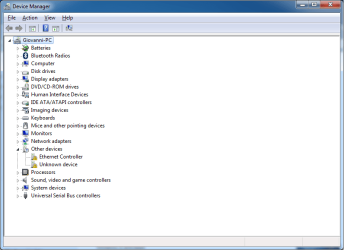
If everything (so also post #40) has been done .... let windows update do its job. After all updates have been installed .... reboot if requested. Check again for updates until all has been installed. After that open "device manager". Expand branch "other devices". Expand branches with exclamation marks. Post screenshot.
Last edited:
My Computer
- Computer type
- Laptop
- Computer Manufacturer/Model Number
- ACER ASPIRE 5742G
- OS
- Microsoft Windows 7 Home Premium 64-bits 7601 Multiprocessor Free Service Pack 1
- CPU
- Intel(R) Core(TM) i3 CPU M 370 @ 2.40GHz
- Motherboard
- Acer Aspire 5742G
- Memory
- 4,00 GB
- Graphics Card(s)
- ATI Mobility Radeon HD 5400 Series
- Sound Card
- (1) AMD High Definition Audio Device (2) Realtek High Defi
- Screen Resolution
- 1366 x 768 x 32 bits (4294967296 colors) @ 60 Hz
- Hard Drives
- WDC WD5000BEVT-22ZAT0
 . When my windows finished updates i restarted it and when it reached step 3 configuring at 32-35% blue screen pops up saying it stopped to protect my PC and then before I can read more, my computer turns off. It did this about 7x now
 ?
?