
Peppermint Live CD/DVD/USB - Create for Emergency Backup

Create Live Peppermint CD/DVD/USB to Backup Data when Windows 7 Will Not Boot

   Information
In some instances, Windows 7 installations can become non-bootable if serious corruption of the system files have taken place, for example through the action of malware. If these corruptions are extremely severe, the installation cannot be repaired and the only course of action left is often to wipe (format) the hard disk and reinstall Windows 7 from scratch. Before you do that, however, you may wish to copy any user data (photo's, music etc.) files from the faulty installation to a backup drive.

This tutorial will show you how to do this in just a few easy steps by creating a free Live PepperMint5 Linux distribution on a bootable USB flash drive or CD.

   Note
There are many free Linux distributions that can accomplish this task, but I have specifically chosen PepperMint5 because:

  • it is a small, lightweight distribution
  • it has a look & feel that will be familiar to Windows-only users
  • it does not require any knowledge of Linux jargon (e.g. sda1, sda2)
  • it is easy for novice users to understand
*** Update ***
I've decided to replace the use of the Lili USB creator originally referenced in this tutorial, with the Rufus USB creator, after some reports of problems with Lili. Special thanks to jumanji who brought this to my attention, and also suggested Rufus as an alternative.

The screen capture images are taken from PepperMint3 -- the distro available at the time of writing this tutorial -- but they are the same for later versions such as PepperMint4 or PepperMint5.


:note: Requirements:
In order to perform an emergency backup, you will need the following :

Hardware:-

  • External USB drive (to store your backed-up data)
  • 1Gb or larger USB thumb/flash drive (to hold your bootable PepperMint5 installation)
Software:-

You will need to know how to boot the troublesome computer from either a CD/DVD or USB drive. The way you do this depends largely on the make of BIOS of your computer. If you aren't sure, just ask.


Step A - Creating the Live Peppermint5 USB/CD/DVD

On a working computer download Rufus and the PepperMint5 ISO from the links above. Now run Rufus by double-clicking the Rufus executable.

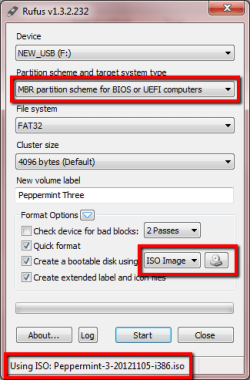
Replicate the settings shown in the Rufus panel below. Use the CD icon to browse to the location of the PepperMint5 ISO, and confirm that correct ISO is selected as shown at the very bottom of the panel.
r1.png

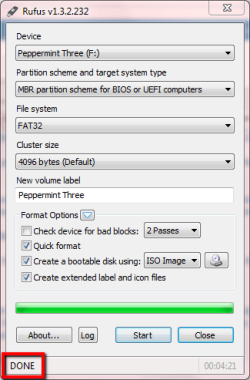
Click Start, and then OK on the warning pop-up to write the ISO and make the USB flash drive bootable. Once complete, a confirmation message is displayed, as shown below.
r2.png
You can now close Rufus and unplug the USB flash drive. You have now created the Live PepperMint5 Linux USB.


Step B - Booting from the Live Peppermint5 USB/CD/DVD

Insert the USB flash drive into a USB2 port (or insert the CD/DVD into the DVD drive) on the problem computer and boot with either device.

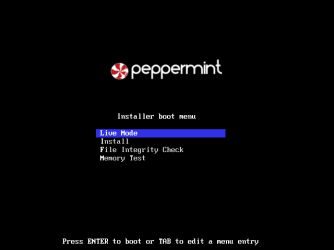
After a few seconds, the PepperMint5 boot screen will appear. Select Live Mode as shown below. and hit enter.
p1.png
PepperMint3 will now boot to the screen shown below.

p3.png


Step C - Copying user data to the external USB drive

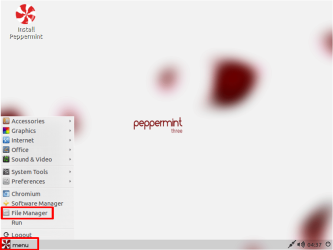
Click Menu and then click File Manager as shown below.
p4.png
Click on the File Manger that opens, and then type CTRL+N to open a duplicate File Manger Window and arrange them side-by-side.

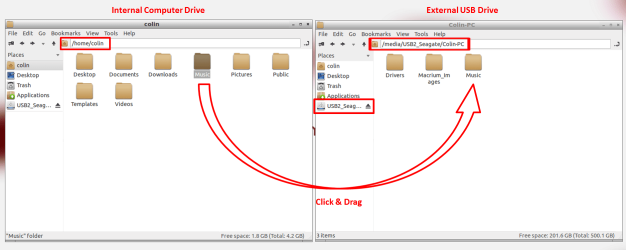
Use the left-hand file manager window to browse for and locate the files you want to copy. Select your external USB drive in the right-hand side file manager window. Now simple click & drag the files you want to copy from the left-hand window to the one on the right. In the example shown below, I am copying my Music folder to the external USB drive.
p5.png
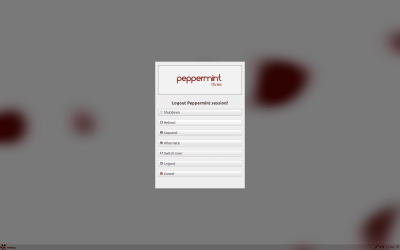
When you are done copying, close the file manger windows, and then select the Logout option from the Menu button. Now select Shutdown as shown below.
p7.png
That's it - your data files are now safely copied to your external USB drive.

Regards,
Golden


Last edited by a moderator:
dont worry greg your on my xmas card list. :D
 

My Computer My Computer

At a glance

Microsoft Windows 7 Home Premium 64-bit 7600IIx4 amd athelon 635 processor2x2gbati radeon HD 5450
Computer Manufacturer/Model Number
Hewlett packard/p6512uk
OS
Microsoft Windows 7 Home Premium 64-bit 7600
CPU
IIx4 amd athelon 635 processor
Motherboard
FOXCONN 2AA9
Memory
2x2gb
Graphics Card(s)
ati radeon HD 5450
Sound Card
(1) Realtek High Definition Audio (2) AMD High Definition
Monitor(s) Displays
samsung lcd tv 32"
Screen Resolution
1360x 768
Hard Drives
(1) WDC WD10 01FAES-60Z2A0 SATA Disk Device (2) Maxtor OneTouch USB Device (3) ST310003 33AS USB Device (4) WD My Book 1111 USB Device
PSU
?
Cooling
air!
Keyboard
wireless hp
Mouse
wireless Hp,optical
Internet Speed
1.10mb/s
Antivirus
MSE
Browser
Firefox
You're on my list too Greg. :D
 

My Computer My Computer

At a glance

Windows 7 Ultimate X64 SP1Intel i5-2550K, Differing ~4.4-4.8GHz No buil...16GB G.Skill Sniper 1866MHz @ 2133MHz 2x8GBASUS GTX650TIB-DC2OC-2GD5, (650TI Boost)
Computer type
PC/Desktop
Computer Manufacturer/Model Number
Home Built Desktop By DataTech
OS
Windows 7 Ultimate X64 SP1
CPU
Intel i5-2550K, Differing ~4.4-4.8GHz No built in GPU
Motherboard
ASUS P8Z68-V PRO/GEN3
Memory
16GB G.Skill Sniper 1866MHz @ 2133MHz 2x8GB
Graphics Card(s)
ASUS GTX650TIB-DC2OC-2GD5, (650TI Boost)
Sound Card
Onboard Realtek 5-1
Monitor(s) Displays
Samsung P2570HD
Screen Resolution
1920x1080
Hard Drives
Samsung 840 Pro 256GB SSD for OS, 500GB Seagate Constellation (Enterprise drive) for Data
PSU
Corsair HX650W
Case
Inwin Dragon Rider
Cooling
Hyper 212 EVO w/two Noctua fans, push-pull, @1300 RPM
Keyboard
E-Z Eyes, bright yellow keys with large characters
Mouse
steelseries SENSEI Laser Pro Gaming
Internet Speed
48-51Mbs Mbs down, 11 Mbs up Xfinity Cable
Antivirus
Norton Internet Security 2013
Browser
IE 10, Opera, Pale Moon if needed
Other Info
4 case fans, LG BluRay-RE, ASUS DVD-RW, Mr. Fusion power supply, 1.21 gigawatts.

My Computer My Computer

At a glance

Windows 7 Ultimate X64 SP1Intel i5-2550K, Differing ~4.4-4.8GHz No buil...16GB G.Skill Sniper 1866MHz @ 2133MHz 2x8GBASUS GTX650TIB-DC2OC-2GD5, (650TI Boost)
Computer type
PC/Desktop
Computer Manufacturer/Model Number
Home Built Desktop By DataTech
OS
Windows 7 Ultimate X64 SP1
CPU
Intel i5-2550K, Differing ~4.4-4.8GHz No built in GPU
Motherboard
ASUS P8Z68-V PRO/GEN3
Memory
16GB G.Skill Sniper 1866MHz @ 2133MHz 2x8GB
Graphics Card(s)
ASUS GTX650TIB-DC2OC-2GD5, (650TI Boost)
Sound Card
Onboard Realtek 5-1
Monitor(s) Displays
Samsung P2570HD
Screen Resolution
1920x1080
Hard Drives
Samsung 840 Pro 256GB SSD for OS, 500GB Seagate Constellation (Enterprise drive) for Data
PSU
Corsair HX650W
Case
Inwin Dragon Rider
Cooling
Hyper 212 EVO w/two Noctua fans, push-pull, @1300 RPM
Keyboard
E-Z Eyes, bright yellow keys with large characters
Mouse
steelseries SENSEI Laser Pro Gaming
Internet Speed
48-51Mbs Mbs down, 11 Mbs up Xfinity Cable
Antivirus
Norton Internet Security 2013
Browser
IE 10, Opera, Pale Moon if needed
Other Info
4 case fans, LG BluRay-RE, ASUS DVD-RW, Mr. Fusion power supply, 1.21 gigawatts.
I found this link from a search, as it appeared exactly what I needed to recover documents and pictures from my old unbootable hard drive.

I followed the instructions precisely, created a Peppermint 5, 32 bit image using Rufus on a new formatted USB stick.

Peppermint 5 opened up fine, I dragged and dropped the document - picture - download....etc.. icons to the adjacent window of my USB external hard drive.

I had no error codes and it all appeared to work fine....However!

In Peppermint the Home folder icons are empty, they do not have any files in them.

On the bad lap top with the external drive attached I am able to see the previously backed up files in an existing folder on the screen. So that appears to work well.

So it seems Peppermint does not view my files.

Is it likely to be a problem with my download?

Or, are my document files, somewhere else than where Peppermint 5 is trying to find them?

cheers.
 

My Computer My Computer

At a glance

7 home premium6gb
Computer type
Laptop
Computer Manufacturer/Model Number
toshiba
OS
7 home premium
Memory
6gb
Hard Drives
Toshiba 640gb
Antivirus
virgin media mamaware bytes
Browser
google chrome

My Computer My Computer

At a glance

W7 Ultimate SP1, LM19.2 MATE, W10 Home 1703, ...AMD Phenom II x6 1100T, 3.3 GHz12GB DDR3 1333 G-Skill (4GB x 2), G-Skill (2G...NVIDIA GeForce GTX 660
Computer type
PC/Desktop
Computer Manufacturer/Model Number
n/a
OS
W7 Ultimate SP1, LM19.2 MATE, W10 Home 1703, W10 Pro 1703 VM, #All 64 bit
CPU
AMD Phenom II x6 1100T, 3.3 GHz
Motherboard
ASUS M4A88T-M/USB3 (AM3)
Memory
12GB DDR3 1333 G-Skill (4GB x 2), G-Skill (2GB x 2)
Graphics Card(s)
NVIDIA GeForce GTX 660
Sound Card
Realtek?
Monitor(s) Displays
Samsung S23B350
Screen Resolution
1920x1080
Hard Drives
WD Green 2TB (SATA), WD Green 3TB (SATA), WD Blue 4TB (SATA), WD Blue 6TB (SATA)
PSU
Cooler Master
Case
Antec GX300 Tower
Cooling
3x Antec TRICOOL 120mm Fans
Mouse
Wired Optical
Internet Speed
DSL
Antivirus
Avast
Browser
Pale Moon (64 bit)
Other Info
2018-12-27 Upgraded HDDs
2015-12-10 Upgraded case, graphics card, storage
2015-08-15 Upgraded motherboard & RAM
2015-07-15 Upgraded LM17.1 to LM17.2
Hi! I have a similar situation to user clubsport, where I just found this link from a search and it looks exactly like what I need in order to recover my files, but when I try and boot my laptop through the USB with Peppermint on it, it doesn't move past the "Starting Up..." screen—the bar fills up slowly, but once it's full it just stays on the screen, and so far I've left it like this for over a half hour with no change. Is this normal? How long is it supposed to take to load?

Edit: Never mind, I shut it down and reloaded it and it worked just fine! I have no idea why it was frozen on that screen, but I'm just happy that I managed to get to my files! (Though I wasn't able to access the external hard drive that I had Peppermint on, so I had to find another external hard drive to transfer the files to, but other than that everything worked fine!)
 
Last edited:

My Computer My Computer

At a glance

Windows 7 Home Premium x64
Computer type
Laptop
Computer Manufacturer/Model Number
Dell
OS
Windows 7 Home Premium x64
Browser
Google Chrome
I may have mentioned before but I use Ubuntu it does just the same job and some.
But horses for courses eh?
 

My Computer My Computer

At a glance

Desk1 7 Home Prem / Desk2 10 Pro / Main lap A...Desk1 i5 3750K / Laptop i7 GTX 860M / Desk2 i...Desk1 8GB (1866) / Desk2 16GB (1333) / Laptop...Desk 1& 2NVidia GTX 650 & Laptops on board Intel
Computer type
PC/Desktop
Computer Manufacturer/Model Number
Own build (new) Desk1 / Asus ROG Win 7 / Desk2 1st build
OS
Desk1 7 Home Prem / Desk2 10 Pro / Main lap Asus ROG 10 Pro 2 laptop Toshiba 7 Pro Asus P2520 7 & 10
CPU
Desk1 i5 3750K / Laptop i7 GTX 860M / Desk2 i5 2500
Motherboard
Desk1 Asus P877-V / Desk2 Gigabyte H67 UD3H / Laptop ?
Memory
Desk1 8GB (1866) / Desk2 16GB (1333) / Laptop 8Gb DDR3
Graphics Card(s)
Desk 1& 2NVidia GTX 650 & Laptops on board Intel
Sound Card
Desk 1 & 2 -XONAR DG Realtek High Def audio Laptop
Monitor(s) Displays
Desk 1 Benq HD 2450 / Desk2 Philips 24" / Laptop 17.5"
Screen Resolution
1920x1080 D1 & D2 & Laptop 1
Hard Drives
Desk1 Samsung 120GB 830 SSD
Asus ROG 256GB 850 Pro SSD
Desk2 Samsung 840 256 SSD
Toshiba 120GB EVO
PSU
Desk 1 Corsair HX 1050/ Laptop ? / Desk 2 Corsair HX 650
Case
Desk 1 Cooler HAF XM ? Toshiba laptop / Desk2 Coolermaster
Cooling
Fans on all Desk1 -2 Desk2 - all Coolermasters 5 Laptop ?
Keyboard
Desk 1 MS Sidewinder X6 Desk 2 MS Sidewinder X 4
Mouse
Desk 1&2 - Gigabyte MS 900 gamer - laptop - Logitec wireless
Internet Speed
ADSL2+
Other Info
One other Desktop (tester) and spare Toshba laptop both with SSD's
Running Kaspersky 2016 ISS on all machines config'd identically
Logitec audio stereo systems on each machine (x3)
Canon MG5250MFC
Router/modem TP-Link running WPA2SK
thanks

This tutorial was a life saver for me .I am a not much of a computer techie but thanks to this wonderful tutorial I managed to pull out my data from the laptop.
Thank you everybody
JD
 

My Computer My Computer

At a glance

windows 7 home premium 64bit
Computer type
Laptop
Computer Manufacturer/Model Number
dell
OS
windows 7 home premium 64bit
Hi Golden,

This looks like a great tutorial. I cannot get my laptop to boot properly, it keeps looping on the start windows normally or do a startup repair screen. Windows isn't launching at all.

I'm just wondering is it completely safe to do? Just that I don't want to further damage my laptop.


Cheers
 

My Computer My Computer

At a glance

Microsoft Windows 7 Professional 64-bitDual Xeon(R) CPU E5-2687W v3 @ 3.10GHz32.00 GBNVIDIA Quadro K4200
Computer type
PC/Desktop
Computer Manufacturer/Model Number
Dell Precision Tower 7910 Workstation
OS
Microsoft Windows 7 Professional 64-bit
CPU
Dual Xeon(R) CPU E5-2687W v3 @ 3.10GHz
Motherboard
Dell Inc. 0215PR
Memory
32.00 GB
Graphics Card(s)
NVIDIA Quadro K4200
Sound Card
(1) NVIDIA High Definition Audio (2) High Definition Audio
Hard Drives
(1) SK hynix SC210 2.5 7MM 256GB ATA Device
(2) ATA WDC WD4003FZEX-0 SCSI Disk Device
Antivirus
Avast Free and Malwarebytes Free
Browser
Chrome
Other Info
BIOS: BIOS Date: 04/14/15 18:58:26 Ver: A07.00
Perfectly safe...when you boot from the Peppermint 3 or 4 USB drive, Windows doesn't startup so nothing in the system is affected when you copy out your user files.
 

My Computer My Computer

At a glance

Windows 10 Pro x64 ; Xubuntu x64Intel i7 860 @ 2.80 GHz O/C'ed to 4.0GHz16GB Corsair Vengance DDR3 @ 661 MHz Dual Cha...EVGA NVidia GTX 560 1024MB
Computer type
PC/Desktop
Computer Manufacturer/Model Number
Golden Mk. I.4
OS
Windows 10 Pro x64 ; Xubuntu x64
CPU
Intel i7 860 @ 2.80 GHz O/C'ed to 4.0GHz
Motherboard
Gigabyte P55A-UD3R Rev.1. Award BIOS F13
Memory
16GB Corsair Vengance DDR3 @ 661 MHz Dual Channel (9-9-9-24)
Graphics Card(s)
EVGA NVidia GTX 560 1024MB
Sound Card
Realtek Integrated
Monitor(s) Displays
Dual Samsung SyncMaster 2494HS
Screen Resolution
1920*1080 and 1920*1080
Hard Drives
1*Samsung 840 EVO 120GB SSD;
1*OCZ Vertex 2 60GB SSD;
2*Samsung F3 SpinPoint 1TB in RAID0;
1*Samsung F1 SpinPoint 1TB;
2*Western Digital 1TB External USB 3.0
1*Western Digital 500GB External USB 3.0
1*Seagate 500GB External USB 2.0
PSU
Thermaltake ToughPower QFan 750W
Case
Thermaltake Element S VK60001W2Z
Cooling
Corsair H60 Water Cooling, 2*230mm and 2*80mm case fans
Keyboard
Logitech G110
Mouse
Logitech MX518
Perfectly safe...when you boot from the Peppermint 3 or 4 USB drive, Windows doesn't startup so nothing in the system is affected when you copy out your user files.

OK, thanks Golden. I will give this a try. I will be delighted if it allows me to save my data somehow. I was on the phone to a data recovery place earlier and they told me it would cost around 700-800 euro to get the data back from my drive, that is crazy expensive, I was not expecting it to cost that much.

Cheers
 

My Computer My Computer

At a glance

Microsoft Windows 7 Professional 64-bitDual Xeon(R) CPU E5-2687W v3 @ 3.10GHz32.00 GBNVIDIA Quadro K4200
Computer type
PC/Desktop
Computer Manufacturer/Model Number
Dell Precision Tower 7910 Workstation
OS
Microsoft Windows 7 Professional 64-bit
CPU
Dual Xeon(R) CPU E5-2687W v3 @ 3.10GHz
Motherboard
Dell Inc. 0215PR
Memory
32.00 GB
Graphics Card(s)
NVIDIA Quadro K4200
Sound Card
(1) NVIDIA High Definition Audio (2) High Definition Audio
Hard Drives
(1) SK hynix SC210 2.5 7MM 256GB ATA Device
(2) ATA WDC WD4003FZEX-0 SCSI Disk Device
Antivirus
Avast Free and Malwarebytes Free
Browser
Chrome
Other Info
BIOS: BIOS Date: 04/14/15 18:58:26 Ver: A07.00
Hi! I followed your tutorial, but when I went to move my internal hard drive material over to my external hard drive, it wouldn't let me "mount volume" from my internal hard drive. I'd give a picture but I'm on my phone,
It first said "Error: An operation is already pending"
It then said "Error: Error mounting /dev/sda2 at /media/peppermint/TI106332W0C: Command-line ' mount-t "ntfs" -o "unhelper=udisks2,nodev,nosuid,uid=999,gid=999,dmask=0077,fmask=0177""/dev/sda2" "/media/peppermint/TI106332W0C"" exited with non-zero exit status 13: ntfs_attr_pread_i: ntfs_pread failure: Input/output error
Failed to read NTFS $Bitmap: Input/output error
NTFS is either inconsistent, or there is a hardware fault, or it's a SoftRAID/FakeRAID hardware. In the first case run chkdsk /f on Windows then reboot into Windows twice. The usage of the /f parameter is very important!" (Etc about SoftRAID/FakeRAID)"

My windows won't start, it loops on the startup repair, and I did not download or update anything. It randomly crashed, gave me the blue screen, then when I restarted it did this. So I was hoping this would at least let me get my files on my hard drive.
Please let me know if you know what I can do about this error message. I don't know how to run chkdsk from the start up commands, and even if I did, everything I've tried through that goes right back to the startup repair black screen with moving mouse cursor.
 

My Computer My Computer

At a glance

Windows 7 Home Premium x6416 GB
Computer type
Laptop
Computer Manufacturer/Model Number
Toshiba
OS
Windows 7 Home Premium x64
Memory
16 GB
I went to "Go" and chose "Devices" and I right clicked my internal hard drive, tried "open" and the cursor spazzed out. I'm trying the other options now but they seem to just be in that loading cursor state.
 

My Computer My Computer

At a glance

Windows 7 Home Premium x6416 GB
Computer type
Laptop
Computer Manufacturer/Model Number
Toshiba
OS
Windows 7 Home Premium x64
Memory
16 GB
question: external hard drive instead of USB

can you use external hard drive instead of usb. i have a lot of to copy so it wold be easier to transfer to hard drive.
 

My Computer My Computer

At a glance

windows vista
Computer type
PC/Desktop
OS
windows vista
can you help me, Golden?
I do everything as you wrote, but when in file manager i want to copy files from my computer to usb flash drive, it copies maybe just few files, then both windows close (both file manager) and it sends me back to the desktop. And only few files were copied. But it says there is still 8gb free memory on my flash drive.
 

My Computer My Computer

At a glance

Windows 7 64bit
Computer type
PC/Desktop
OS
Windows 7 64bit
Hi and welcome to SevenForums,
How much ram does the machine have ?
The Linux live disk operates using ram
Plus the clip board also occupies ram so you might need to copy and paste smaller amounts of files at a time ?

I'm sure Golden will appear sooner or later and confirm or deny this :)
 

My Computer My Computer

At a glance

Win-7-Pro64bit 7-H-Prem-64biti7-5930K 2nd i9-9940x both water blocked VRM'...Trident-z 3200C14 2nd Trident-z 3600C16EVGA 1080ti ftw3 2nd Titan Xp both water blocked
Computer type
PC/Desktop
Computer Manufacturer/Model Number
Custom assembled by me :}
OS
Win-7-Pro64bit 7-H-Prem-64bit
CPU
i7-5930K 2nd i9-9940x both water blocked VRM's too
Motherboard
ASUS SABERTOOTH X99 2nd ASUS x299 Apex
Memory
Trident-z 3200C14 2nd Trident-z 3600C16
Graphics Card(s)
EVGA 1080ti ftw3 2nd Titan Xp both water blocked
Sound Card
Built-in Realtek
Monitor(s) Displays
1-AOC G2460PG 24"G-Sync 144Hz/ 2nd 1-ASUS VG248QE 24" 144Hz
Screen Resolution
1920 x 1080 144Hz
Hard Drives
2-Samsung M.2 Evo & Evo Plus
2-Samsung 850 EVO 500GB SSD's/ 3-2.5 W.D. Black 1tb-&3-1tb/3-3.5 WD Black 1tb hdd's
PSU
EVGA SuperNOVA 1000-P2 2nd 1200-P2
Case
2-Corsair Obsidian Series 450D Black ATX Mid Tower
Cooling
Custom water loops
Keyboard
Logitech G710+/ 2nd Logitech G910
Mouse
2-RedDragon M901 Perdition 16400 dpi Gaming mouse = wired
Internet Speed
Comcast Ping 19ms 89.31mbps download speed 6.12mbps upload
Antivirus
Malwarebytes Pro/ Superantispyware Pro
Browser
FireFox & Pale moon
Other Info
2nd ASUS X299 Apex/Intel i9-9940x with Custom water loop/7H-Prem-x64/Corsair 450D case/Ram Trident-z 3600C16 4x8gb / Samsung970Evo plus 500gb SSD/Dual ssd EZ swap evo/PSU EVGA SuperNova 1200w-P2 80+Platinum/GPU Titan Xp /8-ML-140 on push-pull on 2-280GTX rads
Back
Top