Combofix Detects McAfee After Uninstallation

Possible mate the bloat on bought machines is pretty awful but personally I don't think for the time it takes to run those scans at least it is just another few possibilities eliminated and out of the way as it just may be something very simple.
But the choice is yours:)
 

My Computer My Computer

Computer type
PC/Desktop
Computer Manufacturer/Model Number
Own build (new) Desk1 / Asus ROG Win 7 / Desk2 1st build
OS
Desk1 7 Home Prem / Desk2 10 Pro / Main lap Asus ROG 10 Pro 2 laptop Toshiba 7 Pro Asus P2520 7 & 10
CPU
Desk1 i5 3750K / Laptop i7 GTX 860M / Desk2 i5 2500
Motherboard
Desk1 Asus P877-V / Desk2 Gigabyte H67 UD3H / Laptop ?
Memory
Desk1 8GB (1866) / Desk2 16GB (1333) / Laptop 8Gb DDR3
Graphics Card(s)
Desk 1& 2NVidia GTX 650 & Laptops on board Intel
Sound Card
Desk 1 & 2 -XONAR DG Realtek High Def audio Laptop
Monitor(s) Displays
Desk 1 Benq HD 2450 / Desk2 Philips 24" / Laptop 17.5"
Screen Resolution
1920x1080 D1 & D2 & Laptop 1
Hard Drives
Desk1 Samsung 120GB 830 SSD
Asus ROG 256GB 850 Pro SSD
Desk2 Samsung 840 256 SSD
Toshiba 120GB EVO
PSU
Desk 1 Corsair HX 1050/ Laptop ? / Desk 2 Corsair HX 650
Case
Desk 1 Cooler HAF XM ? Toshiba laptop / Desk2 Coolermaster
Cooling
Fans on all Desk1 -2 Desk2 - all Coolermasters 5 Laptop ?
Keyboard
Desk 1 MS Sidewinder X6 Desk 2 MS Sidewinder X 4
Mouse
Desk 1&2 - Gigabyte MS 900 gamer - laptop - Logitec wireless
Internet Speed
ADSL2+
Other Info
One other Desktop (tester) and spare Toshba laptop both with SSD's
Running Kaspersky 2016 ISS on all machines config'd identically
Logitec audio stereo systems on each machine (x3)
Canon MG5250MFC
Router/modem TP-Link running WPA2SK

Alright, I gave all this a shot. I'm seeing some progress. Honestly, I think it was the Adwcleaner that did the trick.

I think what I might've done wrong was, instead of deleting a key, I deleted part of a key when trying to get rid of McAfee...if that makes sense. I remember deleting entries that had the word McAfee in them, but not the entire key. I think Adwcleaner saw that and fixed the problem.

Well, I have one more computer to do this with, anyway. Another HP, this time, a TouchSmart.

Should I re-run combofix just for kicks?
 

My Computer My Computer

Computer Manufacturer/Model Number
N/A
OS
Windows 7 Ultimate 64-bit
CPU
E6750 OC'd ~ 2.9 Mhz
Motherboard
P5N-E
Memory
DDR2 800 MHz 4GB
Graphics Card(s)
GTX 460 SE 1GB
Sound Card
Realtek Audio (Onboard sound)
Hard Drives
Seagate 500 GB HD
PSU
750 watt
Josh wait for Jacee to answer that one mate as I ma not real sure of that program and I know it has to be used with great caution.
 

My Computer My Computer

Computer type
PC/Desktop
Computer Manufacturer/Model Number
Own build (new) Desk1 / Asus ROG Win 7 / Desk2 1st build
OS
Desk1 7 Home Prem / Desk2 10 Pro / Main lap Asus ROG 10 Pro 2 laptop Toshiba 7 Pro Asus P2520 7 & 10
CPU
Desk1 i5 3750K / Laptop i7 GTX 860M / Desk2 i5 2500
Motherboard
Desk1 Asus P877-V / Desk2 Gigabyte H67 UD3H / Laptop ?
Memory
Desk1 8GB (1866) / Desk2 16GB (1333) / Laptop 8Gb DDR3
Graphics Card(s)
Desk 1& 2NVidia GTX 650 & Laptops on board Intel
Sound Card
Desk 1 & 2 -XONAR DG Realtek High Def audio Laptop
Monitor(s) Displays
Desk 1 Benq HD 2450 / Desk2 Philips 24" / Laptop 17.5"
Screen Resolution
1920x1080 D1 & D2 & Laptop 1
Hard Drives
Desk1 Samsung 120GB 830 SSD
Asus ROG 256GB 850 Pro SSD
Desk2 Samsung 840 256 SSD
Toshiba 120GB EVO
PSU
Desk 1 Corsair HX 1050/ Laptop ? / Desk 2 Corsair HX 650
Case
Desk 1 Cooler HAF XM ? Toshiba laptop / Desk2 Coolermaster
Cooling
Fans on all Desk1 -2 Desk2 - all Coolermasters 5 Laptop ?
Keyboard
Desk 1 MS Sidewinder X6 Desk 2 MS Sidewinder X 4
Mouse
Desk 1&2 - Gigabyte MS 900 gamer - laptop - Logitec wireless
Internet Speed
ADSL2+
Other Info
One other Desktop (tester) and spare Toshba laptop both with SSD's
Running Kaspersky 2016 ISS on all machines config'd identically
Logitec audio stereo systems on each machine (x3)
Canon MG5250MFC
Router/modem TP-Link running WPA2SK
Josh wait for Jacee to answer that one mate as I ma not real sure of that program and I know it has to be used with great caution.

I actually just got finished with a Combofix scan. Now, it's detecting MSE as Antivirus, as it should.

I just also remembered another problem I had, regarding System Restore. That just wasn't turned on. I just enabled it in the settings, so we'll see if that ends up working. At least now when I run it, I get a different message that says there are no restore points, yet.

Anyway, as far as I'm concerned, I think my problem is solved. Thank you everyone. I'm going to try this tomorrow on another computer and see if I can get rid of McAfee and install MSE. My end goal is to actually install Bitdefender. Saw a great deal on it for Black Friday. I read that it's one of the top Anti-virus programs, that and Webroot SecureAnywhere Antivirus is good, too.
 

My Computer My Computer

Computer Manufacturer/Model Number
N/A
OS
Windows 7 Ultimate 64-bit
CPU
E6750 OC'd ~ 2.9 Mhz
Motherboard
P5N-E
Memory
DDR2 800 MHz 4GB
Graphics Card(s)
GTX 460 SE 1GB
Sound Card
Realtek Audio (Onboard sound)
Hard Drives
Seagate 500 GB HD
PSU
750 watt
Josh before you go shelling out money for a security suite mate take a look at this Best Free Antivirus Software I personally do not like MSE or AVG the others I have tested and find ok. The Bitdefender I found good and the only negative was it can be a bit "naggy".

For paid for I use Kaspersky on all my machines but the choice is yours.

Then there are these further links Probably the Best Free Security List in the World section 2 is the real time software the others are other useful tools.
 

My Computer My Computer

Computer type
PC/Desktop
Computer Manufacturer/Model Number
Own build (new) Desk1 / Asus ROG Win 7 / Desk2 1st build
OS
Desk1 7 Home Prem / Desk2 10 Pro / Main lap Asus ROG 10 Pro 2 laptop Toshiba 7 Pro Asus P2520 7 & 10
CPU
Desk1 i5 3750K / Laptop i7 GTX 860M / Desk2 i5 2500
Motherboard
Desk1 Asus P877-V / Desk2 Gigabyte H67 UD3H / Laptop ?
Memory
Desk1 8GB (1866) / Desk2 16GB (1333) / Laptop 8Gb DDR3
Graphics Card(s)
Desk 1& 2NVidia GTX 650 & Laptops on board Intel
Sound Card
Desk 1 & 2 -XONAR DG Realtek High Def audio Laptop
Monitor(s) Displays
Desk 1 Benq HD 2450 / Desk2 Philips 24" / Laptop 17.5"
Screen Resolution
1920x1080 D1 & D2 & Laptop 1
Hard Drives
Desk1 Samsung 120GB 830 SSD
Asus ROG 256GB 850 Pro SSD
Desk2 Samsung 840 256 SSD
Toshiba 120GB EVO
PSU
Desk 1 Corsair HX 1050/ Laptop ? / Desk 2 Corsair HX 650
Case
Desk 1 Cooler HAF XM ? Toshiba laptop / Desk2 Coolermaster
Cooling
Fans on all Desk1 -2 Desk2 - all Coolermasters 5 Laptop ?
Keyboard
Desk 1 MS Sidewinder X6 Desk 2 MS Sidewinder X 4
Mouse
Desk 1&2 - Gigabyte MS 900 gamer - laptop - Logitec wireless
Internet Speed
ADSL2+
Other Info
One other Desktop (tester) and spare Toshba laptop both with SSD's
Running Kaspersky 2016 ISS on all machines config'd identically
Logitec audio stereo systems on each machine (x3)
Canon MG5250MFC
Router/modem TP-Link running WPA2SK
I've had company here since Wednesday. Sorry for not getting back to you any sooner.

You have an old version of Combofix, please uninstall:
For Vista / Windows 7
• Click START Search
• Now type ComboFix /Uninstall in the runbox and click OK. Note the space between the X and the /, it needs to be there.

Next, I'd like you to scan your machine with ESET OnlineScan
  1. Hold down Control and click on the following link to open ESET OnlineScan in a new window.
    ESET OnlineScan
  2. Click the
    esetOnline.png
    button.
  3. For alternate browsers only: (Microsoft Internet Explorer users can skip these steps)
    1. Click on
      esetSmartInstall.png
      to download the ESET Smart Installer. Save it to your desktop.
    2. Double click on the
      esetSmartInstallDesktopIcon.png
      icon on your desktop.
  4. Check
    esetAcceptTerms.png
  5. Click the
    esetStart.png
    button.
  6. Accept any security warnings from your browser.
  7. Check
    esetScanArchives.png
  8. Push the Start button.
  9. ESET will then download updates for itself, install itself, and begin scanning your computer. Please be patient as this can take some time.
  10. When the scan completes, push
    esetListThreats.png
  11. Push
    esetExport.png
    , and save the file to your desktop using a unique name, such as ESETScan. Include the contents of this report in your next reply.
  12. Push the
    esetBack.png
    button.
  13. Push
    esetFinish.png
 

My Computer My Computer

Computer type
PC/Desktop
Computer Manufacturer/Model Number
Bruce ... somewhere in his 40's
OS
Windows 7 Ultimate 32bit SP1
CPU
Intel(R) Core(TM)2 Quad CPU @ 2.40GHz, 2400 MHz
Motherboard
INTEL/D975XBX2
Memory
4 GB
Graphics Card(s)
ATI Radeon HD 2600 Pro
Monitor(s) Displays
Samsung SyncMaster 914v
Screen Resolution
1280 x 1024
Hard Drives
2/500GB each ... ST3500630AS ATA Device.
One is not connected
PSU
Rocketfish 700 W
Case
G.Skill Gigabyte Chassis
Keyboard
Standard PS/2 Keyboard
Mouse
Microsoft PS/2 Mouse
Internet Speed
DSL
Antivirus
Avira Internet Security
Browser
IE 11
Other Info
ATI HDMI Audio
Josh before you go shelling out money for a security suite mate take a look at this Best Free Antivirus Software I personally do not like MSE or AVG the others I have tested and find ok. The Bitdefender I found good and the only negative was it can be a bit "naggy".

For paid for I use Kaspersky on all my machines but the choice is yours.

Then there are these further links Probably the Best Free Security List in the World section 2 is the real time software the others are other useful tools.

There's a Black Friday special for BitDefender Total Security, $24 for a year, 3 PCs, until Dec. 9. Google it. I'm looking for something that will scan without you even doing any extra effort (Real-time scan). Microsoft, I believe admitted recently MSE is weak security, but it's free. It works, for now. As I said, I have another computer to do this to. The McAfee license on it expires on Friday, so I'll end up doing the same thing to it most likely. If I don't like Bitdefender, then I won't renew it next year. I had my eyes set on Webroot but then I found this deal.

I've had company here since Wednesday. Sorry for not getting back to you any sooner.

You have an old version of Combofix, please uninstall:
For Vista / Windows 7
• Click START Search
• Now type ComboFix /Uninstall in the runbox and click OK. Note the space between the X and the /, it needs to be there.

Next, I'd like you to scan your machine with ESET OnlineScan
  1. Hold down Control and click on the following link to open ESET OnlineScan in a new window.
    ESET OnlineScan
  2. Click the
    esetOnline.png

No problem. Thank you for getting back to me. Hope your holidays were nice. I got to spend Thanksgiving day w/ my family.

Anyway...I'm currently on my own computer. I tried to access that link and I keep getting some kind of pop up error on Chrome. I actually see the eset website on IE. Weird. What would I get out of running ESET Online Scanner? I've already fixed the problem.

Regarding Combofix, when I last ran it, it knew it was out of date, so it updated itself, and then continued to run.

As I said, I believe the problem has been fixed. I was able to successfully, not only install MSE, but actually launch it as well, without it crashing. The Security Center in Windows is now actually working. The problem was, getting rid of the remnants of McAfee, which I believe Adwcleaner took care of. Going through the registry myself might've done it as well, had I actually deleted keys instead of attributes of keys. Whoops! I still need to double check the registry, though because when I was trying to delete some keys, I did not have permission to do so. This was somewhere under a Root key.

Anyway, I gave the laptop back to my mother, and she said it's running much faster. No McAfee...go figure.

I'll run ESET later today and post back if I see anything. I doubt it, though.
 

My Computer My Computer

Computer Manufacturer/Model Number
N/A
OS
Windows 7 Ultimate 64-bit
CPU
E6750 OC'd ~ 2.9 Mhz
Motherboard
P5N-E
Memory
DDR2 800 MHz 4GB
Graphics Card(s)
GTX 460 SE 1GB
Sound Card
Realtek Audio (Onboard sound)
Hard Drives
Seagate 500 GB HD
PSU
750 watt
OK I'm now running ESET Online scanner on the laptop. It's been stuck at 20% for the last hour, but it appears as if files are still being scanned...that is, I see the Files scanned number increasing and the names of the files in the Target area changing. So far, nothing. I'll post back when the scan finishes.

Edit: 1 1/2 hours later, now at 25%. Some progress in the scan. Guess it may be another couple hours.

Edit #2: Just about 2 hours into the scan, now 30% complete. Jacee thanks for posting this. Thought I could do without it but apparently, ESET has found a couple Threats. I'll post a reply when finished.
 
Last edited:

My Computer My Computer

Computer Manufacturer/Model Number
N/A
OS
Windows 7 Ultimate 64-bit
CPU
E6750 OC'd ~ 2.9 Mhz
Motherboard
P5N-E
Memory
DDR2 800 MHz 4GB
Graphics Card(s)
GTX 460 SE 1GB
Sound Card
Realtek Audio (Onboard sound)
Hard Drives
Seagate 500 GB HD
PSU
750 watt
Ok mate the Bitdefender is a good deal and I did post the other list but the choice is yours if I didn't have Kaspersky then I would go Bitdefender / Avast / Avira or even Comodo but again the choice is yours.
Bitdefender I found "naggy" and Comodo touch top heavy with utilities which if you happen to choose don't use they are not really worth playing with. Avast and Avira are fairly quiet to use,
 

My Computer My Computer

Computer type
PC/Desktop
Computer Manufacturer/Model Number
Own build (new) Desk1 / Asus ROG Win 7 / Desk2 1st build
OS
Desk1 7 Home Prem / Desk2 10 Pro / Main lap Asus ROG 10 Pro 2 laptop Toshiba 7 Pro Asus P2520 7 & 10
CPU
Desk1 i5 3750K / Laptop i7 GTX 860M / Desk2 i5 2500
Motherboard
Desk1 Asus P877-V / Desk2 Gigabyte H67 UD3H / Laptop ?
Memory
Desk1 8GB (1866) / Desk2 16GB (1333) / Laptop 8Gb DDR3
Graphics Card(s)
Desk 1& 2NVidia GTX 650 & Laptops on board Intel
Sound Card
Desk 1 & 2 -XONAR DG Realtek High Def audio Laptop
Monitor(s) Displays
Desk 1 Benq HD 2450 / Desk2 Philips 24" / Laptop 17.5"
Screen Resolution
1920x1080 D1 & D2 & Laptop 1
Hard Drives
Desk1 Samsung 120GB 830 SSD
Asus ROG 256GB 850 Pro SSD
Desk2 Samsung 840 256 SSD
Toshiba 120GB EVO
PSU
Desk 1 Corsair HX 1050/ Laptop ? / Desk 2 Corsair HX 650
Case
Desk 1 Cooler HAF XM ? Toshiba laptop / Desk2 Coolermaster
Cooling
Fans on all Desk1 -2 Desk2 - all Coolermasters 5 Laptop ?
Keyboard
Desk 1 MS Sidewinder X6 Desk 2 MS Sidewinder X 4
Mouse
Desk 1&2 - Gigabyte MS 900 gamer - laptop - Logitec wireless
Internet Speed
ADSL2+
Other Info
One other Desktop (tester) and spare Toshba laptop both with SSD's
Running Kaspersky 2016 ISS on all machines config'd identically
Logitec audio stereo systems on each machine (x3)
Canon MG5250MFC
Router/modem TP-Link running WPA2SK
Ok mate the Bitdefender is a good deal and I did post the other list but the choice is yours if I didn't have Kaspersky then I would go Bitdefender / Avast / Avira or even Comodo but again the choice is yours.
Bitdefender I found "naggy" and Comodo touch top heavy with utilities which if you happen to choose don't use they are not really worth playing with. Avast and Avira are fairly quiet to use,

I'll try Kaspersky next time around if I feel the need to do so, but for now, Bitdefender seems like a better deal.

As an update: 4 hours into the ESET scan, at 31%. I left the room and the screen went black (screen saver/power saver). Would that impact the scan? I moved the mouse around and had to log back in. The scan was still running. Can I leave this running all night? I might need to, and I believe the laptop is set to hibernate after a while of inactivity.
 

My Computer My Computer

Computer Manufacturer/Model Number
N/A
OS
Windows 7 Ultimate 64-bit
CPU
E6750 OC'd ~ 2.9 Mhz
Motherboard
P5N-E
Memory
DDR2 800 MHz 4GB
Graphics Card(s)
GTX 460 SE 1GB
Sound Card
Realtek Audio (Onboard sound)
Hard Drives
Seagate 500 GB HD
PSU
750 watt
It could possibly be that it is the very first scan it's done my Kaspersky does that but it certainly doesn't take that long but there again my machines are reasonably fast.
 

My Computer My Computer

Computer type
PC/Desktop
Computer Manufacturer/Model Number
Own build (new) Desk1 / Asus ROG Win 7 / Desk2 1st build
OS
Desk1 7 Home Prem / Desk2 10 Pro / Main lap Asus ROG 10 Pro 2 laptop Toshiba 7 Pro Asus P2520 7 & 10
CPU
Desk1 i5 3750K / Laptop i7 GTX 860M / Desk2 i5 2500
Motherboard
Desk1 Asus P877-V / Desk2 Gigabyte H67 UD3H / Laptop ?
Memory
Desk1 8GB (1866) / Desk2 16GB (1333) / Laptop 8Gb DDR3
Graphics Card(s)
Desk 1& 2NVidia GTX 650 & Laptops on board Intel
Sound Card
Desk 1 & 2 -XONAR DG Realtek High Def audio Laptop
Monitor(s) Displays
Desk 1 Benq HD 2450 / Desk2 Philips 24" / Laptop 17.5"
Screen Resolution
1920x1080 D1 & D2 & Laptop 1
Hard Drives
Desk1 Samsung 120GB 830 SSD
Asus ROG 256GB 850 Pro SSD
Desk2 Samsung 840 256 SSD
Toshiba 120GB EVO
PSU
Desk 1 Corsair HX 1050/ Laptop ? / Desk 2 Corsair HX 650
Case
Desk 1 Cooler HAF XM ? Toshiba laptop / Desk2 Coolermaster
Cooling
Fans on all Desk1 -2 Desk2 - all Coolermasters 5 Laptop ?
Keyboard
Desk 1 MS Sidewinder X6 Desk 2 MS Sidewinder X 4
Mouse
Desk 1&2 - Gigabyte MS 900 gamer - laptop - Logitec wireless
Internet Speed
ADSL2+
Other Info
One other Desktop (tester) and spare Toshba laptop both with SSD's
Running Kaspersky 2016 ISS on all machines config'd identically
Logitec audio stereo systems on each machine (x3)
Canon MG5250MFC
Router/modem TP-Link running WPA2SK
As an update: 4 hours into the ESET scan, at 31%. I left the room and the screen went black (screen saver/power saver). Would that impact the scan? I moved the mouse around and had to log back in. The scan was still running. Can I leave this running all night? I might need to, and I believe the laptop is set to hibernate after a while of inactivity.
Yep! This would definitely impact the scan. Can you tell me what ESET has found at this point?
 

My Computer My Computer

Computer type
PC/Desktop
Computer Manufacturer/Model Number
Bruce ... somewhere in his 40's
OS
Windows 7 Ultimate 32bit SP1
CPU
Intel(R) Core(TM)2 Quad CPU @ 2.40GHz, 2400 MHz
Motherboard
INTEL/D975XBX2
Memory
4 GB
Graphics Card(s)
ATI Radeon HD 2600 Pro
Monitor(s) Displays
Samsung SyncMaster 914v
Screen Resolution
1280 x 1024
Hard Drives
2/500GB each ... ST3500630AS ATA Device.
One is not connected
PSU
Rocketfish 700 W
Case
G.Skill Gigabyte Chassis
Keyboard
Standard PS/2 Keyboard
Mouse
Microsoft PS/2 Mouse
Internet Speed
DSL
Antivirus
Avira Internet Security
Browser
IE 11
Other Info
ATI HDMI Audio
Can you tell me what ESET has found at this point?
ESET just finished. Weird how the last 65% went so fast. Here is what it found.
C:\System Volume Information\SystemRestore\FRStaging\Program Files (x86)\PC Speed Maximizer\PCSpeedMaximizer.exe a variant of Win32/SpeedingUpMyPC application cleaned by deleting - quarantined
C:\System Volume Information\SystemRestore\FRStaging\Program Files (x86)\PC Speed Maximizer\SPMSmartScan.exe a variant of Win32/Adware.SpeedingUpMyPC.C application cleaned by deleting - quarantined
C:\Users\Peggy\Downloads\youtube_halloween_embroidery.zip a variant of Win32/Kryptik.BDUM trojan deleted - quarantined
 

My Computer My Computer

Computer Manufacturer/Model Number
N/A
OS
Windows 7 Ultimate 64-bit
CPU
E6750 OC'd ~ 2.9 Mhz
Motherboard
P5N-E
Memory
DDR2 800 MHz 4GB
Graphics Card(s)
GTX 460 SE 1GB
Sound Card
Realtek Audio (Onboard sound)
Hard Drives
Seagate 500 GB HD
PSU
750 watt
That looks good ... now let's see what other 'adware' might be hiding.

Download AdwCleaner by Xplode and save to your Desktop.
  • Double click on AdwCleaner.exe to run the tool.
    Vista/Windows 7/8 users right-click and select Run As Administrator.
  • Click on the Scan button.
  • AdwCleaner will begin...be patient as the scan may take some time to complete.
  • After the scan has finished, click on the Report button...a logfile (AdwCleaner[R#].txt) will open in Notepad for review (where the largest value of # represents the most recent report).
  • The contents of the log file may be confusing. Unless you see a program name that you know should not be removed, don't worry about it. If you see an entry you want to keep, let me know about it.
  • Copy and paste the contents of that logfile in your next reply.
  • A copy of all logfiles are saved in the C:\AdwCleaner folder which was created when running the tool.

Using AdwCleaner v3: Scan & Clean:
Double click on AdwCleaner.exe to run the tool again.
Click on the Scan button.
AdwCleaner will begin to scan your computer like it did before.
After the scan has finished...

This time click on the Clean button.
Press OK when asked to close all programs and follow the onscreen prompts.
Press OK again to allow AdwCleaner to restart the computer and complete the removal process.
After rebooting, a logfile report (AdwCleaner[S#].txt) will open automatically (where the largest value of # represents the most recent report).
Copy and paste the contents of that logfile in your next reply.
A copy of that logfile will also be saved in the C:\AdwCleaner folder
 

My Computer My Computer

Computer type
PC/Desktop
Computer Manufacturer/Model Number
Bruce ... somewhere in his 40's
OS
Windows 7 Ultimate 32bit SP1
CPU
Intel(R) Core(TM)2 Quad CPU @ 2.40GHz, 2400 MHz
Motherboard
INTEL/D975XBX2
Memory
4 GB
Graphics Card(s)
ATI Radeon HD 2600 Pro
Monitor(s) Displays
Samsung SyncMaster 914v
Screen Resolution
1280 x 1024
Hard Drives
2/500GB each ... ST3500630AS ATA Device.
One is not connected
PSU
Rocketfish 700 W
Case
G.Skill Gigabyte Chassis
Keyboard
Standard PS/2 Keyboard
Mouse
Microsoft PS/2 Mouse
Internet Speed
DSL
Antivirus
Avira Internet Security
Browser
IE 11
Other Info
ATI HDMI Audio
I do apologize for not responding sooner. I've been busy with the holidays, myself, along with work. My issue still hasn't been resolved.

That looks good ... now let's see what other 'adware' might be hiding.


Download AdwCleaner by Xplode and save to your Desktop.
  • Double click on AdwCleaner.exe to run the tool.
    Vista/Windows 7/8 users right-click and select Run As Administrator.
  • Click on the Scan button.
  • AdwCleaner will begin...be patient as the scan may take some time to complete.
  • After the scan has finished, click on the Report button...a logfile (AdwCleaner[R#].txt) will open in Notepad for review (where the largest value of # represents the most recent report).
  • The contents of the log file may be confusing. Unless you see a program name that you know should not be removed, don't worry about it. If you see an entry you want to keep, let me know about it.
  • Copy and paste the contents of that logfile in your next reply.
  • A copy of all logfiles are saved in the C:\AdwCleaner folder which was created when running the tool.

I've done this before, as ICit2lol instructed me to do so here. When I initially ran the test, it took several hours. I ran it three times today and each time, it took under a minute, stopping with the message "Pending. Please uncheck items you don't want to remove." I've so far only done what I've quoted in your text. No cleaning, yet.

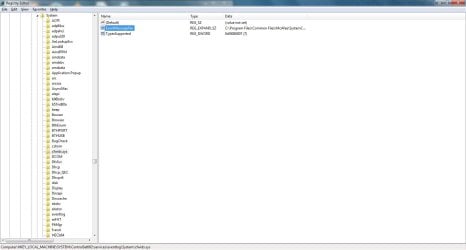
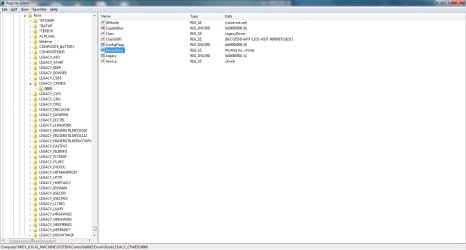
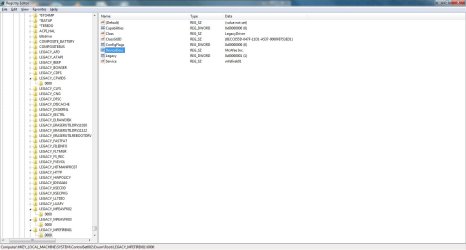
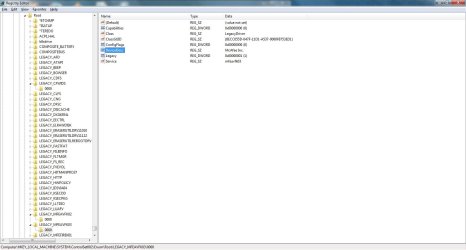
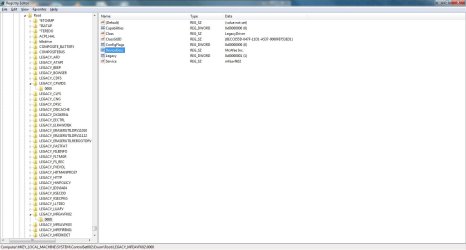
I also went through the registry and did a find of "McAfee", deleting several keys. A few of the keys were stubborn and would not delete, as I did not have permission to do so, even though I'm logged in as Administrator. I've even tried to change permissions on the key, with no luck. I will attempt to attach the screen shots in this post. If it does not allow me to, the McAfee-related registry keys I'm seeing are cfwids.sys and various LEGACY keys under root, all of them containing the word McAfee in a key.

Do I even need to worry about these keys? I was able to get a different AV installed and working properly (MSE), which really was my primary objective. I purchased Bitdefender a week ago just before the Black Friday special ended, but wanted to make sure something that was at least free would work, first.

Attached are log files from today from AdwCleaner and screen shots from my registry.
 

Attachments

  • AdwCleaner[R1].txt
    AdwCleaner[R1].txt
    1.3 KB · Views: 1
  • AdwCleaner[R2].txt
    AdwCleaner[R2].txt
    1.4 KB · Views: 1
  • AdwCleaner[R3].txt
    AdwCleaner[R3].txt
    1.4 KB · Views: 1
  • cfwidsDOTsys.jpg
    cfwidsDOTsys.jpg
    66.4 KB · Views: 1
  • LEGACYCFWIDS0000.jpg
    LEGACYCFWIDS0000.jpg
    87 KB · Views: 1
  • LEGACYMFERTDET0000.jpg
    LEGACYMFERTDET0000.jpg
    87 KB · Views: 0
  • LEGACYMFEFIREK010000.jpg
    LEGACYMFEFIREK010000.jpg
    86.5 KB · Views: 0
  • LEGACYMFEAVFK03000.jpg
    LEGACYMFEAVFK03000.jpg
    86.2 KB · Views: 0
  • LEGACYMFEAVFK02000.jpg
    LEGACYMFEAVFK02000.jpg
    86.8 KB · Views: 0

My Computer My Computer

Computer Manufacturer/Model Number
N/A
OS
Windows 7 Ultimate 64-bit
CPU
E6750 OC'd ~ 2.9 Mhz
Motherboard
P5N-E
Memory
DDR2 800 MHz 4GB
Graphics Card(s)
GTX 460 SE 1GB
Sound Card
Realtek Audio (Onboard sound)
Hard Drives
Seagate 500 GB HD
PSU
750 watt
Run AdwCleaner again .... but This time click on the Clean button.

Press OK when asked to close all programs and follow the onscreen prompts.
Press OK again to allow AdwCleaner to restart the computer and complete the removal process.
After rebooting, a logfile report (AdwCleaner[S#].txt) will open automatically (where the largest value of # represents the most recent report).
Copy and paste the contents of that logfile in your next reply.
A copy of that logfile will also be saved in the C:\AdwCleaner folder
 

My Computer My Computer

Computer type
PC/Desktop
Computer Manufacturer/Model Number
Bruce ... somewhere in his 40's
OS
Windows 7 Ultimate 32bit SP1
CPU
Intel(R) Core(TM)2 Quad CPU @ 2.40GHz, 2400 MHz
Motherboard
INTEL/D975XBX2
Memory
4 GB
Graphics Card(s)
ATI Radeon HD 2600 Pro
Monitor(s) Displays
Samsung SyncMaster 914v
Screen Resolution
1280 x 1024
Hard Drives
2/500GB each ... ST3500630AS ATA Device.
One is not connected
PSU
Rocketfish 700 W
Case
G.Skill Gigabyte Chassis
Keyboard
Standard PS/2 Keyboard
Mouse
Microsoft PS/2 Mouse
Internet Speed
DSL
Antivirus
Avira Internet Security
Browser
IE 11
Other Info
ATI HDMI Audio
Run AdwCleaner again .... but This time click on the Clean button.

Press OK when asked to close all programs and follow the onscreen prompts.
Press OK again to allow AdwCleaner to restart the computer and complete the removal process.
After rebooting, a logfile report (AdwCleaner[S#].txt) will open automatically (where the largest value of # represents the most recent report).
Copy and paste the contents of that logfile in your next reply.
A copy of that logfile will also be saved in the C:\AdwCleaner folder

I am attaching two text files, one from each computer. The first is the HP G72-262NR that I was originally trying to do this to. The second is an HP TouchSmart600, which I found for some reason much easier to work with.
 

Attachments

My Computer My Computer

Computer Manufacturer/Model Number
N/A
OS
Windows 7 Ultimate 64-bit
CPU
E6750 OC'd ~ 2.9 Mhz
Motherboard
P5N-E
Memory
DDR2 800 MHz 4GB
Graphics Card(s)
GTX 460 SE 1GB
Sound Card
Realtek Audio (Onboard sound)
Hard Drives
Seagate 500 GB HD
PSU
750 watt
Back
Top