
Xbox 360 Wireless Gaming Receiver for Windows

Think you can PM me with the number if toll free from US? I already gave you my info over pm about mobo etc.. anything else you need let me know.
Will do, just getting the information together for everyone. Make sure to keep an eye on your PM boxes [here] ;)
 

My Computer My Computer

At a glance

Windows 7 Build 7100 (x64)AMD Phenom 9950 Black Edition4GB (2x2GB) OCZ ReaperPalit Nvidia GeForce 9800GT 512MB
Computer Manufacturer/Model Number
Fx X04c
OS
Windows 7 Build 7100 (x64)
CPU
AMD Phenom 9950 Black Edition
Motherboard
ASUS M3A78-EM
Memory
4GB (2x2GB) OCZ Reaper
Graphics Card(s)
Palit Nvidia GeForce 9800GT 512MB
Sound Card
Onboard from M3A78-EM
Monitor(s) Displays
LG L206W
Screen Resolution
1680x1050x32bpp
Hard Drives
2.8TB of storage across 3 HDDs.
PSU
450W RaidMax
Case
Custom black w/ bluelight/blacklight
Cooling
Forced air intake
Keyboard
Logitech G15 MKII
Mouse
Logitech G5 Gaming Laser Mouse
Internet Speed
15mb dn/1mb up
Other Info
Enough spare parts to build another couple Windows-7-capable machines.
I just got mine from Dell.com (it was unbelievably cheap) and I'm having the exact same problem. Did anyone get to have it replaced? And did it work fine after that?
 

My Computer My Computer

At a glance

Windows 7
OS
Windows 7
sorry to revive this thread but Im assuming if no green light comes on when you plug it in, its irreparable?
thanks
 

My Computer My Computer

At a glance

windows 7 build 7100
OS
windows 7 build 7100
sorry to revive this thread but Im assuming if no green light comes on when you plug it in, its irreparable?
thanks
First, try connecting the device to multiple PCs or even your 360; If the light NEVER comes on, on any device, it's busted (firmware erased)

If you get the light to come on when it's plugged into other devices, but not your PC, then it's either a bad USB port or a driver conflict.
 

My Computer My Computer

At a glance

Windows 7 Build 7100 (x64)AMD Phenom 9950 Black Edition4GB (2x2GB) OCZ ReaperPalit Nvidia GeForce 9800GT 512MB
Computer Manufacturer/Model Number
Fx X04c
OS
Windows 7 Build 7100 (x64)
CPU
AMD Phenom 9950 Black Edition
Motherboard
ASUS M3A78-EM
Memory
4GB (2x2GB) OCZ Reaper
Graphics Card(s)
Palit Nvidia GeForce 9800GT 512MB
Sound Card
Onboard from M3A78-EM
Monitor(s) Displays
LG L206W
Screen Resolution
1680x1050x32bpp
Hard Drives
2.8TB of storage across 3 HDDs.
PSU
450W RaidMax
Case
Custom black w/ bluelight/blacklight
Cooling
Forced air intake
Keyboard
Logitech G15 MKII
Mouse
Logitech G5 Gaming Laser Mouse
Internet Speed
15mb dn/1mb up
Other Info
Enough spare parts to build another couple Windows-7-capable machines.
ahh looks like I'm gonna have to get another one then altho no one seems to sell them in the UK any more, thanks for the info.

For the record will I be alright to just plug this one directly into the machine running seven first time?
 

My Computer My Computer

At a glance

windows 7 build 7100
OS
windows 7 build 7100
I thought i would let you guys know.
My receiver broke about a week (3 days after hawx demo was released) after i posted screenshots on 1st page.
It worked fine when i installed win7, but then one day it just wouldn't light up.
I didnt have warranty for it, so i found a "fix" on the internets, but it only worked for about 5 minutes.
 

My Computer My Computer

At a glance

Windows 7 7100Intel Core2Duo e6400 @ 3.20GHz1GBx2 G.Skill DDR2-1066Apollo HD4850 512MB
OS
Windows 7 7100
CPU
Intel Core2Duo e6400 @ 3.20GHz
Motherboard
GIGABYTE GA-EP45-UD3R
Memory
1GBx2 G.Skill DDR2-1066
Graphics Card(s)
Apollo HD4850 512MB
Sound Card
Onboard
Monitor(s) Displays
Dell 1707FP
Screen Resolution
1280*1027
Hard Drives
Western Digital Caviar SE 250GB Sata HDD
Western Digital Caviar 250GB IDE HDD
PSU
Silencer 450w
Case
Antec 300
Cooling
ThermalTake Big Typhoon lapped
Keyboard
Dell Wireless
Mouse
Logitech G5
Internet Speed
At&t ADSL 300kB\s Down + 60kB\s Up
What was this supposed "fix"? I wouldn't mind trying to get my broken one going again.

For the record, my replacement unit is still working perfectly. :)
 

My Computer My Computer

At a glance

Windows 7 Build 7100 (x64)AMD Phenom 9950 Black Edition4GB (2x2GB) OCZ ReaperPalit Nvidia GeForce 9800GT 512MB
Computer Manufacturer/Model Number
Fx X04c
OS
Windows 7 Build 7100 (x64)
CPU
AMD Phenom 9950 Black Edition
Motherboard
ASUS M3A78-EM
Memory
4GB (2x2GB) OCZ Reaper
Graphics Card(s)
Palit Nvidia GeForce 9800GT 512MB
Sound Card
Onboard from M3A78-EM
Monitor(s) Displays
LG L206W
Screen Resolution
1680x1050x32bpp
Hard Drives
2.8TB of storage across 3 HDDs.
PSU
450W RaidMax
Case
Custom black w/ bluelight/blacklight
Cooling
Forced air intake
Keyboard
Logitech G15 MKII
Mouse
Logitech G5 Gaming Laser Mouse
Internet Speed
15mb dn/1mb up
Other Info
Enough spare parts to build another couple Windows-7-capable machines.

My Computer My Computer

At a glance

Windows 7 7100Intel Core2Duo e6400 @ 3.20GHz1GBx2 G.Skill DDR2-1066Apollo HD4850 512MB
OS
Windows 7 7100
CPU
Intel Core2Duo e6400 @ 3.20GHz
Motherboard
GIGABYTE GA-EP45-UD3R
Memory
1GBx2 G.Skill DDR2-1066
Graphics Card(s)
Apollo HD4850 512MB
Sound Card
Onboard
Monitor(s) Displays
Dell 1707FP
Screen Resolution
1280*1027
Hard Drives
Western Digital Caviar SE 250GB Sata HDD
Western Digital Caviar 250GB IDE HDD
PSU
Silencer 450w
Case
Antec 300
Cooling
ThermalTake Big Typhoon lapped
Keyboard
Dell Wireless
Mouse
Logitech G5
Internet Speed
At&t ADSL 300kB\s Down + 60kB\s Up
ok, i can plug this in to my usb port on my DVR box and it will charge. if i plug it in to any usb port on my win 7 build it will blink a green light once and do nothing.
 

My Computer My Computer

At a glance

win 7 rtm
OS
win 7 rtm
any more info on this? my charge cable works on random usb ports on other electronics but not my pc with win 7 rtm.
 

My Computer My Computer

At a glance

win 7 rtm
OS
win 7 rtm
found a fix for this. you need to go to windows update and check to install updates for additional microsoft products and find the 360 receiver. it will insall and my charge light came on.
 

My Computer My Computer

At a glance

win 7 rtm
OS
win 7 rtm
ive had know problems with wireless 360 reciever with 2 editions of windows 7 (7229 and rtm) the only problem ive had with it is the 360 pad is it would keep flashing even though it was in use ..uninstalled from device manager rebooted and it was automaticly installed driver
 

My Computer My Computer

At a glance

7 RTM 64bitAMD Phenom 965 B3Corsair 4GB (2x2GB) DDR2 800MHz/PC2-6400 XMS2...PowerColour HD 5770 CF 16x-16x
OS
7 RTM 64bit
CPU
AMD Phenom 965 B3
Motherboard
ASUS M3A79-T DELUXE
Memory
Corsair 4GB (2x2GB) DDR2 800MHz/PC2-6400 XMS2 Memory Kit CL5
Graphics Card(s)
PowerColour HD 5770 CF 16x-16x
Monitor(s) Displays
32"
Screen Resolution
1920-1080
Hard Drives
Hitachi

1tb 7200rpm
PSU
Be Quiet Straight Power 650wat
Case
Asus TA-M series
Cooling
CoolIT Eco ALC Water Cooling System
Keyboard
Microsoft wireless Keyboard
Mouse
Microsoft wireless mouse
found a fix for this. you need to go to windows update and check to install updates for additional microsoft products and find the 360 receiver. it will insall and my charge light came on.

I can't seem to find the option to install updates for additional MS products. I'm using Windows 7 Professional. Did this fix work for anyone else as I've got EXACTLY the same problem.

Much appreciated.
 

My Computer My Computer

At a glance

Windows 7
OS
Windows 7
its in windows update in control panel its a link that says allow to update other microsfot products etc.
 

My Computer My Computer

At a glance

win 7 rtm
OS
win 7 rtm
If you've tried the receiver on other computers without Windows recognizing it, I recommend the solution suggested by KRONie. He may have gotten his wires crossed, but it worked great for me:

Help Microsoft Xbox 360 Wireless Receiver For Windows, help help - FixYa
[ame="http://www.youtube.com/watch?v=U86kalOQdmE"]YouTube- xbox 360 wireless controller for windows is dead[/ame]

I opened it, and found that the problem was the F1 Fuse that is cutting the current. You have to open it and bypass (soldering) the two legs of the F1 Fuse.

This is how to open it: http://img22.imageshack.us/img22/6896/openingoi6.jpg
and this is the circuit: http://img14.imageshack.us/img14/231/receivereb4.jpg
 

My Computer My Computer

At a glance

Windows 7 Home PremiumIntel Core 2 Quad Q6600 @ 2.4GHz6 GBnVidia 9600GT
Computer Manufacturer/Model Number
Dell Insipiron 530
OS
Windows 7 Home Premium
CPU
Intel Core 2 Quad Q6600 @ 2.4GHz
Memory
6 GB
Graphics Card(s)
nVidia 9600GT
Monitor(s) Displays
Sony Bravia 46" HDTV
Hard Drives
WD 600GB Internal
Seagate FreeAgent 1.5 TB External
Seagate FreeAgent 750 GB External
After installing Windows 7 in my computer, having it plugged all the time during the installation, mine that up to that point worked perfectly stopped of working as well. It would not turn on the light when plugged nor windows would detect it as "new hardware" when I unplugged it and plugged it again. However, after installing the software that came with the CD, even being a version said for xp/vista, it started working again. It is Microsoft Xbox 360 Accessories Software 1.1, you can find easily a link for download if you google for this. One additional note: although it wouldnt turn on the light when plugged before I made this installation, holding its button for some seconds made it start blinking.
 

My Computer My Computer

At a glance

Open Suse 11.2 and Windows 7
OS
Open Suse 11.2 and Windows 7

My Computer My Computer

At a glance

Windows 7 Home Premium 64Core i7 8604GBGTX275
OS
Windows 7 Home Premium 64
CPU
Core i7 860
Motherboard
MSI
Memory
4GB
Graphics Card(s)
GTX275
Sound Card
X-Fi
Monitor(s) Displays
Samsung 20" + 24"
captureby2.png

How did you get it to work!!! windows won't recognize the drivers for the device, im running a win7 utlimate 64 bit system though..would this be why?
 

My Computer My Computer

At a glance

7 Ultimate x64bitAMD Phenom II X4 920 2.8Ghz4.00 GbATI Radeon 4670HD
OS
7 Ultimate x64bit
CPU
AMD Phenom II X4 920 2.8Ghz
Motherboard
Gigabyte GA - MA790X
Memory
4.00 Gb
Graphics Card(s)
ATI Radeon 4670HD
Sound Card
Onboard
Hard Drives
675gb WD
1.5TB WD
Keyboard
Razer Lycossa
Mouse
Razer Death
Internet Speed
Cable
Windows 7 Wireless Gaming Receiver Tutorial

Ok, guys heres a tutorial on how to get the wireless receiver to work properly with Windows 7.

Xbox 360 Wireless Gaming Receiver For Windows 7 Tutorial

Where I got my Receiver: Microsoft Xbox 360 Wireless Controller Adapter

Driver Download Link: Xbox 360 Wireless Gaming Receiver Drivers

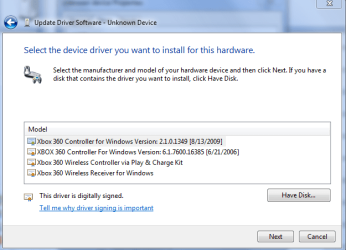
Installation Directions: To use an Xbox wireless receiver on windows 7 operating systems, install the drivers from your disk, or update from the website. Once it’s done installing, then plug in your receiver. Windows will say there are no drivers found for the device. With it still plugged in, go into your start menu and choose “Devices and Printers.” Scroll to the bottom of the page and you will see an unknown device, under the unspecified tab. Right click the icon and choose properties. Click the hardware tab and in the box there should be one option, double click it. Under the drivers tab click “update driver”. A window should pop up saying that there are no drivers, click “Browse my computer from driver software.” Then click “Let me click from a list of drivers on my computer.” Scroll down to the bottom of the list to find “Microsoft Wireless Receiver for Windows Version: 2.1.0.1349 [Date]”. Click that option and then next. A warning will come up telling you that windows is not sure the are the right drivers. If you are sure you have the right ones click yes and you should be done. Your wireless receiver is now set up. Just link your controller to it and start playing some games.
 

My Computer My Computer

At a glance

Windows 7
OS
Windows 7
i do all the steps that you say guys but on my drivers list i dont have wireless reciever "driver version etc: only one choice i have with the name microsoft wireless reciver and no date or diver version:( a also the first time that i did your steps wokred but after somhours i turn on my gamepad and couldnt connect with the reciver.after unistal etc came up this problem.
 

Attachments

  • Capture.PNG
    Capture.PNG
    23 KB · Views: 275
Last edited:

My Computer My Computer

At a glance

windows 7 64 bit
OS
windows 7 64 bit
Back
Top