Unable to cleanly uninstall Microsoft Security Essentials

frozenreads

New member
Member
Local time
10:25 PM
Messages
32
I have noticed that if you use Microsoft Security Essentials normal uninstall from add/remove programs, the program always leaves behind two folders within C:\Programdata\Microsoft: Microsoft Antimalware & Microsoft Security Client You can manually delete Microsoft Antimalware but 9/10 you are unable to delete Microsoft Security Client, usually preventing you with an 'permission is required message'. Occasionally you are able to delete it, but it is restored automatically upon reboot. The issue lies with the file EppOobe.etl, it is this file that automatically recreates itself even after uninstalling MSE. Something is clearly left behind by MSE and I am unable to find a solution to completely remove it. I have tried all the suggestions at: Uninstalling Microsoft Security Essentials - Microsoft Community including the .bat file, but nothing works. I have tried the regular MSE uninstall on several machine and ALL leave behind these files. I find it odd that a security program designed to remove viruses is unable to cleanly remove itself. Has anyone a solution? p.s I have noticed that a uninstall log is left behind by MSE and it reports a clean removal but I notice that the EppOobe.etl file is dated at exactly the same time and date as the uninstall log which suggests the uninstall removes the file, but is then recreated on reboot! Help!
 

My Computer My Computer

OS
Windows 7 64bit Home Premium
CPU
Intel I7 930 @ 4.1ghz
Motherboard
Rampage III Formula
Memory
12GB Mushkin
Graphics Card(s)
GTX580 OC @ 850
Sound Card
Soundblaster Fatality XFI
Monitor(s) Displays
ACER 24" LCD
Screen Resolution
1920x1080
Hard Drives
1TG Segate Barracuda
PSU
EVO Galaxy 1250w
Case
Antec 1200
Cooling
Air
When you encounter problems deleting stuff...
...the first thing to try is to drill down to the file level and delete your way back up.


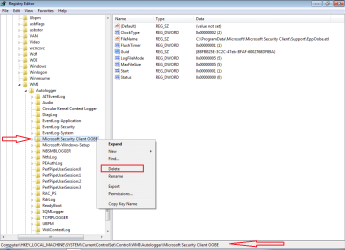
To prevent the folders/files that you mentioned from coming back....
...manually create a restore point
...then delete this one key:

MSE.png

There are many other registry keys the MSE leaves behind.
Just leave them; they do not harm.
 

My Computer My Computer

Computer type
Laptop
Computer Manufacturer/Model Number
Employer provided Dell Latitude
OS
W7 Pro SP1 64bit
CPU
i7
Memory
8GB
Graphics Card(s)
Intel HD Graphics
Hard Drives
crappy SSD
Antivirus
Employer mandated Symantec Endpoint Protection
Browser
Pale Moon 64bit, IE11 64bit & Chrome 64bit

My Computer My Computer

Computer Manufacturer/Model Number
HP, Dell, Gateway, Toshiba - 4 laptops and 2 desktops
OS
Vista, Windows7, Mint Mate, Zorin, Windows 8
CPU
from 1.6GHz Duo to i7
Monitor(s) Displays
2x HP w2207
Hard Drives
5x HDD, 7x SSD, 12x Externals
Keyboard
with trackball - no mices
Mouse
Trackball mice
Internet Speed
DSL 6000

My Computer My Computer

Computer type
Laptop
Computer Manufacturer/Model Number
Employer provided Dell Latitude
OS
W7 Pro SP1 64bit
CPU
i7
Memory
8GB
Graphics Card(s)
Intel HD Graphics
Hard Drives
crappy SSD
Antivirus
Employer mandated Symantec Endpoint Protection
Browser
Pale Moon 64bit, IE11 64bit & Chrome 64bit
Deleting the registry entry worked perfectly, thank you! You would think MSE would do this as part of its uninstall!
When you encounter problems deleting stuff...
...the first thing to try is to drill down to the file level and delete your way back up.


To prevent the folders/files that you mentioned from coming back....
...manually create a restore point
...then delete this one key:

View attachment 297564

There are many other registry keys the MSE leaves behind.
Just leave them; they do not harm.
 

My Computer My Computer

OS
Windows 7 64bit Home Premium
CPU
Intel I7 930 @ 4.1ghz
Motherboard
Rampage III Formula
Memory
12GB Mushkin
Graphics Card(s)
GTX580 OC @ 850
Sound Card
Soundblaster Fatality XFI
Monitor(s) Displays
ACER 24" LCD
Screen Resolution
1920x1080
Hard Drives
1TG Segate Barracuda
PSU
EVO Galaxy 1250w
Case
Antec 1200
Cooling
Air
Back
Top