Trying to install Ubuntu

Okay so I am having an issue myself. I got bored yesterday and decided to try to install Ubuntu 9.10 ALPHA 5 in Virtualbox. It gets to around 65% and then it just freezes (At the Ubuntu white swooshy bar part...can't describe it better). Has anyone had any luck installing it in a VM?
 

My Computer

Computer Manufacturer/Model Number
Compal JFT02 (Custom Build Laptop)
OS
Windows 7 Home Premium x64 - Mac OS X 10.6.4 x64
CPU
Intel Core 2 Duo T9300 2.5 GHz
Motherboard
JFT02
Memory
4GB Kingston DDR2-800
Graphics Card(s)
NVIDIA Geforce 8600M GT (512MB Model)
Sound Card
Realtek HD Audio
Monitor(s) Displays
WUXGA Standard Laptop Display
Screen Resolution
1680*1050
Hard Drives
Toshiba 320GB 5400RPM Laptop HD
PSU
Standard Laptop Power Supply
Case
Standard Laptop Case
Cooling
Standard Laptop Cooling
Keyboard
Standard Laptop 105 Key-Keyboard
Mouse
Synaptics Touchpad
Internet Speed
Verizion Online DSL 3360/864 kbs (dl/up)
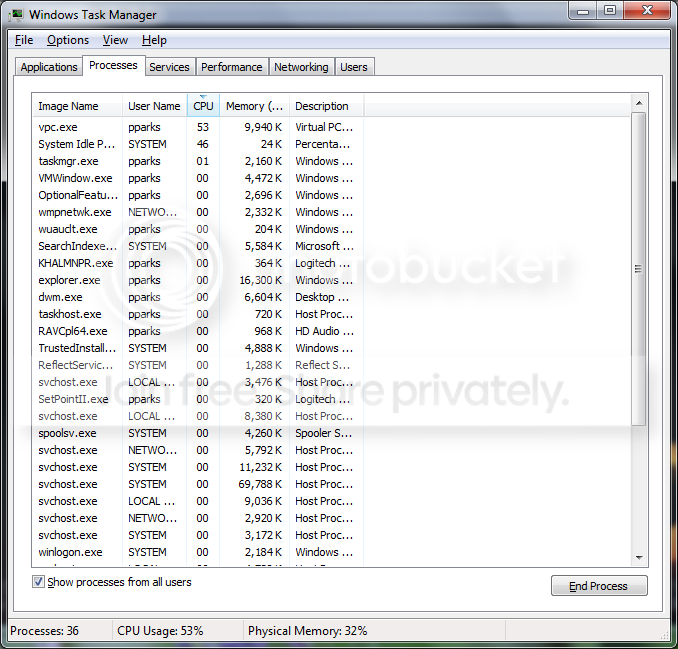
Alright, after not being a fan of Windows Virtual PC due to performance reasons (VM's) being slow, I also noticed that VPC runs my CPU at about 50% with 1 VM running just sitting at idle.

Check this out, this screenshot is VPC running with a single Ubuntu 9.04 box after 15 minutes just sitting at the logon screen. It seriously sat at 50%+ the entire time.
VPC-performance.png


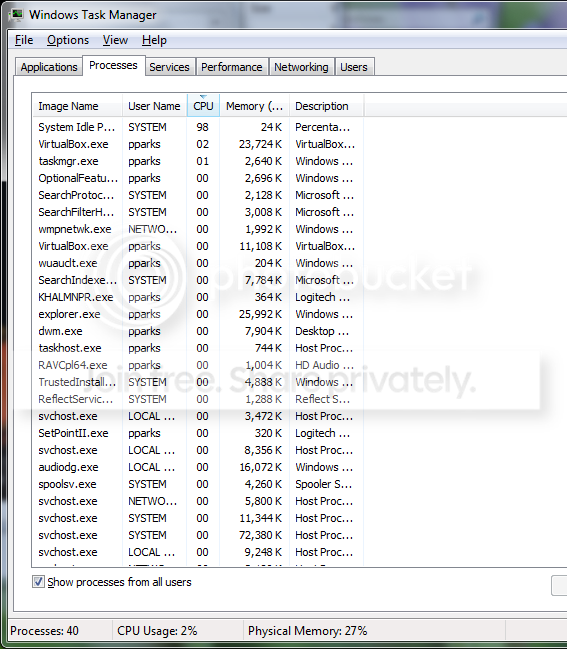
Here is Ubuntu 9.04 VM after 15 minutes running under Virtual Box 3.0.6 sitting at a logon screen. It fluctuated between 0-5%
Vbox-performance.png


Okay so I am having an issue myself. I got bored yesterday and decided to try to install Ubuntu 9.10 ALPHA 5 in Virtualbox. It gets to around 65% and then it just freezes (At the Ubuntu white swooshy bar part...can't describe it better). Has anyone had any luck installing it in a VM?

I'm downloading the ISO now, will let you know. Just FYI: Sun released VirtualBox 3.0.6 yesterday.
 

My Computer

Computer Manufacturer/Model Number
Self-Built in July 2009
OS
Windows 7 Ultimate x64
CPU
Intel Q9550 2.83Ghz OC'd to 3.40Ghz
Motherboard
Gigabyte GA-EP45-UD3R rev. 1.1, F12 BIOS
Memory
8GB G.Skill PI DDR2-800, 4-4-4-12 timings
Graphics Card(s)
EVGA 1280MB Nvidia GeForce GTX570
Sound Card
Realtek ALC899A 8 channel onboard audio
Monitor(s) Displays
23" Acer x233H
Screen Resolution
1920x1080
Hard Drives
Intel X25-M 80GB Gen 2 SSD
Western Digital 1TB Caviar Black, 32MB cache. WD1001FALS
PSU
Corsair 620HX modular
Case
Antec P182
Cooling
stock
Keyboard
ABS M1 Mechanical
Mouse
Logitech G9 Laser Mouse
Internet Speed
15/2 cable modem
Other Info
Windows and Linux enthusiast. Logitech G35 Headset.
Alright, after not being a fan of Windows Virtual PC due to performance reasons (VM's) being slow, I also noticed that VPC runs my CPU at about 50% with 1 VM running just sitting at idle.

Check this out, this screenshot is VPC running with a single Ubuntu 9.04 box after 15 minutes just sitting at the logon screen. It seriously sat at 50%+ the entire time.
VPC-performance.png


Here is Ubuntu 9.04 VM after 15 minutes running under Virtual Box 3.0.6 sitting at a logon screen. It fluctuated between 0-5%
Vbox-performance.png


Okay so I am having an issue myself. I got bored yesterday and decided to try to install Ubuntu 9.10 ALPHA 5 in Virtualbox. It gets to around 65% and then it just freezes (At the Ubuntu white swooshy bar part...can't describe it better). Has anyone had any luck installing it in a VM?

I'm downloading the ISO now, will let you know. Just FYI: Sun released VirtualBox 3.0.6 yesterday.
Thanks a bunch. I downloaded VirtualBox late last night so I am pretty sure I got the newest version. I am going to try different configs in my VM to see where it might be dying
 

My Computer

Computer Manufacturer/Model Number
Compal JFT02 (Custom Build Laptop)
OS
Windows 7 Home Premium x64 - Mac OS X 10.6.4 x64
CPU
Intel Core 2 Duo T9300 2.5 GHz
Motherboard
JFT02
Memory
4GB Kingston DDR2-800
Graphics Card(s)
NVIDIA Geforce 8600M GT (512MB Model)
Sound Card
Realtek HD Audio
Monitor(s) Displays
WUXGA Standard Laptop Display
Screen Resolution
1680*1050
Hard Drives
Toshiba 320GB 5400RPM Laptop HD
PSU
Standard Laptop Power Supply
Case
Standard Laptop Case
Cooling
Standard Laptop Cooling
Keyboard
Standard Laptop 105 Key-Keyboard
Mouse
Synaptics Touchpad
Internet Speed
Verizion Online DSL 3360/864 kbs (dl/up)
Thanks a bunch. I downloaded VirtualBox late last night so I am pretty sure I got the newest version. I am going to try different configs in my VM to see where it might be dying

Ok, got the ISO downloaded. Using the ISO to install from, using Vbox 3.0.6, used a 20GB dynamically expanding hard drive. Left everything else as defaults.

The installation completed without an issue. It shut down alright after the install. I powered it off and unmounted the ISO being used for installation.

On bootup, the system dropped into maintenance mode and complained about an UNEXPECTED INCONSISTENCY. It tried to fsck on it's own, but the process died with exit status 4. I ran, fsck /dev/sda1 and it indicated a problem with the time for the superblock and I fixed that. Everything else checked out fine. I issued, reboot

On the proceeding boot, everything completed normally and brought me up to the logon screen. I was able to logon and things seemed to be alright.
 

My Computer

Computer Manufacturer/Model Number
Self-Built in July 2009
OS
Windows 7 Ultimate x64
CPU
Intel Q9550 2.83Ghz OC'd to 3.40Ghz
Motherboard
Gigabyte GA-EP45-UD3R rev. 1.1, F12 BIOS
Memory
8GB G.Skill PI DDR2-800, 4-4-4-12 timings
Graphics Card(s)
EVGA 1280MB Nvidia GeForce GTX570
Sound Card
Realtek ALC899A 8 channel onboard audio
Monitor(s) Displays
23" Acer x233H
Screen Resolution
1920x1080
Hard Drives
Intel X25-M 80GB Gen 2 SSD
Western Digital 1TB Caviar Black, 32MB cache. WD1001FALS
PSU
Corsair 620HX modular
Case
Antec P182
Cooling
stock
Keyboard
ABS M1 Mechanical
Mouse
Logitech G9 Laser Mouse
Internet Speed
15/2 cable modem
Other Info
Windows and Linux enthusiast. Logitech G35 Headset.
Thanks a bunch. I downloaded VirtualBox late last night so I am pretty sure I got the newest version. I am going to try different configs in my VM to see where it might be dying

Ok, got the ISO downloaded. Using the ISO to install from, using Vbox 3.0.6, used a 20GB dynamically expanding hard drive. Left everything else as defaults.

The installation completed without an issue. It shut down alright after the install. I powered it off and unmounted the ISO being used for installation.

On bootup, the system dropped into maintenance mode and complained about an UNEXPECTED INCONSISTENCY. It tried to fsck on it's own, but the process died with exit status 4. I ran, fsck /dev/sda1 and it indicated a problem with the time for the superblock and I fixed that. Everything else checked out fine. I issued, reboot

On the proceeding boot, everything completed normally and brought me up to the logon screen. I was able to logon and things seemed to be alright.
I just noticed last night that it didn't install 3.0.6...going to try again with the lastest update tonight

Thanks for the update
 

My Computer

Computer Manufacturer/Model Number
Compal JFT02 (Custom Build Laptop)
OS
Windows 7 Home Premium x64 - Mac OS X 10.6.4 x64
CPU
Intel Core 2 Duo T9300 2.5 GHz
Motherboard
JFT02
Memory
4GB Kingston DDR2-800
Graphics Card(s)
NVIDIA Geforce 8600M GT (512MB Model)
Sound Card
Realtek HD Audio
Monitor(s) Displays
WUXGA Standard Laptop Display
Screen Resolution
1680*1050
Hard Drives
Toshiba 320GB 5400RPM Laptop HD
PSU
Standard Laptop Power Supply
Case
Standard Laptop Case
Cooling
Standard Laptop Cooling
Keyboard
Standard Laptop 105 Key-Keyboard
Mouse
Synaptics Touchpad
Internet Speed
Verizion Online DSL 3360/864 kbs (dl/up)
Thanks a bunch. I downloaded VirtualBox late last night so I am pretty sure I got the newest version. I am going to try different configs in my VM to see where it might be dying

Ok, got the ISO downloaded. Using the ISO to install from, using Vbox 3.0.6, used a 20GB dynamically expanding hard drive. Left everything else as defaults.

The installation completed without an issue. It shut down alright after the install. I powered it off and unmounted the ISO being used for installation.

On bootup, the system dropped into maintenance mode and complained about an UNEXPECTED INCONSISTENCY. It tried to fsck on it's own, but the process died with exit status 4. I ran, fsck /dev/sda1 and it indicated a problem with the time for the superblock and I fixed that. Everything else checked out fine. I issued, reboot

On the proceeding boot, everything completed normally and brought me up to the logon screen. I was able to logon and things seemed to be alright.
I just noticed last night that it didn't install 3.0.6...going to try again with the lastest update tonight

Thanks for the update

By the way, Karmic Koala (9.10) Alpha 6 will be out on the 17th this month.
 

My Computer

Computer Manufacturer/Model Number
Custom | Whitebox
OS
Windows 7 Ultimate, OS X 10.7, Ubuntu 11.04
CPU
Intel E6750 @ 3.80GHz
Motherboard
Gigabyte GA-EP45-UD3L (Revision 1.1)
Memory
2x2GB & 2x1GB (6GB) OCZ Reaper 1066MHz @ 1080MHz
Graphics Card(s)
EVGA nVidia GTX 260 896mb (216 Core) FTW Edition
Sound Card
Realtek ALC888
Monitor(s) Displays
21" VIZIO TV
Screen Resolution
1680x1050 @ 60Hz
Hard Drives
Western Digital WD6401AALS - 640GB
Hitachi HDP725016GLA380 - 160GB
PSU
Corsair 750W
Case
NZXT Nemesis Elite
Cooling
Thermaltake SpinQ
Keyboard
Logitech Wireless S520
Mouse
Logitech Wireless S520 - Microsoft Wireless Arc Mouse
Internet Speed
Download: 20mbps, Upload: 3mbps
Haha.. Im still running Hardy .... ;)
 

My Computer

Computer type
PC/Desktop
Computer Manufacturer/Model Number
LENOVO K450 @3.0GHZ
OS
64-bit Windows 8.1 Pro
CPU
Core(TM) i5 CPU 4330 Haswell @ 3.20GHz
Motherboard
LENOVO
Memory
12.00 GB
Graphics Card(s)
Intel(R) HD Graphics
Sound Card
Intel HD integtrated
Monitor(s) Displays
HP 25' ISP Monitor
Screen Resolution
1900/1020
Hard Drives
(1) ST1000DM003-1CH162 (2) Generic STORAGE DEVICE USB Device (3) Generic STORAGE DEVICE USB Device
Internet Speed
100mb down/10mb up
Haha.. Im still running Hardy .... ;)
Thats a bit back...Hardy then Gutsy then Intrepid then Karmic right? Any reason for no upgrade Tews?
 

My Computer

Computer Manufacturer/Model Number
Compal JFT02 (Custom Build Laptop)
OS
Windows 7 Home Premium x64 - Mac OS X 10.6.4 x64
CPU
Intel Core 2 Duo T9300 2.5 GHz
Motherboard
JFT02
Memory
4GB Kingston DDR2-800
Graphics Card(s)
NVIDIA Geforce 8600M GT (512MB Model)
Sound Card
Realtek HD Audio
Monitor(s) Displays
WUXGA Standard Laptop Display
Screen Resolution
1680*1050
Hard Drives
Toshiba 320GB 5400RPM Laptop HD
PSU
Standard Laptop Power Supply
Case
Standard Laptop Case
Cooling
Standard Laptop Cooling
Keyboard
Standard Laptop 105 Key-Keyboard
Mouse
Synaptics Touchpad
Internet Speed
Verizion Online DSL 3360/864 kbs (dl/up)
Haha.. Im still running Hardy .... ;)
Thats a bit back...Hardy then Gutsy then Intrepid then Karmic right? Any reason for no upgrade Tews?

4.10 - Warty Warthog
5.04 - Hoary Hedgehog
5.10 - Breezy Badget
6.06 - Dapper Drake
6.10 - Edgy Eft
7.04 - Feisty Fawn
7.10 - Gutsy Gibbon
8.04 - Hardy Heron
8.10 - Intrepid Ibex (wtf is that?)
9.04 - Jaunty Jackalope (I swear the delevopers get high before naming these things)
9.10 - Karmic Koala
 

My Computer

Computer Manufacturer/Model Number
Custom | Whitebox
OS
Windows 7 Ultimate, OS X 10.7, Ubuntu 11.04
CPU
Intel E6750 @ 3.80GHz
Motherboard
Gigabyte GA-EP45-UD3L (Revision 1.1)
Memory
2x2GB & 2x1GB (6GB) OCZ Reaper 1066MHz @ 1080MHz
Graphics Card(s)
EVGA nVidia GTX 260 896mb (216 Core) FTW Edition
Sound Card
Realtek ALC888
Monitor(s) Displays
21" VIZIO TV
Screen Resolution
1680x1050 @ 60Hz
Hard Drives
Western Digital WD6401AALS - 640GB
Hitachi HDP725016GLA380 - 160GB
PSU
Corsair 750W
Case
NZXT Nemesis Elite
Cooling
Thermaltake SpinQ
Keyboard
Logitech Wireless S520
Mouse
Logitech Wireless S520 - Microsoft Wireless Arc Mouse
Internet Speed
Download: 20mbps, Upload: 3mbps
Haha.. Im still running Hardy .... ;)
Thats a bit back...Hardy then Gutsy then Intrepid then Karmic right? Any reason for no upgrade Tews?

4.10 - Warty Warthog
5.04 - Hoary Hedgehog
5.10 - Breezy Badget
6.06 - Dapper Drake
6.10 - Edgy Eft
7.04 - Feisty Fawn
7.10 - Gutsy Gibbon
8.04 - Hardy Heron
8.10 - Intrepid Ibex (wtf is that?)
9.04 - Jaunty Jackalope (I swear the delevopers get high before naming these things)
9.10 - Karmic Koala
lmao I always forget Jaunty...cause I haven't used it

Yeah I think their conventions team is a bunch of stoners

I will say that I looked at the list of features in Karmic and it deeply saddened me to see them drop pidgin from the list of installed apps
 

My Computer

Computer Manufacturer/Model Number
Compal JFT02 (Custom Build Laptop)
OS
Windows 7 Home Premium x64 - Mac OS X 10.6.4 x64
CPU
Intel Core 2 Duo T9300 2.5 GHz
Motherboard
JFT02
Memory
4GB Kingston DDR2-800
Graphics Card(s)
NVIDIA Geforce 8600M GT (512MB Model)
Sound Card
Realtek HD Audio
Monitor(s) Displays
WUXGA Standard Laptop Display
Screen Resolution
1680*1050
Hard Drives
Toshiba 320GB 5400RPM Laptop HD
PSU
Standard Laptop Power Supply
Case
Standard Laptop Case
Cooling
Standard Laptop Cooling
Keyboard
Standard Laptop 105 Key-Keyboard
Mouse
Synaptics Touchpad
Internet Speed
Verizion Online DSL 3360/864 kbs (dl/up)
Thats a bit back...Hardy then Gutsy then Intrepid then Karmic right? Any reason for no upgrade Tews?

4.10 - Warty Warthog
5.04 - Hoary Hedgehog
5.10 - Breezy Badget
6.06 - Dapper Drake
6.10 - Edgy Eft
7.04 - Feisty Fawn
7.10 - Gutsy Gibbon
8.04 - Hardy Heron
8.10 - Intrepid Ibex (wtf is that?)
9.04 - Jaunty Jackalope (I swear the delevopers get high before naming these things)
9.10 - Karmic Koala
lmao I always forget Jaunty...cause I haven't used it

Yeah I think their conventions team is a bunch of stoners

I will say that I looked at the list of features in Karmic and it deeply saddened me to see them drop pidgin from the list of installed apps

List of Ubuntu releases - Wikipedia, the free encyclopedia

Well, from what I read its suppose to be 'better' (as always?) then Jaunty, Maybe a new theme in the final product of Karmic but if not apparently it will be in 10.04 (oh god.. can only imagine the name..)

EDIT: I got 10.04's name :) Stoned Stingray

(my mind went blank when thinking of an animal for S)
 

My Computer

Computer Manufacturer/Model Number
Custom | Whitebox
OS
Windows 7 Ultimate, OS X 10.7, Ubuntu 11.04
CPU
Intel E6750 @ 3.80GHz
Motherboard
Gigabyte GA-EP45-UD3L (Revision 1.1)
Memory
2x2GB & 2x1GB (6GB) OCZ Reaper 1066MHz @ 1080MHz
Graphics Card(s)
EVGA nVidia GTX 260 896mb (216 Core) FTW Edition
Sound Card
Realtek ALC888
Monitor(s) Displays
21" VIZIO TV
Screen Resolution
1680x1050 @ 60Hz
Hard Drives
Western Digital WD6401AALS - 640GB
Hitachi HDP725016GLA380 - 160GB
PSU
Corsair 750W
Case
NZXT Nemesis Elite
Cooling
Thermaltake SpinQ
Keyboard
Logitech Wireless S520
Mouse
Logitech Wireless S520 - Microsoft Wireless Arc Mouse
Internet Speed
Download: 20mbps, Upload: 3mbps
Haha.. Im still running Hardy .... ;)
Thats a bit back...Hardy then Gutsy then Intrepid then Karmic right? Any reason for no upgrade Tews?


If it ain't broke, no sense in fixing it. Ubuntu generally does 2 major releases per year so it can be a bit of a challenge to continually install, upgrade or rebuild every time something new comes out. And with longer term support available, you can just run the updates and be relatively up to date...even if the main system is one of the slightly older releases.
 

My Computer

Computer Manufacturer/Model Number
Self-Built in July 2009
OS
Windows 7 Ultimate x64
CPU
Intel Q9550 2.83Ghz OC'd to 3.40Ghz
Motherboard
Gigabyte GA-EP45-UD3R rev. 1.1, F12 BIOS
Memory
8GB G.Skill PI DDR2-800, 4-4-4-12 timings
Graphics Card(s)
EVGA 1280MB Nvidia GeForce GTX570
Sound Card
Realtek ALC899A 8 channel onboard audio
Monitor(s) Displays
23" Acer x233H
Screen Resolution
1920x1080
Hard Drives
Intel X25-M 80GB Gen 2 SSD
Western Digital 1TB Caviar Black, 32MB cache. WD1001FALS
PSU
Corsair 620HX modular
Case
Antec P182
Cooling
stock
Keyboard
ABS M1 Mechanical
Mouse
Logitech G9 Laser Mouse
Internet Speed
15/2 cable modem
Other Info
Windows and Linux enthusiast. Logitech G35 Headset.
If only other distro's had WUBI. Like Fedora.
DNG,
If you like Fedora, you might be interested in this, in case your HDD goes down:
The new 8 gig should be perfect.

Note the "hash-check".

Booting and running an OS, like XP, off a stick is slow as ****, but it does run, if and when you need it...
Be sure to have a binary copy of your HDD MBR and Boot Sectors on it...
 

My Computer

Computer Manufacturer/Model Number
Gateway GT5056
OS
XP_Pro, W7_7201, W7RC.vhd, SciLinux5.3, Fedora12, Fedora9_2x, OpenSolaris_09-06
CPU
AMD 64x2
Motherboard
Yes
Memory
1 gig
Graphics Card(s)
Dunno
Sound Card
Realtek something
Monitor(s) Displays
Samsung SyncMaster 940MW w/TV
Screen Resolution
1280x1024
Hard Drives
250 GB WD, USB Seagate Freedesk 1.5 T
Internet Speed
Cable modem
Other Info
1 + 1 = 10b,
7 + 7 = 16o,
a + b = 15h.
If only other distro's had WUBI. Like Fedora.
DNG,
If you like Fedora, you might be interested in this, in case your HDD goes down:
The new 8 gig should be perfect.

Note the "hash-check".

Booting and running an OS, like XP, off a stick is slow as ****, but it does run, if and when you need it...
Be sure to have a binary copy of your HDD MBR and Boot Sectors on it...

Not saying I like it, actually I prefer Linux Distro's that support my Wireless Adapter without me having to go around everywhere searching for a driver! :cry:

I just want to be able to install something and easily remove it. WUBI does that perfectly but only with Ubuntu (Mint4Win is Linux Mints's version of WUBI)

I'm going to assume the reason there isn't a WFBI (odd name) for Fedora is because of the way it is? I mean structure and what not?

I still have yet to find my broadcom's linux driver >.>
 

My Computer

Computer Manufacturer/Model Number
Custom | Whitebox
OS
Windows 7 Ultimate, OS X 10.7, Ubuntu 11.04
CPU
Intel E6750 @ 3.80GHz
Motherboard
Gigabyte GA-EP45-UD3L (Revision 1.1)
Memory
2x2GB & 2x1GB (6GB) OCZ Reaper 1066MHz @ 1080MHz
Graphics Card(s)
EVGA nVidia GTX 260 896mb (216 Core) FTW Edition
Sound Card
Realtek ALC888
Monitor(s) Displays
21" VIZIO TV
Screen Resolution
1680x1050 @ 60Hz
Hard Drives
Western Digital WD6401AALS - 640GB
Hitachi HDP725016GLA380 - 160GB
PSU
Corsair 750W
Case
NZXT Nemesis Elite
Cooling
Thermaltake SpinQ
Keyboard
Logitech Wireless S520
Mouse
Logitech Wireless S520 - Microsoft Wireless Arc Mouse
Internet Speed
Download: 20mbps, Upload: 3mbps

My Computer

Computer Manufacturer/Model Number
Gateway GT5056
OS
XP_Pro, W7_7201, W7RC.vhd, SciLinux5.3, Fedora12, Fedora9_2x, OpenSolaris_09-06
CPU
AMD 64x2
Motherboard
Yes
Memory
1 gig
Graphics Card(s)
Dunno
Sound Card
Realtek something
Monitor(s) Displays
Samsung SyncMaster 940MW w/TV
Screen Resolution
1280x1024
Hard Drives
250 GB WD, USB Seagate Freedesk 1.5 T
Internet Speed
Cable modem
Other Info
1 + 1 = 10b,
7 + 7 = 16o,
a + b = 15h.
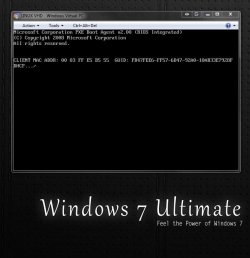
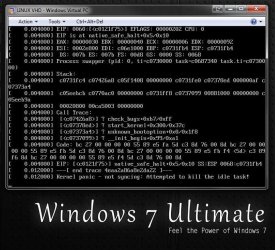
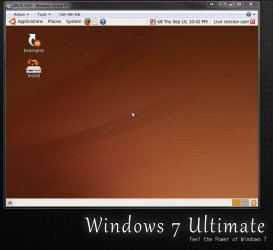
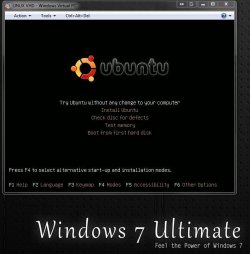
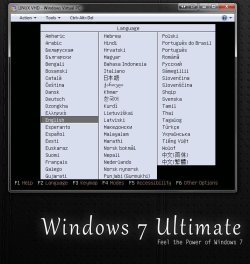
Here's a good look at what was seen when trying to install the 32bit not 64bit Ubuntu 9.04 on a vhd. The ubuntu desktop will simply lock up when first trying it live. Then the install on boot option ends up with another type of problem. The next to last image simply shows the failure to initialize the live cd.

End result? Not compatible for VPC! I believe I ran into this when first working with the beta VPC before where you could see Vista or 7 go right on without a hassle of any type. Yet you can multiboot on the SUN VBox without a problem there as seen with the usb flash drive loading the 64bit 7 along with a few distros. ubuntu 9.04, Knoppix 5.3.1, Puppy 4.2.1
 

Attachments

  • CreateVHD5.jpg
    CreateVHD5.jpg
    37.9 KB · Views: 19
  • INSTALL Ubuntu5.jpg
    INSTALL Ubuntu5.jpg
    55.8 KB · Views: 10
  • INSTALL Ubuntu6.jpg
    INSTALL Ubuntu6.jpg
    122.9 KB · Views: 8
  • INSTALL Ubuntu4.jpg
    INSTALL Ubuntu4.jpg
    71.3 KB · Views: 7
  • INSTALL Ubuntu2.jpg
    INSTALL Ubuntu2.jpg
    61.5 KB · Views: 4
  • INSTALL Ubuntu1.jpg
    INSTALL Ubuntu1.jpg
    88.6 KB · Views: 9
  • True Multiasking2.jpg
    True Multiasking2.jpg
    213.4 KB · Views: 18

My Computers

System One System Two

  • Computer type
    PC/Desktop
    Computer Manufacturer/Model Number
    Custom builds = 2
    OS
    W7 Ultimate x64/W10 Pro x64/W11 Pro Triple Boot - Main PC W7 Remote PC Micro ATX W7 Pro x64/W11 Pro
    CPU
    AMD Phenom II X4 975 Deneb 3.6ghz - 965 2nd remote pc
    Motherboard
    Gigabyte GA-790XTA-UD4-Gigabyte GA-880GM-D2H remote pc
    Memory
    Kingston Hyper X DDR3 1600 1.5v 16gb - Hyper X Fury 8gb 2nd
    Graphics Card(s)
    MSI HD Radeon 5750 1gb - MSI HD Radeon 6450 on mini tower
    Sound Card
    Creative Labs X-Fi Xtreme Audio P - Realtek onooard 2nd case
    Monitor(s) Displays
    ASUS VW199T-P 19" HP 2082a Main-HP 2082a 20" remote pc
    Screen Resolution
    Asus 1440x900 - HP 1600x900
    Hard Drives
    WD Black 1TB HD per OS W7, W10, and pending W11 presently on 500gb OS Drive - Pending Triple 1TB HDs for Spanned Storage/backup volume
    Single 2TB external USB enclosure, single 1TB System 7 Host/Boot drive, Pending 8TB external HD for system image b
    PSU
    Corsair 750TX - primary / Corsair CX600 - second
    Case
    Antec 900-2 - SSD compatible / NZXT Vulcan mini tower
    Cooling
    Zalman CNPS9900A
    Keyboard
    AZIO L70 Backlit Letters Gaming - ONN Cordless/USB
    Mouse
    MSI DS200 Programmable, Logitech Cordless
    Internet Speed
    30mbps upgrade - primary hard wired - mini tower usb WiFi
    Antivirus
    GFI VIPRE Internet Security 2014 on W7 2016 beta on W10,
    Browser
    Cyberfox, WaterFox 64bit FF variants, FireFox x64, Pale Moon
    Other Info
    Accomdata fan cooled usb 2.0 PIDE/Sata II, III external enclosure.
    Sambient usb/eSata PATA/Sata II, III external enclosure.
  • Computer type
    PC/Desktop
    System Manufacturer/Model Number
    CUSTOM ASSEMBLY
    OS
    W7 Pro x64/W11 Pro
    CPU
    AMD Deneb 3.6ghz - 965
    Motherboard
    Gigabyte GA-880GM-D2H remote pc
    Memory
    Kingston Hyper X Fury 8gb
    Graphics Card(s)
    MSI HD Radeon 6450 DVI Output
    Sound Card
    Realtek onooard Creative or Other separate PENDING
    Monitor(s) Displays
    VIZIO 32" LCD TV Separate LCD Pending
    Screen Resolution
    1600x1080
    Hard Drives
    WD 500GB OS Host/Boot WD Green 1TB Storage/Backup
    PSU
    Corsair 600W - THERMALTAKE 600W spare case
    Case
    NZXT Vulcan mini tower
    Cooling
    Twin 120mm Top Fans - 240mm Side Cover
    Keyboard
    ONN Cordless/USB Logitech Cordless
    Mouse
    ONN USB/Cordless - Logitech Cordless
    Internet Speed
    DSL 5G
    Browser
    MS Edge, FireFox, WaterFox x64, FireFox Nightly
    Other Info
    OS Testing-Remote Access to Main TeamViewer
Finally I got it to install and got the same error as pparks above. I did the fsck command and it started just fine
 

My Computer

Computer Manufacturer/Model Number
Compal JFT02 (Custom Build Laptop)
OS
Windows 7 Home Premium x64 - Mac OS X 10.6.4 x64
CPU
Intel Core 2 Duo T9300 2.5 GHz
Motherboard
JFT02
Memory
4GB Kingston DDR2-800
Graphics Card(s)
NVIDIA Geforce 8600M GT (512MB Model)
Sound Card
Realtek HD Audio
Monitor(s) Displays
WUXGA Standard Laptop Display
Screen Resolution
1680*1050
Hard Drives
Toshiba 320GB 5400RPM Laptop HD
PSU
Standard Laptop Power Supply
Case
Standard Laptop Case
Cooling
Standard Laptop Cooling
Keyboard
Standard Laptop 105 Key-Keyboard
Mouse
Synaptics Touchpad
Internet Speed
Verizion Online DSL 3360/864 kbs (dl/up)
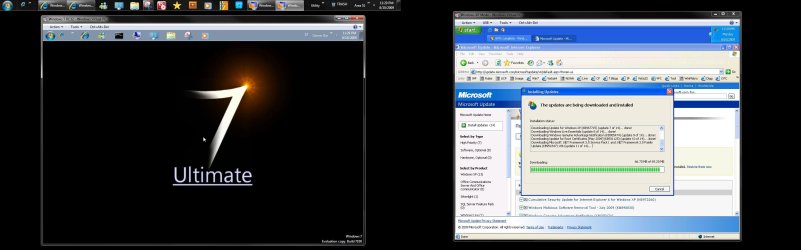
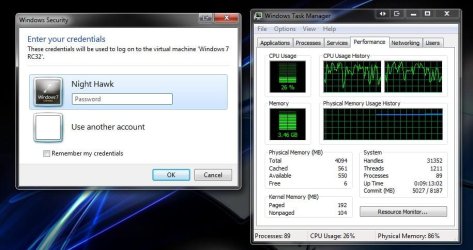
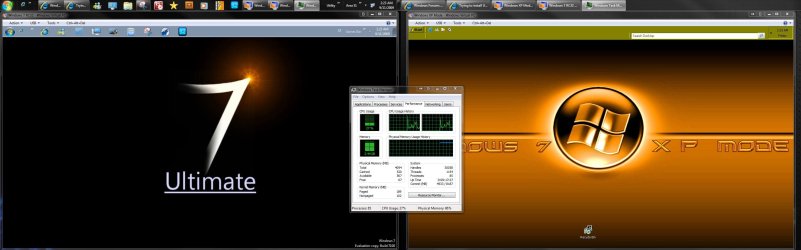
Why is it I'm not running into that one. The screen here shows both the 32bit 7 on vhd as well as the XP mode running at the same time. With both running they never taxed the cpu while they can run a little slower for the obvious reasons there.

Right now I have both starting up at the same time tp watch the process. I seem to be doing ok even with 2gb for ram on each one there.
 

Attachments

  • True Multitasking.jpg
    True Multitasking.jpg
    265 KB · Views: 16
  • VPC Dual Load on CPU Time.jpg
    VPC Dual Load on CPU Time.jpg
    92.8 KB · Views: 12
  • VPC Dual Load on CPU Time2.jpg
    VPC Dual Load on CPU Time2.jpg
    249.3 KB · Views: 23

My Computers

System One System Two

  • Computer type
    PC/Desktop
    Computer Manufacturer/Model Number
    Custom builds = 2
    OS
    W7 Ultimate x64/W10 Pro x64/W11 Pro Triple Boot - Main PC W7 Remote PC Micro ATX W7 Pro x64/W11 Pro
    CPU
    AMD Phenom II X4 975 Deneb 3.6ghz - 965 2nd remote pc
    Motherboard
    Gigabyte GA-790XTA-UD4-Gigabyte GA-880GM-D2H remote pc
    Memory
    Kingston Hyper X DDR3 1600 1.5v 16gb - Hyper X Fury 8gb 2nd
    Graphics Card(s)
    MSI HD Radeon 5750 1gb - MSI HD Radeon 6450 on mini tower
    Sound Card
    Creative Labs X-Fi Xtreme Audio P - Realtek onooard 2nd case
    Monitor(s) Displays
    ASUS VW199T-P 19" HP 2082a Main-HP 2082a 20" remote pc
    Screen Resolution
    Asus 1440x900 - HP 1600x900
    Hard Drives
    WD Black 1TB HD per OS W7, W10, and pending W11 presently on 500gb OS Drive - Pending Triple 1TB HDs for Spanned Storage/backup volume
    Single 2TB external USB enclosure, single 1TB System 7 Host/Boot drive, Pending 8TB external HD for system image b
    PSU
    Corsair 750TX - primary / Corsair CX600 - second
    Case
    Antec 900-2 - SSD compatible / NZXT Vulcan mini tower
    Cooling
    Zalman CNPS9900A
    Keyboard
    AZIO L70 Backlit Letters Gaming - ONN Cordless/USB
    Mouse
    MSI DS200 Programmable, Logitech Cordless
    Internet Speed
    30mbps upgrade - primary hard wired - mini tower usb WiFi
    Antivirus
    GFI VIPRE Internet Security 2014 on W7 2016 beta on W10,
    Browser
    Cyberfox, WaterFox 64bit FF variants, FireFox x64, Pale Moon
    Other Info
    Accomdata fan cooled usb 2.0 PIDE/Sata II, III external enclosure.
    Sambient usb/eSata PATA/Sata II, III external enclosure.
  • Computer type
    PC/Desktop
    System Manufacturer/Model Number
    CUSTOM ASSEMBLY
    OS
    W7 Pro x64/W11 Pro
    CPU
    AMD Deneb 3.6ghz - 965
    Motherboard
    Gigabyte GA-880GM-D2H remote pc
    Memory
    Kingston Hyper X Fury 8gb
    Graphics Card(s)
    MSI HD Radeon 6450 DVI Output
    Sound Card
    Realtek onooard Creative or Other separate PENDING
    Monitor(s) Displays
    VIZIO 32" LCD TV Separate LCD Pending
    Screen Resolution
    1600x1080
    Hard Drives
    WD 500GB OS Host/Boot WD Green 1TB Storage/Backup
    PSU
    Corsair 600W - THERMALTAKE 600W spare case
    Case
    NZXT Vulcan mini tower
    Cooling
    Twin 120mm Top Fans - 240mm Side Cover
    Keyboard
    ONN Cordless/USB Logitech Cordless
    Mouse
    ONN USB/Cordless - Logitech Cordless
    Internet Speed
    DSL 5G
    Browser
    MS Edge, FireFox, WaterFox x64, FireFox Nightly
    Other Info
    OS Testing-Remote Access to Main TeamViewer
What error are you talking about Night Hawk?

As far as Ubuntu 9.10 is concerned...I updated it last night just to see it go to hell and back. Now when I start it up ti says it can't mount /dev/sda1 but it will go to the logon screen where my username Chris Sanders is still present. At this point I lose my mouse but I can press enter->type password-> enter for it to logon....in which it freezes forever
 

My Computer

Computer Manufacturer/Model Number
Compal JFT02 (Custom Build Laptop)
OS
Windows 7 Home Premium x64 - Mac OS X 10.6.4 x64
CPU
Intel Core 2 Duo T9300 2.5 GHz
Motherboard
JFT02
Memory
4GB Kingston DDR2-800
Graphics Card(s)
NVIDIA Geforce 8600M GT (512MB Model)
Sound Card
Realtek HD Audio
Monitor(s) Displays
WUXGA Standard Laptop Display
Screen Resolution
1680*1050
Hard Drives
Toshiba 320GB 5400RPM Laptop HD
PSU
Standard Laptop Power Supply
Case
Standard Laptop Case
Cooling
Standard Laptop Cooling
Keyboard
Standard Laptop 105 Key-Keyboard
Mouse
Synaptics Touchpad
Internet Speed
Verizion Online DSL 3360/864 kbs (dl/up)
Zid... do you see this as an Ubuntu problem or the VM that you are using?? I have used every version of Ubuntu from 7.04 on and have never had a problem that I couldnt resolve without a lot of hassle... just wondering....

Moi!
 

My Computer

Computer type
PC/Desktop
Computer Manufacturer/Model Number
LENOVO K450 @3.0GHZ
OS
64-bit Windows 8.1 Pro
CPU
Core(TM) i5 CPU 4330 Haswell @ 3.20GHz
Motherboard
LENOVO
Memory
12.00 GB
Graphics Card(s)
Intel(R) HD Graphics
Sound Card
Intel HD integtrated
Monitor(s) Displays
HP 25' ISP Monitor
Screen Resolution
1900/1020
Hard Drives
(1) ST1000DM003-1CH162 (2) Generic STORAGE DEVICE USB Device (3) Generic STORAGE DEVICE USB Device
Internet Speed
100mb down/10mb up
Back
Top