nokturrduk84
New member
I've noticed this problem after my new RAM, which run on 2400mhz without any errors & problems.
In short, when I click on "sleep" button PC goes in sleep, but when I hit "turn on" button computer just keeps restarting & monitor keeps just black until after 2nd attempt there is a message:
"All settings were reset to default values.
The previous overclock settings have failed, system has been restored to it's default settings.
Press F1 to run settings
Press F2 to load default values and run setup."
I need to hit "del" button & go in bios to hit "f10" to save current settings, & after restart it brings me to the desktop normally.
If I decrease speed of those RAMs to 1600mhz, then this problem disappears, but I don't want to run my RAMs on a low speed, if I wanted so, then I would buy some 1600mhz RAMs instead of 2400mhz.
So, what's going on to that issue? Anyone got the same problem? Is there any fix?
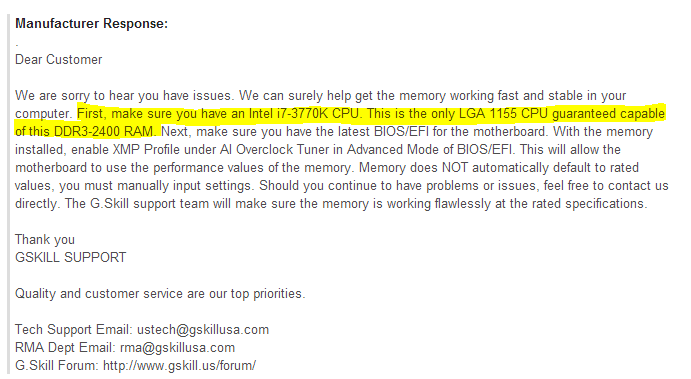
I contacted to the RAM manufacturer & they said, they don't know why it happens & it is Windows issue, not RAM.
These are my PC specs:
----------------------------------
| CPU: i7 3770k | Mobo: MSI Z77A-G45 Gaming | GPU: Zotac GTX 560 | RAM: 16GB G.Skill Trident X 2400mhz | PSU: XFX PRO 1050w | STORAGE: SSD 120GB PQI + 2TB HDD | COOLER: Thermaltake: Water 2.0 | CASE: Cooler Master: HAF 912 Plus |
P.S. I'm not overclocking my CPU.
In short, when I click on "sleep" button PC goes in sleep, but when I hit "turn on" button computer just keeps restarting & monitor keeps just black until after 2nd attempt there is a message:
"All settings were reset to default values.
The previous overclock settings have failed, system has been restored to it's default settings.
Press F1 to run settings
Press F2 to load default values and run setup."
I need to hit "del" button & go in bios to hit "f10" to save current settings, & after restart it brings me to the desktop normally.
If I decrease speed of those RAMs to 1600mhz, then this problem disappears, but I don't want to run my RAMs on a low speed, if I wanted so, then I would buy some 1600mhz RAMs instead of 2400mhz.
So, what's going on to that issue? Anyone got the same problem? Is there any fix?
I contacted to the RAM manufacturer & they said, they don't know why it happens & it is Windows issue, not RAM.
These are my PC specs:
----------------------------------
| CPU: i7 3770k | Mobo: MSI Z77A-G45 Gaming | GPU: Zotac GTX 560 | RAM: 16GB G.Skill Trident X 2400mhz | PSU: XFX PRO 1050w | STORAGE: SSD 120GB PQI + 2TB HDD | COOLER: Thermaltake: Water 2.0 | CASE: Cooler Master: HAF 912 Plus |
P.S. I'm not overclocking my CPU.
My Computer
- Computer type
- PC/Desktop
- OS
- Windows 7 64-bit
- CPU
- i7 3770k
- Motherboard
- Z77A-G45 Gaming
- Memory
- 16GB G.Skill Trident X
- Graphics Card(s)
- GTX 770
- Monitor(s) Displays
- Philips 248 CLH
- Screen Resolution
- 1920x1080
- Hard Drives
- SSD 120GB PQI
2TB HDD
4TB HDD
- PSU
- XFX Pro Black Edition 1050w
- Case
- Cooler Master HAF 912 Plus
- Cooling
- Thermaltake water 2.0
- Keyboard
- Razer Lycosa
- Mouse
- A4tech Bloody v7
- Internet Speed
- 40mb
- Antivirus
- Avast Free
- Browser
- Google Chrome