Sleep problem on high speed RAMs

nokturrduk84

New member
Local time
1:43 PM
Messages
8
Location
Georgia
I've noticed this problem after my new RAM, which run on 2400mhz without any errors & problems.
In short, when I click on "sleep" button PC goes in sleep, but when I hit "turn on" button computer just keeps restarting & monitor keeps just black until after 2nd attempt there is a message:

"All settings were reset to default values.
The previous overclock settings have failed, system has been restored to it's default settings.
Press F1 to run settings
Press F2 to load default values and run setup."


I need to hit "del" button & go in bios to hit "f10" to save current settings, & after restart it brings me to the desktop normally.
If I decrease speed of those RAMs to 1600mhz, then this problem disappears, but I don't want to run my RAMs on a low speed, if I wanted so, then I would buy some 1600mhz RAMs instead of 2400mhz.
So, what's going on to that issue? Anyone got the same problem? Is there any fix?
I contacted to the RAM manufacturer & they said, they don't know why it happens & it is Windows issue, not RAM.

These are my PC specs:
----------------------------------
| CPU: i7 3770k | Mobo: MSI Z77A-G45 Gaming | GPU: Zotac GTX 560 | RAM: 16GB G.Skill Trident X 2400mhz | PSU: XFX PRO 1050w | STORAGE: SSD 120GB PQI + 2TB HDD | COOLER: Thermaltake: Water 2.0 | CASE: Cooler Master: HAF 912 Plus |

P.S. I'm not overclocking my CPU.
 

My Computer

Computer type
PC/Desktop
OS
Windows 7 64-bit
CPU
i7 3770k
Motherboard
Z77A-G45 Gaming
Memory
16GB G.Skill Trident X
Graphics Card(s)
GTX 770
Monitor(s) Displays
Philips 248 CLH
Screen Resolution
1920x1080
Hard Drives
SSD 120GB PQI
2TB HDD
4TB HDD
PSU
XFX Pro Black Edition 1050w
Case
Cooler Master HAF 912 Plus
Cooling
Thermaltake water 2.0
Keyboard
Razer Lycosa
Mouse
A4tech Bloody v7
Internet Speed
40mb
Antivirus
Avast Free
Browser
Google Chrome
Hello nokturrduk84. Welcome to the forum.

You are not overclocking your CPU - true. But you are "overclocking" your RAM.

See here:
Capture.PNG

Your system board is design to run at 1066 and 1333MHz natively. Those * mean that the board can be "overclocked" to run faster RAM up to and including the speeds listed. But, you are not guaranteed that you can get those higher speeds, only that they are possible.

So why can't you run at 2400? Could be a few reasons:

  • You got bad RAM. Your RAM modules where supposed to be tested by the manufacturer and proven to run stable at speeds just over 2400MHz. But stuff happens and you can get defective RAM. You can run tests like Memtest86+ - Advanced Memory Diagnostic Tool to see if there is anything obviously wrong, but often it is just a case of the product not living up to it's advertised standard. It will run fine at the slower speed.
  • If your RAM is XMP rated, then you can have better results by going into your UEFI/BIOS settings and changing the RAM tuner to XMP. This will allow the motherboard to switch to the RAM's Rated speed automatically.
  • If you are manually changing the UEFI/BIOS settings then you may be setting something outside of the acceptable parameters. You need to try again.
Always a good idea when playing with overclocking anything to reset the BIOS defaults and try again. Sometimes just changing things one after another just leaves a tangled mess.


One small note: none of these problems have anything to do with Windows. This is purely a system issue.
If you contacted the RAM manufacturer and they really said "they don't know why it happens" then they were blowing you off. What they meant was "we are not going to do tech support and overclock your system for you".
 

My Computer

Computer type
PC/Desktop
Computer Manufacturer/Model Number
Home Built - Jan 2013
OS
Windows 7 64 Bit Home Premium SP1
CPU
i7-3820
Motherboard
Asus P9X79-PRO - Bios 4608
Memory
GSkill F3-14900CL9Q - 16GB
Graphics Card(s)
EVGA GeForce GTX660 - Driver 352.86
Sound Card
On board Realtek ALC898
Monitor(s) Displays
Acer S271HL
Screen Resolution
1920 x 1080
Hard Drives
#1- Samsung 840 Pro Series
#2- Western Digital WD1002FAEX Sata3 Black
#3- Western Digital WD1002FAEX Sata3 Black
PSU
Corsair CMPSU-850TX-V2 - 850 watt (by Seasonic)
Case
Corsair Obsidian 550D
Cooling
Standard 3 120mm case fans, Cooler Master Hyper 212 EVO
Keyboard
MS KC-0405
Mouse
Intellimouse 5-button
Internet Speed
56 Mbits/Sec (on a good day)
Antivirus
Avast & Malwarebytes
Browser
Firefox
Other Info
Asus DVD - DRW-24B1ST 24X
Hello nokturrduk84. Welcome to the forum.

You are not overclocking your CPU - true. But you are "overclocking" your RAM.

See here:
View attachment 298254

Your system board is design to run at 1066 and 1333MHz natively. Those * mean that the board can be "overclocked" to run faster RAM up to and including the speeds listed. But, you are not guaranteed that you can get those higher speeds, only that they are possible.

So why can't you run at 2400? Could be a few reasons:

  • You got bad RAM. Your RAM modules where supposed to be tested by the manufacturer and proven to run stable at speeds just over 2400MHz. But stuff happens and you can get defective RAM. You can run tests like Memtest86+ - Advanced Memory Diagnostic Tool to see if there is anything obviously wrong, but often it is just a case of the product not living up to it's advertised standard. It will run fine at the slower speed.
  • If your RAM is XMP rated, then you can have better results by going into your UEFI/BIOS settings and changing the RAM tuner to XMP. This will allow the motherboard to switch to the RAM's Rated speed automatically.
  • If you are manually changing the UEFI/BIOS settings then you may be setting something outside of the acceptable parameters. You need to try again.
Always a good idea when playing with overclocking anything to reset the BIOS defaults and try again. Sometimes just changing things one after another just leaves a tangled mess.


One small note: none of these problems have anything to do with Windows. This is purely a system issue.
If you contacted the RAM manufacturer and they really said "they don't know why it happens" then they were blowing you off. What they meant was "we are not going to do tech support and overclock your system for you".

Hi,
Actually I wanted to say that they run on 2400mhz stable except sleep issue. I ran memtest and windows memory diagnostic tools & they say no error. Also I have 2 kits. I tested them separably & they both do the same. They can't be both defective.
I also should note in my first post, that I'm enabling XMP for them & they run on their recommended settings. I reseted bios & tried again, but the same happens.
Maybe I am missing something in my bios & I need to change something, but I don't know what... So if it happens only during sleep/hibernation it maybe be some power/voltage issue? I don't know. I'm not good in overclocking :(
Until I don't find solution, I won't use the sleep function.
 

My Computer

Computer type
PC/Desktop
OS
Windows 7 64-bit
CPU
i7 3770k
Motherboard
Z77A-G45 Gaming
Memory
16GB G.Skill Trident X
Graphics Card(s)
GTX 770
Monitor(s) Displays
Philips 248 CLH
Screen Resolution
1920x1080
Hard Drives
SSD 120GB PQI
2TB HDD
4TB HDD
PSU
XFX Pro Black Edition 1050w
Case
Cooler Master HAF 912 Plus
Cooling
Thermaltake water 2.0
Keyboard
Razer Lycosa
Mouse
A4tech Bloody v7
Internet Speed
40mb
Antivirus
Avast Free
Browser
Google Chrome
XMP should handle all the normal setting changes required to run the modules at 2400.
You can, of course, go off these automatic settings and try manually overclocking. We have an Overclocking Forum here at SevenForums. You should post there to get those guys to take a look.

It is a possibility that the RAM is not compatible with the motherboard. Also possible there is a problem with the board.
And though unlikely, it is not impossible for more than one bad module in a batch.
2400MHz XMP RAM should run in a compatible motherboard on XMP settings without problems. If the PC will not sleep at 2400, but will at 1600, then that is a problem that has something to do with the RAM.
 

My Computer

Computer type
PC/Desktop
Computer Manufacturer/Model Number
Home Built - Jan 2013
OS
Windows 7 64 Bit Home Premium SP1
CPU
i7-3820
Motherboard
Asus P9X79-PRO - Bios 4608
Memory
GSkill F3-14900CL9Q - 16GB
Graphics Card(s)
EVGA GeForce GTX660 - Driver 352.86
Sound Card
On board Realtek ALC898
Monitor(s) Displays
Acer S271HL
Screen Resolution
1920 x 1080
Hard Drives
#1- Samsung 840 Pro Series
#2- Western Digital WD1002FAEX Sata3 Black
#3- Western Digital WD1002FAEX Sata3 Black
PSU
Corsair CMPSU-850TX-V2 - 850 watt (by Seasonic)
Case
Corsair Obsidian 550D
Cooling
Standard 3 120mm case fans, Cooler Master Hyper 212 EVO
Keyboard
MS KC-0405
Mouse
Intellimouse 5-button
Internet Speed
56 Mbits/Sec (on a good day)
Antivirus
Avast & Malwarebytes
Browser
Firefox
Other Info
Asus DVD - DRW-24B1ST 24X
Your cpu may or may not have problems with a ram speed of 2400.
To my knowledge doing a memory test only informs you how good the memory is not if the complete system will accept it at 2400 speed. Jumping from 1600 cpu memory speed to 2400 ram speed is huge. What that has to do with sleep I have no idea.

Your cpu.

Max Memory Size (dependent on memory type) 32 GB Memory Types DDR3-1333/1600 # of Memory Channels 2 Max Memory Bandwidth 25.6 GB/s ECC Memory Supported ‡
No
 

My Computer

Computer type
PC/Desktop
Computer Manufacturer/Model Number
Home made Desktop
OS
Windows 10 Pro. 64/ version 1709 Windows 7 Pro/64
CPU
Intel i7-6800K @ 4.3
Motherboard
ASUS X-99 Deluxe II
Memory
Corsair Platinum 16 gig @2400
Graphics Card(s)
EVGA GTX 1070 OC
Monitor(s) Displays
Asus 27" LED LCD/VE278Q
Screen Resolution
1920-1080 or 1280-720 HDMI
Hard Drives
INTEL SSD 730-240 Gb Sata 3.0/
PSU
EVGA Platium 1200W
Case
Phanteks Luxe Tempered Glass 8 fans/ one radiator
Cooling
XSPC/ Water Cooled CPU
Keyboard
Das 4 Professional
Mouse
Logitech M705/MX Anywhere 2-S
Internet Speed
100 mbits
Antivirus
Microsoft Security Essentials/ Malwarebytes Premium 3.0/ SAS
Browser
I.E. 11 default/Firefox/ ISP Time Warner Cable/Spectrum
Other Info
LG BluRay Burner/
Sound system-KLipsch-THX/
Icy Dock ssd Hot Swap bays.
Your cpu may or may not have problems with a ram speed of 2400.
To my knowledge doing a memory test only informs you how good the memory is not if the complete system will accept it at 2400 speed. Jumping from 1600 cpu memory speed to 2400 ram speed is huge. What that has to do with sleep I have no idea.

Your cpu.

Max Memory Size (dependent on memory type) 32 GB Memory Types DDR3-1333/1600 # of Memory Channels 2 Max Memory Bandwidth 25.6 GB/s ECC Memory Supported ‡
No

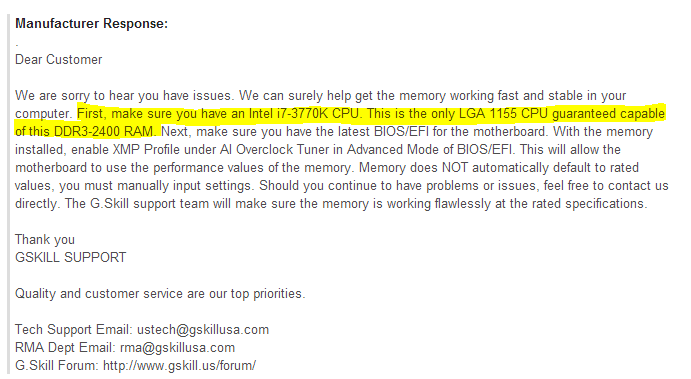
From the manufacturer itself, we can clearly read: (This one is from newegg. I was just reading reviews about these RAMs):
yii8lAb.png
 

My Computer

Computer type
PC/Desktop
OS
Windows 7 64-bit
CPU
i7 3770k
Motherboard
Z77A-G45 Gaming
Memory
16GB G.Skill Trident X
Graphics Card(s)
GTX 770
Monitor(s) Displays
Philips 248 CLH
Screen Resolution
1920x1080
Hard Drives
SSD 120GB PQI
2TB HDD
4TB HDD
PSU
XFX Pro Black Edition 1050w
Case
Cooler Master HAF 912 Plus
Cooling
Thermaltake water 2.0
Keyboard
Razer Lycosa
Mouse
A4tech Bloody v7
Internet Speed
40mb
Antivirus
Avast Free
Browser
Google Chrome
Hello nokturrduk84. Welcome to the forum.

You are not overclocking your CPU - true. But you are "overclocking" your RAM.

See here:
View attachment 298254

Your system board is design to run at 1066 and 1333MHz natively. Those * mean that the board can be "overclocked" to run faster RAM up to and including the speeds listed. But, you are not guaranteed that you can get those higher speeds, only that they are possible.

So why can't you run at 2400? Could be a few reasons:

  • You got bad RAM. Your RAM modules where supposed to be tested by the manufacturer and proven to run stable at speeds just over 2400MHz. But stuff happens and you can get defective RAM. You can run tests like Memtest86+ - Advanced Memory Diagnostic Tool to see if there is anything obviously wrong, but often it is just a case of the product not living up to it's advertised standard. It will run fine at the slower speed.
  • If your RAM is XMP rated, then you can have better results by going into your UEFI/BIOS settings and changing the RAM tuner to XMP. This will allow the motherboard to switch to the RAM's Rated speed automatically.
  • If you are manually changing the UEFI/BIOS settings then you may be setting something outside of the acceptable parameters. You need to try again.
Always a good idea when playing with overclocking anything to reset the BIOS defaults and try again. Sometimes just changing things one after another just leaves a tangled mess.


One small note: none of these problems have anything to do with Windows. This is purely a system issue.
If you contacted the RAM manufacturer and they really said "they don't know why it happens" then they were blowing you off. What they meant was "we are not going to do tech support and overclock your system for you".

Hi,
Actually I wanted to say that they run on 2400mhz stable except sleep issue. I ran memtest and windows memory diagnostic tools & they say no error. Also I have 2 kits. I tested them separably & they both do the same. They can't be both defective.
I also should note in my first post, that I'm enabling XMP for them & they run on their recommended settings. I reseted bios & tried again, but the same happens.
Maybe I am missing something in my bios & I need to change something, but I don't know what... So if it happens only during sleep/hibernation it maybe be some power/voltage issue? I don't know. I'm not good in overclocking :(
Until I don't find solution, I won't use the sleep function.

It is in fact very possible it could be a voltage issue where your psu is not supplying enough juice to the ram slots on the motherboard. And like one of the others mentioned as well; it could very well be a issue with the motherboard itself such as the controllers/hardware that control the flow of what ram gets allocated to what resource(s) etc.
 

My Computer

Computer type
PC/Desktop
Computer Manufacturer/Model Number
custom built
OS
Windows 7 ultimate 64-bit
CPU
Intel I7 2600K 3.4ghz
Motherboard
Asus Evo P8P67
Memory
Corsair 16gb ddr3 1600mhz
Graphics Card(s)
Nvidia Geforce gt 430
Sound Card
Sound Blaster Titanium x-fi pci express
Monitor(s) Displays
Dell E198WFP
Hard Drives
1 western digital 2TB drive.
PSU
Antec 1200 watt
Case
Inwin Dragon Rider
Cooling
6 case supplied cooling fans
Keyboard
logitech mk700
Mouse
logitech m705
Internet Speed
25-50mbps download; 10mbps upload(i think)
Antivirus
avg free 2014
Browser
mozilla firefox
Other Info
Also have a pretty bad speaker setup which is a klipsch promedia 5.1 surround speaker setup with huge subwoofer and lg blu ray player/writer. Also a hp officejet pro 8600 plus wireless all in one and a logitech s7500 webcam.
nokturrduk84 I understand that G-Skill says that but what does Intel say?
It's a trial and error and will very form cpu to cpu, motherboard to motherboard.

What Windows 7 are you using?
As of now I don't understand why every thing else is happy at 2400 except Sleep.

From post #1

"All settings were reset to default values.
The previous overclock settings have failed, system has been restored to it's default settings.
Press F1 to run settings
Press F2 to load default values and run setup.
Do you have a problem running your ram at a slower speed?

If I decrease speed of those RAMs to 1600mhz, then this problem disappears, but I don't want to run my RAMs on a low speed, if I wanted so, then I would buy some 1600mhz RAMs instead of 2400mhz.

Seem like lower speeds work just fine.
You can work your ram speed up in small amount until the system complains then drop back a little from that.
Just because you want 2400 doesn't mean the system will allow it to happen.
 

My Computer

Computer type
PC/Desktop
Computer Manufacturer/Model Number
Home made Desktop
OS
Windows 10 Pro. 64/ version 1709 Windows 7 Pro/64
CPU
Intel i7-6800K @ 4.3
Motherboard
ASUS X-99 Deluxe II
Memory
Corsair Platinum 16 gig @2400
Graphics Card(s)
EVGA GTX 1070 OC
Monitor(s) Displays
Asus 27" LED LCD/VE278Q
Screen Resolution
1920-1080 or 1280-720 HDMI
Hard Drives
INTEL SSD 730-240 Gb Sata 3.0/
PSU
EVGA Platium 1200W
Case
Phanteks Luxe Tempered Glass 8 fans/ one radiator
Cooling
XSPC/ Water Cooled CPU
Keyboard
Das 4 Professional
Mouse
Logitech M705/MX Anywhere 2-S
Internet Speed
100 mbits
Antivirus
Microsoft Security Essentials/ Malwarebytes Premium 3.0/ SAS
Browser
I.E. 11 default/Firefox/ ISP Time Warner Cable/Spectrum
Other Info
LG BluRay Burner/
Sound system-KLipsch-THX/
Icy Dock ssd Hot Swap bays.
nokturrduk84 I understand that G-Skill says that but what does Intel say?
It's a trial and error and will very form cpu to cpu, motherboard to motherboard.

What Windows 7 are you using?
As of now I don't understand why every thing else is happy at 2400 except Sleep.

From post #1

"All settings were reset to default values.
The previous overclock settings have failed, system has been restored to it's default settings.
Press F1 to run settings
Press F2 to load default values and run setup.
Do you have a problem running your ram at a slower speed?

If I decrease speed of those RAMs to 1600mhz, then this problem disappears, but I don't want to run my RAMs on a low speed, if I wanted so, then I would buy some 1600mhz RAMs instead of 2400mhz.

Seem like lower speeds work just fine.
You can work your ram speed up in small amount until the system complains then drop back a little from that.
Just because you want 2400 doesn't mean the system will allow it to happen.

Windows 7 64-bit ulltimate. Yep, that's very strange, why everything else is happy except sleep, I don't understand either. I will try to get in contact to intel now. Let's see what they say.
 

My Computer

Computer type
PC/Desktop
OS
Windows 7 64-bit
CPU
i7 3770k
Motherboard
Z77A-G45 Gaming
Memory
16GB G.Skill Trident X
Graphics Card(s)
GTX 770
Monitor(s) Displays
Philips 248 CLH
Screen Resolution
1920x1080
Hard Drives
SSD 120GB PQI
2TB HDD
4TB HDD
PSU
XFX Pro Black Edition 1050w
Case
Cooler Master HAF 912 Plus
Cooling
Thermaltake water 2.0
Keyboard
Razer Lycosa
Mouse
A4tech Bloody v7
Internet Speed
40mb
Antivirus
Avast Free
Browser
Google Chrome
First off sleep issues are usually not associated with RAM issues, yeah anything is possible, but highly unlikely, but...

As for the Speed of the RAM, it does depend RAM, CPU, & MB. I for example have 32gig of Corsair's Dominator Platinum's which runs at 1866 natively, but I've also got both a processor (i7-4770K) and MB (z87 chipset) to support this configuration. And yes, the modules are set to XMP mode, (for now).

Anyway I kind of hate the word "overclock" when it comes to high end RAM modules because the old specs says anything above 1066MHz is overclocked, whereas as today's RAM modules are far surpassing that spec. So to me, they need to get rid of the "overclock" designation for modules natively running above the stated 1066MHz mark.

That said, having just built a new system (see specs) I too am having sleep issues with 32gig of RAM running at 1866MHz on Windows 8.1 so I'll look into the high megahertz angle, but I'm 99.99 percent sure it's either hardware (other than RAM), or a driver issue.

Lastly, I've seen the sort of behavior the OP describes where a machine sometimes restarts when overclocked, so in the OP's case, being that his CPU (and mine) doesn't "officially" support 2400MHz RAM, the system may be by definition overclocked, and thus some boards will go through a kind of "check" process by booting a few times to insure the OC is stable. I've read about this issue a few times at the Gigabyte forums, and experienced it myself. Why???? :confused:

My two cents.
 

My Computer

Computer type
PC/Desktop
Computer Manufacturer/Model Number
Custom built by me.
OS
Windows 10 Pro
CPU
Intel Core i7-4770K (3.5Ghz)
Motherboard
Gigabyte G1 Sniper 5 (F10 Bios)
Memory
32 gig Corsair Dominator Platinum (4x8Gig)
Graphics Card(s)
Sapphire Tri-X R9 Fury
Sound Card
Soundblaster ZXR
Monitor(s) Displays
NEC PA242W 24" LCD Monitor
Screen Resolution
1920 x 1200
Hard Drives
Primary - Samsung 850 Pro (512gig), Samsung 840 Pro (256gig), 2TB WD Caviar Black.
PSU
EVGA Supernova 1000 G2
Case
Cooler Master HAF X
Cooling
Corsair H100i with Corsair Air Series SP120 Quiet Fans
Keyboard
Logitech Wireless Wave
Mouse
Logitech Performance MX
Internet Speed
High Speed Cable
Antivirus
Norton Security
Browser
IE11
Other Info
Memory Timings - 1866MHz @ 9-9-9-27-1T @ 1.5 volts
I do not have a technical explanation as to why this might be happening, but since Sleep mode involves dumping the open desktop into RAM and then going into a low power state in order to keep the IC's active, then it makes sense to me that any hiccup involving RAM is going to cause an error in the process.

On the "overclocking" subject (which I always put in quotations when discussing RAM because I agree it is not to be confused with 'real' CPU overclocking) It is my understanding that most currently produced RAM modules running over 1600MHZ are technically "overclocked".

This is because the IC's (those chips on the memory module) have a natural (Real Clock) speed that does not change.

Most DDR3 RAM produced today is manufactured with chips that have a Real Clock speed of either 400MHz, 533MHz, and 666MHz. Recently 800MHz chips were introduced and readily available. These, I believe, are the fastest RAM chips available at reasonable prices today.

So Double Data Rate (DDR) Ram has a "DDR Clock" that is double the Real Clock, so 800MHz chips run at 1600MHz in the system naturally. These modules are rated PC3-12800 because at these speeds they should produce a theoretical maximum transfer rate of 12,800 MB/sec.

So my understanding is that most currently produced consumer RAM modules running over 1600MHz must be technically "overclocked" using multipliers and voltage variations in order to achieve these kinds of speed increases.

But things are always changing fast and there are always new stuff coming along. You can now buy high end enthusiast RAM modules with real clock speeds of 1066MHz.
Micron Unleashes World's Fastest DDR3 Memory Chips - X-bit labs
(I have not seen any motherboards that use these ball-grid array modules though. Have you?)

EDIT: Changing even faster - and prices coming down to mere ridiculous!
http://www.newegg.com/Product/Product.aspx?Item=N82E16820211804
 

My Computer

Computer type
PC/Desktop
Computer Manufacturer/Model Number
Home Built - Jan 2013
OS
Windows 7 64 Bit Home Premium SP1
CPU
i7-3820
Motherboard
Asus P9X79-PRO - Bios 4608
Memory
GSkill F3-14900CL9Q - 16GB
Graphics Card(s)
EVGA GeForce GTX660 - Driver 352.86
Sound Card
On board Realtek ALC898
Monitor(s) Displays
Acer S271HL
Screen Resolution
1920 x 1080
Hard Drives
#1- Samsung 840 Pro Series
#2- Western Digital WD1002FAEX Sata3 Black
#3- Western Digital WD1002FAEX Sata3 Black
PSU
Corsair CMPSU-850TX-V2 - 850 watt (by Seasonic)
Case
Corsair Obsidian 550D
Cooling
Standard 3 120mm case fans, Cooler Master Hyper 212 EVO
Keyboard
MS KC-0405
Mouse
Intellimouse 5-button
Internet Speed
56 Mbits/Sec (on a good day)
Antivirus
Avast & Malwarebytes
Browser
Firefox
Other Info
Asus DVD - DRW-24B1ST 24X
Anyway I kind of hate the word "overclock" when it comes to high end RAM modules because the old specs says anything above 1066MHz is overclocked, whereas as today's RAM modules are far surpassing that spec. So to me, they need to get rid of the "overclock" designation for modules natively running above the stated 1066MHz mark.

On the "overclocking" subject (which I always put in quotations when discussing RAM because I agree it is not to be confused with 'real' CPU overclocking) It is my understanding that most currently produced RAM modules running over 1600MHZ are technically "overclocked".

So my understanding is that most currently produced consumer RAM modules running over 1600MHz must be technically "overclocked" using multipliers and voltage variations in order to achieve these kinds of speed increases.

The point I make is I do not agree this should be the case any longer.

I do not have a technical explanation as to why this might be happening, but since Sleep mode involves dumping the open desktop into RAM and then going into a low power state in order to keep the IC's active, then it makes sense to me that any hiccup involving RAM is going to cause an error in the process.

As far as restarts during boot process, yes, sometimes overclocked systems will do this, why? :confused:

With regards to sleep issues... again, while anything is possible, I feel it is more likely a driver or power plan issue as opposed to overclocked RAM. My experience, as well as others is that we've had "overclocked" RAM for years and never had sleep issues. But, anything is possible so...

Point is you'd better look at the drivers and other stuff as well, otherwise you could be chasing something that's not even an issue.

With that, I'd look at the power plan settings as well - http://www.sevenforums.com/tutorials/778-power-plan-settings-change.html
 

My Computer

Computer type
PC/Desktop
Computer Manufacturer/Model Number
Custom built by me.
OS
Windows 10 Pro
CPU
Intel Core i7-4770K (3.5Ghz)
Motherboard
Gigabyte G1 Sniper 5 (F10 Bios)
Memory
32 gig Corsair Dominator Platinum (4x8Gig)
Graphics Card(s)
Sapphire Tri-X R9 Fury
Sound Card
Soundblaster ZXR
Monitor(s) Displays
NEC PA242W 24" LCD Monitor
Screen Resolution
1920 x 1200
Hard Drives
Primary - Samsung 850 Pro (512gig), Samsung 840 Pro (256gig), 2TB WD Caviar Black.
PSU
EVGA Supernova 1000 G2
Case
Cooler Master HAF X
Cooling
Corsair H100i with Corsair Air Series SP120 Quiet Fans
Keyboard
Logitech Wireless Wave
Mouse
Logitech Performance MX
Internet Speed
High Speed Cable
Antivirus
Norton Security
Browser
IE11
Other Info
Memory Timings - 1866MHz @ 9-9-9-27-1T @ 1.5 volts
Anyway I kind of hate the word "overclock" when it comes to high end RAM modules because the old specs says anything above 1066MHz is overclocked, whereas as today's RAM modules are far surpassing that spec. So to me, they need to get rid of the "overclock" designation for modules natively running above the stated 1066MHz mark.

On the "overclocking" subject (which I always put in quotations when discussing RAM because I agree it is not to be confused with 'real' CPU overclocking) It is my understanding that most currently produced RAM modules running over 1600MHZ are technically "overclocked".

So my understanding is that most currently produced consumer RAM modules running over 1600MHz must be technically "overclocked" using multipliers and voltage variations in order to achieve these kinds of speed increases.

The point I make is I do not agree this should be the case any longer.

I do not have a technical explanation as to why this might be happening, but since Sleep mode involves dumping the open desktop into RAM and then going into a low power state in order to keep the IC's active, then it makes sense to me that any hiccup involving RAM is going to cause an error in the process.

As far as restarts during boot process, yes, sometimes overclocked systems will do this, why? :confused:

With regards to sleep issues... again, while anything is possible, I feel it is more likely a driver or power plan issue as opposed to overclocked RAM. My experience, as well as others is that we've had "overclocked" RAM for years and never had sleep issues. But, anything is possible so...

Point is you'd better look at the drivers and other stuff as well, otherwise you could be chasing something that's not even an issue.

With that, I'd look at the power plan settings as well - http://www.sevenforums.com/tutorials/778-power-plan-settings-change.html

I played with that too, changed from balanced to high performance, but it didn't help.

Is there something in Windows 7, where I can set sleep as a shutdown? I mean to enable sleep, but when PC goes in sleep, instead it gonna go to shutdown. Is there something?
Cause sometimes I like to leave my PC & go to sleep myself & I want it to shutdown after 1 or 2 hours of idling.
 

My Computer

Computer type
PC/Desktop
OS
Windows 7 64-bit
CPU
i7 3770k
Motherboard
Z77A-G45 Gaming
Memory
16GB G.Skill Trident X
Graphics Card(s)
GTX 770
Monitor(s) Displays
Philips 248 CLH
Screen Resolution
1920x1080
Hard Drives
SSD 120GB PQI
2TB HDD
4TB HDD
PSU
XFX Pro Black Edition 1050w
Case
Cooler Master HAF 912 Plus
Cooling
Thermaltake water 2.0
Keyboard
Razer Lycosa
Mouse
A4tech Bloody v7
Internet Speed
40mb
Antivirus
Avast Free
Browser
Google Chrome
I don't use sleep. With the 5 sec. it takes to shut down and less that 40 sec to start up cold I see no reason for its use.
I also with my systems might have a sleep problem if I ever used it.
I really don't know.
 

My Computer

Computer type
PC/Desktop
Computer Manufacturer/Model Number
Home made Desktop
OS
Windows 10 Pro. 64/ version 1709 Windows 7 Pro/64
CPU
Intel i7-6800K @ 4.3
Motherboard
ASUS X-99 Deluxe II
Memory
Corsair Platinum 16 gig @2400
Graphics Card(s)
EVGA GTX 1070 OC
Monitor(s) Displays
Asus 27" LED LCD/VE278Q
Screen Resolution
1920-1080 or 1280-720 HDMI
Hard Drives
INTEL SSD 730-240 Gb Sata 3.0/
PSU
EVGA Platium 1200W
Case
Phanteks Luxe Tempered Glass 8 fans/ one radiator
Cooling
XSPC/ Water Cooled CPU
Keyboard
Das 4 Professional
Mouse
Logitech M705/MX Anywhere 2-S
Internet Speed
100 mbits
Antivirus
Microsoft Security Essentials/ Malwarebytes Premium 3.0/ SAS
Browser
I.E. 11 default/Firefox/ ISP Time Warner Cable/Spectrum
Other Info
LG BluRay Burner/
Sound system-KLipsch-THX/
Icy Dock ssd Hot Swap bays.
I don't use sleep. With the 5 sec. it takes to shut down and less that 40 sec to start up cold I see no reason for its use.
I also with my systems might have a sleep problem if I ever used it.
I really don't know.

I see you have the same RAMs as me :)
 

My Computer

Computer type
PC/Desktop
OS
Windows 7 64-bit
CPU
i7 3770k
Motherboard
Z77A-G45 Gaming
Memory
16GB G.Skill Trident X
Graphics Card(s)
GTX 770
Monitor(s) Displays
Philips 248 CLH
Screen Resolution
1920x1080
Hard Drives
SSD 120GB PQI
2TB HDD
4TB HDD
PSU
XFX Pro Black Edition 1050w
Case
Cooler Master HAF 912 Plus
Cooling
Thermaltake water 2.0
Keyboard
Razer Lycosa
Mouse
A4tech Bloody v7
Internet Speed
40mb
Antivirus
Avast Free
Browser
Google Chrome
I guess the key to this is the previous statement in which you say that when you turn the RAM speed down to 1600 the PC sleeps fine, but when you increase it to 2400 the PC won't sleep.

@sygnus21
"As far as restarts during boot process, yes, sometimes overclocked systems will do this, why? :confused:"

My understanding is that this has to do with the series of checks the BIOS makes during the boot process, particularly the POST.
Any inconsistency from expectation is going to make the boot process fail. I'm not familiar with the specifics of a CPU parameter, RAM test, or checksum, but I know that everything must check out as expected before the system will hand off to the Boot Manager.
I believe that is what they mean when they talk about a "stable overclock". You've got to limit your changes so that the system as a whole stays within that acceptable range of test results during POST.
 

My Computer

Computer type
PC/Desktop
Computer Manufacturer/Model Number
Home Built - Jan 2013
OS
Windows 7 64 Bit Home Premium SP1
CPU
i7-3820
Motherboard
Asus P9X79-PRO - Bios 4608
Memory
GSkill F3-14900CL9Q - 16GB
Graphics Card(s)
EVGA GeForce GTX660 - Driver 352.86
Sound Card
On board Realtek ALC898
Monitor(s) Displays
Acer S271HL
Screen Resolution
1920 x 1080
Hard Drives
#1- Samsung 840 Pro Series
#2- Western Digital WD1002FAEX Sata3 Black
#3- Western Digital WD1002FAEX Sata3 Black
PSU
Corsair CMPSU-850TX-V2 - 850 watt (by Seasonic)
Case
Corsair Obsidian 550D
Cooling
Standard 3 120mm case fans, Cooler Master Hyper 212 EVO
Keyboard
MS KC-0405
Mouse
Intellimouse 5-button
Internet Speed
56 Mbits/Sec (on a good day)
Antivirus
Avast & Malwarebytes
Browser
Firefox
Other Info
Asus DVD - DRW-24B1ST 24X
I played with that too, changed from balanced to high performance, but it didn't help.

Is there something in Windows 7, where I can set sleep as a shutdown? I mean to enable sleep, but when PC goes in sleep, instead it gonna go to shutdown. Is there something?
Cause sometimes I like to leave my PC & go to sleep myself & I want it to shutdown after 1 or 2 hours of idling.

I gave you a link, you need to look around in the power settings are make sure things are set correctly. I also suggested looking at drivers, even to the point of making sure you have the latest ones. I'd also add that you should make sure you have all of Win 7's critical updates as well.

Oh, and BTW, moving to "high performance" would be counter to sleep as you're basically telling the system to run full bore all the time. So if you're having sleep issues, you DO NOT want high performance. Again, actually read through the link I provided for Power Plan settings!

Diagnosing sleep issues isn't easy and requires a lot of trial and error as well as patience. I know, I'm having issues with my Win 8.1 setup, which also refuses to sleep :(

For me, I've narrowed it down to either my GPU beta drivers, or my audio card drivers which aren't Win 8.1 supported yet :mad:

I guess the key to this is the previous statement in which you say that when you turn the RAM speed down to 1600 the PC sleeps fine, but when you increase it to 2400 the PC won't sleep.

Hmmm.... I missed that one, but yeah, it is weird, and yeah, the RAM should be looked at in this instance. But if that's the case, I suspect the RAM isn't capable of running at (sustaining) those speeds, or you have a bad stick(s).

@sygnus21
"As far as restarts during boot process, yes, sometimes overclocked systems will do this, why? :confused:"

My understanding is that this has to do with the series of checks the BIOS makes during the boot process, particularly the POST.
Any inconsistency from expectation is going to make the boot process fail. I'm not familiar with the specifics of a CPU parameter, RAM test, or checksum, but I know that everything must check out as expected before the system will hand off to the Boot Manager.
I believe that is what they mean when they talk about a "stable overclock". You've got to limit your changes so that the system as a whole stays within that acceptable range of test results during POST.

Agree; but even "stable" systems will show this behavior at times as was discussed at Gigabyte's forums a few years back. Sounds weird to me too, but... :confused:
 

My Computer

Computer type
PC/Desktop
Computer Manufacturer/Model Number
Custom built by me.
OS
Windows 10 Pro
CPU
Intel Core i7-4770K (3.5Ghz)
Motherboard
Gigabyte G1 Sniper 5 (F10 Bios)
Memory
32 gig Corsair Dominator Platinum (4x8Gig)
Graphics Card(s)
Sapphire Tri-X R9 Fury
Sound Card
Soundblaster ZXR
Monitor(s) Displays
NEC PA242W 24" LCD Monitor
Screen Resolution
1920 x 1200
Hard Drives
Primary - Samsung 850 Pro (512gig), Samsung 840 Pro (256gig), 2TB WD Caviar Black.
PSU
EVGA Supernova 1000 G2
Case
Cooler Master HAF X
Cooling
Corsair H100i with Corsair Air Series SP120 Quiet Fans
Keyboard
Logitech Wireless Wave
Mouse
Logitech Performance MX
Internet Speed
High Speed Cable
Antivirus
Norton Security
Browser
IE11
Other Info
Memory Timings - 1866MHz @ 9-9-9-27-1T @ 1.5 volts
Back
Top