Icons do not Display After Moving Programs to Other Partition

I Am User

New member
Local time
10:36 PM
Messages
32
Location
Current: Ljubljana, Slovenia
Hello users of Windows Seven Forums! I am User!

I am having a problem which I actually caused myself, and now do not know how to fix.

I will write the short version and the long version.

SHORT VERSION:
What Happened: New PC with HDD and SSD. Windows on SSD. HDD with multiple partitions, later wanted it to be only one. made nw partition, and copy-pasted everything there, including the programs and games.
Consequences: They all work propperly, but icons don't display. Instead, most programs have a white paper icon. Not just those which I moved, also the ones on SSD. Also, when new prog. is installed the also have wrong icon.
How I tried to fix this: I tried properties>change icon.. way, didn't work; tried reinstalling the programs; did something with task manager to clear icon cache (I think); and also tried cleaning/repairing the registry with TuneUp Utilities. Nothing worked.

For details, please read the
LONG VERSION

What happened:
I built myself a computer with an SSD and an HDD in it. On the SSD I got my Windows (7) installed, and on the HDD I made several partitions ('Media', 'Programs', 'Games', 'Stuff'). I also installed some often-used programs on the SSD, but most went to the HDD. Then, I realized that I often have to copy-paste/move files from one partition to another, and since they are separate partitions this takes more time. So, I decided to make one partition for the whole HDD and make folders inside of it for my Media, Games, etc. And so I did, I created a new H:/ partition, moved everything to the appropriate place, removed old partitions, and expanded this one to the whole HDD. How I moved programs: copy-paste. Yes, I just copied the whole 'Program Files' to the new partition. I read somewhere that programs do not hav0+e problems with this, but later realized that whoever wrote that was mistaking.

Consequences:
All the programs and Games that I moved work perfectly, but the icons don't.
Most of my programs now display a 'blank white paper' icon. Not only the ones I copy-pasted, but also some which were on the SSD and stayed there the whole time. ALSO, not only the programs which I installed before the moving, but also now when I install any program, anywhere, it has a blank paper icon.

Like this (Desktop):

HydyQ6Q.png


Also in Start Menu:

jdailMY.png

All papers! It's so annoying!

What I noticed afterwards is, that even on the install folder where the original .exe files of these programs are, even the .exe themselves have this paper icon:

YgqlV1p.png


How I tried to fix this:
#1:
The first thing I did was right click >Properties>'Shortcut' Tab>Change Icon...
I get this:
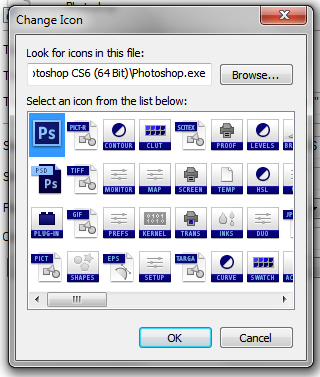
QaZfaOy.png


The first icon is the default one that should be displayed, so I click on it and click OK. But, the icon on the Desktop/StartMenu/InstallFolder (tried everywhere) still stays the paper icon. The other icons work, but not the first one, the default one.

#2:
I tried reinstalling the program, changing the icon afterwards in the properties, but still nothing.

#3:
I tried something with ending explorer.exe in task manager then giving some command to delete icon cache or something.. I'm not sure; I found it on another forum.

#4:
I tried using TuneUp Utilities to clean/fix my registry, as someone on another forum suggested me to do. I did so, and there was even a special option to fix 'icons not displaying properly', but unfortunately even this did not work for me.

-- Then I started trying the most dumb things, just in case.. like running as admin, running in different compatibility modes..

Help me:
This has been going on for a few months already, and I just couldn't find any solution; and neither could anyone who tried to help me. This is the first time I explain in full detail what the problem is.
What I thought of is that I could reinstall my Windows, and then reinstall all the programs too (which would be a real pain in the butt, because I have a lot of stuff).
But then, a previous problem would motivate me to spend time on reinstalling Windows, and that problem is:
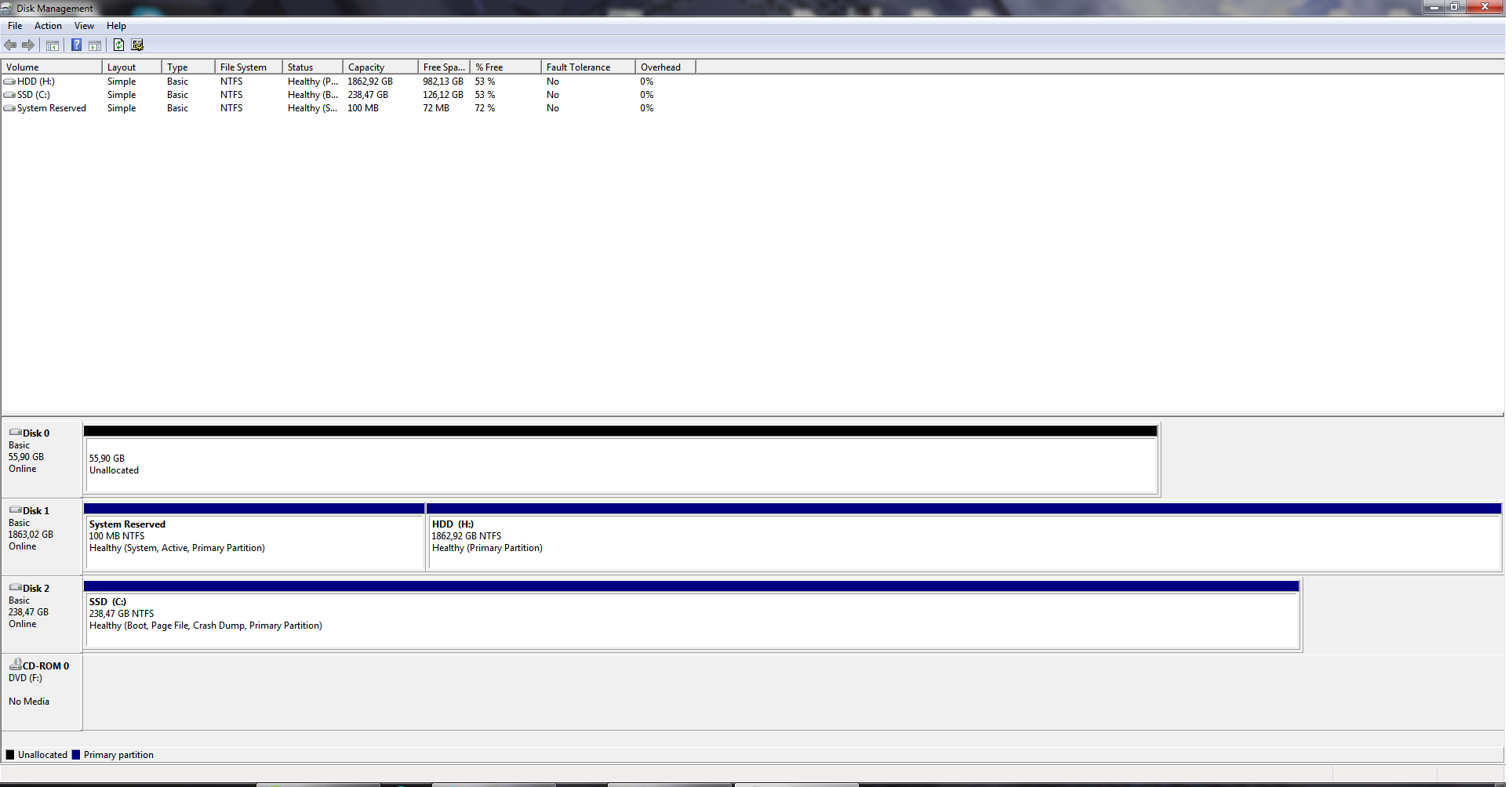
when the guys in the shop were building my comp. they did a messy job. I found a 100MB piece called 'System Reserved' - on my HDD - and Windows is installed on the SSD!
The description of this little 'partition' says: 'Healthy (System, Active, Primary Partition)'. This does not cause any problems, people say, and I only cannot remove my HDD now. But it would be better if it was together with othe Windows stuff on the SSD. But this is not the main problem now.

So please, super please, try to help me solve this, because this is really annoying, especially when I open the wrong program on the Taskbar..

HUGE thanks to anyone who solves this, or at least helps a little bit.

-User
 

My Computer My Computer

At a glance

Windows 7 Home Premium 64bitIntel i7 3770kG.Skill RipjawsX 16GB (8GB x2) @1600MHzNvidia GeForce GTX 670 (EVGA)
Computer type
PC/Desktop
Computer Manufacturer/Model Number
Custom build
OS
Windows 7 Home Premium 64bit
CPU
Intel i7 3770k
Motherboard
Gigabyte GA-Z77X-UD5H
Memory
G.Skill RipjawsX 16GB (8GB x2) @1600MHz
Graphics Card(s)
Nvidia GeForce GTX 670 (EVGA)
Sound Card
Realtek ALC898 [onboard]
Monitor(s) Displays
Philips 273E-LH
Screen Resolution
1080p
Hard Drives
WD Black - 2TB
Samsung 840 Pro - 256GB
PSU
Corsair HX850
Case
Cooler Master Storm Trooper
Cooling
Noctua NH-U9B SE2
Keyboard
Corsair K70 RGB
Mouse
Roccat Kone XTD
Internet Speed
DL: ~120Mbps; UL: ~4Mbps
Antivirus
Bitdefender
Browser
Mozilla Firefox

My Computer My Computer

At a glance

Windows 10 Pro x64Intel Core i7 6700KGSkill TridentZ RGB 16GB 3600 16-16-16-36EVGA GTX 980 Ti SC x2
Computer type
PC/Desktop
Computer Manufacturer/Model Number
Skylake Special #666
OS
Windows 10 Pro x64
CPU
Intel Core i7 6700K
Motherboard
Asus Sabertooth Z170 Mark 1
Memory
GSkill TridentZ RGB 16GB 3600 16-16-16-36
Graphics Card(s)
EVGA GTX 980 Ti SC x2
Sound Card
Realtek High Definition
Monitor(s) Displays
AOC G2460PG
Screen Resolution
1920 x 1080 144Hz
Hard Drives
Samsung 860 Pro 256GB, Seagate Barracuda 4TB x2
PSU
EVGA 1000 P2, EVGA White Custom Braided Cables
Case
Corsair Vengeance C70 Gunmetal Black
Cooling
Corsair H100i v2, Corsair ML120 x2, Thermal Grizzly Kryonaut
Keyboard
Logitech G910 Orion Spectrum
Mouse
Logitech G700s
Internet Speed
Verizon Fios Quantum Gateway 75/75
Antivirus
Windows Defender, Malwarebytes Free 3.8.3
Browser
Chrome
Other Info
Corsair SP120 x4, LG Blu-ray Drive, Durabrand HT-395 100 Watt Dolby Digital Amp, Corsair H2100 Wireless 7.1 Headset
#4:
I tried using TuneUp Utilities to clean/fix my registry, as someone on another forum suggested me to do. I did so, and there was even a special option to fix 'icons not displaying properly', but unfortunately even this did not work for me.
Oh shoot, I was gonna suggest this.

First off, kudos on a well-formatted post/question. Appreciate your tl;dr as well. :)

I used to rebuild icon cache with IconTweaker all the time. It's an old program, but see if you can get something from it. Good luck!
 

My Computer My Computer

At a glance

Windows 7 Professional SP1 x64 (OEM)Intel® Core™ i5 2430M/2410M ProcessorDDR3 1333 SODIMM (8GB)NVIDIA® GeForce® GT 555M (2GB)
Computer type
Laptop
Computer Manufacturer/Model Number
ASUS N45SF
OS
Windows 7 Professional SP1 x64 (OEM)
CPU
Intel® Core™ i5 2430M/2410M Processor
Motherboard
Intel® HM65 Express Chipset
Memory
DDR3 1333 SODIMM (8GB)
Graphics Card(s)
NVIDIA® GeForce® GT 555M (2GB)
Sound Card
Realtek High Definition Audio
Monitor(s) Displays
14.0" LED Backlight
Screen Resolution
16:9 HD (1366x768)
Hard Drives
640GB Seagate (internal), 1TB Toshiba Canvio Portable, 2TB x 2 WD My Book Essential (external)
Antivirus
Malwarebytes Anti-Malware Home (Premium)
Browser
Waterfox
Other Info
Optical Drive: Slimtype DVD A DS8A5SH (Super-Multi DVD);
Audio: Bang & Olufsen ICEpower®, SonicMaster
firstly follow the destructions on this page http://www.sevenforums.com/tutorials/10797-thumbnail-cache-clear-reset.html

if that doesnt work, click start>all programs then right click command prompt and click run as administrator.

At the prompt type:- taskkill /im explorer.exe /f press enter
(Your desktop will go blank)

Now type each line and press enter after each line.
Note the spaces.

CD %USERPROFILE%\AppData\Local

attrib -h IconCache.db

del IconCache.db

shutdown/r
 

My Computer My Computer

At a glance

Windows 7 Ultimate x64, & Mac OS X 10.9.2Intel Core i5 2500kCorsair Vengence 8gb 1866mhzNvidia GTX 770 OC
Computer type
PC/Desktop
Computer Manufacturer/Model Number
Built by badgers!!!
OS
Windows 7 Ultimate x64, & Mac OS X 10.9.2
CPU
Intel Core i5 2500k
Motherboard
Asus P8z68 LE
Memory
Corsair Vengence 8gb 1866mhz
Graphics Card(s)
Nvidia GTX 770 OC
Monitor(s) Displays
2x ASUS LED 22" IPS
Screen Resolution
3840x1080
Hard Drives
240GB Crucial M500 SSD
120gb Corsair Force 3 SSD
1TB Western Digital
PSU
Corsair HX650w Modular
Case
Corsair Air 540
Cooling
Corsair H60 Push/Pull
Keyboard
Corsair K70/ Logitech G27 wheel
Mouse
Saitek R.A.T 9
Internet Speed
Too slow!
Other Info
AMD fusion E350N Home server-Windows Home Server 2011 (also made by badgers!)
2011 Macbook 2.4ghz Core2Duo, 4gb ddr3, 120gb Ocz Vertex SSD
Unfortunately..

http://www.sevenforums.com/tutorials/49819-icon-cache-rebuild.html

But you may have to start re installing the programs to get your icons to show up properly.

That is after you un install them and remove every folder and registry setting left behind.

Did that, and cleaned registry, and reinstalled.. no fix

---

It's 'not available for my version of windows'.. perhaps that thing's too old?
Thanks for trying to help tho.

firstly follow the destructions on this page http://www.sevenforums.com/tutorials/10797-thumbnail-cache-clear-reset.html

if that doesnt work, click start>all programs then right click command prompt and click run as administrator.

[...]

Tried both, but nope.. thanks

----

I also tried this: http://www.sevenforums.com/tutorials/19449-default-file-type-associations-restore.html

paper icons only appear for .exe files and .zip files. I see all other icons, e.g. .txt lined papers, folder icons, the little image icons beside images, etc.
.. and some rare .exe-s display their icons properly.. (chrome, notepad, my computer..)

hmm.. only the system stuff that comes with the PC is right.. but then, chrome was installed later and it still displays its icon :sarc: -- everything else that is installed separately has paper icons...

I cleaned/fixed my registry twice already, but nothing.
Also, apparently clearing and rebuilding icon cache doesn't help..
Now I'm defragmenting my HDD with TuneUp utilities. I'll see if this helps (don't know why it would).

Thanks to all for replying, and please give more suggestions.. if you have any.
Rep to everyone :)
 

My Computer My Computer

At a glance

Windows 7 Home Premium 64bitIntel i7 3770kG.Skill RipjawsX 16GB (8GB x2) @1600MHzNvidia GeForce GTX 670 (EVGA)
Computer type
PC/Desktop
Computer Manufacturer/Model Number
Custom build
OS
Windows 7 Home Premium 64bit
CPU
Intel i7 3770k
Motherboard
Gigabyte GA-Z77X-UD5H
Memory
G.Skill RipjawsX 16GB (8GB x2) @1600MHz
Graphics Card(s)
Nvidia GeForce GTX 670 (EVGA)
Sound Card
Realtek ALC898 [onboard]
Monitor(s) Displays
Philips 273E-LH
Screen Resolution
1080p
Hard Drives
WD Black - 2TB
Samsung 840 Pro - 256GB
PSU
Corsair HX850
Case
Cooler Master Storm Trooper
Cooling
Noctua NH-U9B SE2
Keyboard
Corsair K70 RGB
Mouse
Roccat Kone XTD
Internet Speed
DL: ~120Mbps; UL: ~4Mbps
Antivirus
Bitdefender
Browser
Mozilla Firefox

My Computer My Computer

At a glance

Windows 7 Home Premium 64bitIntel i7 3770kG.Skill RipjawsX 16GB (8GB x2) @1600MHzNvidia GeForce GTX 670 (EVGA)
Computer type
PC/Desktop
Computer Manufacturer/Model Number
Custom build
OS
Windows 7 Home Premium 64bit
CPU
Intel i7 3770k
Motherboard
Gigabyte GA-Z77X-UD5H
Memory
G.Skill RipjawsX 16GB (8GB x2) @1600MHz
Graphics Card(s)
Nvidia GeForce GTX 670 (EVGA)
Sound Card
Realtek ALC898 [onboard]
Monitor(s) Displays
Philips 273E-LH
Screen Resolution
1080p
Hard Drives
WD Black - 2TB
Samsung 840 Pro - 256GB
PSU
Corsair HX850
Case
Cooler Master Storm Trooper
Cooling
Noctua NH-U9B SE2
Keyboard
Corsair K70 RGB
Mouse
Roccat Kone XTD
Internet Speed
DL: ~120Mbps; UL: ~4Mbps
Antivirus
Bitdefender
Browser
Mozilla Firefox
Just found this:

BatchIconExtractor:
Batch Icon Extractor - Free download and software reviews - CNET Download.com

It is a way to half-fix my problem. It extracts .ico icon files from a .exe file, which one can then use later in properties>change icon.

But like this I have to change the icon manually for every shortcut I make.

Still, the original .exe files in the installation folder of the program stays a white paper and this I cannot change manually in properties.

... thinking: if I can extract the .ico files from the .exe-s and then use them, it means they exist and work/are not corrupt or whatever! So why can't the shortcuts/.exe-s just use them while they are inside the .exe??

There must be some setting that .exe files use the icons inside themselves.

Last 2 posts are by me.. is anyone else there? Please help
 

My Computer My Computer

At a glance

Windows 7 Home Premium 64bitIntel i7 3770kG.Skill RipjawsX 16GB (8GB x2) @1600MHzNvidia GeForce GTX 670 (EVGA)
Computer type
PC/Desktop
Computer Manufacturer/Model Number
Custom build
OS
Windows 7 Home Premium 64bit
CPU
Intel i7 3770k
Motherboard
Gigabyte GA-Z77X-UD5H
Memory
G.Skill RipjawsX 16GB (8GB x2) @1600MHz
Graphics Card(s)
Nvidia GeForce GTX 670 (EVGA)
Sound Card
Realtek ALC898 [onboard]
Monitor(s) Displays
Philips 273E-LH
Screen Resolution
1080p
Hard Drives
WD Black - 2TB
Samsung 840 Pro - 256GB
PSU
Corsair HX850
Case
Cooler Master Storm Trooper
Cooling
Noctua NH-U9B SE2
Keyboard
Corsair K70 RGB
Mouse
Roccat Kone XTD
Internet Speed
DL: ~120Mbps; UL: ~4Mbps
Antivirus
Bitdefender
Browser
Mozilla Firefox
How to make applications use the first icon stored in the .exe file?

Edit: this doesnt make sense after moving to this original thread.. but meh.

This question evolved from my previous thread, which can be found here: http://www.sevenforums.com/general-...ay-after-moving-programs-other-partition.html


For all details about my problem please see that previous thread.

Basically all the .exe files on my PC (except system ones and all those which came with PC) do not use their icons which are stored inside them - instead they just have a blank paper icon (not even the default/general .exe icon).

Like this:


YgqlV1p.png


This is also happening for the shortcuts of those .exe-s.
For shortcuts: when going to properties>change icon, all icons will work except the first icon.

The first one doesn't work:


QaZfaOy.png


At first I thought these first icons were corrupt, but then I found a tool to extract the icons stored inside an .exe file, and I could later use those icons on the shortcuts. Which means they are not corrupt and can be used, but just the .exe-s and the shortcuts cannot read/use these first/default icons.

My question: How do I make .exe-s (and shortcuts for those .exe-s) use their own icons immediately, without me having to extract them and assign them?
 
Last edited:

My Computer My Computer

At a glance

Windows 7 Home Premium 64bitIntel i7 3770kG.Skill RipjawsX 16GB (8GB x2) @1600MHzNvidia GeForce GTX 670 (EVGA)
Computer type
PC/Desktop
Computer Manufacturer/Model Number
Custom build
OS
Windows 7 Home Premium 64bit
CPU
Intel i7 3770k
Motherboard
Gigabyte GA-Z77X-UD5H
Memory
G.Skill RipjawsX 16GB (8GB x2) @1600MHz
Graphics Card(s)
Nvidia GeForce GTX 670 (EVGA)
Sound Card
Realtek ALC898 [onboard]
Monitor(s) Displays
Philips 273E-LH
Screen Resolution
1080p
Hard Drives
WD Black - 2TB
Samsung 840 Pro - 256GB
PSU
Corsair HX850
Case
Cooler Master Storm Trooper
Cooling
Noctua NH-U9B SE2
Keyboard
Corsair K70 RGB
Mouse
Roccat Kone XTD
Internet Speed
DL: ~120Mbps; UL: ~4Mbps
Antivirus
Bitdefender
Browser
Mozilla Firefox
I didnt see it listed; what about doing a system restore? I am assuming you probably already tried that; correct?
 

My Computer My Computer

At a glance

Windows 7 ultimate 64-bitIntel I7 2600K 3.4ghzCorsair 16gb ddr3 1600mhzNvidia Geforce gt 430
Computer type
PC/Desktop
Computer Manufacturer/Model Number
custom built
OS
Windows 7 ultimate 64-bit
CPU
Intel I7 2600K 3.4ghz
Motherboard
Asus Evo P8P67
Memory
Corsair 16gb ddr3 1600mhz
Graphics Card(s)
Nvidia Geforce gt 430
Sound Card
Sound Blaster Titanium x-fi pci express
Monitor(s) Displays
Dell E198WFP
Hard Drives
1 western digital 2TB drive.
PSU
Antec 1200 watt
Case
Inwin Dragon Rider
Cooling
6 case supplied cooling fans
Keyboard
logitech mk700
Mouse
logitech m705
Internet Speed
25-50mbps download; 10mbps upload(i think)
Antivirus
avg free 2014
Browser
mozilla firefox
Other Info
Also have a pretty bad speaker setup which is a klipsch promedia 5.1 surround speaker setup with huge subwoofer and lg blu ray player/writer. Also a hp officejet pro 8600 plus wireless all in one and a logitech s7500 webcam.
Your whole problem started because you copy and pasted, you can`t do that with programs, they have to be installed properly.

Just bite the bullet and re install windows, you could have been done a long time ago. ;)

It sux, but hey, it`s no big deal.
 

My Computer My Computer

At a glance

Windows 10 Pro x64Intel Core i7 6700KGSkill TridentZ RGB 16GB 3600 16-16-16-36EVGA GTX 980 Ti SC x2
Computer type
PC/Desktop
Computer Manufacturer/Model Number
Skylake Special #666
OS
Windows 10 Pro x64
CPU
Intel Core i7 6700K
Motherboard
Asus Sabertooth Z170 Mark 1
Memory
GSkill TridentZ RGB 16GB 3600 16-16-16-36
Graphics Card(s)
EVGA GTX 980 Ti SC x2
Sound Card
Realtek High Definition
Monitor(s) Displays
AOC G2460PG
Screen Resolution
1920 x 1080 144Hz
Hard Drives
Samsung 860 Pro 256GB, Seagate Barracuda 4TB x2
PSU
EVGA 1000 P2, EVGA White Custom Braided Cables
Case
Corsair Vengeance C70 Gunmetal Black
Cooling
Corsair H100i v2, Corsair ML120 x2, Thermal Grizzly Kryonaut
Keyboard
Logitech G910 Orion Spectrum
Mouse
Logitech G700s
Internet Speed
Verizon Fios Quantum Gateway 75/75
Antivirus
Windows Defender, Malwarebytes Free 3.8.3
Browser
Chrome
Other Info
Corsair SP120 x4, LG Blu-ray Drive, Durabrand HT-395 100 Watt Dolby Digital Amp, Corsair H2100 Wireless 7.1 Headset
Alright..

I just thought there would be an easier way.

Edit: But would 'repairing' Windows work instead of complete reinstalation, so that I dont have to lose all the stuff?
 

My Computer My Computer

At a glance

Windows 7 Home Premium 64bitIntel i7 3770kG.Skill RipjawsX 16GB (8GB x2) @1600MHzNvidia GeForce GTX 670 (EVGA)
Computer type
PC/Desktop
Computer Manufacturer/Model Number
Custom build
OS
Windows 7 Home Premium 64bit
CPU
Intel i7 3770k
Motherboard
Gigabyte GA-Z77X-UD5H
Memory
G.Skill RipjawsX 16GB (8GB x2) @1600MHz
Graphics Card(s)
Nvidia GeForce GTX 670 (EVGA)
Sound Card
Realtek ALC898 [onboard]
Monitor(s) Displays
Philips 273E-LH
Screen Resolution
1080p
Hard Drives
WD Black - 2TB
Samsung 840 Pro - 256GB
PSU
Corsair HX850
Case
Cooler Master Storm Trooper
Cooling
Noctua NH-U9B SE2
Keyboard
Corsair K70 RGB
Mouse
Roccat Kone XTD
Internet Speed
DL: ~120Mbps; UL: ~4Mbps
Antivirus
Bitdefender
Browser
Mozilla Firefox
Loose all what stuff ? Start backing everything up, you won`t loose anything.

Could you please post a shot of disk management so we can advise you further.
 

My Computer My Computer

At a glance

Windows 10 Pro x64Intel Core i7 6700KGSkill TridentZ RGB 16GB 3600 16-16-16-36EVGA GTX 980 Ti SC x2
Computer type
PC/Desktop
Computer Manufacturer/Model Number
Skylake Special #666
OS
Windows 10 Pro x64
CPU
Intel Core i7 6700K
Motherboard
Asus Sabertooth Z170 Mark 1
Memory
GSkill TridentZ RGB 16GB 3600 16-16-16-36
Graphics Card(s)
EVGA GTX 980 Ti SC x2
Sound Card
Realtek High Definition
Monitor(s) Displays
AOC G2460PG
Screen Resolution
1920 x 1080 144Hz
Hard Drives
Samsung 860 Pro 256GB, Seagate Barracuda 4TB x2
PSU
EVGA 1000 P2, EVGA White Custom Braided Cables
Case
Corsair Vengeance C70 Gunmetal Black
Cooling
Corsair H100i v2, Corsair ML120 x2, Thermal Grizzly Kryonaut
Keyboard
Logitech G910 Orion Spectrum
Mouse
Logitech G700s
Internet Speed
Verizon Fios Quantum Gateway 75/75
Antivirus
Windows Defender, Malwarebytes Free 3.8.3
Browser
Chrome
Other Info
Corsair SP120 x4, LG Blu-ray Drive, Durabrand HT-395 100 Watt Dolby Digital Amp, Corsair H2100 Wireless 7.1 Headset
This?

Tak7oXK.png


*If you make a reinstall everything is gone. if you repair install you just repair system stuff and all programs/games/media stay.
 

My Computer My Computer

At a glance

Windows 7 Home Premium 64bitIntel i7 3770kG.Skill RipjawsX 16GB (8GB x2) @1600MHzNvidia GeForce GTX 670 (EVGA)
Computer type
PC/Desktop
Computer Manufacturer/Model Number
Custom build
OS
Windows 7 Home Premium 64bit
CPU
Intel i7 3770k
Motherboard
Gigabyte GA-Z77X-UD5H
Memory
G.Skill RipjawsX 16GB (8GB x2) @1600MHz
Graphics Card(s)
Nvidia GeForce GTX 670 (EVGA)
Sound Card
Realtek ALC898 [onboard]
Monitor(s) Displays
Philips 273E-LH
Screen Resolution
1080p
Hard Drives
WD Black - 2TB
Samsung 840 Pro - 256GB
PSU
Corsair HX850
Case
Cooler Master Storm Trooper
Cooling
Noctua NH-U9B SE2
Keyboard
Corsair K70 RGB
Mouse
Roccat Kone XTD
Internet Speed
DL: ~120Mbps; UL: ~4Mbps
Antivirus
Bitdefender
Browser
Mozilla Firefox
Your whole problem started because you copy and pasted, you can`t do that with programs, they have to be installed properly.
As mentioned by AddRAM, copying and pasting Program File folders of installed software cannot be done like you would for normal files. It will break a lot of registries. It is like an "illegal" act so to speak, hence why we have "portable"/stand-alone apps (which you can copy paste without issues).

You can try and repair Windows, but the problem may not only be there, but also in the software you copied and pasted. They can appear to work, but they can have medium-high crash risk due to the illegal transfer.

Unfortunately, it is quite probable the copy-paste broke both the OS and the programs.
 

My Computer My Computer

At a glance

Windows 7 Professional SP1 x64 (OEM)Intel® Core™ i5 2430M/2410M ProcessorDDR3 1333 SODIMM (8GB)NVIDIA® GeForce® GT 555M (2GB)
Computer type
Laptop
Computer Manufacturer/Model Number
ASUS N45SF
OS
Windows 7 Professional SP1 x64 (OEM)
CPU
Intel® Core™ i5 2430M/2410M Processor
Motherboard
Intel® HM65 Express Chipset
Memory
DDR3 1333 SODIMM (8GB)
Graphics Card(s)
NVIDIA® GeForce® GT 555M (2GB)
Sound Card
Realtek High Definition Audio
Monitor(s) Displays
14.0" LED Backlight
Screen Resolution
16:9 HD (1366x768)
Hard Drives
640GB Seagate (internal), 1TB Toshiba Canvio Portable, 2TB x 2 WD My Book Essential (external)
Antivirus
Malwarebytes Anti-Malware Home (Premium)
Browser
Waterfox
Other Info
Optical Drive: Slimtype DVD A DS8A5SH (Super-Multi DVD);
Audio: Bang & Olufsen ICEpower®, SonicMaster
You should really unplug disk 0 and disk 1 and re install windows to the ssd.

And make sure the ssd is plugged into sata port 1 on the motherboard, which should be 6 Gb/s
 

My Computer My Computer

At a glance

Windows 10 Pro x64Intel Core i7 6700KGSkill TridentZ RGB 16GB 3600 16-16-16-36EVGA GTX 980 Ti SC x2
Computer type
PC/Desktop
Computer Manufacturer/Model Number
Skylake Special #666
OS
Windows 10 Pro x64
CPU
Intel Core i7 6700K
Motherboard
Asus Sabertooth Z170 Mark 1
Memory
GSkill TridentZ RGB 16GB 3600 16-16-16-36
Graphics Card(s)
EVGA GTX 980 Ti SC x2
Sound Card
Realtek High Definition
Monitor(s) Displays
AOC G2460PG
Screen Resolution
1920 x 1080 144Hz
Hard Drives
Samsung 860 Pro 256GB, Seagate Barracuda 4TB x2
PSU
EVGA 1000 P2, EVGA White Custom Braided Cables
Case
Corsair Vengeance C70 Gunmetal Black
Cooling
Corsair H100i v2, Corsair ML120 x2, Thermal Grizzly Kryonaut
Keyboard
Logitech G910 Orion Spectrum
Mouse
Logitech G700s
Internet Speed
Verizon Fios Quantum Gateway 75/75
Antivirus
Windows Defender, Malwarebytes Free 3.8.3
Browser
Chrome
Other Info
Corsair SP120 x4, LG Blu-ray Drive, Durabrand HT-395 100 Watt Dolby Digital Amp, Corsair H2100 Wireless 7.1 Headset
I realized that copy pasting programs is very dumb, but it was too late..

AddRAM, a piece called 'system reserved' is on my disk 1, and this piece is the 'active' partition. I cant just unplug it.
I should first backup, then uninstall Windows. then unplug disk 0 and 1, leaving only ssd inside, and install windows on that; then put back my backed-up thinks and install programs I had. Right?

(I hate myself). I have max 500GB external HDD to backup to..

I have OEM windows. Could this cause problems? Im installing on same mobo so it's ok, right?

P.S. I never did this.
 
Last edited:

My Computer My Computer

At a glance

Windows 7 Home Premium 64bitIntel i7 3770kG.Skill RipjawsX 16GB (8GB x2) @1600MHzNvidia GeForce GTX 670 (EVGA)
Computer type
PC/Desktop
Computer Manufacturer/Model Number
Custom build
OS
Windows 7 Home Premium 64bit
CPU
Intel i7 3770k
Motherboard
Gigabyte GA-Z77X-UD5H
Memory
G.Skill RipjawsX 16GB (8GB x2) @1600MHz
Graphics Card(s)
Nvidia GeForce GTX 670 (EVGA)
Sound Card
Realtek ALC898 [onboard]
Monitor(s) Displays
Philips 273E-LH
Screen Resolution
1080p
Hard Drives
WD Black - 2TB
Samsung 840 Pro - 256GB
PSU
Corsair HX850
Case
Cooler Master Storm Trooper
Cooling
Noctua NH-U9B SE2
Keyboard
Corsair K70 RGB
Mouse
Roccat Kone XTD
Internet Speed
DL: ~120Mbps; UL: ~4Mbps
Antivirus
Bitdefender
Browser
Mozilla Firefox

My Computer My Computer

At a glance

Windows 10 Pro x64Intel Core i7 6700KGSkill TridentZ RGB 16GB 3600 16-16-16-36EVGA GTX 980 Ti SC x2
Computer type
PC/Desktop
Computer Manufacturer/Model Number
Skylake Special #666
OS
Windows 10 Pro x64
CPU
Intel Core i7 6700K
Motherboard
Asus Sabertooth Z170 Mark 1
Memory
GSkill TridentZ RGB 16GB 3600 16-16-16-36
Graphics Card(s)
EVGA GTX 980 Ti SC x2
Sound Card
Realtek High Definition
Monitor(s) Displays
AOC G2460PG
Screen Resolution
1920 x 1080 144Hz
Hard Drives
Samsung 860 Pro 256GB, Seagate Barracuda 4TB x2
PSU
EVGA 1000 P2, EVGA White Custom Braided Cables
Case
Corsair Vengeance C70 Gunmetal Black
Cooling
Corsair H100i v2, Corsair ML120 x2, Thermal Grizzly Kryonaut
Keyboard
Logitech G910 Orion Spectrum
Mouse
Logitech G700s
Internet Speed
Verizon Fios Quantum Gateway 75/75
Antivirus
Windows Defender, Malwarebytes Free 3.8.3
Browser
Chrome
Other Info
Corsair SP120 x4, LG Blu-ray Drive, Durabrand HT-395 100 Watt Dolby Digital Amp, Corsair H2100 Wireless 7.1 Headset
Try rebuilding the icon cache, then post your results.

http://www.sevenforums.com/tutorials/49819-icon-cache-rebuild.html

But you may have to start re installing the programs to get your icons to show up properly.

That is after you un install them and remove every folder and registry setting left behind.
I just want to confirm the script (.bat) from Option One of the tutorial worked like a charm. Nice! :)

I came across undefined icons just moments back for two programs (i.e. LINE and Wise Registry Cleaner) and now they're back to normal after running the script.

line_wrc.png


I must say this topic has just been timely.

Good luck I Am User, hope this forum will be of much support for your issue.
 

My Computer My Computer

At a glance

Windows 7 Professional SP1 x64 (OEM)Intel® Core™ i5 2430M/2410M ProcessorDDR3 1333 SODIMM (8GB)NVIDIA® GeForce® GT 555M (2GB)
Computer type
Laptop
Computer Manufacturer/Model Number
ASUS N45SF
OS
Windows 7 Professional SP1 x64 (OEM)
CPU
Intel® Core™ i5 2430M/2410M Processor
Motherboard
Intel® HM65 Express Chipset
Memory
DDR3 1333 SODIMM (8GB)
Graphics Card(s)
NVIDIA® GeForce® GT 555M (2GB)
Sound Card
Realtek High Definition Audio
Monitor(s) Displays
14.0" LED Backlight
Screen Resolution
16:9 HD (1366x768)
Hard Drives
640GB Seagate (internal), 1TB Toshiba Canvio Portable, 2TB x 2 WD My Book Essential (external)
Antivirus
Malwarebytes Anti-Malware Home (Premium)
Browser
Waterfox
Other Info
Optical Drive: Slimtype DVD A DS8A5SH (Super-Multi DVD);
Audio: Bang & Olufsen ICEpower®, SonicMaster
As long as you can read your key you will have no problems, don`t worry about activating windows yet, you have 30 days.

I already activated windows a few months ago.. but i suppose you can activate again.

I'm sorry for making this so long :/ im not on my pc now and just asking about things here from phone. got nothing to do.

Anyway, many thanks for the help, I'll be reinstalling as soon as I get my hands on the PC and I'll report back.
 

My Computer My Computer

At a glance

Windows 7 Home Premium 64bitIntel i7 3770kG.Skill RipjawsX 16GB (8GB x2) @1600MHzNvidia GeForce GTX 670 (EVGA)
Computer type
PC/Desktop
Computer Manufacturer/Model Number
Custom build
OS
Windows 7 Home Premium 64bit
CPU
Intel i7 3770k
Motherboard
Gigabyte GA-Z77X-UD5H
Memory
G.Skill RipjawsX 16GB (8GB x2) @1600MHz
Graphics Card(s)
Nvidia GeForce GTX 670 (EVGA)
Sound Card
Realtek ALC898 [onboard]
Monitor(s) Displays
Philips 273E-LH
Screen Resolution
1080p
Hard Drives
WD Black - 2TB
Samsung 840 Pro - 256GB
PSU
Corsair HX850
Case
Cooler Master Storm Trooper
Cooling
Noctua NH-U9B SE2
Keyboard
Corsair K70 RGB
Mouse
Roccat Kone XTD
Internet Speed
DL: ~120Mbps; UL: ~4Mbps
Antivirus
Bitdefender
Browser
Mozilla Firefox
If you have a COA sticker on your pc, you can use that key code over and over, that`s what it`s there for ;)


Thanks for that Tutorial go out to Brink, Kathy.

He is our leading Extra Terrestrial from a Galaxy Far Far Away ;)
 
Last edited:

My Computer My Computer

At a glance

Windows 10 Pro x64Intel Core i7 6700KGSkill TridentZ RGB 16GB 3600 16-16-16-36EVGA GTX 980 Ti SC x2
Computer type
PC/Desktop
Computer Manufacturer/Model Number
Skylake Special #666
OS
Windows 10 Pro x64
CPU
Intel Core i7 6700K
Motherboard
Asus Sabertooth Z170 Mark 1
Memory
GSkill TridentZ RGB 16GB 3600 16-16-16-36
Graphics Card(s)
EVGA GTX 980 Ti SC x2
Sound Card
Realtek High Definition
Monitor(s) Displays
AOC G2460PG
Screen Resolution
1920 x 1080 144Hz
Hard Drives
Samsung 860 Pro 256GB, Seagate Barracuda 4TB x2
PSU
EVGA 1000 P2, EVGA White Custom Braided Cables
Case
Corsair Vengeance C70 Gunmetal Black
Cooling
Corsair H100i v2, Corsair ML120 x2, Thermal Grizzly Kryonaut
Keyboard
Logitech G910 Orion Spectrum
Mouse
Logitech G700s
Internet Speed
Verizon Fios Quantum Gateway 75/75
Antivirus
Windows Defender, Malwarebytes Free 3.8.3
Browser
Chrome
Other Info
Corsair SP120 x4, LG Blu-ray Drive, Durabrand HT-395 100 Watt Dolby Digital Amp, Corsair H2100 Wireless 7.1 Headset
Back
Top