

- Local time
- 9:17 AM
- Messages
- 89
The board has two C602 native 6G SATAs & Marvell has four 6G. The rest are SATA-2 3Gb/s. There are no SATA-1.I suspect you don't have your drives connected in their right spots either. There's a difference between being connected on a 3.0 Gbps bus and a 6.0 Gbps bus, by looking at the image of it.
Fortunately, I know about mixing buses for RAID. I’ve used Hi-Point RAIDs before on diff system. All my production SSDs are 6Gb/s and are put on SATA-3 headers, even though none them can saturate a SATA-3 bus. My utility SSDs are on SATA-2s since speed doesn’t matter. And my opticals are on USB-3 ports because they are slow and seldom used except burning DVDs and BluRays.You can't RAID if your drives are connected on a different-speed bus.
You also might want to take note, a drive may be certified for SATA-III but will plug into a SATA-II bus and still work, but runs slower. However, as with SATA-II drives, it will not work on a SATA-I bus unless you put something across a jumper block of some kind.
CD/DVD-ROM drives always operate at SATA-I speed. Bluray drives will require a SATA-II bus.
….. over at NewEgg and saw many similar complaints: faulty bios, unstable RAID, bad user's manual, doesn't always play well with other components, such as GPU cards. etc. Reading Those reviews before buying would have been more than enough to scare me away from that board.
All these questions are making my brain heat up. Lol. I have 1600 RAM which is as high as the Xeon quads tolerate. And Honeycomb is correct: 4 dimms (64G) quads feed one xeon, and another 4 dimms feed the xeon - although the QPI allows both Xeons and mem banks to talk to each other. I don’t OC ram, I like stability. The Xeons are locked at 3.1, 3.8 turbo – no wiggle room there. 32 hyper-threads at 3.8Ghz is enough for me. Also when the 1600 RAM voltage is increased even slightly, the sticks fail, so no luck there. I just thought of something maybe easier in answering these questions.One thing that jumped out at me when I checked you System Specs: 128GB RAM. That's an awful lot of RAM (and I thought I went nuts with 32GB RAM)! The specs on the board at NewEgg also says the board only supports up to 64GB. I checked at ASUS' website and they also said the board supports only 64GB RAM (256GB registered memory—i.e. RDIMM—you don't list a part number for your RAM so I can't check it out). Even with heavy video editing , etc. I have trouble envisioning a need for 128GB of RAM. Have you tried cutting back to 64GB of RAM to see if stability has improved. Also, are you trying to overclock your CPUS and your RAM? Both can contribute to instability. In the case of RAM, overclocking can actually slow a machine down even if the benches look good (benchmarking is good for seeing if system performance has deteriorated over time bit; other than that, it's mostly only good for bragging rights). Very little benefit is gained running RAM much faster than 1600MHz.
Moving on to a different tack, what kind of a backup scheme are you using?
Intel embedded their fan registers in an unconventional, unknown location – and I couldn’t monitor my fans speeds to tune my fans (xeon e5-2687Ws heat up lots). So I did some research and found the embedded register addresses and talked AIDA64 into writing a special patch for my board, which they did. To repay them for the favor, I designed my own custom sensor panel bezel for my system and made a video that ran a stress test on my Xeons with their monitoring software – too help promote their software, since they helped me with the patch they made for the fans.
So many of your questions will be answered by viewing this video of my board. The vid shows mem size, temps, efficiency, and compatibility. It shows to run fine. As I said before: it's the buggy drivers & old BIOS causing the problems. And you’ll see a picture of the cabinet. Then if you still have questions after the video, I’ll be happy to answer them. And about Newegg reviews, I read them but rather put most of my stock in the mobo reviews of professional reviewers like AnandTech, SSD Review, et al. Because I never know the tech competence of the Newegg reviewers; some may be having problems for reasons Honeycomb cited: wrong wires in the wrong holes, plugging USB-3 connectors into SATA-3 ports…. and complaining the wires are bad. Although some of their complaints are valid, since I have the same.
https://www.youtube.com/watch?v=wH9ole4ypTs
I suggest viewing 720 HD and go full screen to see all the numbers clearly.
My Computer
- Computer type
- PC/Desktop
- Computer Manufacturer/Model Number
- Homemade with cube tower
- OS
- Windows 7 Ultimate x64
- CPU
- 2x - Xeon E5-2687W
- Motherboard
- ASUS Z9PE-D8 WS
- Memory
- 128GB Kingston - (2ea kits – 4x16GB)
- Graphics Card(s)
- Gigabyte GTX-680 & EVGA GTX-Titan
- Sound Card
- Realtek ALC898 8-chan audio
- Monitor(s) Displays
- 2ea - Samsung T260HD 25.5-Inch LCD HDTV / Monitors
- Screen Resolution
- 1920x1200
- Hard Drives
- 8 ea. Crucial & Samsung EVO 2TB SSDs; misc 4ea. 8TB external Seagate spinners.
- PSU
- Corsair AX-1200
- Case
- Lian-Li cube custom
- Cooling
- 2x Dynatron R-17 - CPU Air sinks (160watts TDP)
- Keyboard
- HP slimline wireless
- Mouse
- Microsoft ARC
- Internet Speed
- Faster than a speeding bullet.
- Antivirus
- Norton Security 360 - 2020



 Joking!
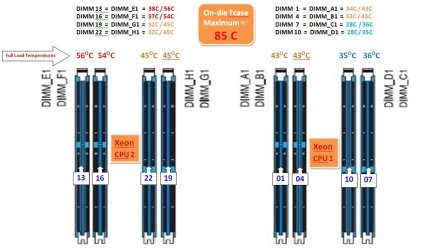
 I check MOBO temp every once in a while and it runs only 10°C over ambient. I do monitor CPU temp in the tray since cooling is somewhat less than stellar in my tight case but I haven't really thrashed the CPU yet.

