Empty Card Reader appears as four drives?

I suspect you don't have your drives connected in their right spots either. There's a difference between being connected on a 3.0 Gbps bus and a 6.0 Gbps bus, by looking at the image of it.
The board has two C602 native 6G SATAs & Marvell has four 6G. The rest are SATA-2 3Gb/s. There are no SATA-1.


You can't RAID if your drives are connected on a different-speed bus.
You also might want to take note, a drive may be certified for SATA-III but will plug into a SATA-II bus and still work, but runs slower. However, as with SATA-II drives, it will not work on a SATA-I bus unless you put something across a jumper block of some kind.
CD/DVD-ROM drives always operate at SATA-I speed. Bluray drives will require a SATA-II bus.
Fortunately, I know about mixing buses for RAID. I’ve used Hi-Point RAIDs before on diff system. All my production SSDs are 6Gb/s and are put on SATA-3 headers, even though none them can saturate a SATA-3 bus. My utility SSDs are on SATA-2s since speed doesn’t matter. And my opticals are on USB-3 ports because they are slow and seldom used except burning DVDs and BluRays.


….. over at NewEgg and saw many similar complaints: faulty bios, unstable RAID, bad user's manual, doesn't always play well with other components, such as GPU cards. etc. Reading Those reviews before buying would have been more than enough to scare me away from that board.
One thing that jumped out at me when I checked you System Specs: 128GB RAM. That's an awful lot of RAM (and I thought I went nuts with 32GB RAM)! The specs on the board at NewEgg also says the board only supports up to 64GB. I checked at ASUS' website and they also said the board supports only 64GB RAM (256GB registered memory—i.e. RDIMM—you don't list a part number for your RAM so I can't check it out). Even with heavy video editing , etc. I have trouble envisioning a need for 128GB of RAM. Have you tried cutting back to 64GB of RAM to see if stability has improved. Also, are you trying to overclock your CPUS and your RAM? Both can contribute to instability. In the case of RAM, overclocking can actually slow a machine down even if the benches look good (benchmarking is good for seeing if system performance has deteriorated over time bit; other than that, it's mostly only good for bragging rights). Very little benefit is gained running RAM much faster than 1600MHz.

Moving on to a different tack, what kind of a backup scheme are you using?
All these questions are making my brain heat up. Lol. I have 1600 RAM which is as high as the Xeon quads tolerate. And Honeycomb is correct: 4 dimms (64G) quads feed one xeon, and another 4 dimms feed the xeon - although the QPI allows both Xeons and mem banks to talk to each other. I don’t OC ram, I like stability. The Xeons are locked at 3.1, 3.8 turbo – no wiggle room there. 32 hyper-threads at 3.8Ghz is enough for me. Also when the 1600 RAM voltage is increased even slightly, the sticks fail, so no luck there. I just thought of something maybe easier in answering these questions.

Intel embedded their fan registers in an unconventional, unknown location – and I couldn’t monitor my fans speeds to tune my fans (xeon e5-2687Ws heat up lots). So I did some research and found the embedded register addresses and talked AIDA64 into writing a special patch for my board, which they did. To repay them for the favor, I designed my own custom sensor panel bezel for my system and made a video that ran a stress test on my Xeons with their monitoring software – too help promote their software, since they helped me with the patch they made for the fans.

So many of your questions will be answered by viewing this video of my board. The vid shows mem size, temps, efficiency, and compatibility. It shows to run fine. As I said before: it's the buggy drivers & old BIOS causing the problems. And you’ll see a picture of the cabinet. Then if you still have questions after the video, I’ll be happy to answer them. And about Newegg reviews, I read them but rather put most of my stock in the mobo reviews of professional reviewers like AnandTech, SSD Review, et al. Because I never know the tech competence of the Newegg reviewers; some may be having problems for reasons Honeycomb cited: wrong wires in the wrong holes, plugging USB-3 connectors into SATA-3 ports…. and complaining the wires are bad. Although some of their complaints are valid, since I have the same.

https://www.youtube.com/watch?v=wH9ole4ypTs

I suggest viewing 720 HD and go full screen to see all the numbers clearly.
 

My Computer My Computer

Computer type
PC/Desktop
Computer Manufacturer/Model Number
Homemade with cube tower
OS
Windows 7 Ultimate x64
CPU
2x - Xeon E5-2687W
Motherboard
ASUS Z9PE-D8 WS
Memory
128GB Kingston - (2ea kits – 4x16GB)
Graphics Card(s)
Gigabyte GTX-680 & EVGA GTX-Titan
Sound Card
Realtek ALC898 8-chan audio
Monitor(s) Displays
2ea - Samsung T260HD 25.5-Inch LCD HDTV / Monitors
Screen Resolution
1920x1200
Hard Drives
8 ea. Crucial & Samsung EVO 2TB SSDs; misc 4ea. 8TB external Seagate spinners.
PSU
Corsair AX-1200
Case
Lian-Li cube custom
Cooling
2x Dynatron R-17 - CPU Air sinks (160watts TDP)
Keyboard
HP slimline wireless
Mouse
Microsoft ARC
Internet Speed
Faster than a speeding bullet.
Antivirus
Norton Security 360 - 2020
There is nothing wrong with it mine used to show that way too

It happens when you use it ,It has to assign a Driver letter to work because technically it's a mini hard drive
 

Attachments

  • Card reader.PNG
    Card reader.PNG
    57.8 KB · Views: 0

My Computer My Computer

Computer type
PC/Desktop
Computer Manufacturer/Model Number
CoreI7-6700K MrFingerIII Special Builds
OS
Windows 10 Home Premium 64bit sp1
CPU
Intel I7-6700K @ 4.6 Ghz 1.344 volts everyday OC
Motherboard
Asrock Fatality K6 Z170 Socket 1151
Memory
32GB G-Skill TridentZ 3200mhz 16-18-18-38 DDR4
Graphics Card(s)
Sli Gigabyte Windforce GTX 980 G1
Sound Card
AC97 Creative Rage Tactic 3D Headphones Bluetooth
Monitor(s) Displays
27" Asus ROG Swift PG278Q G-Sync 48" Vizio Smart HD TV
Screen Resolution
2560x1440p 27"- 48" Currently Gaming at 2560x1440p Res 2K
Hard Drives
250GB Samsung Evo840SSD Seagate baracuda 500 GB WD Mybook 500Gb 1TB Seagate Barracuda
PSU
HX1050w Corsair Silver 80plus certified crosfire/sli
Case
Enthod Pro Full Tower
Cooling
Corsair H110i GT 280 mm High Performance WaterBlock
Keyboard
Logitech wireless keyboard
Mouse
Logitech wireless mouse
Internet Speed
Cox Cable 100+ mb
Antivirus
WebRoot Spysweeper with Antivirus
Browser
IE-10, Chrome, Opera
Other Info
My Other Rig is a AMD FX8320E @4.6Ghz 16GB Ballistic Sport Ram
Mobo Asrock Fatality 990FX 120GB OCZ SSD 1TB Seagate Barracuda Corsair H75 Cooling PSU Corsair CX750
GPU GTX Gigabyte 970G1
Nice video mate, I enjoyed it, very stable system it seems. What is your reboot time? I'd like to see you participate in some http://www.sevenforums.com/benchmarks/ if time permits.

How are you posting? I use a dark forum theme due to poor eyesight and your post looks like this:

snip.PNG
 

My Computer My Computer

Computer type
PC/Desktop
Computer Manufacturer/Model Number
Home Built Desktop By DataTech
OS
Windows 7 Ultimate X64 SP1
CPU
Intel i5-2550K, Differing ~4.4-4.8GHz No built in GPU
Motherboard
ASUS P8Z68-V PRO/GEN3
Memory
16GB G.Skill Sniper 1866MHz @ 2133MHz 2x8GB
Graphics Card(s)
ASUS GTX650TIB-DC2OC-2GD5, (650TI Boost)
Sound Card
Onboard Realtek 5-1
Monitor(s) Displays
Samsung P2570HD
Screen Resolution
1920x1080
Hard Drives
Samsung 840 Pro 256GB SSD for OS, 500GB Seagate Constellation (Enterprise drive) for Data
PSU
Corsair HX650W
Case
Inwin Dragon Rider
Cooling
Hyper 212 EVO w/two Noctua fans, push-pull, @1300 RPM
Keyboard
E-Z Eyes, bright yellow keys with large characters
Mouse
steelseries SENSEI Laser Pro Gaming
Internet Speed
48-51Mbs Mbs down, 11 Mbs up Xfinity Cable
Antivirus
Norton Internet Security 2013
Browser
IE 10, Opera, Pale Moon if needed
Other Info
4 case fans, LG BluRay-RE, ASUS DVD-RW, Mr. Fusion power supply, 1.21 gigawatts.
The issue I have with the pro reviews is they get only one product to test, usually cherry picked by the manufacturer. Also, products usually are tested for comparatively short times; many problems don't show up until after the product has been in use for a while. Rarely is more than one hardware configuration used for testing whereas actual users will have numerous configurations. One of the comments in the NewEgg reviews is that the board doesn't always play well with certain combinations. This isn't to say that pro reviews aren't useful but I don't like to depend on them only.

Granted, user reviews are heavily dependent on user competency but one can read "between the lines" to determine that. What is more significant is when the same complaint keeps cropping up.

Nice video, btw. What was the source of the music playing (I realize it was looped)?
 

My Computer My Computer

Computer type
PC/Desktop
Computer Manufacturer/Model Number
Custom Build
OS
Win 7 Ultimate 64 bit
CPU
Intel i7-3930K
Motherboard
ASUS P9X79 WS
Memory
Kingston HyperX Genesis 32GB Kit (8x4GB Modules) 1600MHz DDR
Graphics Card(s)
MSI R7850 Twin Frozr 2GD5/OC Radeon HD 7850 2GB 256-bit GDDR
Sound Card
Asus Xonar Essence STX
Monitor(s) Displays
3x Asus VG248QE 24", Vizio 32" TV
Screen Resolution
1920 x 1080, ?
Hard Drives
Samsung 128GB 840 Pro SSD (1),
Samsung 4TB 850 EVO SSDs (4)
Samsung 4TB 850 EVO SSDs (16) external backup drives used in 2.5" hot swap bays in the computer.
PSU
Corsair HX750w
Case
Antec Two Hundred v2 (modified)
Cooling
Cooler Master GeminII S524 120mm (fan replaced with a 140mm)
Keyboard
Logitech G510s
Mouse
Logitech M525 (two in use)
Internet Speed
=< 32Mbps down, 8Mbps up
Antivirus
AVAST!, MBAM, SAS, Spybot S&D (all but MBAM free) Glary Util
Browser
IE11
Other Info
LSI 9211-8i HBA card (8 SATA III ports), 2.5" & 3.5" Hot Swap Bays, HooToo HT-CR001 PCI-E to USB 3.0 Internal Hub + 6 Slot Card Reader, and LG Model CH12LS28 BD-ROM Optical Drive. Also, ScanSnap S1500 ADF duplexing scanner, Canon 9000F flat bed scanner, Corsair SP2500 2.1 speakers, Samsung CLP 415nw laser color printer, Cyberpower PP2200SW UPS
I kind of suspect pro reviewers get some perks if a favorable review is made, aside from what Jeannie said about them being cherry picked. Many Newegg reviewers are noobs but as said, read between the lines.

I have posted some very negative reviews there and they published them so they don't filter bad ones out. I have found recently they will show the same set of reviews for similar products. It was with Samsung SSDs, they had the same set of reviews for all sizes and the Pro and EVO series.
 

My Computer My Computer

Computer type
PC/Desktop
Computer Manufacturer/Model Number
Home Built Desktop By DataTech
OS
Windows 7 Ultimate X64 SP1
CPU
Intel i5-2550K, Differing ~4.4-4.8GHz No built in GPU
Motherboard
ASUS P8Z68-V PRO/GEN3
Memory
16GB G.Skill Sniper 1866MHz @ 2133MHz 2x8GB
Graphics Card(s)
ASUS GTX650TIB-DC2OC-2GD5, (650TI Boost)
Sound Card
Onboard Realtek 5-1
Monitor(s) Displays
Samsung P2570HD
Screen Resolution
1920x1080
Hard Drives
Samsung 840 Pro 256GB SSD for OS, 500GB Seagate Constellation (Enterprise drive) for Data
PSU
Corsair HX650W
Case
Inwin Dragon Rider
Cooling
Hyper 212 EVO w/two Noctua fans, push-pull, @1300 RPM
Keyboard
E-Z Eyes, bright yellow keys with large characters
Mouse
steelseries SENSEI Laser Pro Gaming
Internet Speed
48-51Mbs Mbs down, 11 Mbs up Xfinity Cable
Antivirus
Norton Internet Security 2013
Browser
IE 10, Opera, Pale Moon if needed
Other Info
4 case fans, LG BluRay-RE, ASUS DVD-RW, Mr. Fusion power supply, 1.21 gigawatts.
...I have found recently they will show the same set of reviews for similar products. It was with Samsung SSDs, they had the same set of reviews for all sizes and the Pro and EVO series.

I've seen the same thing with WD HDDs. Annoying, isn't it?
 

My Computer My Computer

Computer type
PC/Desktop
Computer Manufacturer/Model Number
Custom Build
OS
Win 7 Ultimate 64 bit
CPU
Intel i7-3930K
Motherboard
ASUS P9X79 WS
Memory
Kingston HyperX Genesis 32GB Kit (8x4GB Modules) 1600MHz DDR
Graphics Card(s)
MSI R7850 Twin Frozr 2GD5/OC Radeon HD 7850 2GB 256-bit GDDR
Sound Card
Asus Xonar Essence STX
Monitor(s) Displays
3x Asus VG248QE 24", Vizio 32" TV
Screen Resolution
1920 x 1080, ?
Hard Drives
Samsung 128GB 840 Pro SSD (1),
Samsung 4TB 850 EVO SSDs (4)
Samsung 4TB 850 EVO SSDs (16) external backup drives used in 2.5" hot swap bays in the computer.
PSU
Corsair HX750w
Case
Antec Two Hundred v2 (modified)
Cooling
Cooler Master GeminII S524 120mm (fan replaced with a 140mm)
Keyboard
Logitech G510s
Mouse
Logitech M525 (two in use)
Internet Speed
=< 32Mbps down, 8Mbps up
Antivirus
AVAST!, MBAM, SAS, Spybot S&D (all but MBAM free) Glary Util
Browser
IE11
Other Info
LSI 9211-8i HBA card (8 SATA III ports), 2.5" & 3.5" Hot Swap Bays, HooToo HT-CR001 PCI-E to USB 3.0 Internal Hub + 6 Slot Card Reader, and LG Model CH12LS28 BD-ROM Optical Drive. Also, ScanSnap S1500 ADF duplexing scanner, Canon 9000F flat bed scanner, Corsair SP2500 2.1 speakers, Samsung CLP 415nw laser color printer, Cyberpower PP2200SW UPS
...I have found recently they will show the same set of reviews for similar products. It was with Samsung SSDs, they had the same set of reviews for all sizes and the Pro and EVO series.

I've seen the same thing with WD HDDs. Annoying, isn't it?

It's annoying especially when you know what quality product is i have never used anything but WD and Seagate ,I have bought an optional drive that was another brand for my dad because that is what he wanted

Just a couple a weeks ago i installed a back up Hitachi Drive my Dad gave me as well that is far as the brands i will go ,I might of had one Maxtor but that was way back in 94

Lady i would assume though most of the drives out now are comparable unless it's an SSD
 

My Computer My Computer

Computer type
PC/Desktop
Computer Manufacturer/Model Number
CoreI7-6700K MrFingerIII Special Builds
OS
Windows 10 Home Premium 64bit sp1
CPU
Intel I7-6700K @ 4.6 Ghz 1.344 volts everyday OC
Motherboard
Asrock Fatality K6 Z170 Socket 1151
Memory
32GB G-Skill TridentZ 3200mhz 16-18-18-38 DDR4
Graphics Card(s)
Sli Gigabyte Windforce GTX 980 G1
Sound Card
AC97 Creative Rage Tactic 3D Headphones Bluetooth
Monitor(s) Displays
27" Asus ROG Swift PG278Q G-Sync 48" Vizio Smart HD TV
Screen Resolution
2560x1440p 27"- 48" Currently Gaming at 2560x1440p Res 2K
Hard Drives
250GB Samsung Evo840SSD Seagate baracuda 500 GB WD Mybook 500Gb 1TB Seagate Barracuda
PSU
HX1050w Corsair Silver 80plus certified crosfire/sli
Case
Enthod Pro Full Tower
Cooling
Corsair H110i GT 280 mm High Performance WaterBlock
Keyboard
Logitech wireless keyboard
Mouse
Logitech wireless mouse
Internet Speed
Cox Cable 100+ mb
Antivirus
WebRoot Spysweeper with Antivirus
Browser
IE-10, Chrome, Opera
Other Info
My Other Rig is a AMD FX8320E @4.6Ghz 16GB Ballistic Sport Ram
Mobo Asrock Fatality 990FX 120GB OCZ SSD 1TB Seagate Barracuda Corsair H75 Cooling PSU Corsair CX750
GPU GTX Gigabyte 970G1
Nice video mate, I enjoyed it, very stable system it seems. What is your reboot time? I'd like to see you participate in some Benchmarks - Windows 7 Help Forums if time permits. How are you posting?
Thanks. Though it may be stable in one sense — when there’s not things running that happen to address drivers that have bugs in them, then yes, it runs stable. But when multi-workloads run, strange little glitches arise. Or as mentioned earlier, when you have RAIDS, etc — or run AS-SSD (as you know) and little flags or error msgs appear like with the RAMdisk and AS-SSD showing alignment flag; when on the i7 rig nothing like that appears for RAM drive.

But what I call unstable in operation vs performance, is when it consistently boots fine as usual, then for no apparent reason, the next boot sets at black screen; then I press Restart button and it boots as usual and is fine on reboot for another five boots and then does it again. Lots of little things like this. BIOS seems unstable sometimes, then stable at other times -- so can you really consider that stable? It seems easier to live with the small glitches than hassle ASUS support on each and every issue. I would rather beleaguer you guys with my whining. Kidding!

Reboot and POSTing are terrible. I suspect part of the BIOS issues. POST recycles over & over 3-4 times as if looking for more devices — sometimes taking up to 30-40 seconds. (amazingly my ASUS ultra-lite Zenbook boots in 3 seconds). Also, I’m not so sure I’d be a candidate for the Benchmarks thread. Remember, the Z9PE-D8 WS board only out-shines the X79 boards during large multi-task, multi-thread-leveraging workloads. I liken it to a 60mph semi-truck carrying a massive load compared to a 200mph Ferrari with a small cargo area.

Mine is NOT a speed demon, locked at 3.8GHz; I’m no match for a 4.5G OC chip on an X79 board. I built mine to handle massive amounts of data rendering/transcoding for video/3Dmod while still having lots of headroom (cores & ram) for working on other functions simultaneously: text editing, Photoshop image editing, recording TV programs, AfterEffects, etc — all can be done at the same time without impacting each other. I can work on difference stages of three diff projects at the same time — very time efficient, if you don’t go nuts trying to keep track of everything at each stage.

The issue I have with the pro reviews is they get only one product to test, usually cherry picked by the manufacturer. [True] Also, products usually are tested for comparatively short times; many problems don't show up until after the product has been in use for a while. [Totally agree] Rarely is more than one hardware configuration used for testing whereas actual users will have numerous configurations. One of the comments in the NewEgg reviews is that the board doesn't always play well with certain combinations. [Also my experience] This isn't to say that pro reviews aren't useful but I don't like to depend on them only.

Granted, user reviews are heavily dependent on user competency but one can read "between the lines" to determine that. What is more significant is when the same complaint keeps cropping up.
[How true! But remember, if you all buy the same product at about the same time, you don’t get the benefit of someone else’s long-term experience with the later arising faults]

Nice video, btw. [Thanks] What was the source of the music playing [On these "review vids" I use royalty-free stuff, so I don’t have to “Credit” the artist at ending; therefore I don’t bother keeping track of artist, title, or source. I usually rename the music file itself with a mood label rather than the title of song (ie: dramatic, documentary, classical, serene etc.) If I can find the source of this one, I can PM you if you want it.] (I realize it was looped)?


I kind of suspect pro reviewers get some perks if a favorable review is made, aside from what Jeannie said about them being cherry picked. Many Newegg reviewers are noobs but as said, read between the lines.

I have posted some very negative reviews there and they published them so they don't filter bad ones out. I have found recently they will show the same set of reviews for similar products. It was with Samsung SSDs, they had the same set of reviews for all sizes and the Pro and EVO series.
Okay… you guys got me on that one. I stand corrected, you’re right. Plus I forgot, the pro reviewers usually get free product to test so long as they don’t beat it up the product with bad reviews. I suppose I place too much credibility on reviewers simply because they are called “Pros.” And “J” is right, their testing is short-lived — many of my issues didn’t surface until much later. I probably unfairly judge some of the Newegg reviews (I buy there too) when occasionally I read an outlandishly poor review based mostly on the customer’s anger vs the defectiveness of the product. Although, I’ve had my share of upset episodes in the past over blatant product defects…. Maaaaybe even over motherboards….

I find they do the same at Amazon — same reviews for diff model SSDs, HDDs, and cameras. As you guys aptly point out…. We must be careful and read betw the lines. Great feedback and comments from you guys!! You offer good reminders about reality, so as to remember to use our good common sense.
 

My Computer My Computer

Computer type
PC/Desktop
Computer Manufacturer/Model Number
Homemade with cube tower
OS
Windows 7 Ultimate x64
CPU
2x - Xeon E5-2687W
Motherboard
ASUS Z9PE-D8 WS
Memory
128GB Kingston - (2ea kits – 4x16GB)
Graphics Card(s)
Gigabyte GTX-680 & EVGA GTX-Titan
Sound Card
Realtek ALC898 8-chan audio
Monitor(s) Displays
2ea - Samsung T260HD 25.5-Inch LCD HDTV / Monitors
Screen Resolution
1920x1200
Hard Drives
8 ea. Crucial & Samsung EVO 2TB SSDs; misc 4ea. 8TB external Seagate spinners.
PSU
Corsair AX-1200
Case
Lian-Li cube custom
Cooling
2x Dynatron R-17 - CPU Air sinks (160watts TDP)
Keyboard
HP slimline wireless
Mouse
Microsoft ARC
Internet Speed
Faster than a speeding bullet.
Antivirus
Norton Security 360 - 2020
It's annoying especially when you know what quality product is i have never used anything but WD and Seagate.... Lady i would assume though most of the drives out now are comparable unless it's an SSD
Like you, I think most of us buy a particular brand HDD for whatever reason, have good luck with it, then tend to favor it. I too have had good luck with Seagate HDDs.

Now I try to buy mostly SSDs for the speed and also for their solid state reliability. But because SSDs are still a bit expensive vs HDDs -- I usually pick the one's with the lower price tags, since they say the NAND technology and controllers are becoming so evolved now, that in mainline, consumer levels, that often the brand doesn't matter all that much. But if you're looking for pricey high-speeds, some brands do better than others.
 

My Computer My Computer

Computer type
PC/Desktop
Computer Manufacturer/Model Number
Homemade with cube tower
OS
Windows 7 Ultimate x64
CPU
2x - Xeon E5-2687W
Motherboard
ASUS Z9PE-D8 WS
Memory
128GB Kingston - (2ea kits – 4x16GB)
Graphics Card(s)
Gigabyte GTX-680 & EVGA GTX-Titan
Sound Card
Realtek ALC898 8-chan audio
Monitor(s) Displays
2ea - Samsung T260HD 25.5-Inch LCD HDTV / Monitors
Screen Resolution
1920x1200
Hard Drives
8 ea. Crucial & Samsung EVO 2TB SSDs; misc 4ea. 8TB external Seagate spinners.
PSU
Corsair AX-1200
Case
Lian-Li cube custom
Cooling
2x Dynatron R-17 - CPU Air sinks (160watts TDP)
Keyboard
HP slimline wireless
Mouse
Microsoft ARC
Internet Speed
Faster than a speeding bullet.
Antivirus
Norton Security 360 - 2020
If you can find the source of the music, I would be interested. Thanks!

Going back to RAM, my curiosity got the better of me and I posed the question on the ASUS forums. Here is the reply I got. Just FYI since we don't know the brand and part numbers of your RAM.
 

My Computer My Computer

Computer type
PC/Desktop
Computer Manufacturer/Model Number
Custom Build
OS
Win 7 Ultimate 64 bit
CPU
Intel i7-3930K
Motherboard
ASUS P9X79 WS
Memory
Kingston HyperX Genesis 32GB Kit (8x4GB Modules) 1600MHz DDR
Graphics Card(s)
MSI R7850 Twin Frozr 2GD5/OC Radeon HD 7850 2GB 256-bit GDDR
Sound Card
Asus Xonar Essence STX
Monitor(s) Displays
3x Asus VG248QE 24", Vizio 32" TV
Screen Resolution
1920 x 1080, ?
Hard Drives
Samsung 128GB 840 Pro SSD (1),
Samsung 4TB 850 EVO SSDs (4)
Samsung 4TB 850 EVO SSDs (16) external backup drives used in 2.5" hot swap bays in the computer.
PSU
Corsair HX750w
Case
Antec Two Hundred v2 (modified)
Cooling
Cooler Master GeminII S524 120mm (fan replaced with a 140mm)
Keyboard
Logitech G510s
Mouse
Logitech M525 (two in use)
Internet Speed
=< 32Mbps down, 8Mbps up
Antivirus
AVAST!, MBAM, SAS, Spybot S&D (all but MBAM free) Glary Util
Browser
IE11
Other Info
LSI 9211-8i HBA card (8 SATA III ports), 2.5" & 3.5" Hot Swap Bays, HooToo HT-CR001 PCI-E to USB 3.0 Internal Hub + 6 Slot Card Reader, and LG Model CH12LS28 BD-ROM Optical Drive. Also, ScanSnap S1500 ADF duplexing scanner, Canon 9000F flat bed scanner, Corsair SP2500 2.1 speakers, Samsung CLP 415nw laser color printer, Cyberpower PP2200SW UPS
I did some research and found the embedded register addresses and talked AIDA64 into writing a special patch for my board, which they did. To repay them for the favor, I designed my own custom sensor panel bezel for my system and made a video that ran a stress test on my Xeons with their monitoring software – too help promote their software, since they helped me with the patch they made for the fans.

Very impressive, I played around with the AIDA64 demo a bit but ended up using Open Hardware Monitor to feed some LCDStats mini screens. I'm going to take another look at AIDA64. You've assembled a impressive machine that acualy does something beside bench tests.
 

My Computer My Computer

Computer type
PC/Desktop
Computer Manufacturer/Model Number
Custom, Dell and Lenono LT's
OS
Win8/8.1,Win7-U64, Vista U64, uncounted Linux distor's
CPU
AMD and Intell, 9590, 8350, i5 3570k
Motherboard
CFVFZ, GA990FXA, Z77e-itx
Memory
Corsair G Skill
Graphics Card(s)
Crossfired Sapphire HD 7950 Vapor-X, ASUS R9 280X TOP
Sound Card
Realtek ALC889
Monitor(s) Displays
ViewSonic VX2770SMH 27" / ViewSonic VX2433 LCD 24"
Screen Resolution
1080i HD
Hard Drives
Samsung SSD 840 Pro
OCZ Agility 3's
OCZ Vector's
WD's Blue, red, green, Velociraptors
Seagate USB3 & Hybrid's
ASUS Blu-Ray
ASUS DVD
PSU
Corsair AX1200i, Seasonice 850 Gold
Case
Cooler Master HAF 922 & HAF 932, Lian Li Train case.
Cooling
Air, Glacer 240L expanded, custom EK loop with duel D5's
Keyboard
Microsoft SideWinder X4 USB Keyboard / Logitech 250 PS2
Mouse
Logitech G500 / MS wireless 5000
Internet Speed
Best of 5ms / 75+ dn / 12+ up More or less.
Antivirus
MS esentials-MalwareBytes
Browser
Firefox Chromebook
..... I played around with the AIDA64 demo..... I'm going to take another look at AIDA64. You've assembled a impressive machine that actually does something besides bench tests.

Thank you, but it wasn't as easy as I anticipated. Finding the embedded registers and creating a patch for the fans monitor/ctl was one of the several speed bumps that cropped up toward the end of this build. Prior to that were more challenges. Since the Xeon E5-2687W was one of the faster Xeons, they also run the hottest temp at 150watts. So I knew I had to carefully plan the cooling. For safety I opted for water. I tried Corsair H100s, they didn’t work. More research revealed a newly released Swiftech water kit# H220 that held great promise. But another failure since their sink/pump assembly footprint was too wide to fit between the RAM sticks and the heatsinks nestled too close to the 2011 sockets, no matter the orientation of the sink. Dual-socket boards are quite congested even on their expanded form factor. I sent several detailed hi-def photos to Swiftech revealing the impossible fit, which they conceded.

Giving up on water, then the search for air sinks. I found two that faired close enough to water efficiency. The best one I rejected fearing the footprint may be too wide again. My second choice worked well (Dynatron R-17 @ 160watts), though I still had to shave a few millimeters off one fan to get it in between the mem sticks. To compensate for the diff between water and air efficiency, I bought two high-output Delta fans to replace the R-17 OEM fans. I opted for performance vs acoustics, and settled on Deltas @ 102cfm for each CPU heatsink (~1,384cfm total flow for case). This is when I needed the patch from AIDA64 in order to initially monitor the fan speeds, to tune them to ideal cooling speeds and temperatures — and balanced so as not having too much acoustics.

The box I used has separate left and right-wing bay compartments (in a cube cabinet). If you notice in the video, the mobo bay (left wing) has no HDD/SSDs in either drive bay; instead I put large fans. All drives were placed in the adjacent right-wing of cabinet to reduce heat generated in the mobo bay. This helps cooling significantly. Except under full load, there is always cool air coming from the rear exhaust fans. Under full load it exhausts warm air, but not hot. Mission accomplished.

So it hasn’t exactly been a stroll through the park making this system perform according to my original plan to accommodate massive amounts of fast rendering and throughput. It’s like every woman knows — it often takes a considerable amount of exerted effort to make the independent self-confident charismatic male vertebrate to behave in a manner befitting her taste. This dual Xeon system was no exception.

P.S. - I encourage you to reconsider AIDA64. They are good people. And their product is unsurpassed in comprehensiveness and thoroughness in my opinion. They are very skilled and very honest. And for the money, even though there are many free products available - theirs is well worth it I think. It has many extra features that the others don't have. Good luck on your project.
 

My Computer My Computer

Computer type
PC/Desktop
Computer Manufacturer/Model Number
Homemade with cube tower
OS
Windows 7 Ultimate x64
CPU
2x - Xeon E5-2687W
Motherboard
ASUS Z9PE-D8 WS
Memory
128GB Kingston - (2ea kits – 4x16GB)
Graphics Card(s)
Gigabyte GTX-680 & EVGA GTX-Titan
Sound Card
Realtek ALC898 8-chan audio
Monitor(s) Displays
2ea - Samsung T260HD 25.5-Inch LCD HDTV / Monitors
Screen Resolution
1920x1200
Hard Drives
8 ea. Crucial & Samsung EVO 2TB SSDs; misc 4ea. 8TB external Seagate spinners.
PSU
Corsair AX-1200
Case
Lian-Li cube custom
Cooling
2x Dynatron R-17 - CPU Air sinks (160watts TDP)
Keyboard
HP slimline wireless
Mouse
Microsoft ARC
Internet Speed
Faster than a speeding bullet.
Antivirus
Norton Security 360 - 2020
...... Going back to RAM, my curiosity got the better of me and I posed the question on the ASUS forums. Here is the reply I got. Just FYI since we don't know the brand and part numbers of your RAM.

J…. So many questions; I missed this one because it was so tiny. Sorry. Actually the brand – Kingston – has always been displayed in my “system specs” (button in lower left corner of my posts). As for the model#

2ea Kits Kingston KVR16R11D4K4/64 (4x16GB 240-pin) DDR-3 SDRAM 1600 ECC Registered Server Memory…… [it’s Intel certified]

http://www.kingston.com/dataSheets/KVR16R11D4K4_64.pdf

(I don’t know why the above link puts out a “signature” warning — this link is virus free. If Norton or Microsoft Office flags it — ignore it. The PDF is safe)
 

My Computer My Computer

Computer type
PC/Desktop
Computer Manufacturer/Model Number
Homemade with cube tower
OS
Windows 7 Ultimate x64
CPU
2x - Xeon E5-2687W
Motherboard
ASUS Z9PE-D8 WS
Memory
128GB Kingston - (2ea kits – 4x16GB)
Graphics Card(s)
Gigabyte GTX-680 & EVGA GTX-Titan
Sound Card
Realtek ALC898 8-chan audio
Monitor(s) Displays
2ea - Samsung T260HD 25.5-Inch LCD HDTV / Monitors
Screen Resolution
1920x1200
Hard Drives
8 ea. Crucial & Samsung EVO 2TB SSDs; misc 4ea. 8TB external Seagate spinners.
PSU
Corsair AX-1200
Case
Lian-Li cube custom
Cooling
2x Dynatron R-17 - CPU Air sinks (160watts TDP)
Keyboard
HP slimline wireless
Mouse
Microsoft ARC
Internet Speed
Faster than a speeding bullet.
Antivirus
Norton Security 360 - 2020
OK, your board is rated for the amount of RAM you have since it's registered. I've had good luck with Kingston products.
 

My Computer My Computer

Computer type
PC/Desktop
Computer Manufacturer/Model Number
Custom Build
OS
Win 7 Ultimate 64 bit
CPU
Intel i7-3930K
Motherboard
ASUS P9X79 WS
Memory
Kingston HyperX Genesis 32GB Kit (8x4GB Modules) 1600MHz DDR
Graphics Card(s)
MSI R7850 Twin Frozr 2GD5/OC Radeon HD 7850 2GB 256-bit GDDR
Sound Card
Asus Xonar Essence STX
Monitor(s) Displays
3x Asus VG248QE 24", Vizio 32" TV
Screen Resolution
1920 x 1080, ?
Hard Drives
Samsung 128GB 840 Pro SSD (1),
Samsung 4TB 850 EVO SSDs (4)
Samsung 4TB 850 EVO SSDs (16) external backup drives used in 2.5" hot swap bays in the computer.
PSU
Corsair HX750w
Case
Antec Two Hundred v2 (modified)
Cooling
Cooler Master GeminII S524 120mm (fan replaced with a 140mm)
Keyboard
Logitech G510s
Mouse
Logitech M525 (two in use)
Internet Speed
=< 32Mbps down, 8Mbps up
Antivirus
AVAST!, MBAM, SAS, Spybot S&D (all but MBAM free) Glary Util
Browser
IE11
Other Info
LSI 9211-8i HBA card (8 SATA III ports), 2.5" & 3.5" Hot Swap Bays, HooToo HT-CR001 PCI-E to USB 3.0 Internal Hub + 6 Slot Card Reader, and LG Model CH12LS28 BD-ROM Optical Drive. Also, ScanSnap S1500 ADF duplexing scanner, Canon 9000F flat bed scanner, Corsair SP2500 2.1 speakers, Samsung CLP 415nw laser color printer, Cyberpower PP2200SW UPS
OK, your board is rated for the amount of RAM you have since it's registered. I've had good luck with Kingston products.

I do appreciate your feedback, and encourage it.... but if you only knew me well enough to know how much research I put into these component choices, you likely wouldn't bother verifying my component compatibility. In this area, I likely rival you on your "Backups obsession." I know you’re trying to help, so I don’t mind. But I meticulously triple check everything from a variety of different sources before dropping the dime. But sometimes mistakes still happen.

I hate making too many mistakes, so I’m careful. But this board was the exception; there was no way to know in advance about the foibles and driver bugs. Since I'm aware of its vulnerabilities, I've learned how it runs best; and better yet as ASUS adds updates. When you happen to buy the board hot out of the oven, there’s not yet enough available feedback from other users. However, I find some consolation in the fact that even Intel R&D uses this same board to test their Xeons, although I know Intel is still a fledgling ma&pa operation in its infancy stage. Ha-ha. But it never hurts to get others’ opinions. So thanks! Good to know you have good luck w/ Kingston.

Intel link: https://www.youtube.com/watch?v=jMictlPOrQw

Plus it’s way too late to change the RAM memory anyway……. I super-glued it into the sockets. :( Joking! :)

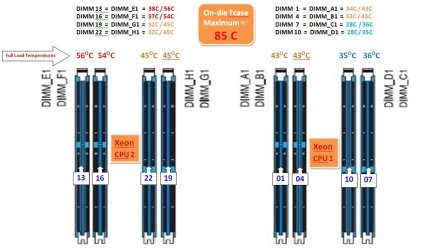
Below is a diagram I drew up amongst the voluminous records I keep for this system, if you are interested. It shows my idle and full load temps under stress; and in case any other Z9PE-D8 users are interested in comparing. Kingston confirmed they are in-range and fine since on-die max is 85C. Are you able to detect your temps?
 

Attachments

  • DIMM Config & Temps.JPG
    DIMM Config & Temps.JPG
    76.8 KB · Views: 1

My Computer My Computer

Computer type
PC/Desktop
Computer Manufacturer/Model Number
Homemade with cube tower
OS
Windows 7 Ultimate x64
CPU
2x - Xeon E5-2687W
Motherboard
ASUS Z9PE-D8 WS
Memory
128GB Kingston - (2ea kits – 4x16GB)
Graphics Card(s)
Gigabyte GTX-680 & EVGA GTX-Titan
Sound Card
Realtek ALC898 8-chan audio
Monitor(s) Displays
2ea - Samsung T260HD 25.5-Inch LCD HDTV / Monitors
Screen Resolution
1920x1200
Hard Drives
8 ea. Crucial & Samsung EVO 2TB SSDs; misc 4ea. 8TB external Seagate spinners.
PSU
Corsair AX-1200
Case
Lian-Li cube custom
Cooling
2x Dynatron R-17 - CPU Air sinks (160watts TDP)
Keyboard
HP slimline wireless
Mouse
Microsoft ARC
Internet Speed
Faster than a speeding bullet.
Antivirus
Norton Security 360 - 2020
Why are your DIMMS numbered so?
 

My Computer My Computer

Computer type
PC/Desktop
Computer Manufacturer/Model Number
Home Built Desktop By DataTech
OS
Windows 7 Ultimate X64 SP1
CPU
Intel i5-2550K, Differing ~4.4-4.8GHz No built in GPU
Motherboard
ASUS P8Z68-V PRO/GEN3
Memory
16GB G.Skill Sniper 1866MHz @ 2133MHz 2x8GB
Graphics Card(s)
ASUS GTX650TIB-DC2OC-2GD5, (650TI Boost)
Sound Card
Onboard Realtek 5-1
Monitor(s) Displays
Samsung P2570HD
Screen Resolution
1920x1080
Hard Drives
Samsung 840 Pro 256GB SSD for OS, 500GB Seagate Constellation (Enterprise drive) for Data
PSU
Corsair HX650W
Case
Inwin Dragon Rider
Cooling
Hyper 212 EVO w/two Noctua fans, push-pull, @1300 RPM
Keyboard
E-Z Eyes, bright yellow keys with large characters
Mouse
steelseries SENSEI Laser Pro Gaming
Internet Speed
48-51Mbs Mbs down, 11 Mbs up Xfinity Cable
Antivirus
Norton Internet Security 2013
Browser
IE 10, Opera, Pale Moon if needed
Other Info
4 case fans, LG BluRay-RE, ASUS DVD-RW, Mr. Fusion power supply, 1.21 gigawatts.
...But this board was the exception; there was no way to know in advance about the foibles and driver bugs...When you happen to buy the board hot out of the oven, there’s not yet enough available feedback from other users...

That's one reason why I don't like to buy anything "hot out of the oven". I prefer to let others be the Guinea Pigs and give the manufacturers time to debug the product.

...Are you able to detect your temps?

No, I don't have any software for detecting RAM temps. I'm not worried about it, though. I have checked them using my high tech, calibrated finger to see how warm the modules get and didn't get burned, for whatever that is worth. ;) I check MOBO temp every once in a while and it runs only 10°C over ambient. I do monitor CPU temp in the tray since cooling is somewhat less than stellar in my tight case but I haven't really thrashed the CPU yet.
 

My Computer My Computer

Computer type
PC/Desktop
Computer Manufacturer/Model Number
Custom Build
OS
Win 7 Ultimate 64 bit
CPU
Intel i7-3930K
Motherboard
ASUS P9X79 WS
Memory
Kingston HyperX Genesis 32GB Kit (8x4GB Modules) 1600MHz DDR
Graphics Card(s)
MSI R7850 Twin Frozr 2GD5/OC Radeon HD 7850 2GB 256-bit GDDR
Sound Card
Asus Xonar Essence STX
Monitor(s) Displays
3x Asus VG248QE 24", Vizio 32" TV
Screen Resolution
1920 x 1080, ?
Hard Drives
Samsung 128GB 840 Pro SSD (1),
Samsung 4TB 850 EVO SSDs (4)
Samsung 4TB 850 EVO SSDs (16) external backup drives used in 2.5" hot swap bays in the computer.
PSU
Corsair HX750w
Case
Antec Two Hundred v2 (modified)
Cooling
Cooler Master GeminII S524 120mm (fan replaced with a 140mm)
Keyboard
Logitech G510s
Mouse
Logitech M525 (two in use)
Internet Speed
=< 32Mbps down, 8Mbps up
Antivirus
AVAST!, MBAM, SAS, Spybot S&D (all but MBAM free) Glary Util
Browser
IE11
Other Info
LSI 9211-8i HBA card (8 SATA III ports), 2.5" & 3.5" Hot Swap Bays, HooToo HT-CR001 PCI-E to USB 3.0 Internal Hub + 6 Slot Card Reader, and LG Model CH12LS28 BD-ROM Optical Drive. Also, ScanSnap S1500 ADF duplexing scanner, Canon 9000F flat bed scanner, Corsair SP2500 2.1 speakers, Samsung CLP 415nw laser color printer, Cyberpower PP2200SW UPS
Not to drift (too much) but I was looking at workstation boards last week and noticed that the Intel boards support 512GB of memory on 8 channels for a memory bandwidth over 800GB/s. That's smokin'! Add quad Teslas and 8 displays and I could probably get caught up on my emails. :) It seems a shame to hog-tie a system like that with 6GB/s disk drives even if they were SSDs. I can hardly wait for the new drive technology to hit the market. :cool:

Oh yeah, back on topic; My reader has had the drives assigned since day 1.
 

My Computer My Computer

Computer type
PC/Desktop
Computer Manufacturer/Model Number
Built 2/11/2011
OS
Windows 7 Pro-x64
CPU
i7-2600 3.4GHz - 3.8GHz Turbo
Motherboard
Intel DH67BL-B3
Memory
8Gb - 2x4GB, Muskin 991770 PC3-1333
Graphics Card(s)
Integrated Intel HD 2000
Sound Card
Integrated Intel 10.1 HD, RealTek ALC892
Monitor(s) Displays
Asus LCD VH222H, Haier HL24XSL2a
Screen Resolution
1920x1080, 1920x1080
Hard Drives
Crucial SSD C300-128Gb,
Western Digital WD5002AALX - 500Gb,
Western Digital WD7501AALS - 750Gb
PSU
Seasonic 650W 80+ Gold Modular
Case
Rosewill Defender
Cooling
Stock CPU, Four 120mm case fans, PCH fan added
Keyboard
Logitech EX100 Y-RBH94 Wireless
Mouse
Logitech EX100 M-RCE95 Wireless
Internet Speed
3.0/1.5 Mbs
Antivirus
Microsoft Security Essentials
Browser
Microsoft Internet Explorer 11
Other Info
Antec Veris Premier-Multimedia IR Station,
Cyber Accoustics-3602 Speakers,
AFT XM-5U Card Reader,
Hauppauge TV-HVR-2250,
Sony LX300 USB Turntable
Why are your DIMMS numbered so?
I have no clue why ASUS numbers them this way in their manual; tech support doesn't know why either. I copied the Asus numbering from manual and then cross-ref'd it to the AIDA64 numbering system so I could interpret the temp readouts for each stick. Then condensed it in this chart. Two sticks were running hotter under load, and I wanted to identity which two.

As far as the ordering, CPU#1 is on the right, #2 on the left. The sequence numbering may have something to do with the way the circuits are arranged. Not sure. The numbering may have technical significance to help engineers trouble-shoot boards, instead of helping us poor peons figure out which slots are which.

And thanks for info on sigs. I tried my first one, as you can see, but it didn't turn out that great. I photoshop it on the desktop, then xfer it to laptop connected to web. During the xfer some of the pixels must have fallen out of the file since it's much smaller than yours. I'll have to look around; I've got some extra pixels around here somewhere. Don't you hate it when you can't remember where you put stuff? And they're so small! :sick:
 

My Computer My Computer

Computer type
PC/Desktop
Computer Manufacturer/Model Number
Homemade with cube tower
OS
Windows 7 Ultimate x64
CPU
2x - Xeon E5-2687W
Motherboard
ASUS Z9PE-D8 WS
Memory
128GB Kingston - (2ea kits – 4x16GB)
Graphics Card(s)
Gigabyte GTX-680 & EVGA GTX-Titan
Sound Card
Realtek ALC898 8-chan audio
Monitor(s) Displays
2ea - Samsung T260HD 25.5-Inch LCD HDTV / Monitors
Screen Resolution
1920x1200
Hard Drives
8 ea. Crucial & Samsung EVO 2TB SSDs; misc 4ea. 8TB external Seagate spinners.
PSU
Corsair AX-1200
Case
Lian-Li cube custom
Cooling
2x Dynatron R-17 - CPU Air sinks (160watts TDP)
Keyboard
HP slimline wireless
Mouse
Microsoft ARC
Internet Speed
Faster than a speeding bullet.
Antivirus
Norton Security 360 - 2020
...And thanks for info on sigs. I tried my first one, as you can see, but it didn't turn out that great. I photoshop it on the desktop, then xfer it to laptop connected to web. During the xfer some of the pixels must have fallen out of the file since it's much smaller than yours. I'll have to look around; I've got some extra pixels around here somewhere. Don't you hate it when you can't remember where you put stuff? And they're so small! :sick:

:roflmao:
 

My Computer My Computer

Computer type
PC/Desktop
Computer Manufacturer/Model Number
Custom Build
OS
Win 7 Ultimate 64 bit
CPU
Intel i7-3930K
Motherboard
ASUS P9X79 WS
Memory
Kingston HyperX Genesis 32GB Kit (8x4GB Modules) 1600MHz DDR
Graphics Card(s)
MSI R7850 Twin Frozr 2GD5/OC Radeon HD 7850 2GB 256-bit GDDR
Sound Card
Asus Xonar Essence STX
Monitor(s) Displays
3x Asus VG248QE 24", Vizio 32" TV
Screen Resolution
1920 x 1080, ?
Hard Drives
Samsung 128GB 840 Pro SSD (1),
Samsung 4TB 850 EVO SSDs (4)
Samsung 4TB 850 EVO SSDs (16) external backup drives used in 2.5" hot swap bays in the computer.
PSU
Corsair HX750w
Case
Antec Two Hundred v2 (modified)
Cooling
Cooler Master GeminII S524 120mm (fan replaced with a 140mm)
Keyboard
Logitech G510s
Mouse
Logitech M525 (two in use)
Internet Speed
=< 32Mbps down, 8Mbps up
Antivirus
AVAST!, MBAM, SAS, Spybot S&D (all but MBAM free) Glary Util
Browser
IE11
Other Info
LSI 9211-8i HBA card (8 SATA III ports), 2.5" & 3.5" Hot Swap Bays, HooToo HT-CR001 PCI-E to USB 3.0 Internal Hub + 6 Slot Card Reader, and LG Model CH12LS28 BD-ROM Optical Drive. Also, ScanSnap S1500 ADF duplexing scanner, Canon 9000F flat bed scanner, Corsair SP2500 2.1 speakers, Samsung CLP 415nw laser color printer, Cyberpower PP2200SW UPS
Back
Top