Empty Card Reader appears as four drives?

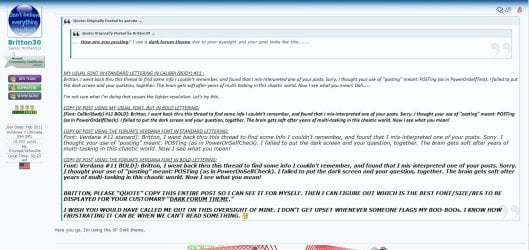
.... How are you posting? I use a dark forum theme due to poor eyesight and your post looks like this:......


MY USUAL FONT IN STANDARD LETTERING IN CALIBRI (BODY) #11 :
Britton, I went back thru this thread to find some info I couldn’t remember, and found that I mis-interpreted one of your posts. Sorry. I thought your use of “posting” meant: POSTing (as in PowerOnSelfTest). I failed to put the dark screen and your question, together. The brain gets soft after years of multi-tasking in this chaotic world. Now I see what you mean! Dah……

I’m not sure what I’m doing that causes the lighter resolution. Let’s try this.

COPY OF POST USING MY USUAL FONT, BUT IN BOLD LETTERING:
[Font: Calibri(body) #11 BOLD]: Britton, I went back thru this thread to find some info I couldn’t remember, and found that I mis-interpreted one of your posts. Sorry. I thought your use of “posting” meant: POSTing (as in PowerOnSelfCheck). I failed to put the dark screen and your question, together. The brain gets soft after years of multi-tasking in this chaotic world. Now I see what you mean!

COPY OF POST USING THE FORUM’S VERDANA FONT IN STANDARD LETTERING:
Font: Verdana #11 stanard]: Britton, I went back thru this thread to find some info I couldn’t remember, and found that I mis-interpreted one of your posts. Sorry. I thought your use of “posting” meant: POSTing (as in PowerOnSelfCheck). I failed to put the dark screen and your question, together. The brain gets soft after years of multi-tasking in this chaotic world. Now I see what you mean!

COPY OF POST USING THE FORUM’S VERDANA FONT IN BOLD LETTERING:
Font: Verdana #11 BOLD]: Britton, I went back thru this thread to find some info I couldn’t remember, and found that I mis-interpreted one of your posts. Sorry. I thought your use of “posting” meant: POSTing (as in PowerOnSelfCheck). I failed to put the dark screen and your question, together. The brain gets soft after years of multi-tasking in this chaotic world. Now I see what you mean!


BRITTON, PLEASE “QUOTE” COPY THIS ENTIRE POST SO I CAN SEE IT FOR MYSELF. THEN I CAN FIGURE OUT WHICH IS THE BEST FONT/SIZE/RES TO BE DISPLAYED FOR YOUR CUSTOMARY “DARK FORUM THEME.”

I WISH YOU WOULD HAVE CALLED ME OUT ON THIS OVERSIGHT OF MINE. I DON’T GET UPSET WHENEVER SOMEONE FLAGS MY BOO-BOOs. I KNOW HOW FRUSTRATING IT CAN BE WHEN WE CAN’T READ SOMETHING. :eek:
 

My Computer My Computer

Computer type
PC/Desktop
Computer Manufacturer/Model Number
Homemade with cube tower
OS
Windows 7 Ultimate x64
CPU
2x - Xeon E5-2687W
Motherboard
ASUS Z9PE-D8 WS
Memory
128GB Kingston - (2ea kits – 4x16GB)
Graphics Card(s)
Gigabyte GTX-680 & EVGA GTX-Titan
Sound Card
Realtek ALC898 8-chan audio
Monitor(s) Displays
2ea - Samsung T260HD 25.5-Inch LCD HDTV / Monitors
Screen Resolution
1920x1200
Hard Drives
8 ea. Crucial & Samsung EVO 2TB SSDs; misc 4ea. 8TB external Seagate spinners.
PSU
Corsair AX-1200
Case
Lian-Li cube custom
Cooling
2x Dynatron R-17 - CPU Air sinks (160watts TDP)
Keyboard
HP slimline wireless
Mouse
Microsoft ARC
Internet Speed
Faster than a speeding bullet.
Antivirus
Norton Security 360 - 2020
Try switching to a dark theme from the drop down list at the bottom of the page and you can see what it looks like.
 

My Computer My Computer

Computer type
PC/Desktop
Computer Manufacturer/Model Number
Self Built
OS
Win 10 Pro x64
CPU
Intel I5-2500K @3.3GHz
Motherboard
Asrock P67 Extreme4
Memory
16GB G.Skill Ripjaws X (4x4GB)
Graphics Card(s)
EVGA GeForce 750 Ti SC 2GB
Sound Card
ASUS Xonar DG 5.1 Channels 24-bit 96KHz PCI Interface Sound
Monitor(s) Displays
auria eq2367
Screen Resolution
1920 x 1080
Hard Drives
250GB Samsung 850 EVO SSD
1TB WD Blue
1TB Hitachi
PSU
SeaSonic X 650W 80 Plus Gold
Case
Corsair Obsidian 750D
Cooling
Corsair H60, Three 140mm case fans
Keyboard
Logitech Wireless Keyboard K520
Mouse
Logitech Wireless Mouse M310
Internet Speed
Wave Broadband ~ 100 dn 5 up
Antivirus
Windows Defender, Malwarebytes Premium
Browser
Edge, IE11, Chrome
Other Info
Laptop specs: HP g7-1365dx /
CPU: AMD A6-3420M APU with Radeon(tm) HD Graphics /
RAM: Crucial 8Gb (2x4Gb) /
SSD: Crucial M4-CT128M4SSD2 ATA Device/ FW 000F /
GFX: AMD Radeon HD 6520G /
OS: Windows 10 Pro x64
.... How are you posting? I use a dark forum theme due to poor eyesight and your post looks like this:......


MY USUAL FONT IN STANDARD LETTERING IN CALIBRI (BODY) #11 :
Britton, I went back thru this thread to find some info I couldn’t remember, and found that I mis-interpreted one of your posts. Sorry. I thought your use of “posting” meant: POSTing (as in PowerOnSelfTest). I failed to put the dark screen and your question, together. The brain gets soft after years of multi-tasking in this chaotic world. Now I see what you mean! Dah……

I’m not sure what I’m doing that causes the lighter resolution. Let’s try this.

COPY OF POST USING MY USUAL FONT, BUT IN BOLD LETTERING:
[Font: Calibri(body) #11 BOLD]: Britton, I went back thru this thread to find some info I couldn’t remember, and found that I mis-interpreted one of your posts. Sorry. I thought your use of “posting” meant: POSTing (as in PowerOnSelfCheck). I failed to put the dark screen and your question, together. The brain gets soft after years of multi-tasking in this chaotic world. Now I see what you mean!

COPY OF POST USING THE FORUM’S VERDANA FONT IN STANDARD LETTERING:
Font: Verdana #11 stanard]: Britton, I went back thru this thread to find some info I couldn’t remember, and found that I mis-interpreted one of your posts. Sorry. I thought your use of “posting” meant: POSTing (as in PowerOnSelfCheck). I failed to put the dark screen and your question, together. The brain gets soft after years of multi-tasking in this chaotic world. Now I see what you mean!

COPY OF POST USING THE FORUM’S VERDANA FONT IN BOLD LETTERING:
Font: Verdana #11 BOLD]: Britton, I went back thru this thread to find some info I couldn’t remember, and found that I mis-interpreted one of your posts. Sorry. I thought your use of “posting” meant: POSTing (as in PowerOnSelfCheck). I failed to put the dark screen and your question, together. The brain gets soft after years of multi-tasking in this chaotic world. Now I see what you mean!


BRITTON, PLEASE “QUOTE” COPY THIS ENTIRE POST SO I CAN SEE IT FOR MYSELF. THEN I CAN FIGURE OUT WHICH IS THE BEST FONT/SIZE/RES TO BE DISPLAYED FOR YOUR CUSTOMARY “DARK FORUM THEME.”

I WISH YOU WOULD HAVE CALLED ME OUT ON THIS OVERSIGHT OF MINE. I DON’T GET UPSET WHENEVER SOMEONE FLAGS MY BOO-BOOs. I KNOW HOW FRUSTRATING IT CAN BE WHEN WE CAN’T READ SOMETHING. :eek:
Here you go, I'm using the SF Dark theme.
 

My Computer My Computer

Computer type
PC/Desktop
Computer Manufacturer/Model Number
Home Built Desktop By DataTech
OS
Windows 7 Ultimate X64 SP1
CPU
Intel i5-2550K, Differing ~4.4-4.8GHz No built in GPU
Motherboard
ASUS P8Z68-V PRO/GEN3
Memory
16GB G.Skill Sniper 1866MHz @ 2133MHz 2x8GB
Graphics Card(s)
ASUS GTX650TIB-DC2OC-2GD5, (650TI Boost)
Sound Card
Onboard Realtek 5-1
Monitor(s) Displays
Samsung P2570HD
Screen Resolution
1920x1080
Hard Drives
Samsung 840 Pro 256GB SSD for OS, 500GB Seagate Constellation (Enterprise drive) for Data
PSU
Corsair HX650W
Case
Inwin Dragon Rider
Cooling
Hyper 212 EVO w/two Noctua fans, push-pull, @1300 RPM
Keyboard
E-Z Eyes, bright yellow keys with large characters
Mouse
steelseries SENSEI Laser Pro Gaming
Internet Speed
48-51Mbs Mbs down, 11 Mbs up Xfinity Cable
Antivirus
Norton Internet Security 2013
Browser
IE 10, Opera, Pale Moon if needed
Other Info
4 case fans, LG BluRay-RE, ASUS DVD-RW, Mr. Fusion power supply, 1.21 gigawatts.
.... How are you posting? I use a dark forum theme due to poor eyesight and your post looks like this:......


MY USUAL FONT IN STANDARD LETTERING IN CALIBRI (BODY) #11 :
Britton, I went back thru this thread to find some info I couldn’t remember, and found that I mis-interpreted one of your posts. Sorry. I thought your use of “posting” meant: POSTing (as in PowerOnSelfTest). I failed to put the dark screen and your question, together. The brain gets soft after years of multi-tasking in this chaotic world. Now I see what you mean! Dah……

I’m not sure what I’m doing that causes the lighter resolution. Let’s try this.

COPY OF POST USING MY USUAL FONT, BUT IN BOLD LETTERING:
[Font: Calibri(body) #11 BOLD]: Britton, I went back thru this thread to find some info I couldn’t remember, and found that I mis-interpreted one of your posts. Sorry. I thought your use of “posting” meant: POSTing (as in PowerOnSelfCheck). I failed to put the dark screen and your question, together. The brain gets soft after years of multi-tasking in this chaotic world. Now I see what you mean!

COPY OF POST USING THE FORUM’S VERDANA FONT IN STANDARD LETTERING:
Font: Verdana #11 stanard]: Britton, I went back thru this thread to find some info I couldn’t remember, and found that I mis-interpreted one of your posts. Sorry. I thought your use of “posting” meant: POSTing (as in PowerOnSelfCheck). I failed to put the dark screen and your question, together. The brain gets soft after years of multi-tasking in this chaotic world. Now I see what you mean!

COPY OF POST USING THE FORUM’S VERDANA FONT IN BOLD LETTERING:
Font: Verdana #11 BOLD]: Britton, I went back thru this thread to find some info I couldn’t remember, and found that I mis-interpreted one of your posts. Sorry. I thought your use of “posting” meant: POSTing (as in PowerOnSelfCheck). I failed to put the dark screen and your question, together. The brain gets soft after years of multi-tasking in this chaotic world. Now I see what you mean!


BRITTON, PLEASE “QUOTE” COPY THIS ENTIRE POST SO I CAN SEE IT FOR MYSELF. THEN I CAN FIGURE OUT WHICH IS THE BEST FONT/SIZE/RES TO BE DISPLAYED FOR YOUR CUSTOMARY “DARK FORUM THEME.”

I WISH YOU WOULD HAVE CALLED ME OUT ON THIS OVERSIGHT OF MINE. I DON’T GET UPSET WHENEVER SOMEONE FLAGS MY BOO-BOOs. I KNOW HOW FRUSTRATING IT CAN BE WHEN WE CAN’T READ SOMETHING. :eek:
Here you go, I'm using the SF Dark theme.

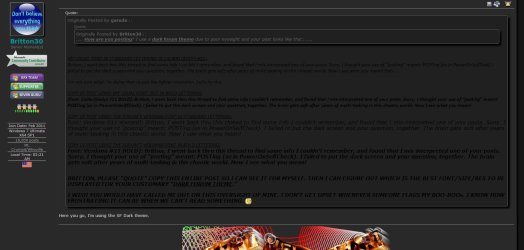
Unfortunately, quoting the post is not showing how it looks on a dark theme.

post2.JPG

With a dark theme,
 

Attachments

  • post1.JPG
    post1.JPG
    111.9 KB · Views: 0

My Computer My Computer

Computer type
PC/Desktop
Computer Manufacturer/Model Number
Self Built
OS
Win 10 Pro x64
CPU
Intel I5-2500K @3.3GHz
Motherboard
Asrock P67 Extreme4
Memory
16GB G.Skill Ripjaws X (4x4GB)
Graphics Card(s)
EVGA GeForce 750 Ti SC 2GB
Sound Card
ASUS Xonar DG 5.1 Channels 24-bit 96KHz PCI Interface Sound
Monitor(s) Displays
auria eq2367
Screen Resolution
1920 x 1080
Hard Drives
250GB Samsung 850 EVO SSD
1TB WD Blue
1TB Hitachi
PSU
SeaSonic X 650W 80 Plus Gold
Case
Corsair Obsidian 750D
Cooling
Corsair H60, Three 140mm case fans
Keyboard
Logitech Wireless Keyboard K520
Mouse
Logitech Wireless Mouse M310
Internet Speed
Wave Broadband ~ 100 dn 5 up
Antivirus
Windows Defender, Malwarebytes Premium
Browser
Edge, IE11, Chrome
Other Info
Laptop specs: HP g7-1365dx /
CPU: AMD A6-3420M APU with Radeon(tm) HD Graphics /
RAM: Crucial 8Gb (2x4Gb) /
SSD: Crucial M4-CT128M4SSD2 ATA Device/ FW 000F /
GFX: AMD Radeon HD 6520G /
OS: Windows 10 Pro x64
Here you go, I'm using the SF Dark theme.

Thanks derekimo.
Britton, I mis-worded that. I meant was capture a screenshot copy as you see it from your side -- with both text & quotes – and attach an image, just as you did last time. So I can see the font size & lighting from your view.

Reason being: when I view my post to you, while in “SF DARK” or “SF Dark Wide” ( as derekimo suggested), I see black text against a dark gray background. It’s appear to me harder to distinguish the text than when it’s black against white back. This is why I suggested you screen-shoot my post after there are “Quote” boxes in it.

For example, in the original one you sent me (thread page 3), the attached image contained both “quotes” and “text” in which both texts were white font against dk gray back. Only diff was the thickness and whiteness of the text fonts.
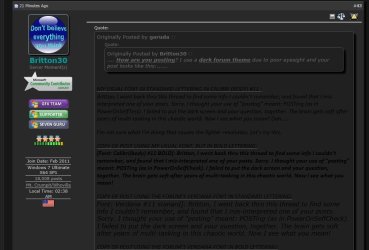
This is my view in SF DARK mode:
It seems black on gray is harder to read; is it better for you?


/////// TEXT IN WHITE AGAINST WHITE:

Thanks derekimo.
Britton, I mis-worded that. I meant was capture a screenshot copy as you see it from your side -- with both text & quotes – and attach an image, just as you did last time. So I can the font size & lighting from your view.
Reason being: when I view my post to you, while in “SF DARK” or “SF Dark Wide” ( as derekimo suggested), I see black text against a dark gray background. It’s appear to me harder to distinguish the text than when it’s black against white back. This is why I suggested you screen-shoot my post after there are “Quote” boxes in it.
For example, in the original one you sent me (thread page 3), the attached image contained both “quotes” and “text” in which both texts were white font against dk gray back. Only diff was the thickness and whiteness of the text fonts.
This is my view in SF DARK mode:

MY VIEW IN "SF DARK":
 

Attachments

  • Capture.JPG
    Capture.JPG
    70.1 KB · Views: 0
Last edited:

My Computer My Computer

Computer type
PC/Desktop
Computer Manufacturer/Model Number
Homemade with cube tower
OS
Windows 7 Ultimate x64
CPU
2x - Xeon E5-2687W
Motherboard
ASUS Z9PE-D8 WS
Memory
128GB Kingston - (2ea kits – 4x16GB)
Graphics Card(s)
Gigabyte GTX-680 & EVGA GTX-Titan
Sound Card
Realtek ALC898 8-chan audio
Monitor(s) Displays
2ea - Samsung T260HD 25.5-Inch LCD HDTV / Monitors
Screen Resolution
1920x1200
Hard Drives
8 ea. Crucial & Samsung EVO 2TB SSDs; misc 4ea. 8TB external Seagate spinners.
PSU
Corsair AX-1200
Case
Lian-Li cube custom
Cooling
2x Dynatron R-17 - CPU Air sinks (160watts TDP)
Keyboard
HP slimline wireless
Mouse
Microsoft ARC
Internet Speed
Faster than a speeding bullet.
Antivirus
Norton Security 360 - 2020
Britton, Derek must have been posting at the same time as me. His screenshot also shows the same as mine. The "Quote" box text seems a brighter White than the text portion. While in "Dark Theme" mode, which text sample sent you is best for you?

Britton, Derek must have been posting at the same time as me. His screenshot also shows the same as mine. The "Quote" box text seems a brighter White than the text portion. While in "Dark Theme" mode, which text sample sent you is best for you?

Britton, Derek must have been posting at the same time as me. His screenshot also shows the same as mine. The "Quote" box text seems a brighter White than the text portion. While in "Dark Theme" mode, which text sample sent you is best for you?

Britton, Derek must have been posting at the same time as me. His screenshot also shows the same as mine. The "Quote" box text seems a brighter White than the text portion. While in "Dark Theme" mode, which text sample sent you is best for you?

(Testing colors) (Testing colors)
 

My Computer My Computer

Computer type
PC/Desktop
Computer Manufacturer/Model Number
Homemade with cube tower
OS
Windows 7 Ultimate x64
CPU
2x - Xeon E5-2687W
Motherboard
ASUS Z9PE-D8 WS
Memory
128GB Kingston - (2ea kits – 4x16GB)
Graphics Card(s)
Gigabyte GTX-680 & EVGA GTX-Titan
Sound Card
Realtek ALC898 8-chan audio
Monitor(s) Displays
2ea - Samsung T260HD 25.5-Inch LCD HDTV / Monitors
Screen Resolution
1920x1200
Hard Drives
8 ea. Crucial & Samsung EVO 2TB SSDs; misc 4ea. 8TB external Seagate spinners.
PSU
Corsair AX-1200
Case
Lian-Li cube custom
Cooling
2x Dynatron R-17 - CPU Air sinks (160watts TDP)
Keyboard
HP slimline wireless
Mouse
Microsoft ARC
Internet Speed
Faster than a speeding bullet.
Antivirus
Norton Security 360 - 2020
.... workstation boards last week and noticed that the Intel boards support 512GB of memory on 8 channels for a memory bandwidth over 800GB/s. That's smokin'! Add quad Teslas and 8 displays and I could probably get caught up on my emails. :) I can hardly wait for the new drive technology to hit the market. :cool:

Oh yeah, back on topic; My reader has had the drives assigned since day 1.
Thanks for heads up on drive assignments; hopefully we've got that one figured out.

I was surprised with the 8-channel RAM at 800GB/s you mentioned. Last I checked, Intel reported E-5 family 4-channel bandwidth board/processors were peaking at 52G. 800 is a pretty big jump, even at 8-chan I would think. Possible I guess, but pretty steep. But sometimes, reviews or ads are mis-worded and can mislead us. Sometimes my 4-channel config is called an 8-channel setup because 4-chan per CPU together might be construed as eight total. on an E5 dual processor config -- there are 8 channels - 4 on one frontside, and 4 on the other. Collectively you might say that 8 channels are feeding, but technically not true.

Do you remember the board model# or processor family of the board you saw?

... It seems a shame to hog-tie a system like that with 6GB/s disk drives even if they were SSDs.
Hog-tie should evaporate hopefully around mid-year when NVMe is adopted by SSD mfrs. Samsung already has one about ready for release to Enterprise, maybe client. Intel isn't telling, but I suspect their Q2 2014 PCIe SSD P3700 for Data Centers will likely have NVMe judging by their xfer speed claims. Anything near 16G should saturate the SATA-3 bus. Then a new hog-tie may emerge unless they're already working on a new interface spec for non-PCIe drives. They'll probably have to resort to fire hoses until the new interface specs are released. :sick:
 

My Computer My Computer

Computer type
PC/Desktop
Computer Manufacturer/Model Number
Homemade with cube tower
OS
Windows 7 Ultimate x64
CPU
2x - Xeon E5-2687W
Motherboard
ASUS Z9PE-D8 WS
Memory
128GB Kingston - (2ea kits – 4x16GB)
Graphics Card(s)
Gigabyte GTX-680 & EVGA GTX-Titan
Sound Card
Realtek ALC898 8-chan audio
Monitor(s) Displays
2ea - Samsung T260HD 25.5-Inch LCD HDTV / Monitors
Screen Resolution
1920x1200
Hard Drives
8 ea. Crucial & Samsung EVO 2TB SSDs; misc 4ea. 8TB external Seagate spinners.
PSU
Corsair AX-1200
Case
Lian-Li cube custom
Cooling
2x Dynatron R-17 - CPU Air sinks (160watts TDP)
Keyboard
HP slimline wireless
Mouse
Microsoft ARC
Internet Speed
Faster than a speeding bullet.
Antivirus
Norton Security 360 - 2020
Back
Top