Solved IE9 did not finishing installing on Windows 7 64-bit

captain123

New member
Local time
9:41 AM
Messages
13
Hi,

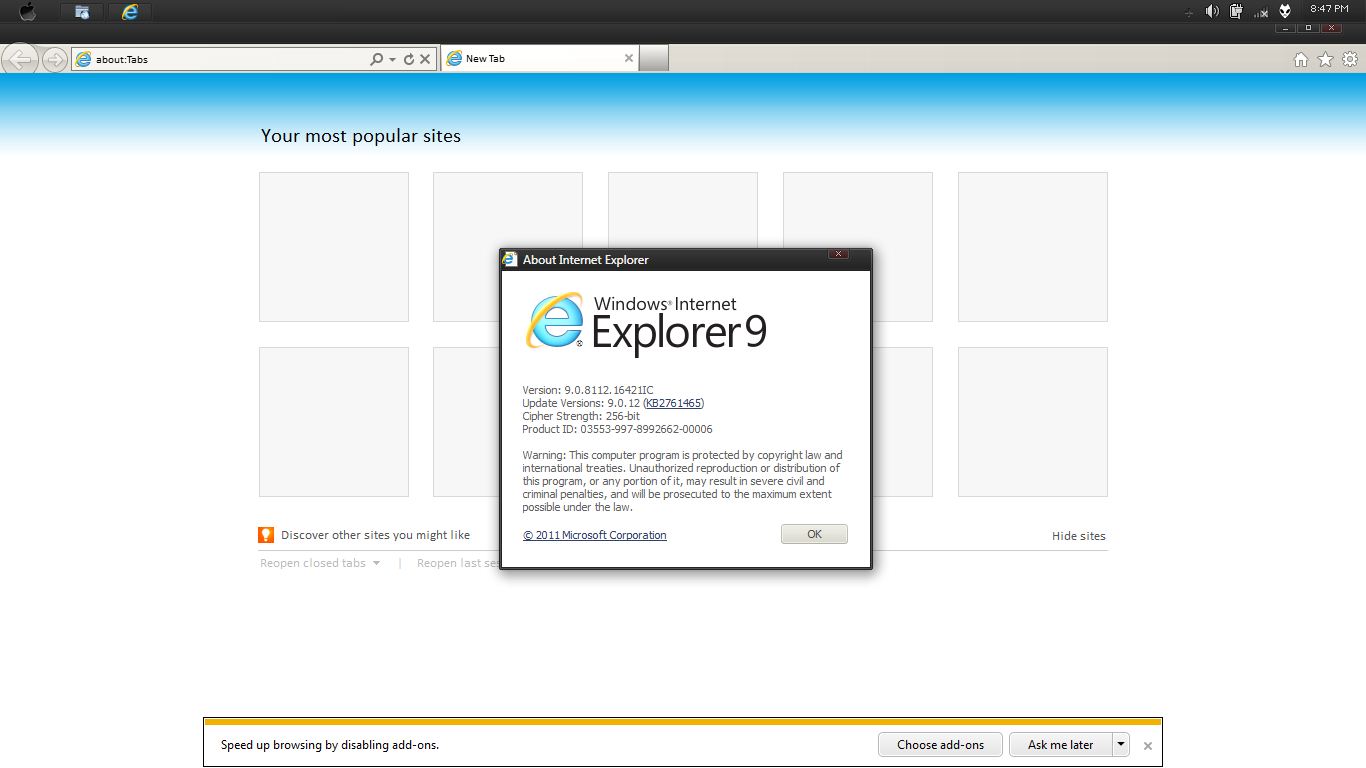
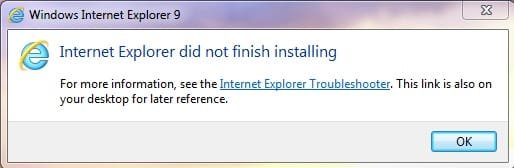
I did a clean install of Windows 7 64bit Enterprise Edition. Downloaded the IE9 offline installer i.e. IE9-Windows7-x64-enu.exe but was never able to install it. The error is: "Internet Explorer did not finish installing. For more information, see the Internet Explorer Troubleshooter. This link is also on your desktop for later reference." The OS came with IE8 as default, the interesting thing is that when I go to Programs and Features > Turn Windows Features on or off, I see IE9 there not IE8 ! As I said I was never able to install IE9. Things I tried:

-Removed IE8 from Turn Windows Features on or off, rebooted, tried installing IE9 cleanly
-Tried in Safe Mode with and without networking
-Turned AV/firewall off
-Run in CMD sfc /scannow
-Tried Windows Update, but it never comes up as an update
-Checked Programs and Features > View Installed Updates, not there also
-Run the Windows Install Cleanup Tool
-Tried installing using Windows Clean boot
-Run Windows Update Readiness Tool from MS but found no errors

No matter what I did I always came up with the same error described above. Can someone help please ?

Thank you.
 
Last edited:

My Computer My Computer

At a glance

Microsoft Windows 7 Enterprise SP1 64-bit
Computer type
Laptop
OS
Microsoft Windows 7 Enterprise SP1 64-bit
try online installer! I also ever faced same problem! Don't forget to open IE, who knows it's just upgraded to IE9 by checking at ''about' and also check for update patch for IE as IE has many security issues :)
'
 

My Computer My Computer

At a glance

Windows 7 SP1 Ultimate x86
OS
Windows 7 SP1 Ultimate x86
try online installer! I also ever faced same problem! Don't forget to open IE, who knows it's just upgraded to IE9 by checking at ''about' and also check for update patch for IE as IE has many security issues :)
'

Can you please clarify what you mean by online installer ? I have already tried the online installer provided in the Browsers link section of this forum, error is exactly the same as with the offline one. Can you provide a link for it ? If you are referring to Windows Update - IE9 does not show up under the list with avaialble updates. It looks like Windows thinks that IE is already updated to IE9, but in fact if you open the about section on the browser it show IE8 and it completely looks like it :)
 

My Computer My Computer

At a glance

Microsoft Windows 7 Enterprise SP1 64-bit
Computer type
Laptop
OS
Microsoft Windows 7 Enterprise SP1 64-bit
I mean online installer that is from m$ website! I did some trials actually until it completely installed in win 7 with good internet connection! Yes, windows update for IE; though I rarely use IE, every update for it is always installed since IE is vulnerable web browser! :)
MbRTV.jpg
 

My Computer My Computer

At a glance

Windows 7 SP1 Ultimate x86
OS
Windows 7 SP1 Ultimate x86
I mean online installer that is from m$ website! I did some trials actually until it completely installed in win 7 with good internet connection! Yes, windows update for IE; though I rarely use IE, every update for it is always installed since IE is vulnerable web browser! :)
MbRTV.jpg

As I said this is not working for me, any other suggestions please ?
 

My Computer My Computer

At a glance

Microsoft Windows 7 Enterprise SP1 64-bit
Computer type
Laptop
OS
Microsoft Windows 7 Enterprise SP1 64-bit
Removed IE8 from Turn Windows Features on or off, rebooted, tried installing IE9 cleanly

So at the moment, if you click on the IE icon, no web browser comes up at all?

I ask because you said that you turned IE8 off in "Turn Windows Features On or Off" and that even though IE9 didn't finish installing, it now (IE9) shows up in the listing. I just checked for IE9 under "View installed updates", but didn't see it listed, even though it is indeed the version that is installed on this computer. And yes, my original Windows 7 install came with IE8 as well.
 

My Computer My Computer

At a glance

Windows 7 Home Premium 64bit SP 1Intel i5 2500k8 gigabytes Corsair PC3-12800 DDR3EVGA GeForce GTX 460 superclocked
Computer Manufacturer/Model Number
Customized build from CyberPower
OS
Windows 7 Home Premium 64bit SP 1
CPU
Intel i5 2500k
Motherboard
Asus P8P67 Deluxe
Memory
8 gigabytes Corsair PC3-12800 DDR3
Graphics Card(s)
EVGA GeForce GTX 460 superclocked
Sound Card
Integrated
Monitor(s) Displays
ViewSonic 23" LCD
Screen Resolution
1980 x 1080
Hard Drives
120 Gb Samsung 840 Pro SSD
120 Gb Kingston Hyper X SSD
1 Tb WD Caviar Black HDD
PSU
Coolermaster 1000 watt modular
Case
Coolermaster HAF X full tower
Cooling
Coolermaster Hyper 212 plus
Keyboard
Logitech USB
Mouse
Microsoft 3 button
Internet Speed
download 1.5 Mb/sec upload 300Kb/sec
  • Like
Reactions: Arc
Yes, when I removed the check mark right next to IE8 in turn Windows features on and off the browser is no longer showing up, there is no IE icon to click on.
 

My Computer My Computer

At a glance

Microsoft Windows 7 Enterprise SP1 64-bit
Computer type
Laptop
OS
Microsoft Windows 7 Enterprise SP1 64-bit
Hi Guys,

The issue is still not solved after all that time ! All suggestions are welcome, thank you !
 

My Computer My Computer

At a glance

Microsoft Windows 7 Enterprise SP1 64-bit
Computer type
Laptop
OS
Microsoft Windows 7 Enterprise SP1 64-bit

My Computer My Computer

At a glance

Win-7-Pro64bit 7-H-Prem-64biti7-5930K 2nd i9-9940x both water blocked VRM'...Trident-z 3200C14 2nd Trident-z 3600C16EVGA 1080ti ftw3 2nd Titan Xp both water blocked
Computer type
PC/Desktop
Computer Manufacturer/Model Number
Custom assembled by me :}
OS
Win-7-Pro64bit 7-H-Prem-64bit
CPU
i7-5930K 2nd i9-9940x both water blocked VRM's too
Motherboard
ASUS SABERTOOTH X99 2nd ASUS x299 Apex
Memory
Trident-z 3200C14 2nd Trident-z 3600C16
Graphics Card(s)
EVGA 1080ti ftw3 2nd Titan Xp both water blocked
Sound Card
Built-in Realtek
Monitor(s) Displays
1-AOC G2460PG 24"G-Sync 144Hz/ 2nd 1-ASUS VG248QE 24" 144Hz
Screen Resolution
1920 x 1080 144Hz
Hard Drives
2-Samsung M.2 Evo & Evo Plus
2-Samsung 850 EVO 500GB SSD's/ 3-2.5 W.D. Black 1tb-&3-1tb/3-3.5 WD Black 1tb hdd's
PSU
EVGA SuperNOVA 1000-P2 2nd 1200-P2
Case
2-Corsair Obsidian Series 450D Black ATX Mid Tower
Cooling
Custom water loops
Keyboard
Logitech G710+/ 2nd Logitech G910
Mouse
2-RedDragon M901 Perdition 16400 dpi Gaming mouse = wired
Internet Speed
Comcast Ping 19ms 89.31mbps download speed 6.12mbps upload
Antivirus
Malwarebytes Pro/ Superantispyware Pro
Browser
FireFox & Pale moon
Other Info
2nd ASUS X299 Apex/Intel i9-9940x with Custom water loop/7H-Prem-x64/Corsair 450D case/Ram Trident-z 3600C16 4x8gb / Samsung970Evo plus 500gb SSD/Dual ssd EZ swap evo/PSU EVGA SuperNova 1200w-P2 80+Platinum/GPU Titan Xp /8-ML-140 on push-pull on 2-280GTX rads


IE9_main.log:

02:56.204: INFO: Launched package installation: C:\Windows\system32\dism.exe /online /add-package /packagepath:C:\Windows\TEMP\IE99971.tmp\IE9-neutral.Downloaded\Windows6.1-KB982861-x64.cab /quiet /norestart
08:29.640: INFO: Process exit code 0x00000490 (1168) [Element not found. ]
08:29.640: ERROR: Neutral MSU installation failed (exit code = 0x00000490 (1168)).
08:29.640: INFO: No reboot logic message NrApiInstallDone(7), lParam=0x00000490 returned 0x00000000.
08:29.640: INFO: No reboot logic message NrApiStartFinish(11), lParam=0x00000000 returned 0x00000000.
08:29.765: INFO: No reboot logic message NrApiFinish(12), lParam=0x00000000 returned 0x00000016.
08:29.968: INFO: PauseOrResumeAUThread: Successfully resumed Automatic Updates.
08:40.467: INFO: Setup exit code 0x00000490 (1168) [Element not found. ]


CBS.log:

2014-01-06 20:31:47, Error CBS Failed to resolve package 'Package_5_for_KB2647516~31bf3856ad364e35~amd64~~6.1.1.0' [HRESULT = 0x80070490 - ERROR_NOT_FOUND]
2014-01-06 20:31:47, Info CBS Failed to resolve package [HRESULT = 0x80070490 - ERROR_NOT_FOUND]
2014-01-06 20:31:47, Info CBS Failed to get next package to re-evaluate [HRESULT = 0x80070490 - ERROR_NOT_FOUND]
2014-01-06 20:31:47, Info CBS Failed to process component watch list. [HRESULT = 0x80070490 - ERROR_NOT_FOUND]
2014-01-06 20:31:47, Info CSI 00000028@2014/1/6:18:31:47.068 CSI Transaction @0x1e4c140 destroyed
2014-01-06 20:31:47, Info CBS Perf: InstallUninstallChain complete.
2014-01-06 20:31:47, Info CBS Failed to execute execution chain. [HRESULT = 0x80070490 - ERROR_NOT_FOUND]
2014-01-06 20:31:47, Error CBS Failed to process single phase execution. [HRESULT = 0x80070490 - ERROR_NOT_FOUND]
2014-01-06 20:31:47, Info CBS WER: Generating failure report for package: Microsoft-Windows-InternetExplorer-Package-TopLevel~31bf3856ad364e35~amd64~~9.4.8112.16421, status: 0x80070490, failure source: Execute, start state: Staged, target state: Installed, client id: DISM Package Manager Provider
2014-01-06 20:31:47, Info CBS Failed to query DisableWerReporting flag. Assuming not set... [HRESULT = 0x80070002 - ERROR_FILE_NOT_FOUND]
2014-01-06 20:31:47, Info CBS Failed to add %windir%\winsxs\pending.xml to WER report because it is missing. Continuing without it...
2014-01-06 20:31:47, Info CBS Failed to add %windir%\winsxs\pending.xml.bad to WER report because it is missing. Continuing without it...
2014-01-06 20:31:48, Info CBS Reboot mark refs: 0
2014-01-06 20:31:48, Info CBS SQM: Reporting package change for package: Microsoft-Windows-InternetExplorer-Package-TopLevel~31bf3856ad364e35~amd64~~9.4.8112.16421, current: Absent, pending: Default, start: Absent, applicable: Installed, target: Installed, limit: Installed, hotpatch status: DisabledBecauseNoHotpatchPackagesInitiated, status: 0x0, failure source: Execute, reboot required: False, client id: DISM Package Manager Provider, initiated offline: False, execution sequence: 601, first merged sequence: 601
2014-01-06 20:31:48, Info CBS SQM: Upload requested for report: PackageChangeBegin_Microsoft-Windows-InternetExplorer-Package-TopLevel~31bf3856ad364e35~amd64~~9.4.8112.16421, session id: 142859, sample type: Standard
2014-01-06 20:31:48, Info CBS SQM: Ignoring upload request because the sample type is not enabled: Standard
2014-01-06 20:31:48, Info CBS SQM: Reporting package change completion for package: Microsoft-Windows-InternetExplorer-Package-TopLevel~31bf3856ad364e35~amd64~~9.4.8112.16421, current: Staged, original: Absent, target: Installed, status: 0x80070490, failure source: Execute, failure details: "(null)", client id: DISM Package Manager Provider, initiated offline: False, execution sequence: 601, first merged sequence: 601
2014-01-06 20:31:48, Info CBS SQM: execute time performance datapoint is invalid. [HRESULT = 0x80070490 - ERROR_NOT_FOUND]
2014-01-06 20:31:48, Info CBS SQM: Win SAT assessment state is invalid.
2014-01-06 20:31:48, Info CBS SQM: average disk throughput datapoint is invalid [HRESULT = 0x80004005 - E_FAIL]
2014-01-06 20:31:48, Info CBS SQM: Upload requested for report: PackageChangeEnd_Microsoft-Windows-InternetExplorer-Package-TopLevel~31bf3856ad364e35~amd64~~9.4.8112.16421, session id: 142862, sample type: Standard
2014-01-06 20:31:48, Info CBS SQM: Ignoring upload request because the sample type is not enabled: Standard
2014-01-06 20:31:48, Info CBS Enabling LKG boot option
2014-01-06 20:31:48, Info CBS Exec: End: nested restore point - complete.
2014-01-06 20:31:48, Info CBS Restored system sleep block state: 0x80000000
2014-01-06 20:31:48, Info CBS Exec: Processing complete. Session: 30345997_1801635363, Package: Microsoft-Windows-InternetExplorer-Package-TopLevel~31bf3856ad364e35~amd64~~9.4.8112.16421 [HRESULT = 0x80070490 - ERROR_NOT_FOUND]
2014-01-06 20:31:48, Error CBS Failed to perform operation. [HRESULT = 0x80070490 - ERROR_NOT_FOUND]
2014-01-06 20:31:48, Info CBS Session: 30345997_1801635363 finalized. Reboot required: no [HRESULT = 0x80070490 - ERROR_NOT_FOUND]


Reliability Monitor Output looks good/reliable enough. I am able to perform all other updates successfully, I only have an issue with upgrading IE.

The error I get while installing IE9 is: "Internet Explorer did not finish installing. For more information, see the Internet Explorer Troubleshooter. This link is also on your desktop for later reference."

The error I get in Windows Event Viewer is:
"Package 982861 failed to be changed to the Installed state. Status: 0x80070490."


CheckSUR.log:

Checking System Update Readiness.
Binary Version 6.1.7601.22471
Package Version 22.0
2014-01-06 16:45
Checking Windows Servicing Packages
Checking Package Manifests and Catalogs
Checking Package Watchlist
Checking Component Watchlist
Checking Packages
Checking Component Store
Summary:
Seconds executed: 1949
No errors detected

 

Attachments

  • IE9.jpg
    IE9.jpg
    12.5 KB · Views: 47
Last edited:

My Computer My Computer

At a glance

Microsoft Windows 7 Enterprise SP1 64-bit
Computer type
Laptop
OS
Microsoft Windows 7 Enterprise SP1 64-bit

My Computer My Computer

At a glance

Win-7-Pro64bit 7-H-Prem-64biti7-5930K 2nd i9-9940x both water blocked VRM'...Trident-z 3200C14 2nd Trident-z 3600C16EVGA 1080ti ftw3 2nd Titan Xp both water blocked
Computer type
PC/Desktop
Computer Manufacturer/Model Number
Custom assembled by me :}
OS
Win-7-Pro64bit 7-H-Prem-64bit
CPU
i7-5930K 2nd i9-9940x both water blocked VRM's too
Motherboard
ASUS SABERTOOTH X99 2nd ASUS x299 Apex
Memory
Trident-z 3200C14 2nd Trident-z 3600C16
Graphics Card(s)
EVGA 1080ti ftw3 2nd Titan Xp both water blocked
Sound Card
Built-in Realtek
Monitor(s) Displays
1-AOC G2460PG 24"G-Sync 144Hz/ 2nd 1-ASUS VG248QE 24" 144Hz
Screen Resolution
1920 x 1080 144Hz
Hard Drives
2-Samsung M.2 Evo & Evo Plus
2-Samsung 850 EVO 500GB SSD's/ 3-2.5 W.D. Black 1tb-&3-1tb/3-3.5 WD Black 1tb hdd's
PSU
EVGA SuperNOVA 1000-P2 2nd 1200-P2
Case
2-Corsair Obsidian Series 450D Black ATX Mid Tower
Cooling
Custom water loops
Keyboard
Logitech G710+/ 2nd Logitech G910
Mouse
2-RedDragon M901 Perdition 16400 dpi Gaming mouse = wired
Internet Speed
Comcast Ping 19ms 89.31mbps download speed 6.12mbps upload
Antivirus
Malwarebytes Pro/ Superantispyware Pro
Browser
FireFox & Pale moon
Other Info
2nd ASUS X299 Apex/Intel i9-9940x with Custom water loop/7H-Prem-x64/Corsair 450D case/Ram Trident-z 3600C16 4x8gb / Samsung970Evo plus 500gb SSD/Dual ssd EZ swap evo/PSU EVGA SuperNova 1200w-P2 80+Platinum/GPU Titan Xp /8-ML-140 on push-pull on 2-280GTX rads
This model originally came with Windows 7 Professional installed. Did you upgrade to Enterprise?
 

My Computer My Computer

At a glance

Windows 7 Ultimate 32bit SP1Intel(R) Core(TM)2 Quad CPU @ 2.40GHz, 2400 MHz4 GBATI Radeon HD 2600 Pro
Computer type
PC/Desktop
Computer Manufacturer/Model Number
Bruce ... somewhere in his 40's
OS
Windows 7 Ultimate 32bit SP1
CPU
Intel(R) Core(TM)2 Quad CPU @ 2.40GHz, 2400 MHz
Motherboard
INTEL/D975XBX2
Memory
4 GB
Graphics Card(s)
ATI Radeon HD 2600 Pro
Monitor(s) Displays
Samsung SyncMaster 914v
Screen Resolution
1280 x 1024
Hard Drives
2/500GB each ... ST3500630AS ATA Device.
One is not connected
PSU
Rocketfish 700 W
Case
G.Skill Gigabyte Chassis
Keyboard
Standard PS/2 Keyboard
Mouse
Microsoft PS/2 Mouse
Internet Speed
DSL
Antivirus
Avira Internet Security
Browser
IE 11
Other Info
ATI HDMI Audio
This model originally came with Windows 7 Professional installed. Did you upgrade to Enterprise?

Yes, I did a clean install with Enterprise Edition and please keep in mind that SP1 was embedded, thus no way of uninstalling it and re-installing it.
 
Last edited:

My Computer My Computer

At a glance

Microsoft Windows 7 Enterprise SP1 64-bit
Computer type
Laptop
OS
Microsoft Windows 7 Enterprise SP1 64-bit
Where did you get your copy of Windows 7 Enterprise edition?
 

My Computer My Computer

At a glance

Windows 7 Ultimate 32bit SP1Intel(R) Core(TM)2 Quad CPU @ 2.40GHz, 2400 MHz4 GBATI Radeon HD 2600 Pro
Computer type
PC/Desktop
Computer Manufacturer/Model Number
Bruce ... somewhere in his 40's
OS
Windows 7 Ultimate 32bit SP1
CPU
Intel(R) Core(TM)2 Quad CPU @ 2.40GHz, 2400 MHz
Motherboard
INTEL/D975XBX2
Memory
4 GB
Graphics Card(s)
ATI Radeon HD 2600 Pro
Monitor(s) Displays
Samsung SyncMaster 914v
Screen Resolution
1280 x 1024
Hard Drives
2/500GB each ... ST3500630AS ATA Device.
One is not connected
PSU
Rocketfish 700 W
Case
G.Skill Gigabyte Chassis
Keyboard
Standard PS/2 Keyboard
Mouse
Microsoft PS/2 Mouse
Internet Speed
DSL
Antivirus
Avira Internet Security
Browser
IE 11
Other Info
ATI HDMI Audio
After another unsuccessful attempt to install IE9 I examined the CBS.log very carefully and was able to isolate when exactly the installation breaks - CBS.log:

2014-01-09 14:20:11, Error CBS Failed to resolve package 'Package_5_for_KB2647516~31bf3856ad364e35~amd64~~6.1.1.0' [HRESULT = 0x80070490 - ERROR_NOT_FOUND]
2014-01-09 14:20:11, Info CBS Failed to resolve package [HRESULT = 0x80070490 - ERROR_NOT_FOUND]
2014-01-09 14:20:11, Info CBS Failed to get next package to re-evaluate [HRESULT = 0x80070490 - ERROR_NOT_FOUND]
2014-01-09 14:20:11, Info CBS Failed to process component watch list. [HRESULT = 0x80070490 - ERROR_NOT_FOUND]
2014-01-09 14:20:11, Info CSI 0000002d@2014/1/9:12:20:11.787 CSI Transaction @0x33b6250 destroyed
2014-01-09 14:20:11, Info CBS Perf: InstallUninstallChain complete.
2014-01-09 14:20:11, Info CBS Failed to execute execution chain. [HRESULT = 0x80070490 - ERROR_NOT_FOUND]
2014-01-09 14:20:11, Error CBS Failed to process single phase execution. [HRESULT = 0x80070490 - ERROR_NOT_FOUND]
2014-01-09 14:20:11, Info CBS WER: Generating failure report for package: Microsoft-Windows-InternetExplorer-Package-TopLevel~31bf3856ad364e35~amd64~~9.4.8112.16421, status: 0x80070490, failure source: Execute, start state: Staged, target state: Installed, client id: DISM Package Manager Provider
2014-01-09 14:20:11, Info CBS Failed to query DisableWerReporting flag. Assuming not set... [HRESULT = 0x80070002 - ERROR_FILE_NOT_FOUND]
2014-01-09 14:20:11, Info CBS Failed to add %windir%\winsxs\pending.xml to WER report because it is missing. Continuing without it...
2014-01-09 14:20:11, Info CBS Failed to add %windir%\winsxs\pending.xml.bad to WER report because it is missing. Continuing without it...
2014-01-09 14:20:12, Info CBS Reboot mark refs: 0
2014-01-09 14:20:12, Info CBS SQM: Reporting package change for package: Microsoft-Windows-InternetExplorer-Package-TopLevel~31bf3856ad364e35~amd64~~9.4.8112.16421, current: Absent, pending: Default, start: Absent, applicable: Installed, target: Installed, limit: Installed, hotpatch status: DisabledBecauseNoHotpatchPackagesInitiated, status: 0x0, failure source: Execute, reboot required: False, client id: DISM Package Manager Provider, initiated offline: False, execution sequence: 709, first merged sequence: 709
2014-01-09 14:20:12, Info CBS SQM: Upload requested for report: PackageChangeBegin_Microsoft-Windows-InternetExplorer-Package-TopLevel~31bf3856ad364e35~amd64~~9.4.8112.16421, session id: 142859, sample type: Standard
2014-01-09 14:20:12, Info CBS SQM: Ignoring upload request because the sample type is not enabled: Standard
2014-01-09 14:20:12, Info CBS SQM: Reporting package change completion for package: Microsoft-Windows-InternetExplorer-Package-TopLevel~31bf3856ad364e35~amd64~~9.4.8112.16421, current: Staged, original: Absent, target: Installed, status: 0x80070490, failure source: Execute, failure details: "(null)", client id: DISM Package Manager Provider, initiated offline: False, execution sequence: 709, first merged sequence: 709
2014-01-09 14:20:12, Info CBS SQM: execute time performance datapoint is invalid. [HRESULT = 0x80070490 - ERROR_NOT_FOUND]
2014-01-09 14:20:12, Info CBS SQM: Win SAT assessment state is invalid.
2014-01-09 14:20:12, Info CBS SQM: average disk throughput datapoint is invalid [HRESULT = 0x80004005 - E_FAIL]
2014-01-09 14:20:12, Info CBS SQM: Upload requested for report: PackageChangeEnd_Microsoft-Windows-InternetExplorer-Package-TopLevel~31bf3856ad364e35~amd64~~9.4.8112.16421, session id: 142862, sample type: Standard
2014-01-09 14:20:12, Info CBS SQM: Ignoring upload request because the sample type is not enabled: Standard
2014-01-09 14:20:12, Info CBS Enabling LKG boot option
2014-01-09 14:20:12, Info CBS Exec: End: nested restore point - complete.
2014-01-09 14:20:12, Info CBS Restored system sleep block state: 0x80000000
2014-01-09 14:20:12, Info CBS Exec: Processing complete. Session: 30346548_4092248688, Package: Microsoft-Windows-InternetExplorer-Package-TopLevel~31bf3856ad364e35~amd64~~9.4.8112.16421 [HRESULT = 0x80070490 - ERROR_NOT_FOUND]
2014-01-09 14:20:12, Error CBS Failed to perform operation. [HRESULT = 0x80070490 - ERROR_NOT_FOUND]
2014-01-09 14:20:12, Info CBS Session: 30346548_4092248688 finalized. Reboot required: no [HRESULT = 0x80070490 - ERROR_NOT_FOUND]
2014-01-09 14:20:12, Info CBS Session: 30346549_623119990 initialized by client DISM Package Manager Provider.


Please examine carefully and do let me know if something can be done to correct this. Thank you.
 

My Computer My Computer

At a glance

Microsoft Windows 7 Enterprise SP1 64-bit
Computer type
Laptop
OS
Microsoft Windows 7 Enterprise SP1 64-bit

My Computer My Computer

At a glance

Windows 7 Ultimate 32bit SP1Intel(R) Core(TM)2 Quad CPU @ 2.40GHz, 2400 MHz4 GBATI Radeon HD 2600 Pro
Computer type
PC/Desktop
Computer Manufacturer/Model Number
Bruce ... somewhere in his 40's
OS
Windows 7 Ultimate 32bit SP1
CPU
Intel(R) Core(TM)2 Quad CPU @ 2.40GHz, 2400 MHz
Motherboard
INTEL/D975XBX2
Memory
4 GB
Graphics Card(s)
ATI Radeon HD 2600 Pro
Monitor(s) Displays
Samsung SyncMaster 914v
Screen Resolution
1280 x 1024
Hard Drives
2/500GB each ... ST3500630AS ATA Device.
One is not connected
PSU
Rocketfish 700 W
Case
G.Skill Gigabyte Chassis
Keyboard
Standard PS/2 Keyboard
Mouse
Microsoft PS/2 Mouse
Internet Speed
DSL
Antivirus
Avira Internet Security
Browser
IE 11
Other Info
ATI HDMI Audio

My Computer My Computer

At a glance

Microsoft Windows 7 Enterprise SP1 64-bit
Computer type
Laptop
OS
Microsoft Windows 7 Enterprise SP1 64-bit
Sorry it came to that but thanks for the update,
Cheers.
 

My Computer My Computer

At a glance

Win-7-Pro64bit 7-H-Prem-64biti7-5930K 2nd i9-9940x both water blocked VRM'...Trident-z 3200C14 2nd Trident-z 3600C16EVGA 1080ti ftw3 2nd Titan Xp both water blocked
Computer type
PC/Desktop
Computer Manufacturer/Model Number
Custom assembled by me :}
OS
Win-7-Pro64bit 7-H-Prem-64bit
CPU
i7-5930K 2nd i9-9940x both water blocked VRM's too
Motherboard
ASUS SABERTOOTH X99 2nd ASUS x299 Apex
Memory
Trident-z 3200C14 2nd Trident-z 3600C16
Graphics Card(s)
EVGA 1080ti ftw3 2nd Titan Xp both water blocked
Sound Card
Built-in Realtek
Monitor(s) Displays
1-AOC G2460PG 24"G-Sync 144Hz/ 2nd 1-ASUS VG248QE 24" 144Hz
Screen Resolution
1920 x 1080 144Hz
Hard Drives
2-Samsung M.2 Evo & Evo Plus
2-Samsung 850 EVO 500GB SSD's/ 3-2.5 W.D. Black 1tb-&3-1tb/3-3.5 WD Black 1tb hdd's
PSU
EVGA SuperNOVA 1000-P2 2nd 1200-P2
Case
2-Corsair Obsidian Series 450D Black ATX Mid Tower
Cooling
Custom water loops
Keyboard
Logitech G710+/ 2nd Logitech G910
Mouse
2-RedDragon M901 Perdition 16400 dpi Gaming mouse = wired
Internet Speed
Comcast Ping 19ms 89.31mbps download speed 6.12mbps upload
Antivirus
Malwarebytes Pro/ Superantispyware Pro
Browser
FireFox & Pale moon
Other Info
2nd ASUS X299 Apex/Intel i9-9940x with Custom water loop/7H-Prem-x64/Corsair 450D case/Ram Trident-z 3600C16 4x8gb / Samsung970Evo plus 500gb SSD/Dual ssd EZ swap evo/PSU EVGA SuperNova 1200w-P2 80+Platinum/GPU Titan Xp /8-ML-140 on push-pull on 2-280GTX rads
Back
Top