
Solved HP Webcam not working well with W7

pappi

Banned
Local time
3:10 AM
Messages
294
Location
Manhattan, New York City
I just acquired this used laptop (Pavilion dv7-2173cl)which was upgraded to W7 pro 32-bit.

Device manager says "This device is working properly". Indeed it works with google chat but I cannot make it work alone, on its own. The cam shortcut does not make it turn on; all it does is open a box for properties.

This is my first 18 hours with W7. Already I miss Vista.
 

My Computer My Computer

At a glance

W7 pro 32-bit.4GBATI Mobility Radeon HD 4650 (M96)
Computer type
Laptop
Computer Manufacturer/Model Number
HP Pavilion dv7-2173cl Entertainment Notebook PC
OS
W7 pro 32-bit.
Memory
4GB
Graphics Card(s)
ATI Mobility Radeon HD 4650 (M96)
Sound Card
•Altec Lansing with SRS Premium Sound and Sub-Woofer
Monitor(s) Displays
17.3” Diagonal HD+ High-Definition HP LED BrightView W
Screen Resolution
1600 x 900
Hard Drives
500GB (5400RPM)
Keyboard
101-key compatible with full size keyboard
Antivirus
MSE
Browser
IE 11
It's ok, folks. I solved the problem. Turned out I was using an old webcam icon.
 

My Computer My Computer

At a glance

W7 pro 32-bit.4GBATI Mobility Radeon HD 4650 (M96)
Computer type
Laptop
Computer Manufacturer/Model Number
HP Pavilion dv7-2173cl Entertainment Notebook PC
OS
W7 pro 32-bit.
Memory
4GB
Graphics Card(s)
ATI Mobility Radeon HD 4650 (M96)
Sound Card
•Altec Lansing with SRS Premium Sound and Sub-Woofer
Monitor(s) Displays
17.3” Diagonal HD+ High-Definition HP LED BrightView W
Screen Resolution
1600 x 900
Hard Drives
500GB (5400RPM)
Keyboard
101-key compatible with full size keyboard
Antivirus
MSE
Browser
IE 11

My Computer My Computer

At a glance

x64 (6.3.9600) Win8.1 Pro & soon dual boot x6...AMD A6-3420M APU with Radeon(tm) HD Graphics6.00 GBAMD Radeon(TM) HD 6520G
Computer type
Laptop
Computer Manufacturer/Model Number
HP Pavilion dv6-6c10us
OS
x64 (6.3.9600) Win8.1 Pro & soon dual boot x64 (6.1.7601) Win7_SP1 HomePrem
CPU
AMD A6-3420M APU with Radeon(tm) HD Graphics
Motherboard
Hewlett-Packard 1805
Memory
6.00 GB
Graphics Card(s)
AMD Radeon(TM) HD 6520G
Sound Card
(1) AMD High Definition Audio Device (2) IDT High Definiti
Monitor(s) Displays
HP W2072a 20" LCD (1600 x 900) @ 60 Hz
Screen Resolution
1366 x 768 x 32 bits (4294967296 colors) @ 60 Hz
Hard Drives
ST640LM0 00 HM641JI SATA Disk Device
Keyboard
Logitech k520 wireless KB
Mouse
Logitech m320 wireless mouse (bundled with KB)
Internet Speed
15/5 | 54 MB Wireless 'n'
Antivirus
Realtime: Defender or Avast | On-demand: Malwarebytes, ESET
Browser
IE 11 on Win8, IE 10 on win 7
Other Info
Media: [Gimp, Audacity, VLC] || Comm: [WEmail 2012, Skype] || Productivity: [OpenOffice,| Textpad] || Utils: [Sysinternals, cCleaner, Speccy, Defraggler]
"Here's what HP offers for your box: HP MediaSmart Webcam Software - HP Pavilion dv7-2173cl Entertainment Notebook PC | HP® Support="

Hi Slarty....Indeed it solved the problem(I found it minutes before you posted your reply.)

Now I have problems with HP Media Smart Live TV and Internet TV(and God knows what else among the other HP Media Smart programs HP Support website offers...there are 17 of them all of which I installed). They are all provided by Cyberlink which I had a lot of problems with in my old Pavilion dv7-1170us.
 

My Computer My Computer

At a glance

W7 pro 32-bit.4GBATI Mobility Radeon HD 4650 (M96)
Computer type
Laptop
Computer Manufacturer/Model Number
HP Pavilion dv7-2173cl Entertainment Notebook PC
OS
W7 pro 32-bit.
Memory
4GB
Graphics Card(s)
ATI Mobility Radeon HD 4650 (M96)
Sound Card
•Altec Lansing with SRS Premium Sound and Sub-Woofer
Monitor(s) Displays
17.3” Diagonal HD+ High-Definition HP LED BrightView W
Screen Resolution
1600 x 900
Hard Drives
500GB (5400RPM)
Keyboard
101-key compatible with full size keyboard
Antivirus
MSE
Browser
IE 11
Well unfortunately; a lot of the programs that comp. makers these days include with their systems tend to be more "bloatware" then anything. I would just uninstall them all and get rid of them unless you know you feel they are absolutely essential for your use.

I would download, install, and run the following called revo uninstaller; which will clear out any files for programs u dont want or need:

http://www.revouninstaller.com/download-free-portable.php
 

My Computer My Computer

At a glance

Windows 7 ultimate 64-bitIntel I7 2600K 3.4ghzCorsair 16gb ddr3 1600mhzNvidia Geforce gt 430
Computer type
PC/Desktop
Computer Manufacturer/Model Number
custom built
OS
Windows 7 ultimate 64-bit
CPU
Intel I7 2600K 3.4ghz
Motherboard
Asus Evo P8P67
Memory
Corsair 16gb ddr3 1600mhz
Graphics Card(s)
Nvidia Geforce gt 430
Sound Card
Sound Blaster Titanium x-fi pci express
Monitor(s) Displays
Dell E198WFP
Hard Drives
1 western digital 2TB drive.
PSU
Antec 1200 watt
Case
Inwin Dragon Rider
Cooling
6 case supplied cooling fans
Keyboard
logitech mk700
Mouse
logitech m705
Internet Speed
25-50mbps download; 10mbps upload(i think)
Antivirus
avg free 2014
Browser
mozilla firefox
Other Info
Also have a pretty bad speaker setup which is a klipsch promedia 5.1 surround speaker setup with huge subwoofer and lg blu ray player/writer. Also a hp officejet pro 8600 plus wireless all in one and a logitech s7500 webcam.
Either you can check or I'll take a look, but not all software offered is appropriate for every dv7.

I think the TV stuff is offered for may machine, but I don't have a TV tuner card! Maybe it's their way of softselling HW. "Oh, you're having trouble with TV software. I see, your macine doesnt' have a tuner card. Just so happens that Hp offeres an excellent......"

Anyway, as matt menitoned lots of that stuff is bloatware. Some of it is fun, some of it even useful. None of it is required except the HW drivers and most of them will be provided theough Windows Update.

Figure out what HW you have (Belarc Advisor is an excellent auditor) and if you don't have the hardware, uninstall the software.

Do NOT post the Belarc Advisor report - it contains information that should be protected from Internet eyes.

Other than the Webcam software, I honestly don't think you need the other 17 software pkgs. That decision is up to you, though

It's always good practice to install one thing at a time, see how your machine operates, then if needed install the next. There are exceptions of course... Windows Updates.

Could you elaborate on "I have problems with HP Media Smart Live TV and Internet TV".

I'll be off for the evening, so you have pleanty of time to auit your hardware, and look at the software, make a decision to keep it or uninstall it.


"Here's what HP offers for your box: HP MediaSmart Webcam Software - HP Pavilion dv7-2173cl Entertainment Notebook PC | HP® Support="

Hi Slarty....Indeed it solved the problem(I found it minutes before you posted your reply.)

Now I have problems with HP Media Smart Live TV and Internet TV(and God knows what else among the other HP Media Smart programs HP Support website offers...there are 17 of them all of which I installed). They are all provided by Cyberlink which I had a lot of problems with in my old Pavilion dv7-1170us.
 

My Computer My Computer

At a glance

x64 (6.3.9600) Win8.1 Pro & soon dual boot x6...AMD A6-3420M APU with Radeon(tm) HD Graphics6.00 GBAMD Radeon(TM) HD 6520G
Computer type
Laptop
Computer Manufacturer/Model Number
HP Pavilion dv6-6c10us
OS
x64 (6.3.9600) Win8.1 Pro & soon dual boot x64 (6.1.7601) Win7_SP1 HomePrem
CPU
AMD A6-3420M APU with Radeon(tm) HD Graphics
Motherboard
Hewlett-Packard 1805
Memory
6.00 GB
Graphics Card(s)
AMD Radeon(TM) HD 6520G
Sound Card
(1) AMD High Definition Audio Device (2) IDT High Definiti
Monitor(s) Displays
HP W2072a 20" LCD (1600 x 900) @ 60 Hz
Screen Resolution
1366 x 768 x 32 bits (4294967296 colors) @ 60 Hz
Hard Drives
ST640LM0 00 HM641JI SATA Disk Device
Keyboard
Logitech k520 wireless KB
Mouse
Logitech m320 wireless mouse (bundled with KB)
Internet Speed
15/5 | 54 MB Wireless 'n'
Antivirus
Realtime: Defender or Avast | On-demand: Malwarebytes, ESET
Browser
IE 11 on Win8, IE 10 on win 7
Other Info
Media: [Gimp, Audacity, VLC] || Comm: [WEmail 2012, Skype] || Productivity: [OpenOffice,| Textpad] || Utils: [Sysinternals, cCleaner, Speccy, Defraggler]
Just like the Quick Play in Pavilion dv7-1170us(also operated by cyberlink), this HP Media Smart live TV and internet TV in Pavilion dv7-2173cl are supposed to be awesome programs and they should work well with my HP Express card TV tuner. They show classic TV shows and movies and can show live TV from international broadcast...like soccer games.

Both QP and MS TV programs are unique to dv7- series entertainment notebook. The Keyboard in both notebooks have unique designs to enable these programs. They can boot straight to these program by using the feature just above the keyboard.

Unfortunately, both QP and MS cyberlink software are very temperamental. That's why I ended up uninstalling QP after three years. Cyberlink kind of abandoned the software support or offered updates...for a price.

Both HP MediaSmart live TV and internet TV would open their windows, warn that "your TV tuner is being initialized" but nothing is visible on the window even when the HD blinking light suggests hard drive activity...and then blinking light slows down after a minute or so, and dies. And the program window remains blank with clickable signs(TV channels, On Now, On Later, Record, etc.) that are unresponsive to the arrow.
 

My Computer My Computer

At a glance

W7 pro 32-bit.4GBATI Mobility Radeon HD 4650 (M96)
Computer type
Laptop
Computer Manufacturer/Model Number
HP Pavilion dv7-2173cl Entertainment Notebook PC
OS
W7 pro 32-bit.
Memory
4GB
Graphics Card(s)
ATI Mobility Radeon HD 4650 (M96)
Sound Card
•Altec Lansing with SRS Premium Sound and Sub-Woofer
Monitor(s) Displays
17.3” Diagonal HD+ High-Definition HP LED BrightView W
Screen Resolution
1600 x 900
Hard Drives
500GB (5400RPM)
Keyboard
101-key compatible with full size keyboard
Antivirus
MSE
Browser
IE 11

My Computer My Computer

At a glance

x64 (6.3.9600) Win8.1 Pro & soon dual boot x6...AMD A6-3420M APU with Radeon(tm) HD Graphics6.00 GBAMD Radeon(TM) HD 6520G
Computer type
Laptop
Computer Manufacturer/Model Number
HP Pavilion dv6-6c10us
OS
x64 (6.3.9600) Win8.1 Pro & soon dual boot x64 (6.1.7601) Win7_SP1 HomePrem
CPU
AMD A6-3420M APU with Radeon(tm) HD Graphics
Motherboard
Hewlett-Packard 1805
Memory
6.00 GB
Graphics Card(s)
AMD Radeon(TM) HD 6520G
Sound Card
(1) AMD High Definition Audio Device (2) IDT High Definiti
Monitor(s) Displays
HP W2072a 20" LCD (1600 x 900) @ 60 Hz
Screen Resolution
1366 x 768 x 32 bits (4294967296 colors) @ 60 Hz
Hard Drives
ST640LM0 00 HM641JI SATA Disk Device
Keyboard
Logitech k520 wireless KB
Mouse
Logitech m320 wireless mouse (bundled with KB)
Internet Speed
15/5 | 54 MB Wireless 'n'
Antivirus
Realtime: Defender or Avast | On-demand: Malwarebytes, ESET
Browser
IE 11 on Win8, IE 10 on win 7
Other Info
Media: [Gimp, Audacity, VLC] || Comm: [WEmail 2012, Skype] || Productivity: [OpenOffice,| Textpad] || Utils: [Sysinternals, cCleaner, Speccy, Defraggler]
"Please follow this tutorial to provide the current operating environment of your machine.
[Speccy - Publish Snapshot of your System Specs

In the past, even before the Java debacle, each time I got a virus(or viruses), it was from third party purveyors of free stuffs... with notable exception of Auslogic products, CCleaner(from Piriform ) and MBAM.

I am trusting you on this link. But before I download it, one or two questions:

Are the product specifications this link will publish any different from the ones I already have in System Information of this particular notebook sitting on my lap right now(not just any dv7-2173cl produced by HP)? I mean, will they tell me whether or not I am downloading software and drivers that are not relevant to this particular unit?

I know I do not have integral TV tuner but I have HP express card TV tuner(actually I have two) that works very well with Media Center and Quick Play(now, called separately Media Smart Live TV and Internet TV).
 

My Computer My Computer

At a glance

W7 pro 32-bit.4GBATI Mobility Radeon HD 4650 (M96)
Computer type
Laptop
Computer Manufacturer/Model Number
HP Pavilion dv7-2173cl Entertainment Notebook PC
OS
W7 pro 32-bit.
Memory
4GB
Graphics Card(s)
ATI Mobility Radeon HD 4650 (M96)
Sound Card
•Altec Lansing with SRS Premium Sound and Sub-Woofer
Monitor(s) Displays
17.3” Diagonal HD+ High-Definition HP LED BrightView W
Screen Resolution
1600 x 900
Hard Drives
500GB (5400RPM)
Keyboard
101-key compatible with full size keyboard
Antivirus
MSE
Browser
IE 11
I definitely hear ya on that; but yea; most of that stuff that you have there is in fact bloatware because it clogs your machine and makes your system slower and slower. So you are safe to uninstall it.
 

My Computer My Computer

At a glance

Windows 7 ultimate 64-bitIntel I7 2600K 3.4ghzCorsair 16gb ddr3 1600mhzNvidia Geforce gt 430
Computer type
PC/Desktop
Computer Manufacturer/Model Number
custom built
OS
Windows 7 ultimate 64-bit
CPU
Intel I7 2600K 3.4ghz
Motherboard
Asus Evo P8P67
Memory
Corsair 16gb ddr3 1600mhz
Graphics Card(s)
Nvidia Geforce gt 430
Sound Card
Sound Blaster Titanium x-fi pci express
Monitor(s) Displays
Dell E198WFP
Hard Drives
1 western digital 2TB drive.
PSU
Antec 1200 watt
Case
Inwin Dragon Rider
Cooling
6 case supplied cooling fans
Keyboard
logitech mk700
Mouse
logitech m705
Internet Speed
25-50mbps download; 10mbps upload(i think)
Antivirus
avg free 2014
Browser
mozilla firefox
Other Info
Also have a pretty bad speaker setup which is a klipsch promedia 5.1 surround speaker setup with huge subwoofer and lg blu ray player/writer. Also a hp officejet pro 8600 plus wireless all in one and a logitech s7500 webcam.
Hi Slarty, thanks for the Speccy tutorial link. Hmmm.....speaking of Toooo much information. It will take me sometime to read the whole publication. I had no idea this unit is so loaded. I still do not know though what software and drivers I had installed that my not be pertinent to this unit's specs.
 

My Computer My Computer

At a glance

W7 pro 32-bit.4GBATI Mobility Radeon HD 4650 (M96)
Computer type
Laptop
Computer Manufacturer/Model Number
HP Pavilion dv7-2173cl Entertainment Notebook PC
OS
W7 pro 32-bit.
Memory
4GB
Graphics Card(s)
ATI Mobility Radeon HD 4650 (M96)
Sound Card
•Altec Lansing with SRS Premium Sound and Sub-Woofer
Monitor(s) Displays
17.3” Diagonal HD+ High-Definition HP LED BrightView W
Screen Resolution
1600 x 900
Hard Drives
500GB (5400RPM)
Keyboard
101-key compatible with full size keyboard
Antivirus
MSE
Browser
IE 11
I have realized I installed more Media Smart drivers/software from HP support site than I need or care for. So I uninstalled a few(all more than a gig size)...and lo and behold the Media Smart Live TV and Internet TV programs started to work like there was never a problem. And they are awesome features.

I am not sure whether or not the uninstallation had a cause-and-effect relevance.

Now, the only thing I still have to figure out is my SY-BT Headphone. Now W7 refuses to recognize it(it did once but could not find driver. So I deleted it). Apparently, W7's Add Device wizard recognizes and displays some new hardware only once.
 

My Computer My Computer

At a glance

W7 pro 32-bit.4GBATI Mobility Radeon HD 4650 (M96)
Computer type
Laptop
Computer Manufacturer/Model Number
HP Pavilion dv7-2173cl Entertainment Notebook PC
OS
W7 pro 32-bit.
Memory
4GB
Graphics Card(s)
ATI Mobility Radeon HD 4650 (M96)
Sound Card
•Altec Lansing with SRS Premium Sound and Sub-Woofer
Monitor(s) Displays
17.3” Diagonal HD+ High-Definition HP LED BrightView W
Screen Resolution
1600 x 900
Hard Drives
500GB (5400RPM)
Keyboard
101-key compatible with full size keyboard
Antivirus
MSE
Browser
IE 11
Ain't technology wonderful! Sorry I was amiss on helping.

Glad you sorted out the Media Smart drivers.

If you post the model of the headphones, members can be of more help.

Is this a BT pairing issue?

If it's the driver, the model is important.
 

My Computer My Computer

At a glance

x64 (6.3.9600) Win8.1 Pro & soon dual boot x6...AMD A6-3420M APU with Radeon(tm) HD Graphics6.00 GBAMD Radeon(TM) HD 6520G
Computer type
Laptop
Computer Manufacturer/Model Number
HP Pavilion dv6-6c10us
OS
x64 (6.3.9600) Win8.1 Pro & soon dual boot x64 (6.1.7601) Win7_SP1 HomePrem
CPU
AMD A6-3420M APU with Radeon(tm) HD Graphics
Motherboard
Hewlett-Packard 1805
Memory
6.00 GB
Graphics Card(s)
AMD Radeon(TM) HD 6520G
Sound Card
(1) AMD High Definition Audio Device (2) IDT High Definiti
Monitor(s) Displays
HP W2072a 20" LCD (1600 x 900) @ 60 Hz
Screen Resolution
1366 x 768 x 32 bits (4294967296 colors) @ 60 Hz
Hard Drives
ST640LM0 00 HM641JI SATA Disk Device
Keyboard
Logitech k520 wireless KB
Mouse
Logitech m320 wireless mouse (bundled with KB)
Internet Speed
15/5 | 54 MB Wireless 'n'
Antivirus
Realtime: Defender or Avast | On-demand: Malwarebytes, ESET
Browser
IE 11 on Win8, IE 10 on win 7
Other Info
Media: [Gimp, Audacity, VLC] || Comm: [WEmail 2012, Skype] || Productivity: [OpenOffice,| Textpad] || Utils: [Sysinternals, cCleaner, Speccy, Defraggler]
The first time I tried to add the headphone, it was recognized correctly as SY-BT Headphone; it paired easily but W7 could not find/install driver. So, the device's icon was displayed in Bluetooth devices list with yellow warning(needs troubleshooting). Troubleshooting found the problem: no driver installed... but was unable to fix.

Someone from Microsoft Forum suggested an "easy" fix which necessitated deleting the device from the display, reboot and add again. Unfortunately, W7 Add New Hardware wizard does adding of some devices(not all) only once.

So now I have two problems : (1) No recognition of device (2) no driver(in the event I somehow find a way to have it recognized.

I will try to use Add wizard configured with either Vista or XP.
 

My Computer My Computer

At a glance

W7 pro 32-bit.4GBATI Mobility Radeon HD 4650 (M96)
Computer type
Laptop
Computer Manufacturer/Model Number
HP Pavilion dv7-2173cl Entertainment Notebook PC
OS
W7 pro 32-bit.
Memory
4GB
Graphics Card(s)
ATI Mobility Radeon HD 4650 (M96)
Sound Card
•Altec Lansing with SRS Premium Sound and Sub-Woofer
Monitor(s) Displays
17.3” Diagonal HD+ High-Definition HP LED BrightView W
Screen Resolution
1600 x 900
Hard Drives
500GB (5400RPM)
Keyboard
101-key compatible with full size keyboard
Antivirus
MSE
Browser
IE 11
I'm a bit sleepy right now, but it sounds as though you removed the BT driver.

Not sure what you mean by "I will try to use Add wizard configured with either Vista or XP." but if that's some kind application that finds and adds drivers for you - stay away from those utilities.

I'd like to make ceertain this is the correct driver for your machine and that the driver is in fact absent before installing it.

If you could download it in preparation, that would be great.
Please do NOT install it though. I'm too tired right now to ask the correct questions.
It would be better if a member (it doesn't have to be me) assited you with verifiying the device and driver

Look in Device manager to see if there is a Bluetooth device present and if it is functioning.
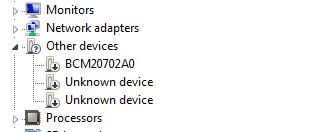
It might in located in Other devices or Bluetooth
BCM20702 Bluetooth or 20702 Bluetooth

I'm subscribed to this post so I'm notified of new posts (don't always get to it right away though)


You can download the Softpaq here (download begins when you click the link)
ftp://ftp.hp.com/pub/softpaq/sp61501-62000/sp61617.exe

Release notes: (online HTML)

Code:
[SIZE=2][B]TITLE: [/B][/SIZE][SIZE=2]Broadcom Bluetooth 4.0 Software and Driver [/SIZE]
[LEFT][SIZE=2][B]VERSION: [/B][/SIZE][SIZE=2]6.5 REV: M [/SIZE]
[SIZE=2][B]DESCRIPTION:[/B][/SIZE] [SIZE=2][COLOR=red]See online HTML link above[/COLOR][/SIZE] 
[SIZE=2][B]PURPOSE: [/B][/SIZE][SIZE=2]Routine [/SIZE]
[SIZE=2][B]SoftPaq NUMBER: [/B][/SIZE][SIZE=2]sp61617 [/SIZE][/LEFT]
[SIZE=2]SoftPaq MD5: 614b6df0e1313c7691a31d71b0f292e3 [/SIZE]
[LEFT][SIZE=2][B]SUPERSEDES: [/B][/SIZE][SIZE=2]sp61616 [/SIZE]
[SIZE=2][B]EFFECTIVE DATE: [/B][/SIZE][SIZE=2]April 19, 2013 [/SIZE]
[SIZE=2][B]CATEGORY: [/B][/SIZE][SIZE=2]Driver - Network [/SIZE]
[SIZE=2][B]SSM SUPPORTED: [/B][/SIZE][SIZE=2]YES [/SIZE]
[SIZE=2][B]PRODUCT TYPE(S): [/B][/SIZE][SIZE=2]Notebooks [/SIZE][/LEFT]
 
 
[LEFT][SIZE=2][B]HARDWARE PRODUCT MODEL(S): [/B][/SIZE][COLOR=red]See online HTML link above[/COLOR][/LEFT]
 

My Computer My Computer

At a glance

x64 (6.3.9600) Win8.1 Pro & soon dual boot x6...AMD A6-3420M APU with Radeon(tm) HD Graphics6.00 GBAMD Radeon(TM) HD 6520G
Computer type
Laptop
Computer Manufacturer/Model Number
HP Pavilion dv6-6c10us
OS
x64 (6.3.9600) Win8.1 Pro & soon dual boot x64 (6.1.7601) Win7_SP1 HomePrem
CPU
AMD A6-3420M APU with Radeon(tm) HD Graphics
Motherboard
Hewlett-Packard 1805
Memory
6.00 GB
Graphics Card(s)
AMD Radeon(TM) HD 6520G
Sound Card
(1) AMD High Definition Audio Device (2) IDT High Definiti
Monitor(s) Displays
HP W2072a 20" LCD (1600 x 900) @ 60 Hz
Screen Resolution
1366 x 768 x 32 bits (4294967296 colors) @ 60 Hz
Hard Drives
ST640LM0 00 HM641JI SATA Disk Device
Keyboard
Logitech k520 wireless KB
Mouse
Logitech m320 wireless mouse (bundled with KB)
Internet Speed
15/5 | 54 MB Wireless 'n'
Antivirus
Realtime: Defender or Avast | On-demand: Malwarebytes, ESET
Browser
IE 11 on Win8, IE 10 on win 7
Other Info
Media: [Gimp, Audacity, VLC] || Comm: [WEmail 2012, Skype] || Productivity: [OpenOffice,| Textpad] || Utils: [Sysinternals, cCleaner, Speccy, Defraggler]
In Device Manager, there are two entries under Bluetooth Radios (1) HP Integrated Bluetooth Module (2)Microsoft Bluetooth Enumerator. Both of these are described as working properly with drivers dated 6/21/2006.

Under Network Adapters there are two Bluetooth related entries:(1)Bluetooth Device(Personal Area Network) (2)Bluetooth Device(RFCOMM Protocol TDI). These two items are described as working properly with drivers dated 6/21/2006.
I tried to update these drivers through Automatic Search, but Windows explorer claims the "best driver is already installed ". I uninstalled each one of them and the same drivers were installed automatically on reboot.

Incidentally, these are the same Bluetooth related entries in Device Manager in Vista. I remember with Vista, I installed from HP site a driver that has something to do with Broadcom...but I cannot find it in W7 drivers/software list in HP site.
 

My Computer My Computer

At a glance

W7 pro 32-bit.4GBATI Mobility Radeon HD 4650 (M96)
Computer type
Laptop
Computer Manufacturer/Model Number
HP Pavilion dv7-2173cl Entertainment Notebook PC
OS
W7 pro 32-bit.
Memory
4GB
Graphics Card(s)
ATI Mobility Radeon HD 4650 (M96)
Sound Card
•Altec Lansing with SRS Premium Sound and Sub-Woofer
Monitor(s) Displays
17.3” Diagonal HD+ High-Definition HP LED BrightView W
Screen Resolution
1600 x 900
Hard Drives
500GB (5400RPM)
Keyboard
101-key compatible with full size keyboard
Antivirus
MSE
Browser
IE 11
Add Wizard is the program that installs driver when a new device is plugged in. It asks whether or not you have a disc. Without disc, it installs what W7 finds.

I think W7 add wizard is finicky while earlier OS was not(meaning it just installed everything, repeatedly on demand)
 

My Computer My Computer

At a glance

W7 pro 32-bit.4GBATI Mobility Radeon HD 4650 (M96)
Computer type
Laptop
Computer Manufacturer/Model Number
HP Pavilion dv7-2173cl Entertainment Notebook PC
OS
W7 pro 32-bit.
Memory
4GB
Graphics Card(s)
ATI Mobility Radeon HD 4650 (M96)
Sound Card
•Altec Lansing with SRS Premium Sound and Sub-Woofer
Monitor(s) Displays
17.3” Diagonal HD+ High-Definition HP LED BrightView W
Screen Resolution
1600 x 900
Hard Drives
500GB (5400RPM)
Keyboard
101-key compatible with full size keyboard
Antivirus
MSE
Browser
IE 11
Thanks,

Bluetooth can be finicky and it can cause issues on Win7.

Yeah, HP doesn't seem to helpful on some drivers (finding AMD USB chipset, Bluetooth and Wireless drivers on my dv6 casued me headaches for a while)

I tend to search the main HP support site (not my dv6 page) for some things. Even that is a headache. So I might search HP's ftp site. That's where I found my BT driver (turns out to be the same driver for your machine)

Let me chew on this new information - I forgot some things last night (this morning?)

Bill

In Device Manager, there are two entries under Bluetooth Radios (1) HP Integrated Bluetooth Module (2)Microsoft Bluetooth Enumerator. Both of these are described as working properly with drivers dated 6/21/2006.

Under Network Adapters there are two Bluetooth related entries:(1)Bluetooth Device(Personal Area Network) (2)Bluetooth Device(RFCOMM Protocol TDI). These two items are described as working properly with drivers dated 6/21/2006.

I tried to update these drivers through Automatic Search, but Windows explorer claims the "best driver is already installed ". I uninstalled each one of them and the same drivers were installed automatically on reboot.

Incidentally, these are the same Bluetooth related entries in Device Manager in Vista. I remember with Vista, I installed from HP site a driver that has something to do with Broadcom...but I cannot find it in W7 drivers/software list in HP site.
 

My Computer My Computer

At a glance

x64 (6.3.9600) Win8.1 Pro & soon dual boot x6...AMD A6-3420M APU with Radeon(tm) HD Graphics6.00 GBAMD Radeon(TM) HD 6520G
Computer type
Laptop
Computer Manufacturer/Model Number
HP Pavilion dv6-6c10us
OS
x64 (6.3.9600) Win8.1 Pro & soon dual boot x64 (6.1.7601) Win7_SP1 HomePrem
CPU
AMD A6-3420M APU with Radeon(tm) HD Graphics
Motherboard
Hewlett-Packard 1805
Memory
6.00 GB
Graphics Card(s)
AMD Radeon(TM) HD 6520G
Sound Card
(1) AMD High Definition Audio Device (2) IDT High Definiti
Monitor(s) Displays
HP W2072a 20" LCD (1600 x 900) @ 60 Hz
Screen Resolution
1366 x 768 x 32 bits (4294967296 colors) @ 60 Hz
Hard Drives
ST640LM0 00 HM641JI SATA Disk Device
Keyboard
Logitech k520 wireless KB
Mouse
Logitech m320 wireless mouse (bundled with KB)
Internet Speed
15/5 | 54 MB Wireless 'n'
Antivirus
Realtime: Defender or Avast | On-demand: Malwarebytes, ESET
Browser
IE 11 on Win8, IE 10 on win 7
Other Info
Media: [Gimp, Audacity, VLC] || Comm: [WEmail 2012, Skype] || Productivity: [OpenOffice,| Textpad] || Utils: [Sysinternals, cCleaner, Speccy, Defraggler]
I've asked for some help on BT

It might well be the driver, so could you post screen shots of your Device Manger showing the BT entries you mentioned?

Please see http://www.sevenforums.com/tutorials/9733-screenshots-files-upload-post-seven-forums.html for the preferred method of posting files and images on Sevenforums.

That will help determine if it is the driver of something else.

Thanks

edit: I uninstalled my BT because I don't have any BT devices - so why use resources on my machine.
You do have BT devices, so you need the drivers on your machine.

When you post the screen shot of your Dev Mgr, please expand the BT entries. You'll see an expanded Other Devices in my screen shot below (that's where my BT [BCM20702A0] is displayed since I intentionally uninstalled it)
 

Attachments

  • dm.PNG
    dm.PNG
    2.6 KB · Views: 15
Last edited:

My Computer My Computer

At a glance

x64 (6.3.9600) Win8.1 Pro & soon dual boot x6...AMD A6-3420M APU with Radeon(tm) HD Graphics6.00 GBAMD Radeon(TM) HD 6520G
Computer type
Laptop
Computer Manufacturer/Model Number
HP Pavilion dv6-6c10us
OS
x64 (6.3.9600) Win8.1 Pro & soon dual boot x64 (6.1.7601) Win7_SP1 HomePrem
CPU
AMD A6-3420M APU with Radeon(tm) HD Graphics
Motherboard
Hewlett-Packard 1805
Memory
6.00 GB
Graphics Card(s)
AMD Radeon(TM) HD 6520G
Sound Card
(1) AMD High Definition Audio Device (2) IDT High Definiti
Monitor(s) Displays
HP W2072a 20" LCD (1600 x 900) @ 60 Hz
Screen Resolution
1366 x 768 x 32 bits (4294967296 colors) @ 60 Hz
Hard Drives
ST640LM0 00 HM641JI SATA Disk Device
Keyboard
Logitech k520 wireless KB
Mouse
Logitech m320 wireless mouse (bundled with KB)
Internet Speed
15/5 | 54 MB Wireless 'n'
Antivirus
Realtime: Defender or Avast | On-demand: Malwarebytes, ESET
Browser
IE 11 on Win8, IE 10 on win 7
Other Info
Media: [Gimp, Audacity, VLC] || Comm: [WEmail 2012, Skype] || Productivity: [OpenOffice,| Textpad] || Utils: [Sysinternals, cCleaner, Speccy, Defraggler]
Win7 is different from XP and Vista.
It took me about two months to get used to the differences after using Vista.

Try steps 1, 2, and 3 of this tutorial: http://www.sevenforums.com/tutorials/2803-device-installation-settings.html

Then run Windows Update (WU), check for updates.

See if WU provides any BT drivers offered - tick them and install.

If there are no WU updates offered for BT, please post the screen shot requestd in Post# 19

Thanks

Add Wizard is the program that installs driver when a new device is plugged in. It asks whether or not you have a disc. Without disc, it installs what W7 finds.

I think W7 add wizard is finicky while earlier OS was not(meaning it just installed everything, repeatedly on demand)
 

My Computer My Computer

At a glance

x64 (6.3.9600) Win8.1 Pro & soon dual boot x6...AMD A6-3420M APU with Radeon(tm) HD Graphics6.00 GBAMD Radeon(TM) HD 6520G
Computer type
Laptop
Computer Manufacturer/Model Number
HP Pavilion dv6-6c10us
OS
x64 (6.3.9600) Win8.1 Pro & soon dual boot x64 (6.1.7601) Win7_SP1 HomePrem
CPU
AMD A6-3420M APU with Radeon(tm) HD Graphics
Motherboard
Hewlett-Packard 1805
Memory
6.00 GB
Graphics Card(s)
AMD Radeon(TM) HD 6520G
Sound Card
(1) AMD High Definition Audio Device (2) IDT High Definiti
Monitor(s) Displays
HP W2072a 20" LCD (1600 x 900) @ 60 Hz
Screen Resolution
1366 x 768 x 32 bits (4294967296 colors) @ 60 Hz
Hard Drives
ST640LM0 00 HM641JI SATA Disk Device
Keyboard
Logitech k520 wireless KB
Mouse
Logitech m320 wireless mouse (bundled with KB)
Internet Speed
15/5 | 54 MB Wireless 'n'
Antivirus
Realtime: Defender or Avast | On-demand: Malwarebytes, ESET
Browser
IE 11 on Win8, IE 10 on win 7
Other Info
Media: [Gimp, Audacity, VLC] || Comm: [WEmail 2012, Skype] || Productivity: [OpenOffice,| Textpad] || Utils: [Sysinternals, cCleaner, Speccy, Defraggler]
Back
Top