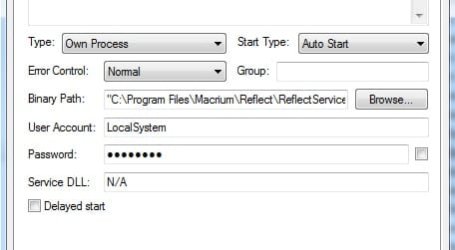
Thank you all for sharing the knowledge! I will try Macrium Reflect Free and leave Windows 7 imaging tool. Have you all always had success in restoring a Macrium full image of a drive? Also, let me ask you a few questions about the Macrium program itself. Does it have any processes/services that run in the background all the time or is it a run-when-needed kind of application? Is there any adware or calling phone (since it's a freeware app)? I guess if supports USB 3.0 speeds and I saw that it comes in 32 and 64-bit flavours (I have Win7 x64). The freeware version is a bit hidden on tha Macrium site but I have found it - though it only has a small DL installer.
Anyway, I'm going to go and try it, thank you very much for help, much appreciated!
I'm using Macrium Free for full-HDD imaging and have tested the process from the image-creation to an external HDD and have restored the image back to my spare internal HDD and have booted up Windows and tested it without problems.
I use my WinPE CD when processing image backup and restore. I like to do that since that's testing the process with the worse-case scenario in case I couldn't boot up Windows on my "C" HDD or my "C" HDD failed, or was infected by a malicious object.
I usually store 2-3 full-disk images on an external HDD. All have tested ok (restored to my test HDD and booted into Windows).
I agree with the posters here. After I read about Macrium at this forum, I decided to give it a try. Aside from a couple of issues encountered during the creation of the WinPE CD, all has been running good with consistent repeatable results with full-HDD imaging and restoration process.
I have also used the Cloning option several times with successful results.
My Computer
- Computer type
- PC/Desktop
- Computer Manufacturer/Model Number
- Built at Micro Center Richardson, TX
- OS
- Windows 7 Home Premium 64 bit
- CPU
- Intel i5 650 Dual Core 3.20 GHz Cache 4MB Threads: 4
- Motherboard
- ASUS PRO P7P55D-E
- Memory
- Corsair 16GB DDR3 1600MHz 9-9-9-24 P/N: CMZ8GX3M2A1600C
- Graphics Card(s)
- ZOTAC GeFORCE 9500 ZT-95TEK2M-FSL 1GB GDDR2
- Sound Card
- Mother Bd
- Monitor(s) Displays
- ASUS V228H 21.5” Diag
- Screen Resolution
- 1440 x 900
- Hard Drives
- SEAGATE BARRACUDA (2ea) 3.5” INTERNAL 1Tb 16 MB SATA ST1000DM003-9YN162 7200RPM, 64MB, SATA 6Gb/s ** 2 Sata Hot-Swap Racks installed in Tower
- PSU
- Thermaltake Model TR2 RX 750W
- Cooling
- 2 Tower Fans
- Keyboard
- Dell Quietkey PS/2 Windows 104 P/N 0463CD
- Mouse
- Kensington Mechanical Trackball USB Model 64217
- Internet Speed
- 35/35
- Antivirus
- Norton 360 & MBAM Pro
- Browser
- IE10
- Other Info
- Printer: HP DeskJet 3520 USB 2.0 **
Speakers: ALTEC Model VS4621 2.1 28 W/Channel w/Sub-woofer **
IOGEAR HDMI Monitor Switcher Swx3 MODEL GHDSW3 ** Addonics ZDRWESU3 eSata/USB 3.0 external DVD Read/Write DVD Drive** SEAGATE GoFlex USB 2.0 Portable HD 500GB 5400 RPM P/N: 9ZF2A2-570