Solved Image your system with free Macrium

Thank you all for sharing the knowledge! I will try Macrium Reflect Free and leave Windows 7 imaging tool. Have you all always had success in restoring a Macrium full image of a drive? Also, let me ask you a few questions about the Macrium program itself. Does it have any processes/services that run in the background all the time or is it a run-when-needed kind of application? Is there any adware or calling phone (since it's a freeware app)? I guess if supports USB 3.0 speeds and I saw that it comes in 32 and 64-bit flavours (I have Win7 x64). The freeware version is a bit hidden on tha Macrium site but I have found it - though it only has a small DL installer.

Anyway, I'm going to go and try it, thank you very much for help, much appreciated!

I'm using Macrium Free for full-HDD imaging and have tested the process from the image-creation to an external HDD and have restored the image back to my spare internal HDD and have booted up Windows and tested it without problems.

I use my WinPE CD when processing image backup and restore. I like to do that since that's testing the process with the worse-case scenario in case I couldn't boot up Windows on my "C" HDD or my "C" HDD failed, or was infected by a malicious object.

I usually store 2-3 full-disk images on an external HDD. All have tested ok (restored to my test HDD and booted into Windows).

I agree with the posters here. After I read about Macrium at this forum, I decided to give it a try. Aside from a couple of issues encountered during the creation of the WinPE CD, all has been running good with consistent repeatable results with full-HDD imaging and restoration process.

I have also used the Cloning option several times with successful results.
 

My Computer My Computer

Computer type
PC/Desktop
Computer Manufacturer/Model Number
Built at Micro Center Richardson, TX
OS
Windows 7 Home Premium 64 bit
CPU
Intel i5 650 Dual Core 3.20 GHz Cache 4MB Threads: 4
Motherboard
ASUS PRO P7P55D-E
Memory
Corsair 16GB DDR3 1600MHz 9-9-9-24 P/N: CMZ8GX3M2A1600C
Graphics Card(s)
ZOTAC GeFORCE 9500 ZT-95TEK2M-FSL 1GB GDDR2
Sound Card
Mother Bd
Monitor(s) Displays
ASUS V228H 21.5” Diag
Screen Resolution
1440 x 900
Hard Drives
SEAGATE BARRACUDA (2ea) 3.5” INTERNAL 1Tb 16 MB SATA ST1000DM003-9YN162 7200RPM, 64MB, SATA 6Gb/s ** 2 Sata Hot-Swap Racks installed in Tower
PSU
Thermaltake Model TR2 RX 750W
Cooling
2 Tower Fans
Keyboard
Dell Quietkey PS/2 Windows 104 P/N 0463CD
Mouse
Kensington Mechanical Trackball USB Model 64217
Internet Speed
35/35
Antivirus
Norton 360 & MBAM Pro
Browser
IE10
Other Info
Printer: HP DeskJet 3520 USB 2.0 **
Speakers: ALTEC Model VS4621 2.1 28 W/Channel w/Sub-woofer **
IOGEAR HDMI Monitor Switcher Swx3 MODEL GHDSW3 ** Addonics ZDRWESU3 eSata/USB 3.0 external DVD Read/Write DVD Drive** SEAGATE GoFlex USB 2.0 Portable HD 500GB 5400 RPM P/N: 9ZF2A2-570
Not aware of any adware or other nasties.

I have on maybe three occasions had to restore an image I made, usually after installing other softwsare or updates that mucked up the PC. Twice I was successful, the third time I wasn't (interestingly I was experimenting with Macrium at the time and tried making both an image and a clone - the clone failed but the image, which I made the same day, succeeded in restoring).

Worth mentioning that in the restore menu, as well as restoring, you can also "verify" that an image has been made successfully (takes as long as making the original image, goodness only knows what the software is doing...) I have no idea if that "guarantees" that the image will restore in the event of a crash but it makes me feel better to do that. No idea why Macrium put it on the restore menu when checking it is best done straight after making the image (in the paid for image you can set Macrium to autoverify, in the free version you must do it manually).

When I right click the image file and open via Macrium I see all my folders and files just as though the image file was a giant zip file, so I guess if I had to restore to a new PC and found the drivers etc were too different to let me do that, at least my data files would still be accessible if I kept them on the C drive.
 

My Computer My Computer

OS
Win 7 Pro 64 bit
...Have you all always had success in restoring a Macrium full image of a drive?...

I have. I have Macrium Reflect set to automagically verify the image immediately after making it. It takes almost twice as long but I know for a fact afterward that the image is good and should restore successfully. Only once did an image not verify; I just reran it and the image came out perfectly afterward.

...Does it have any processes/services that run in the background all the time or is it a run-when-needed kind of application?...

It runs only when you initiate it.

...Is there any adware or calling phone (since it's a freeware app)?...

No adware. It will "phone home" to check for updates but it will not transmit any personal data.
 

My Computer My Computer

Computer type
PC/Desktop
Computer Manufacturer/Model Number
Custom Build
OS
Win 7 Ultimate 64 bit
CPU
Intel i7-3930K
Motherboard
ASUS P9X79 WS
Memory
Kingston HyperX Genesis 32GB Kit (8x4GB Modules) 1600MHz DDR
Graphics Card(s)
MSI R7850 Twin Frozr 2GD5/OC Radeon HD 7850 2GB 256-bit GDDR
Sound Card
Asus Xonar Essence STX
Monitor(s) Displays
3x Asus VG248QE 24", Vizio 32" TV
Screen Resolution
1920 x 1080, ?
Hard Drives
Samsung 128GB 840 Pro SSD (1),
Samsung 4TB 850 EVO SSDs (4)
Samsung 4TB 850 EVO SSDs (16) external backup drives used in 2.5" hot swap bays in the computer.
PSU
Corsair HX750w
Case
Antec Two Hundred v2 (modified)
Cooling
Cooler Master GeminII S524 120mm (fan replaced with a 140mm)
Keyboard
Logitech G510s
Mouse
Logitech M525 (two in use)
Internet Speed
=< 32Mbps down, 8Mbps up
Antivirus
AVAST!, MBAM, SAS, Spybot S&D (all but MBAM free) Glary Util
Browser
IE11
Other Info
LSI 9211-8i HBA card (8 SATA III ports), 2.5" & 3.5" Hot Swap Bays, HooToo HT-CR001 PCI-E to USB 3.0 Internal Hub + 6 Slot Card Reader, and LG Model CH12LS28 BD-ROM Optical Drive. Also, ScanSnap S1500 ADF duplexing scanner, Canon 9000F flat bed scanner, Corsair SP2500 2.1 speakers, Samsung CLP 415nw laser color printer, Cyberpower PP2200SW UPS
I can't recall having an image fail with any of the imaging programs I have used. They all work fine.

Damage to an image file is very rare and almost always due to problems on the disk.

...Does it have any processes/services that run in the background all the time

Yes. Macrium and Aomei have one service running for scheduling.

I don't use scheduling, so I just turn Aomei schedule service off. It doesn't mind that at all.

Some of the others have a lot more going on than that.
 

My Computers My Computers

System One System Two

  • Computer type
    PC/Desktop
    OS
    7 X64
    CPU
    i5 8400
    Motherboard
    gigabyte b365m ds3h
    Memory
    2x8gb 3200mhz
    Hard Drives
    various
    PSU
    pure power 11 400w cm
    Case
    Coolermaster
    Cooling
    cryorig m9i
  • Computer type
    PC/Desktop
    OS
    7x64
    CPU
    g5400
    Motherboard
    ga b365m ds3h
    Memory
    8gb ddr4 2400
    PSU
    xfx pro 450w
Thank you all for sharing the knowledge! I will try Macrium Reflect Free and leave Windows 7 imaging tool. Have you all always had success in restoring a Macrium full image of a drive? Also, let me ask you a few questions about the Macrium program itself. Does it have any processes/services that run in the background all the time or is it a run-when-needed kind of application? Is there any adware or calling phone (since it's a freeware app)? I guess if supports USB 3.0 speeds and I saw that it comes in 32 and 64-bit flavours (I have Win7 x64). The freeware version is a bit hidden on tha Macrium site but I have found it - though it only has a small DL installer.

Anyway, I'm going to go and try it, thank you very much for help, much appreciated!
You worry too much. Macrium is clean and reliable and after appr. 100 restores I have never seen a failure. And there is no bothering whatsoever. Just use it - you'll see.

Download from here under 'Free': Macrium Reflect FREE Edition - Information and download
 

My Computer My Computer

Computer Manufacturer/Model Number
HP, Dell, Gateway, Toshiba - 4 laptops and 2 desktops
OS
Vista, Windows7, Mint Mate, Zorin, Windows 8
CPU
from 1.6GHz Duo to i7
Monitor(s) Displays
2x HP w2207
Hard Drives
5x HDD, 7x SSD, 12x Externals
Keyboard
with trackball - no mices
Mouse
Trackball mice
Internet Speed
DSL 6000
...Yes. Macrium and Aomei have one service running for scheduling...

I just checked to be sure; Macrium Reflect doesn't have any services running on my machine. I'm not aware if Reflect has an option for scheduling.
 

My Computer My Computer

Computer type
PC/Desktop
Computer Manufacturer/Model Number
Custom Build
OS
Win 7 Ultimate 64 bit
CPU
Intel i7-3930K
Motherboard
ASUS P9X79 WS
Memory
Kingston HyperX Genesis 32GB Kit (8x4GB Modules) 1600MHz DDR
Graphics Card(s)
MSI R7850 Twin Frozr 2GD5/OC Radeon HD 7850 2GB 256-bit GDDR
Sound Card
Asus Xonar Essence STX
Monitor(s) Displays
3x Asus VG248QE 24", Vizio 32" TV
Screen Resolution
1920 x 1080, ?
Hard Drives
Samsung 128GB 840 Pro SSD (1),
Samsung 4TB 850 EVO SSDs (4)
Samsung 4TB 850 EVO SSDs (16) external backup drives used in 2.5" hot swap bays in the computer.
PSU
Corsair HX750w
Case
Antec Two Hundred v2 (modified)
Cooling
Cooler Master GeminII S524 120mm (fan replaced with a 140mm)
Keyboard
Logitech G510s
Mouse
Logitech M525 (two in use)
Internet Speed
=< 32Mbps down, 8Mbps up
Antivirus
AVAST!, MBAM, SAS, Spybot S&D (all but MBAM free) Glary Util
Browser
IE11
Other Info
LSI 9211-8i HBA card (8 SATA III ports), 2.5" & 3.5" Hot Swap Bays, HooToo HT-CR001 PCI-E to USB 3.0 Internal Hub + 6 Slot Card Reader, and LG Model CH12LS28 BD-ROM Optical Drive. Also, ScanSnap S1500 ADF duplexing scanner, Canon 9000F flat bed scanner, Corsair SP2500 2.1 speakers, Samsung CLP 415nw laser color printer, Cyberpower PP2200SW UPS
Perhaps there is something different about mine then .

I haven't used macrium since I found Aomei.

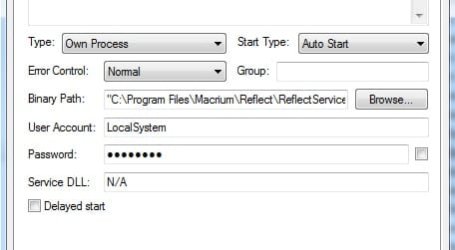
Coincidentally, I just installed macrium due to a question on another thread. It is in fact the image mounting service. One or two little services like that don't matter.

Iirc it was Acronis that had a whole bunch of stuff running last time I looked at it. Easeus is quite hefty, too.

reflectservice.jpg
 

My Computers My Computers

System One System Two

  • Computer type
    PC/Desktop
    OS
    7 X64
    CPU
    i5 8400
    Motherboard
    gigabyte b365m ds3h
    Memory
    2x8gb 3200mhz
    Hard Drives
    various
    PSU
    pure power 11 400w cm
    Case
    Coolermaster
    Cooling
    cryorig m9i
  • Computer type
    PC/Desktop
    OS
    7x64
    CPU
    g5400
    Motherboard
    ga b365m ds3h
    Memory
    8gb ddr4 2400
    PSU
    xfx pro 450w
Odd, I have ReflectService.exe running, and I have no auto scheduled back up set.
 

My Computer My Computer

Computer type
PC/Desktop
Computer Manufacturer/Model Number
Home Built Desktop By DataTech
OS
Windows 7 Ultimate X64 SP1
CPU
Intel i5-2550K, Differing ~4.4-4.8GHz No built in GPU
Motherboard
ASUS P8Z68-V PRO/GEN3
Memory
16GB G.Skill Sniper 1866MHz @ 2133MHz 2x8GB
Graphics Card(s)
ASUS GTX650TIB-DC2OC-2GD5, (650TI Boost)
Sound Card
Onboard Realtek 5-1
Monitor(s) Displays
Samsung P2570HD
Screen Resolution
1920x1080
Hard Drives
Samsung 840 Pro 256GB SSD for OS, 500GB Seagate Constellation (Enterprise drive) for Data
PSU
Corsair HX650W
Case
Inwin Dragon Rider
Cooling
Hyper 212 EVO w/two Noctua fans, push-pull, @1300 RPM
Keyboard
E-Z Eyes, bright yellow keys with large characters
Mouse
steelseries SENSEI Laser Pro Gaming
Internet Speed
48-51Mbs Mbs down, 11 Mbs up Xfinity Cable
Antivirus
Norton Internet Security 2013
Browser
IE 10, Opera, Pale Moon if needed
Other Info
4 case fans, LG BluRay-RE, ASUS DVD-RW, Mr. Fusion power supply, 1.21 gigawatts.
Odd, I have ReflectService.exe running, and I have no auto scheduled back up set.
That is probably the check for updates. Look into the startups what it is.
 

My Computer My Computer

Computer Manufacturer/Model Number
HP, Dell, Gateway, Toshiba - 4 laptops and 2 desktops
OS
Vista, Windows7, Mint Mate, Zorin, Windows 8
CPU
from 1.6GHz Duo to i7
Monitor(s) Displays
2x HP w2207
Hard Drives
5x HDD, 7x SSD, 12x Externals
Keyboard
with trackball - no mices
Mouse
Trackball mice
Internet Speed
DSL 6000

My Computer My Computer

Computer type
PC/Desktop
Computer Manufacturer/Model Number
Custom Build
OS
Win 7 Ultimate 64 bit
CPU
Intel i7-3930K
Motherboard
ASUS P9X79 WS
Memory
Kingston HyperX Genesis 32GB Kit (8x4GB Modules) 1600MHz DDR
Graphics Card(s)
MSI R7850 Twin Frozr 2GD5/OC Radeon HD 7850 2GB 256-bit GDDR
Sound Card
Asus Xonar Essence STX
Monitor(s) Displays
3x Asus VG248QE 24", Vizio 32" TV
Screen Resolution
1920 x 1080, ?
Hard Drives
Samsung 128GB 840 Pro SSD (1),
Samsung 4TB 850 EVO SSDs (4)
Samsung 4TB 850 EVO SSDs (16) external backup drives used in 2.5" hot swap bays in the computer.
PSU
Corsair HX750w
Case
Antec Two Hundred v2 (modified)
Cooling
Cooler Master GeminII S524 120mm (fan replaced with a 140mm)
Keyboard
Logitech G510s
Mouse
Logitech M525 (two in use)
Internet Speed
=< 32Mbps down, 8Mbps up
Antivirus
AVAST!, MBAM, SAS, Spybot S&D (all but MBAM free) Glary Util
Browser
IE11
Other Info
LSI 9211-8i HBA card (8 SATA III ports), 2.5" & 3.5" Hot Swap Bays, HooToo HT-CR001 PCI-E to USB 3.0 Internal Hub + 6 Slot Card Reader, and LG Model CH12LS28 BD-ROM Optical Drive. Also, ScanSnap S1500 ADF duplexing scanner, Canon 9000F flat bed scanner, Corsair SP2500 2.1 speakers, Samsung CLP 415nw laser color printer, Cyberpower PP2200SW UPS
Perhaps there is something different about mine then .

I haven't used macrium since I found Aomei.

Coincidentally, I just installed macrium due to a question on another thread. It is in fact the image mounting service. One or two little services like that don't matter.

Iirc it was Acronis that had a whole bunch of stuff running last time I looked at it. Easeus is quite hefty, too.

View attachment 303014

I checked under Services and it was way down on the list. It is either inactive or using so little, it will not show up in Processes. It's definitely not enough to worry about.
 

My Computer My Computer

Computer type
PC/Desktop
Computer Manufacturer/Model Number
Custom Build
OS
Win 7 Ultimate 64 bit
CPU
Intel i7-3930K
Motherboard
ASUS P9X79 WS
Memory
Kingston HyperX Genesis 32GB Kit (8x4GB Modules) 1600MHz DDR
Graphics Card(s)
MSI R7850 Twin Frozr 2GD5/OC Radeon HD 7850 2GB 256-bit GDDR
Sound Card
Asus Xonar Essence STX
Monitor(s) Displays
3x Asus VG248QE 24", Vizio 32" TV
Screen Resolution
1920 x 1080, ?
Hard Drives
Samsung 128GB 840 Pro SSD (1),
Samsung 4TB 850 EVO SSDs (4)
Samsung 4TB 850 EVO SSDs (16) external backup drives used in 2.5" hot swap bays in the computer.
PSU
Corsair HX750w
Case
Antec Two Hundred v2 (modified)
Cooling
Cooler Master GeminII S524 120mm (fan replaced with a 140mm)
Keyboard
Logitech G510s
Mouse
Logitech M525 (two in use)
Internet Speed
=< 32Mbps down, 8Mbps up
Antivirus
AVAST!, MBAM, SAS, Spybot S&D (all but MBAM free) Glary Util
Browser
IE11
Other Info
LSI 9211-8i HBA card (8 SATA III ports), 2.5" & 3.5" Hot Swap Bays, HooToo HT-CR001 PCI-E to USB 3.0 Internal Hub + 6 Slot Card Reader, and LG Model CH12LS28 BD-ROM Optical Drive. Also, ScanSnap S1500 ADF duplexing scanner, Canon 9000F flat bed scanner, Corsair SP2500 2.1 speakers, Samsung CLP 415nw laser color printer, Cyberpower PP2200SW UPS
You may be right. After further research I found this:
 

Attachments

  • 2014-01-23_2043.png
    2014-01-23_2043.png
    1.8 KB · Views: 21

My Computer My Computer

Computer Manufacturer/Model Number
HP, Dell, Gateway, Toshiba - 4 laptops and 2 desktops
OS
Vista, Windows7, Mint Mate, Zorin, Windows 8
CPU
from 1.6GHz Duo to i7
Monitor(s) Displays
2x HP w2207
Hard Drives
5x HDD, 7x SSD, 12x Externals
Keyboard
with trackball - no mices
Mouse
Trackball mice
Internet Speed
DSL 6000
I just recently (ish ) installed Easeus as well. I had tested their beta of the 6.5,.

They are trying to stay ahead by including Android backup, would you believe. I don't have any use for that bit, but they obviously think it will be a draw. Easeus is a very large creature.


I already said all that here:1367

Perhaps there is something different about mine then .

I haven't used macrium since I found Aomei.

Coincidentally, I just installed macrium due to a question on another thread. It is in fact the image mounting service. One or two little services like that don't matter.


Perhaps we all had crossed posts.
 

My Computers My Computers

System One System Two

  • Computer type
    PC/Desktop
    OS
    7 X64
    CPU
    i5 8400
    Motherboard
    gigabyte b365m ds3h
    Memory
    2x8gb 3200mhz
    Hard Drives
    various
    PSU
    pure power 11 400w cm
    Case
    Coolermaster
    Cooling
    cryorig m9i
  • Computer type
    PC/Desktop
    OS
    7x64
    CPU
    g5400
    Motherboard
    ga b365m ds3h
    Memory
    8gb ddr4 2400
    PSU
    xfx pro 450w
I just downloaded Macrium Free and along cam PE 3 components. What exactly is this and what do I do with it? If I understand correctly, this is with what I create my boot CD. Is there any simpler way (a pre-made boot CD which I just burn on a CD and that's it)?

Also, would Macrium still work normally when initiated if I disabled it's service in services.msc? I really don't want any services as I won't be scheduling anything.

Again, thank you!
 

My Computer My Computer

OS
Windows 7 Ultimate x64 SP1
...Also, would Macrium still work normally when initiated if I disabled it's service in services.msc? I really don't want any services as I won't be scheduling anything...

I might or it might not but it just doesn't matter. You are overthinking things. It uses up so little you will never know it's even there. Just leave it alone; it's there for a reason.
 

My Computer My Computer

Computer type
PC/Desktop
Computer Manufacturer/Model Number
Custom Build
OS
Win 7 Ultimate 64 bit
CPU
Intel i7-3930K
Motherboard
ASUS P9X79 WS
Memory
Kingston HyperX Genesis 32GB Kit (8x4GB Modules) 1600MHz DDR
Graphics Card(s)
MSI R7850 Twin Frozr 2GD5/OC Radeon HD 7850 2GB 256-bit GDDR
Sound Card
Asus Xonar Essence STX
Monitor(s) Displays
3x Asus VG248QE 24", Vizio 32" TV
Screen Resolution
1920 x 1080, ?
Hard Drives
Samsung 128GB 840 Pro SSD (1),
Samsung 4TB 850 EVO SSDs (4)
Samsung 4TB 850 EVO SSDs (16) external backup drives used in 2.5" hot swap bays in the computer.
PSU
Corsair HX750w
Case
Antec Two Hundred v2 (modified)
Cooling
Cooler Master GeminII S524 120mm (fan replaced with a 140mm)
Keyboard
Logitech G510s
Mouse
Logitech M525 (two in use)
Internet Speed
=< 32Mbps down, 8Mbps up
Antivirus
AVAST!, MBAM, SAS, Spybot S&D (all but MBAM free) Glary Util
Browser
IE11
Other Info
LSI 9211-8i HBA card (8 SATA III ports), 2.5" & 3.5" Hot Swap Bays, HooToo HT-CR001 PCI-E to USB 3.0 Internal Hub + 6 Slot Card Reader, and LG Model CH12LS28 BD-ROM Optical Drive. Also, ScanSnap S1500 ADF duplexing scanner, Canon 9000F flat bed scanner, Corsair SP2500 2.1 speakers, Samsung CLP 415nw laser color printer, Cyberpower PP2200SW UPS
It isn't scheduling, looks like you don't get that in free macrium. Scheduling and incremental/differential functions come with free Aomei. The macrium service is for image mounting.

Macrium needs to d/l the winpe components to make pe rescue media. Now you have done that, you can run the create rescue media thing under "Other tasks" at the top of the main window ( tho it might prompt you anyway).
 

My Computers My Computers

System One System Two

  • Computer type
    PC/Desktop
    OS
    7 X64
    CPU
    i5 8400
    Motherboard
    gigabyte b365m ds3h
    Memory
    2x8gb 3200mhz
    Hard Drives
    various
    PSU
    pure power 11 400w cm
    Case
    Coolermaster
    Cooling
    cryorig m9i
  • Computer type
    PC/Desktop
    OS
    7x64
    CPU
    g5400
    Motherboard
    ga b365m ds3h
    Memory
    8gb ddr4 2400
    PSU
    xfx pro 450w
OK, maybe I'll try it and see. I have another concern - I'm planning of always doing an image of a whole HDD (all partitions), not a clone. But to be able to restore it to a new drive, it says here, I will need ReDeploy (something I have to pay for)?

Macrium Support Forum - Clone v Image

I've also read that a clone is like an image + MBR. So what will create a new MBR on a brand new empty HDD in case I want to restore my backup from my old (broken) HDD to the new one. Will it be possible?
 

My Computer My Computer

OS
Windows 7 Ultimate x64 SP1
I just downloaded Macrium Free and along cam PE 3 components. What exactly is this and what do I do with it? If I understand correctly, this is with what I create my boot CD. Is there any simpler way (a pre-made boot CD which I just burn on a CD and that's it)?

Also, would Macrium still work normally when initiated if I disabled it's service in services.msc? I really don't want any services as I won't be scheduling anything.

Again, thank you!
You can download a premade WinPE recovery CD .iso from my Skydrive. Just burn it to CD (now DVD because it is only a few MBs).

And leave the services alone. The process that is running does nothing unless you mount the image - it is just dormant.
 

My Computer My Computer

Computer Manufacturer/Model Number
HP, Dell, Gateway, Toshiba - 4 laptops and 2 desktops
OS
Vista, Windows7, Mint Mate, Zorin, Windows 8
CPU
from 1.6GHz Duo to i7
Monitor(s) Displays
2x HP w2207
Hard Drives
5x HDD, 7x SSD, 12x Externals
Keyboard
with trackball - no mices
Mouse
Trackball mice
Internet Speed
DSL 6000
But to be able to restore it to a new drive, it says here, I will need ReDeploy (something I have to pay for)?

It will ok to new drive. It is only if you restore to a different machine you will need "restore to different hardware" function.

So what will create a new MBR on a brand new empty HDD in case I want to restore my backup from my old (broken) HDD to the new one. Will it be possible?

Yes. all imaging programs will do that.
 

My Computers My Computers

System One System Two

  • Computer type
    PC/Desktop
    OS
    7 X64
    CPU
    i5 8400
    Motherboard
    gigabyte b365m ds3h
    Memory
    2x8gb 3200mhz
    Hard Drives
    various
    PSU
    pure power 11 400w cm
    Case
    Coolermaster
    Cooling
    cryorig m9i
  • Computer type
    PC/Desktop
    OS
    7x64
    CPU
    g5400
    Motherboard
    ga b365m ds3h
    Memory
    8gb ddr4 2400
    PSU
    xfx pro 450w
OK, maybe I'll try it and see. I have another concern - I'm planning of always doing an image of a whole HDD (all partitions), not a clone. But to be able to restore it to a new drive, it says here, I will need ReDeploy (something I have to pay for)?

Macrium Support Forum - Clone v Image

I've also read that a clone is like an image + MBR. So what will create a new MBR on a brand new empty HDD in case I want to restore my backup from my old (broken) HDD to the new one. Will it be possible?

ReDeploy is for restoring an image to a computer with different components than were used when the image was made. For example, you make an image then replace the MOBO. Unless you have ReDeploy, you probably won't be able to restore the image. If you have to replace the MOBO, you would probably be better off doing a clean install anyway. Otherwise, you will be able to restore to a new drive.

A clone will duplicate the entire drive so all partitions will be replicated. If you want to just image the C: partition, you should include the MBR partition with the C: partition. If you also have a data partition on the drive, you should image it separately from the MBR & C: partition.
 

My Computer My Computer

Computer type
PC/Desktop
Computer Manufacturer/Model Number
Custom Build
OS
Win 7 Ultimate 64 bit
CPU
Intel i7-3930K
Motherboard
ASUS P9X79 WS
Memory
Kingston HyperX Genesis 32GB Kit (8x4GB Modules) 1600MHz DDR
Graphics Card(s)
MSI R7850 Twin Frozr 2GD5/OC Radeon HD 7850 2GB 256-bit GDDR
Sound Card
Asus Xonar Essence STX
Monitor(s) Displays
3x Asus VG248QE 24", Vizio 32" TV
Screen Resolution
1920 x 1080, ?
Hard Drives
Samsung 128GB 840 Pro SSD (1),
Samsung 4TB 850 EVO SSDs (4)
Samsung 4TB 850 EVO SSDs (16) external backup drives used in 2.5" hot swap bays in the computer.
PSU
Corsair HX750w
Case
Antec Two Hundred v2 (modified)
Cooling
Cooler Master GeminII S524 120mm (fan replaced with a 140mm)
Keyboard
Logitech G510s
Mouse
Logitech M525 (two in use)
Internet Speed
=< 32Mbps down, 8Mbps up
Antivirus
AVAST!, MBAM, SAS, Spybot S&D (all but MBAM free) Glary Util
Browser
IE11
Other Info
LSI 9211-8i HBA card (8 SATA III ports), 2.5" & 3.5" Hot Swap Bays, HooToo HT-CR001 PCI-E to USB 3.0 Internal Hub + 6 Slot Card Reader, and LG Model CH12LS28 BD-ROM Optical Drive. Also, ScanSnap S1500 ADF duplexing scanner, Canon 9000F flat bed scanner, Corsair SP2500 2.1 speakers, Samsung CLP 415nw laser color printer, Cyberpower PP2200SW UPS
Back
Top