

Some of you may be aware I built a Haswell system a little over a month ago; see system specs.
That said love the system but the fan noise was getting on my nerves as the system turned out to be louder than my old system; and this was even after replacing both the rad fans on my H100i and the back 140mm case fan.
Anyway my Gigabyte motherboard features 7 fan headers, but two of these are just 3-pin fan headers, and these were what I was using for 2 of my 3 case fans. The problem with these particular 3-pin headers is they’re just straight fan headers with no control or sensor reading. They’re simply a straight power connector.
Getting to the point - I wound up re-routing the case fans to the 4-pin headers where the MB controls them, plus you get sensor readings. Lo and behold... my fan noise decreased as the case fans aren’t running full bore now.
Point... if you guys have a motherboard with smart headers that increase the fans as the temps rise, use those, and some of your fan noise issues may decrease. And perhaps you may not need that fan controller, or those fan speed reducers.
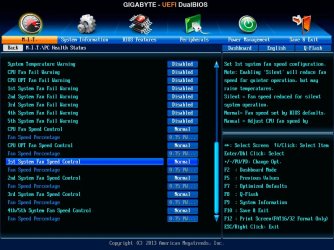
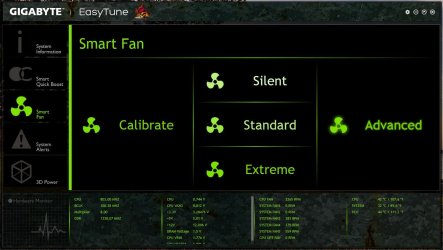
And if need be, the fan headers could be configured through BIOS or software to run at a speed of your choosing depending on BIOS or software options.
Gigabyte's G1 Sniper 5 BIOS...
Gigabytes Easy Tune Software...
So before you purchase that fan controller, check out your board’s fan header options. Might save you some headaches, and money.
For the record I have mine set to normal so as the temps (CPU) rise, so does the fan speed. Obviously those overclocking may require a different solution.
Just a suggestion
That said love the system but the fan noise was getting on my nerves as the system turned out to be louder than my old system; and this was even after replacing both the rad fans on my H100i and the back 140mm case fan.
Anyway my Gigabyte motherboard features 7 fan headers, but two of these are just 3-pin fan headers, and these were what I was using for 2 of my 3 case fans. The problem with these particular 3-pin headers is they’re just straight fan headers with no control or sensor reading. They’re simply a straight power connector.
Getting to the point - I wound up re-routing the case fans to the 4-pin headers where the MB controls them, plus you get sensor readings. Lo and behold... my fan noise decreased as the case fans aren’t running full bore now.
Point... if you guys have a motherboard with smart headers that increase the fans as the temps rise, use those, and some of your fan noise issues may decrease. And perhaps you may not need that fan controller, or those fan speed reducers.
And if need be, the fan headers could be configured through BIOS or software to run at a speed of your choosing depending on BIOS or software options.
Gigabyte's G1 Sniper 5 BIOS...
Gigabytes Easy Tune Software...
So before you purchase that fan controller, check out your board’s fan header options. Might save you some headaches, and money.
For the record I have mine set to normal so as the temps (CPU) rise, so does the fan speed. Obviously those overclocking may require a different solution.
Just a suggestion
My Computer
At a glance
Windows 10 ProIntel Core i7-4770K (3.5Ghz)32 gig Corsair Dominator Platinum (4x8Gig)Sapphire Tri-X R9 Fury
- Computer type
- PC/Desktop
- Computer Manufacturer/Model Number
- Custom built by me.
- OS
- Windows 10 Pro
- CPU
- Intel Core i7-4770K (3.5Ghz)
- Motherboard
- Gigabyte G1 Sniper 5 (F10 Bios)
- Memory
- 32 gig Corsair Dominator Platinum (4x8Gig)
- Graphics Card(s)
- Sapphire Tri-X R9 Fury
- Sound Card
- Soundblaster ZXR
- Monitor(s) Displays
- NEC PA242W 24" LCD Monitor
- Screen Resolution
- 1920 x 1200
- Hard Drives
- Primary - Samsung 850 Pro (512gig), Samsung 840 Pro (256gig), 2TB WD Caviar Black.
- PSU
- EVGA Supernova 1000 G2
- Case
- Cooler Master HAF X
- Cooling
- Corsair H100i with Corsair Air Series SP120 Quiet Fans
- Keyboard
- Logitech Wireless Wave
- Mouse
- Logitech Performance MX
- Internet Speed
- High Speed Cable
- Antivirus
- Norton Security
- Browser
- IE11
- Other Info
- Memory Timings - 1866MHz @ 9-9-9-27-1T @ 1.5 volts


