
In the free version the "verify" is an option under Restore. Yes it does take about as long to make the image. I don't know exactly what checking it does - maybe Wolfgang's suggestion of a hash check is it.Ok, I have the Pro version so I can't check myself but can one click on the Other Tasks tab at the top of the screen in the free version, click on Edit Defaults, and get this screen?
If you can mount the image explore and maybe even copy out a file then that builds some confidence. Then you can do that with Windows inbuilt imaging which for some users seems not to restore.
My Computer
At a glance
Windows 7x64 Home Premium SP1Intel i7 2600kG.Skill Ripjaws (DDR3-1600) 2x4GBNvidia GeForce GTS 450; Intel HD Graphics 300...
- Computer type
- PC/Desktop
- Computer Manufacturer/Model Number
- Own build
- OS
- Windows 7x64 Home Premium SP1
- CPU
- Intel i7 2600k
- Motherboard
- ASUS P8Z68 Deluxe
- Memory
- G.Skill Ripjaws (DDR3-1600) 2x4GB
- Graphics Card(s)
- Nvidia GeForce GTS 450; Intel HD Graphics 3000(GT2+)
- Monitor(s) Displays
- Dell Ultrasharp IPS panel U2311H, Samsung SyncMaster P2350
- Screen Resolution
- 1920x1080
- Hard Drives
- Samsung 850 Pro SSD 256GB, Samsung SSD 840 120GB, Seagates 1TB Barracuda ST31000528AS x2
- PSU
- Seasonic M12II 520W
- Case
- Lian Li Lancool PC-K60
- Cooling
- Case: 1x120mm, 3x140mm CPU: Hyper 212+
- Keyboard
- Logitech MK520 (wireless)
- Mouse
- Logitech MK520
- Internet Speed
- 6-7 Mbps
- Antivirus
- Norton Security Premium, Malwarebytes on 2 (MSE on 3rd PC)
- Browser
- FireFox
- Other Info
- Audio: Logitech Z523 2.1


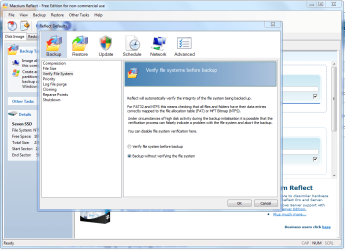


 Apparently, the free version will not automatically verify an image after creation; yet another reason I'm glad to be using the Pro version. I'm surprised Macrium doesn't promote that when comparing their various versions; that's a marketing goldmine.


