can only save pictures as untitled.png

phoenixmark

New member
Member
VIP
Local time
5:13 PM
Messages
103
For some reason whenever I try to save pictures the only option is untitled.png. I can no longer save them as a .jpg file. There is no other choice as to what file type to save to in the drop down menu. The only way to save as a .jpg is to delete the history on i.e. and reboot the computer. i need to do this about every 2 weeks. It does not matter which program I'm in at the time. Is there a setting i can change to not to do this every 2 weeks? It's a Dell desktop running win7 professional 64 bit. Thanks.

Mark
 

My Computer My Computer

At a glance

win7 professional 64 bitintel3g- 6gbuilt in
Computer type
PC/Desktop
Computer Manufacturer/Model Number
dell latitude e5530, 1537, xp13, 541s
OS
win7 professional 64 bit
CPU
intel
Motherboard
dell
Memory
3g- 6g
Graphics Card(s)
built in
Sound Card
built in
Monitor(s) Displays
dell m990
hi Mark,

What application are you using when you try to save the pics? IE?
>> I see that you posted it doesn't matter which app. Can you identify which apps you have tried?

If you delete IE history and reboot you can save a pic as jpg - correct?
>> this works for about 2 weeks and then you have to repeast the process.

There's no setting that I know of that would make any app behave this way.

Are you able to just type in a filename and filetype when you save a pic?

In the save box: untitled.png
type over the entire string with: _pmark.jpg
does it save or complain?
can you open or view _pmark.jpg?

Bill
.
 

My Computer My Computer

At a glance

x64 (6.3.9600) Win8.1 Pro & soon dual boot x6...AMD A6-3420M APU with Radeon(tm) HD Graphics6.00 GBAMD Radeon(TM) HD 6520G
Computer type
Laptop
Computer Manufacturer/Model Number
HP Pavilion dv6-6c10us
OS
x64 (6.3.9600) Win8.1 Pro & soon dual boot x64 (6.1.7601) Win7_SP1 HomePrem
CPU
AMD A6-3420M APU with Radeon(tm) HD Graphics
Motherboard
Hewlett-Packard 1805
Memory
6.00 GB
Graphics Card(s)
AMD Radeon(TM) HD 6520G
Sound Card
(1) AMD High Definition Audio Device (2) IDT High Definiti
Monitor(s) Displays
HP W2072a 20" LCD (1600 x 900) @ 60 Hz
Screen Resolution
1366 x 768 x 32 bits (4294967296 colors) @ 60 Hz
Hard Drives
ST640LM0 00 HM641JI SATA Disk Device
Keyboard
Logitech k520 wireless KB
Mouse
Logitech m320 wireless mouse (bundled with KB)
Internet Speed
15/5 | 54 MB Wireless 'n'
Antivirus
Realtime: Defender or Avast | On-demand: Malwarebytes, ESET
Browser
IE 11 on Win8, IE 10 on win 7
Other Info
Media: [Gimp, Audacity, VLC] || Comm: [WEmail 2012, Skype] || Productivity: [OpenOffice,| Textpad] || Utils: [Sysinternals, cCleaner, Speccy, Defraggler]
See my responses to your questions below.

hi Mark,

What application are you using when you try to save the pics? IE?

either IE or AOL.

>> I see that you posted it doesn't matter which app. Can you identify which apps you have tried?

I like expensive cars- you know the ones that are worth 6-7 figures- although I can't afford them! When I see them on ebay, I like to save the pictures that are in the auction. Same goes for Hess trucks.

If you delete IE history and reboot you can save a pic as jpg - correct?
>> this works for about 2 weeks and then you have to repeast the process.

yes, that is correct.

There's no setting that I know of that would make any app behave this way.

Are you able to just type in a filename and filetype when you save a pic?

I can change the name from "untitled" to whatever I want to but there is no choice to change the .png filetype to any other type. If I click on the dropdown menu arrow, the only choice is .png.

In the save box: untitled.png
type over the entire string with: _pmark.jpg
does it save or complain?

Haven't tried that.

can you open or view _pmark.jpg?

Don't know the answer to that.

Bill
.
 

My Computer My Computer

At a glance

win7 professional 64 bitintel3g- 6gbuilt in
Computer type
PC/Desktop
Computer Manufacturer/Model Number
dell latitude e5530, 1537, xp13, 541s
OS
win7 professional 64 bit
CPU
intel
Motherboard
dell
Memory
3g- 6g
Graphics Card(s)
built in
Sound Card
built in
Monitor(s) Displays
dell m990
I am not sure how your problem can be resolved. But .png gives you the best picture quality. I would not quarrel with that. It is anyhow easy to convert to .jpg, if that is what you prefer. Use the PAINT program.
 

My Computer My Computer

At a glance

Vista, Windows7, Mint Mate, Zorin, Windows 8from 1.6GHz Duo to i7
Computer Manufacturer/Model Number
HP, Dell, Gateway, Toshiba - 4 laptops and 2 desktops
OS
Vista, Windows7, Mint Mate, Zorin, Windows 8
CPU
from 1.6GHz Duo to i7
Monitor(s) Displays
2x HP w2207
Hard Drives
5x HDD, 7x SSD, 12x Externals
Keyboard
with trackball - no mices
Mouse
Trackball mice
Internet Speed
DSL 6000
Hmmmmm..... just tried some "save as" inside IE9

I'm embarrased to say that what you describe seems to be normal behavior.
I do get the type of the image (gif, jpg, png) as a choice and I also get Bitmap as a choice
gif & bmp
jpg & bmp
png & bmp

The type is determined by the original file.

Try this:
right click on the YouTube icon on the post window menu
select "save picture as.."
the Save as type: dropdown box should have GIF (*.gif)
or I can chose Bitmap (*.bmp)

Maybe I don't understand, but I think whs is right. There might be no easy resolution.

Can you post some screen shots of what you're doing and what you see.
See: http://www.sevenforums.com/tutorials/9733-screenshots-files-upload-post-seven-forums.html
 

My Computer My Computer

At a glance

x64 (6.3.9600) Win8.1 Pro & soon dual boot x6...AMD A6-3420M APU with Radeon(tm) HD Graphics6.00 GBAMD Radeon(TM) HD 6520G
Computer type
Laptop
Computer Manufacturer/Model Number
HP Pavilion dv6-6c10us
OS
x64 (6.3.9600) Win8.1 Pro & soon dual boot x64 (6.1.7601) Win7_SP1 HomePrem
CPU
AMD A6-3420M APU with Radeon(tm) HD Graphics
Motherboard
Hewlett-Packard 1805
Memory
6.00 GB
Graphics Card(s)
AMD Radeon(TM) HD 6520G
Sound Card
(1) AMD High Definition Audio Device (2) IDT High Definiti
Monitor(s) Displays
HP W2072a 20" LCD (1600 x 900) @ 60 Hz
Screen Resolution
1366 x 768 x 32 bits (4294967296 colors) @ 60 Hz
Hard Drives
ST640LM0 00 HM641JI SATA Disk Device
Keyboard
Logitech k520 wireless KB
Mouse
Logitech m320 wireless mouse (bundled with KB)
Internet Speed
15/5 | 54 MB Wireless 'n'
Antivirus
Realtime: Defender or Avast | On-demand: Malwarebytes, ESET
Browser
IE 11 on Win8, IE 10 on win 7
Other Info
Media: [Gimp, Audacity, VLC] || Comm: [WEmail 2012, Skype] || Productivity: [OpenOffice,| Textpad] || Utils: [Sysinternals, cCleaner, Speccy, Defraggler]
I'm not at home right now. I'll try it tomorrow on the computer that I use the most- my desktop. That's the one that I see the problem with.
 

My Computer My Computer

At a glance

win7 professional 64 bitintel3g- 6gbuilt in
Computer type
PC/Desktop
Computer Manufacturer/Model Number
dell latitude e5530, 1537, xp13, 541s
OS
win7 professional 64 bit
CPU
intel
Motherboard
dell
Memory
3g- 6g
Graphics Card(s)
built in
Sound Card
built in
Monitor(s) Displays
dell m990
I really don't understand what the problem is. .png is the second best filetype (after .bmp) for pictures. .jpg is a lot lower quality - why would you want that.
 

My Computer My Computer

At a glance

Vista, Windows7, Mint Mate, Zorin, Windows 8from 1.6GHz Duo to i7
Computer Manufacturer/Model Number
HP, Dell, Gateway, Toshiba - 4 laptops and 2 desktops
OS
Vista, Windows7, Mint Mate, Zorin, Windows 8
CPU
from 1.6GHz Duo to i7
Monitor(s) Displays
2x HP w2207
Hard Drives
5x HDD, 7x SSD, 12x Externals
Keyboard
with trackball - no mices
Mouse
Trackball mice
Internet Speed
DSL 6000

My Computer My Computer

At a glance

Win-7-Pro64bit 7-H-Prem-64biti7-5930K 2nd i9-9940x both water blocked VRM'...Trident-z 3200C14 2nd Trident-z 3600C16EVGA 1080ti ftw3 2nd Titan Xp both water blocked
Computer type
PC/Desktop
Computer Manufacturer/Model Number
Custom assembled by me :}
OS
Win-7-Pro64bit 7-H-Prem-64bit
CPU
i7-5930K 2nd i9-9940x both water blocked VRM's too
Motherboard
ASUS SABERTOOTH X99 2nd ASUS x299 Apex
Memory
Trident-z 3200C14 2nd Trident-z 3600C16
Graphics Card(s)
EVGA 1080ti ftw3 2nd Titan Xp both water blocked
Sound Card
Built-in Realtek
Monitor(s) Displays
1-AOC G2460PG 24"G-Sync 144Hz/ 2nd 1-ASUS VG248QE 24" 144Hz
Screen Resolution
1920 x 1080 144Hz
Hard Drives
2-Samsung M.2 Evo & Evo Plus
2-Samsung 850 EVO 500GB SSD's/ 3-2.5 W.D. Black 1tb-&3-1tb/3-3.5 WD Black 1tb hdd's
PSU
EVGA SuperNOVA 1000-P2 2nd 1200-P2
Case
2-Corsair Obsidian Series 450D Black ATX Mid Tower
Cooling
Custom water loops
Keyboard
Logitech G710+/ 2nd Logitech G910
Mouse
2-RedDragon M901 Perdition 16400 dpi Gaming mouse = wired
Internet Speed
Comcast Ping 19ms 89.31mbps download speed 6.12mbps upload
Antivirus
Malwarebytes Pro/ Superantispyware Pro
Browser
FireFox & Pale moon
Other Info
2nd ASUS X299 Apex/Intel i9-9940x with Custom water loop/7H-Prem-x64/Corsair 450D case/Ram Trident-z 3600C16 4x8gb / Samsung970Evo plus 500gb SSD/Dual ssd EZ swap evo/PSU EVGA SuperNova 1200w-P2 80+Platinum/GPU Titan Xp /8-ML-140 on push-pull on 2-280GTX rads
Does this problem not stem from what picture viewer you use as your default viewer. I use Irfanview and that saves to a jpeg by default.
 

My Computer My Computer

At a glance

Microsoft Windows 7 Home Premium 64-bit 7601 ...Intel(R) Core(TM) i7-3770 CPU @ 3.40GHz8.00 GBIntel(R) HD Graphics 4000
Computer type
PC/Desktop
OS
Microsoft Windows 7 Home Premium 64-bit 7601 Multiprocessor Free Service Pack 1
CPU
Intel(R) Core(TM) i7-3770 CPU @ 3.40GHz
Motherboard
ASUSTeK COMPUTER INC. P8H77-M
Memory
8.00 GB
Graphics Card(s)
Intel(R) HD Graphics 4000
Sound Card
On Board
Monitor(s) Displays
Dell 24"
Screen Resolution
1920 x 1080
Hard Drives
(1) INTEL SSDSC2CT180A3 ATA Device (2) ST500DM002-1BD142 ATA Device (3) WDC WD3200AAKS-75L9A0 ATA Device (4) Generic- Compact Flash USB Device (5) Generic- MS/MS-Pro USB Device (6) Generic- SD/MMC USB Device (7) Generic- SM/xD-Picture USB
PSU
500w Corsair
Case
Cooler Master
Cooling
3 Fans
Keyboard
Logitech MK300
Mouse
Logitech WOM
Internet Speed
75Mb
Antivirus
Norton 360
Browser
Firefox, Opera, IE
Does this problem not stem from what picture viewer you use as your default viewer. I use Irfanview and that saves to a jpeg by default.

What application are you using when you try to save the pics? IE?

either IE or AOL.


I think this is normal behavoir of the browsers.
The thing that confuses me is that a browser history delete and reboot changes the behavoir.
It shouldn't.

I've asked phoenixmark to do a simple test (save a gif file), I'll suggest testing a jpg, bmp, png file too.

This might simply be a misunderstanding of "save picture as" in IE or AOL.
Testing IE "save picture as.." on my system showed you only get two choices, the original format of the image and bmp.

I'll wait for a response from Mark to see if there is an issue or just something that needed to be explained.

Bill
.
 

My Computer My Computer

At a glance

x64 (6.3.9600) Win8.1 Pro & soon dual boot x6...AMD A6-3420M APU with Radeon(tm) HD Graphics6.00 GBAMD Radeon(TM) HD 6520G
Computer type
Laptop
Computer Manufacturer/Model Number
HP Pavilion dv6-6c10us
OS
x64 (6.3.9600) Win8.1 Pro & soon dual boot x64 (6.1.7601) Win7_SP1 HomePrem
CPU
AMD A6-3420M APU with Radeon(tm) HD Graphics
Motherboard
Hewlett-Packard 1805
Memory
6.00 GB
Graphics Card(s)
AMD Radeon(TM) HD 6520G
Sound Card
(1) AMD High Definition Audio Device (2) IDT High Definiti
Monitor(s) Displays
HP W2072a 20" LCD (1600 x 900) @ 60 Hz
Screen Resolution
1366 x 768 x 32 bits (4294967296 colors) @ 60 Hz
Hard Drives
ST640LM0 00 HM641JI SATA Disk Device
Keyboard
Logitech k520 wireless KB
Mouse
Logitech m320 wireless mouse (bundled with KB)
Internet Speed
15/5 | 54 MB Wireless 'n'
Antivirus
Realtime: Defender or Avast | On-demand: Malwarebytes, ESET
Browser
IE 11 on Win8, IE 10 on win 7
Other Info
Media: [Gimp, Audacity, VLC] || Comm: [WEmail 2012, Skype] || Productivity: [OpenOffice,| Textpad] || Utils: [Sysinternals, cCleaner, Speccy, Defraggler]
I really don't understand what the problem is. .png is the second best filetype (after .bmp) for pictures. .jpg is a lot lower quality - why would you want that.

I'm concerned as to why .png is my only choice until I delete history in IE and reboot. Something must be causing my pc to default to .png.
 

My Computer My Computer

At a glance

win7 professional 64 bitintel3g- 6gbuilt in
Computer type
PC/Desktop
Computer Manufacturer/Model Number
dell latitude e5530, 1537, xp13, 541s
OS
win7 professional 64 bit
CPU
intel
Motherboard
dell
Memory
3g- 6g
Graphics Card(s)
built in
Sound Card
built in
Monitor(s) Displays
dell m990
I agree completely .png files are far superior in quality,
You must of uninstalled Chrome ?
Save picture as,
http://support.microsoft.com/kb/260650
Cheers.
I do not have nor have I installed Chrome on my pc. I have already tried what is in the link you posted and still need to delete history and reboot. Remember, this occurs about every 2 or so weeks.
 

My Computer My Computer

At a glance

win7 professional 64 bitintel3g- 6gbuilt in
Computer type
PC/Desktop
Computer Manufacturer/Model Number
dell latitude e5530, 1537, xp13, 541s
OS
win7 professional 64 bit
CPU
intel
Motherboard
dell
Memory
3g- 6g
Graphics Card(s)
built in
Sound Card
built in
Monitor(s) Displays
dell m990
Does this problem not stem from what picture viewer you use as your default viewer. I use Irfanview and that saves to a jpeg by default.

What application are you using when you try to save the pics? IE?

either IE or AOL.

I think this is normal behavoir of the browsers.
The thing that confuses me is that a browser history delete and reboot changes the behavoir.
It shouldn't.

I've asked phoenixmark to do a simple test (save a gif file), I'll suggest testing a jpg, bmp, png file too.

This might simply be a misunderstanding of "save picture as" in IE or AOL.
Testing IE "save picture as.." on my system showed you only get two choices, the original format of the image and bmp.

I'll wait for a response from Mark to see if there is an issue or just something that needed to be explained.

Bill
.

I can save and access each of those filetypes. I have 10's of thousands of saved pictures. I'm just at a loss as to why I need to delete history and reboot to regain my "save picture as" default as .jpg with .bmp as a dropdown menu option, not wanting untitled.png as my only choice.
 

My Computer My Computer

At a glance

win7 professional 64 bitintel3g- 6gbuilt in
Computer type
PC/Desktop
Computer Manufacturer/Model Number
dell latitude e5530, 1537, xp13, 541s
OS
win7 professional 64 bit
CPU
intel
Motherboard
dell
Memory
3g- 6g
Graphics Card(s)
built in
Sound Card
built in
Monitor(s) Displays
dell m990
I agree completely .png files are far superior in quality,
You must of uninstalled Chrome ?
Save picture as,
http://support.microsoft.com/kb/260650
Cheers.
I do not have nor have I installed Chrome on my pc. I have already tried what is in the link you posted and still need to delete history and reboot. Remember, this occurs about every 2 or so weeks.

This is a great free utility,
Temp files delete,
http://www.geekstogo.com/forum/files/file/187-tfc-temp-file-cleaner-by-oldtimer/
Please verify your temp files folder size,
Internet explorer,
Control panel/ Internet options/ Delete browser history Settings button,
Default should show 250mg,
Cheers.
 

My Computer My Computer

At a glance

Win-7-Pro64bit 7-H-Prem-64biti7-5930K 2nd i9-9940x both water blocked VRM'...Trident-z 3200C14 2nd Trident-z 3600C16EVGA 1080ti ftw3 2nd Titan Xp both water blocked
Computer type
PC/Desktop
Computer Manufacturer/Model Number
Custom assembled by me :}
OS
Win-7-Pro64bit 7-H-Prem-64bit
CPU
i7-5930K 2nd i9-9940x both water blocked VRM's too
Motherboard
ASUS SABERTOOTH X99 2nd ASUS x299 Apex
Memory
Trident-z 3200C14 2nd Trident-z 3600C16
Graphics Card(s)
EVGA 1080ti ftw3 2nd Titan Xp both water blocked
Sound Card
Built-in Realtek
Monitor(s) Displays
1-AOC G2460PG 24"G-Sync 144Hz/ 2nd 1-ASUS VG248QE 24" 144Hz
Screen Resolution
1920 x 1080 144Hz
Hard Drives
2-Samsung M.2 Evo & Evo Plus
2-Samsung 850 EVO 500GB SSD's/ 3-2.5 W.D. Black 1tb-&3-1tb/3-3.5 WD Black 1tb hdd's
PSU
EVGA SuperNOVA 1000-P2 2nd 1200-P2
Case
2-Corsair Obsidian Series 450D Black ATX Mid Tower
Cooling
Custom water loops
Keyboard
Logitech G710+/ 2nd Logitech G910
Mouse
2-RedDragon M901 Perdition 16400 dpi Gaming mouse = wired
Internet Speed
Comcast Ping 19ms 89.31mbps download speed 6.12mbps upload
Antivirus
Malwarebytes Pro/ Superantispyware Pro
Browser
FireFox & Pale moon
Other Info
2nd ASUS X299 Apex/Intel i9-9940x with Custom water loop/7H-Prem-x64/Corsair 450D case/Ram Trident-z 3600C16 4x8gb / Samsung970Evo plus 500gb SSD/Dual ssd EZ swap evo/PSU EVGA SuperNova 1200w-P2 80+Platinum/GPU Titan Xp /8-ML-140 on push-pull on 2-280GTX rads
I find it interesting that your first thread back in 2009 had almost the same issue/title:
http://www.sevenforums.com/general-discussion/33167-can-only-save-pictures-untitled-bmp.html
You were stuck in a different file format back then :-(

It would help us to help you if you would tell us more than "IE or AOL" when describing your browsers.

AOL currently offers:
AOL Software Downloads Center | Discover AOL

AOL Desktop 9.7
(which installs/uses Chrome)
(past AOL Desktop versions seemed to use Firefox)


AOL Edition of IE9 Optimized for AOL:
AOL-IE.PNG
Which currently installs IE11.


AOL Edition of Firefox Optimized for AOL:
AOL-Firefox.PNG
Which currently installs Firefox 26.

Please take a look at this post and let us know which version of IE you have:
http://www.sevenforums.com/browsers...8-9-10-i-got-my-windows-7-pc.html#post2395795


Do you have the AOL toobar installed for IE?


Were you able to complete the test suggested in post #5?
 

My Computer My Computer

At a glance

W7 Pro SP1 64biti78GBIntel HD Graphics
Computer type
Laptop
Computer Manufacturer/Model Number
Employer provided Dell Latitude
OS
W7 Pro SP1 64bit
CPU
i7
Memory
8GB
Graphics Card(s)
Intel HD Graphics
Hard Drives
crappy SSD
Antivirus
Employer mandated Symantec Endpoint Protection
Browser
Pale Moon 64bit, IE11 64bit & Chrome 64bit
UsernameIssues. Different computer then, although both are Dells. IE is IE11 and AOL is AOL desktop 9.7. I do not have any toolbars installed.

from post 5:
If I right click>save picture as the you tube icon, I do get the choice to save it as a .gif or .bmp. I can't do screenshots to show the problem right now because the "save picture as" is defsulting to .jpg with .bmp as an option. This may take another 2 weeks for it to occur. I did run disk cleanup and removed almost 7g of junk. Maybe that will fix it??

Thanks for everyones help.

Mark
 

My Computer My Computer

At a glance

win7 professional 64 bitintel3g- 6gbuilt in
Computer type
PC/Desktop
Computer Manufacturer/Model Number
dell latitude e5530, 1537, xp13, 541s
OS
win7 professional 64 bit
CPU
intel
Motherboard
dell
Memory
3g- 6g
Graphics Card(s)
built in
Sound Card
built in
Monitor(s) Displays
dell m990
If it happens again, please try the same test from post #5 before attempting to clear IE's temp files. It would be nice to know if the save options change for that tiny image when the temp files are full. I could not replicate that... but then again, I've never understood how I can set IE's temp file limit to 8MB and have more than a gig of temp files.
 

My Computer My Computer

At a glance

W7 Pro SP1 64biti78GBIntel HD Graphics
Computer type
Laptop
Computer Manufacturer/Model Number
Employer provided Dell Latitude
OS
W7 Pro SP1 64bit
CPU
i7
Memory
8GB
Graphics Card(s)
Intel HD Graphics
Hard Drives
crappy SSD
Antivirus
Employer mandated Symantec Endpoint Protection
Browser
Pale Moon 64bit, IE11 64bit & Chrome 64bit
Even though the temp folder size can be anything,
The days ie retains files can also be changed,
20 days is the default no matter what size is selected on the folder size,
Then you get into the top section of delete browser history,
The box by default is checked/ Preserve favorite website data I also have it Unchecked and delete on exit,
There are many Data and Cache's in Internet explorer which is another can of worms,
But the free utility I offered did remove quite a few files I never knew existed and I've always thought I keep ie lean and clean of garbage temp files,
Cheers.
 

My Computer My Computer

At a glance

Win-7-Pro64bit 7-H-Prem-64biti7-5930K 2nd i9-9940x both water blocked VRM'...Trident-z 3200C14 2nd Trident-z 3600C16EVGA 1080ti ftw3 2nd Titan Xp both water blocked
Computer type
PC/Desktop
Computer Manufacturer/Model Number
Custom assembled by me :}
OS
Win-7-Pro64bit 7-H-Prem-64bit
CPU
i7-5930K 2nd i9-9940x both water blocked VRM's too
Motherboard
ASUS SABERTOOTH X99 2nd ASUS x299 Apex
Memory
Trident-z 3200C14 2nd Trident-z 3600C16
Graphics Card(s)
EVGA 1080ti ftw3 2nd Titan Xp both water blocked
Sound Card
Built-in Realtek
Monitor(s) Displays
1-AOC G2460PG 24"G-Sync 144Hz/ 2nd 1-ASUS VG248QE 24" 144Hz
Screen Resolution
1920 x 1080 144Hz
Hard Drives
2-Samsung M.2 Evo & Evo Plus
2-Samsung 850 EVO 500GB SSD's/ 3-2.5 W.D. Black 1tb-&3-1tb/3-3.5 WD Black 1tb hdd's
PSU
EVGA SuperNOVA 1000-P2 2nd 1200-P2
Case
2-Corsair Obsidian Series 450D Black ATX Mid Tower
Cooling
Custom water loops
Keyboard
Logitech G710+/ 2nd Logitech G910
Mouse
2-RedDragon M901 Perdition 16400 dpi Gaming mouse = wired
Internet Speed
Comcast Ping 19ms 89.31mbps download speed 6.12mbps upload
Antivirus
Malwarebytes Pro/ Superantispyware Pro
Browser
FireFox & Pale moon
Other Info
2nd ASUS X299 Apex/Intel i9-9940x with Custom water loop/7H-Prem-x64/Corsair 450D case/Ram Trident-z 3600C16 4x8gb / Samsung970Evo plus 500gb SSD/Dual ssd EZ swap evo/PSU EVGA SuperNova 1200w-P2 80+Platinum/GPU Titan Xp /8-ML-140 on push-pull on 2-280GTX rads
Even though the temp folder size can be anything,
The days ie retains files can also be changed,
20 days is the default no matter what size is selected on the folder size,
~~~
Cheers.
I thought that the 20 day default refers to the history list, not the temp internet files.

Specify how many days Internet Explorer should save the list of websites you have visited.
Days to keep pages in history:


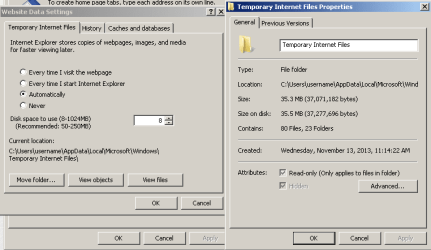
As you know, starting with IE10, MS put stuff in different places. Oddly enough, the webcache folder only brought out a select few tinfoil hat wearers. As for the temp internet files (TIF), one rarely cleans them in the middle of a surfing session and IE does not seem to honor its limit... so I'm still puzzled on how a user can fill up the TIF area.

With the limit set to 8MB, see what IE stores:
Capture.PNG
The same was true back with IE5 and IE6 - where you could set the limit to 1MB.

I don't care what IE caches in the TIF area. I've been using my own script to automatically clear those files (and other IE, flash & java things) for almost a decade. [Not for tinfoil hat reasons.] The script clears the thing each time IE exits ram. But there are MS KB articles that mention IE limiting the "save image as" file format if the TIF is full. Hence my bewilderment as to how TIF can be full. {Filling the hard drive is not part of the discussion.}


IE11 should offer to save the image in the original file format or to convert image format to bitmap. The OP should never convert since (as a general rule) that only reduces the image quality. While BMP is better than JPG, if you are starting with a JPG, then saving it as a BMP is not going to improve the image quality. (I could be wrong, but that is my understanding of file format conversions.)
 

My Computer My Computer

At a glance

W7 Pro SP1 64biti78GBIntel HD Graphics
Computer type
Laptop
Computer Manufacturer/Model Number
Employer provided Dell Latitude
OS
W7 Pro SP1 64bit
CPU
i7
Memory
8GB
Graphics Card(s)
Intel HD Graphics
Hard Drives
crappy SSD
Antivirus
Employer mandated Symantec Endpoint Protection
Browser
Pale Moon 64bit, IE11 64bit & Chrome 64bit
The main issue with either bmp and png built in windows photo editing programs can not edit them,
With an exception to Paint which is pretty narrow editing program,
So either would need a third party program to edit the files,
I remember the other thread well,
I did finally reveal the system folder as described and it was about the same size as others posted,

At least the op can verify the settings and we/ you ;) can go from there :D
If the op had just uninstalled Chrome was just a thought ?
Cheers.
 

My Computer My Computer

At a glance

Win-7-Pro64bit 7-H-Prem-64biti7-5930K 2nd i9-9940x both water blocked VRM'...Trident-z 3200C14 2nd Trident-z 3600C16EVGA 1080ti ftw3 2nd Titan Xp both water blocked
Computer type
PC/Desktop
Computer Manufacturer/Model Number
Custom assembled by me :}
OS
Win-7-Pro64bit 7-H-Prem-64bit
CPU
i7-5930K 2nd i9-9940x both water blocked VRM's too
Motherboard
ASUS SABERTOOTH X99 2nd ASUS x299 Apex
Memory
Trident-z 3200C14 2nd Trident-z 3600C16
Graphics Card(s)
EVGA 1080ti ftw3 2nd Titan Xp both water blocked
Sound Card
Built-in Realtek
Monitor(s) Displays
1-AOC G2460PG 24"G-Sync 144Hz/ 2nd 1-ASUS VG248QE 24" 144Hz
Screen Resolution
1920 x 1080 144Hz
Hard Drives
2-Samsung M.2 Evo & Evo Plus
2-Samsung 850 EVO 500GB SSD's/ 3-2.5 W.D. Black 1tb-&3-1tb/3-3.5 WD Black 1tb hdd's
PSU
EVGA SuperNOVA 1000-P2 2nd 1200-P2
Case
2-Corsair Obsidian Series 450D Black ATX Mid Tower
Cooling
Custom water loops
Keyboard
Logitech G710+/ 2nd Logitech G910
Mouse
2-RedDragon M901 Perdition 16400 dpi Gaming mouse = wired
Internet Speed
Comcast Ping 19ms 89.31mbps download speed 6.12mbps upload
Antivirus
Malwarebytes Pro/ Superantispyware Pro
Browser
FireFox & Pale moon
Other Info
2nd ASUS X299 Apex/Intel i9-9940x with Custom water loop/7H-Prem-x64/Corsair 450D case/Ram Trident-z 3600C16 4x8gb / Samsung970Evo plus 500gb SSD/Dual ssd EZ swap evo/PSU EVGA SuperNova 1200w-P2 80+Platinum/GPU Titan Xp /8-ML-140 on push-pull on 2-280GTX rads
Back
Top