Windows firewall blocking .exe file even after firewall is disabled

jchurch

New member
Hey everyone,
This is my first post, and first time I've not been able to solve my problem by searching previous posts...so hopefully someone can help me out.
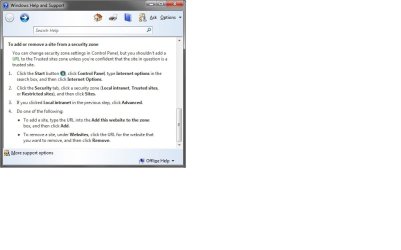
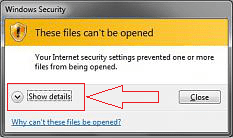
I'm trying to install a downloaded .exe file, and Windows firewall is blocking it regardless of whether the firewall is active or not; the specific error message & the subsequent Windows help screen are attached. The Windows help screen indicates that the file came from an "untrusted" website, and suggests adding the source website to the "trusted" list if I'm sure that the file is safe (which I am, and I did...and I'm getting the same results when I try to open the .exe).
After the adding the source site to the "trusted" category failed, I attempted to run the file after completely shutting off Windows firewall (along with Bitdefender, which I'm also running). I'm still getting the same error message; it's as if Windows firewall is just ignoring me...can anyone help me either get around this, or tell me how to really shut off the firewall so it stops blocking this file?
 

Attachments

  • Error 1.jpg
    Error 1.jpg
    36.4 KB · Views: 5
  • Windows help screen.jpg
    Windows help screen.jpg
    90.4 KB · Views: 3

My Computer

Computer type
PC/Desktop
OS
windows 7 ultimate x64

My Computer

Computer type
Laptop
Computer Manufacturer/Model Number
Employer provided Dell Latitude
OS
W7 Pro SP1 64bit
CPU
i7
Memory
8GB
Graphics Card(s)
Intel HD Graphics
Hard Drives
crappy SSD
Antivirus
Employer mandated Symantec Endpoint Protection
Browser
Pale Moon 64bit, IE11 64bit & Chrome 64bit
What .exe is it your trying to download?
 

My Computer

Computer type
Laptop
Computer Manufacturer/Model Number
Packard Bell
OS
Windows 7 Home Premium 64Bit
CPU
AMD A6-3420M 1.5GHZ OC - 2.0GHZ
Memory
4GB DDR3 1600MHZ
Graphics Card(s)
AMD RADEON 6520G+AMD RADEON HD7470M 1GB DDR3
Screen Resolution
1366x768
Hard Drives
500GB SATA
Internet Speed
18Mb Unlimited
Antivirus
AVAST!
Browser
MOZILLA FIREFOX
Thanks for the replies! Usernameissues, I read the thread on resetting IE and gave that a shot; I set all IE options back to their default settings and tried again, but got the same results. I actually use Mozilla as my default browser, so I'll give the same thing a try on Mozilla I guess...since the error was coming from a Windows dialogue box, I figured it would've been a Windows application blocking the program.

Devlin1888, the file I'm trying to run is a trial version of Sketchup Pro...not sure why my computer doesn't trust it.

I'll try resetting my Mozilla security options and let you know the results. If you have any other ideas in the meantime, I'd be glad to hear them; thanks!
 

My Computer

Computer type
PC/Desktop
OS
windows 7 ultimate x64
You are probably right about the popup coming from Windows instead of a browser. But I've never seen the firewall make that warning and googling the text in the popup lead to several forum threads where the issue was solved by resetting IE.

You might want to glance at this post/video to identify the process associated with a popup:
http://www.sevenforums.com/general-discussion/315326-win7-resource-monitor-3.html#post2644972

Can you provide a link to the download so we can try too?
 

My Computer

Computer type
Laptop
Computer Manufacturer/Model Number
Employer provided Dell Latitude
OS
W7 Pro SP1 64bit
CPU
i7
Memory
8GB
Graphics Card(s)
Intel HD Graphics
Hard Drives
crappy SSD
Antivirus
Employer mandated Symantec Endpoint Protection
Browser
Pale Moon 64bit, IE11 64bit & Chrome 64bit
As a side issue, did you save those screenshots using MS Paint?
 

My Computer

Computer type
Laptop
Computer Manufacturer/Model Number
Employer provided Dell Latitude
OS
W7 Pro SP1 64bit
CPU
i7
Memory
8GB
Graphics Card(s)
Intel HD Graphics
Hard Drives
crappy SSD
Antivirus
Employer mandated Symantec Endpoint Protection
Browser
Pale Moon 64bit, IE11 64bit & Chrome 64bit
Can you tell us where you're trying to download it from?
Don't post a direct link! ... just let us know from 'where'.
 

My Computer

Computer type
PC/Desktop
Computer Manufacturer/Model Number
Bruce ... somewhere in his 40's
OS
Windows 7 Ultimate 32bit SP1
CPU
Intel(R) Core(TM)2 Quad CPU @ 2.40GHz, 2400 MHz
Motherboard
INTEL/D975XBX2
Memory
4 GB
Graphics Card(s)
ATI Radeon HD 2600 Pro
Monitor(s) Displays
Samsung SyncMaster 914v
Screen Resolution
1280 x 1024
Hard Drives
2/500GB each ... ST3500630AS ATA Device.
One is not connected
PSU
Rocketfish 700 W
Case
G.Skill Gigabyte Chassis
Keyboard
Standard PS/2 Keyboard
Mouse
Microsoft PS/2 Mouse
Internet Speed
DSL
Antivirus
Avira Internet Security
Browser
IE 11
Other Info
ATI HDMI Audio
If you let us know where from, as Jacee said but not a direct link, il give it a look and try and download myself depending on the source.
 

My Computer

Computer type
Laptop
Computer Manufacturer/Model Number
Packard Bell
OS
Windows 7 Home Premium 64Bit
CPU
AMD A6-3420M 1.5GHZ OC - 2.0GHZ
Memory
4GB DDR3 1600MHZ
Graphics Card(s)
AMD RADEON 6520G+AMD RADEON HD7470M 1GB DDR3
Screen Resolution
1366x768
Hard Drives
500GB SATA
Internet Speed
18Mb Unlimited
Antivirus
AVAST!
Browser
MOZILLA FIREFOX
Can you expand the Show details chevron on the warning and post that screen shot?

Thanks
 

Attachments

  • secwarn.png
    secwarn.png
    37 KB · Views: 75

My Computer

Computer type
Laptop
Computer Manufacturer/Model Number
HP Pavilion dv6-6c10us
OS
x64 (6.3.9600) Win8.1 Pro & soon dual boot x64 (6.1.7601) Win7_SP1 HomePrem
CPU
AMD A6-3420M APU with Radeon(tm) HD Graphics
Motherboard
Hewlett-Packard 1805
Memory
6.00 GB
Graphics Card(s)
AMD Radeon(TM) HD 6520G
Sound Card
(1) AMD High Definition Audio Device (2) IDT High Definiti
Monitor(s) Displays
HP W2072a 20" LCD (1600 x 900) @ 60 Hz
Screen Resolution
1366 x 768 x 32 bits (4294967296 colors) @ 60 Hz
Hard Drives
ST640LM0 00 HM641JI SATA Disk Device
Keyboard
Logitech k520 wireless KB
Mouse
Logitech m320 wireless mouse (bundled with KB)
Internet Speed
15/5 | 54 MB Wireless 'n'
Antivirus
Realtime: Defender or Avast | On-demand: Malwarebytes, ESET
Browser
IE 11 on Win8, IE 10 on win 7
Other Info
Media: [Gimp, Audacity, VLC] || Comm: [WEmail 2012, Skype] || Productivity: [OpenOffice,| Textpad] || Utils: [Sysinternals, cCleaner, Speccy, Defraggler]
This is odd...I'd shut my laptop down for the night, and it the file worked when I tried to run it when I turned it back on this morning. Maybe after clearing my IE/Mozilla options yesterday, I needed a reboot? I hadn't completely shut off & turned back on yesterday after clearing IE per UsernameIssues' suggestion.

To answer the other questions, I'd downloaded from sketchup.com; file name's SketchUpProWEN.exe

Thanks for the help everyone!
 

My Computer

Computer type
PC/Desktop
OS
windows 7 ultimate x64
Also, to answer UsernameIssues' question about my screenshots: yes, I did a print screen & saved in MS paint. Is there an easier way to do this without something like Snagit? I don't have any extra screen capture software on my home laptop.
 

My Computer

Computer type
PC/Desktop
OS
windows 7 ultimate x64
I visited sketchup.com and tried the download. I had no difficulties or warnings.

The Mozilla clean, reboot seems to have resolved the issue for you. That's good.

What caused it in the first place will be difficult, if not impossible, to figure out.

I'd like you to do a quick malware scan on your system just to make sure there isn't anything lurking.

Download Malwarebytes Anti-Malware Free (click here to download, select the free version)
"Save as" the install package to your Desktop
Double click the mbam-setup file on your desktop to install and run Malwarebytes (Mbam)

Answer YES to all authorization prompts and then follow the Mbam setup prompts.
Do not make any changes to default settings.
When the install is finished, verify that only the following two options have checkmarks,
change to match if necessary.
[[FONT=Webdings, serif]a[/FONT]] Update Malwarebytes’ Anti-Malware
[a] Launch Malwarebytes’ Anti-Malware

Make sure that there is NOT a checkmark next to:
[ ] Enable free trial of Malwarebytes Anti-Malware PRO

Then click the Finish button.

Allow Mbam to update, then
Select Perform Quick Scan from the options on the Scanner tab, then
Click the Scan button.

After the scan is complete
Click on Show Results
A window displaying any detected malware is shown
Select all malware (make sure all objects are ticked [a]), then
Click on Remove Selected

The Mbam report file pops up in your text editor when Mbam has completed the removal process.

:ar: Select all of the text in the report (Ctrl+A) and paste the text in a new post on this thread.

   Note
If Mbam encounters a file that is difficult to remove, you are asked to restart the computer.
The restart is REQUIRED to allow Mbam to complete the removal of the malware.
Failure to restart means that the malware is still present on your machine.

:info: You want to restart in Normal mode, not in Safe mode.
 

My Computer

Computer type
Laptop
Computer Manufacturer/Model Number
HP Pavilion dv6-6c10us
OS
x64 (6.3.9600) Win8.1 Pro & soon dual boot x64 (6.1.7601) Win7_SP1 HomePrem
CPU
AMD A6-3420M APU with Radeon(tm) HD Graphics
Motherboard
Hewlett-Packard 1805
Memory
6.00 GB
Graphics Card(s)
AMD Radeon(TM) HD 6520G
Sound Card
(1) AMD High Definition Audio Device (2) IDT High Definiti
Monitor(s) Displays
HP W2072a 20" LCD (1600 x 900) @ 60 Hz
Screen Resolution
1366 x 768 x 32 bits (4294967296 colors) @ 60 Hz
Hard Drives
ST640LM0 00 HM641JI SATA Disk Device
Keyboard
Logitech k520 wireless KB
Mouse
Logitech m320 wireless mouse (bundled with KB)
Internet Speed
15/5 | 54 MB Wireless 'n'
Antivirus
Realtime: Defender or Avast | On-demand: Malwarebytes, ESET
Browser
IE 11 on Win8, IE 10 on win 7
Other Info
Media: [Gimp, Audacity, VLC] || Comm: [WEmail 2012, Skype] || Productivity: [OpenOffice,| Textpad] || Utils: [Sysinternals, cCleaner, Speccy, Defraggler]
Also, to answer UsernameIssues' question about my screenshots: yes, I did a print screen & saved in MS paint. Is there an easier way to do this without something like Snagit? I don't have any extra screen capture software on my home laptop.
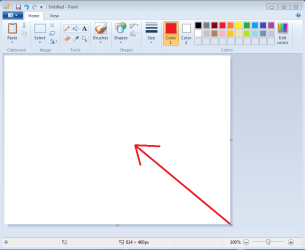
MS Paint is fine. I was going to suggest reducing the "whiteboard" area. That makes for better screenshots.

Open MS Paint.
Click on (and hold) the lower right corner of the whiteboard area.
Drag that corner diagonally until the whiteboard area is small.
Close MS Paint.
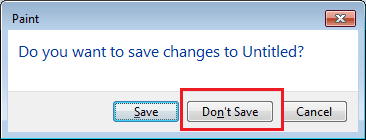
(Select Don't Save.)

The next time that you open MS Paint, the whiteboard area should be small.
If you paste a small image in (like your first screenshot)...
... all of that extra whiteboard area will not be shown.

p1.png

p2.png

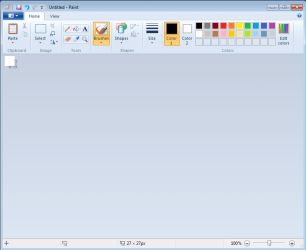
Below is a small image without the extra whiteboard area. As long as the whiteboard area is smaller than the image being pasted in, that whiteboard area should not show:
p3.png

Below is the same small image that was pasted in without reducing the whiteboard area. It is kind of hard to see.
p4.png


It is a minor thing... but it makes smaller images easier to see in the forum.

You can also use W7's native Snipping Tool.

You can have the images appear in the body of your post instead of as attachments at the end. See the steps here: http://www.sevenforums.com/tutorials/9733-screenshots-files-upload-post-seven-forums.html


You can always expand the whiteboard area within MS Paint if you need it someday :-)
 

My Computer

Computer type
Laptop
Computer Manufacturer/Model Number
Employer provided Dell Latitude
OS
W7 Pro SP1 64bit
CPU
i7
Memory
8GB
Graphics Card(s)
Intel HD Graphics
Hard Drives
crappy SSD
Antivirus
Employer mandated Symantec Endpoint Protection
Browser
Pale Moon 64bit, IE11 64bit & Chrome 64bit
Unernameissues, I hear you and I know it works, but I really don't enjoy pasting individual screens one at a time and having to create a new page for every one that gets filled up. I participate in other forums where this is not such a problem. Honestly, I think paint is pretty lame. I can save a whole thread as .pdf in Acrobat, but noooo! I like helping others but this can be a pain to do for several people who don't read and follow direction until somebody hits them in the nose.
 

My Computer

Computer type
PC/Desktop
Computer Manufacturer/Model Number
custom build
OS
Microsoft Windows 7 Ultimate 64-bit 7601 Multiprocessor Free Service Pack 1
CPU
AMD FX(tm)-6100 Six-Core Processor
Motherboard
ASUSTeK Computer INC. M5A78L-M LX PLUS
Memory
4.00 GB
Graphics Card(s)
AMD Radeon HD 6450
Sound Card
(1) AMD High Definition Audio Device (2) Realtek High Defi
Monitor(s) Displays
Toshiba 47ZV650U 47" LCD 240Hz
Screen Resolution
1920 x 1080 x 32 bits (4294967296 colors) @ 60 Hz
Hard Drives
(1) HDT722516DLA380 ATA Device (2) Hitachi HDS721025CLA382 ATA Device (3) ST4000VN000-1H4168 ATA Device (4) Generic STORAGE DEVICE USB Device (5) Generic STORAGE DEVICE USB Device (6) Generic STORAGE DEVICE USB Device (7) Generic STORAGE
PSU
Corsair CX430M
Case
WMI (Waste Management Incorporated)
Cooling
Yes, it's very cool.
Keyboard
Bluetooth KB & Mousepad
Internet Speed
Fios 15/5 and it sucks when Verizon is throttling it down
Antivirus
Avast, MSE and Malwarebytes
Browser
Firefox v.41.0.2 and IE 11
Other Info
2 years old and so far this rig still kicks butt
Back
Top