
I can't turn on network discovery and file sharing on my computer. After turning these on in the control panel, when going back to the control panel they are still switched off.
I have been trying to fix this for a long time and have narrowed down the problem to windows firewall, as when windows firewall is turned off, everything works fine. I have been trying to configure the firewall so that it allows file and printer sharing through; however, under "Allow a program or feature through Windows Firewall", there is no program called "File and Printer Sharing" in the list. This also does not appear in the 'Allow another program...' list.
After some googling I found that ports UDP 137-139 and TCP 135 and 455 should be open. So I've set up some rules as follows:

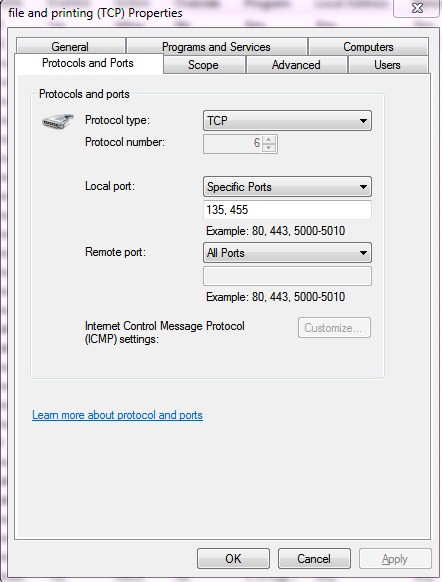
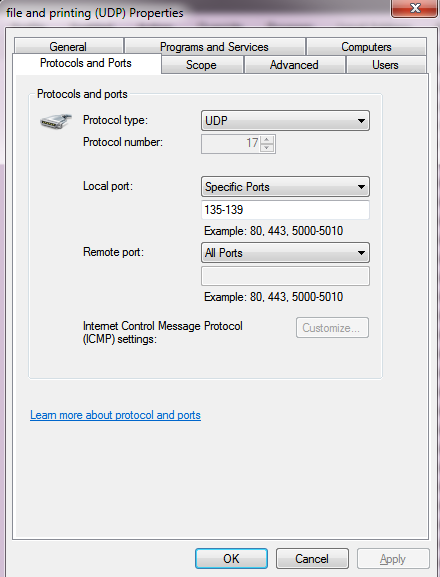
However this doesn't work. I can't find anything else online. I would be very grateful if someone could help me fix this problem. I may have not set up the rules properly or maybe I have used the wrong ports.
Thanking you in advance
Hgat
I have been trying to fix this for a long time and have narrowed down the problem to windows firewall, as when windows firewall is turned off, everything works fine. I have been trying to configure the firewall so that it allows file and printer sharing through; however, under "Allow a program or feature through Windows Firewall", there is no program called "File and Printer Sharing" in the list. This also does not appear in the 'Allow another program...' list.
After some googling I found that ports UDP 137-139 and TCP 135 and 455 should be open. So I've set up some rules as follows:
However this doesn't work. I can't find anything else online. I would be very grateful if someone could help me fix this problem. I may have not set up the rules properly or maybe I have used the wrong ports.
Thanking you in advance
Hgat
My Computer
- Computer type
- PC/Desktop
- OS
- Windows 7 Home Premium 64bit


