Solved backup from c drive to d drive

maurylen

New member
Local time
9:51 PM
Messages
42
Location
Tauranga
I've got two HHDs,
Local Disk (C:) 135GB -- 37GB used
New Volume (D:) 330GB -- 1GB used -- recycle bin, open office.org 3.2(en-US), system volume, not accessible
is there any good reason not to use D as a backup disk?
 

My Computer My Computer

At a glance

Windows 7 Home Premium (x64) Service Pack 1 (...AMD Athlon 11 X2 270 3.40Gh3840Mb usable installed memory(display?) NVIDIA GeForce 7025/NVIDIA nforce ...
Computer type
PC/Desktop
Computer Manufacturer/Model Number
unknown
OS
Windows 7 Home Premium (x64) Service Pack 1 (build 7601)
CPU
AMD Athlon 11 X2 270 3.40Gh
Motherboard
ASROCK N68-VGS3 FX
Memory
3840Mb usable installed memory
Graphics Card(s)
(display?) NVIDIA GeForce 7025/NVIDIA nforce 630a
Hard Drives
500.00Gb usable hard drive capacity
Antivirus
Avast
Browser
Firefox & IE 8
If they are 2 physical drives I don't see why not. If you can, I always think it's a good idea to have another backup that's not connected to the machine(USB stick, external drive etc.) in case a virus spreads to all drives in the system.
 

My Computer My Computer

At a glance

Windows 7 32 bitAMD 5200+ dual core2 GBNVidia GeForce 6150SE 128 MB
Computer Manufacturer/Model Number
HP Media Center
OS
Windows 7 32 bit
CPU
AMD 5200+ dual core
Memory
2 GB
Graphics Card(s)
NVidia GeForce 6150SE 128 MB
Monitor(s) Displays
CRT
Screen Resolution
1280x1024
Hard Drives
500 GB Sata internal :

SIIG USB 3.0 docking stations w/WD Caviar Black 6 Gb/s drives
Keyboard
PS/2
Mouse
PS/2 Wheel Mouse
Other Info
SIIG USB 3.0 PCIexpress card.
It's a second internal hard drive? Mostly unused at the moment?

Absolutely no reason not to begin using it as a regular backup drive, both for "system image" and "data". That's what makes a second internal or external (USB 3.0) drive so advantageous as compared to simply a second partition on the one internal hard drive which also contains C. In the case of having two or more true hard drives there is that much less probability of losing not only your C-partition but also your "backup partition" (somewhere on a secondary internal or external hard drive).

You might consider Macrium Reflect (which comes in both Free and somewhat more robust non-Free versions, so it's up to you and the price is fair) for both of these needs. It can create backup "jobs" that can be scheduled to run on a regular basis. The non-Free versions also do automatic "grooming", i.e. automatic purging of older generations of backup datasets according to your own scheme when sufficient newer versions have been created. My own feeling is that Macrium Reflect is SUPERB for "system image" backups, but not quite so spectacular for "data".

You might also consider NovaBACKUP, which also addresses both of these backup needs (i.e. image and data). But in this case it is SUPERB for "data", but not quite so spectacular for "system image". again, there is automatic "grooming" capability available to keep the number of backup dataset generations under control. This program is not free, but again is fairly priced.

I use BOTH of these products with an automatic daily/weekly/monthly backup schedule implemented for both: non-free Macrium Reflect Standard for my weekly "system image" backups (to my 2TB external USB 3.0 backup drive), and non-free NovaBACKUP for my monthly FULL and daily INCREMENTAL "data" backups (which do NOT include the C:\Windows contents) (also to my 2TB external USB 3.0 backup drive).

Note that since my weekly Macrium Reflect "system image" backups (which I perform twice-weekly on my separate HTPC, because of copy-protection considerations on cable TV recordings) are written to my 2TB external USB 3.0 drive and are my recovery approach if I ever did lose Windows integrity in a fatal way (which could not be resolved by a simple "system restore" from a recent restore point) such that I would have otherwise possibly considered a complete reinstall as my only last recourse, I retain 6 generations of "system image" backups of C and "system reserved" partitions, mostly for my own comfort level. But in actuality I have virtualy never actually needed to revert to restoring "the most recent system image" to C in order to recover from some major system problem. My systems are simply very stable.

On the "data backup" side, I use NovaBACKUP again writing backup datasets to my 2TB external USB 3.0 drive. I retain 3-4 months of "complete" sets (i.e. FULL plus all following INCREMENTAL datasets, until the next FULL starts the cycle again) which thus provide 90-120 days of complete "daily recovery" capability. In other words I could recover any folder/file that existed anywhere on my four hard drives on any day over the past 90-120 days, as long as it existed at the time the monthly or nightly backup took place so that it got copied onto one of those backups in the 90-120 day period. Each new 1st-of-month FULL backup process "grooms" the oldest month off, so that I'm back to 90-days capability on that 1st of the month. As the month goes on the system works its way up to the eventual 120-days capability on the 30th of the month.

I also keep three older FULL backups, thus giving me further recovery capability going back up to 6 months, but only for folders/files which existed on those 1st-of-the-month FULL backups from 4, 5, and 6 months ago.

In actuality, I have almost never needed to recover anything other than something fairly recent that I accidentally or unintentionally deleted, and now have changed my mind and want it back. But having the recovery capability I have designed through my automatic scheduled backups gives me peace of mind.

Note that my "system image" backup approach for C means I DO NOT NEED TO BACKUP C:\Windows in my monthly/daily "data" backups. This saves LOTS of backup job time and backup dataset space.

Anyway, that's just my own personal backup scheme, for both "system image" and "data" backups. The key here is that you use SECONDARY MEDIA (either second internal/external hard drives, or maybe a TAPE drive although that is slower) for your backups. You do NOT want your backup partition to be on the same hard drive as the partition whose contents you are backing up. You don't want to risk losing your drive (or partition) through a hardware failure requiring the host drive's replacement, and simultaneously also losing your backup of the critical partition or data on that partition. All backups should absolutely be written to a SEPARATE HARD DRIVE/PARTITION OR SECONDARY MEDIA LIKE TAPE.

So, if you now have a second hard drive, it's the right time to invent and implement your own regular automated backup regimen, using some VERY HIGHLY RATED program products.

And one final comment... having "data" backups available makes reinstall of Windows, if necessary, very very easy. You're no long concerned with "losing any data", as all of your "data" is backed up essentially on a daily basis, no matter whether that data is also external on D (or elsewhere), or on C (in C:\Users or C:\ProgramData or C:\Program Files, etc.). It's all automatically available for recovery onto newly-installed C if necessary, or simply never lost during a reinstall because it's external location is on D or elsewhere.
 

My Computer My Computer

At a glance

Windows 7 Pro x64 (1), Win7 Pro X64 (2)i5-3350p 3.1Ghz/6MB-cache (1); E8400 3.0Ghz/6...8GB PC3-12800 DDR3 (1); 4GB PC3-10600 DDR3 (2)ATI HD7750 (1), (see TV cards); ATI R7 250 (2)
Computer type
PC/Desktop
Computer Manufacturer/Model Number
Home-built, two systems (1) and (2)
OS
Windows 7 Pro x64 (1), Win7 Pro X64 (2)
CPU
i5-3350p 3.1Ghz/6MB-cache (1); E8400 3.0Ghz/6MB-cache (2)
Motherboard
ASUS P8Z77-V Pro (1); ASUS P5Q3 (2)
Memory
8GB PC3-12800 DDR3 (1); 4GB PC3-10600 DDR3 (2)
Graphics Card(s)
ATI HD7750 (1), (see TV cards); ATI R7 250 (2)
Sound Card
Realtek ALC892 HD Audio (1); Realtek ALC1200 HD Audio (2)
Monitor(s) Displays
Eizo HD2441W LCD, Eizo S2433W (1); Eizo 24" S2433W (2)
Screen Resolution
1920x1200, 1920x1200 (1); 1920x1200 (2)
Hard Drives
(1) 1TB SATA-II (7200RPM), 2x2TB SATA-III (7200RPM), 250GB SATA-III (10000RPM) for OS; 2x2TB external USB 3.0

(2) 320GB SATA-II (7200RPM), 750GB SATA-II (7200RPM), 150GB SATA-II (10000RPM) for OS; 2TB external USB 3.0
PSU
Nesteq ECS-6001 600W (1); Nesteq ECS-5001 500W (2)
Case
Acousti-Case 360 (1) and (2)
Cooling
Noctua NH-U12P SE2 for CPU, 2x120mm case fans (1) and (2)
Keyboard
IBM PS/2 (1) and (2)
Mouse
Logitech MX Revolution wireless (1); Microsoft wired (2)
Internet Speed
100mbps down / 10mbps up
Antivirus
Microsoft Security Essentials; Malwarebyte Anti-Malware Pro
Browser
Firefox
Other Info
Ceton InfiniTV 4-tuner cablecard-enabled TV card as well as Hauppauge HVR-2250 OTA/ATSC 2-tuner TV card in (1), running under Win7 WMC
DSPERBER, many thanks for that comprehensive reply, the part I'm most interested in is the ability to reinstall the O/S. I'm reasonably competent but have always had some doubt about my CD & USB drive backups, cheers from down-under
 

My Computer My Computer

At a glance

Windows 7 Home Premium (x64) Service Pack 1 (...AMD Athlon 11 X2 270 3.40Gh3840Mb usable installed memory(display?) NVIDIA GeForce 7025/NVIDIA nforce ...
Computer type
PC/Desktop
Computer Manufacturer/Model Number
unknown
OS
Windows 7 Home Premium (x64) Service Pack 1 (build 7601)
CPU
AMD Athlon 11 X2 270 3.40Gh
Motherboard
ASROCK N68-VGS3 FX
Memory
3840Mb usable installed memory
Graphics Card(s)
(display?) NVIDIA GeForce 7025/NVIDIA nforce 630a
Hard Drives
500.00Gb usable hard drive capacity
Antivirus
Avast
Browser
Firefox & IE 8
I think d drive is enough big. you can create a backup%recovery partition. Other partitions for data storage.
 

My Computer My Computer

At a glance

Windows 7
Computer type
PC/Desktop
OS
Windows 7
DSPERBER, if you've got a minute to spare
I finally got round to copying my C:\ drive to D:\ - just to reassure myself would you comment on my actions please?
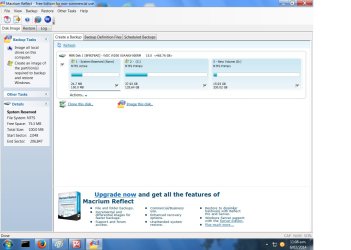
I clicked "image this disc" a few minutes later task completed, D:\ now has a folder "A7FBC3EA3FC1426C-00-00.mrimg" but there's a new drive F is this a new partition of D? There's only 2 entries on it (a log & and ini) and they're measured in bits (54 & 500 about)
If so far so good? then I scheduled a backup for each month, should be enough, this is a domestic system. There's choice, Full - incremental - differential I chose Full - and hopefully that's that - seem okay to you"
 

My Computer My Computer

At a glance

Windows 7 Home Premium (x64) Service Pack 1 (...AMD Athlon 11 X2 270 3.40Gh3840Mb usable installed memory(display?) NVIDIA GeForce 7025/NVIDIA nforce ...
Computer type
PC/Desktop
Computer Manufacturer/Model Number
unknown
OS
Windows 7 Home Premium (x64) Service Pack 1 (build 7601)
CPU
AMD Athlon 11 X2 270 3.40Gh
Motherboard
ASROCK N68-VGS3 FX
Memory
3840Mb usable installed memory
Graphics Card(s)
(display?) NVIDIA GeForce 7025/NVIDIA nforce 630a
Hard Drives
500.00Gb usable hard drive capacity
Antivirus
Avast
Browser
Firefox & IE 8
DSPERBER, if you've got a minute to spare
I finally got round to copying my C:\ drive to D:\ - just to reassure myself would you comment on my actions please?
I clicked "image this disc" a few minutes later task completed, D:\ now has a folder "A7FBC3EA3FC1426C-00-00.mrimg" but there's a new drive F is this a new partition of D? There's only 2 entries on it (a log & and ini) and they're measured in bits (54 & 500 about)
If so far so good? then I scheduled a backup for each month, should be enough, this is a domestic system. There's choice, Full - incremental - differential I chose Full - and hopefully that's that - seem okay to you"
Please post a screenshot (full-screen) of the output from DISKMGMT.MSC.

Be sure to spread the "status" column (and any other columns which need it) so that all text information in it is visible.
 

My Computer My Computer

At a glance

Windows 7 Pro x64 (1), Win7 Pro X64 (2)i5-3350p 3.1Ghz/6MB-cache (1); E8400 3.0Ghz/6...8GB PC3-12800 DDR3 (1); 4GB PC3-10600 DDR3 (2)ATI HD7750 (1), (see TV cards); ATI R7 250 (2)
Computer type
PC/Desktop
Computer Manufacturer/Model Number
Home-built, two systems (1) and (2)
OS
Windows 7 Pro x64 (1), Win7 Pro X64 (2)
CPU
i5-3350p 3.1Ghz/6MB-cache (1); E8400 3.0Ghz/6MB-cache (2)
Motherboard
ASUS P8Z77-V Pro (1); ASUS P5Q3 (2)
Memory
8GB PC3-12800 DDR3 (1); 4GB PC3-10600 DDR3 (2)
Graphics Card(s)
ATI HD7750 (1), (see TV cards); ATI R7 250 (2)
Sound Card
Realtek ALC892 HD Audio (1); Realtek ALC1200 HD Audio (2)
Monitor(s) Displays
Eizo HD2441W LCD, Eizo S2433W (1); Eizo 24" S2433W (2)
Screen Resolution
1920x1200, 1920x1200 (1); 1920x1200 (2)
Hard Drives
(1) 1TB SATA-II (7200RPM), 2x2TB SATA-III (7200RPM), 250GB SATA-III (10000RPM) for OS; 2x2TB external USB 3.0

(2) 320GB SATA-II (7200RPM), 750GB SATA-II (7200RPM), 150GB SATA-II (10000RPM) for OS; 2TB external USB 3.0
PSU
Nesteq ECS-6001 600W (1); Nesteq ECS-5001 500W (2)
Case
Acousti-Case 360 (1) and (2)
Cooling
Noctua NH-U12P SE2 for CPU, 2x120mm case fans (1) and (2)
Keyboard
IBM PS/2 (1) and (2)
Mouse
Logitech MX Revolution wireless (1); Microsoft wired (2)
Internet Speed
100mbps down / 10mbps up
Antivirus
Microsoft Security Essentials; Malwarebyte Anti-Malware Pro
Browser
Firefox
Other Info
Ceton InfiniTV 4-tuner cablecard-enabled TV card as well as Hauppauge HVR-2250 OTA/ATSC 2-tuner TV card in (1), running under Win7 WMC
I can't get the copy saved and pasted!!!! I've got it pinned to an email' is there an address for the forum?
 

My Computer My Computer

At a glance

Windows 7 Home Premium (x64) Service Pack 1 (...AMD Athlon 11 X2 270 3.40Gh3840Mb usable installed memory(display?) NVIDIA GeForce 7025/NVIDIA nforce ...
Computer type
PC/Desktop
Computer Manufacturer/Model Number
unknown
OS
Windows 7 Home Premium (x64) Service Pack 1 (build 7601)
CPU
AMD Athlon 11 X2 270 3.40Gh
Motherboard
ASROCK N68-VGS3 FX
Memory
3840Mb usable installed memory
Graphics Card(s)
(display?) NVIDIA GeForce 7025/NVIDIA nforce 630a
Hard Drives
500.00Gb usable hard drive capacity
Antivirus
Avast
Browser
Firefox & IE 8

My Computer My Computer

At a glance

Windows 10 Pro x64 ; Xubuntu x64Intel i7 860 @ 2.80 GHz O/C'ed to 4.0GHz16GB Corsair Vengance DDR3 @ 661 MHz Dual Cha...EVGA NVidia GTX 560 1024MB
Computer type
PC/Desktop
Computer Manufacturer/Model Number
Golden Mk. I.4
OS
Windows 10 Pro x64 ; Xubuntu x64
CPU
Intel i7 860 @ 2.80 GHz O/C'ed to 4.0GHz
Motherboard
Gigabyte P55A-UD3R Rev.1. Award BIOS F13
Memory
16GB Corsair Vengance DDR3 @ 661 MHz Dual Channel (9-9-9-24)
Graphics Card(s)
EVGA NVidia GTX 560 1024MB
Sound Card
Realtek Integrated
Monitor(s) Displays
Dual Samsung SyncMaster 2494HS
Screen Resolution
1920*1080 and 1920*1080
Hard Drives
1*Samsung 840 EVO 120GB SSD;
1*OCZ Vertex 2 60GB SSD;
2*Samsung F3 SpinPoint 1TB in RAID0;
1*Samsung F1 SpinPoint 1TB;
2*Western Digital 1TB External USB 3.0
1*Western Digital 500GB External USB 3.0
1*Seagate 500GB External USB 2.0
PSU
Thermaltake ToughPower QFan 750W
Case
Thermaltake Element S VK60001W2Z
Cooling
Corsair H60 Water Cooling, 2*230mm and 2*80mm case fans
Keyboard
Logitech G110
Mouse
Logitech MX518
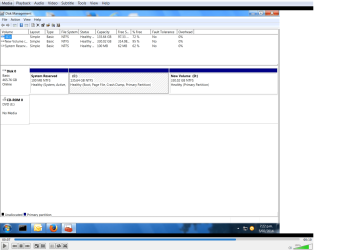
DISKMGMT.png
 

My Computer My Computer

At a glance

Windows 7 Home Premium (x64) Service Pack 1 (...AMD Athlon 11 X2 270 3.40Gh3840Mb usable installed memory(display?) NVIDIA GeForce 7025/NVIDIA nforce ...
Computer type
PC/Desktop
Computer Manufacturer/Model Number
unknown
OS
Windows 7 Home Premium (x64) Service Pack 1 (build 7601)
CPU
AMD Athlon 11 X2 270 3.40Gh
Motherboard
ASROCK N68-VGS3 FX
Memory
3840Mb usable installed memory
Graphics Card(s)
(display?) NVIDIA GeForce 7025/NVIDIA nforce 630a
Hard Drives
500.00Gb usable hard drive capacity
Antivirus
Avast
Browser
Firefox & IE 8
Thats 1 HDD, with 2 main partitions. You can still image/backup to that partition, but you should also copy the image file to an external USB drive.
 

My Computer My Computer

At a glance

Windows 10 Pro x64 ; Xubuntu x64Intel i7 860 @ 2.80 GHz O/C'ed to 4.0GHz16GB Corsair Vengance DDR3 @ 661 MHz Dual Cha...EVGA NVidia GTX 560 1024MB
Computer type
PC/Desktop
Computer Manufacturer/Model Number
Golden Mk. I.4
OS
Windows 10 Pro x64 ; Xubuntu x64
CPU
Intel i7 860 @ 2.80 GHz O/C'ed to 4.0GHz
Motherboard
Gigabyte P55A-UD3R Rev.1. Award BIOS F13
Memory
16GB Corsair Vengance DDR3 @ 661 MHz Dual Channel (9-9-9-24)
Graphics Card(s)
EVGA NVidia GTX 560 1024MB
Sound Card
Realtek Integrated
Monitor(s) Displays
Dual Samsung SyncMaster 2494HS
Screen Resolution
1920*1080 and 1920*1080
Hard Drives
1*Samsung 840 EVO 120GB SSD;
1*OCZ Vertex 2 60GB SSD;
2*Samsung F3 SpinPoint 1TB in RAID0;
1*Samsung F1 SpinPoint 1TB;
2*Western Digital 1TB External USB 3.0
1*Western Digital 500GB External USB 3.0
1*Seagate 500GB External USB 2.0
PSU
Thermaltake ToughPower QFan 750W
Case
Thermaltake Element S VK60001W2Z
Cooling
Corsair H60 Water Cooling, 2*230mm and 2*80mm case fans
Keyboard
Logitech G110
Mouse
Logitech MX518
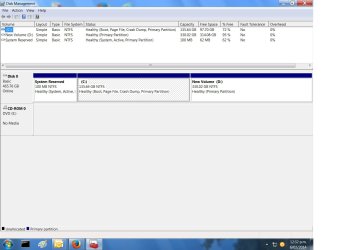
I don't understand. You said you had TWO hard drives, but the screenshot only shows one hard drive with two partitions on it (C and D). What's going on? Where is your second hard drive?

Are you sure you didn't have two partitions, not two hard drives? That looks like a 500GB hard drive, formatted into two NTFS partitions. Did you use Partition Wizard or DISKMGMT or some other method to create those two partitions? Did it come that way, or did you do it yourself?


Also, you mentioned that you saw a "new partition F", but the screenshot does not show any such partition. It only shows the two partitions C and D on your one hard drive, and the small un-lettered 100MB "system reserved" partition (which if you'd expanded the "status" column in the upper pane we would have seen that it shows itself as the "active" partition) where Boot Manager lives.

So what/where it his F??

Were you in Macrium Reflect when you saw F, or Explorer, or what? Can you please post a screenshot of that program window where the F partition was visible... if you can get it back, so that we can see it too.


Also, when you take a screenshot from DISKMGMT maximized to full-screen like you did, you also need to spread the columns in the upper pane where text is contained, so that we can see all of the verbiage. The screenshot you posted is maximized, but the columns are still compressed so that all of the potentially useful and helpful information is not visible.

Anyway, even as shown, there are some seeming inconsistencies between what you've described previously and what the picture shows. Only one hard drive, and no F.

If you really only have one hard drive with two partitions, although you certainly can use the second partition D for backups, as Golden has said it's a much better idea to use an external USB 3.0 drive for this purpose. Ideally your backup target outputs should really be on a physically separate media (e.g. second internal hard drive, or separate external hard drive) than the partition(s) you're backing up from.
 

My Computer My Computer

At a glance

Windows 7 Pro x64 (1), Win7 Pro X64 (2)i5-3350p 3.1Ghz/6MB-cache (1); E8400 3.0Ghz/6...8GB PC3-12800 DDR3 (1); 4GB PC3-10600 DDR3 (2)ATI HD7750 (1), (see TV cards); ATI R7 250 (2)
Computer type
PC/Desktop
Computer Manufacturer/Model Number
Home-built, two systems (1) and (2)
OS
Windows 7 Pro x64 (1), Win7 Pro X64 (2)
CPU
i5-3350p 3.1Ghz/6MB-cache (1); E8400 3.0Ghz/6MB-cache (2)
Motherboard
ASUS P8Z77-V Pro (1); ASUS P5Q3 (2)
Memory
8GB PC3-12800 DDR3 (1); 4GB PC3-10600 DDR3 (2)
Graphics Card(s)
ATI HD7750 (1), (see TV cards); ATI R7 250 (2)
Sound Card
Realtek ALC892 HD Audio (1); Realtek ALC1200 HD Audio (2)
Monitor(s) Displays
Eizo HD2441W LCD, Eizo S2433W (1); Eizo 24" S2433W (2)
Screen Resolution
1920x1200, 1920x1200 (1); 1920x1200 (2)
Hard Drives
(1) 1TB SATA-II (7200RPM), 2x2TB SATA-III (7200RPM), 250GB SATA-III (10000RPM) for OS; 2x2TB external USB 3.0

(2) 320GB SATA-II (7200RPM), 750GB SATA-II (7200RPM), 150GB SATA-II (10000RPM) for OS; 2TB external USB 3.0
PSU
Nesteq ECS-6001 600W (1); Nesteq ECS-5001 500W (2)
Case
Acousti-Case 360 (1) and (2)
Cooling
Noctua NH-U12P SE2 for CPU, 2x120mm case fans (1) and (2)
Keyboard
IBM PS/2 (1) and (2)
Mouse
Logitech MX Revolution wireless (1); Microsoft wired (2)
Internet Speed
100mbps down / 10mbps up
Antivirus
Microsoft Security Essentials; Malwarebyte Anti-Malware Pro
Browser
Firefox
Other Info
Ceton InfiniTV 4-tuner cablecard-enabled TV card as well as Hauppauge HVR-2250 OTA/ATSC 2-tuner TV card in (1), running under Win7 WMC
I clicked "image this disc" a few minutes later task completed, D:\ now has a folder "A7FBC3EA3FC1426C-00-00.mrimg"
Is that .MRIMG file (not folder) in the root of D? My own preference would be to create an actual FOLDER at the root level inside of which the backup .MRIMG image backups are then placed. Just a bit cleaner, so that you only have the "image backup folder" at the root level rather than numerous individual backup .MRIMG files.

So for example you might create a "D:\Macrium Images" folder, and then designate that folder as the target location for the Macrium backups. When you create the backup file definition you navigate the "destination folder" to point to that target folder location.

Also, although by default Macrium Reflect will create a file name constructed as an 8-byte (16-hex-digit) arbitrary name, I find that approach to be not terribly user-friendly. Yes it's really no different than having a human-readable file name in terms of what's inside the .MRIMG backup file itself. But if you take various different kinds of backups I feel it is helpful and informative to have a human-readable English file name instead of the 16-hex-digits.

So when I create a backup file definition I UN-CHECK the "use the image-ID as the file name" (even though it shows "recommended). And then I enter my own name in the "backup" field (e.g. "Win7 System Image C"). Then that name will be placed in front of the .MRIMG extension in the output backup file, in the target backup folder.

NOTE: if you are using the "free" version of Macrium Reflect, there is no automatic "pruning" of older generations as you create newer backups. This is referred to as "space management" and is only an automatic feature available with the "standard" (non-free) version of the product. If you don't have this functionality, you'll have to do your own manual deletion of old .MRIMG files every so often, to keep your backup folder under control.


then I scheduled a backup for each month, should be enough, this is a domestic system. There's choice, Full - incremental - differential I chose Full - and hopefully that's that - seem okay to you"
Well in my mind FULL is certainly the right type of "system image" backup to take at regular periodic intervals. As to whether monthly frequency is adequate, well that's up to you. Seems a bit sparse to me. Remember this is your backup, so you have to ask yourself how important is it to potentially lose the last month's worth of data and files I might have updated or created if a disaster struck and I had to go back to my most recent backup (if not one or more versions before that in the case of an extreme disaster).

In my own case, that would never be acceptable... especially not on my HTPC where recorded TV programs that are "copy protected" would not be playable if I had to restore a "system image" that was taken prior to the date/time that the TV program was recorded. So, for example, on my HTPC I actually take TWO "system image" backups per week!!

But on my other systems I take ONE "system image" backup per week. That's good enough, since "system image" is really my Windows operating system backup, protecting me against a corrupted Windows.

However my DATA is also very volatile and important to me. I would not want to lose ANY data if possible, ever. As my earlier post explained, I have a completely separate "data" backup scheme (i.e. separate from my weekly or twice-weekly "system image" backups), using Novabackup (although Macrium Reflect also provides "data" backup capability along with its "system image" backup).

As I described previously, I take a monthly FULL "data" backup (i.e. all folders and files, but NOT the C:\Windows folder) scheduled to run on the 1st of each month. Then, EVERY DAY OF THE MONTH I take an "incremental" backup (which backs up only the data which has been created or changed since yesterday's backup job... full or incremental... ran).

So on a monthly basis I have a FULL backup. And then every day during the month I have an INCREMENTAL backup. This scheme gives me "daily recovery" capability where I have no more exposure to lost data than 1 day tops. As long as a data file existed when that night's data backup (incremental or full) got run, it now is in my backup collection and thus available to be recovered if necessary.

I keep five "sets" of FULL+INCREMENTAL backups, i.e. FIVE months of "daily recoverability", just because I'm paranoid. Novabackup has automatic "grooming/pruning" which I've set at 5 months, so that complete sets older than that are automatically deleted when a new set begins on the 1st of each month.

Again, my own backup scheme reflects my own personal recovery requirements... or rather my own personal paranoia about possibly losing something I'm working on, or inadvertently deleted and didn't discover that deletion for a while. Your own needs and paranoia may not look like mine.

Note that Macrium Reflect can also do "incremental" versions of "system image" backups. I've never used Macrium Reflect for "data" backups, nor for anything but "FULL system image" backups so I can't really argue for or against it. But I've certainly played with Macrium Reflect for "data" backups, both FULL and INCREMENTAL (just like Novabackup) and this works fine and can also be scheduled to run on a monthly and daily basis (just like Novabackup).

Bottom line: I would think your plan to do your own backups only on a monthly schedule seems inadequate. The real question is: "would you cry if you had to restore one of these backups, and you'd just lost everything you'd worked on for the entire last month?" and if so, then you're not backing up often enough.

 

My Computer My Computer

At a glance

Windows 7 Pro x64 (1), Win7 Pro X64 (2)i5-3350p 3.1Ghz/6MB-cache (1); E8400 3.0Ghz/6...8GB PC3-12800 DDR3 (1); 4GB PC3-10600 DDR3 (2)ATI HD7750 (1), (see TV cards); ATI R7 250 (2)
Computer type
PC/Desktop
Computer Manufacturer/Model Number
Home-built, two systems (1) and (2)
OS
Windows 7 Pro x64 (1), Win7 Pro X64 (2)
CPU
i5-3350p 3.1Ghz/6MB-cache (1); E8400 3.0Ghz/6MB-cache (2)
Motherboard
ASUS P8Z77-V Pro (1); ASUS P5Q3 (2)
Memory
8GB PC3-12800 DDR3 (1); 4GB PC3-10600 DDR3 (2)
Graphics Card(s)
ATI HD7750 (1), (see TV cards); ATI R7 250 (2)
Sound Card
Realtek ALC892 HD Audio (1); Realtek ALC1200 HD Audio (2)
Monitor(s) Displays
Eizo HD2441W LCD, Eizo S2433W (1); Eizo 24" S2433W (2)
Screen Resolution
1920x1200, 1920x1200 (1); 1920x1200 (2)
Hard Drives
(1) 1TB SATA-II (7200RPM), 2x2TB SATA-III (7200RPM), 250GB SATA-III (10000RPM) for OS; 2x2TB external USB 3.0

(2) 320GB SATA-II (7200RPM), 750GB SATA-II (7200RPM), 150GB SATA-II (10000RPM) for OS; 2TB external USB 3.0
PSU
Nesteq ECS-6001 600W (1); Nesteq ECS-5001 500W (2)
Case
Acousti-Case 360 (1) and (2)
Cooling
Noctua NH-U12P SE2 for CPU, 2x120mm case fans (1) and (2)
Keyboard
IBM PS/2 (1) and (2)
Mouse
Logitech MX Revolution wireless (1); Microsoft wired (2)
Internet Speed
100mbps down / 10mbps up
Antivirus
Microsoft Security Essentials; Malwarebyte Anti-Malware Pro
Browser
Firefox
Other Info
Ceton InfiniTV 4-tuner cablecard-enabled TV card as well as Hauppauge HVR-2250 OTA/ATSC 2-tuner TV card in (1), running under Win7 WMC
Your image is being stored on a partition of the same physical drive. This is not desirable. If your drive fails or even if the partition table gets damaged, the image is useless. It is best to use an external HDD and make the image directly to it. If you are buying one get a USB3 external HDD. Even if your ports are currently just USB 2, you may have a USB 3 port PC in the future.
 

My Computer My Computer

At a glance

Windows 7x64 Home Premium SP1Intel i7 2600kG.Skill Ripjaws (DDR3-1600) 2x4GBNvidia GeForce GTS 450; Intel HD Graphics 300...
Computer type
PC/Desktop
Computer Manufacturer/Model Number
Own build
OS
Windows 7x64 Home Premium SP1
CPU
Intel i7 2600k
Motherboard
ASUS P8Z68 Deluxe
Memory
G.Skill Ripjaws (DDR3-1600) 2x4GB
Graphics Card(s)
Nvidia GeForce GTS 450; Intel HD Graphics 3000(GT2+)
Monitor(s) Displays
Dell Ultrasharp IPS panel U2311H, Samsung SyncMaster P2350
Screen Resolution
1920x1080
Hard Drives
Samsung 850 Pro SSD 256GB, Samsung SSD 840 120GB, Seagates 1TB Barracuda ST31000528AS x2
PSU
Seasonic M12II 520W
Case
Lian Li Lancool PC-K60
Cooling
Case: 1x120mm, 3x140mm CPU: Hyper 212+
Keyboard
Logitech MK520 (wireless)
Mouse
Logitech MK520
Internet Speed
6-7 Mbps
Antivirus
Norton Security Premium, Malwarebytes on 2 (MSE on 3rd PC)
Browser
FireFox
Other Info
Audio: Logitech Z523 2.1
One more comment regarding using the Macrium Reflect FREE version (which is free) vs. one of their non-free versions such as Macrium Reflect Standard (which is what I use).

The non-free versions provide additional functionality which I find very very useful and (clearly to me easily worth the modest price, say for the Standard version), for example:

(1) space management, aka "automatic pruning" or "automatic grooming". This keeps the number of generations of backups to whatever you configure, automatically. Each time you run a new backup the oldest generation(s) will automatically be "pruned away" if necessary. You never have to get involved manually. I find this feature incredibly valuable and easily justifies the price of the non-free version by itself.

(2) Boot Manager menu entry for Macrium Reflect Recovery. In the free program version you must burn your own standalone boot CD version of Macrium Reflect. If a disaster strikes and you need to recover your system from a backup image, you must boot to the standalone CD and proceed from there. Works fine, but this is your only option.

With the non-free program version you can add a "Macrium Reflect Recovery" item to your Boot Manager menu. As long as your hard drive itself is still usable and the Boot Manager is still intact and working, you can opt to boot to the Macrium Reflect Recovery item... which is identical in effect to booting to the standalone CD, but without requiring the standalone CD. I find this very convenient. although for situations such as "drive cloning" (when upgrading a hard disk to a larger size, etc.) you will/may still need to use the standalone boot CD is the situation requires it.


And one more time for emphasis...

While you certainly CAN use a second partition on your one-and-only internal hard drive for backups (i.e. it's "better than nothing to have some kind of backup"), this is not the best arrangement.

You want to use either (a) a physically separate second internal hard drive/partition (as you'd originally stated you had) to hold your backups, or (b) an external USB drive, preferably USB 3.0 if possible for greatly enhanced speed in both the backup and potential restore if necessary.

You want your backups on a PHYSICALLY UNIQUE MEDIA than the partition(s) you are actually backing up.
 

My Computer My Computer

At a glance

Windows 7 Pro x64 (1), Win7 Pro X64 (2)i5-3350p 3.1Ghz/6MB-cache (1); E8400 3.0Ghz/6...8GB PC3-12800 DDR3 (1); 4GB PC3-10600 DDR3 (2)ATI HD7750 (1), (see TV cards); ATI R7 250 (2)
Computer type
PC/Desktop
Computer Manufacturer/Model Number
Home-built, two systems (1) and (2)
OS
Windows 7 Pro x64 (1), Win7 Pro X64 (2)
CPU
i5-3350p 3.1Ghz/6MB-cache (1); E8400 3.0Ghz/6MB-cache (2)
Motherboard
ASUS P8Z77-V Pro (1); ASUS P5Q3 (2)
Memory
8GB PC3-12800 DDR3 (1); 4GB PC3-10600 DDR3 (2)
Graphics Card(s)
ATI HD7750 (1), (see TV cards); ATI R7 250 (2)
Sound Card
Realtek ALC892 HD Audio (1); Realtek ALC1200 HD Audio (2)
Monitor(s) Displays
Eizo HD2441W LCD, Eizo S2433W (1); Eizo 24" S2433W (2)
Screen Resolution
1920x1200, 1920x1200 (1); 1920x1200 (2)
Hard Drives
(1) 1TB SATA-II (7200RPM), 2x2TB SATA-III (7200RPM), 250GB SATA-III (10000RPM) for OS; 2x2TB external USB 3.0

(2) 320GB SATA-II (7200RPM), 750GB SATA-II (7200RPM), 150GB SATA-II (10000RPM) for OS; 2TB external USB 3.0
PSU
Nesteq ECS-6001 600W (1); Nesteq ECS-5001 500W (2)
Case
Acousti-Case 360 (1) and (2)
Cooling
Noctua NH-U12P SE2 for CPU, 2x120mm case fans (1) and (2)
Keyboard
IBM PS/2 (1) and (2)
Mouse
Logitech MX Revolution wireless (1); Microsoft wired (2)
Internet Speed
100mbps down / 10mbps up
Antivirus
Microsoft Security Essentials; Malwarebyte Anti-Malware Pro
Browser
Firefox
Other Info
Ceton InfiniTV 4-tuner cablecard-enabled TV card as well as Hauppauge HVR-2250 OTA/ATSC 2-tuner TV card in (1), running under Win7 WMC
.MSC

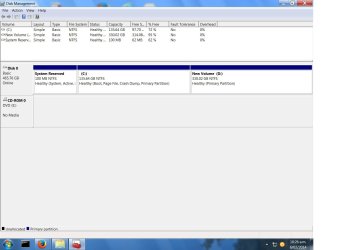
DISKMGMT.jpg

my latest attempt

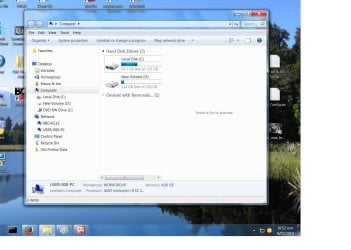
regarding the drives - I have to admit to ignorance there - when first looking at the computer drive tree it appeared to have 2 drives - attached

computer.jpg
 

My Computer My Computer

At a glance

Windows 7 Home Premium (x64) Service Pack 1 (...AMD Athlon 11 X2 270 3.40Gh3840Mb usable installed memory(display?) NVIDIA GeForce 7025/NVIDIA nforce ...
Computer type
PC/Desktop
Computer Manufacturer/Model Number
unknown
OS
Windows 7 Home Premium (x64) Service Pack 1 (build 7601)
CPU
AMD Athlon 11 X2 270 3.40Gh
Motherboard
ASROCK N68-VGS3 FX
Memory
3840Mb usable installed memory
Graphics Card(s)
(display?) NVIDIA GeForce 7025/NVIDIA nforce 630a
Hard Drives
500.00Gb usable hard drive capacity
Antivirus
Avast
Browser
Firefox & IE 8
macrium image

Macrium.jpg
 

My Computer My Computer

At a glance

Windows 7 Home Premium (x64) Service Pack 1 (...AMD Athlon 11 X2 270 3.40Gh3840Mb usable installed memory(display?) NVIDIA GeForce 7025/NVIDIA nforce ...
Computer type
PC/Desktop
Computer Manufacturer/Model Number
unknown
OS
Windows 7 Home Premium (x64) Service Pack 1 (build 7601)
CPU
AMD Athlon 11 X2 270 3.40Gh
Motherboard
ASROCK N68-VGS3 FX
Memory
3840Mb usable installed memory
Graphics Card(s)
(display?) NVIDIA GeForce 7025/NVIDIA nforce 630a
Hard Drives
500.00Gb usable hard drive capacity
Antivirus
Avast
Browser
Firefox & IE 8
replying to your previous post
I did say 2 drives - pleading ignorance here
it came as\is
F: lost that too, did a repeat of yesterday, so another ???
I'll get a USB ext HDD
I'll reread yours and other posts again & again, very helpful and patient
don't really know how to thank you guys but guess I learnt a bit more
Many Thanks
 

My Computer My Computer

At a glance

Windows 7 Home Premium (x64) Service Pack 1 (...AMD Athlon 11 X2 270 3.40Gh3840Mb usable installed memory(display?) NVIDIA GeForce 7025/NVIDIA nforce ...
Computer type
PC/Desktop
Computer Manufacturer/Model Number
unknown
OS
Windows 7 Home Premium (x64) Service Pack 1 (build 7601)
CPU
AMD Athlon 11 X2 270 3.40Gh
Motherboard
ASROCK N68-VGS3 FX
Memory
3840Mb usable installed memory
Graphics Card(s)
(display?) NVIDIA GeForce 7025/NVIDIA nforce 630a
Hard Drives
500.00Gb usable hard drive capacity
Antivirus
Avast
Browser
Firefox & IE 8
replying to your previous post
I did say 2 drives - pleading ignorance here
it came as\is
Aha... that explains it.

If you've never dealt with "carving up a single hard drive into multiple partitions" you would easily have misconstrued what you saw as reflecting two hard drives, since it got "two drive letters" assigned by Windows. Actually you have one 500GB hard drive that contains THREE partitions:

(1) small 100MB "system reserved" with no drive letter assigned by Windows, which is marked "active" and is where Boot Manager lives. The fact that it is the "active" partition on what the BIOS in the machine has been configured to recognize as the FIRST HARD DRIVE IN THE BOOT SEQUENCE causes the boot process to go there (to the "active" partition) for its first stage, i.e. Boot Manager.

(2) large 135GB "C partition" where Windows lives. Boot Manager will go here by default to continue the boot process to the Windows dekstop, since you only have a single bootable operating system defined in the Boot Manager menu (which you don't ever see, since you only have a single bootable Windows which is automatically gone to as the default OS).

(3) large 330GB "D partition" for "data". Whoever did this partitioning never bothered to "label" this partition (say, as "DATA") so whatever tool was used to do the partitioning gave it a label of "NEW VOLUME". You can use DISKMGMT.MSC (or Partition Wizard, or other products) to re-label that partition to something more meaningful and easy to understand (say, "DATA").

Your latest attempt to post the DISKMGMT.MSC screenshot still doesn't reflect the "spreading of the column dividers" in the upper pane horizontally left and/or right in order to allow all of the text in those columns to become visible. Also, you can pull the vertical separator (between upper where text information appears, and lower pane where the graphical drives/partitions presentation appears) to get it all to appear to your liking.

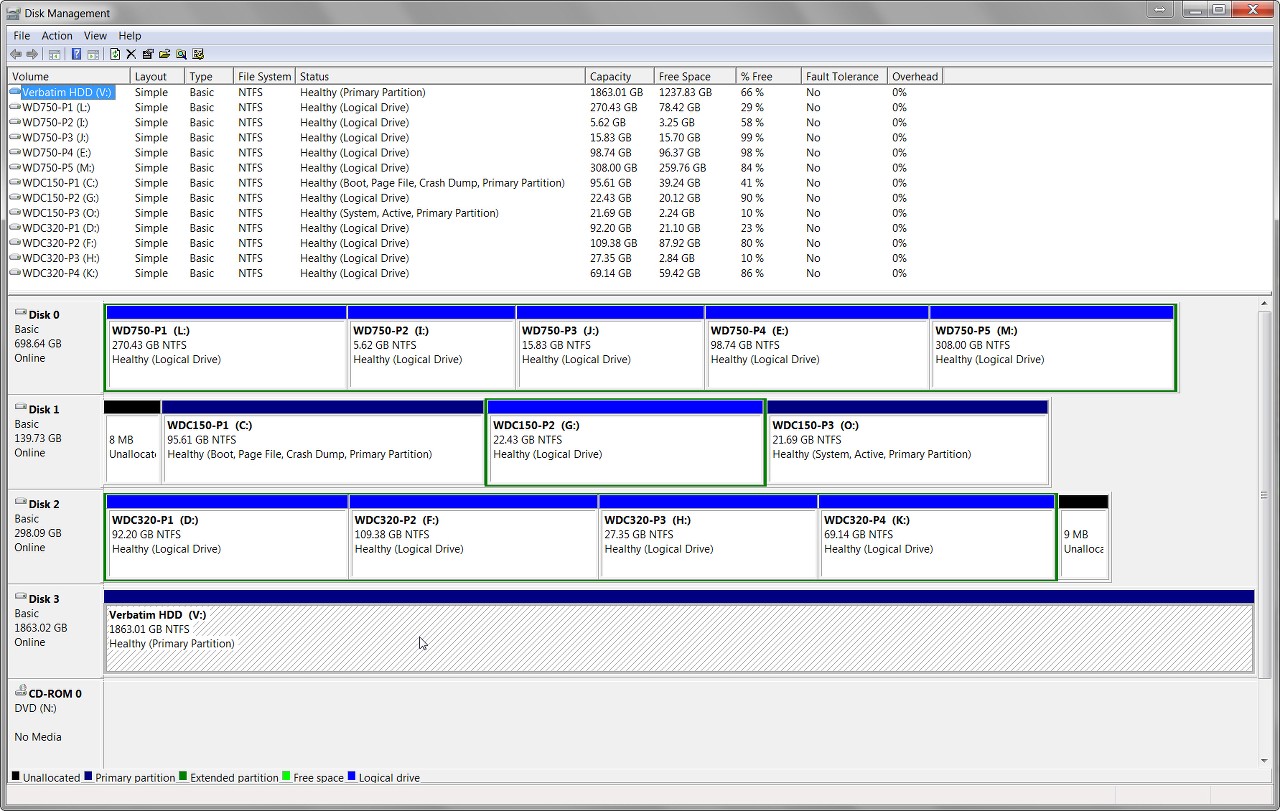
For example, here's my setup (three internal hard drives identified in the lower pane as DISK0, DISK1, DISK2, etc., partitioned with letters C-M, one external USB 3.0 hard drive lettered V, CD/DVD drive lettered O). Note that I've dragged those column separators (on the headings title line) in the upper pane to the right so as to reveal ALL of the text in those cells. I've also dragged the horizontal separator between upper and lower panes up/down so as to get everything in the screenshot.

Note that my own personal preference for partition "labeling" is not to use something as generic as "DATA" (after all, each of these partitions contains "data"). Rather I use an abbreviation of the drive brand/model/size as a prefix, followed by a simple partition designator of P1, P2, P3, etc.. I find this labeling scheme acceptably simple and acceptably informative. What's important is that I've given unique labels to each partition, for recognizability and possible informational value.


f0uw.jpg
 

My Computer My Computer

At a glance

Windows 7 Pro x64 (1), Win7 Pro X64 (2)i5-3350p 3.1Ghz/6MB-cache (1); E8400 3.0Ghz/6...8GB PC3-12800 DDR3 (1); 4GB PC3-10600 DDR3 (2)ATI HD7750 (1), (see TV cards); ATI R7 250 (2)
Computer type
PC/Desktop
Computer Manufacturer/Model Number
Home-built, two systems (1) and (2)
OS
Windows 7 Pro x64 (1), Win7 Pro X64 (2)
CPU
i5-3350p 3.1Ghz/6MB-cache (1); E8400 3.0Ghz/6MB-cache (2)
Motherboard
ASUS P8Z77-V Pro (1); ASUS P5Q3 (2)
Memory
8GB PC3-12800 DDR3 (1); 4GB PC3-10600 DDR3 (2)
Graphics Card(s)
ATI HD7750 (1), (see TV cards); ATI R7 250 (2)
Sound Card
Realtek ALC892 HD Audio (1); Realtek ALC1200 HD Audio (2)
Monitor(s) Displays
Eizo HD2441W LCD, Eizo S2433W (1); Eizo 24" S2433W (2)
Screen Resolution
1920x1200, 1920x1200 (1); 1920x1200 (2)
Hard Drives
(1) 1TB SATA-II (7200RPM), 2x2TB SATA-III (7200RPM), 250GB SATA-III (10000RPM) for OS; 2x2TB external USB 3.0

(2) 320GB SATA-II (7200RPM), 750GB SATA-II (7200RPM), 150GB SATA-II (10000RPM) for OS; 2TB external USB 3.0
PSU
Nesteq ECS-6001 600W (1); Nesteq ECS-5001 500W (2)
Case
Acousti-Case 360 (1) and (2)
Cooling
Noctua NH-U12P SE2 for CPU, 2x120mm case fans (1) and (2)
Keyboard
IBM PS/2 (1) and (2)
Mouse
Logitech MX Revolution wireless (1); Microsoft wired (2)
Internet Speed
100mbps down / 10mbps up
Antivirus
Microsoft Security Essentials; Malwarebyte Anti-Malware Pro
Browser
Firefox
Other Info
Ceton InfiniTV 4-tuner cablecard-enabled TV card as well as Hauppauge HVR-2250 OTA/ATSC 2-tuner TV card in (1), running under Win7 WMC
Untitled.jpg

this is the best I can do
how do I know what port I have, 2 or 3, for an ext USB drive? I'll get one
 

My Computer My Computer

At a glance

Windows 7 Home Premium (x64) Service Pack 1 (...AMD Athlon 11 X2 270 3.40Gh3840Mb usable installed memory(display?) NVIDIA GeForce 7025/NVIDIA nforce ...
Computer type
PC/Desktop
Computer Manufacturer/Model Number
unknown
OS
Windows 7 Home Premium (x64) Service Pack 1 (build 7601)
CPU
AMD Athlon 11 X2 270 3.40Gh
Motherboard
ASROCK N68-VGS3 FX
Memory
3840Mb usable installed memory
Graphics Card(s)
(display?) NVIDIA GeForce 7025/NVIDIA nforce 630a
Hard Drives
500.00Gb usable hard drive capacity
Antivirus
Avast
Browser
Firefox & IE 8
Back
Top