Solved Help with bsod,think It's a hardware failure

That would be great. Thanks a lot.
 

My Computers My Computers

  • At a glance

    Windows 11 ProRyzen 9 5900X32GB G Skill DDR4-3600EVGA RTX 3080 FTW 3 Ultra
    Computer type
    PC/Desktop
    Computer Manufacturer/Model Number
    ALWAYS UNDER CONSTRUCTION
    OS
    Windows 11 Pro
    CPU
    Ryzen 9 5900X
    Motherboard
    Asus X570 Crosshair Viii Hero
    Memory
    32GB G Skill DDR4-3600
    Graphics Card(s)
    EVGA RTX 3080 FTW 3 Ultra
    Sound Card
    On Board/Sennheiser PC37X Headset
    Monitor(s) Displays
    3 X Asus 27"
    Screen Resolution
    2560x1440
    Hard Drives
    2 X 1 TB NVME drives
    PSU
    EVGA 850
    Case
    Phanteks Eclipse P400A
    Cooling
    EVGA 280 AIO
    Keyboard
    Logitech G510s/ Logitech G13
    Mouse
    Logitech G502
    Internet Speed
    24/1
    Antivirus
    ESET/MBAM Pro/SAS Pro
    Browser
    Chrome/ Firefox/ Edge
  • At a glance

    Windows 11 ProIntel Ultra 9 288V32 GB LPDDR5X 8533
    Computer type
    Laptop
    System Manufacturer/Model Number
    Dell 16 Plus
    OS
    Windows 11 Pro
    CPU
    Intel Ultra 9 288V
    Memory
    32 GB LPDDR5X 8533
    Monitor(s) Displays
    16" Mini-LED HDR600 Touch 90 Hz
    Screen Resolution
    2560X1600
    Hard Drives
    1 TB NVME
View attachment 302665

The latest BSOD as per the zip is of 17th; and already checked in post #10.

If it does not BSOD, you dont need to upload any zip. Do it if only it BSODs.
 

My Computer My Computer

At a glance

Microsoft Windows 10 Pro Insider Preview 64-bitIntel(R) Core(TM) i3-4130 CPU @ 3.40GHzCorsair Vengence 4GB x2 (8.00GB Dual-Channel ...2047MB GeForce GTS 450 (ZOTAC International)
Computer type
PC/Desktop
Computer Manufacturer/Model Number
Self Assembled
OS
Microsoft Windows 10 Pro Insider Preview 64-bit
CPU
Intel(R) Core(TM) i3-4130 CPU @ 3.40GHz
Motherboard
Gigabyte Technology Co., Ltd. B85M-D3H
Memory
Corsair Vengence 4GB x2 (8.00GB Dual-Channel DDR3 @ 798MHz)
Graphics Card(s)
2047MB GeForce GTS 450 (ZOTAC International)
Sound Card
Onboard (Realtek High Definition Audio)
Monitor(s) Displays
LG Flatron E2040T
Screen Resolution
1600x900
Hard Drives
Western Digital 1 TB
Seagate 500 GB
PSU
Corsair VS550
Case
Cooler Master K380
Cooling
Cooler Master Seidon 120V Plus
Keyboard
Logitech MK260r
Mouse
Logitech MK260r
Internet Speed
PMPL Broadband
Antivirus
Windows Defender + MBAM
Browser
Firefox
Other Info
Dell Studio 15" Laptop
Thanks Arc.
 

My Computer My Computer

At a glance

Windows 10 Pro x64 ; Xubuntu x64Intel i7 860 @ 2.80 GHz O/C'ed to 4.0GHz16GB Corsair Vengance DDR3 @ 661 MHz Dual Cha...EVGA NVidia GTX 560 1024MB
Computer type
PC/Desktop
Computer Manufacturer/Model Number
Golden Mk. I.4
OS
Windows 10 Pro x64 ; Xubuntu x64
CPU
Intel i7 860 @ 2.80 GHz O/C'ed to 4.0GHz
Motherboard
Gigabyte P55A-UD3R Rev.1. Award BIOS F13
Memory
16GB Corsair Vengance DDR3 @ 661 MHz Dual Channel (9-9-9-24)
Graphics Card(s)
EVGA NVidia GTX 560 1024MB
Sound Card
Realtek Integrated
Monitor(s) Displays
Dual Samsung SyncMaster 2494HS
Screen Resolution
1920*1080 and 1920*1080
Hard Drives
1*Samsung 840 EVO 120GB SSD;
1*OCZ Vertex 2 60GB SSD;
2*Samsung F3 SpinPoint 1TB in RAID0;
1*Samsung F1 SpinPoint 1TB;
2*Western Digital 1TB External USB 3.0
1*Western Digital 500GB External USB 3.0
1*Seagate 500GB External USB 2.0
PSU
Thermaltake ToughPower QFan 750W
Case
Thermaltake Element S VK60001W2Z
Cooling
Corsair H60 Water Cooling, 2*230mm and 2*80mm case fans
Keyboard
Logitech G110
Mouse
Logitech MX518
View attachment 302665

The latest BSOD as per the zip is of 17th; and already checked in post #10.

If it does not BSOD, you dont need to upload any zip. Do it if only it BSODs.

Sorry I thought you havent analyzed it,yesterday gave me another bsod
 

My Computer My Computer

At a glance

Windows 7 Professional x64Intel Core 2 Quad Q66004xKingston Value Ram DDR2 (2GB)Geforce GT 210,Geforce 8800GT Alpha Dog Editi...
Computer type
PC/Desktop
Computer Manufacturer/Model Number
Custom Build
OS
Windows 7 Professional x64
CPU
Intel Core 2 Quad Q6600
Motherboard
P5B-PLUS Vista Edition
Memory
4xKingston Value Ram DDR2 (2GB)
Graphics Card(s)
Geforce GT 210,Geforce 8800GT Alpha Dog Edition [Died :(]
Monitor(s) Displays
Asus VW247H
Screen Resolution
1920x1080
PSU
Coolbox PowerLine F500
Keyboard
Microsoft Wireless Keyboard 3000
Mouse
Microsoft Wireless Mouse 5000
Internet Speed
20Mbps
Antivirus
ESET NOD32 7
Browser
Google Chrome
I couldn't find the last bsod??.It isn't the memory.dmp and the last in the mindump folder is what you said??
 

My Computer My Computer

At a glance

Windows 7 Professional x64Intel Core 2 Quad Q66004xKingston Value Ram DDR2 (2GB)Geforce GT 210,Geforce 8800GT Alpha Dog Editi...
Computer type
PC/Desktop
Computer Manufacturer/Model Number
Custom Build
OS
Windows 7 Professional x64
CPU
Intel Core 2 Quad Q6600
Motherboard
P5B-PLUS Vista Edition
Memory
4xKingston Value Ram DDR2 (2GB)
Graphics Card(s)
Geforce GT 210,Geforce 8800GT Alpha Dog Edition [Died :(]
Monitor(s) Displays
Asus VW247H
Screen Resolution
1920x1080
PSU
Coolbox PowerLine F500
Keyboard
Microsoft Wireless Keyboard 3000
Mouse
Microsoft Wireless Mouse 5000
Internet Speed
20Mbps
Antivirus
ESET NOD32 7
Browser
Google Chrome
That's great about the ram passing. As far as the dump files and diagnostic tool, I'll get someone who can read them to answer. I'm not smart enough to read the files. Tell me about your Furmark test. Did you see any artifacts? When you ran the test, the temps started rising, did you let it run long enough for the temps to level out? Typically, that's what cards do. The temps will rise to a point, them level out and stay about the same with only a little fluctuation. Did yours run long enough to do that? Your temps were real good for that test.

I started fumark with a gpu temperature of 39ºC and stopped it a 68ºC and 30 minutes.I haven't seen any artifacts (is a graphical anormaly no?,if this is the case,I haven't seen any artifact).

Have you run all the Windows upgates? Look at the updates it wants to install, don't let it update the graphics card driver. But run all the rest of the updates.

Yes,my windows 7 is updated but It gave me one grpahics card driver update dated in October,so viewing what arc said to me I haven't updated it.

When you get the BSOds, is there anything in particular you are doing? Are you, for example, running one particular program or app? Is there anything else unusual about your operating system happening as well as the BSODs?

I get it randomly,the last when I was starting IntelliJ Idea,others when running chrome or when I was in the desktop.

If you would, would you please go into BIOS and look in the area rhat monitors your hardware like temps and voltages and please give me the reading of your +12V, +5V and +3.3V. I am unfamilar with the brand of power supply you have. Many of the cheaper models, don't put out what they claim to and most will put out less power with age as capacitors get older.

Here is what the hardware monitor says:
3gQGBYl.jpg


If you have any thoughts of what the problem is, please let us know. You can see and hear what is going on. It's difficult for us because we can't. We have to depend on you to be our eyes and ears and let us know exactly what is happening.


Okay.As I said on the first post,the problem started when I connected an usb port upside down in the motherboard.

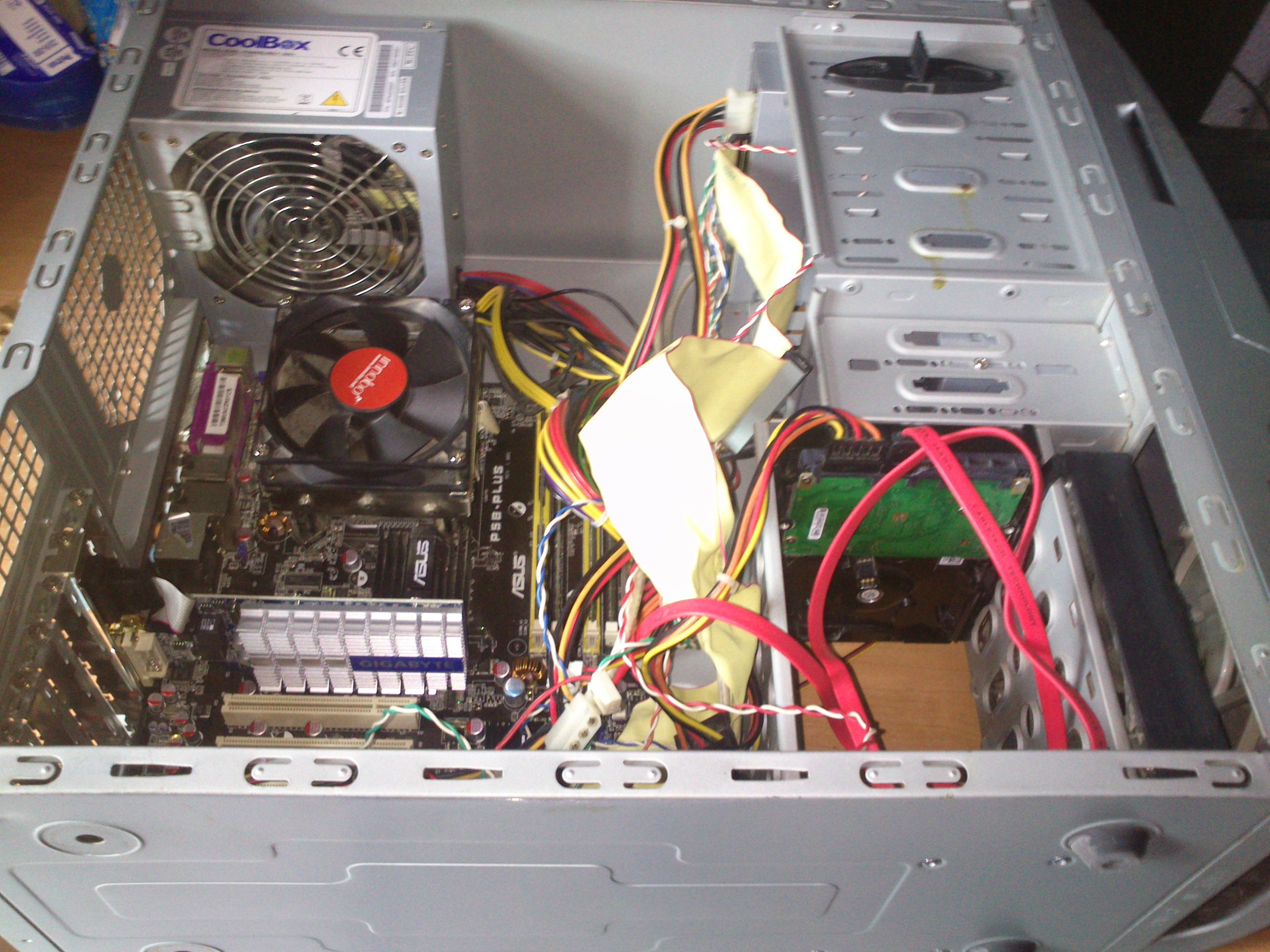
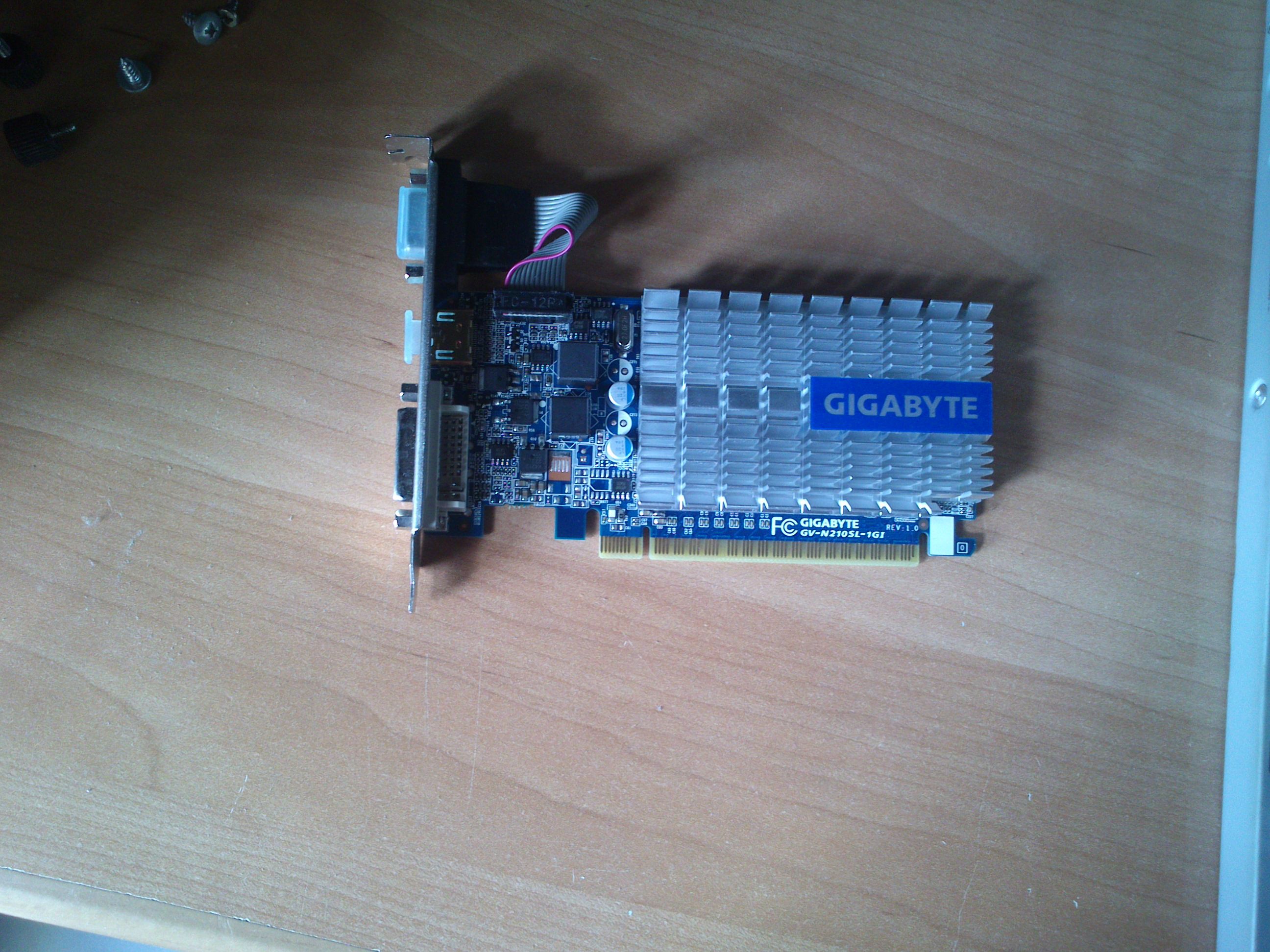
PD: here are photos from my computer and my graphics card:
fqpCgGS.jpg

QW9BZiE.jpg
 

My Computer My Computer

At a glance

Windows 7 Professional x64Intel Core 2 Quad Q66004xKingston Value Ram DDR2 (2GB)Geforce GT 210,Geforce 8800GT Alpha Dog Editi...
Computer type
PC/Desktop
Computer Manufacturer/Model Number
Custom Build
OS
Windows 7 Professional x64
CPU
Intel Core 2 Quad Q6600
Motherboard
P5B-PLUS Vista Edition
Memory
4xKingston Value Ram DDR2 (2GB)
Graphics Card(s)
Geforce GT 210,Geforce 8800GT Alpha Dog Edition [Died :(]
Monitor(s) Displays
Asus VW247H
Screen Resolution
1920x1080
PSU
Coolbox PowerLine F500
Keyboard
Microsoft Wireless Keyboard 3000
Mouse
Microsoft Wireless Mouse 5000
Internet Speed
20Mbps
Antivirus
ESET NOD32 7
Browser
Google Chrome
Hello to all.I haven't posted for three weeks because I haven't time to post.Three weeks ago I bought the Samsung 840 EVO SSD and installed Windows 8.1.Windows 8.1 gave me a lots of bsod and always with the nvidia driver,so I moved back to Windows 7 and installed nvidia driver 307.Now I hardly ever get a bsod,but now about one in three days.But now I don't know what is causing the bsod.Here I post it
 

My Computer My Computer

At a glance

Windows 7 Professional x64Intel Core 2 Quad Q66004xKingston Value Ram DDR2 (2GB)Geforce GT 210,Geforce 8800GT Alpha Dog Editi...
Computer type
PC/Desktop
Computer Manufacturer/Model Number
Custom Build
OS
Windows 7 Professional x64
CPU
Intel Core 2 Quad Q6600
Motherboard
P5B-PLUS Vista Edition
Memory
4xKingston Value Ram DDR2 (2GB)
Graphics Card(s)
Geforce GT 210,Geforce 8800GT Alpha Dog Edition [Died :(]
Monitor(s) Displays
Asus VW247H
Screen Resolution
1920x1080
PSU
Coolbox PowerLine F500
Keyboard
Microsoft Wireless Keyboard 3000
Mouse
Microsoft Wireless Mouse 5000
Internet Speed
20Mbps
Antivirus
ESET NOD32 7
Browser
Google Chrome
ercarlitosg, hopefully Arc or Golden will look at your SF Diagnostic tool. In the pictures you showed, I didn't see any fans. Fans are important to keep the components supplied with cooler fresh air and the wiring should not block your airflow. I noticed spaces for exhaust fans in the back of the case, but no fans installed. I also noted your graphics driver seems to be out of date if I read the Nvidia site correct. it appears you should be on driver version 332.21. If you don't mind, go to the Nvidia web site and see what the current WHQL driver is for your card.

Are you using the port where you plugged the USB in upside down? If I am understanding that correctly, I can't see how there was not some damage done. It would seem that it would have to damage the USB you plugged in or the port one. Try not using that port if you can. If you will download the correct driver for the graphics card, please let us tell you how to install it. We will try to give you the cleanest install we can.

I'm sure you'll enjoy the SSD. Good choice in SSDs also.
 

My Computers My Computers

  • At a glance

    Windows 11 ProRyzen 9 5900X32GB G Skill DDR4-3600EVGA RTX 3080 FTW 3 Ultra
    Computer type
    PC/Desktop
    Computer Manufacturer/Model Number
    ALWAYS UNDER CONSTRUCTION
    OS
    Windows 11 Pro
    CPU
    Ryzen 9 5900X
    Motherboard
    Asus X570 Crosshair Viii Hero
    Memory
    32GB G Skill DDR4-3600
    Graphics Card(s)
    EVGA RTX 3080 FTW 3 Ultra
    Sound Card
    On Board/Sennheiser PC37X Headset
    Monitor(s) Displays
    3 X Asus 27"
    Screen Resolution
    2560x1440
    Hard Drives
    2 X 1 TB NVME drives
    PSU
    EVGA 850
    Case
    Phanteks Eclipse P400A
    Cooling
    EVGA 280 AIO
    Keyboard
    Logitech G510s/ Logitech G13
    Mouse
    Logitech G502
    Internet Speed
    24/1
    Antivirus
    ESET/MBAM Pro/SAS Pro
    Browser
    Chrome/ Firefox/ Edge
  • At a glance

    Windows 11 ProIntel Ultra 9 288V32 GB LPDDR5X 8533
    Computer type
    Laptop
    System Manufacturer/Model Number
    Dell 16 Plus
    OS
    Windows 11 Pro
    CPU
    Intel Ultra 9 288V
    Memory
    32 GB LPDDR5X 8533
    Monitor(s) Displays
    16" Mini-LED HDR600 Touch 90 Hz
    Screen Resolution
    2560X1600
    Hard Drives
    1 TB NVME
I'll take a look at the dmp file tommorrow morning.
 

My Computer My Computer

At a glance

Windows 10 Pro x64 ; Xubuntu x64Intel i7 860 @ 2.80 GHz O/C'ed to 4.0GHz16GB Corsair Vengance DDR3 @ 661 MHz Dual Cha...EVGA NVidia GTX 560 1024MB
Computer type
PC/Desktop
Computer Manufacturer/Model Number
Golden Mk. I.4
OS
Windows 10 Pro x64 ; Xubuntu x64
CPU
Intel i7 860 @ 2.80 GHz O/C'ed to 4.0GHz
Motherboard
Gigabyte P55A-UD3R Rev.1. Award BIOS F13
Memory
16GB Corsair Vengance DDR3 @ 661 MHz Dual Channel (9-9-9-24)
Graphics Card(s)
EVGA NVidia GTX 560 1024MB
Sound Card
Realtek Integrated
Monitor(s) Displays
Dual Samsung SyncMaster 2494HS
Screen Resolution
1920*1080 and 1920*1080
Hard Drives
1*Samsung 840 EVO 120GB SSD;
1*OCZ Vertex 2 60GB SSD;
2*Samsung F3 SpinPoint 1TB in RAID0;
1*Samsung F1 SpinPoint 1TB;
2*Western Digital 1TB External USB 3.0
1*Western Digital 500GB External USB 3.0
1*Seagate 500GB External USB 2.0
PSU
Thermaltake ToughPower QFan 750W
Case
Thermaltake Element S VK60001W2Z
Cooling
Corsair H60 Water Cooling, 2*230mm and 2*80mm case fans
Keyboard
Logitech G110
Mouse
Logitech MX518
ercarlitosg, hopefully Arc or Golden will look at your SF Diagnostic tool. In the pictures you showed, I didn't see any fans. Fans are important to keep the components supplied with cooler fresh air and the wiring should not block your airflow. I noticed spaces for exhaust fans in the back of the case, but no fans installed. I also noted your graphics driver seems to be out of date if I read the Nvidia site correct. it appears you should be on driver version 332.21. If you don't mind, go to the Nvidia web site and see what the current WHQL driver is for your card.

Are you using the port where you plugged the USB in upside down? If I am understanding that correctly, I can't see how there was not some damage done. It would seem that it would have to damage the USB you plugged in or the port one. Try not using that port if you can. If you will download the correct driver for the graphics card, please let us tell you how to install it. We will try to give you the cleanest install we can.

I'm sure you'll enjoy the SSD. Good choice in SSDs also.

Yes,the computer has got two fans,one in the front (near to the hdd bay,black rectangle in the photo) and another in the cover.

About the graphics card driver,Arc said to me to install the 314.22 instead of the latest nvidia driver.

The usb when the problem started I removed the usb from the motherboard but the bsods continues.

The SSD is magic,in crystal disk mark on a SATA II computer got 553MB/s of read when activated the rapid mode ,incredible!!
 

My Computer My Computer

At a glance

Windows 7 Professional x64Intel Core 2 Quad Q66004xKingston Value Ram DDR2 (2GB)Geforce GT 210,Geforce 8800GT Alpha Dog Editi...
Computer type
PC/Desktop
Computer Manufacturer/Model Number
Custom Build
OS
Windows 7 Professional x64
CPU
Intel Core 2 Quad Q6600
Motherboard
P5B-PLUS Vista Edition
Memory
4xKingston Value Ram DDR2 (2GB)
Graphics Card(s)
Geforce GT 210,Geforce 8800GT Alpha Dog Edition [Died :(]
Monitor(s) Displays
Asus VW247H
Screen Resolution
1920x1080
PSU
Coolbox PowerLine F500
Keyboard
Microsoft Wireless Keyboard 3000
Mouse
Microsoft Wireless Mouse 5000
Internet Speed
20Mbps
Antivirus
ESET NOD32 7
Browser
Google Chrome
In my opinion, an SSD is the most noticeable upgrade you can do to a computer. They're great. I have 8 of them and would never be without one again. I can't believe we used to use mechanical hard drives and like them.

There is a distinct possibility you damaged the motherboard when the USB was inserted wrong. Especially since that is when your problems started and have continued since. It's just that it affects the graphics card. If you have another card, or have a friend who would loan you one for a while, try that to see if the card is the problem. I would rather you do that than buy another card just to find out if that is the problem. I try to spend money only when I know what the problem is. If you have a place for one, I would install another fan or 2 to bring in cooler air, and perhaps try to arrange the wiring to not obstruct airflow in the case. If the motherboard is damaged, it could just manifest itself in the pcie lanes, and there is no reasonable way to repair it that I know of.
 

My Computers My Computers

  • At a glance

    Windows 11 ProRyzen 9 5900X32GB G Skill DDR4-3600EVGA RTX 3080 FTW 3 Ultra
    Computer type
    PC/Desktop
    Computer Manufacturer/Model Number
    ALWAYS UNDER CONSTRUCTION
    OS
    Windows 11 Pro
    CPU
    Ryzen 9 5900X
    Motherboard
    Asus X570 Crosshair Viii Hero
    Memory
    32GB G Skill DDR4-3600
    Graphics Card(s)
    EVGA RTX 3080 FTW 3 Ultra
    Sound Card
    On Board/Sennheiser PC37X Headset
    Monitor(s) Displays
    3 X Asus 27"
    Screen Resolution
    2560x1440
    Hard Drives
    2 X 1 TB NVME drives
    PSU
    EVGA 850
    Case
    Phanteks Eclipse P400A
    Cooling
    EVGA 280 AIO
    Keyboard
    Logitech G510s/ Logitech G13
    Mouse
    Logitech G502
    Internet Speed
    24/1
    Antivirus
    ESET/MBAM Pro/SAS Pro
    Browser
    Chrome/ Firefox/ Edge
  • At a glance

    Windows 11 ProIntel Ultra 9 288V32 GB LPDDR5X 8533
    Computer type
    Laptop
    System Manufacturer/Model Number
    Dell 16 Plus
    OS
    Windows 11 Pro
    CPU
    Intel Ultra 9 288V
    Memory
    32 GB LPDDR5X 8533
    Monitor(s) Displays
    16" Mini-LED HDR600 Touch 90 Hz
    Screen Resolution
    2560X1600
    Hard Drives
    1 TB NVME
In my opinion, an SSD is the most noticeable upgrade you can do to a computer. They're great. I have 8 of them and would never be without one again. I can't believe we used to use mechanical hard drives and like them.

There is a distinct possibility you damaged the motherboard when the USB was inserted wrong. Especially since that is when your problems started and have continued since. It's just that it affects the graphics card. If you have another card, or have a friend who would loan you one for a while, try that to see if the card is the problem. I would rather you do that than buy another card just to find out if that is the problem. I try to spend money only when I know what the problem is. If you have a place for one, I would install another fan or 2 to bring in cooler air, and perhaps try to arrange the wiring to not obstruct airflow in the case. If the motherboard is damaged, it could just manifest itself in the pcie lanes, and there is no reasonable way to repair it that I know of.

I think temperatures are ok,23C after two hours.I got another gpu but it is AGP hahaha.I will try to find one
 

My Computer My Computer

At a glance

Windows 7 Professional x64Intel Core 2 Quad Q66004xKingston Value Ram DDR2 (2GB)Geforce GT 210,Geforce 8800GT Alpha Dog Editi...
Computer type
PC/Desktop
Computer Manufacturer/Model Number
Custom Build
OS
Windows 7 Professional x64
CPU
Intel Core 2 Quad Q6600
Motherboard
P5B-PLUS Vista Edition
Memory
4xKingston Value Ram DDR2 (2GB)
Graphics Card(s)
Geforce GT 210,Geforce 8800GT Alpha Dog Edition [Died :(]
Monitor(s) Displays
Asus VW247H
Screen Resolution
1920x1080
PSU
Coolbox PowerLine F500
Keyboard
Microsoft Wireless Keyboard 3000
Mouse
Microsoft Wireless Mouse 5000
Internet Speed
20Mbps
Antivirus
ESET NOD32 7
Browser
Google Chrome
Code:
*******************************************************************************
*                                                                             *
*                        Bugcheck Analysis                                    *
*                                                                             *
*******************************************************************************

Use !analyze -v to get detailed debugging information.

BugCheck C2, {99, fffffa8007d27300, 0, 0}

*** WARNING: Unable to verify timestamp for aswStm.sys
*** ERROR: Module load completed but symbols could not be loaded for aswStm.sys
[COLOR=Red]Probably caused by : aswStm.sys[/COLOR] ( aswStm+8951 )

Followup: MachineOwner
---------
Description here: What is aswstm.sys ? | System Explorer

Uninstall Avast using Avast Uninstall Utility. Use Microsoft Security Essentials as your antivirus with windows inbuilt firewall, and free MBAM as the on demand scanner.
Download, install and update those, and then run full system scans with both of them, one by one; for a safety reason.

Make it sure that the SSD is using the up-to-date firmware.
How to Upgrade Samsung SSD Firmware | StorageReview.com - Storage Reviews

Let us know the results.

At one point I am a little bit afraid, that is the age of the computer. The BIOS is old enough, and it is still the latest available. ASUSTeK Computer Inc. -Support- Drivers and Download P5B-Plus
SSDs need not only the up-to-date firmware, but also the up-to-date BIOS and storage controllers.

Let us know how it is running without Avast, and with the latest DDS firmware.

http://systemexplorer.net/file-database/file/aswstm-sys
 

My Computer My Computer

At a glance

Microsoft Windows 10 Pro Insider Preview 64-bitIntel(R) Core(TM) i3-4130 CPU @ 3.40GHzCorsair Vengence 4GB x2 (8.00GB Dual-Channel ...2047MB GeForce GTS 450 (ZOTAC International)
Computer type
PC/Desktop
Computer Manufacturer/Model Number
Self Assembled
OS
Microsoft Windows 10 Pro Insider Preview 64-bit
CPU
Intel(R) Core(TM) i3-4130 CPU @ 3.40GHz
Motherboard
Gigabyte Technology Co., Ltd. B85M-D3H
Memory
Corsair Vengence 4GB x2 (8.00GB Dual-Channel DDR3 @ 798MHz)
Graphics Card(s)
2047MB GeForce GTS 450 (ZOTAC International)
Sound Card
Onboard (Realtek High Definition Audio)
Monitor(s) Displays
LG Flatron E2040T
Screen Resolution
1600x900
Hard Drives
Western Digital 1 TB
Seagate 500 GB
PSU
Corsair VS550
Case
Cooler Master K380
Cooling
Cooler Master Seidon 120V Plus
Keyboard
Logitech MK260r
Mouse
Logitech MK260r
Internet Speed
PMPL Broadband
Antivirus
Windows Defender + MBAM
Browser
Firefox
Other Info
Dell Studio 15" Laptop
Today I got a new bsod.It seems that bsods occurs every three days since the last,curious.
 

My Computer My Computer

At a glance

Windows 7 Professional x64Intel Core 2 Quad Q66004xKingston Value Ram DDR2 (2GB)Geforce GT 210,Geforce 8800GT Alpha Dog Editi...
Computer type
PC/Desktop
Computer Manufacturer/Model Number
Custom Build
OS
Windows 7 Professional x64
CPU
Intel Core 2 Quad Q6600
Motherboard
P5B-PLUS Vista Edition
Memory
4xKingston Value Ram DDR2 (2GB)
Graphics Card(s)
Geforce GT 210,Geforce 8800GT Alpha Dog Edition [Died :(]
Monitor(s) Displays
Asus VW247H
Screen Resolution
1920x1080
PSU
Coolbox PowerLine F500
Keyboard
Microsoft Wireless Keyboard 3000
Mouse
Microsoft Wireless Mouse 5000
Internet Speed
20Mbps
Antivirus
ESET NOD32 7
Browser
Google Chrome

My Computer My Computer

At a glance

Windows 10 Pro x64 ; Xubuntu x64Intel i7 860 @ 2.80 GHz O/C'ed to 4.0GHz16GB Corsair Vengance DDR3 @ 661 MHz Dual Cha...EVGA NVidia GTX 560 1024MB
Computer type
PC/Desktop
Computer Manufacturer/Model Number
Golden Mk. I.4
OS
Windows 10 Pro x64 ; Xubuntu x64
CPU
Intel i7 860 @ 2.80 GHz O/C'ed to 4.0GHz
Motherboard
Gigabyte P55A-UD3R Rev.1. Award BIOS F13
Memory
16GB Corsair Vengance DDR3 @ 661 MHz Dual Channel (9-9-9-24)
Graphics Card(s)
EVGA NVidia GTX 560 1024MB
Sound Card
Realtek Integrated
Monitor(s) Displays
Dual Samsung SyncMaster 2494HS
Screen Resolution
1920*1080 and 1920*1080
Hard Drives
1*Samsung 840 EVO 120GB SSD;
1*OCZ Vertex 2 60GB SSD;
2*Samsung F3 SpinPoint 1TB in RAID0;
1*Samsung F1 SpinPoint 1TB;
2*Western Digital 1TB External USB 3.0
1*Western Digital 500GB External USB 3.0
1*Seagate 500GB External USB 2.0
PSU
Thermaltake ToughPower QFan 750W
Case
Thermaltake Element S VK60001W2Z
Cooling
Corsair H60 Water Cooling, 2*230mm and 2*80mm case fans
Keyboard
Logitech G110
Mouse
Logitech MX518

Ok sorry.

Avast removed,installed mse and mbam.SSD was updated also old HDD (seagate barracuda 7200rpm 500GB 2007)The bios as you said and I checked it is the latest

MBAM and MSE said no viruses
 

My Computer My Computer

At a glance

Windows 7 Professional x64Intel Core 2 Quad Q66004xKingston Value Ram DDR2 (2GB)Geforce GT 210,Geforce 8800GT Alpha Dog Editi...
Computer type
PC/Desktop
Computer Manufacturer/Model Number
Custom Build
OS
Windows 7 Professional x64
CPU
Intel Core 2 Quad Q6600
Motherboard
P5B-PLUS Vista Edition
Memory
4xKingston Value Ram DDR2 (2GB)
Graphics Card(s)
Geforce GT 210,Geforce 8800GT Alpha Dog Edition [Died :(]
Monitor(s) Displays
Asus VW247H
Screen Resolution
1920x1080
PSU
Coolbox PowerLine F500
Keyboard
Microsoft Wireless Keyboard 3000
Mouse
Microsoft Wireless Mouse 5000
Internet Speed
20Mbps
Antivirus
ESET NOD32 7
Browser
Google Chrome
Code:
*******************************************************************************
*                                                                             *
*                        Bugcheck Analysis                                    *
*                                                                             *
*******************************************************************************

Use !analyze -v to get detailed debugging information.

BugCheck 1000007E, {ffffffffc0000005, fffff8800ff67c7e, fffff880035a57a8, fffff880035a5000}
[COLOR=Red]
Probably caused by : hardware[/COLOR] ( [COLOR=Red]dxgmms1!VIDMM_GLOBAL[/COLOR]::xWaitForAllEngines+17e )

Followup: MachineOwner
---------
As per the crash dump, it is display hardware error.
 

My Computer My Computer

At a glance

Microsoft Windows 10 Pro Insider Preview 64-bitIntel(R) Core(TM) i3-4130 CPU @ 3.40GHzCorsair Vengence 4GB x2 (8.00GB Dual-Channel ...2047MB GeForce GTS 450 (ZOTAC International)
Computer type
PC/Desktop
Computer Manufacturer/Model Number
Self Assembled
OS
Microsoft Windows 10 Pro Insider Preview 64-bit
CPU
Intel(R) Core(TM) i3-4130 CPU @ 3.40GHz
Motherboard
Gigabyte Technology Co., Ltd. B85M-D3H
Memory
Corsair Vengence 4GB x2 (8.00GB Dual-Channel DDR3 @ 798MHz)
Graphics Card(s)
2047MB GeForce GTS 450 (ZOTAC International)
Sound Card
Onboard (Realtek High Definition Audio)
Monitor(s) Displays
LG Flatron E2040T
Screen Resolution
1600x900
Hard Drives
Western Digital 1 TB
Seagate 500 GB
PSU
Corsair VS550
Case
Cooler Master K380
Cooling
Cooler Master Seidon 120V Plus
Keyboard
Logitech MK260r
Mouse
Logitech MK260r
Internet Speed
PMPL Broadband
Antivirus
Windows Defender + MBAM
Browser
Firefox
Other Info
Dell Studio 15" Laptop
Code:
*******************************************************************************
*                                                                             *
*                        Bugcheck Analysis                                    *
*                                                                             *
*******************************************************************************

Use !analyze -v to get detailed debugging information.

BugCheck 1000007E, {ffffffffc0000005, fffff8800ff67c7e, fffff880035a57a8, fffff880035a5000}
[COLOR=Red]
Probably caused by : hardware[/COLOR] ( [COLOR=Red]dxgmms1!VIDMM_GLOBAL[/COLOR]::xWaitForAllEngines+17e )

Followup: MachineOwner
---------
As per the crash dump, it is display hardware error.

OK thanks.It also can be a power issue in the motherboard??
 

My Computer My Computer

At a glance

Windows 7 Professional x64Intel Core 2 Quad Q66004xKingston Value Ram DDR2 (2GB)Geforce GT 210,Geforce 8800GT Alpha Dog Editi...
Computer type
PC/Desktop
Computer Manufacturer/Model Number
Custom Build
OS
Windows 7 Professional x64
CPU
Intel Core 2 Quad Q6600
Motherboard
P5B-PLUS Vista Edition
Memory
4xKingston Value Ram DDR2 (2GB)
Graphics Card(s)
Geforce GT 210,Geforce 8800GT Alpha Dog Edition [Died :(]
Monitor(s) Displays
Asus VW247H
Screen Resolution
1920x1080
PSU
Coolbox PowerLine F500
Keyboard
Microsoft Wireless Keyboard 3000
Mouse
Microsoft Wireless Mouse 5000
Internet Speed
20Mbps
Antivirus
ESET NOD32 7
Browser
Google Chrome
Code:
*******************************************************************************
*                                                                             *
*                        Bugcheck Analysis                                    *
*                                                                             *
*******************************************************************************

Use !analyze -v to get detailed debugging information.

BugCheck 1000007E, {ffffffffc0000005, fffff8800ff67c7e, fffff880035a57a8, fffff880035a5000}
[COLOR=Red]
Probably caused by : hardware[/COLOR] ( [COLOR=Red]dxgmms1!VIDMM_GLOBAL[/COLOR]::xWaitForAllEngines+17e )

Followup: MachineOwner
---------
As per the crash dump, it is display hardware error.

OK thanks.It also can be a power issue in the motherboard??
I cannot say.
 

My Computer My Computer

At a glance

Microsoft Windows 10 Pro Insider Preview 64-bitIntel(R) Core(TM) i3-4130 CPU @ 3.40GHzCorsair Vengence 4GB x2 (8.00GB Dual-Channel ...2047MB GeForce GTS 450 (ZOTAC International)
Computer type
PC/Desktop
Computer Manufacturer/Model Number
Self Assembled
OS
Microsoft Windows 10 Pro Insider Preview 64-bit
CPU
Intel(R) Core(TM) i3-4130 CPU @ 3.40GHz
Motherboard
Gigabyte Technology Co., Ltd. B85M-D3H
Memory
Corsair Vengence 4GB x2 (8.00GB Dual-Channel DDR3 @ 798MHz)
Graphics Card(s)
2047MB GeForce GTS 450 (ZOTAC International)
Sound Card
Onboard (Realtek High Definition Audio)
Monitor(s) Displays
LG Flatron E2040T
Screen Resolution
1600x900
Hard Drives
Western Digital 1 TB
Seagate 500 GB
PSU
Corsair VS550
Case
Cooler Master K380
Cooling
Cooler Master Seidon 120V Plus
Keyboard
Logitech MK260r
Mouse
Logitech MK260r
Internet Speed
PMPL Broadband
Antivirus
Windows Defender + MBAM
Browser
Firefox
Other Info
Dell Studio 15" Laptop
OK.Thank you very much,I mark this as solved
 

My Computer My Computer

At a glance

Windows 7 Professional x64Intel Core 2 Quad Q66004xKingston Value Ram DDR2 (2GB)Geforce GT 210,Geforce 8800GT Alpha Dog Editi...
Computer type
PC/Desktop
Computer Manufacturer/Model Number
Custom Build
OS
Windows 7 Professional x64
CPU
Intel Core 2 Quad Q6600
Motherboard
P5B-PLUS Vista Edition
Memory
4xKingston Value Ram DDR2 (2GB)
Graphics Card(s)
Geforce GT 210,Geforce 8800GT Alpha Dog Edition [Died :(]
Monitor(s) Displays
Asus VW247H
Screen Resolution
1920x1080
PSU
Coolbox PowerLine F500
Keyboard
Microsoft Wireless Keyboard 3000
Mouse
Microsoft Wireless Mouse 5000
Internet Speed
20Mbps
Antivirus
ESET NOD32 7
Browser
Google Chrome
Back
Top