Solved Need help in moving the System partition to a different Hard disk

Sanjeeb

New member
Local time
12:56 AM
Messages
25
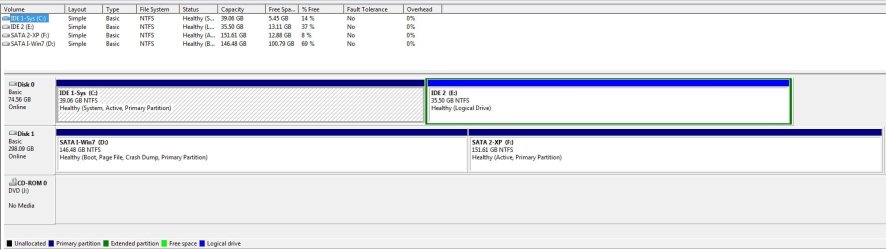
I have provided Disk information in the attachment.

Disk 0 - Partition C (System) and Partiton E (Data)
Disk 1 - Partiton D(Win7 OS) and Partiton F(WinXP)

To boot I need Disk 0 as it has the system partiton, which got messed up during installation of WinXP and it didn't change when I installed Win7 in my current dual boot System. It is working fine today as long as I connceted the Disk0. If I remove Disk0 and set the boot order to Disk1 I am getting the ntldr missing error and the system refuses to boot.

I need help in moving the System parttion to one of the existing OS partition or to a new partition in Disk1 so that I can get rid of the old Disk0 completely without disturbing my current dual boot system.

I am not able to find any straight forward safe solution to move the system partition. As it contains the boot information of both XP and Win7. Any help will be highly appreciated to do so without installing any of the existing OS. Thank you

-Sanjeeb
 

Attachments

  • SystemInformation.JPG
    SystemInformation.JPG
    58 KB · Views: 11

My Computer My Computer

At a glance

Win Xp prfessional and Windows 7 UltimateIntel Core2Duo4GB
Computer type
PC/Desktop
Computer Manufacturer/Model Number
custom build
OS
Win Xp prfessional and Windows 7 Ultimate
CPU
Intel Core2Duo
Motherboard
GA-G41M
Memory
4GB
Hard Drives
Samsung
Seagate
Western Digital
Antivirus
AVG
Browser
IE, Mozilla

My Computer My Computer

At a glance

Microsoft Windows 7 Home Premium 64-bits 7601...Intel(R) Core(TM) i3 CPU M 370 @ 2.40GHz4,00 GBATI Mobility Radeon HD 5400 Series
Computer type
Laptop
Computer Manufacturer/Model Number
ACER ASPIRE 5742G
OS
Microsoft Windows 7 Home Premium 64-bits 7601 Multiprocessor Free Service Pack 1
CPU
Intel(R) Core(TM) i3 CPU M 370 @ 2.40GHz
Motherboard
Acer Aspire 5742G
Memory
4,00 GB
Graphics Card(s)
ATI Mobility Radeon HD 5400 Series
Sound Card
(1) AMD High Definition Audio Device (2) Realtek High Defi
Screen Resolution
1366 x 768 x 32 bits (4294967296 colors) @ 60 Hz
Hard Drives
WDC WD5000BEVT-22ZAT0
Last edited:
@GREG ... win7 and winxp are both installed on same physical disk (disk1 in screenshot).
 

My Computer My Computer

At a glance

Microsoft Windows 7 Home Premium 64-bits 7601...Intel(R) Core(TM) i3 CPU M 370 @ 2.40GHz4,00 GBATI Mobility Radeon HD 5400 Series
Computer type
Laptop
Computer Manufacturer/Model Number
ACER ASPIRE 5742G
OS
Microsoft Windows 7 Home Premium 64-bits 7601 Multiprocessor Free Service Pack 1
CPU
Intel(R) Core(TM) i3 CPU M 370 @ 2.40GHz
Motherboard
Acer Aspire 5742G
Memory
4,00 GB
Graphics Card(s)
ATI Mobility Radeon HD 5400 Series
Sound Card
(1) AMD High Definition Audio Device (2) Realtek High Defi
Screen Resolution
1366 x 768 x 32 bits (4294967296 colors) @ 60 Hz
Hard Drives
WDC WD5000BEVT-22ZAT0
Correct I have booted in Windows XP. I will Post the screenshot and the required info once I booted in Win7. The Windows XP and Win7 both are in Disk1 on two different partition. I am not sure why active OS drive is not coming as C may be it is due to the System partiton resides in C drive...
 

My Computer My Computer

At a glance

Win Xp prfessional and Windows 7 UltimateIntel Core2Duo4GB
Computer type
PC/Desktop
Computer Manufacturer/Model Number
custom build
OS
Win Xp prfessional and Windows 7 Ultimate
CPU
Intel Core2Duo
Motherboard
GA-G41M
Memory
4GB
Hard Drives
Samsung
Seagate
Western Digital
Antivirus
AVG
Browser
IE, Mozilla
This could have been caused by installing XP from C when/if an OS was ever on it. Otherwise XP and Win7 would claim C when booted if each were correctly installed from boot.

Is it possible an inert OS still exists on C partition which needs to be correctly removed by deleting its partition after backing up data?

If Win7 does not boot as C then it was also installed from an existing OS and not from booted installer. If you don't want it on another drive letter then I would reinstall it, preferably to the other HD with the XP HD unplugged. XP is so old I would not worry about it's drive letter, just delete it in Disk Mgmt and extend Win7 into the space when ready.
 
Great catch.. There is an inert Windows XP existing on the C: drive- Disk0. When insalled new version of WinXP it was installed on a different partiton of another disk (currently F drive- Disk1). Does it cause any issue if i dont re partiton it rather I will make inactive once I am able to move the System partiton to Disk1
 

My Computer My Computer

At a glance

Win Xp prfessional and Windows 7 UltimateIntel Core2Duo4GB
Computer type
PC/Desktop
Computer Manufacturer/Model Number
custom build
OS
Win Xp prfessional and Windows 7 Ultimate
CPU
Intel Core2Duo
Motherboard
GA-G41M
Memory
4GB
Hard Drives
Samsung
Seagate
Western Digital
Antivirus
AVG
Browser
IE, Mozilla
Please do the command as asked in #2 .
Post output.
 

My Computer My Computer

At a glance

Microsoft Windows 7 Home Premium 64-bits 7601...Intel(R) Core(TM) i3 CPU M 370 @ 2.40GHz4,00 GBATI Mobility Radeon HD 5400 Series
Computer type
Laptop
Computer Manufacturer/Model Number
ACER ASPIRE 5742G
OS
Microsoft Windows 7 Home Premium 64-bits 7601 Multiprocessor Free Service Pack 1
CPU
Intel(R) Core(TM) i3 CPU M 370 @ 2.40GHz
Motherboard
Acer Aspire 5742G
Memory
4,00 GB
Graphics Card(s)
ATI Mobility Radeon HD 5400 Series
Sound Card
(1) AMD High Definition Audio Device (2) Realtek High Defi
Screen Resolution
1366 x 768 x 32 bits (4294967296 colors) @ 60 Hz
Hard Drives
WDC WD5000BEVT-22ZAT0
If you boot to win7 is the win7 partition called C?
 
Last edited:

My Computer My Computer

At a glance

Microsoft Windows 7 Home Premium 64-bits 7601...Intel(R) Core(TM) i3 CPU M 370 @ 2.40GHz4,00 GBATI Mobility Radeon HD 5400 Series
Computer type
Laptop
Computer Manufacturer/Model Number
ACER ASPIRE 5742G
OS
Microsoft Windows 7 Home Premium 64-bits 7601 Multiprocessor Free Service Pack 1
CPU
Intel(R) Core(TM) i3 CPU M 370 @ 2.40GHz
Motherboard
Acer Aspire 5742G
Memory
4,00 GB
Graphics Card(s)
ATI Mobility Radeon HD 5400 Series
Sound Card
(1) AMD High Definition Audio Device (2) Realtek High Defi
Screen Resolution
1366 x 768 x 32 bits (4294967296 colors) @ 60 Hz
Hard Drives
WDC WD5000BEVT-22ZAT0
I have posted both bcd.txt and screenshot of diskmgmt tool for your further reference
 

Attachments

  • bcd.txt
    bcd.txt
    3.8 KB · Views: 8
  • SystemInfoFromWin7.jpg
    SystemInfoFromWin7.jpg
    81 KB · Views: 11

My Computer My Computer

At a glance

Win Xp prfessional and Windows 7 UltimateIntel Core2Duo4GB
Computer type
PC/Desktop
Computer Manufacturer/Model Number
custom build
OS
Win Xp prfessional and Windows 7 Ultimate
CPU
Intel Core2Duo
Motherboard
GA-G41M
Memory
4GB
Hard Drives
Samsung
Seagate
Western Digital
Antivirus
AVG
Browser
IE, Mozilla
Also in order to boot from DVD player I need to adjust jumper setting to make it as Master as DVD disk is connected to the same IDE cable as Disk0
 

My Computer My Computer

At a glance

Win Xp prfessional and Windows 7 UltimateIntel Core2Duo4GB
Computer type
PC/Desktop
Computer Manufacturer/Model Number
custom build
OS
Win Xp prfessional and Windows 7 Ultimate
CPU
Intel Core2Duo
Motherboard
GA-G41M
Memory
4GB
Hard Drives
Samsung
Seagate
Western Digital
Antivirus
AVG
Browser
IE, Mozilla
Do this http://www.sevenforums.com/tutorials/209885-bootmgr-move-c-easybcd.html
But move to D instead in that tutorial.
Afterwards in elevated command prompt:
Code:
diskpart
select vol c
inactive
select vol e
inactive
select vol d
active
exit

Most likely C was made inactive by easybcd. Most likely D was made active by easybcd.

Afterwards reboot again to win7 and make disk management screenshot
 

My Computer My Computer

At a glance

Microsoft Windows 7 Home Premium 64-bits 7601...Intel(R) Core(TM) i3 CPU M 370 @ 2.40GHz4,00 GBATI Mobility Radeon HD 5400 Series
Computer type
Laptop
Computer Manufacturer/Model Number
ACER ASPIRE 5742G
OS
Microsoft Windows 7 Home Premium 64-bits 7601 Multiprocessor Free Service Pack 1
CPU
Intel(R) Core(TM) i3 CPU M 370 @ 2.40GHz
Motherboard
Acer Aspire 5742G
Memory
4,00 GB
Graphics Card(s)
ATI Mobility Radeon HD 5400 Series
Sound Card
(1) AMD High Definition Audio Device (2) Realtek High Defi
Screen Resolution
1366 x 768 x 32 bits (4294967296 colors) @ 60 Hz
Hard Drives
WDC WD5000BEVT-22ZAT0
Forgot to mention this screen shot is taken when booted into Win7 OS. I understood that during the installation of OS the old HD was not unplugged causing this behavior. Another query: in case I change the drive letters manually is it going to impact the functioning of OS or any of the installed software?
 

My Computer My Computer

At a glance

Win Xp prfessional and Windows 7 UltimateIntel Core2Duo4GB
Computer type
PC/Desktop
Computer Manufacturer/Model Number
custom build
OS
Win Xp prfessional and Windows 7 Ultimate
CPU
Intel Core2Duo
Motherboard
GA-G41M
Memory
4GB
Hard Drives
Samsung
Seagate
Western Digital
Antivirus
AVG
Browser
IE, Mozilla
If I make Vol c inactive, does it cause any issue of booting into win7 without any windows restore DVD. Do I need to create a rescue disk before performing the step you are suggesting...
 

My Computer My Computer

At a glance

Win Xp prfessional and Windows 7 UltimateIntel Core2Duo4GB
Computer type
PC/Desktop
Computer Manufacturer/Model Number
custom build
OS
Win Xp prfessional and Windows 7 Ultimate
CPU
Intel Core2Duo
Motherboard
GA-G41M
Memory
4GB
Hard Drives
Samsung
Seagate
Western Digital
Antivirus
AVG
Browser
IE, Mozilla
Forgot to mention this screen shot is taken when booted into Win7 OS. I understood that during the installation of OS the old HD was not unplugged causing this behavior. Another query: in case I change the drive letters manually is it going to impact the functioning of OS or any of the installed software?
Drive letters are defined in the registry of current running OS. So in winxp, vista or win7 it can differ! When booting with install dvd... and actually installing.... the disk letter where you install will be called C.

Since you installed from within winxp.... C was already occupied.... C was not used for the install volume.

Don't change the drive letter of win7 from within win7. It makes the system malfunction
Don't change the drive letter of winxp from within winxp. It makes the system malfunction
 

My Computer My Computer

At a glance

Microsoft Windows 7 Home Premium 64-bits 7601...Intel(R) Core(TM) i3 CPU M 370 @ 2.40GHz4,00 GBATI Mobility Radeon HD 5400 Series
Computer type
Laptop
Computer Manufacturer/Model Number
ACER ASPIRE 5742G
OS
Microsoft Windows 7 Home Premium 64-bits 7601 Multiprocessor Free Service Pack 1
CPU
Intel(R) Core(TM) i3 CPU M 370 @ 2.40GHz
Motherboard
Acer Aspire 5742G
Memory
4,00 GB
Graphics Card(s)
ATI Mobility Radeon HD 5400 Series
Sound Card
(1) AMD High Definition Audio Device (2) Realtek High Defi
Screen Resolution
1366 x 768 x 32 bits (4294967296 colors) @ 60 Hz
Hard Drives
WDC WD5000BEVT-22ZAT0
It is late night for me , I'll catch up with this thread tomorrow and try as suggested. I am really thankful for all the valuable suggestions and your precious time.
 

My Computer My Computer

At a glance

Win Xp prfessional and Windows 7 UltimateIntel Core2Duo4GB
Computer type
PC/Desktop
Computer Manufacturer/Model Number
custom build
OS
Win Xp prfessional and Windows 7 Ultimate
CPU
Intel Core2Duo
Motherboard
GA-G41M
Memory
4GB
Hard Drives
Samsung
Seagate
Western Digital
Antivirus
AVG
Browser
IE, Mozilla

My Computer My Computer

At a glance

Microsoft Windows 7 Home Premium 64-bits 7601...Intel(R) Core(TM) i3 CPU M 370 @ 2.40GHz4,00 GBATI Mobility Radeon HD 5400 Series
Computer type
Laptop
Computer Manufacturer/Model Number
ACER ASPIRE 5742G
OS
Microsoft Windows 7 Home Premium 64-bits 7601 Multiprocessor Free Service Pack 1
CPU
Intel(R) Core(TM) i3 CPU M 370 @ 2.40GHz
Motherboard
Acer Aspire 5742G
Memory
4,00 GB
Graphics Card(s)
ATI Mobility Radeon HD 5400 Series
Sound Card
(1) AMD High Definition Audio Device (2) Realtek High Defi
Screen Resolution
1366 x 768 x 32 bits (4294967296 colors) @ 60 Hz
Hard Drives
WDC WD5000BEVT-22ZAT0
I've already given you the steps that will fully repair Win7 so that you have all of its functions including the Repair My Computer System Recovery Options on F8 Advanced Boot Options which is NOT reinstated by EasyBCD.

For this reason the best method is the one we've used here tens of thousands of times: Mark Win7 Partition Active, power down to unplug DISK0 swapping its cable DISK1 so it becomes DISK0 which is preferable, then boot into Win7 installation media or Repair CD (linked by Kaktussoft above) to run Startup Repair - Run 3 Separate Times.

When Win7 starts install EasyBCD to add XP to a Dual Boot menu.

After this is all successfully completed plug back in the other HD to Mark Inactive the old System Partition.

The only way to have both XP and Win7 on C is to boot their installer to install each, preferably to separate HD's with the other one unplugged.
 
Thanks @Greg and @Kaktu for your valuable suggestions
I am confused now, have two suggestions which one should I try now (#12 and #18). As @Greg mentioned to get full repair of windows7 I should go for #18 which seems a safer bet, @Kaktu your advice please on #18, waiting to hear from you if I am on right track.
 

My Computer My Computer

At a glance

Win Xp prfessional and Windows 7 UltimateIntel Core2Duo4GB
Computer type
PC/Desktop
Computer Manufacturer/Model Number
custom build
OS
Win Xp prfessional and Windows 7 Ultimate
CPU
Intel Core2Duo
Motherboard
GA-G41M
Memory
4GB
Hard Drives
Samsung
Seagate
Western Digital
Antivirus
AVG
Browser
IE, Mozilla
Do #12. The bcd output shows that all itmes in it are refering to D and E. Only bcd entry memtest and bootmgr and ntldr (=winxp) are on C. Easybcd transfers them without problems. "advanced boot options" should work afterwards.

Report back if win7 works afterwards. And post disk management screenshot.
 

My Computer My Computer

At a glance

Microsoft Windows 7 Home Premium 64-bits 7601...Intel(R) Core(TM) i3 CPU M 370 @ 2.40GHz4,00 GBATI Mobility Radeon HD 5400 Series
Computer type
Laptop
Computer Manufacturer/Model Number
ACER ASPIRE 5742G
OS
Microsoft Windows 7 Home Premium 64-bits 7601 Multiprocessor Free Service Pack 1
CPU
Intel(R) Core(TM) i3 CPU M 370 @ 2.40GHz
Motherboard
Acer Aspire 5742G
Memory
4,00 GB
Graphics Card(s)
ATI Mobility Radeon HD 5400 Series
Sound Card
(1) AMD High Definition Audio Device (2) Realtek High Defi
Screen Resolution
1366 x 768 x 32 bits (4294967296 colors) @ 60 Hz
Hard Drives
WDC WD5000BEVT-22ZAT0
Back
Top