sashimi929
New member
- Local time
- 4:31 AM
- Messages
- 2
Hey guys,
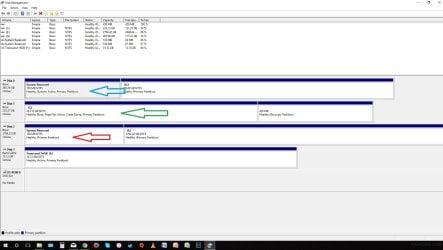
I need some help here as I am stuck with this for a day and half now. I recently bought a 3TB (disk 2) hard drive and want to swap out 500GB (disk 0) with it. I cloned the disk 0 to disk 2 already. I am stuck in a dilemma where I can't turn boot into windows 10 without the need of disk 0. I figured it has to do with the fact that the system partition is part of disk 0. I have 2 questions :
question #1. can i moved the system partition over to the C drive where the boot partition is? (I don't know if this is even possible?)
question #2. Move the system partition where the red arrow system reserved partition is. (I have not seen anyone with this perform yet. Again i am not sure if it is possible at all?)
I know i made a mistake of separating the the boot and system. How should i come about to fix it? Any suggestions? Thanks
I need some help here as I am stuck with this for a day and half now. I recently bought a 3TB (disk 2) hard drive and want to swap out 500GB (disk 0) with it. I cloned the disk 0 to disk 2 already. I am stuck in a dilemma where I can't turn boot into windows 10 without the need of disk 0. I figured it has to do with the fact that the system partition is part of disk 0. I have 2 questions :
question #1. can i moved the system partition over to the C drive where the boot partition is? (I don't know if this is even possible?)
question #2. Move the system partition where the red arrow system reserved partition is. (I have not seen anyone with this perform yet. Again i am not sure if it is possible at all?)
I know i made a mistake of separating the the boot and system. How should i come about to fix it? Any suggestions? Thanks
Attachments
My Computer
At a glance
Windows 10 64 bit
- Computer type
- PC/Desktop
- OS
- Windows 10 64 bit