Solved Samsung Magician driver

csjag

New member
Local time
5:20 PM
Messages
19
I have ordered a Samsung 840 EVO SSD and will be installing it in a few days. While looking at the manuals on Samsung's support page, I was reading the procedures for using the Magician software. After the system requirements, which my system is well over the minimums, there is a section on Driver Support. In this section, the table says that AMD chipsets are not supported.

What does this mean? I have an ASUS mobo with an AMD FX990 chipset running an FX-4300 CPU. What will not work - the Magician software, the 840 EVO SSD, or what??? I've seen plenty of reviews of this SSD and never seen any reference to not being compatible with an AMD system.

Thanks for any clarification on this.
 

My Computer My Computer

Computer type
PC/Desktop
Computer Manufacturer/Model Number
custom built
OS
Windows 7 Home Premium 64-bit
CPU
AMD FX-4300
Motherboard
ASUS M5A97 R2.0
Memory
8 GB Kinsgston DDR3 1600
Graphics Card(s)
GeForce GTX-550 TI
Sound Card
ASUS Zonar D1
Monitor(s) Displays
22" Dell LCD
Hard Drives
WD 500 GB SATA 6.0 Black
PSU
Corsair CX500M
Case
Corsair Carbide 300
Keyboard
Logitech
Mouse
Logitech G5
Antivirus
AVG
Browser
Firefox
I've not heard this before but you should be fine. I have a 840 running in my 990fxa/8350 no problems. I installed the magician software without issue. I have used the software and I had trouble with the auto firmware update, that's the only AMD compatibility issue I know of. Very minor technicality.
 

My Computer My Computer

Computer type
PC/Desktop
Computer Manufacturer/Model Number
Custom, Dell and Lenono LT's
OS
Win8/8.1,Win7-U64, Vista U64, uncounted Linux distor's
CPU
AMD and Intell, 9590, 8350, i5 3570k
Motherboard
CFVFZ, GA990FXA, Z77e-itx
Memory
Corsair G Skill
Graphics Card(s)
Crossfired Sapphire HD 7950 Vapor-X, ASUS R9 280X TOP
Sound Card
Realtek ALC889
Monitor(s) Displays
ViewSonic VX2770SMH 27" / ViewSonic VX2433 LCD 24"
Screen Resolution
1080i HD
Hard Drives
Samsung SSD 840 Pro
OCZ Agility 3's
OCZ Vector's
WD's Blue, red, green, Velociraptors
Seagate USB3 & Hybrid's
ASUS Blu-Ray
ASUS DVD
PSU
Corsair AX1200i, Seasonice 850 Gold
Case
Cooler Master HAF 922 & HAF 932, Lian Li Train case.
Cooling
Air, Glacer 240L expanded, custom EK loop with duel D5's
Keyboard
Microsoft SideWinder X4 USB Keyboard / Logitech 250 PS2
Mouse
Logitech G500 / MS wireless 5000
Internet Speed
Best of 5ms / 75+ dn / 12+ up More or less.
Antivirus
MS esentials-MalwareBytes
Browser
Firefox Chromebook
Thanks, madcrate, for the info. Yours is close enough to mine that if you have had no problems, I should not either. As soon as i get my 840 installed and up and running, I'll let you know.

Appreciate the help.
 

My Computer My Computer

Computer type
PC/Desktop
Computer Manufacturer/Model Number
custom built
OS
Windows 7 Home Premium 64-bit
CPU
AMD FX-4300
Motherboard
ASUS M5A97 R2.0
Memory
8 GB Kinsgston DDR3 1600
Graphics Card(s)
GeForce GTX-550 TI
Sound Card
ASUS Zonar D1
Monitor(s) Displays
22" Dell LCD
Hard Drives
WD 500 GB SATA 6.0 Black
PSU
Corsair CX500M
Case
Corsair Carbide 300
Keyboard
Logitech
Mouse
Logitech G5
Antivirus
AVG
Browser
Firefox
Only Problem was migration would't work

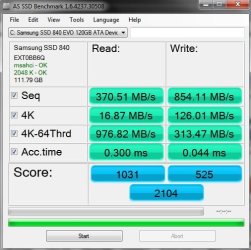
I installed the Samsung 840 EVO 120G, Motherboard is an ASUSTek M5A88-EVO with 880G AMD chipset. I never could get the migration application to work, ended up restoring from a backup image to the new SSD.

As soon as I opened the Magician software it detected the Samsung SSD and showed a firmware update, I updated the firmware before doing anything else. That maybe could have been the cause of the migration failure, I have no way of knowing.

Other that that one glitch I am happy with the SSD, it's very fast. Using the RAPID mode from the Magician has increased my score 3x, see snip below.
 

Attachments

  • SSD 840.JPG
    SSD 840.JPG
    49.7 KB · Views: 49
Last edited:

My Computer My Computer

Computer type
PC/Desktop
Computer Manufacturer/Model Number
Self built
OS
Windows 11 Home x64
CPU
AMD Ryzen 5 5600G
Motherboard
ASUSTeK Prime B450M-A II
Memory
G.SKILL Ripjaws Gaming Series (2x8G) DDR4
Graphics Card(s)
None (AMD Radeon Graphics on MB and CPU)
Sound Card
None (integrated on MB)
Monitor(s) Displays
Acer S200HLAbd Black 20"
Screen Resolution
1600 x 900
Hard Drives
Samsung SSD 840 EVO 120GB (W10)
WD Blue 500G SATA 6G WDBAAX5000ENC-NRSN (Backup/Storage)
PSU
Corsair CX500 500W ATX12V v2.3 80 Plus Bronze Active PFC
Case
Unknown
Cooling
CPU-stock cooling fan, 1 extra 80mm case fan
Keyboard
Azio KB505U Large Print Tri-Color Illuminated USB Keyboard
Mouse
MS Optical Wheel Mouse (USB)
Internet Speed
ATT Fiber 5000/VOIP 5G down/5G up
Antivirus
Win Defender, SAS, Spyware Blaster all free editions
Browser
Firefox, Waterfox, sometimes Edge
cmmtch, it may be even faster if you move the SSD off of msahci and to an AMD SATA controller, probably SATA_0 or SATA_1.
 

My Computer My Computer

Computer type
PC/Desktop
Computer Manufacturer/Model Number
Home Built Desktop By DataTech
OS
Windows 7 Ultimate X64 SP1
CPU
Intel i5-2550K, Differing ~4.4-4.8GHz No built in GPU
Motherboard
ASUS P8Z68-V PRO/GEN3
Memory
16GB G.Skill Sniper 1866MHz @ 2133MHz 2x8GB
Graphics Card(s)
ASUS GTX650TIB-DC2OC-2GD5, (650TI Boost)
Sound Card
Onboard Realtek 5-1
Monitor(s) Displays
Samsung P2570HD
Screen Resolution
1920x1080
Hard Drives
Samsung 840 Pro 256GB SSD for OS, 500GB Seagate Constellation (Enterprise drive) for Data
PSU
Corsair HX650W
Case
Inwin Dragon Rider
Cooling
Hyper 212 EVO w/two Noctua fans, push-pull, @1300 RPM
Keyboard
E-Z Eyes, bright yellow keys with large characters
Mouse
steelseries SENSEI Laser Pro Gaming
Internet Speed
48-51Mbs Mbs down, 11 Mbs up Xfinity Cable
Antivirus
Norton Internet Security 2013
Browser
IE 10, Opera, Pale Moon if needed
Other Info
4 case fans, LG BluRay-RE, ASUS DVD-RW, Mr. Fusion power supply, 1.21 gigawatts.
cmmtch, it may be even faster if you move the SSD off of msahci and to an AMD SATA controller, probably SATA_0 or SATA_1.

Help me out Britton, what exactly do you mean? The SSD is on SATA_0 port on the MB, when I got my first SSD I did the registry hack/change or whatever it's called to enable AHCI. I haven't installed/updated any drivers other than printers since I built it except the BIOS which I updated to ver. 1001 12/30/2011.

I haven't had any problems so far and from what I've read on this forum and others unless you're having some sort of a problem it might be best to leave things alone.

I did go to this site AMD Chipset Drivers 7 - 64 and downloaded the AMD chipset drivers. I haven't done anything with them yet, it is an exe file and I'm not really sure how to install drivers other than clicking the DL'd exe file 13-12_win7_win8_32-64_sb. exe Is that all there is to it? Then I guess a reboot.
 

My Computer My Computer

Computer type
PC/Desktop
Computer Manufacturer/Model Number
Self built
OS
Windows 11 Home x64
CPU
AMD Ryzen 5 5600G
Motherboard
ASUSTeK Prime B450M-A II
Memory
G.SKILL Ripjaws Gaming Series (2x8G) DDR4
Graphics Card(s)
None (AMD Radeon Graphics on MB and CPU)
Sound Card
None (integrated on MB)
Monitor(s) Displays
Acer S200HLAbd Black 20"
Screen Resolution
1600 x 900
Hard Drives
Samsung SSD 840 EVO 120GB (W10)
WD Blue 500G SATA 6G WDBAAX5000ENC-NRSN (Backup/Storage)
PSU
Corsair CX500 500W ATX12V v2.3 80 Plus Bronze Active PFC
Case
Unknown
Cooling
CPU-stock cooling fan, 1 extra 80mm case fan
Keyboard
Azio KB505U Large Print Tri-Color Illuminated USB Keyboard
Mouse
MS Optical Wheel Mouse (USB)
Internet Speed
ATT Fiber 5000/VOIP 5G down/5G up
Antivirus
Win Defender, SAS, Spyware Blaster all free editions
Browser
Firefox, Waterfox, sometimes Edge

My Computer My Computer

Computer Manufacturer/Model Number
HP, Dell, Gateway, Toshiba - 4 laptops and 2 desktops
OS
Vista, Windows7, Mint Mate, Zorin, Windows 8
CPU
from 1.6GHz Duo to i7
Monitor(s) Displays
2x HP w2207
Hard Drives
5x HDD, 7x SSD, 12x Externals
Keyboard
with trackball - no mices
Mouse
Trackball mice
Internet Speed
DSL 6000
I would leave the SATA driver as-is, unless you have the driver disk that come with your motherboard. I went to the ASUS support site and it is not helpful, it only has info for Windows XP.
 

My Computer My Computer

Computer type
PC/Desktop
Computer Manufacturer/Model Number
Home Built Desktop By DataTech
OS
Windows 7 Ultimate X64 SP1
CPU
Intel i5-2550K, Differing ~4.4-4.8GHz No built in GPU
Motherboard
ASUS P8Z68-V PRO/GEN3
Memory
16GB G.Skill Sniper 1866MHz @ 2133MHz 2x8GB
Graphics Card(s)
ASUS GTX650TIB-DC2OC-2GD5, (650TI Boost)
Sound Card
Onboard Realtek 5-1
Monitor(s) Displays
Samsung P2570HD
Screen Resolution
1920x1080
Hard Drives
Samsung 840 Pro 256GB SSD for OS, 500GB Seagate Constellation (Enterprise drive) for Data
PSU
Corsair HX650W
Case
Inwin Dragon Rider
Cooling
Hyper 212 EVO w/two Noctua fans, push-pull, @1300 RPM
Keyboard
E-Z Eyes, bright yellow keys with large characters
Mouse
steelseries SENSEI Laser Pro Gaming
Internet Speed
48-51Mbs Mbs down, 11 Mbs up Xfinity Cable
Antivirus
Norton Internet Security 2013
Browser
IE 10, Opera, Pale Moon if needed
Other Info
4 case fans, LG BluRay-RE, ASUS DVD-RW, Mr. Fusion power supply, 1.21 gigawatts.
Samsung site not very helpful for the 840 SSD

@csjag sorry for the hijack of your thread :o any other replies from me will be on topic. I did find the Samsung site sorely lacking in information for this product, that was disappointing since Samsung is one of the better SSD manufacturers.
Britton, thanks for your input. It seems a lot of sites are not very helpful, see above about the Samsung 840 EVO SSD. Maybe other items are better represented on their site, IDK since I only had the SSD that I was interested in.

Good luck csjag, SSD's are great once they're set up and working as they should be. :)
 

My Computer My Computer

Computer type
PC/Desktop
Computer Manufacturer/Model Number
Self built
OS
Windows 11 Home x64
CPU
AMD Ryzen 5 5600G
Motherboard
ASUSTeK Prime B450M-A II
Memory
G.SKILL Ripjaws Gaming Series (2x8G) DDR4
Graphics Card(s)
None (AMD Radeon Graphics on MB and CPU)
Sound Card
None (integrated on MB)
Monitor(s) Displays
Acer S200HLAbd Black 20"
Screen Resolution
1600 x 900
Hard Drives
Samsung SSD 840 EVO 120GB (W10)
WD Blue 500G SATA 6G WDBAAX5000ENC-NRSN (Backup/Storage)
PSU
Corsair CX500 500W ATX12V v2.3 80 Plus Bronze Active PFC
Case
Unknown
Cooling
CPU-stock cooling fan, 1 extra 80mm case fan
Keyboard
Azio KB505U Large Print Tri-Color Illuminated USB Keyboard
Mouse
MS Optical Wheel Mouse (USB)
Internet Speed
ATT Fiber 5000/VOIP 5G down/5G up
Antivirus
Win Defender, SAS, Spyware Blaster all free editions
Browser
Firefox, Waterfox, sometimes Edge
Thanks, guys, for the answers. I am going to use a program called Mini-Tool Partition Wizard. It has the ability to clone my HDD to my SSD with the correct alignment at the same time. It looks like an easy to use program and is very versatile in what all it can do. The Home version, 8.1.1, is a free download and can be used for lots of things. This will be my weekend project, so I'll post back next week and let you all know how it turned out.
 

My Computer My Computer

Computer type
PC/Desktop
Computer Manufacturer/Model Number
custom built
OS
Windows 7 Home Premium 64-bit
CPU
AMD FX-4300
Motherboard
ASUS M5A97 R2.0
Memory
8 GB Kinsgston DDR3 1600
Graphics Card(s)
GeForce GTX-550 TI
Sound Card
ASUS Zonar D1
Monitor(s) Displays
22" Dell LCD
Hard Drives
WD 500 GB SATA 6.0 Black
PSU
Corsair CX500M
Case
Corsair Carbide 300
Keyboard
Logitech
Mouse
Logitech G5
Antivirus
AVG
Browser
Firefox
Thanks, guys, for the answers. I am going to use a program called Mini-Tool Partition Wizard. It has the ability to clone my HDD to my SSD with the correct alignment at the same time. It looks like an easy to use program and is very versatile in what all it can do. The Home version, 8.1.1, is a free download and can be used for lots of things. This will be my weekend project, so I'll post back next week and let you all know how it turned out.
I know Partition Wizard can align partitions, but where did you see a cloning function in PW. I never saw that.
 

My Computer My Computer

Computer Manufacturer/Model Number
HP, Dell, Gateway, Toshiba - 4 laptops and 2 desktops
OS
Vista, Windows7, Mint Mate, Zorin, Windows 8
CPU
from 1.6GHz Duo to i7
Monitor(s) Displays
2x HP w2207
Hard Drives
5x HDD, 7x SSD, 12x Externals
Keyboard
with trackball - no mices
Mouse
Trackball mice
Internet Speed
DSL 6000
I see no cloning function mentioned for Partition Wizard, maybe you mistook Partition Copy as clone, it's not the same thing.
I would still recommend Macrium, whs has done a good tutorial for it and it works very well.
Better yet would be a nice fresh install.

Whichever situation suits you.

http://www.sevenforums.com/tutorials/174907-clean-install-factory-coa-activation-key.html

http://www.sevenforums.com/tutorials/1649-clean-install-windows-7-a.html#post16008

http://www.sevenforums.com/tutorials/219487-clean-reinstall-factory-oem-windows-7-a.html#post1839164
 

My Computer My Computer

Computer type
PC/Desktop
Computer Manufacturer/Model Number
Home Built Desktop By DataTech
OS
Windows 7 Ultimate X64 SP1
CPU
Intel i5-2550K, Differing ~4.4-4.8GHz No built in GPU
Motherboard
ASUS P8Z68-V PRO/GEN3
Memory
16GB G.Skill Sniper 1866MHz @ 2133MHz 2x8GB
Graphics Card(s)
ASUS GTX650TIB-DC2OC-2GD5, (650TI Boost)
Sound Card
Onboard Realtek 5-1
Monitor(s) Displays
Samsung P2570HD
Screen Resolution
1920x1080
Hard Drives
Samsung 840 Pro 256GB SSD for OS, 500GB Seagate Constellation (Enterprise drive) for Data
PSU
Corsair HX650W
Case
Inwin Dragon Rider
Cooling
Hyper 212 EVO w/two Noctua fans, push-pull, @1300 RPM
Keyboard
E-Z Eyes, bright yellow keys with large characters
Mouse
steelseries SENSEI Laser Pro Gaming
Internet Speed
48-51Mbs Mbs down, 11 Mbs up Xfinity Cable
Antivirus
Norton Internet Security 2013
Browser
IE 10, Opera, Pale Moon if needed
Other Info
4 case fans, LG BluRay-RE, ASUS DVD-RW, Mr. Fusion power supply, 1.21 gigawatts.
Guys, look at the main menu page on Mini Tool. On the left side is a list of Wizards and a list of Operations. The second wizard on the list is "Copy Disc Wizard". After selecting this, you go through several steps of selecting source and target discs. On step 5, you review your changes and have several options at the bottom of the page. One is to fit partition to entire disc. This can work both ways - you can go up or down, depending on whether your SSD is larger or smaller than the source disc. At the bottom of this page, there is a box, that if checked, forces partition alignment while copying. After all of this, just reboot your PC and the cloning operation begins.

Yes, a clean install would be "better", but , frankly, it would be a pain in the butt, having to reinstall everything! I've already had one reactivation session with Microsoft when I upgraded my mobo last year, and I'm not ready to do that again. I've used cloning several times when upgrading HDD's in the past , and so long as I follow the instructions to the letter, I have never had a problem. There, I've said my peace about cloning.
 

My Computer My Computer

Computer type
PC/Desktop
Computer Manufacturer/Model Number
custom built
OS
Windows 7 Home Premium 64-bit
CPU
AMD FX-4300
Motherboard
ASUS M5A97 R2.0
Memory
8 GB Kinsgston DDR3 1600
Graphics Card(s)
GeForce GTX-550 TI
Sound Card
ASUS Zonar D1
Monitor(s) Displays
22" Dell LCD
Hard Drives
WD 500 GB SATA 6.0 Black
PSU
Corsair CX500M
Case
Corsair Carbide 300
Keyboard
Logitech
Mouse
Logitech G5
Antivirus
AVG
Browser
Firefox
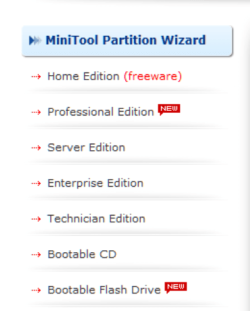
Hmm, my Wizards are different.
 

Attachments

  • 2014-02-20_2207.png
    2014-02-20_2207.png
    15.4 KB · Views: 16

My Computer My Computer

Computer Manufacturer/Model Number
HP, Dell, Gateway, Toshiba - 4 laptops and 2 desktops
OS
Vista, Windows7, Mint Mate, Zorin, Windows 8
CPU
from 1.6GHz Duo to i7
Monitor(s) Displays
2x HP w2207
Hard Drives
5x HDD, 7x SSD, 12x Externals
Keyboard
with trackball - no mices
Mouse
Trackball mice
Internet Speed
DSL 6000
This page is for the several downloads available. If you download the Home Edition (freeware), then double-click on the exe file, you should have the page I mentioned. I downloaded my copy 3 days ago and got version 8.1.1
 

My Computer My Computer

Computer type
PC/Desktop
Computer Manufacturer/Model Number
custom built
OS
Windows 7 Home Premium 64-bit
CPU
AMD FX-4300
Motherboard
ASUS M5A97 R2.0
Memory
8 GB Kinsgston DDR3 1600
Graphics Card(s)
GeForce GTX-550 TI
Sound Card
ASUS Zonar D1
Monitor(s) Displays
22" Dell LCD
Hard Drives
WD 500 GB SATA 6.0 Black
PSU
Corsair CX500M
Case
Corsair Carbide 300
Keyboard
Logitech
Mouse
Logitech G5
Antivirus
AVG
Browser
Firefox
OK - not that I need it because I only use Macrium for imaging.
 

My Computer My Computer

Computer Manufacturer/Model Number
HP, Dell, Gateway, Toshiba - 4 laptops and 2 desktops
OS
Vista, Windows7, Mint Mate, Zorin, Windows 8
CPU
from 1.6GHz Duo to i7
Monitor(s) Displays
2x HP w2207
Hard Drives
5x HDD, 7x SSD, 12x Externals
Keyboard
with trackball - no mices
Mouse
Trackball mice
Internet Speed
DSL 6000
While a clean install is a pain, it's a bigger pain to continue with problems or have unknown ones lurking, waiting to attack. I have been told by Crucial that OS installing puts the most wear on a SSD, so the fewer the better. Having a clone in a drawer is great if you have to be back and running within 5 minutes, but it's not a backup plan.

That's why I prefer the imaging method and clean installs when replacing an OS drive, especially with a SSD. A clone will store only one version of a particular install, while that same drive could store 10-15 versions, any of which can be restored within 10-15 minutes and 2-3 clicks.
 

My Computer My Computer

Computer type
PC/Desktop
Computer Manufacturer/Model Number
Home Built Desktop By DataTech
OS
Windows 7 Ultimate X64 SP1
CPU
Intel i5-2550K, Differing ~4.4-4.8GHz No built in GPU
Motherboard
ASUS P8Z68-V PRO/GEN3
Memory
16GB G.Skill Sniper 1866MHz @ 2133MHz 2x8GB
Graphics Card(s)
ASUS GTX650TIB-DC2OC-2GD5, (650TI Boost)
Sound Card
Onboard Realtek 5-1
Monitor(s) Displays
Samsung P2570HD
Screen Resolution
1920x1080
Hard Drives
Samsung 840 Pro 256GB SSD for OS, 500GB Seagate Constellation (Enterprise drive) for Data
PSU
Corsair HX650W
Case
Inwin Dragon Rider
Cooling
Hyper 212 EVO w/two Noctua fans, push-pull, @1300 RPM
Keyboard
E-Z Eyes, bright yellow keys with large characters
Mouse
steelseries SENSEI Laser Pro Gaming
Internet Speed
48-51Mbs Mbs down, 11 Mbs up Xfinity Cable
Antivirus
Norton Internet Security 2013
Browser
IE 10, Opera, Pale Moon if needed
Other Info
4 case fans, LG BluRay-RE, ASUS DVD-RW, Mr. Fusion power supply, 1.21 gigawatts.
  • Like
Reactions: whs
Back
Top