Solved Multiple icons showing in smallest size when using Extra Large Icons

RoadkillSD

New member
Local time
1:37 PM
Messages
9
I've seen multiple posts here and other forums and I have tried all of the steps provided in those posts but it is not resolving my issue. I have the exact same issue as the user in THIS THREAD. I have tried the icon database rebuild (both manually and using the bat file HERE), I have tried ie4uinit.exe - ClearIconCache from command prompt, I have tried Disk Cleanup and checked the box to delete icon cache and I have tried different cache size amounts using the steps HERE. I've tried these all from normal boot and safe mode. I don't know what else to do. The icons that have the problem keep changing every time I restart the PC. I can change them to another icon, rename the icon the shortcut had previously been using and reapply that icon and it shows normal at that time but as soon as I restart the PC, icons change to the smaller size on random shortcuts again. What other steps are there?

Thanks in advance.
 

My Computer My Computer

At a glance

Windows 7 Pro x64Intel i5-3570k 3.4Ghz32Gb G.Skill DDR3 1600 PC3-10700EVGA GeForce GTX 980Ti Classified
Computer type
PC/Desktop
Computer Manufacturer/Model Number
Self built
OS
Windows 7 Pro x64
CPU
Intel i5-3570k 3.4Ghz
Motherboard
ASUS P8Z77-V LK
Memory
32Gb G.Skill DDR3 1600 PC3-10700
Graphics Card(s)
EVGA GeForce GTX 980Ti Classified
Sound Card
SB X-Fi Titanium Fatal1ty Pro
Hard Drives
250Gb Samsung Evo 840 (Primary)
PSU
Corsair RM750X 750W
Keyboard
MS Ergonomic 4000
Internet Speed
300Mbps
Antivirus
Microsoft Security Essentials, MalwareBytes AM Premium
Browser
IE, Firefox & Chrome
Welcome to the Seven Forums.

Have you tried the batch file in this tutorial:
http://www.sevenforums.com/tutorials/15692-folder-view-settings-reset-all-default.html
It resets the area of the registry that stores some desktop icon info.
warning: read the note about desktoprestore.

You might also want to try combining the batch file for icon cache rebuild with this one... only kill/restart explorer once at the end.

Does this problem happen if you create (& log onto) a new (test) user account?
 

My Computer My Computer

At a glance

W7 Pro SP1 64biti78GBIntel HD Graphics
Computer type
Laptop
Computer Manufacturer/Model Number
Employer provided Dell Latitude
OS
W7 Pro SP1 64bit
CPU
i7
Memory
8GB
Graphics Card(s)
Intel HD Graphics
Hard Drives
crappy SSD
Antivirus
Employer mandated Symantec Endpoint Protection
Browser
Pale Moon 64bit, IE11 64bit & Chrome 64bit
Welcome to the Seven Forums.

Have you tried the batch file in this tutorial:
http://www.sevenforums.com/tutorials/15692-folder-view-settings-reset-all-default.html
It resets the area of the registry that stores some desktop icon info.
warning: read the note about desktoprestore.

You might also want to try combining the batch file for icon cache rebuild with this one... only kill/restart explorer once at the end.

Does this problem happen if you create (& log onto) a new (test) user account?


I combined both batch files into one and ran it. No change except that it changed the window sizes and rearranged icons on the desktop. Still have the same some-small-some-extra-large icon issue. I attached the batch file I made with the two combined so you can verify. I created a test user and logged on as that user and it has the same issue.

Thanks for the help so far. What else can I do?
 

Attachments

Last edited:

My Computer My Computer

At a glance

Windows 7 Pro x64Intel i5-3570k 3.4Ghz32Gb G.Skill DDR3 1600 PC3-10700EVGA GeForce GTX 980Ti Classified
Computer type
PC/Desktop
Computer Manufacturer/Model Number
Self built
OS
Windows 7 Pro x64
CPU
Intel i5-3570k 3.4Ghz
Motherboard
ASUS P8Z77-V LK
Memory
32Gb G.Skill DDR3 1600 PC3-10700
Graphics Card(s)
EVGA GeForce GTX 980Ti Classified
Sound Card
SB X-Fi Titanium Fatal1ty Pro
Hard Drives
250Gb Samsung Evo 840 (Primary)
PSU
Corsair RM750X 750W
Keyboard
MS Ergonomic 4000
Internet Speed
300Mbps
Antivirus
Microsoft Security Essentials, MalwareBytes AM Premium
Browser
IE, Firefox & Chrome
I hope that you did not have too many desktop shortcut/icons to arrange again. If you install DesktopRestore, it would put them back for you.

I seem to recall that there is another active tread about this same issue (but I cannot find the thread right now).

I'll ask others to join in on helping you.
 

My Computer My Computer

At a glance

W7 Pro SP1 64biti78GBIntel HD Graphics
Computer type
Laptop
Computer Manufacturer/Model Number
Employer provided Dell Latitude
OS
W7 Pro SP1 64bit
CPU
i7
Memory
8GB
Graphics Card(s)
Intel HD Graphics
Hard Drives
crappy SSD
Antivirus
Employer mandated Symantec Endpoint Protection
Browser
Pale Moon 64bit, IE11 64bit & Chrome 64bit
You might give this a try...
Right click on the Desktop
Select Personalize > Window Color > Advance appearance settings...

In the Item drop-down box select Icon. The size setting is to the right.
 

My Computer My Computer

At a glance

Microsoft Windows 7 Ultimate 64-bit 7601 Mult...Intel(R) Core(TM) i7 CPU 950 @ 3.07GHz16.0GB Dual-Channel DDR3 @ 534MHz (8-8-8-20)1023MB NVIDIA GeForce GTX 650 (EVGA)
Computer type
PC/Desktop
Computer Manufacturer/Model Number
Custome Built
OS
Microsoft Windows 7 Ultimate 64-bit 7601 Multiprocessor Free Service Pack 1
CPU
Intel(R) Core(TM) i7 CPU 950 @ 3.07GHz
Motherboard
ASUSTeK Computer INC. SABERTOOTH X58 (LGA1366)
Memory
16.0GB Dual-Channel DDR3 @ 534MHz (8-8-8-20)
Graphics Card(s)
1023MB NVIDIA GeForce GTX 650 (EVGA)
Sound Card
(1) NVIDIA High Definition Audio (2) High Definition Audio
Monitor(s) Displays
HP W2072a LED Backlit
Screen Resolution
1920x1080@60Hz
Hard Drives
(1) SAMSUNG MMCRE28G5MXP-0VB SCSI Disk Device
(2) ST1000DM 003-1CH162 SCSI Disk Device
(3) WDC WD10EURX-73FH1Y0 SCSI Disk Device
PSU
XION XON-1000P14F
Cooling
Fans
Antivirus
Windows Security Essentials
Browser
Mozilla Firefox
Other Info
BIOS Version/Date
American Megatrends Inc. 1402, 8/9/2012
SMBIOS Version 2.5
Hi,
You might also show us what these icons look like before you change them and after you change them,
Cheers.
 

My Computer My Computer

At a glance

Win-7-Pro64bit 7-H-Prem-64biti7-5930K 2nd i9-9940x both water blocked VRM'...Trident-z 3200C14 2nd Trident-z 3600C16EVGA 1080ti ftw3 2nd Titan Xp both water blocked
Computer type
PC/Desktop
Computer Manufacturer/Model Number
Custom assembled by me :}
OS
Win-7-Pro64bit 7-H-Prem-64bit
CPU
i7-5930K 2nd i9-9940x both water blocked VRM's too
Motherboard
ASUS SABERTOOTH X99 2nd ASUS x299 Apex
Memory
Trident-z 3200C14 2nd Trident-z 3600C16
Graphics Card(s)
EVGA 1080ti ftw3 2nd Titan Xp both water blocked
Sound Card
Built-in Realtek
Monitor(s) Displays
1-AOC G2460PG 24"G-Sync 144Hz/ 2nd 1-ASUS VG248QE 24" 144Hz
Screen Resolution
1920 x 1080 144Hz
Hard Drives
2-Samsung M.2 Evo & Evo Plus
2-Samsung 850 EVO 500GB SSD's/ 3-2.5 W.D. Black 1tb-&3-1tb/3-3.5 WD Black 1tb hdd's
PSU
EVGA SuperNOVA 1000-P2 2nd 1200-P2
Case
2-Corsair Obsidian Series 450D Black ATX Mid Tower
Cooling
Custom water loops
Keyboard
Logitech G710+/ 2nd Logitech G910
Mouse
2-RedDragon M901 Perdition 16400 dpi Gaming mouse = wired
Internet Speed
Comcast Ping 19ms 89.31mbps download speed 6.12mbps upload
Antivirus
Malwarebytes Pro/ Superantispyware Pro
Browser
FireFox & Pale moon
Other Info
2nd ASUS X299 Apex/Intel i9-9940x with Custom water loop/7H-Prem-x64/Corsair 450D case/Ram Trident-z 3600C16 4x8gb / Samsung970Evo plus 500gb SSD/Dual ssd EZ swap evo/PSU EVGA SuperNova 1200w-P2 80+Platinum/GPU Titan Xp /8-ML-140 on push-pull on 2-280GTX rads
Here is my understanding about icons:

An icon is a complete system wide applicable icon for all view types when it contains multiple layers and colors, viz

  • Small icons: 16x16
  • Medium icons: 48x48
  • Large icons: 128x128
  • Extra large icons: 256x256
When such an icon is opened with windows photo viewer, it looks like this:
2014-02-28_232730.jpg
If an icon contains the largest resolution only, it tries to shrink it for different sizes, but the icon having small resolution only cannot expand beyond its maximum size. Then it leaves an outline box around it, when the higher resolution is set.

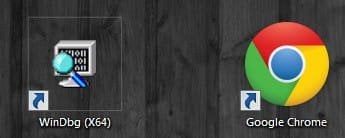
Suppose the google chrome icon and windbg icon. When set to medium icon view:
2014-02-28_233241.jpg
But when set as large icon view:
2014-02-28_233449.jpg
It happens. Because the windbg icon does not contain the higher resolutions. Have a look below:
1.jpg2.jpg
That is why all icons does not show in the large size, even if the large icon view is set.
 

My Computer My Computer

At a glance

Microsoft Windows 10 Pro Insider Preview 64-bitIntel(R) Core(TM) i3-4130 CPU @ 3.40GHzCorsair Vengence 4GB x2 (8.00GB Dual-Channel ...2047MB GeForce GTS 450 (ZOTAC International)
Computer type
PC/Desktop
Computer Manufacturer/Model Number
Self Assembled
OS
Microsoft Windows 10 Pro Insider Preview 64-bit
CPU
Intel(R) Core(TM) i3-4130 CPU @ 3.40GHz
Motherboard
Gigabyte Technology Co., Ltd. B85M-D3H
Memory
Corsair Vengence 4GB x2 (8.00GB Dual-Channel DDR3 @ 798MHz)
Graphics Card(s)
2047MB GeForce GTS 450 (ZOTAC International)
Sound Card
Onboard (Realtek High Definition Audio)
Monitor(s) Displays
LG Flatron E2040T
Screen Resolution
1600x900
Hard Drives
Western Digital 1 TB
Seagate 500 GB
PSU
Corsair VS550
Case
Cooler Master K380
Cooling
Cooler Master Seidon 120V Plus
Keyboard
Logitech MK260r
Mouse
Logitech MK260r
Internet Speed
PMPL Broadband
Antivirus
Windows Defender + MBAM
Browser
Firefox
Other Info
Dell Studio 15" Laptop
RoadKillSD: Thank you for filling in your system specs.

Do you have any 3rd party theme builders on your system?

Does the issue exist in a basic theme or only aero?

Does this happen only on the Desktop or in Explorer too?

I'll think about it a little more, but that's all I can offer at the moment.

ThrashZone made a good suggestion - show us what you see.
See: http://www.sevenforums.com/tutorials/9733-screenshots-files-upload-post-seven-forums.html

Bill
.
 
Last edited:

My Computer My Computer

At a glance

x64 (6.3.9600) Win8.1 Pro & soon dual boot x6...AMD A6-3420M APU with Radeon(tm) HD Graphics6.00 GBAMD Radeon(TM) HD 6520G
Computer type
Laptop
Computer Manufacturer/Model Number
HP Pavilion dv6-6c10us
OS
x64 (6.3.9600) Win8.1 Pro & soon dual boot x64 (6.1.7601) Win7_SP1 HomePrem
CPU
AMD A6-3420M APU with Radeon(tm) HD Graphics
Motherboard
Hewlett-Packard 1805
Memory
6.00 GB
Graphics Card(s)
AMD Radeon(TM) HD 6520G
Sound Card
(1) AMD High Definition Audio Device (2) IDT High Definiti
Monitor(s) Displays
HP W2072a 20" LCD (1600 x 900) @ 60 Hz
Screen Resolution
1366 x 768 x 32 bits (4294967296 colors) @ 60 Hz
Hard Drives
ST640LM0 00 HM641JI SATA Disk Device
Keyboard
Logitech k520 wireless KB
Mouse
Logitech m320 wireless mouse (bundled with KB)
Internet Speed
15/5 | 54 MB Wireless 'n'
Antivirus
Realtime: Defender or Avast | On-demand: Malwarebytes, ESET
Browser
IE 11 on Win8, IE 10 on win 7
Other Info
Media: [Gimp, Audacity, VLC] || Comm: [WEmail 2012, Skype] || Productivity: [OpenOffice,| Textpad] || Utils: [Sysinternals, cCleaner, Speccy, Defraggler]
The icons that have the problem keep changing every time I restart the PC. I can change them to another icon, rename the icon the shortcut had previously been using and reapply that icon and it shows normal at that time but as soon as I restart the PC, icons change to the smaller size on random shortcuts again. What other steps are there?

Thanks in advance.
http://www.sevenforums.com/tutorials/53402-shortcut-change-icon.html

I think you want to change the icon to any custom icon. So you have to skip step 4. But make it 100% sure that the custom icon is remaining in the target location (to which you are navigating) forever, not deleted or moved to another place.
 

My Computer My Computer

At a glance

Microsoft Windows 10 Pro Insider Preview 64-bitIntel(R) Core(TM) i3-4130 CPU @ 3.40GHzCorsair Vengence 4GB x2 (8.00GB Dual-Channel ...2047MB GeForce GTS 450 (ZOTAC International)
Computer type
PC/Desktop
Computer Manufacturer/Model Number
Self Assembled
OS
Microsoft Windows 10 Pro Insider Preview 64-bit
CPU
Intel(R) Core(TM) i3-4130 CPU @ 3.40GHz
Motherboard
Gigabyte Technology Co., Ltd. B85M-D3H
Memory
Corsair Vengence 4GB x2 (8.00GB Dual-Channel DDR3 @ 798MHz)
Graphics Card(s)
2047MB GeForce GTS 450 (ZOTAC International)
Sound Card
Onboard (Realtek High Definition Audio)
Monitor(s) Displays
LG Flatron E2040T
Screen Resolution
1600x900
Hard Drives
Western Digital 1 TB
Seagate 500 GB
PSU
Corsair VS550
Case
Cooler Master K380
Cooling
Cooler Master Seidon 120V Plus
Keyboard
Logitech MK260r
Mouse
Logitech MK260r
Internet Speed
PMPL Broadband
Antivirus
Windows Defender + MBAM
Browser
Firefox
Other Info
Dell Studio 15" Laptop
You might give this a try...
Right click on the Desktop
Select Personalize > Window Color > Advance appearance settings...

In the Item drop-down box select Icon. The size setting is to the right.

That's for desktop icons. The icons I am referring to are all shortcuts inside of a folder. Desktop icons are all displayed correctly because they are at the standard 32 size.

RoadKillSD: Thank you for filling in your system specs.

Do you have any 3rd party theme builders on your system?

Does the issue exist in a basic theme or only aero?

Does this happen only on the Desktop or in Explorer too?

I'll think about it a little more, but that's all I can offer at the moment.

ThrashZone made a good suggestion - show us what you see.
See: http://www.sevenforums.com/tutorials/9733-screenshots-files-upload-post-seven-forums.html

Bill
.

I have Frameworkx Vista Shortcut Manager installed to remove the shortcut arrow from the icons. This issue was occurring before I installed it though. Only the UnsignedThemeSvc enabler that you have to use to allow for custom themes was in place before this started happening. I only use the extra large icons in game folders so I only noticed it in Explorer. I ctrl+scrollwheel the desktop and I see that icons that have a extra large size do expand as I do that. The icons have the same issue in basic theme as they do in Aero.

The icons that have the problem keep changing every time I restart the PC. I can change them to another icon, rename the icon the shortcut had previously been using and reapply that icon and it shows normal at that time but as soon as I restart the PC, icons change to the smaller size on random shortcuts again. What other steps are there?

Thanks in advance.
http://www.sevenforums.com/tutorials/53402-shortcut-change-icon.html

I think you want to change the icon to any custom icon. So you have to skip step 4. But make it 100% sure that the custom icon is remaining in the target location (to which you are navigating) forever, not deleted or moved to another place.

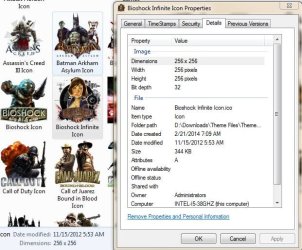
That is exactly how I've done all of the icons in my folders aside from the default icons that Steam assigned the shortcuts it created. Coincidentally, those Steam icons are only 128x128 yet they are scaling to 256x256 without issue until Windows randomly chooses one of those icons to display incorrectly. I'm using icons that I either created off PNGs that were far above 256x256 and converted to 32-bit 256x256 icons using iConvertIcons.com with 32-bit Windows icons as the only options, or I downloaded ICO files that other users created on deviantART in 256x256 or 512x512 sizes. After I convert PNGs to ICOs, I verify in the details tab of the icon file that it indeed says it is 256x256. Every single shortcut has displayed the icons correctly at one point. Every time I restart Windows or put it to sleep and resume, a different set of icons is then showing incorrectly whereas icons that may have been showing incorrectly are now showing correctly. It seems totally random.

Also, if I rename the icon file that a shortcut is currently using and edit the shortcut to point to the newly renamed icon file, it displays correctly. If I rename the icon back to what it was (or never rename it and just change the icon to a different one and then back to the old one again) and change the shortcut icon back to the icon file that I have changed back to its previous name, the icon shows incorrectly again. It's like the icon database rebuild does nothing. I don't get it.
 

Attachments

  • Icon Properties.JPG
    Icon Properties.JPG
    67.2 KB · Views: 75
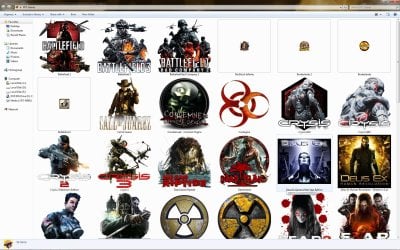
  • Icon Issue 1.jpg
    Icon Issue 1.jpg
    338.4 KB · Views: 8
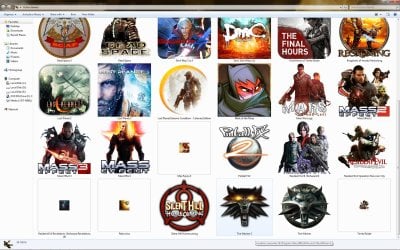
  • Icon Issue 2.jpg
    Icon Issue 2.jpg
    342.8 KB · Views: 5

My Computer My Computer

At a glance

Windows 7 Pro x64Intel i5-3570k 3.4Ghz32Gb G.Skill DDR3 1600 PC3-10700EVGA GeForce GTX 980Ti Classified
Computer type
PC/Desktop
Computer Manufacturer/Model Number
Self built
OS
Windows 7 Pro x64
CPU
Intel i5-3570k 3.4Ghz
Motherboard
ASUS P8Z77-V LK
Memory
32Gb G.Skill DDR3 1600 PC3-10700
Graphics Card(s)
EVGA GeForce GTX 980Ti Classified
Sound Card
SB X-Fi Titanium Fatal1ty Pro
Hard Drives
250Gb Samsung Evo 840 (Primary)
PSU
Corsair RM750X 750W
Keyboard
MS Ergonomic 4000
Internet Speed
300Mbps
Antivirus
Microsoft Security Essentials, MalwareBytes AM Premium
Browser
IE, Firefox & Chrome
Thanks for that feedback. I'm not well versed in icons, so I'm going to back out of this thread.

Before I go...
Check folder options view
[ ] Always show icons, never thumbnails
[ ] Display file icon on thumbnails

Since you mention the icon db
navigate to %LOCALAPPDATA% and rename IconCache.db to IconCache_db.bak
restart your machine

I had a similar issue with Libraries. The album art was in the file but would not display in Explorer. The simple solution was to create a new folder and copy the music to the new folder. After that the album art displayed fine. Not a real solution because there were so many folders.

The thing about Windows is that when something like this goes awry, the crawl time to repair is very long. You could also try rebuilding the search index (Control Panel - Indexing options - Advanced - Rebuild). Why? It forces Windows to crawl faster.

These are off the top of my head ideas, another member will probably give you more straight forward advice on this issue.

Good luck, I look forward to reading the solution.

Bill
.
 

My Computer My Computer

At a glance

x64 (6.3.9600) Win8.1 Pro & soon dual boot x6...AMD A6-3420M APU with Radeon(tm) HD Graphics6.00 GBAMD Radeon(TM) HD 6520G
Computer type
Laptop
Computer Manufacturer/Model Number
HP Pavilion dv6-6c10us
OS
x64 (6.3.9600) Win8.1 Pro & soon dual boot x64 (6.1.7601) Win7_SP1 HomePrem
CPU
AMD A6-3420M APU with Radeon(tm) HD Graphics
Motherboard
Hewlett-Packard 1805
Memory
6.00 GB
Graphics Card(s)
AMD Radeon(TM) HD 6520G
Sound Card
(1) AMD High Definition Audio Device (2) IDT High Definiti
Monitor(s) Displays
HP W2072a 20" LCD (1600 x 900) @ 60 Hz
Screen Resolution
1366 x 768 x 32 bits (4294967296 colors) @ 60 Hz
Hard Drives
ST640LM0 00 HM641JI SATA Disk Device
Keyboard
Logitech k520 wireless KB
Mouse
Logitech m320 wireless mouse (bundled with KB)
Internet Speed
15/5 | 54 MB Wireless 'n'
Antivirus
Realtime: Defender or Avast | On-demand: Malwarebytes, ESET
Browser
IE 11 on Win8, IE 10 on win 7
Other Info
Media: [Gimp, Audacity, VLC] || Comm: [WEmail 2012, Skype] || Productivity: [OpenOffice,| Textpad] || Utils: [Sysinternals, cCleaner, Speccy, Defraggler]
You could install an icon viewer to check if the larger size icons are present.

For example, IconViewer v3.02 Shell Extension
Make sure you download the correct version (i.e. 32 bit or 64 bit).
 

My Computer My Computer

At a glance

W7 Ultimate SP1, LM19.2 MATE, W10 Home 1703, ...AMD Phenom II x6 1100T, 3.3 GHz12GB DDR3 1333 G-Skill (4GB x 2), G-Skill (2G...NVIDIA GeForce GTX 660
Computer type
PC/Desktop
Computer Manufacturer/Model Number
n/a
OS
W7 Ultimate SP1, LM19.2 MATE, W10 Home 1703, W10 Pro 1703 VM, #All 64 bit
CPU
AMD Phenom II x6 1100T, 3.3 GHz
Motherboard
ASUS M4A88T-M/USB3 (AM3)
Memory
12GB DDR3 1333 G-Skill (4GB x 2), G-Skill (2GB x 2)
Graphics Card(s)
NVIDIA GeForce GTX 660
Sound Card
Realtek?
Monitor(s) Displays
Samsung S23B350
Screen Resolution
1920x1080
Hard Drives
WD Green 2TB (SATA), WD Green 3TB (SATA), WD Blue 4TB (SATA), WD Blue 6TB (SATA)
PSU
Cooler Master
Case
Antec GX300 Tower
Cooling
3x Antec TRICOOL 120mm Fans
Mouse
Wired Optical
Internet Speed
DSL
Antivirus
Avast
Browser
Pale Moon (64 bit)
Other Info
2018-12-27 Upgraded HDDs
2015-12-10 Upgraded case, graphics card, storage
2015-08-15 Upgraded motherboard & RAM
2015-07-15 Upgraded LM17.1 to LM17.2
I think you have to increase the icon size in the icon cache.
 

My Computer My Computer

At a glance

Vista, Windows7, Mint Mate, Zorin, Windows 8from 1.6GHz Duo to i7
Computer Manufacturer/Model Number
HP, Dell, Gateway, Toshiba - 4 laptops and 2 desktops
OS
Vista, Windows7, Mint Mate, Zorin, Windows 8
CPU
from 1.6GHz Duo to i7
Monitor(s) Displays
2x HP w2207
Hard Drives
5x HDD, 7x SSD, 12x Externals
Keyboard
with trackball - no mices
Mouse
Trackball mice
Internet Speed
DSL 6000
One more information is needed over what you said very elaborately.

What is the location of the two folders "FPS Games" and "action games" in the computer?
 

My Computer My Computer

At a glance

Microsoft Windows 10 Pro Insider Preview 64-bitIntel(R) Core(TM) i3-4130 CPU @ 3.40GHzCorsair Vengence 4GB x2 (8.00GB Dual-Channel ...2047MB GeForce GTS 450 (ZOTAC International)
Computer type
PC/Desktop
Computer Manufacturer/Model Number
Self Assembled
OS
Microsoft Windows 10 Pro Insider Preview 64-bit
CPU
Intel(R) Core(TM) i3-4130 CPU @ 3.40GHz
Motherboard
Gigabyte Technology Co., Ltd. B85M-D3H
Memory
Corsair Vengence 4GB x2 (8.00GB Dual-Channel DDR3 @ 798MHz)
Graphics Card(s)
2047MB GeForce GTS 450 (ZOTAC International)
Sound Card
Onboard (Realtek High Definition Audio)
Monitor(s) Displays
LG Flatron E2040T
Screen Resolution
1600x900
Hard Drives
Western Digital 1 TB
Seagate 500 GB
PSU
Corsair VS550
Case
Cooler Master K380
Cooling
Cooler Master Seidon 120V Plus
Keyboard
Logitech MK260r
Mouse
Logitech MK260r
Internet Speed
PMPL Broadband
Antivirus
Windows Defender + MBAM
Browser
Firefox
Other Info
Dell Studio 15" Laptop
You could install an icon viewer to check if the larger size icons are present.

For example, IconViewer v3.02 Shell Extension
Make sure you download the correct version (i.e. 32 bit or 64 bit).

Not sure what this will do to help as it has already been established that 256 versions exist for almost every single icon being used with the exception of the few Steam shortcuts that are using the default Steam icons at 128 (yet still scale to 256). Every single icon at one point has displayed correctly.

I think you have to increase the icon size in the icon cache.

Are you referring to the steps in THIS KB ARTICLE? I have already done that. Tried 500, 1024, 2048 and 4096 with no change.

One more information is needed over what you said very elaborately.

What is the location of the two folders "FPS Games" and "action games" in the computer?

They are on the desktop (my user only, not public).
 

My Computer My Computer

At a glance

Windows 7 Pro x64Intel i5-3570k 3.4Ghz32Gb G.Skill DDR3 1600 PC3-10700EVGA GeForce GTX 980Ti Classified
Computer type
PC/Desktop
Computer Manufacturer/Model Number
Self built
OS
Windows 7 Pro x64
CPU
Intel i5-3570k 3.4Ghz
Motherboard
ASUS P8Z77-V LK
Memory
32Gb G.Skill DDR3 1600 PC3-10700
Graphics Card(s)
EVGA GeForce GTX 980Ti Classified
Sound Card
SB X-Fi Titanium Fatal1ty Pro
Hard Drives
250Gb Samsung Evo 840 (Primary)
PSU
Corsair RM750X 750W
Keyboard
MS Ergonomic 4000
Internet Speed
300Mbps
Antivirus
Microsoft Security Essentials, MalwareBytes AM Premium
Browser
IE, Firefox & Chrome
They are on the desktop (my user only, not public).
There is no adequate reason for such a mishap, other than a very particular fact that the shortcuts are internet shortcuts.

The shortcuts to installed exe files should not change in this fashion at all. But an internet resource which is not present in your computer may react in this way.
 

My Computer My Computer

At a glance

Microsoft Windows 10 Pro Insider Preview 64-bitIntel(R) Core(TM) i3-4130 CPU @ 3.40GHzCorsair Vengence 4GB x2 (8.00GB Dual-Channel ...2047MB GeForce GTS 450 (ZOTAC International)
Computer type
PC/Desktop
Computer Manufacturer/Model Number
Self Assembled
OS
Microsoft Windows 10 Pro Insider Preview 64-bit
CPU
Intel(R) Core(TM) i3-4130 CPU @ 3.40GHz
Motherboard
Gigabyte Technology Co., Ltd. B85M-D3H
Memory
Corsair Vengence 4GB x2 (8.00GB Dual-Channel DDR3 @ 798MHz)
Graphics Card(s)
2047MB GeForce GTS 450 (ZOTAC International)
Sound Card
Onboard (Realtek High Definition Audio)
Monitor(s) Displays
LG Flatron E2040T
Screen Resolution
1600x900
Hard Drives
Western Digital 1 TB
Seagate 500 GB
PSU
Corsair VS550
Case
Cooler Master K380
Cooling
Cooler Master Seidon 120V Plus
Keyboard
Logitech MK260r
Mouse
Logitech MK260r
Internet Speed
PMPL Broadband
Antivirus
Windows Defender + MBAM
Browser
Firefox
Other Info
Dell Studio 15" Laptop
They are on the desktop (my user only, not public).
There is no adequate reason for such a mishap, other than a very particular fact that the shortcuts are internet shortcuts.

The shortcuts to installed exe files should not change in this fashion at all. But an internet resource which is not present in your computer may react in this way.

Yeah unfortunately this is not the case. The Steam shortcuts, while they list as internet shortcuts in their properties, are pulling their icons from the icon repository at C:\Program Files (x86)\Steam\steam\games\. The icons for non-Steam, standard shortcuts to game executables are having the issue as well as Steam shortcuts.

I said F it and deleted all of the game folders on my desktop, ran the batch file to clear the icon database and reset all folder settings to default, set the Max Cached Icons string to 1024, rebooted, recreated the game folders on the desktop, created shortcuts to every executable manually by right-clicking in the folders (while in extra large icon mode already so that when the shortcut appears, it is already choosing 256 size) and selecting new shortcut and pointing it to the executables then opening properties on each shortcut and setting the icons to the 256 icons on my D drive. Every shortcut is now displaying correctly... for now. I'll restart, logon/logoff a few times and test when I get home tonight and see if that did the trick. I'm not getting my hopes up as all the commands in the batch and the reg entry should have resolved this. :(
 

My Computer My Computer

At a glance

Windows 7 Pro x64Intel i5-3570k 3.4Ghz32Gb G.Skill DDR3 1600 PC3-10700EVGA GeForce GTX 980Ti Classified
Computer type
PC/Desktop
Computer Manufacturer/Model Number
Self built
OS
Windows 7 Pro x64
CPU
Intel i5-3570k 3.4Ghz
Motherboard
ASUS P8Z77-V LK
Memory
32Gb G.Skill DDR3 1600 PC3-10700
Graphics Card(s)
EVGA GeForce GTX 980Ti Classified
Sound Card
SB X-Fi Titanium Fatal1ty Pro
Hard Drives
250Gb Samsung Evo 840 (Primary)
PSU
Corsair RM750X 750W
Keyboard
MS Ergonomic 4000
Internet Speed
300Mbps
Antivirus
Microsoft Security Essentials, MalwareBytes AM Premium
Browser
IE, Firefox & Chrome
Best of luck. Wish you a success.

If not, by any chance, you may think of changing the executable files icons in C:\Program Files (x86)\Steam\steam\games\ by using Resource Hacker.
 

My Computer My Computer

At a glance

Microsoft Windows 10 Pro Insider Preview 64-bitIntel(R) Core(TM) i3-4130 CPU @ 3.40GHzCorsair Vengence 4GB x2 (8.00GB Dual-Channel ...2047MB GeForce GTS 450 (ZOTAC International)
Computer type
PC/Desktop
Computer Manufacturer/Model Number
Self Assembled
OS
Microsoft Windows 10 Pro Insider Preview 64-bit
CPU
Intel(R) Core(TM) i3-4130 CPU @ 3.40GHz
Motherboard
Gigabyte Technology Co., Ltd. B85M-D3H
Memory
Corsair Vengence 4GB x2 (8.00GB Dual-Channel DDR3 @ 798MHz)
Graphics Card(s)
2047MB GeForce GTS 450 (ZOTAC International)
Sound Card
Onboard (Realtek High Definition Audio)
Monitor(s) Displays
LG Flatron E2040T
Screen Resolution
1600x900
Hard Drives
Western Digital 1 TB
Seagate 500 GB
PSU
Corsair VS550
Case
Cooler Master K380
Cooling
Cooler Master Seidon 120V Plus
Keyboard
Logitech MK260r
Mouse
Logitech MK260r
Internet Speed
PMPL Broadband
Antivirus
Windows Defender + MBAM
Browser
Firefox
Other Info
Dell Studio 15" Laptop
No go. After a few reboots the issue has returned. I don't understand what the deal is here. Guess it's time for a chat with Microsoft. :huh:
 

My Computer My Computer

At a glance

Windows 7 Pro x64Intel i5-3570k 3.4Ghz32Gb G.Skill DDR3 1600 PC3-10700EVGA GeForce GTX 980Ti Classified
Computer type
PC/Desktop
Computer Manufacturer/Model Number
Self built
OS
Windows 7 Pro x64
CPU
Intel i5-3570k 3.4Ghz
Motherboard
ASUS P8Z77-V LK
Memory
32Gb G.Skill DDR3 1600 PC3-10700
Graphics Card(s)
EVGA GeForce GTX 980Ti Classified
Sound Card
SB X-Fi Titanium Fatal1ty Pro
Hard Drives
250Gb Samsung Evo 840 (Primary)
PSU
Corsair RM750X 750W
Keyboard
MS Ergonomic 4000
Internet Speed
300Mbps
Antivirus
Microsoft Security Essentials, MalwareBytes AM Premium
Browser
IE, Firefox & Chrome
Any luck in finding a solution? I have the exact same issue. Games folder on the desktop with shortcuts to my games, all with custom icons I know have 256x256 size and half of them display as small icons.
 

My Computer My Computer

At a glance

Windows 7 x64
Computer type
PC/Desktop
OS
Windows 7 x64
Back
Top