Some Extra Large Icons appear Extra Small

lok2

New member
Local time
12:25 AM
Messages
12
Hello all,

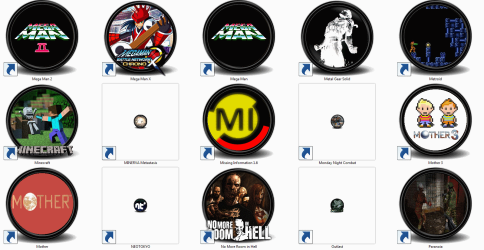
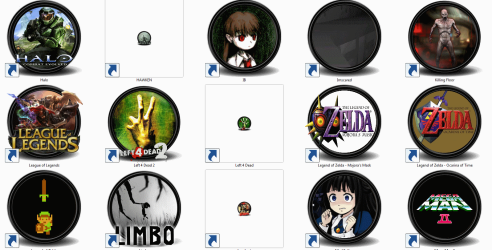
I have been having a seriously frustrating time trying to fix icons displaying in my games folder way too small. Every icon is a custom x256 by x256 icon, and I have seen them all work properly at one point. However, for some reason these icons now appear in their 32x by 32x bit forms, as seen in the attached image.

I have tried everything, including rebuilding and refreshing the icon cache, editing the registry value to x4068 size, only refreshing or rebuilding then restarting, moving the icon files, moving the game shortcuts, so on. All of these shortcuts are offline .exe files, and these icons have taken me a long time to build.

I'm sick and tired of trying to solve it myself, so I've come here for help. The only thing that has worked so far was a Microsoft support file, which fixed the problem until I switched my account to my brothers so he could play, where his icons were broken and when I logged back in so were mine. I haven't been able to find the support file since. I'm very tired of trying to fix this computer, with some V9.com malware stuck in there and rooted so I cannot remove it, broken Windows Photo Viewer that won't even launch, general messes. Do you guys have any clue how I can fix my icons?
 

Attachments
  • Untitled.png
    Untitled.png
    211.5 KB · Views: 5

My Computer

Computer type
PC/Desktop
Computer Manufacturer/Model Number
HP
OS
Windows 7 Ultimate x64
Antivirus
Kaspersky
Hi and welcome to SevenForums,
We might look into this malware issue first,
Post all scan results for review,
Repeat for all users,
Review Jacee’s instructions to run Adwcleaner here post #7,
Ignore the title of the thread,
http://www.sevenforums.com/system-security/316404-instant-savings-app.html
Screen shot of the download button to use for Adwcleaner
You can use these free tools to see if they find anything,
Manually Update them before running full scans,
Try not to use your computer while the scans are running, (one at a time of course).
Uncheck the box to Activate the Free trial from the final install options,
Also use the Custom scan option not the Threat scan,
Select the drive to scan usually C,
If your really infected check the box to scan for Rootkits = this scan option will take several hours to complete,
Never use your machine while scans are running for best results,
http://www.malwarebytes.org/products/malwarebytes_free
http://www.superantispyware.com/?tag=SUPERANTISPYWARE
This one is the longest up to 4 hours, the others are only about 45 minutes,
http://www.microsoft.com/security/scanner/en-us/default.aspx


You will likely be better served in the security section for this issue,
Cheers.
 

My Computer

Computer type
PC/Desktop
Computer Manufacturer/Model Number
Custom assembled by me :}
OS
Win-7-Pro64bit 7-H-Prem-64bit
CPU
i7-5930K 2nd i9-9940x both water blocked VRM's too
Motherboard
ASUS SABERTOOTH X99 2nd ASUS x299 Apex
Memory
Trident-z 3200C14 2nd Trident-z 3600C16
Graphics Card(s)
EVGA 1080ti ftw3 2nd Titan Xp both water blocked
Sound Card
Built-in Realtek
Monitor(s) Displays
1-AOC G2460PG 24"G-Sync 144Hz/ 2nd 1-ASUS VG248QE 24" 144Hz
Screen Resolution
1920 x 1080 144Hz
Hard Drives
2-Samsung M.2 Evo & Evo Plus
2-Samsung 850 EVO 500GB SSD's/ 3-2.5 W.D. Black 1tb-&3-1tb/3-3.5 WD Black 1tb hdd's
PSU
EVGA SuperNOVA 1000-P2 2nd 1200-P2
Case
2-Corsair Obsidian Series 450D Black ATX Mid Tower
Cooling
Custom water loops
Keyboard
Logitech G710+/ 2nd Logitech G910
Mouse
2-RedDragon M901 Perdition 16400 dpi Gaming mouse = wired
Internet Speed
Comcast Ping 19ms 89.31mbps download speed 6.12mbps upload
Antivirus
Malwarebytes Pro/ Superantispyware Pro
Browser
FireFox & Pale moon
Other Info
2nd ASUS X299 Apex/Intel i9-9940x with Custom water loop/7H-Prem-x64/Corsair 450D case/Ram Trident-z 3600C16 4x8gb / Samsung970Evo plus 500gb SSD/Dual ssd EZ swap evo/PSU EVGA SuperNova 1200w-P2 80+Platinum/GPU Titan Xp /8-ML-140 on push-pull on 2-280GTX rads
My results were: Although a ton of spam was removed by both the first program and another one I had already been using, the icons are still showing up in small size. My problem isn't adware, its the icons. I've done full scans using the not-so-cheap-and-free, excellent Kaspersky Anti-Virus, and only discovered that the icons are still tiny. What is causing the icons to be so small when they should render in full-size 256 by 256? Why is it that new ones render incorrectly when I clear the cache?

The icons are all custom made at 256 by 256 by professional software, and at one point or another they have all rendered at 256 by 256. How do I get the icons to render at this size without the computer skipping over them and rendering them unnecessarily tiny??? This is definitely not security.
 

My Computer

Computer type
PC/Desktop
Computer Manufacturer/Model Number
HP
OS
Windows 7 Ultimate x64
Antivirus
Kaspersky
Hi,
Post the scan results for review ;)
Repeat for other users,
Cheers.
 

My Computer

Computer type
PC/Desktop
Computer Manufacturer/Model Number
Custom assembled by me :}
OS
Win-7-Pro64bit 7-H-Prem-64bit
CPU
i7-5930K 2nd i9-9940x both water blocked VRM's too
Motherboard
ASUS SABERTOOTH X99 2nd ASUS x299 Apex
Memory
Trident-z 3200C14 2nd Trident-z 3600C16
Graphics Card(s)
EVGA 1080ti ftw3 2nd Titan Xp both water blocked
Sound Card
Built-in Realtek
Monitor(s) Displays
1-AOC G2460PG 24"G-Sync 144Hz/ 2nd 1-ASUS VG248QE 24" 144Hz
Screen Resolution
1920 x 1080 144Hz
Hard Drives
2-Samsung M.2 Evo & Evo Plus
2-Samsung 850 EVO 500GB SSD's/ 3-2.5 W.D. Black 1tb-&3-1tb/3-3.5 WD Black 1tb hdd's
PSU
EVGA SuperNOVA 1000-P2 2nd 1200-P2
Case
2-Corsair Obsidian Series 450D Black ATX Mid Tower
Cooling
Custom water loops
Keyboard
Logitech G710+/ 2nd Logitech G910
Mouse
2-RedDragon M901 Perdition 16400 dpi Gaming mouse = wired
Internet Speed
Comcast Ping 19ms 89.31mbps download speed 6.12mbps upload
Antivirus
Malwarebytes Pro/ Superantispyware Pro
Browser
FireFox & Pale moon
Other Info
2nd ASUS X299 Apex/Intel i9-9940x with Custom water loop/7H-Prem-x64/Corsair 450D case/Ram Trident-z 3600C16 4x8gb / Samsung970Evo plus 500gb SSD/Dual ssd EZ swap evo/PSU EVGA SuperNova 1200w-P2 80+Platinum/GPU Titan Xp /8-ML-140 on push-pull on 2-280GTX rads
Attached are all the logs from ADWCleaner. Kaspersky just says "No Threats."

Clearing the cache after these runs still doesn't fix the icons. I really don't care about the adware; in fact another application had cleared it out before this one. So my only question is, is this to clear the adware or actually fix the icons??? I'm starting to lose faith in these forums.
 

Attachments

My Computer

Computer type
PC/Desktop
Computer Manufacturer/Model Number
HP
OS
Windows 7 Ultimate x64
Antivirus
Kaspersky
OMG! You had/have a seriously infected system! You just want to fix an icon problem, but it is the least of your problems. You likely won't be able to fix it until you fix all these infections. Windows is "corrupted" and until it is not, trying to fix icons is useless. I am not a security expert, but I would scan with the free Malwarebytes, followed by the online Eset scan at least.

https://www.malwarebytes.org/antimalware (turn down the trial offer unless you want to try it out)

Now the Eset scanner, follow Jacee's instructions (Ignore the title of the thread)

http://www.sevenforums.com/system-s...icious-error-message-program.html#post2771089

After that I would run the System File Checker

http://www.sevenforums.com/tutorials/1538-sfc-scannow-command-system-file-checker.html

Then let us know how you stand. You may not care about the adware (not wise), but it is all tied together. A Guy
 

My Computer

Computer type
PC/Desktop
OS
Windows 10 Home x64
CPU
INTEL Core i5-750 Quad-Core 3.37GHz
Motherboard
ASUS P7P55D
Memory
HyperX Fury Black Series 8GB (2 x 4GB) 1866Mhz
Graphics Card(s)
EVGA GeForce GTX 750 Superclocked 1GB 128-Bit GDDR5
Monitor(s) Displays
LG 32MA68HY 32" IPS
Screen Resolution
1920 x 1080
Hard Drives
Samsung 840 Evo 120GB, SEAGATE 500GB Barracuda® 7200.12, SATA 3 Gb/s, 7200 RPM, 16MB cache
PSU
ANTEC TruePower New TP-550, 80 PLUS, 550W
Case
ANTEC Three Hundred Illusion
Cooling
COOLER MASTER Hyper 212 Plus, 4 x 120mm 1 x 140mm Noctua's
Internet Speed
85 + Mbps
Antivirus
Avast
Browser
Vivaldi
"I am not a security expert, but I would scan with the free Malwarebytes, followed by the online Eset scan at least."

I don't believe you are, and I think I will call my technician over. You gentlemen appear playing me off right now like I'm completely computer unsavvy, like I'm my sweet grandmother, bless her kind heart, who despite her kindness and intelligence can't find the power button because she is older and less aware.

I'll do all of these scans, post up the results, but personally I have used other software, not freeware either, and I highly doubt my system is, as you put it, "seriously infected."

How do I know? Each morning I wake up and the sfc /scannow runs on COMMAND.exe, followed by Kaspersky and the rest, according to a program I have programmed. I hope I haven't given you gentlemen the appearance of someone less-than-knowledgeable on computers, because I think I have and I personally feel a little insulted that you all are using it to exaggerate this simple, annoying problem without solving it.

Now, you people might be nice people who do know a thing or two or even a hundred about Windows 7. There's you way you aren't, running a forum labeled as such. And I will admit I shouldn't have even brought up the adware, as it was just V9.com. I removed it pretty quickly with the scans. Here's the ordeal: I don't care about the adware because my system is not SUPERINFECTEDOMGFREESCANFREESCAN. Calm down there cowboy. So I'll make an honest deal: You tell me why my icons are broken and if there's anything else I can do other than download these "free-scan" bits of adware, and I won't leave with a worse impression of you people.

I will admit, however, that its cute how much the one piece of adware I lightly referenced has snowballed. Right now, despite 3 significantly large posts, I haven't been even given a single notion about the icons or even a bit of actual help. I've read the files, and the programs aren't that bad. Heck, JZip is a piece of "adware" I use every day!

However, next time you tell me something I am doing is "not wise," I'll leave this forum pretty quickly with a pretty bad impression of you people. Considering you haven't helped the situation one bit, only avoided it, I will be quite happy to spend some well earned cash on having a true professional come over and fix this simple problem.

I'm sure you people are nice people, maybe a little confused about my dilemma here. However, I came here just for my problem to be solved, and I'm quite sure you all would want to solve it so it would have your forum reflected badly or me spending my good money. I will post at a later time with the results from these scans, but in the meantime do not attempt to make this situation melodramatic or out of hand again. Maybe its because I'm younger and simply misinterpreting you, but I would like for things to remain calm. Next time, instead of giving me this jack about how badly my computer, running multiple Operating Systems on virtual machines and smoothly playing some of the next-generation graphics, is so horribly infected, just simply redirect me to the scans. There's nothing to be gained or lost here other than my time and your effort, so why don't we all just take it down a notch.

Alright? I'm going to get to these scans now, and I'll post later, but if you don't wish to help me past this point because you have misinterpreted this post, know I recognize your genuine efforts and it will only reflect poorly on yourselves and this forum to leave. But, I'm quite sure you two already knew that. Now, I'll get to those scans.
 
Last edited:

My Computer

Computer type
PC/Desktop
Computer Manufacturer/Model Number
HP
OS
Windows 7 Ultimate x64
Antivirus
Kaspersky
Lol, good luck then. You posted just AdwCleaner logs, and there were multiple issues in each one. Not one small malware issue. Quite frankly, I will let someone else deal with you and your attitude. this is a two way street, and you just seem to want to hear what you want. I will not let you tell me how it reflects badly on me if I don't continue to help. I've never said this before, but feel free to leave if you like. It's a free world. There, now we are a horrible forum. A Guy
 

My Computer

Computer type
PC/Desktop
OS
Windows 10 Home x64
CPU
INTEL Core i5-750 Quad-Core 3.37GHz
Motherboard
ASUS P7P55D
Memory
HyperX Fury Black Series 8GB (2 x 4GB) 1866Mhz
Graphics Card(s)
EVGA GeForce GTX 750 Superclocked 1GB 128-Bit GDDR5
Monitor(s) Displays
LG 32MA68HY 32" IPS
Screen Resolution
1920 x 1080
Hard Drives
Samsung 840 Evo 120GB, SEAGATE 500GB Barracuda® 7200.12, SATA 3 Gb/s, 7200 RPM, 16MB cache
PSU
ANTEC TruePower New TP-550, 80 PLUS, 550W
Case
ANTEC Three Hundred Illusion
Cooling
COOLER MASTER Hyper 212 Plus, 4 x 120mm 1 x 140mm Noctua's
Internet Speed
85 + Mbps
Antivirus
Avast
Browser
Vivaldi
Gentlemen, I have returned with your scan results, and the results are not-so-surprising.

First thing, one scanner had a website download with the following caveat written above, and this was just a plain crock of shit. I don't care about how impolite and unintelligent those last set of maledictions were, this is just plain rude:
"IMPORTANT: Please uninstall your existing antivirus solution. For a list of removal tools for common antivirus software, click here."

I'm quite happy you two gentlemen brought up the command prompt command, because had you not I would have lost faith and belief in your authenticity.

The other program had a similar message in its install, but being so distraught and shocked I went ahead and installed it all the same, after scanning it multiple times of course. It wasn't pleasing either, very commercial, stereotypical and not very trustworthy. It's still running, but even then it seems to be having no problems.

The only one I found to be any help was Command Prompt, having learned it by myself when I was beginning Junior High and therefore very close to it, and of course, as it reports every morning, "Windows Resource Protection did not find any integrity violations." Kaspersky just finished with some other scanners, and they were fine as well.

I'm glad to report nothing major is wrong with my system. However I'm also unhappy to report you two gentlemen right now appear to be full of yourselves. Luckily, I am a sporting man and will give anyone at all as many posts as they need to help me fix my problem. My icons mean a lot to me, as you two have already guessed. However, if you two don't know how to fix this problem simply say so. I don't need my time wasted any further. I will keep in high spirits that this forum has an answer, but if I continue to receive these posts without even any attempts at helping me with my icons, I will quickly lose that spirit. Dare show me rudeness, and I will leave. I'm quite sure you two gentlemen wish to revive yourself in my eyes, so why don't we all just try again:

Hello all,

I have been having a seriously frustrating time trying to fix icons displaying in my games folder way too small. Every icon is a custom x256 by x256 icon, and I have seen them all work properly at one point. However, for some reason these icons now appear in their 32x by 32x bit forms, as seen in the attached image.

I have tried everything, including rebuilding and refreshing the icon cache, editing the registry value to x4068 size, only refreshing or rebuilding then restarting, moving the icon files, moving the game shortcuts, so on. All of these shortcuts are offline .exe files, and these icons have taken me a long time to build.

I'm sick and tired of trying to solve it myself, so I've come here for help. The only thing that has worked so far was a Microsoft support file, which fixed the problem until I switched my account to my brothers so he could play, where his icons were broken and when I logged back in so were mine. I haven't been able to find the support file since. Do you guys have any clue how I can fix my icons?
 

Attachments

  • Untitled.png
    Untitled.png
    155.2 KB · Views: 5

My Computer

Computer type
PC/Desktop
Computer Manufacturer/Model Number
HP
OS
Windows 7 Ultimate x64
Antivirus
Kaspersky
I will be leaving then, there is no reason for any of this, even some of my behavior. You all still have an excellent day, and I am sorry for wasting both your times. I just had the scan finish, nothing wrong.
 

My Computer

Computer type
PC/Desktop
Computer Manufacturer/Model Number
HP
OS
Windows 7 Ultimate x64
Antivirus
Kaspersky
Thanks for being part of a botnet that you are probably infected with. Us with clean computers sure do appreciate it :sarc: Sigh. It should be against the law to allow your pc to be infected....

Most likely the adware is redirecting you when trying to go to the actual sites.

Enjoy the infected PC!
 

My Computer

Computer type
PC/Desktop
Computer Manufacturer/Model Number
Custom Built
OS
Windows 10 Pro
CPU
AMD Ryzen 5 2400G Processor with Radeon RX Vega 11 Graphics
Motherboard
ASRock X470 Master SLI/AC AM4 AMD Promontory X470 SATA 6Gb/s
Memory
G.SKILL Ripjaws V Series 16GB (2 x 8GB) 288-Pin DDR4 SDRAM D
Graphics Card(s)
2047MB NVIDIA GeForce GTX 1060 6GB (EVGA)
Sound Card
Motherboard Built in
Monitor(s) Displays
Acer R240HY bidx 23.8-Inch IPS HDMI DVI VGA (1920 x 1080) Wi
Screen Resolution
1920 x 1080
Hard Drives
1TB Sandisk SSD PLUS (Main drive)
500 GB Seagate 7200 RPM (Games)
500 GB Western Digital 7200 RPM (Virtual Machines)
PSU
CORSAIR TX Series TX650M 650W 80+ Gold Modular Power Supply
Case
CORSAIR CARBIDE SPEC-02 Mid-Tower Gaming Case, Red LED Fan
Cooling
220mm, two 120mm, and four 60mm fans
Keyboard
Wired Dell keyboard
Mouse
Wireless Logitech mouse
Internet Speed
250mb down, 30mb up
Antivirus
Panda Cloud Antivirus
Browser
Chrome-ish x64
Other Info
Your awesome for reading this.
It should be against the law to allow your pc to be infected....
Enjoy the infected PC!

It quite possibly could be a breach of 'common law' at least in some jurisdictions - especially if the user continues to knowingly provide services for spammers and/or malware servers.
 

My Computer

Computer type
Laptop
Computer Manufacturer/Model Number
Asus K52F or Lenovo B51-80
OS
Win 7 x64 Home Premium (and x86 VirtualBox VM)/Win10
CPU
i3 370M/i7 6500U
Motherboard
Asus/Lenovo
Memory
8GB - finally :)/8GB
Graphics Card(s)
it's an i3, dude!/dual Intel&nVidia
Sound Card
onboard
Monitor(s) Displays
15.6" built-in
Screen Resolution
1366x768/1920x1080
Hard Drives
750GB Seagate internal
Sundry external drives attached to other computers on the local network
1TB SSD on the Lenovo
PSU
n/a
Internet Speed
as much as I can get - usually on a dongle/phone, so <1MB/s
Antivirus
MSE/Defender
Browser
IE11/12/Edge/Chrome/FF(if I must)
Alright, fine,

I apologize for letting my ego get in the way. I've been having some hard days and nights, and when one goes looking for how to fix a display problem and gets told a computer he just got cleared and fixed is completely broken after all he's done to keep it in good shape, he overreacts like I did. I apologize for letting myself get out of hand, and I worked against all your own egos and deserved what I got.

However, I didn't like the fact I was being given stuff for malware and adware. I've found other adware scanners, and they haven't said anything is out of the ordinary. So being told by people you believe to be professionals that "windows is totally corrupted" is quite an eye opener. I didn't catch the drama, that's all.

Look, I've had my coffee now and I apologize for attacking you all and showing you some rudeness. I'm inexperienced and young and a little upset, that's all. I will gladly leave knowing I was in the wrong, but before I do I would like to ask if there is some way I can fix my icons. The technician is working on my computer in the other room right now, I'm listening to smooth jazz, no more "what I want to hear" in exchange for no more drama, I came here looking for help and I instead ended up looking a gift horse in the mouth. I wasn't expecting you servicemen to take my anger to so much offense. Do you guys know what's wrong with my icons?
 

My Computer

Computer type
PC/Desktop
Computer Manufacturer/Model Number
HP
OS
Windows 7 Ultimate x64
Antivirus
Kaspersky
I care more about the malware right now, let the technician take a look at that. No doubt they will use the same tools we asked you to run. If they know what they are doing.

Icons are an interesting issue. But we need to get the big stuff taken care of first.
 

My Computer

Computer type
PC/Desktop
Computer Manufacturer/Model Number
Custom Built
OS
Windows 10 Pro
CPU
AMD Ryzen 5 2400G Processor with Radeon RX Vega 11 Graphics
Motherboard
ASRock X470 Master SLI/AC AM4 AMD Promontory X470 SATA 6Gb/s
Memory
G.SKILL Ripjaws V Series 16GB (2 x 8GB) 288-Pin DDR4 SDRAM D
Graphics Card(s)
2047MB NVIDIA GeForce GTX 1060 6GB (EVGA)
Sound Card
Motherboard Built in
Monitor(s) Displays
Acer R240HY bidx 23.8-Inch IPS HDMI DVI VGA (1920 x 1080) Wi
Screen Resolution
1920 x 1080
Hard Drives
1TB Sandisk SSD PLUS (Main drive)
500 GB Seagate 7200 RPM (Games)
500 GB Western Digital 7200 RPM (Virtual Machines)
PSU
CORSAIR TX Series TX650M 650W 80+ Gold Modular Power Supply
Case
CORSAIR CARBIDE SPEC-02 Mid-Tower Gaming Case, Red LED Fan
Cooling
220mm, two 120mm, and four 60mm fans
Keyboard
Wired Dell keyboard
Mouse
Wireless Logitech mouse
Internet Speed
250mb down, 30mb up
Antivirus
Panda Cloud Antivirus
Browser
Chrome-ish x64
Other Info
Your awesome for reading this.
Are the icons related to the malware? Thank you for responding, by the way.
 

My Computer

Computer type
PC/Desktop
Computer Manufacturer/Model Number
HP
OS
Windows 7 Ultimate x64
Antivirus
Kaspersky

My Computer

Computer type
PC/Desktop
Computer Manufacturer/Model Number
Custom Built
OS
Windows 10 Pro
CPU
AMD Ryzen 5 2400G Processor with Radeon RX Vega 11 Graphics
Motherboard
ASRock X470 Master SLI/AC AM4 AMD Promontory X470 SATA 6Gb/s
Memory
G.SKILL Ripjaws V Series 16GB (2 x 8GB) 288-Pin DDR4 SDRAM D
Graphics Card(s)
2047MB NVIDIA GeForce GTX 1060 6GB (EVGA)
Sound Card
Motherboard Built in
Monitor(s) Displays
Acer R240HY bidx 23.8-Inch IPS HDMI DVI VGA (1920 x 1080) Wi
Screen Resolution
1920 x 1080
Hard Drives
1TB Sandisk SSD PLUS (Main drive)
500 GB Seagate 7200 RPM (Games)
500 GB Western Digital 7200 RPM (Virtual Machines)
PSU
CORSAIR TX Series TX650M 650W 80+ Gold Modular Power Supply
Case
CORSAIR CARBIDE SPEC-02 Mid-Tower Gaming Case, Red LED Fan
Cooling
220mm, two 120mm, and four 60mm fans
Keyboard
Wired Dell keyboard
Mouse
Wireless Logitech mouse
Internet Speed
250mb down, 30mb up
Antivirus
Panda Cloud Antivirus
Browser
Chrome-ish x64
Other Info
Your awesome for reading this.
Yes your Icons you downloaded could be infected and opened the back door to more infections.
A Guy and some others are well versed in personalization of Icons and most everything else in personalization. I'm not one of them.

But like most anybody else that has been around computers in a meaningful way he knows security also and know it comes first on the list of things to take care of.

I would make a major bet that the members trying to help you in this thread would never call in a repairman. Not that is bad because it's needed by most computer users. They are like me. We fix them ourselves or come to this forum for guidance.
That is what we do here; give guidance and suggestion on how to fix computer problems others are having. We do it free and for me most of the time it's a fun thing to help others.
If I can't help I will hunt down another member that can help.
That is what we do here HELP.

I'm no expert and I know it; but I know where to find some. The Seven Forum.
 

My Computer

Computer type
PC/Desktop
Computer Manufacturer/Model Number
Home made Desktop
OS
Windows 10 Pro. 64/ version 1709 Windows 7 Pro/64
CPU
Intel i7-6800K @ 4.3
Motherboard
ASUS X-99 Deluxe II
Memory
Corsair Platinum 16 gig @2400
Graphics Card(s)
EVGA GTX 1070 OC
Monitor(s) Displays
Asus 27" LED LCD/VE278Q
Screen Resolution
1920-1080 or 1280-720 HDMI
Hard Drives
INTEL SSD 730-240 Gb Sata 3.0/
PSU
EVGA Platium 1200W
Case
Phanteks Luxe Tempered Glass 8 fans/ one radiator
Cooling
XSPC/ Water Cooled CPU
Keyboard
Das 4 Professional
Mouse
Logitech M705/MX Anywhere 2-S
Internet Speed
100 mbits
Antivirus
Microsoft Security Essentials/ Malwarebytes Premium 3.0/ SAS
Browser
I.E. 11 default/Firefox/ ISP Time Warner Cable/Spectrum
Other Info
LG BluRay Burner/
Sound system-KLipsch-THX/
Icy Dock ssd Hot Swap bays.
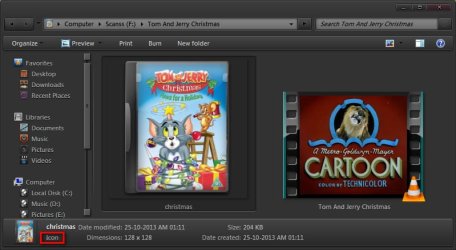
I am not a gamer. I maintain large icons for my cartoon collection.

2014-07-20_235730.jpg

And I put the icon in a real location, which will always be present in the physical computer.

2014-07-20_235912.jpg

You must know how to use the customization tab to change the icon of any location, as you customize. I set the target to the real location where the icon is permanently saved.

Icons never change the size.
 

My Computer

Computer type
PC/Desktop
Computer Manufacturer/Model Number
Self Assembled
OS
Microsoft Windows 10 Pro Insider Preview 64-bit
CPU
Intel(R) Core(TM) i3-4130 CPU @ 3.40GHz
Motherboard
Gigabyte Technology Co., Ltd. B85M-D3H
Memory
Corsair Vengence 4GB x2 (8.00GB Dual-Channel DDR3 @ 798MHz)
Graphics Card(s)
2047MB GeForce GTS 450 (ZOTAC International)
Sound Card
Onboard (Realtek High Definition Audio)
Monitor(s) Displays
LG Flatron E2040T
Screen Resolution
1600x900
Hard Drives
Western Digital 1 TB
Seagate 500 GB
PSU
Corsair VS550
Case
Cooler Master K380
Cooling
Cooler Master Seidon 120V Plus
Keyboard
Logitech MK260r
Mouse
Logitech MK260r
Internet Speed
PMPL Broadband
Antivirus
Windows Defender + MBAM
Browser
Firefox
Other Info
Dell Studio 15" Laptop
Nice Icons Arc. I bet your computer isn't infected!
 

My Computer

Computer type
PC/Desktop
Computer Manufacturer/Model Number
Home made Desktop
OS
Windows 10 Pro. 64/ version 1709 Windows 7 Pro/64
CPU
Intel i7-6800K @ 4.3
Motherboard
ASUS X-99 Deluxe II
Memory
Corsair Platinum 16 gig @2400
Graphics Card(s)
EVGA GTX 1070 OC
Monitor(s) Displays
Asus 27" LED LCD/VE278Q
Screen Resolution
1920-1080 or 1280-720 HDMI
Hard Drives
INTEL SSD 730-240 Gb Sata 3.0/
PSU
EVGA Platium 1200W
Case
Phanteks Luxe Tempered Glass 8 fans/ one radiator
Cooling
XSPC/ Water Cooled CPU
Keyboard
Das 4 Professional
Mouse
Logitech M705/MX Anywhere 2-S
Internet Speed
100 mbits
Antivirus
Microsoft Security Essentials/ Malwarebytes Premium 3.0/ SAS
Browser
I.E. 11 default/Firefox/ ISP Time Warner Cable/Spectrum
Other Info
LG BluRay Burner/
Sound system-KLipsch-THX/
Icy Dock ssd Hot Swap bays.
Try this as a test:
Create a new folder on C:\
Copy one of the .exe files that present a small icon to the new folder
Create a new shortcut to the copied .exe
Amy change in what's presented?
No? Delete the new folder

Yes? Sometimes Windows gets confused.
You could try rebuilding the search index.

Sometimes a new or updated program changes how Windows presents icons or overlays (one version of VLC on Windows 7 made me rebuild the entire music folder tree so that the album art was correct)
This is more difficult to isolate, especially from afar. You know best what has been installed, updated or uninstalled on your machine. Investigate any application related to media (graphics, album art, video, music player, codecs, camera, webcams.......anything that deals with images) Has there been any recent changes to that group of programs recently? I know it's a big question, but I don't know how else to ask it.
 

My Computer

Computer type
Laptop
Computer Manufacturer/Model Number
HP Pavilion dv6-6c10us
OS
x64 (6.3.9600) Win8.1 Pro & soon dual boot x64 (6.1.7601) Win7_SP1 HomePrem
CPU
AMD A6-3420M APU with Radeon(tm) HD Graphics
Motherboard
Hewlett-Packard 1805
Memory
6.00 GB
Graphics Card(s)
AMD Radeon(TM) HD 6520G
Sound Card
(1) AMD High Definition Audio Device (2) IDT High Definiti
Monitor(s) Displays
HP W2072a 20" LCD (1600 x 900) @ 60 Hz
Screen Resolution
1366 x 768 x 32 bits (4294967296 colors) @ 60 Hz
Hard Drives
ST640LM0 00 HM641JI SATA Disk Device
Keyboard
Logitech k520 wireless KB
Mouse
Logitech m320 wireless mouse (bundled with KB)
Internet Speed
15/5 | 54 MB Wireless 'n'
Antivirus
Realtime: Defender or Avast | On-demand: Malwarebytes, ESET
Browser
IE 11 on Win8, IE 10 on win 7
Other Info
Media: [Gimp, Audacity, VLC] || Comm: [WEmail 2012, Skype] || Productivity: [OpenOffice,| Textpad] || Utils: [Sysinternals, cCleaner, Speccy, Defraggler]
Back
Top