Solved No AMD Catalyst Control Center shows anywhere after installing driver?

sdowney717

New member
Power User
VIP
Local time
4:47 AM
Messages
705
I have a PC with HD 2600 Pro AGP video card.

I downloaded the drivers, afterwards though there is no CCC?
I see it installed a Catalyst install manager.

I installed twice, so what to do to fix it?

Legacy
 

My Computer My Computer

At a glance

Windows 7 Ultimate x64
OS
Windows 7 Ultimate x64
Nothing but install manager?
I tried again this time uninstalling from device manager, will see on a reboot?

Does this need to be installed in safe mode?
Catalyst™ Install Manager
Installation Report
03/04/14 11:34:42


Hardware information
Name
Manufacturer Advanced Micro Devices, Inc.
Device ID 0xaa08
Vendor ID 0x1002
Class Code 0x040300
Revision ID 0x00
Subsystem ID 0xaa08
Subsystem vendor ID 0x1545
Other hardware

Existing packagesAMD Catalyst Install Manager
AMD APP SDK Runtime
HydraVision

Packages for install
AMD Catalyst Install ManagerFinal Status: Success
Version of Item: 8.0.877.0
Size: 20 Mbytes


Other detected devices

Manufacturer Advanced Micro Devices, Inc.
Device ID 0xaa08
Vendor ID 0x1002
Class Code 0x040300
Revision ID 0x00
Subsystem ID 0xaa08
Subsystem vendor ID 0x1545


Error messages
 

My Computer My Computer

At a glance

Windows 7 Ultimate x64
OS
Windows 7 Ultimate x64
Did you do an Express, or Custom install?

Try choosing the Custom install option, and make sure that the CCC option is checked. It sounds like the install manager only installed the driver.

Also, check your System Tray for the CCC icon, that's usually how it's accessed. It has no entry in the Windows start menu.
 

My Computer My Computer

At a glance

Win 7 Pro x64/Win 10 Pro x64 dual bootAMD FX 8350 Vishera @ 420016 GB Mushkin Blackline DDR3-2400 @ 1866 (9-1...XFX Radeon R9 280 Double D Black Edition
Computer type
PC/Desktop
Computer Manufacturer/Model Number
Mellon Labs (custom build)
OS
Win 7 Pro x64/Win 10 Pro x64 dual boot
CPU
AMD FX 8350 Vishera @ 4200
Motherboard
ASUS M5A97 R2.0
Memory
16 GB Mushkin Blackline DDR3-2400 @ 1866 (9-10-10-10-31)
Graphics Card(s)
XFX Radeon R9 280 Double D Black Edition
Sound Card
Realtek HD Audio on MB. Sounds great.
Monitor(s) Displays
Acer 24", Acer 22"
Screen Resolution
3840 x 1080
Hard Drives
1 x Mushkin Chronos 120 GB SSD (Win 10)
1 x Samsung 850 EVO 250 GB SSD (Win 7)
1 x WD 1TB SATA Blue
1 x WD 1TB SATA Green
PSU
Corsair TX-750
Case
CoolerMaster HAF 912+
Cooling
Coolermaster Seidon 240M Liquid AIO. 6 case fans
Keyboard
Logitech G710+
Mouse
Logitech G500s
Internet Speed
Much better since I got fiber, but still way overpriced.
Antivirus
MSE, Malware Bytes for scanning
Browser
Firefox
Other Info
Corsair VOID USB headphones.

A Mellon Labs X-1 - LCD Smartie driven system status display.

Brought to you by the letter E
Well, safe mode you can not uninstall anything.
I rebooted, then uninstalled the driver that windows ALWAYS installs.
Then installed the amd catalyst install manager which apparently is not a driver since when I go back to control panel, the entire entry for display adapter is missing.

Then when I reboot, windows reinstalls its builtin driver and AMD seems to just do nothing excpet install a catalyst installer.??

So I have no idea what to do, why cant AMD catalyst install manager just do what it is supposed to do?
install i
 

My Computer My Computer

At a glance

Windows 7 Ultimate x64
OS
Windows 7 Ultimate x64
Did you do an Express, or Custom install?

Try choosing the Custom install option, and make sure that the CCC option is checked. It sounds like the install manager only installed the driver.

Also, check your System Tray for the CCC icon, that's usually how it's accessed. It has no entry in the Windows start menu.

I did an express.
I see these instructions here
It is not in the system tray

How-To Install AMD Catalyst? Drivers For A Windows® Based System

I never get the restart message.
AMD install manager just says click to finish, and that is it.
GPU507_16.jpg
 

My Computer My Computer

At a glance

Windows 7 Ultimate x64
OS
Windows 7 Ultimate x64
Ok, trying custom.
then click next, it instantly starts copying files, etc... no where to select anything.

Then a prompt with ! and it says AMD catalyst Manager is already installed and up to date.

Select to install version 8.0877.0 again

And CIM installation package.

OK, clicked next and it only installs CIM and a log appears.
 

My Computer My Computer

At a glance

Windows 7 Ultimate x64
OS
Windows 7 Ultimate x64
here is the cim log output
Code:
Catalyst™ Install Manager
Installation Report
03/04/14 12:12:17


Hardware information 
Name AMD Radeon Graphics Processor 
Manufacturer Advanced Micro Devices, Inc. 
Device ID 0x9587 
Vendor ID 0x1002 
Class Code 0x030000 
Revision ID 0x00 
Subsystem ID 0x0028 
Subsystem vendor ID 0x1545 
Other hardware 
 
Existing packagesAMD Catalyst Install Manager 
AMD APP SDK Runtime 
 
Packages for install
AMD Catalyst Install ManagerFinal Status: Success 
Version of Item: 8.0.877.0 
Size: 20 Mbytes 
 

Other detected devices 
 
Manufacturer Advanced Micro Devices, Inc. 
Device ID 0xaa08 
Vendor ID 0x1002 
Class Code 0x040300 
Revision ID 0x00 
Subsystem ID 0xaa08 
Subsystem vendor ID 0x1545 
 
AMD Radeon Graphics Processor 
Manufacturer Advanced Micro Devices, Inc. 
Device ID 0x9587 
Vendor ID 0x1002 
Class Code 0x030000 
Revision ID 0x00 
Subsystem ID 0x0028 
Subsystem vendor ID 0x1545 
 
 
Manufacturer Advanced Micro Devices, Inc. 
Device ID 0xaa08 
Vendor ID 0x1002 
Class Code 0x040300 
Revision ID 0x00 
Subsystem ID 0xaa08 
Subsystem vendor ID 0x1545 
 

Error messages
 

My Computer My Computer

At a glance

Windows 7 Ultimate x64
OS
Windows 7 Ultimate x64
I found another amd installer which automatically downloads the appropriate driver, which is the same one I picked.

That one seemed to do more work here is the log and it is different.

was called amddriverdownload_installer.exe

Code:
Catalyst™ Install Manager
Installation Report
03/04/14 12:29:04


Hardware information 
Name AMD Radeon Graphics Processor 
Manufacturer Advanced Micro Devices, Inc. 
Device ID 0x9587 
Vendor ID 0x1002 
Class Code 0x030000 
Revision ID 0x00 
Subsystem ID 0x0028 
Subsystem vendor ID 0x1545 
Other hardware 
 
Existing packagesAMD Catalyst Install Manager 
AMD APP SDK Runtime 
 
Packages for install
AMD Catalyst Install ManagerFinal Status: Success 
Version of Item: 8.0.877.0 
Size: 20 Mbytes 
 

Other detected devices 
 
Manufacturer Advanced Micro Devices, Inc. 
Device ID 0xaa08 
Vendor ID 0x1002 
Class Code 0x040300 
Revision ID 0x00 
Subsystem ID 0xaa08 
Subsystem vendor ID 0x1545 
 
AMD Radeon Graphics Processor 
Manufacturer Advanced Micro Devices, Inc. 
Device ID 0x9587 
Vendor ID 0x1002 
Class Code 0x030000 
Revision ID 0x00 
Subsystem ID 0x0028 
Subsystem vendor ID 0x1545 
 
 
Manufacturer Advanced Micro Devices, Inc. 
Device ID 0xaa08 
Vendor ID 0x1002 
Class Code 0x040300 
Revision ID 0x00 
Subsystem ID 0xaa08 
Subsystem vendor ID 0x1545 
 

Error messages
 

My Computer My Computer

At a glance

Windows 7 Ultimate x64
OS
Windows 7 Ultimate x64
still no CCC.
The driver is installed by windows 7 not AMD.
The driver date is 4/25/2009
version 8.56.1.16
 

My Computer My Computer

At a glance

Windows 7 Ultimate x64
OS
Windows 7 Ultimate x64
Is this something windows update needs to do to install a driver? vs, going to AMD and getting it?
I am very confused about what this CIM from AMD is doing, seems to do really nothing. It claims it is extracting lots of files, etc...

Do I need to reinstall windows 7, is it messed up somehow?
Like reinstall windows, then immediately try to install the AMD driver?

the 4th time for an install, I tried this from AMD
http://support.amd.com/en-us/download/auto-detect-tool
 

My Computer My Computer

At a glance

Windows 7 Ultimate x64
OS
Windows 7 Ultimate x64
Ok, It says it will install the files to a folder called 'program files\ati technologies\.

I just watched it run, and when it is done, there are no files in that folder, it is empty.

I just tried to install as administrator, and still no files appear in that destination folder?
 

My Computer My Computer

At a glance

Windows 7 Ultimate x64
OS
Windows 7 Ultimate x64
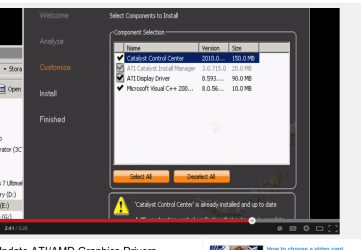
How to Install/Update ATI/AMD Graphics Drivers - YouTube

watching this, my ATI install manager never shows the ATI driver as it does in this guys list.

here is his install, mine does not list the driver or the ccc as his shows.
All I get is the cim

So something is very messed up I think.

the amd special installer detects my card and downloads the driver, but also fails. (amddriverdownload_installer.exe)
 

Attachments

  • Screenshot from 2014-03-04 13:12:09.png
    Screenshot from 2014-03-04 13:12:09.png
    44.5 KB · Views: 0

My Computer My Computer

At a glance

Windows 7 Ultimate x64
OS
Windows 7 Ultimate x64
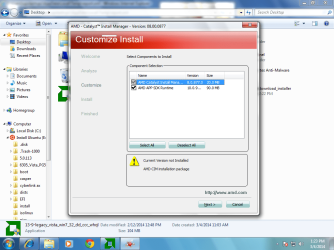
here is screen showing no driver in the list for me in custom install.
I also downloaded the AMD cleaner to clear out all amd stuff first.
So of course not working because AMD installer does not install the driver or the CCC.
 

Attachments

  • amdfail1.png
    amdfail1.png
    75.6 KB · Views: 1

My Computer My Computer

At a glance

Windows 7 Ultimate x64
OS
Windows 7 Ultimate x64

My Computer My Computer

At a glance

Windows 7 Ultimate x64
OS
Windows 7 Ultimate x64
I have a PC with HD 2600 Pro AGP video card.

hat is the make and model of the motherboard?

Also have you installed the chipset drivers, primarily the AGP/GART driver? Without that the video card driver won't install.
 

My Computer My Computer

At a glance

Win 7 Ultimate x64FX-8350 @ 4.6 GHz so farADATA XPG V1 Series Black 8GB DDR3 1600Sapphire R9 270x Dual-X
Computer type
PC/Desktop
Computer Manufacturer/Model Number
Me
OS
Win 7 Ultimate x64
CPU
FX-8350 @ 4.6 GHz so far
Motherboard
Asus M5A97 EVO
Memory
ADATA XPG V1 Series Black 8GB DDR3 1600
Graphics Card(s)
Sapphire R9 270x Dual-X
Sound Card
Xonar DGX w/ Corsair Vengence 1300
Monitor(s) Displays
Acer S232HL Abid
Screen Resolution
1920x1080
Hard Drives
120 GB OCZ Vertex 3
500 GB Seagate 7200.12
PSU
Antec Earthwatts 650W Green
Case
Antec Three Hundred
Cooling
Cooler Master 212 EVO
Keyboard
Logitech G510
Mouse
Logitech G500s
Internet Speed
35000/3000
I have a PC with HD 2600 Pro AGP video card.

hat is the make and model of the motherboard?

Also have you installed the chipset drivers, primarily the AGP/GART driver? Without that the video card driver won't install.

PM8M-v msi 7104 rev 2

MSI USA PM8M-V

It is all working good now that I got the correct driver for that card.
And sound works with the AC97 driver from realtek.

Netflix is running smoothly in Chrome.
 

My Computer My Computer

At a glance

Windows 7 Ultimate x64
OS
Windows 7 Ultimate x64
Are 6you sure the CCC is suitable for your video card? The latest catalyst drivers may not support your card.
 

My Computer My Computer

At a glance

Windows 10 (64 bit)AMD FX832016 GBAMD 7870
Computer type
PC/Desktop
Computer Manufacturer/Model Number
Custom Build
OS
Windows 10 (64 bit)
CPU
AMD FX8320
Motherboard
Asus M5A99X EVO
Memory
16 GB
Graphics Card(s)
AMD 7870
Amd catalyst control problems.

Hello everybody,
I have been struggling with the problem of installing AMD CCC on a Windows 7x64 system. I have tried all the solutions that I have discovered on various forums with no success.
In the end, in desperation I tried running the installer in custom mode attempting to install each component in turn, and I found that the MS Visual C++ packages were not installing, I downloaded the files from MS, installed them manually, and ran the installer again. Bugger me, it worked and completed the set-up. Hope this helps.:D
 

My Computer My Computer

At a glance

Multiboot XP, XPx64, Win7, Win7x64AMDFX63008GbRadeon HD 5450 x2
Computer type
PC/Desktop
Computer Manufacturer/Model Number
Custom
OS
Multiboot XP, XPx64, Win7, Win7x64
CPU
AMDFX6300
Motherboard
Gigabyte 970A-UD3p
Memory
8Gb
Graphics Card(s)
Radeon HD 5450 x2
Hard Drives
WD Caviar Green
Antivirus
Avira
Browser
Firefox
just curious, does ccc show in your control panel?

(just built my first amd rig ever) and im used to having access to nvcp via the control panel however i see nada that points to amd's equivalent. Assuming either they actually expect you to run it in your tray or go to the start menu to open it OR there was an issue with my installation as well :P
 

My Computer My Computer

At a glance

8.14770k32gb DDR3Quad-SLI GTX Titan SC
Computer type
PC/Desktop
Computer Manufacturer/Model Number
HomeGrown
OS
8.1
CPU
4770k
Motherboard
OC-Force
Memory
32gb DDR3
Graphics Card(s)
Quad-SLI GTX Titan SC
Hard Drives
256gb Samsung EVO x 2 RAID0
2tb Seagate Barracuda x2 RAID0
Antivirus
YeaRight
Browser
IE
The CCC access menu shows up when I right click on the desktop. It is also in the start menu.
 

My Computer My Computer

At a glance

Windows 10 (64 bit)AMD FX832016 GBAMD 7870
Computer type
PC/Desktop
Computer Manufacturer/Model Number
Custom Build
OS
Windows 10 (64 bit)
CPU
AMD FX8320
Motherboard
Asus M5A99X EVO
Memory
16 GB
Graphics Card(s)
AMD 7870
Back
Top