Sound Devices Have Disappeared

More reference links:
M-1620 overview
M-1620 specs

Microsoft Update Catalog query=sigmatel

You'll have to log in to MS Catalog, but hold off on downloading anything yet. I'm still digesting other data and a few dormant brain cells are firing.

Can you post a Sound -> Recording tab screen shot? Yeah, I know - it's a playback issue - the awakening brain cells almost recall a similar issue and recording was involved - go figure. A look at your tab might jar the old memory.

Once I absorb the M-1629 information I can better advise what drivers to try - you might have to work around the installation by using Dev Mgr to install the driver (avoiding a restart when the device is reportedly not found) or setting compatibility to Vista SP2.

Thanks,

Bill
.
 

My Computer My Computer

Computer type
Laptop
Computer Manufacturer/Model Number
HP Pavilion dv6-6c10us
OS
x64 (6.3.9600) Win8.1 Pro & soon dual boot x64 (6.1.7601) Win7_SP1 HomePrem
CPU
AMD A6-3420M APU with Radeon(tm) HD Graphics
Motherboard
Hewlett-Packard 1805
Memory
6.00 GB
Graphics Card(s)
AMD Radeon(TM) HD 6520G
Sound Card
(1) AMD High Definition Audio Device (2) IDT High Definiti
Monitor(s) Displays
HP W2072a 20" LCD (1600 x 900) @ 60 Hz
Screen Resolution
1366 x 768 x 32 bits (4294967296 colors) @ 60 Hz
Hard Drives
ST640LM0 00 HM641JI SATA Disk Device
Keyboard
Logitech k520 wireless KB
Mouse
Logitech m320 wireless mouse (bundled with KB)
Internet Speed
15/5 | 54 MB Wireless 'n'
Antivirus
Realtime: Defender or Avast | On-demand: Malwarebytes, ESET
Browser
IE 11 on Win8, IE 10 on win 7
Other Info
Media: [Gimp, Audacity, VLC] || Comm: [WEmail 2012, Skype] || Productivity: [OpenOffice,| Textpad] || Utils: [Sysinternals, cCleaner, Speccy, Defraggler]
Ok, now the question is why are there no speakers, most laptops have built in speakers.
Well...., yes there are built in speakers. The thumbnail is what device manager and Playback looked like on Friday when I finally got the sound working with the internal laptop speakers. Of course it all went away when I rebooted. So to emphasize, the thumbnail is not current - it's from 2 days ago.
Some devices have a checkbox or it prompts you to remove the software (driver?) when you uninstall a device. You don't have to look elsewhere and it appears that the HD Audio Device is down to the base MS driver. This is where I wanted to get - a base level.

I'll look at the 1629 information, there are some M series with Intel boards and some with Gateway boards.

Launch Services and export the list to a Text (Tab Delimitated) (*.txt) file and attach that output to a new post. I want to check the current status of the audio services.
Oh, and I uninstalled Speccy and reinstalled - got the same server error as the screen shot I posted.
 

Attachments

  • Capture12.PNG
    Capture12.PNG
    19.7 KB · Views: 24
  • Services.txt
    Services.txt
    45.1 KB · Views: 3

My Computer My Computer

Computer type
Laptop
OS
Windows 7 home premium 64 bit
CPU
AMD K10
Motherboard
Hewlett-Packard 1444 (Socket S1G4)
Memory
3.00GB Dual-Channel DDR3 @ 532MHz
Graphics Card(s)
ATI AMD M880G with ATI Mobility Radeon HD 4250 (HP)
Sound Card
Realtek
Screen Resolution
1366 x 768
Hard Drives
465GB Western Digital
Antivirus
MSE
A quick test would be to disable the Digital Audio (S/PDIF) device and see how the machine behaves. After a bit more reading, I might suggest uninstalling that device, but wait until I read more.

Could you attach the Windows Update (WU) log to a post? I'm wondering if WU 'helped' you with driver updates.
C:\Windows\WindowsUpdate.log
No change after disabling the device other than the red X
 

Attachments

  • Capture18.PNG
    Capture18.PNG
    10.6 KB · Views: 23

My Computer My Computer

Computer type
Laptop
OS
Windows 7 home premium 64 bit
CPU
AMD K10
Motherboard
Hewlett-Packard 1444 (Socket S1G4)
Memory
3.00GB Dual-Channel DDR3 @ 532MHz
Graphics Card(s)
ATI AMD M880G with ATI Mobility Radeon HD 4250 (HP)
Sound Card
Realtek
Screen Resolution
1366 x 768
Hard Drives
465GB Western Digital
Antivirus
MSE
More reference links:
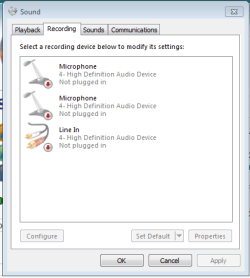
Can you post a Sound -> Recording tab screen shot? Yeah, I know - it's a playback issue - the awakening brain cells almost recall a similar issue and recording was involved - go figure. A look at your tab might jar the old memory.
Recording Tab screenshot
 

Attachments

  • recording tab.PNG
    recording tab.PNG
    8.7 KB · Views: 24

My Computer My Computer

Computer type
Laptop
OS
Windows 7 home premium 64 bit
CPU
AMD K10
Motherboard
Hewlett-Packard 1444 (Socket S1G4)
Memory
3.00GB Dual-Channel DDR3 @ 532MHz
Graphics Card(s)
ATI AMD M880G with ATI Mobility Radeon HD 4250 (HP)
Sound Card
Realtek
Screen Resolution
1366 x 768
Hard Drives
465GB Western Digital
Antivirus
MSE
Thanks, I'll be posting in this thread - yeah Speccy is a Piriform server issue.

What screenshot is this?
Current or two days ago - because this looks pretty good (speakers=default) except the ATI HD device is back. This is most likely being installed after a restart and is probably causing the sound issue. The BSOD might have been a result of the AMD HD 'update' to the ATI device. AMD/ATI are same company now, but these are old drivers (2004-2008) and then there's the Sigmatel/IDT 9205 device itself.

All of this worked at some point, right, so it's just a matter of unwinding the changes/updates.

309654d1394392427-sound-devices-have-disappeared-capture12.png


So.... I'm confused. It's probably better to post screenshots with current information and provide a link reference to previous information (for me anyway).

Words often get in the way of communicating - this sort of threw me off
So to emphasize, the thumbnail is not current - it's from 2 days ago.
I wasn't sure which thumbnail was from 2 days ago, although I did not see a post with this information (so I assume this is current)

Bill
.
 

My Computer My Computer

Computer type
Laptop
Computer Manufacturer/Model Number
HP Pavilion dv6-6c10us
OS
x64 (6.3.9600) Win8.1 Pro & soon dual boot x64 (6.1.7601) Win7_SP1 HomePrem
CPU
AMD A6-3420M APU with Radeon(tm) HD Graphics
Motherboard
Hewlett-Packard 1805
Memory
6.00 GB
Graphics Card(s)
AMD Radeon(TM) HD 6520G
Sound Card
(1) AMD High Definition Audio Device (2) IDT High Definiti
Monitor(s) Displays
HP W2072a 20" LCD (1600 x 900) @ 60 Hz
Screen Resolution
1366 x 768 x 32 bits (4294967296 colors) @ 60 Hz
Hard Drives
ST640LM0 00 HM641JI SATA Disk Device
Keyboard
Logitech k520 wireless KB
Mouse
Logitech m320 wireless mouse (bundled with KB)
Internet Speed
15/5 | 54 MB Wireless 'n'
Antivirus
Realtime: Defender or Avast | On-demand: Malwarebytes, ESET
Browser
IE 11 on Win8, IE 10 on win 7
Other Info
Media: [Gimp, Audacity, VLC] || Comm: [WEmail 2012, Skype] || Productivity: [OpenOffice,| Textpad] || Utils: [Sysinternals, cCleaner, Speccy, Defraggler]
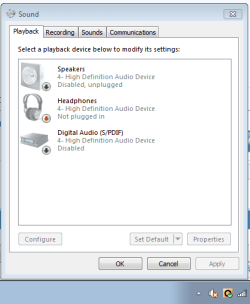
Seems as though the driver rolled back (AMD to ATI)
Uninstall the ATI HD Audio device, remove software if option is present
Uninstalled the ATI HD Audio device and rebooted. Got this.

Can you get back to this?

Also, there should be a built-in microphone, right? Try disabling both of the mics shown on the
Sound -> Recording tab

One should be an internal mic and the other references the 3.5 jack
 

My Computer My Computer

Computer type
Laptop
Computer Manufacturer/Model Number
HP Pavilion dv6-6c10us
OS
x64 (6.3.9600) Win8.1 Pro & soon dual boot x64 (6.1.7601) Win7_SP1 HomePrem
CPU
AMD A6-3420M APU with Radeon(tm) HD Graphics
Motherboard
Hewlett-Packard 1805
Memory
6.00 GB
Graphics Card(s)
AMD Radeon(TM) HD 6520G
Sound Card
(1) AMD High Definition Audio Device (2) IDT High Definiti
Monitor(s) Displays
HP W2072a 20" LCD (1600 x 900) @ 60 Hz
Screen Resolution
1366 x 768 x 32 bits (4294967296 colors) @ 60 Hz
Hard Drives
ST640LM0 00 HM641JI SATA Disk Device
Keyboard
Logitech k520 wireless KB
Mouse
Logitech m320 wireless mouse (bundled with KB)
Internet Speed
15/5 | 54 MB Wireless 'n'
Antivirus
Realtime: Defender or Avast | On-demand: Malwarebytes, ESET
Browser
IE 11 on Win8, IE 10 on win 7
Other Info
Media: [Gimp, Audacity, VLC] || Comm: [WEmail 2012, Skype] || Productivity: [OpenOffice,| Textpad] || Utils: [Sysinternals, cCleaner, Speccy, Defraggler]
Thanks, I'll be posting in this thread - yeah Speccy is a Piriform server issue.

What screenshot is this?
Current or two days ago - because this looks pretty good (speakers=default) except the ATI HD device is back. This is most likely being installed after a restart and is probably causing the sound issue. The BSOD might have been a result of the AMD HD 'update' to the ATI device. AMD/ATI are same company now, but these are old drivers (2004-2008) and then there's the Sigmatel/IDT 9205 device itself.
That was from post #22 in this thread, and I emphasized that the image was from this past Friday, the 7th of March, and yes, when that image was taken I had working sound from the internal speakers.
All of this worked at some point, right, so it's just a matter of unwinding the changes/updates.

309654d1394392427-sound-devices-have-disappeared-capture12.png


So.... I'm confused. It's probably better to post screenshots with current information and provide a link reference to previous information (for me anyway).

Words often get in the way of communicating - this sort of threw me off
So to emphasize, the thumbnail is not current - it's from 2 days ago.
I wasn't sure which thumbnail was from 2 days ago, although I did not see a post with this information (so I assume this is current)
Maybe I could have made that clearer.. You asked (post #19 of this thread) 'Ok, now the question is why are there no speakers, most laptops have built in speakers.' In post #22 I answered that and gave you the screenshot of the playback tab as it looked when the sound was working. I've saved all the screen images so I can refer to them later. The image from #22 was simply one I took and kept to sort of prove to people that I DID have sound.
 

My Computer My Computer

Computer type
Laptop
OS
Windows 7 home premium 64 bit
CPU
AMD K10
Motherboard
Hewlett-Packard 1444 (Socket S1G4)
Memory
3.00GB Dual-Channel DDR3 @ 532MHz
Graphics Card(s)
ATI AMD M880G with ATI Mobility Radeon HD 4250 (HP)
Sound Card
Realtek
Screen Resolution
1366 x 768
Hard Drives
465GB Western Digital
Antivirus
MSE
Seems as though the driver rolled back (AMD to ATI)
Uninstall the ATI HD Audio device, remove software if option is present
Uninstalled the ATI HD Audio device and rebooted. Got this.

Can you get back to this?

Also, there should be a built-in microphone, right? Try disabling both of the mics shown on the
Sound -> Recording tab

One should be an internal mic and the other references the 3.5 jack
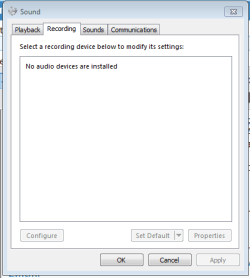
Post #12 http://www.sevenforums.com/bsod-help-support/324518-sound-device-driver-problems-causing-bsod-2.html shows what I have now
Since I currently have no audio device installed, the Recording tab looks just like the Playback tab
 

Attachments

  • Capture20.PNG
    Capture20.PNG
    5.5 KB · Views: 21

My Computer My Computer

Computer type
Laptop
OS
Windows 7 home premium 64 bit
CPU
AMD K10
Motherboard
Hewlett-Packard 1444 (Socket S1G4)
Memory
3.00GB Dual-Channel DDR3 @ 532MHz
Graphics Card(s)
ATI AMD M880G with ATI Mobility Radeon HD 4250 (HP)
Sound Card
Realtek
Screen Resolution
1366 x 768
Hard Drives
465GB Western Digital
Antivirus
MSE
By definition, HD Audio Devices connect to an upstream HD Audio bus controller. As i understand it, the first problem to tackle is audio devices don't always appear in DevMgr? In any case, I'd first refresh the controller.

The HD Audio bus controller appears in DevMgr under System Devices. Find it, right click->Uninstall. At top of DevMgr menu click Action->Scan For Hardware changes. Windows will reinstall the controller. The HD bus controller will attempt to re-detect attached HD devices. Do the HD audio devices re-appear? (they may not have the right names till the thieir driver is installed - but that's the next step after detection)
 
Last edited:

My Computer My Computer

Computer type
PC/Desktop
Computer Manufacturer/Model Number
Dell Optiplex 360 and Optiplex 755
OS
Desk 1: Win 7 Pro x32; Desk 2: Windows 10 x64
Hard Drives
500GB Crucial SSD in both Desktops
Other Info
Buffalo 6TB NAS, Raid 1
Ok, good enough.

This is the current Dev Mgr - correct?

309672d1394399211-sound-device-driver-problems-causing-bsod-capture19.png


What happened to the :warn: High Definition Audio Device in post# 18 (this thread)?
Uninstalled the ATI HD Audio device and rebooted. Got this.

309610d1394355372-sound-devices-have-disappeared-capture17.png


I was going to ask you to copy the hardware id for the HD Audio device on the details tab of Dev Mgr, but now I have to try to find it in the other info you posted since it doesn't appear any longer.

Try the MS Catalog for the Sigmatel driver. It's a few mods ahead of the one on Gateway and it lists Win7 as an OS.
Click here You have to register the 1st time you use the MS Catalog.
Description: SigmaTel Audio software update released in February, 2008
Architecture: X86
Classification: Drivers
Supported products: Windows 7 , Windows 8 , Windows 8.1 Drivers , Windows Vista
Driver Manufacturer: SigmaTel
Driver Class: Other Hardware
Driver Model: SigmaTel High Definition Audio CODEC
Driver Provider: SigmaTel
Version: 6.10.5866.0
Version Date: 2/15/2008
 
Last edited:

My Computer My Computer

Computer type
Laptop
Computer Manufacturer/Model Number
HP Pavilion dv6-6c10us
OS
x64 (6.3.9600) Win8.1 Pro & soon dual boot x64 (6.1.7601) Win7_SP1 HomePrem
CPU
AMD A6-3420M APU with Radeon(tm) HD Graphics
Motherboard
Hewlett-Packard 1805
Memory
6.00 GB
Graphics Card(s)
AMD Radeon(TM) HD 6520G
Sound Card
(1) AMD High Definition Audio Device (2) IDT High Definiti
Monitor(s) Displays
HP W2072a 20" LCD (1600 x 900) @ 60 Hz
Screen Resolution
1366 x 768 x 32 bits (4294967296 colors) @ 60 Hz
Hard Drives
ST640LM0 00 HM641JI SATA Disk Device
Keyboard
Logitech k520 wireless KB
Mouse
Logitech m320 wireless mouse (bundled with KB)
Internet Speed
15/5 | 54 MB Wireless 'n'
Antivirus
Realtime: Defender or Avast | On-demand: Malwarebytes, ESET
Browser
IE 11 on Win8, IE 10 on win 7
Other Info
Media: [Gimp, Audacity, VLC] || Comm: [WEmail 2012, Skype] || Productivity: [OpenOffice,| Textpad] || Utils: [Sysinternals, cCleaner, Speccy, Defraggler]
The HD Audio bus controller appears in DevMgr under System Devices. Find it, right click->Uninstall. At top of DevMgr menu click Action->Scan For Hardware changes. Windows will reinstall the controller. The HD bus controller will attempt to re-detect attached HD devices.
I had nothing called HD Audio bus controller under System Devices, although I did have 2 devices called High Definition Audio Controller. I uninstalled them both, then Scanned for Hardware Changes and got my old BSOD friend AtihdW73.sys. A reboot gave me another BSOD. Last Known Good Configuration got me up and running again, but with No Audio Output Device is installed, same as it's been all day.
 

My Computer My Computer

Computer type
Laptop
OS
Windows 7 home premium 64 bit
CPU
AMD K10
Motherboard
Hewlett-Packard 1444 (Socket S1G4)
Memory
3.00GB Dual-Channel DDR3 @ 532MHz
Graphics Card(s)
ATI AMD M880G with ATI Mobility Radeon HD 4250 (HP)
Sound Card
Realtek
Screen Resolution
1366 x 768
Hard Drives
465GB Western Digital
Antivirus
MSE
Ok, yes. It's named hd audio controller. And your result begins to make a bit more sense now. You have TWO hd controllers (first time I saw that on a laptop). And only one is probably using the windows generic driver. Gotta get some sleep now but back tomorrow.

P.s. @slaty.. The primary display for DevMgrr is devices . You don't see driver filters unless you go looking in device properties. That ati hd device isn't a filter. My guess is that it's a downstream device on one of the two controllers
 

My Computer My Computer

Computer type
PC/Desktop
Computer Manufacturer/Model Number
Dell Optiplex 360 and Optiplex 755
OS
Desk 1: Win 7 Pro x32; Desk 2: Windows 10 x64
Hard Drives
500GB Crucial SSD in both Desktops
Other Info
Buffalo 6TB NAS, Raid 1
I'm going to suggest a few things that will hopefully resolve the issue without too much effort.

Stop using 3rd party finders and tune ups.
They might be "easy" but you can't be certain of the value added.

Uninstall the following "helper" apps:
  • DriverEasy
  • PC Tools Perfomance
    >> Windows 7 utilities are sufficient. There are some trusted defrag utilities: Piriform defraggler, Auslogics Disk Defrag, Puran Defrag
  • Anything Google
    • Google Updater (can be reinstalled, but not advised)
    • Google Desktop (can be reinstalled, but not advised)

Download the Chipset drivers from Gateway: Click here
Chipset Driver: D20259-001-001.exe
Version: ATI (3GIO) 1.00.0000.1
Release Date: 6/3/2008
File Size: 139 KB
Supported Computers and Parts:
... Gateway M-1629 Notebook [Part #1015602R]
:note: Drivers are hardware dependent, they are not OS dependent.​
Backup your system and make a Restore Point

Uninstall AMD Catalyst Install Manager (CIM): How-To Uninstall AMD Catalyst Drivers From A Windows Based System
Pay attention to step 11: If ATI specific software is still listed, remove any remaining ATI software components using the above process and restart the system when complete.
:note: Consider AMD and ATI as the same thing.

Unistall any AMD /ATI driver(s) that you installed with Drivereasy (CIM might not pick these up).

After uninstalling the AMD/ATI using CIM and restarting the system
Install the Chipset drivers you downloaded above. Hopefully that download contains all of the drivers needed for your board. (My HP required me to hunt out one or two drivers that were not in my download and not offered by Windows Update)

If you have sound now, great.

After the chipset is installed, manually run Windows Update (WU) and look at the optional offers for hardware (HW) drivers. Tick one at a time and let WU install it, then see if anything has changed (sound / no sound).
If sound worked but stopped working after WU installed an update, back off that one update, hide it in WU (Right click / hide) and do the next HW update offered by WU. Continue through all HW WUs offered until the list is exhausted.

Then follow the instructions in OPTION TWO of http://www.sevenforums.com/tutorials/1538-sfc-scannow-command-system-file-checker.html

Attach the entire Windows\Logs\CBS\CBS.log to a post.

Those steps are how I have approached similar issues on one of my machines (Hpq laptop with Vista).

Thanks
 

My Computer My Computer

Computer type
Laptop
Computer Manufacturer/Model Number
HP Pavilion dv6-6c10us
OS
x64 (6.3.9600) Win8.1 Pro & soon dual boot x64 (6.1.7601) Win7_SP1 HomePrem
CPU
AMD A6-3420M APU with Radeon(tm) HD Graphics
Motherboard
Hewlett-Packard 1805
Memory
6.00 GB
Graphics Card(s)
AMD Radeon(TM) HD 6520G
Sound Card
(1) AMD High Definition Audio Device (2) IDT High Definiti
Monitor(s) Displays
HP W2072a 20" LCD (1600 x 900) @ 60 Hz
Screen Resolution
1366 x 768 x 32 bits (4294967296 colors) @ 60 Hz
Hard Drives
ST640LM0 00 HM641JI SATA Disk Device
Keyboard
Logitech k520 wireless KB
Mouse
Logitech m320 wireless mouse (bundled with KB)
Internet Speed
15/5 | 54 MB Wireless 'n'
Antivirus
Realtime: Defender or Avast | On-demand: Malwarebytes, ESET
Browser
IE 11 on Win8, IE 10 on win 7
Other Info
Media: [Gimp, Audacity, VLC] || Comm: [WEmail 2012, Skype] || Productivity: [OpenOffice,| Textpad] || Utils: [Sysinternals, cCleaner, Speccy, Defraggler]
Uninstall the following "helper" apps:
  • DriverEasy
  • PC Tools Perfomance
    >> Windows 7 utilities are sufficient. There are some trusted defrag utilities: Piriform defraggler, Auslogics Disk Defrag, Puran Defrag
  • Anything Google
    • Google Updater (can be reinstalled, but not advised)
    • Google Desktop (can be reinstalled, but not advised)
Okay, done... I have no investment in any of these tools although DriverEasy was the only thing that actually got my sound back this past Friday. PC Tools does not seem to exist - I went to Programs and Features and Revo Uninstaller without finding it, then went to the Program Folders files and couldn't find it there. I have removed Google Desktop (although that also removed Google Earth) and Google Toolbar. I can't find Google Updater (Google Update Service had already been stopped)
Download the Chipset drivers from Gateway: Click here

Chipset Driver: D20259-001-001.exe
Version: ATI (3GIO) 1.00.0000.1
Release Date: 6/3/2008
File Size: 139 KB
Supported Computers and Parts:
... Gateway M-1629 Notebook [Part #1015602R]
:note: Drivers are hardware dependent, they are not OS dependent.
Done
Backup your system and make a Restore Point
Done
Uninstall AMD Catalyst Install Manager (CIM): How-To Uninstall AMD Catalyst Drivers From A Windows Based System
Pay attention to step 11: If ATI specific software is still listed, remove any remaining ATI software components using the above process and restart the system when complete.
:note: Consider AMD and ATI as the same thing.

Unistall any AMD /ATI driver(s) that you installed with Drivereasy (CIM might not pick these up).
There are no ATI or AMD listings currently residing - checked both with Control Panel and Revo. I had both an ATI and AMD folder off the root directory which I deleted. I also manually deleted the DriverEasy folder which was under ....\AppData\Roaming\Easeware. It contained drivers download using DriverEasy
After uninstalling the AMD/ATI using CIM and restarting the system
Install the Chipset drivers you downloaded above. Hopefully that download contains all of the drivers needed for your board. (My HP required me to hunt out one or two drivers that were not in my download and not offered by Windows Update)
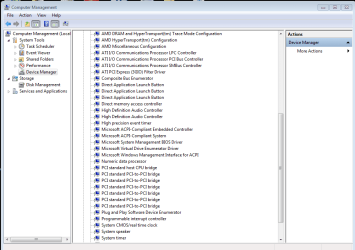
Running the chipset.exe gives me a readme.txt file with instructions on how to install it. I've included the entire document as an attachment, but here is what's got me stymied:
4. In Device Manager, click the plus sign (+) next to System Devices.
5. Click PCI Bus, and then from the Action menu, click Update Driver Software.
I have no PCI Bus listed there, or anywhere in DevMgr that I can see, so I'm stopping to await a reply. I wish there was a way I could export my device manager so you could see the whole thing and not just the portion below
 

Attachments

  • Capture21.PNG
    Capture21.PNG
    22.9 KB · Views: 1
  • read_me.txt
    read_me.txt
    2 KB · Views: 2

My Computer My Computer

Computer type
Laptop
OS
Windows 7 home premium 64 bit
CPU
AMD K10
Motherboard
Hewlett-Packard 1444 (Socket S1G4)
Memory
3.00GB Dual-Channel DDR3 @ 532MHz
Graphics Card(s)
ATI AMD M880G with ATI Mobility Radeon HD 4250 (HP)
Sound Card
Realtek
Screen Resolution
1366 x 768
Hard Drives
465GB Western Digital
Antivirus
MSE
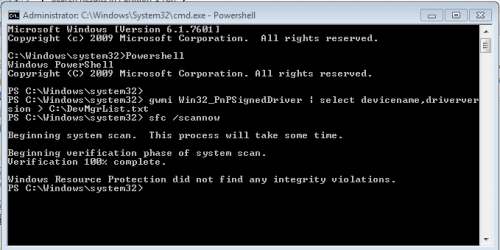
Try this powershell script
Launch an elevated (Run as admin...) Powershell
copy the line below and paste into the PS window
gwmi Win32_PnPSignedDriver | select devicename,driverversion > C:\DevMgrList.txt
The script creates C:\DevMgrList.txt - attach it to a post.

Piriform was still down when I checked it last night. Speccy would have all of that information in it. I'll have to find where you posted the link and try Piriform again.
 

My Computer My Computer

Computer type
Laptop
Computer Manufacturer/Model Number
HP Pavilion dv6-6c10us
OS
x64 (6.3.9600) Win8.1 Pro & soon dual boot x64 (6.1.7601) Win7_SP1 HomePrem
CPU
AMD A6-3420M APU with Radeon(tm) HD Graphics
Motherboard
Hewlett-Packard 1805
Memory
6.00 GB
Graphics Card(s)
AMD Radeon(TM) HD 6520G
Sound Card
(1) AMD High Definition Audio Device (2) IDT High Definiti
Monitor(s) Displays
HP W2072a 20" LCD (1600 x 900) @ 60 Hz
Screen Resolution
1366 x 768 x 32 bits (4294967296 colors) @ 60 Hz
Hard Drives
ST640LM0 00 HM641JI SATA Disk Device
Keyboard
Logitech k520 wireless KB
Mouse
Logitech m320 wireless mouse (bundled with KB)
Internet Speed
15/5 | 54 MB Wireless 'n'
Antivirus
Realtime: Defender or Avast | On-demand: Malwarebytes, ESET
Browser
IE 11 on Win8, IE 10 on win 7
Other Info
Media: [Gimp, Audacity, VLC] || Comm: [WEmail 2012, Skype] || Productivity: [OpenOffice,| Textpad] || Utils: [Sysinternals, cCleaner, Speccy, Defraggler]
Yeah, PCI bus should be there, it is at least on my system.

I wonder if removing AMD/ATI had an unwanted side effect. Have you restarted the machine since removing AMD /ATI?
If you have restarted, see if this helps with the missing PCI Bus:

Please follow the instructions in OPTION TWO of http://www.sevenforums.com/tutorials/1538-sfc-scannow-command-system-file-checker.html

Attach the entire CBS.log to a post.

I'll read the readme and look for Speccy.

Thanks
 

My Computer My Computer

Computer type
Laptop
Computer Manufacturer/Model Number
HP Pavilion dv6-6c10us
OS
x64 (6.3.9600) Win8.1 Pro & soon dual boot x64 (6.1.7601) Win7_SP1 HomePrem
CPU
AMD A6-3420M APU with Radeon(tm) HD Graphics
Motherboard
Hewlett-Packard 1805
Memory
6.00 GB
Graphics Card(s)
AMD Radeon(TM) HD 6520G
Sound Card
(1) AMD High Definition Audio Device (2) IDT High Definiti
Monitor(s) Displays
HP W2072a 20" LCD (1600 x 900) @ 60 Hz
Screen Resolution
1366 x 768 x 32 bits (4294967296 colors) @ 60 Hz
Hard Drives
ST640LM0 00 HM641JI SATA Disk Device
Keyboard
Logitech k520 wireless KB
Mouse
Logitech m320 wireless mouse (bundled with KB)
Internet Speed
15/5 | 54 MB Wireless 'n'
Antivirus
Realtime: Defender or Avast | On-demand: Malwarebytes, ESET
Browser
IE 11 on Win8, IE 10 on win 7
Other Info
Media: [Gimp, Audacity, VLC] || Comm: [WEmail 2012, Skype] || Productivity: [OpenOffice,| Textpad] || Utils: [Sysinternals, cCleaner, Speccy, Defraggler]
Not much in the readme.....

AFTER the system file checker has done it's job, you could try to manually install the inf file and then scan for updates in DevMgr.

I stress after because SFC might correct the PCI bus issue and then you can follow the readme instructions. I could be wrong on SFC, but it won't hurt and it has great potential in resolving file system FUBARs.

Bill
.
 

My Computer My Computer

Computer type
Laptop
Computer Manufacturer/Model Number
HP Pavilion dv6-6c10us
OS
x64 (6.3.9600) Win8.1 Pro & soon dual boot x64 (6.1.7601) Win7_SP1 HomePrem
CPU
AMD A6-3420M APU with Radeon(tm) HD Graphics
Motherboard
Hewlett-Packard 1805
Memory
6.00 GB
Graphics Card(s)
AMD Radeon(TM) HD 6520G
Sound Card
(1) AMD High Definition Audio Device (2) IDT High Definiti
Monitor(s) Displays
HP W2072a 20" LCD (1600 x 900) @ 60 Hz
Screen Resolution
1366 x 768 x 32 bits (4294967296 colors) @ 60 Hz
Hard Drives
ST640LM0 00 HM641JI SATA Disk Device
Keyboard
Logitech k520 wireless KB
Mouse
Logitech m320 wireless mouse (bundled with KB)
Internet Speed
15/5 | 54 MB Wireless 'n'
Antivirus
Realtime: Defender or Avast | On-demand: Malwarebytes, ESET
Browser
IE 11 on Win8, IE 10 on win 7
Other Info
Media: [Gimp, Audacity, VLC] || Comm: [WEmail 2012, Skype] || Productivity: [OpenOffice,| Textpad] || Utils: [Sysinternals, cCleaner, Speccy, Defraggler]
Device Manager text
 

Attachments

My Computer My Computer

Computer type
Laptop
OS
Windows 7 home premium 64 bit
CPU
AMD K10
Motherboard
Hewlett-Packard 1444 (Socket S1G4)
Memory
3.00GB Dual-Channel DDR3 @ 532MHz
Graphics Card(s)
ATI AMD M880G with ATI Mobility Radeon HD 4250 (HP)
Sound Card
Realtek
Screen Resolution
1366 x 768
Hard Drives
465GB Western Digital
Antivirus
MSE
CBS.log at 7.69 MB exceeds the size limit
 

Attachments

  • Capture22.PNG
    Capture22.PNG
    7.8 KB · Views: 16

My Computer My Computer

Computer type
Laptop
OS
Windows 7 home premium 64 bit
CPU
AMD K10
Motherboard
Hewlett-Packard 1444 (Socket S1G4)
Memory
3.00GB Dual-Channel DDR3 @ 532MHz
Graphics Card(s)
ATI AMD M880G with ATI Mobility Radeon HD 4250 (HP)
Sound Card
Realtek
Screen Resolution
1366 x 768
Hard Drives
465GB Western Digital
Antivirus
MSE
Tried zipping the log file....
 

My Computer My Computer

Computer type
Laptop
OS
Windows 7 home premium 64 bit
CPU
AMD K10
Motherboard
Hewlett-Packard 1444 (Socket S1G4)
Memory
3.00GB Dual-Channel DDR3 @ 532MHz
Graphics Card(s)
ATI AMD M880G with ATI Mobility Radeon HD 4250 (HP)
Sound Card
Realtek
Screen Resolution
1366 x 768
Hard Drives
465GB Western Digital
Antivirus
MSE
Back
Top