Sound Devices Have Disappeared

Here's what i see going on...

As mentioned earlier, a device name can change when the driver is installed.
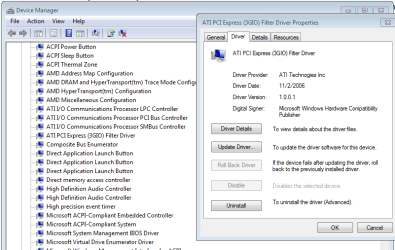
I inspected the chipset driver file from Gateway. When the chipset driver is installed the "PCI bus" gets renamed to the ATI PCI Express (3GIO)! Since we see that name appearing in your DevMgr snapshot, the chipset driver is already installed! To verify and see if its the same version i see in the Gateway download, right click the ATI PCI (3GIO) device->Properties->Driver tab. If it's the same driver, i believe the Driver tab will display provider= AMD (or ATI), and driver version= 11/02/2006, v1.00.0000.1​

Next, you do have TWO HD audio controllers. After some thinking, it makes sense (even for a laptop!). Here's why:
  • You have one HD Audio Controller that connects to the downstream ATI HD device. The ATI/AMD HD audio device we se in DevMgr supports sound for the computer's HDMI port! (It also seems this controller may be related to your BSODs)
  • The other HD Audio Controller connects to the HD Audio device on the motherboard that supports HD sound for the speakers and mic.

Download DevManView (32-bit)32 bit version of DevManView. (fyi to anyone reading in the future, there's a 64bit version as well).
  • Run the DevManView.exe
  • Click Ctl-A to select all, Ctl-S to save
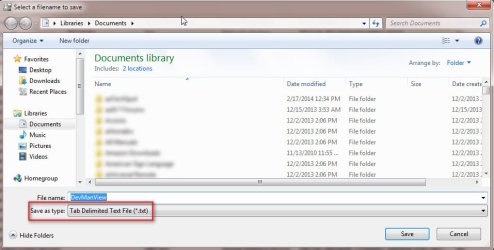
  • Before you save! be sure you change the SAVE AS type to Tab Delimited text.
  • attach the text file to next post
 

Attachments
  • DevManView.jpg
    DevManView.jpg
    54.9 KB · Views: 0

My Computer My Computer

Computer type
PC/Desktop
Computer Manufacturer/Model Number
Dell Optiplex 360 and Optiplex 755
OS
Desk 1: Win 7 Pro x32; Desk 2: Windows 10 x64
Hard Drives
500GB Crucial SSD in both Desktops
Other Info
Buffalo 6TB NAS, Raid 1
p.s. DevManView will give me a look at your Device Manager data. Let's also check for any Problem Devices while we're at it

> Hit the Start Orb. Enter msinfo32 in the search box. Hit Enter
> When the report appears, click to expand Components. Then select Problem Devices
> Anything appear? Ctl-A to select all the paste into next post
> If no problem devices listed tell us that too
 

My Computer My Computer

Computer type
PC/Desktop
Computer Manufacturer/Model Number
Dell Optiplex 360 and Optiplex 755
OS
Desk 1: Win 7 Pro x32; Desk 2: Windows 10 x64
Hard Drives
500GB Crucial SSD in both Desktops
Other Info
Buffalo 6TB NAS, Raid 1
Not much in the readme.....

AFTER the system file checker has done it's job, you could try to manually install the inf file and then scan for updates in DevMgr.

I stress after because SFC might correct the PCI bus issue and then you can follow the readme instructions. I could be wrong on SFC, but it won't hurt and it has great potential in resolving file system FUBARs.

Bill
.
When I right-click on the .inf file, then left-click on install, this is what I get.
 

Attachments

  • Capture23.PNG
    Capture23.PNG
    10.4 KB · Views: 23

My Computer My Computer

Computer type
Laptop
OS
Windows 7 home premium 64 bit
CPU
AMD K10
Motherboard
Hewlett-Packard 1444 (Socket S1G4)
Memory
3.00GB Dual-Channel DDR3 @ 532MHz
Graphics Card(s)
ATI AMD M880G with ATI Mobility Radeon HD 4250 (HP)
Sound Card
Realtek
Screen Resolution
1366 x 768
Hard Drives
465GB Western Digital
Antivirus
MSE
Here's what i see going on...

As mentioned earlier, a device name can change when the driver is installed.
I inspected the chipset driver file from Gateway. When the chipset driver is installed the "PCI bus" gets renamed to the ATI PCI Express (3GIO)! Since we see that name appearing in your DevMgr snapshot, the chipset driver is already installed! To verify and see if its the same version i see in the Gateway download, right click the ATI PCI (3GIO) device->Properties->Driver tab. If it's the same driver, i believe the Driver tab will display provider= AMD (or ATI), and driver version= 11/02/2006, v1.00.0000.1
You are correct, sir! I am impressed.
Next, you do have TWO HD audio controllers. After some thinking, it makes sense (even for a laptop!). Here's why:
  • You have one HD Audio Controller that connects to the downstream ATI HD device. The ATI/AMD HD audio device we se in DevMgr supports sound for the computer's HDMI port! (It also seems this controller may be related to your BSODs)
  • The other HD Audio Controller connects to the HD Audio device on the motherboard that supports HD sound for the speakers and mic.
Wow! You ARE good! Yes this laptop has an HDMI port
Download DevManView (32-bit)32 bit version of DevManView. (fyi to anyone reading in the future, there's a 64bit version as well).
  • Run the DevManView.exe
  • Click Ctl-A to select all, Ctl-S to save
  • Before you save! be sure you change the SAVE AS type to Tab Delimited text.
  • attach the text file to next post
I'm actually becoming hopeful....
 

Attachments

My Computer My Computer

Computer type
Laptop
OS
Windows 7 home premium 64 bit
CPU
AMD K10
Motherboard
Hewlett-Packard 1444 (Socket S1G4)
Memory
3.00GB Dual-Channel DDR3 @ 532MHz
Graphics Card(s)
ATI AMD M880G with ATI Mobility Radeon HD 4250 (HP)
Sound Card
Realtek
Screen Resolution
1366 x 768
Hard Drives
465GB Western Digital
Antivirus
MSE
p.s. DevManView will give me a look at your Device Manager data. Let's also check for any Problem Devices while we're at it

> Hit the Start Orb. Enter msinfo32 in the search box. Hit Enter
> When the report appears, click to expand Components. Then select Problem Devices
> Anything appear? Ctl-A to select all the paste into next post
> If no problem devices listed tell us that too
No Problem Devices listed. Of course, I have no audio output devices at this juncture, so how could there be a problem with a non-existent device?
 

My Computer My Computer

Computer type
Laptop
OS
Windows 7 home premium 64 bit
CPU
AMD K10
Motherboard
Hewlett-Packard 1444 (Socket S1G4)
Memory
3.00GB Dual-Channel DDR3 @ 532MHz
Graphics Card(s)
ATI AMD M880G with ATI Mobility Radeon HD 4250 (HP)
Sound Card
Realtek
Screen Resolution
1366 x 768
Hard Drives
465GB Western Digital
Antivirus
MSE
Tried zipping the log file....

Thanks for the CBS log. There are a few INFO entries that might be resolved by running this MS Automated Trouble Shooter (MATS)


Other than that it looks good. Are you getting any errors when you run Windows Update(WU)?

There's another utility that might help if the above MATS doesn't correct the CBS entry and another MATS that resets Windows Update. But..... one step at a time.

There's also a nearly sure fire fix: a clean install of Windows. I'll have to take another look at your hardware (memory mostly) to see if I would recommend x64. I normally don't go to the clean install route unless there is no other ready solution, the issue has dragged on for weeks, or there is some benefit (x86 -> x64). Call it seed planting and preparation. I'm still on the fix it path, this is only something to think about.

ComputerGeek is giving you some good information. I'll try to stay on one side of the street so we don't bump into each other trying to help solve the issue on your machine.

Bill
.
 

My Computer My Computer

Computer type
Laptop
Computer Manufacturer/Model Number
HP Pavilion dv6-6c10us
OS
x64 (6.3.9600) Win8.1 Pro & soon dual boot x64 (6.1.7601) Win7_SP1 HomePrem
CPU
AMD A6-3420M APU with Radeon(tm) HD Graphics
Motherboard
Hewlett-Packard 1805
Memory
6.00 GB
Graphics Card(s)
AMD Radeon(TM) HD 6520G
Sound Card
(1) AMD High Definition Audio Device (2) IDT High Definiti
Monitor(s) Displays
HP W2072a 20" LCD (1600 x 900) @ 60 Hz
Screen Resolution
1366 x 768 x 32 bits (4294967296 colors) @ 60 Hz
Hard Drives
ST640LM0 00 HM641JI SATA Disk Device
Keyboard
Logitech k520 wireless KB
Mouse
Logitech m320 wireless mouse (bundled with KB)
Internet Speed
15/5 | 54 MB Wireless 'n'
Antivirus
Realtime: Defender or Avast | On-demand: Malwarebytes, ESET
Browser
IE 11 on Win8, IE 10 on win 7
Other Info
Media: [Gimp, Audacity, VLC] || Comm: [WEmail 2012, Skype] || Productivity: [OpenOffice,| Textpad] || Utils: [Sysinternals, cCleaner, Speccy, Defraggler]
Copied your BSOD zip file from the other thread. Members might find it useful

See boweasel.zip

When I right-click on the .inf file, then left-click on install, this is what I get.

Yeah, I thought that might happen. Stick with ComputerGeek(CG) on the device issue, I'll stay enganged, but CG is on the ball.


Bill
.
 
Last edited:

My Computer My Computer

Computer type
Laptop
Computer Manufacturer/Model Number
HP Pavilion dv6-6c10us
OS
x64 (6.3.9600) Win8.1 Pro & soon dual boot x64 (6.1.7601) Win7_SP1 HomePrem
CPU
AMD A6-3420M APU with Radeon(tm) HD Graphics
Motherboard
Hewlett-Packard 1805
Memory
6.00 GB
Graphics Card(s)
AMD Radeon(TM) HD 6520G
Sound Card
(1) AMD High Definition Audio Device (2) IDT High Definiti
Monitor(s) Displays
HP W2072a 20" LCD (1600 x 900) @ 60 Hz
Screen Resolution
1366 x 768 x 32 bits (4294967296 colors) @ 60 Hz
Hard Drives
ST640LM0 00 HM641JI SATA Disk Device
Keyboard
Logitech k520 wireless KB
Mouse
Logitech m320 wireless mouse (bundled with KB)
Internet Speed
15/5 | 54 MB Wireless 'n'
Antivirus
Realtime: Defender or Avast | On-demand: Malwarebytes, ESET
Browser
IE 11 on Win8, IE 10 on win 7
Other Info
Media: [Gimp, Audacity, VLC] || Comm: [WEmail 2012, Skype] || Productivity: [OpenOffice,| Textpad] || Utils: [Sysinternals, cCleaner, Speccy, Defraggler]
Thanks for the CBS log. There are a few INFO entries that might be resolved by running this MS Automated Trouble Shooter (MATS)
Other than that it looks good. Are you getting any errors when you run Windows Update(WU)?
Haven't really had any problems with WU, but I ran the MATS utility anyway - there were no important updates and the optional ones were totally bogus - a Bing Bar and a Bing Bar Desktop (what a load of BS - promoting your own crappy products under the umbrella of Windows Updates).
 

My Computer My Computer

Computer type
Laptop
OS
Windows 7 home premium 64 bit
CPU
AMD K10
Motherboard
Hewlett-Packard 1444 (Socket S1G4)
Memory
3.00GB Dual-Channel DDR3 @ 532MHz
Graphics Card(s)
ATI AMD M880G with ATI Mobility Radeon HD 4250 (HP)
Sound Card
Realtek
Screen Resolution
1366 x 768
Hard Drives
465GB Western Digital
Antivirus
MSE
Ok, thanks.

I hide each and every Bing and Silverlight WU offers (right click -hide)
... never see them again until MS offers an update (there were 3 Bings and 5 Silvers in my hidden update list at one point. MS seems to have consolidated Bing to only two (1 bar, 1 DT). hmmm just checked and there is only the Bing DT offer hidden - still have the 5 Silverlight offers.

Even though you aren't experiencing WU issues, I'd like to see if the INFO msgs were cleared up. This tutorial runs an additional system tool that has been relegated to WU issues, then the tut asks you to run SFC. Please run through the entire tutorial and post the resultant logs.

Windows Update Posting Instructions Steps 1, 2, and 4. The zip file you create in step 4 will contain the CBS folder not just the log. The CBS folder holds both output logs.
Steps 3 & 5 do not apply for this exercise.

Yeah, sorry about not mentioning zip - I thought the tutorial covered that

Thanks

Bill
.
 

My Computer My Computer

Computer type
Laptop
Computer Manufacturer/Model Number
HP Pavilion dv6-6c10us
OS
x64 (6.3.9600) Win8.1 Pro & soon dual boot x64 (6.1.7601) Win7_SP1 HomePrem
CPU
AMD A6-3420M APU with Radeon(tm) HD Graphics
Motherboard
Hewlett-Packard 1805
Memory
6.00 GB
Graphics Card(s)
AMD Radeon(TM) HD 6520G
Sound Card
(1) AMD High Definition Audio Device (2) IDT High Definiti
Monitor(s) Displays
HP W2072a 20" LCD (1600 x 900) @ 60 Hz
Screen Resolution
1366 x 768 x 32 bits (4294967296 colors) @ 60 Hz
Hard Drives
ST640LM0 00 HM641JI SATA Disk Device
Keyboard
Logitech k520 wireless KB
Mouse
Logitech m320 wireless mouse (bundled with KB)
Internet Speed
15/5 | 54 MB Wireless 'n'
Antivirus
Realtime: Defender or Avast | On-demand: Malwarebytes, ESET
Browser
IE 11 on Win8, IE 10 on win 7
Other Info
Media: [Gimp, Audacity, VLC] || Comm: [WEmail 2012, Skype] || Productivity: [OpenOffice,| Textpad] || Utils: [Sysinternals, cCleaner, Speccy, Defraggler]
I'm still trying to make sense of some of your DevManView data. fyi... It shows several HD audio devices listed but only your modem appears connected (which i believe implies the others are not currently being detected"

I'd like to see which devices attach to which controller.
  • By default, Device Manager only displays connected devices. Set devmgr to show non-present/ghost devices see HERE
  • Open Device manager. Click View->Show hidden devices
  • Next click View->Devices by connection. (this displays devices based on the connection to one another) Expand any ACPI devices until you see the PCI bus (or likely ATI PCI Express in your case)
  • Drill down to find both HD Audio Controllers and expand each to show the present and non-present devices ("non-present" devices are the ones with the semi-transparent icons) they attach to
  • Please give me a snapshot

/* EDIT */
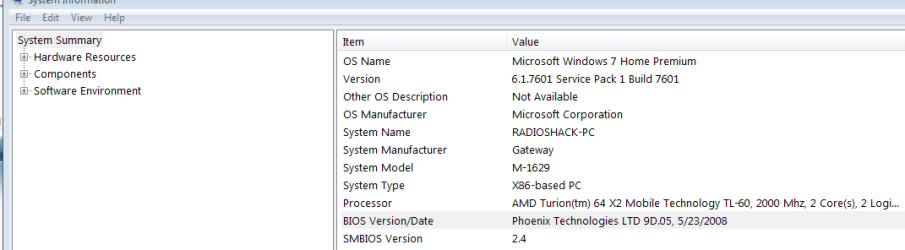
While you're at it, run msinfo32 again. On the System Summary, tell me the BIOS version and date
 
Last edited:

My Computer My Computer

Computer type
PC/Desktop
Computer Manufacturer/Model Number
Dell Optiplex 360 and Optiplex 755
OS
Desk 1: Win 7 Pro x32; Desk 2: Windows 10 x64
Hard Drives
500GB Crucial SSD in both Desktops
Other Info
Buffalo 6TB NAS, Raid 1
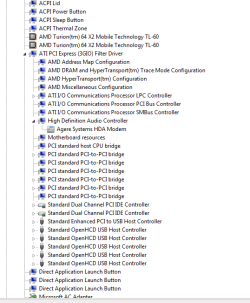
I'm sure you can explain this... as you can see from the thumbnails, when I do as you suggest I only see 1 HD Audio Controller, yet the 2nd thumbnail shows 2 of them in device manager under system devices. And I haven't even started to drink yet..... (I feel a 3:1 vodka gimlet in my immediate future).
 

Attachments

  • Capture25.PNG
    Capture25.PNG
    10.5 KB · Views: 17
  • Capture26.PNG
    Capture26.PNG
    10.2 KB · Views: 16
  • Capture27.PNG
    Capture27.PNG
    11.3 KB · Views: 0

My Computer My Computer

Computer type
Laptop
OS
Windows 7 home premium 64 bit
CPU
AMD K10
Motherboard
Hewlett-Packard 1444 (Socket S1G4)
Memory
3.00GB Dual-Channel DDR3 @ 532MHz
Graphics Card(s)
ATI AMD M880G with ATI Mobility Radeon HD 4250 (HP)
Sound Card
Realtek
Screen Resolution
1366 x 768
Hard Drives
465GB Western Digital
Antivirus
MSE
Update...

Still provide the information requested in last post, but fyi... after some analysis of your Device manager data, "Houston we may have a problem". :(

There's evidence the sigmatel Hi Def audio chip and/or its controller are mis-behaving. In any case, will explain that and next steps after you provide BIOS info and snapshot as requested in my last post
 

My Computer My Computer

Computer type
PC/Desktop
Computer Manufacturer/Model Number
Dell Optiplex 360 and Optiplex 755
OS
Desk 1: Win 7 Pro x32; Desk 2: Windows 10 x64
Hard Drives
500GB Crucial SSD in both Desktops
Other Info
Buffalo 6TB NAS, Raid 1
Looks like we both posted at same time! just saw your info. Gotta go out to dinner now. Will explain what i see and next steps when i get back
 

My Computer My Computer

Computer type
PC/Desktop
Computer Manufacturer/Model Number
Dell Optiplex 360 and Optiplex 755
OS
Desk 1: Win 7 Pro x32; Desk 2: Windows 10 x64
Hard Drives
500GB Crucial SSD in both Desktops
Other Info
Buffalo 6TB NAS, Raid 1
Re: Only one HD Controller seen when View by Connections
I believe that's what you're seeing but not sure why. Maybe because no devices are attached to it??? I’m really not sure but that’s OK. I still got to see what I wanted to know.

Re: Sigmatel audio
I went through your data as well as inspected the Sigmatel driver from Gateway. Before I explain what I see, let me quickly explain “Hardware IDs”. Every Windows device is assigned one or more hardware ids. Hardware ids are cryptic looking strings but actually contain useful data.

The Sigmatel audio chip on your machine should be reporting hwid strings that start with HDAUDIO\FUNC_01&VEN_8384. That's consistent with the Sigmatel driver. I see it checking for a hwid string that starts HDAUDIO\FUNC_01&VEN_8384. (If none found, the driver install fails). The two problems I see from your data
  1. The audio chip and its devices are not always detected (as is the case right now). The device must be detected and the hwid reported for the device and its driver to work
  2. I also see evidence of a couple times when the device was detected but it seems data bits were dropped! and the WRONG hwid reported! (I wouldn't think that possible and is the first time i've seen it. But I can provide the info if anyone else is curious about that fact to draw their own conclusion) A wrong hwid would also explains why the Sigmatel driver wouldn’t install even when your device was detected several posts back
Both your audio controllers are running the generic Windows driver (which I see 99.9% of the time so that should be ok) BUT I do see you’re running BIOS v9D.05 dated 2008. Gateway support site only lists v9D.06 dated 2010. Suggest you carefully do a BIOS update first. (make sure laptop is plugged in and doesn’t loose power during the update)

Then let's see what happens next.
 

My Computer My Computer

Computer type
PC/Desktop
Computer Manufacturer/Model Number
Dell Optiplex 360 and Optiplex 755
OS
Desk 1: Win 7 Pro x32; Desk 2: Windows 10 x64
Hard Drives
500GB Crucial SSD in both Desktops
Other Info
Buffalo 6TB NAS, Raid 1
Although you came into this thread fairly late, I assume you acquainted yourself with the various changes that my sound devices have entertained over the past week or so. That being said, I would like to emphasize that I have had sound from my internal speakers several times since the thread was initiated. Those times when I did have sound the system would always 'tell me' that it was going to disappear when the shutdown process would hang for about a minute because explorer was unable to play the logoff tune. The computer would of course shut down, but the subsequent reboot would ALWAYS be soundless.

And I also assume that you know that this originally ran Vista and was successfully (and sound-fully) updated to W7 years ago.

So I have no idea where to look for a BIOS update. Do I go to Phoenix? Gateway?

I was so encouraged the other day. Now I'm ready to copy the music, pictures, documents, buy a new laptop and take a 20 pound sledgehammer to this. It's been 10 days, 55 posts and I'm seemingly no closer to a resolution than when I first posted.

Will a complete reinstall fix this, or do I opt for the sledgehammer? Or is there anything behind door number 3?
 
Last edited:

My Computer My Computer

Computer type
Laptop
OS
Windows 7 home premium 64 bit
CPU
AMD K10
Motherboard
Hewlett-Packard 1444 (Socket S1G4)
Memory
3.00GB Dual-Channel DDR3 @ 532MHz
Graphics Card(s)
ATI AMD M880G with ATI Mobility Radeon HD 4250 (HP)
Sound Card
Realtek
Screen Resolution
1366 x 768
Hard Drives
465GB Western Digital
Antivirus
MSE
I don't drink, but a Vodka Gimlet sounds tasty right about now.

Post# 44 DevMgr:
309861d1394519634-sound-devices-have-disappeared-capture24.png


Post# 51 DevMgr:
309974d1394585486-sound-devices-have-disappeared-capture25.png


If ComputerGeek agrees, I don't want to derail anything he was trying or might try, I suggest uninstalling
AMD PCI Express (3GIO) Filter Driver and get back to the base MS pci bus. After that, post another DevMgr screen showing what driver supplies the pci bus.

If you look at the SF Diag output I copied over from Bo's BSOD thread (post# 47), pci bus is in the MSINFO. I understand that things were uninstalled, but this is a bit confusing. Nothing should have touched pci bus, in fact, anything uninstalled should have rolled it back to the MS base.

I thought you already removed AMD/ATI from your machine. Where is it coming from? The chipset download from Gateway failed to install, even manually, so that's not it.

Windows update? Device installs at reboot or scan?

Will a complete reinstall fix this, or do I opt for the sledgehammer? Or is there anything behind door number 3?

There's also a nearly sure fire fix: a clean install of Windows. I'll have to take another look at your hardware (memory mostly) to see if I would recommend x64.
If you go the reinstall route, I would recommend another gig of memory and install Win7 x64. You can run x64 with 3 gig, but it will run better with 4 gig.

The choice is yours, just let the thread know your decision. Read both of these tutorials and prepare first.
http://www.sevenforums.com/tutorials/1649-clean-install-windows-7-a.html
http://www.sevenforums.com/tutorials/219487-clean-reinstall-factory-oem-windows-7-a.html

Door# 3? Already suggested before my re-install response.

10 days... 55 posts - that's nuthin' :geek:

Troubleshooting is difficult enough when working on old equipment that require old software/drivers. Not having physical access to the machine and the nature of forums increase the difficulty and time required to find a solution. Members on this side of the monitor depend on you to be the eyes and hands - if something is putting the AMD driver back in place, you should see something - a new device found, installing driver.... - or a Windows Update.

Malware is another possibility. I've never seen malware do this device driver switching though, but let's see.
I'd like you to do a quick malware scan on your system just to make sure there isn't anything lurking.
Download Malwarebytes Anti-Malware Free (click here to download, select the free version)
"Save as" the install package to your Desktop
Double click the mbam-setup file on your desktop to install and run Malwarebytes (Mbam)

Answer YES to all authorization prompts and then follow the Mbam setup prompts.
Do not make any changes to default settings.
When the install is finished, verify that only the following two options have checkmarks,
change to match if necessary.
[[FONT=Webdings, serif]a[/FONT]] Update Malwarebytes’ Anti-Malware
[a] Launch Malwarebytes’ Anti-Malware

Make sure that there is NOT a checkmark next to:
[..] Enable free trial of Malwarebytes Anti-Malware PRO

Then click the Finish button.

Allow Mbam to update, then
Select Perform Quick Scan from the options on the Scanner tab, then
Click the Scan button.

After the scan is complete
Click on Show Results
A window displaying any detected malware is shown
Select all malware (make sure all objects are ticked [a]), then
Click on Remove Selected

The Mbam report file pops up in your text editor when Mbam has completed the removal process.

:ar: Select all of the text in the report (Ctrl+A) and paste the text in a new post on this thread.

   Note
If MBAM encounters a file that is difficult to remove, you are asked to restart the computer.
The restart is REQUIRED to allow Mbam to complete the removal of the malware.
Failure to restart means that the malware is still present on your machine.

:info: You want to restart in Normal mode, not in Safe mode.
 

My Computer My Computer

Computer type
Laptop
Computer Manufacturer/Model Number
HP Pavilion dv6-6c10us
OS
x64 (6.3.9600) Win8.1 Pro & soon dual boot x64 (6.1.7601) Win7_SP1 HomePrem
CPU
AMD A6-3420M APU with Radeon(tm) HD Graphics
Motherboard
Hewlett-Packard 1805
Memory
6.00 GB
Graphics Card(s)
AMD Radeon(TM) HD 6520G
Sound Card
(1) AMD High Definition Audio Device (2) IDT High Definiti
Monitor(s) Displays
HP W2072a 20" LCD (1600 x 900) @ 60 Hz
Screen Resolution
1366 x 768 x 32 bits (4294967296 colors) @ 60 Hz
Hard Drives
ST640LM0 00 HM641JI SATA Disk Device
Keyboard
Logitech k520 wireless KB
Mouse
Logitech m320 wireless mouse (bundled with KB)
Internet Speed
15/5 | 54 MB Wireless 'n'
Antivirus
Realtime: Defender or Avast | On-demand: Malwarebytes, ESET
Browser
IE 11 on Win8, IE 10 on win 7
Other Info
Media: [Gimp, Audacity, VLC] || Comm: [WEmail 2012, Skype] || Productivity: [OpenOffice,| Textpad] || Utils: [Sysinternals, cCleaner, Speccy, Defraggler]
As of right now (just about 40 minutes past noon - way too early here for a vodka gimlet),
  • I have no audio output devices installed.
  • DevMgr - under Sound, Video and Game Controllers I have one thing - Audio Device on High Definition Audio Bus
  • The only place in DevMgr where I see any reference to AMD or ATI is under System Devices - the image you show above, Post# 44 DevMgr:, is exactly how it looks now with those 8 AMD/ATI devices. Should I just uninstall all 8? Can it get any worse if I do?
  • My concerns about a reinstall are multiple - First of all, it's a pain in the butt. There's a lot of music, both iTunes and non-iTunes that has to be backed up, along with the documents and pictures and videos. Secondly, I'm no longer positive about the product key. We ordered Windows 7 for this laptop online, receiving an iso file which we downloaded and burnt, along with a product key. That key was printed out and taped to the bottom of the laptop, but it does not match the key that displays from the Belarc printout. I do not want to spend any more money on what several people have referred to as an aging laptop. Thirdly, if the sound chip itself is in some sort of death throes, a reinstall ain't gonna help. Then there's the issue of the other drivers - since I'd be wiping everything out, a non-Gateway reinstall is not even going to supply me with an Ethernet driver, so I'd have to use another computer to go to where? Gateway? Will the drivers listed under M-1629 Vista work on Windows 7? And look at all the trouble I've had with the chipset drivers - ComputerGeek tells me that I have the correct driver for that, while Slartybart gives me a chipset link that can't be installed. I dunno....
As far as malware, I was apparently remiss. Before I ever posted here I ran a full, updated MalwareBytes scan, along with an online ESET scan, SuperAntiSpyware, JRT, AdAware, TDSSKiller, ComboFix and a BitDefender scan run from a bootable disk. All were clean, other than 2 PUP entries from MBAM which I removed. I have continued to run occasional quick MalwareBytes scans since the thread(s) started and everything continues to be clean (although I really haven't used this laptop to do anything beyond reply and post here).
 

My Computer My Computer

Computer type
Laptop
OS
Windows 7 home premium 64 bit
CPU
AMD K10
Motherboard
Hewlett-Packard 1444 (Socket S1G4)
Memory
3.00GB Dual-Channel DDR3 @ 532MHz
Graphics Card(s)
ATI AMD M880G with ATI Mobility Radeon HD 4250 (HP)
Sound Card
Realtek
Screen Resolution
1366 x 768
Hard Drives
465GB Western Digital
Antivirus
MSE
So I have no idea where to look for a BIOS update. Do I go to Phoenix? Gateway
@boweasel

I appreciate and am sorry for your frustration. But I am following the data. Your sound has become problematic and intermittent over the last several weeks. At times your audio chip is not even detected. And on occasion when it has been detected, it seems to supplied the wrong information.

Your BIOS is clearly out of date and IMO, given all the problems/symptoms, your BIOS should be updated. (Gateway doesn't even list your current BIOS version on their website). Go to the Gateway support site for your model, select the Vista x32 OS and look for BIOS on Gateway site v9D.06 dated 2010. Download and follow their instructions.

If that doesn't help, I would have you refresh ONLY the controller for the Sigmatel chip. (But i will have to get back with instructions so you can identify which is which)

I can see all you devices in your DevMgr data. I suggest you NOT uninstall all of the other AMT system devices. The Audio device on Audio bus is the AMT HD audio for your HDMI (with the wrong name - until AMD is installed again) but I'd hold that off till we can complete testing of Sigmatel.

After BIOS update, if still needed we will attempt controller refresh again BUT ONLY the controller for Sigmatel.. I'll need to give you instruction to know which controller is which.

I appreciate @slaty's input. Uninstalling the ATI PCI express driver is another avenue but i'd prefer to first update the BIOS and then we try the controller refresh next

/* EDIT */
At some point, i hope the issue resolved and we can ALL celebrate with that vodka gimlet!
 

My Computer My Computer

Computer type
PC/Desktop
Computer Manufacturer/Model Number
Dell Optiplex 360 and Optiplex 755
OS
Desk 1: Win 7 Pro x32; Desk 2: Windows 10 x64
Hard Drives
500GB Crucial SSD in both Desktops
Other Info
Buffalo 6TB NAS, Raid 1
Thanks for the malware scan info.

Where to begin with answers?

Yes, it is my opinion that the AMD PCI Express (3GIO) Filter Driver should be uninstalled in DevMgr.
If there is a checkbox for Remove software - Tick it so the software is removed
If a dialog box prompts you to remove the software - answer YES.

Restart you machine - cancel any device driver installs.
Post a current device manager->system, hopefully showing pci bus, not AMD PCI Express (3GIO) Filter Driver
If you have the pci bus - install the GW chipset


As far as a reinstall, you have a lot of questions - good questions.
Backups are always good - your choice of course.
The product key and product id numbers will be different - only you can determine the validity
Money? I suggested, not required, one gig of memory if you elected to install x64 - again your choice.
You're correct - a dying chip will not be helped by a reinstall.

Other drivers:
  • You will need the LAN driver and yes from Gateway
I always suggest starting with the Mfrs driver downloads as a base install and working up (Vista and Win7 are close enough OSes not to worry about compatibility).
The tutorials advise downloading the Ethernet driver (you need something to connect) and letting Windows update the drivers, OEM back filling any that WU doesn't offer. The OEM could be GW or another vendor of the actual device.

As far as difference between ComputerGeek(CG) and myself - it's a difference of opinion. As I mentioned, I advise getting back to the base if there are undetermined issues - back to the MS base drivers if necessary. The GW chipset is one of these cases - you need the pci bus to install the chipset. You currently don't have the pci bus - this I'm not clear on, but your SF diag shows that it was there. The DevMgr in post# 51 shows many devices under AMD PCI Express (3GIO) Filter Driver that I believe should be under System devices.

I think I've exhausted the options I have to offer on this issue, the choice of direction is yours to make and I won't be much help with that, so I'll back out of the thread.

Bill
.

edit: since I've extracted myself - follow ComputerGeeks lead.
Man, do I type way too slow (23 minutes+);)
 

My Computer My Computer

Computer type
Laptop
Computer Manufacturer/Model Number
HP Pavilion dv6-6c10us
OS
x64 (6.3.9600) Win8.1 Pro & soon dual boot x64 (6.1.7601) Win7_SP1 HomePrem
CPU
AMD A6-3420M APU with Radeon(tm) HD Graphics
Motherboard
Hewlett-Packard 1805
Memory
6.00 GB
Graphics Card(s)
AMD Radeon(TM) HD 6520G
Sound Card
(1) AMD High Definition Audio Device (2) IDT High Definiti
Monitor(s) Displays
HP W2072a 20" LCD (1600 x 900) @ 60 Hz
Screen Resolution
1366 x 768 x 32 bits (4294967296 colors) @ 60 Hz
Hard Drives
ST640LM0 00 HM641JI SATA Disk Device
Keyboard
Logitech k520 wireless KB
Mouse
Logitech m320 wireless mouse (bundled with KB)
Internet Speed
15/5 | 54 MB Wireless 'n'
Antivirus
Realtime: Defender or Avast | On-demand: Malwarebytes, ESET
Browser
IE 11 on Win8, IE 10 on win 7
Other Info
Media: [Gimp, Audacity, VLC] || Comm: [WEmail 2012, Skype] || Productivity: [OpenOffice,| Textpad] || Utils: [Sysinternals, cCleaner, Speccy, Defraggler]
Followup-

AFTER the BIOS update, if there's still a problem: We want to identifty which Audio Controller is for Sigmatel. It has a hwid string that start's PCI\VEN_1002&DEV_4383&SUBSYS_43831002&REV_00

You can check the hwid of each controller in DevMgr right click->Properties->Details Tab. Change the pull down menu to Hardware Ids. The controller we want for Sigmatel will have a hwid that starts PCI\VEN_1002&DEV_4383
/*edit: That 4383 will distinguish it from the other controller */

That's the controller you want to uninstall then action->scan for hardware changes to see if any new audio devices appear. If a new audio device is listed, right click to see Properties->Details etc. and confirm the hwid for the new audio device is HDAUDIO\FUNC_01&VEN_8384 (to make sure it's being reported properly). If so, you can then reinstall the Sigmatel driver
 
Last edited:

My Computer My Computer

Computer type
PC/Desktop
Computer Manufacturer/Model Number
Dell Optiplex 360 and Optiplex 755
OS
Desk 1: Win 7 Pro x32; Desk 2: Windows 10 x64
Hard Drives
500GB Crucial SSD in both Desktops
Other Info
Buffalo 6TB NAS, Raid 1
Back
Top