Win7 x64 - Alt Tab look is broken

GamerPET

New member
Local time
6:27 AM
Messages
6
Hello,

see the attached file.

No idea why but after my latest windows re-install my alt+tab window looks like that. The Skin is Aero so I didn't messed up with that. It looks like the alt tab window is missing it' texture or something.

I tried switching to Windows Classic theme but I only saw the classic alt tab one time. Second time it switched to this "broken look".

I tried in regedit to make windows load the classic alttab (The one fron win xp that only shows icons) with no success.

Any ideas on what I can do? The main problem is not the look but the fact that sometimes it has a delay when switching trough windows... especially when it should go over a specific window.

Thank You
 

Attachments
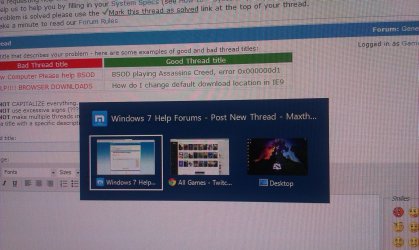
  • 2014-03-15 22.58.43.jpg
    2014-03-15 22.58.43.jpg
    559.7 KB · Views: 2

My Computer My Computer

At a glance

Windows 7 x64
Computer type
PC/Desktop
OS
Windows 7 x64
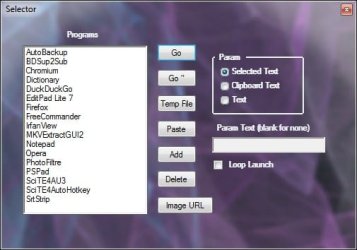
The background looks like some of my programs when using translucent composition. Like this one:

SelectorTrans.jpg

I would try a 3rd party Alt Tab utility just to see what happens.
 

My Computer My Computer

At a glance

Windows 7 32 bitAMD 5200+ dual core2 GBNVidia GeForce 6150SE 128 MB
Computer Manufacturer/Model Number
HP Media Center
OS
Windows 7 32 bit
CPU
AMD 5200+ dual core
Memory
2 GB
Graphics Card(s)
NVidia GeForce 6150SE 128 MB
Monitor(s) Displays
CRT
Screen Resolution
1280x1024
Hard Drives
500 GB Sata internal :

SIIG USB 3.0 docking stations w/WD Caviar Black 6 Gb/s drives
Keyboard
PS/2
Mouse
PS/2 Wheel Mouse
Other Info
SIIG USB 3.0 PCIexpress card.
Well that screenshot has loaded the graphics of aero. You have a border window. My alt tab has no border window or any graphics at all. It only has a slight transparency which is not interacting with my transparency from Aero settings.

Can you point me to an ok 3rd Party Alt Tab? I only found some for XP.
 

My Computer My Computer

At a glance

Windows 7 x64
Computer type
PC/Desktop
OS
Windows 7 x64

My Computer My Computer

At a glance

Windows 7 32 bitAMD 5200+ dual core2 GBNVidia GeForce 6150SE 128 MB
Computer Manufacturer/Model Number
HP Media Center
OS
Windows 7 32 bit
CPU
AMD 5200+ dual core
Memory
2 GB
Graphics Card(s)
NVidia GeForce 6150SE 128 MB
Monitor(s) Displays
CRT
Screen Resolution
1280x1024
Hard Drives
500 GB Sata internal :

SIIG USB 3.0 docking stations w/WD Caviar Black 6 Gb/s drives
Keyboard
PS/2
Mouse
PS/2 Wheel Mouse
Other Info
SIIG USB 3.0 PCIexpress card.
b0225.gif
 

My Computer My Computer

At a glance

Windows 7 32 bitAMD 5200+ dual core2 GBNVidia GeForce 6150SE 128 MB
Computer Manufacturer/Model Number
HP Media Center
OS
Windows 7 32 bit
CPU
AMD 5200+ dual core
Memory
2 GB
Graphics Card(s)
NVidia GeForce 6150SE 128 MB
Monitor(s) Displays
CRT
Screen Resolution
1280x1024
Hard Drives
500 GB Sata internal :

SIIG USB 3.0 docking stations w/WD Caviar Black 6 Gb/s drives
Keyboard
PS/2
Mouse
PS/2 Wheel Mouse
Other Info
SIIG USB 3.0 PCIexpress card.
Well it worked great until I restarted the PC. Even that VistaSwitcher is running I still got my alt+tab back.

Had to open prefferences in VistaSwitcher then open it close it a couple of times in order to fix this :(
 

My Computer My Computer

At a glance

Windows 7 x64
Computer type
PC/Desktop
OS
Windows 7 x64
Did you replace system files to use themes? Maybe it didn't install correctly if so.
 

My Computer My Computer

At a glance

Windows 7 32 bitAMD 5200+ dual core2 GBNVidia GeForce 6150SE 128 MB
Computer Manufacturer/Model Number
HP Media Center
OS
Windows 7 32 bit
CPU
AMD 5200+ dual core
Memory
2 GB
Graphics Card(s)
NVidia GeForce 6150SE 128 MB
Monitor(s) Displays
CRT
Screen Resolution
1280x1024
Hard Drives
500 GB Sata internal :

SIIG USB 3.0 docking stations w/WD Caviar Black 6 Gb/s drives
Keyboard
PS/2
Mouse
PS/2 Wheel Mouse
Other Info
SIIG USB 3.0 PCIexpress card.
Did you replace system files to use themes? Maybe it didn't install correctly if so.

No, only like 2 days ago in order to try to load another skin trying to overwrite this alt tab. No success, probably because I didn't find an ok skin, also I have no idea how to install themes.
 

My Computer My Computer

At a glance

Windows 7 x64
Computer type
PC/Desktop
OS
Windows 7 x64
Curious, what happens when you Win + Tab?
 

My Computer My Computer

At a glance

Windows 7 Pro 32bit / Windows 7 ProfessionalIntel Core i7-620M Duel Core 2.66GHz / Intel ...4.0 GB / 8.0 GB1.0 GB NVIDIA Quadro FX 2800M / Intel HD Grap...
Computer type
PC/Desktop
Computer Manufacturer/Model Number
Dell Precision M6500 / Dell Insprion 3847
OS
Windows 7 Pro 32bit / Windows 7 Professional
CPU
Intel Core i7-620M Duel Core 2.66GHz / Intel Core i5-4460
Memory
4.0 GB / 8.0 GB
Graphics Card(s)
1.0 GB NVIDIA Quadro FX 2800M / Intel HD Graphics
Screen Resolution
1440x900 / 1920x1080

My Computer My Computer

At a glance

Windows 7 Pro 32bit / Windows 7 ProfessionalIntel Core i7-620M Duel Core 2.66GHz / Intel ...4.0 GB / 8.0 GB1.0 GB NVIDIA Quadro FX 2800M / Intel HD Grap...
Computer type
PC/Desktop
Computer Manufacturer/Model Number
Dell Precision M6500 / Dell Insprion 3847
OS
Windows 7 Pro 32bit / Windows 7 Professional
CPU
Intel Core i7-620M Duel Core 2.66GHz / Intel Core i5-4460
Memory
4.0 GB / 8.0 GB
Graphics Card(s)
1.0 GB NVIDIA Quadro FX 2800M / Intel HD Graphics
Screen Resolution
1440x900 / 1920x1080

My Computer My Computer

At a glance

Windows 7 x64
Computer type
PC/Desktop
OS
Windows 7 x64
Back
Top