Solved BlackX 5G Thermaltake external dock - HDD not regocnized

ChrisPbass

New member
Member
VIP
Local time
1:22 PM
Messages
317
Location
Fairfax, VA
Not really solved...but the dock is not at fault.


Win 7 x64 Pro
Asrock A75 Pro4-M set to AHCI
Hitachi 3TB (brand spankin' new)

***note - I have a HD installed in this system that has never been initialized -call it "Sally" ***

Supposedly the dock is plug and play.

I have the USB version.
I plugged it in to a USB3 port, plugged in the HD and powered on the dock.
Disk Manager - Up pops the new drive and Sally and I'm told to initialize for DM to work correctly.
I unchecked Sally so I can do the new drive only. Set it to NTFS. It starts the process and then says DM needs to be refreshed and then quickly drops back to the DM only. The format window is gone.
I can't see the new HD anymore.
Through a series of powering on and off both PC and dock I get the drive back but it is unformatted.
Hit 'format'. It seems to work and then just stops. HD is not visible in DM.
Power on/off and I cannot see the new HD.

Connect the HD to the mobo and completely format it. I copy 1TB of data onto it.

Power down. Take the new HD and plug it into the dock, power it on. NADA :confused:
Not visible in DM or explorer. Any thoughts???

EDIT: As I'm typing this up I got a window that says the new drive needs to be formatted in order for it to work??? It is mos def formatted and has a TB of data on it!
Still not visible in DM or explorer.

Maybe an issue because it's a 3TB drive?
There is an update that I have not installed. Maybe I should do that...but I'm almost certain I read that it would work w/3TB drives.
 
Last edited:

My Computer My Computer

At a glance

7 Ultimate 64 bit2x4Gb DDR3-SDRAMt750
Computer type
PC/Desktop
Computer Manufacturer/Model Number
need to update!
OS
7 Ultimate 64 bit
Memory
2x4Gb DDR3-SDRAM
Graphics Card(s)
t750
Monitor(s) Displays
AOC 24" yee haw and Dell 19"
Screen Resolution
1680 x 1050 @60hz
Hard Drives
Samsung 840EVO
Internet Speed
100/20
Antivirus
MSE
Browser
Firefox
I would def check the docking bay to see if it supports 3TB drives... my external docking bay says right on the bottom "up to 3TB" ... Google the model and see if it's not on the bay.

EDIT: Just remembered too, when I got my bay the little 'manual' that came with it stated I would need to install a firmware upgrade on it if I planned to use certain Seagate drives (I don't use Seagate)... so might check for compatibility that way too.
 

My Computer My Computer

At a glance

Win 7 Ultimate 64-bit
OS
Win 7 Ultimate 64-bit
If you are sure that the dock can handle 3TB drives, then do update the firmware of the dock and then check. If it still plays hide and seek, then it could be a dock-HDD compatibility problem. Try with another brand HDD.( A newegg review states it does not work with some drives.) To me it looks to be a peril operating the dock near to its maximum handling capacity where some HDDs which marginally exceed the capacity can be knocked out.
 

My Computer My Computer

At a glance

Windows 7 Home Premium 32 bit
OS
Windows 7 Home Premium 32 bit
What model dock do you have? What USB3 chip set? How is the dock powered?
 

My Computer My Computer

At a glance

Win8/8.1,Win7-U64, Vista U64, uncounted Linux...AMD and Intell, 9590, 8350, i5 3570kCorsair G SkillCrossfired Sapphire HD 7950 Vapor-X, ASUS R9 ...
Computer type
PC/Desktop
Computer Manufacturer/Model Number
Custom, Dell and Lenono LT's
OS
Win8/8.1,Win7-U64, Vista U64, uncounted Linux distor's
CPU
AMD and Intell, 9590, 8350, i5 3570k
Motherboard
CFVFZ, GA990FXA, Z77e-itx
Memory
Corsair G Skill
Graphics Card(s)
Crossfired Sapphire HD 7950 Vapor-X, ASUS R9 280X TOP
Sound Card
Realtek ALC889
Monitor(s) Displays
ViewSonic VX2770SMH 27" / ViewSonic VX2433 LCD 24"
Screen Resolution
1080i HD
Hard Drives
Samsung SSD 840 Pro
OCZ Agility 3's
OCZ Vector's
WD's Blue, red, green, Velociraptors
Seagate USB3 & Hybrid's
ASUS Blu-Ray
ASUS DVD
PSU
Corsair AX1200i, Seasonice 850 Gold
Case
Cooler Master HAF 922 & HAF 932, Lian Li Train case.
Cooling
Air, Glacer 240L expanded, custom EK loop with duel D5's
Keyboard
Microsoft SideWinder X4 USB Keyboard / Logitech 250 PS2
Mouse
Logitech G500 / MS wireless 5000
Internet Speed
Best of 5ms / 75+ dn / 12+ up More or less.
Antivirus
MS esentials-MalwareBytes
Browser
Firefox Chromebook
What model dock do you have? What USB3 chip set? How is the dock powered?

Thermaltake BlacX Duet 5G ST0022U ABS Plastic 2.5" & 3.5" Black USB 3.0 HDD Docking Station


HGST Deskstar NAS H3IKNAS30003272SN(0S03660) 3TB 7200 RPM 64MB Cache SATA 6.0Gb/s 3.5"


USB chipset is by AMD. I'm not sure how to determine details beyond that.
 

My Computer My Computer

At a glance

7 Ultimate 64 bit2x4Gb DDR3-SDRAMt750
Computer type
PC/Desktop
Computer Manufacturer/Model Number
need to update!
OS
7 Ultimate 64 bit
Memory
2x4Gb DDR3-SDRAM
Graphics Card(s)
t750
Monitor(s) Displays
AOC 24" yee haw and Dell 19"
Screen Resolution
1680 x 1050 @60hz
Hard Drives
Samsung 840EVO
Internet Speed
100/20
Antivirus
MSE
Browser
Firefox
If you are sure that the dock can handle 3TB drives, then do update the firmware of the dock and then check. If it still plays hide and seek, then it could be a dock-HDD compatibility problem. Try with another brand HDD.( A newegg review states it does not work with some drives.) To me it looks to be a peril operating the dock near to its maximum handling capacity where some HDDs which marginally exceed the capacity can be knocked out.

Supposedly it works w/Hitachi driver. At least one person said it did....

I tried the firmware update but was 'no device found!' was returned.
There is a zip file w/an executable. No instructions. Device is on, HD is in the device.

BTW - is the dock the FLIP CC in device manager?
 

My Computer My Computer

At a glance

7 Ultimate 64 bit2x4Gb DDR3-SDRAMt750
Computer type
PC/Desktop
Computer Manufacturer/Model Number
need to update!
OS
7 Ultimate 64 bit
Memory
2x4Gb DDR3-SDRAM
Graphics Card(s)
t750
Monitor(s) Displays
AOC 24" yee haw and Dell 19"
Screen Resolution
1680 x 1050 @60hz
Hard Drives
Samsung 840EVO
Internet Speed
100/20
Antivirus
MSE
Browser
Firefox
UPDATE

1. The device surely shows in devices but the firmware upgrade will not find it.

2. USB 3 Port: If I power on/off, windows tells me to format the drive. 'No' - then nothing happens.

3. USB 2 Port: Power on/off. 1st time I did this I was told to reformat, I hit 'no' and up popped autoplay...there's the drive. I decided to try the USB 3 Port - same thing happened as in no.2 above.

4. USB 2 Port: This time autoplay popped up with no request to format the drive.

SO, I believe I need to upgrade the firmware of the device but I am failing at that...I've emailed tech support. Got their addy off a newegg review. However, if anyone has any thoughts about how to upgrade the firmware, I'd be happy to try suggestions.

Firmware - Thermaltake - Global - BlacX Duet 5G - ST0022
 

My Computer My Computer

At a glance

7 Ultimate 64 bit2x4Gb DDR3-SDRAMt750
Computer type
PC/Desktop
Computer Manufacturer/Model Number
need to update!
OS
7 Ultimate 64 bit
Memory
2x4Gb DDR3-SDRAM
Graphics Card(s)
t750
Monitor(s) Displays
AOC 24" yee haw and Dell 19"
Screen Resolution
1680 x 1050 @60hz
Hard Drives
Samsung 840EVO
Internet Speed
100/20
Antivirus
MSE
Browser
Firefox
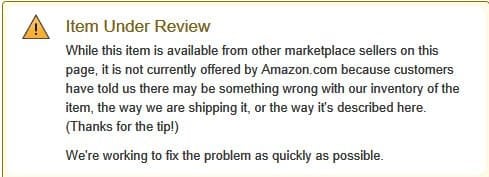
Amazon.com has this to say on your dock.

20-03-2014 20-08-06.jpg

That I think is a more polished way of telling that all is not well with that dock from the customer reports.

You may try the dock on another known working PC. If you encounter the same problem/s it would confirm a serious hardware problem and you may have to take it up with the Thermaltake Technical Support.
 
Last edited:

My Computer My Computer

At a glance

Windows 7 Home Premium 32 bit
OS
Windows 7 Home Premium 32 bit
Great find, jumaniji! I've never seen such a thing on Amazon. Hopefully the OP can return it for another product.
 

My Computer My Computer

At a glance

Win 7 Ultimate 64-bit
OS
Win 7 Ultimate 64-bit
Amazon.com has this to say on your dock.

View attachment 311110

That I think is a more polished way of telling that all is not well with that dock from the customer reports.

You may try the dock on another known working PC. If you encounter the same problem/s it would confirm a serious hardware problem and you may have to take it up with the Thermaltake Technical Support.

WELL CRAP

it has 1600 reviews on newegg! Oh well, I'll wait for tech support to contact me.
Thanks for the research.

EDIT: they replied. Said there might be a bad controller w/the dock and to return it. They also asked for the serial # so I gave them that. Maybe there is a bad batch.
 

My Computer My Computer

At a glance

7 Ultimate 64 bit2x4Gb DDR3-SDRAMt750
Computer type
PC/Desktop
Computer Manufacturer/Model Number
need to update!
OS
7 Ultimate 64 bit
Memory
2x4Gb DDR3-SDRAM
Graphics Card(s)
t750
Monitor(s) Displays
AOC 24" yee haw and Dell 19"
Screen Resolution
1680 x 1050 @60hz
Hard Drives
Samsung 840EVO
Internet Speed
100/20
Antivirus
MSE
Browser
Firefox

My Computer My Computer

At a glance

7 Ultimate 64 bit2x4Gb DDR3-SDRAMt750
Computer type
PC/Desktop
Computer Manufacturer/Model Number
need to update!
OS
7 Ultimate 64 bit
Memory
2x4Gb DDR3-SDRAM
Graphics Card(s)
t750
Monitor(s) Displays
AOC 24" yee haw and Dell 19"
Screen Resolution
1680 x 1050 @60hz
Hard Drives
Samsung 840EVO
Internet Speed
100/20
Antivirus
MSE
Browser
Firefox
Anticlimax :D . But I told you

.......You may try the dock on another known working PC. If you encounter the same problem/s it would confirm a serious hardware problem and you may have to take it up with the Thermaltake Technical Support.

Not guilty. You put the cart before the horse. :)
 

My Computer My Computer

At a glance

Windows 7 Home Premium 32 bit
OS
Windows 7 Home Premium 32 bit
Anticlimax :D . But I told you

.......You may try the dock on another known working PC. If you encounter the same problem/s it would confirm a serious hardware problem and you may have to take it up with the Thermaltake Technical Support.

Not guilty. You put the cart before the horse. :)

Are you helping??? I can't tell.
 

My Computer My Computer

At a glance

7 Ultimate 64 bit2x4Gb DDR3-SDRAMt750
Computer type
PC/Desktop
Computer Manufacturer/Model Number
need to update!
OS
7 Ultimate 64 bit
Memory
2x4Gb DDR3-SDRAM
Graphics Card(s)
t750
Monitor(s) Displays
AOC 24" yee haw and Dell 19"
Screen Resolution
1680 x 1050 @60hz
Hard Drives
Samsung 840EVO
Internet Speed
100/20
Antivirus
MSE
Browser
Firefox
Back
Top