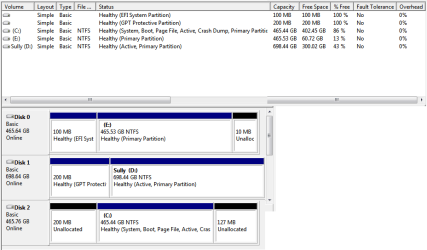
This is my first computer build, and it has been working, by and large, solidly since I assembled it late last year**. I booted it up earlier this week and got the “BOOTMGR IS MISSING” screen. My first step was to go into the BIOS and make sure the boot order was correct.
There are three internal drives in the computer: an SSD with my main Windows 7 install, a drive with a hackintosh boot to OSX 10.9, and a drive for use with windows backup. I’ve tried switching the cables around to eliminate the possibility of a bad cable, and checked that all connections are secure. I tried all of the steps outlined below both with all the drives attached and with only the boot drive hooked up.
The boot order seemed fine, but I tried a few variations to make sure it hadn’t gotten mixed up. 6 drives showed up in the BIOS- both a UEFI labeled version and non-UEFI (P1:, P2 for the non system drives, and what appears to be a non-UEFI version of the boot (P0 and the Windows Boot manager on the boot.
Changing the order did not make much difference. I can boot into the Hackintosh drive just fine, but any variation on the boot drive still gives the BOOTMGR issue. Occasionally the boot drive will load to the startup repair screen, but telling it to repair appears to be unsuccessful as it loops back to the repair screen, and telling it to boot windows normally goes to the BOOTMGR screen.
When I remove all drives but the boot drive, I sometimes get two choices showing up in the BIOS (non-UEFI version of the boot (P0 and the Windows Boot manager) but usually the boot manager doesn’t show up as a choice.
Changing the BIOS to Legacy only mode as opposed to UEFI only or combo often goes to a screen saying “Reboot and select proper boot device or insert boot media in selected boot drive…”
The computer does not have an internal optical drive, but I have a USB drive that I’ve been booting to my install disc from. In following various directions for repairing the BootManager (including the process outlined here: http://www.sevenforums.com/tutorials/219533-troubleshooting-windows-7-failure-boot.html and here: http://www.sevenforums.com/installation-setup/196371-bootmgr-missing-can-t-boot-can-t-repair.html ) I kept running into the issue that my boot drive would not show up in the drive select for the repair tools. After several reboots and some messing around in the BIOS (mainly switching between UEFI and legacy modes) it now shows up in the list fairly regularly. I have to make sure to boot from the UEFI version of the optical drive, or else I get a compatibility error on the repair tools.
Sometimes the startup repair says it can’t fix the issue, and sometimes it says it can’t find an issue. The console commands for fixing the bootmanager ( http://www.sevenforums.com/installation-setup/178280-error-0xc0000225-boot.html#post1514443 ) report successful completion, but the ones that scan for windows installs always report 0 installs.
I could get through the steps for marking the partition as active, but it would error out on the last step.
I tried doing two different system restores, both of which reported as successful but neither made a difference.
Out of curiosity I tried the initial steps of the installer, but it said it couldn’t install Windows on any of the 4 partitions that showed up on the boot drive because of the drive type, despite there being an existing install on the drive.
Part of me thinks I could be missing something in the BIOS since I’m not very familiar with it, but I’ve cycled through the options I think would make a difference without much luck. I can’t think of any big system changes that happened within a few days of the issue starting.
**The oddest thing in my mind, this has actually happened a couple of times before, but both times I didn’t have time to really troubleshoot, and when I came back to dig into it a few days later, everything booted up fine. No such luck this time, but even it it did just start working on its own, I’d like to figure out what’s making the issue.
I just got a cleanly formatted drive that I did a basic install of Windows7 on, and it seems to boot alright. As far as I know the Windows backup I have on the internal drive is up to date, but in case it’s a few days old or there’s a problem I’d rather not start with wiping the current boot drive completely if it can be avoided.
Any suggestions or thoughts on what I’m missing would be greatly appreciated.
There are three internal drives in the computer: an SSD with my main Windows 7 install, a drive with a hackintosh boot to OSX 10.9, and a drive for use with windows backup. I’ve tried switching the cables around to eliminate the possibility of a bad cable, and checked that all connections are secure. I tried all of the steps outlined below both with all the drives attached and with only the boot drive hooked up.
The boot order seemed fine, but I tried a few variations to make sure it hadn’t gotten mixed up. 6 drives showed up in the BIOS- both a UEFI labeled version and non-UEFI (P1:, P2
for the non system drives, and what appears to be a non-UEFI version of the boot (P0 and the Windows Boot manager on the boot.Changing the order did not make much difference. I can boot into the Hackintosh drive just fine, but any variation on the boot drive still gives the BOOTMGR issue. Occasionally the boot drive will load to the startup repair screen, but telling it to repair appears to be unsuccessful as it loops back to the repair screen, and telling it to boot windows normally goes to the BOOTMGR screen.
When I remove all drives but the boot drive, I sometimes get two choices showing up in the BIOS (non-UEFI version of the boot (P0
and the Windows Boot manager) but usually the boot manager doesn’t show up as a choice.Changing the BIOS to Legacy only mode as opposed to UEFI only or combo often goes to a screen saying “Reboot and select proper boot device or insert boot media in selected boot drive…”
The computer does not have an internal optical drive, but I have a USB drive that I’ve been booting to my install disc from. In following various directions for repairing the BootManager (including the process outlined here: http://www.sevenforums.com/tutorials/219533-troubleshooting-windows-7-failure-boot.html and here: http://www.sevenforums.com/installation-setup/196371-bootmgr-missing-can-t-boot-can-t-repair.html ) I kept running into the issue that my boot drive would not show up in the drive select for the repair tools. After several reboots and some messing around in the BIOS (mainly switching between UEFI and legacy modes) it now shows up in the list fairly regularly. I have to make sure to boot from the UEFI version of the optical drive, or else I get a compatibility error on the repair tools.
Sometimes the startup repair says it can’t fix the issue, and sometimes it says it can’t find an issue. The console commands for fixing the bootmanager ( http://www.sevenforums.com/installation-setup/178280-error-0xc0000225-boot.html#post1514443 ) report successful completion, but the ones that scan for windows installs always report 0 installs.
I could get through the steps for marking the partition as active, but it would error out on the last step.
I tried doing two different system restores, both of which reported as successful but neither made a difference.
Out of curiosity I tried the initial steps of the installer, but it said it couldn’t install Windows on any of the 4 partitions that showed up on the boot drive because of the drive type, despite there being an existing install on the drive.
Part of me thinks I could be missing something in the BIOS since I’m not very familiar with it, but I’ve cycled through the options I think would make a difference without much luck. I can’t think of any big system changes that happened within a few days of the issue starting.
**The oddest thing in my mind, this has actually happened a couple of times before, but both times I didn’t have time to really troubleshoot, and when I came back to dig into it a few days later, everything booted up fine. No such luck this time, but even it it did just start working on its own, I’d like to figure out what’s making the issue.
I just got a cleanly formatted drive that I did a basic install of Windows7 on, and it seems to boot alright. As far as I know the Windows backup I have on the internal drive is up to date, but in case it’s a few days old or there’s a problem I’d rather not start with wiping the current boot drive completely if it can be avoided.
Any suggestions or thoughts on what I’m missing would be greatly appreciated.
My Computer
- Computer type
- PC/Desktop
- Computer Manufacturer/Model Number
- Custom Build
- OS
- Windows 7 x64
- CPU
- Intel Core i7-4770K Haswell 3.5GHz
- Motherboard
- GIGABYTE GA-Z87X-UD5 TH
- Memory
- G.SKILL Ripjaws X Series 4 x 8GB
- Graphics Card(s)
- EVGA GeForce GTX 780 3GB
- Hard Drives
- Samsung 840 SSD, 500GB
- Antivirus
- MSE
- Browser
- Chrome