Removable Flash Drive Recognized as a Local Disk and not a Flash Drive

masonta

New member
Local time
2:19 AM
Messages
3
I recently purchased a 32 GB San Disk Flash Drive. The security files pre-installed on the drive were junk, and I could not delete them so I formatted the drive to remove them. This cleaned the disk, and it holds data, but I'm not sure if this is part of my problem. I am trying to load my copy of windows 7 onto this disk, and using the Windows 7 USB/DVD Download tool, I can select my ISO file, but when I go to select my USB drive, my computer does not recognize the flash drive as a flash drive. Is there a way to change the Flash Drive so Windows will recognize my Flash Drive as removable media? Smaller USB drives still work on my computer, so its not the computer. Anyone have any suggestions?
 

My Computer My Computer

Computer type
Laptop
Computer Manufacturer/Model Number
HP
OS
Home Premium x64
CPU
AMD A4-3320M APU
Graphics Card(s)
Radeon Integrated Graphics
Antivirus
Avast
Browser
Chrome
Hello masonta. Welcome to the forum.

Let's start with this: can you post a screenshot of your Disk Management window, expanded so we can read everything, with the USB stick installed?

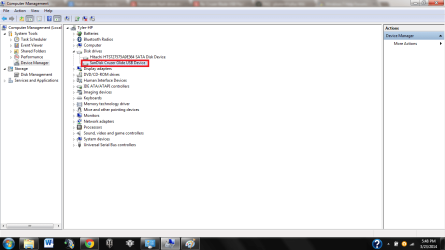
You also might check in Device Manager to see if the stick shows up as a USB device, or a hard disk.
 

My Computer My Computer

Computer type
PC/Desktop
Computer Manufacturer/Model Number
Home Built - Jan 2013
OS
Windows 7 64 Bit Home Premium SP1
CPU
i7-3820
Motherboard
Asus P9X79-PRO - Bios 4608
Memory
GSkill F3-14900CL9Q - 16GB
Graphics Card(s)
EVGA GeForce GTX660 - Driver 352.86
Sound Card
On board Realtek ALC898
Monitor(s) Displays
Acer S271HL
Screen Resolution
1920 x 1080
Hard Drives
#1- Samsung 840 Pro Series
#2- Western Digital WD1002FAEX Sata3 Black
#3- Western Digital WD1002FAEX Sata3 Black
PSU
Corsair CMPSU-850TX-V2 - 850 watt (by Seasonic)
Case
Corsair Obsidian 550D
Cooling
Standard 3 120mm case fans, Cooler Master Hyper 212 EVO
Keyboard
MS KC-0405
Mouse
Intellimouse 5-button
Internet Speed
56 Mbits/Sec (on a good day)
Antivirus
Avast & Malwarebytes
Browser
Firefox
Other Info
Asus DVD - DRW-24B1ST 24X
The Flash Drive is Disk G, and I also uploaded a screen shot of my device manager where the flash was listed as a hard drive. Thanks for timely response btw
 

Attachments

  • Disk Managment.png
    Disk Managment.png
    45.4 KB · Views: 20
  • device manager.png
    device manager.png
    42.9 KB · Views: 8

My Computer My Computer

Computer type
Laptop
Computer Manufacturer/Model Number
HP
OS
Home Premium x64
CPU
AMD A4-3320M APU
Graphics Card(s)
Radeon Integrated Graphics
Antivirus
Avast
Browser
Chrome
Hi there .. This is quite a common problem with some Flash Drives .. Have seen it many times on the forum ..
 

My Computer My Computer

Computer Manufacturer/Model Number
W530-3630QM1
OS
windows 7 home 64bit
CPU
INTEL-CORE I7
Memory
16GB
Hard Drives
750GB
Browser
Chrome
Reformat it to NTFS and see whether that works.
 

My Computer My Computer

Computer Manufacturer/Model Number
HP, Dell, Gateway, Toshiba - 4 laptops and 2 desktops
OS
Vista, Windows7, Mint Mate, Zorin, Windows 8
CPU
from 1.6GHz Duo to i7
Monitor(s) Displays
2x HP w2207
Hard Drives
5x HDD, 7x SSD, 12x Externals
Keyboard
with trackball - no mices
Mouse
Trackball mice
Internet Speed
DSL 6000
I used the quick format to NTFS, that hasn't helped. I'm currently formatting the flash with the "quick format" option unchecked. Will see if that changes things...
 

My Computer My Computer

Computer type
Laptop
Computer Manufacturer/Model Number
HP
OS
Home Premium x64
CPU
AMD A4-3320M APU
Graphics Card(s)
Radeon Integrated Graphics
Antivirus
Avast
Browser
Chrome

My Computer My Computer

Computer type
PC/Desktop
Computer Manufacturer/Model Number
Home Built - Jan 2013
OS
Windows 7 64 Bit Home Premium SP1
CPU
i7-3820
Motherboard
Asus P9X79-PRO - Bios 4608
Memory
GSkill F3-14900CL9Q - 16GB
Graphics Card(s)
EVGA GeForce GTX660 - Driver 352.86
Sound Card
On board Realtek ALC898
Monitor(s) Displays
Acer S271HL
Screen Resolution
1920 x 1080
Hard Drives
#1- Samsung 840 Pro Series
#2- Western Digital WD1002FAEX Sata3 Black
#3- Western Digital WD1002FAEX Sata3 Black
PSU
Corsair CMPSU-850TX-V2 - 850 watt (by Seasonic)
Case
Corsair Obsidian 550D
Cooling
Standard 3 120mm case fans, Cooler Master Hyper 212 EVO
Keyboard
MS KC-0405
Mouse
Intellimouse 5-button
Internet Speed
56 Mbits/Sec (on a good day)
Antivirus
Avast & Malwarebytes
Browser
Firefox
Other Info
Asus DVD - DRW-24B1ST 24X
Let us know how you are doing. Will be useful input for the future.
 

My Computer My Computer

Computer Manufacturer/Model Number
HP, Dell, Gateway, Toshiba - 4 laptops and 2 desktops
OS
Vista, Windows7, Mint Mate, Zorin, Windows 8
CPU
from 1.6GHz Duo to i7
Monitor(s) Displays
2x HP w2207
Hard Drives
5x HDD, 7x SSD, 12x Externals
Keyboard
with trackball - no mices
Mouse
Trackball mice
Internet Speed
DSL 6000
As well as the solutions already suggested by TVeblen & whs try formatting it as a FAT32, which I think they are originally.
 

My Computer My Computer

Computer type
PC/Desktop
Computer Manufacturer/Model Number
Self built using existing case
OS
Windows 7 Home Premium 64 bit sp1
CPU
Intel i5 3570 3.4Ghz Ivy Bridge SKT 1155 quad core
Motherboard
Gigabyte Z77-HD3 SKT 1155 2xSata 3, 4x USB 3.0
Memory
G-Skill Rip Jaws 16Gb (8x2) DDR3 -1600 PC3 12800 CL 10 red
Graphics Card(s)
Gigabyte NVIDIA GT610 1Gb DDR3 810/1200 PCI-E 2.0 Silent
Sound Card
NVIDIA High Definition & Realtech High Definition Audio
Monitor(s) Displays
2 x Philips 226V4L 16:9 aspect ratio
Screen Resolution
1920 x 1080 HD
Hard Drives
Samsung 840 Pro 256gb SSD, SATA 3.
Hitachi Touro Portable 1tb, USB 3.0 HDD used for image b/ups.
PSU
Corsair VS450
Case
Codeng
Cooling
PSU fan & CPU fan
Keyboard
Logitech
Mouse
Logitech Wireless trackball M570
Internet Speed
Wireless 3G. 3mg down & 550kb up.
Antivirus
Bitdefender Internet Security 2020
Browser
Opera (Current Version) & Firefox
Other Info
MS Office 2013 Pro. Davis weather station software. MGE Nova 600 avr UPS.
Yes this happens to me to this is how new windows and flash drives are they do this for security and it's a requirement for windows 8 / 8.1 so new flash drives are setup that way
 

My Computer My Computer

Computer type
PC/Desktop
Computer Manufacturer/Model Number
Dell
OS
Windows 7 Ultimate x64
CPU
Intel Core 2 Quad Q6600
Motherboard
Dell
Memory
8gb PC28500 DDR2
Graphics Card(s)
Nvidia GT 635
Hard Drives
Intel 320 SSD
Antivirus
Avast Premium
Browser
Google Chrome
The Flash Drive is Disk G, and I also uploaded a screen shot of my device manager where the flash was listed as a hard drive. Thanks for timely response btw


Why dont you format to ntfs thats more reason so you make the usb bootable
 

My Computer My Computer

Computer type
PC/Desktop
Computer Manufacturer/Model Number
Dell
OS
Windows 7 Ultimate x64
CPU
Intel Core 2 Quad Q6600
Motherboard
Dell
Memory
8gb PC28500 DDR2
Graphics Card(s)
Nvidia GT 635
Hard Drives
Intel 320 SSD
Antivirus
Avast Premium
Browser
Google Chrome
Return the SanDisk pen drive to the vendor and get some other brand.

Extract from a communication from Sandisk:

We have recently made some changes in the manufacturing of the flash drives to make them compatible with Windows 8 certification. The changes are in effect from June 2012. Flash drives configured as fixed disks still function the same as those configured as removable disks.

This fixed disk matter had already been brought to notice in this forum by Britton30.

http://www.sevenforums.com/hardware-devices/299263-flash-stick-showing-local-disk.html

In a Dec 2013 post one user elsewhere indicated :

SanDisk has recently reversed their decision on configuring drives as fixed disk and are back to removable. Per support "all sandisk drives are being moved back to the removable disk configuration".

So you got one manufactured in the interim period between this flip-flop by SanDisk. :)
 
Last edited:

My Computer My Computer

OS
Windows 7 Home Premium 32 bit
I did not know that. Thanks jumanji and Britton30!
 

My Computer My Computer

Computer type
PC/Desktop
Computer Manufacturer/Model Number
Home Built - Jan 2013
OS
Windows 7 64 Bit Home Premium SP1
CPU
i7-3820
Motherboard
Asus P9X79-PRO - Bios 4608
Memory
GSkill F3-14900CL9Q - 16GB
Graphics Card(s)
EVGA GeForce GTX660 - Driver 352.86
Sound Card
On board Realtek ALC898
Monitor(s) Displays
Acer S271HL
Screen Resolution
1920 x 1080
Hard Drives
#1- Samsung 840 Pro Series
#2- Western Digital WD1002FAEX Sata3 Black
#3- Western Digital WD1002FAEX Sata3 Black
PSU
Corsair CMPSU-850TX-V2 - 850 watt (by Seasonic)
Case
Corsair Obsidian 550D
Cooling
Standard 3 120mm case fans, Cooler Master Hyper 212 EVO
Keyboard
MS KC-0405
Mouse
Intellimouse 5-button
Internet Speed
56 Mbits/Sec (on a good day)
Antivirus
Avast & Malwarebytes
Browser
Firefox
Other Info
Asus DVD - DRW-24B1ST 24X
You're welcome, I did return mine. :D
 

My Computer My Computer

Computer type
PC/Desktop
Computer Manufacturer/Model Number
Home Built Desktop By DataTech
OS
Windows 7 Ultimate X64 SP1
CPU
Intel i5-2550K, Differing ~4.4-4.8GHz No built in GPU
Motherboard
ASUS P8Z68-V PRO/GEN3
Memory
16GB G.Skill Sniper 1866MHz @ 2133MHz 2x8GB
Graphics Card(s)
ASUS GTX650TIB-DC2OC-2GD5, (650TI Boost)
Sound Card
Onboard Realtek 5-1
Monitor(s) Displays
Samsung P2570HD
Screen Resolution
1920x1080
Hard Drives
Samsung 840 Pro 256GB SSD for OS, 500GB Seagate Constellation (Enterprise drive) for Data
PSU
Corsair HX650W
Case
Inwin Dragon Rider
Cooling
Hyper 212 EVO w/two Noctua fans, push-pull, @1300 RPM
Keyboard
E-Z Eyes, bright yellow keys with large characters
Mouse
steelseries SENSEI Laser Pro Gaming
Internet Speed
48-51Mbs Mbs down, 11 Mbs up Xfinity Cable
Antivirus
Norton Internet Security 2013
Browser
IE 10, Opera, Pale Moon if needed
Other Info
4 case fans, LG BluRay-RE, ASUS DVD-RW, Mr. Fusion power supply, 1.21 gigawatts.

My Computer My Computer

Computer type
Laptop
Computer Manufacturer/Model Number
Lenovo
OS
Windows 7 Ultimate x64
CPU
Core i5
Memory
4GB
Graphics Card(s)
Intel
Antivirus
ESET NOD32
Browser
Mozilla Firefox
Change flash drive type to hard disk

I have an opposite problem. I have a new ScanDisk 64 gig flash drive. I loaded it up with misic. I want to add it as an additional location in the Music Library. Windows 7 won't allow this for removable drives. How can I force Windows to change the drive type to hard drive?
 

My Computer My Computer

Computer type
Laptop
Computer Manufacturer/Model Number
hp
OS
windows 7 64 bit
Antivirus
bitdefendder
TMK (To My Knowledge :)) that is not possible.
 

My Computer My Computer

OS
Windows 7 Home Premium 32 bit
Hello all, sorry to dig up an old thread but I have the same problem. did anyone find a way that wasn't a workaround?

I contacted Western digital and they said to update the firmware on the drive and my computer drivers. I did all that and no change.

My problem is I have a backup utility that uploads an automatically encrypted backup to online storage space. The way it is configured, because my computer sees my external drive as a hard disk, if I start it up without having my drive mounted, it assume the data has been deleted and deletes the files. I contacted the program owner and they said the disk needs to be recognised as a removable device for this not to happen. I was given the following explanation to what is happening:

"Under Windows, a drive is considered external if the API function GetDriveType does not return DRIVE_FIXED. CD/DVD drives, USB & firewire devices, and mounted network shares are all treated as removable. If the hard drive is reporting it's a "Local Disk," then it is reporting DRIVE_FIXED - it's telling the Windows operating system that it is permanently mounted inside the case to your computer."

Problem is, if WD think that the problem should go away after using their latest firmware the problem (assuming WD is right) has to be something in my windows set up doesn't it?

Thanks
 

My Computer My Computer

Computer type
PC/Desktop
Computer Manufacturer/Model Number
Dell
OS
Windows 7 Profession 64-bit Service Pack 1
CPU
Intel(R) Core(TM) i7-2860QM CPU @ 2.50GHz
Memory
16.0 Gb
Graphics Card(s)
NVIDIA Quadro 3000M
Hard Drives
WDC WD7500BPKT-75PK4TO
Browser
Chrome
Welcome decksie.

This thread deals with Flash drives showing up differently than as a Removable drive.

Your problem is different from what little I understand.

You will be better off to start a new thread with your problem stated ab-initio.. That way it will catch and get the required attention from others.
 

My Computer My Computer

OS
Windows 7 Home Premium 32 bit
Back
Top