Sony Vaio laptop does not want to connect to internet

FatimaIsabel

New member
Local time
6:18 PM
Messages
1
I am trying to connect to the internet and the wireless appears disconnected. I've gone to the control panel to change adapter settings and the laptop is still disconnected. Someone please help me solve this problem asap. Thank you.
 

My Computer My Computer

At a glance

Windows 7 Home Premium OA
Computer type
Laptop
Computer Manufacturer/Model Number
Sony Vaio Model: PCG-71913L Product name: VPCEH24FX
OS
Windows 7 Home Premium OA
Antivirus
Norton
Well first; go into the device manager in the control panel and check to make sure there are no question marks or exclamation points by any of the network adapters/connections. Then, I would open a elevated command prompt by doing the following: click start, programs, accessories, then system tools, then right click on command prompt and choose run as administrator. Then type ipconfig /release then once it releases the ip; type a ipconfg /renew. Lastly; I would check your router and try power cycling your modem and router. Unplug both of them; wait about a minute; then plug the modem back in first and let that boot; then plug the router back in and let that boot. Try these things and see if they help ya any. Report back if any or all fail or if they work.
 

My Computer My Computer

At a glance

Windows 7 ultimate 64-bitIntel I7 2600K 3.4ghzCorsair 16gb ddr3 1600mhzNvidia Geforce gt 430
Computer type
PC/Desktop
Computer Manufacturer/Model Number
custom built
OS
Windows 7 ultimate 64-bit
CPU
Intel I7 2600K 3.4ghz
Motherboard
Asus Evo P8P67
Memory
Corsair 16gb ddr3 1600mhz
Graphics Card(s)
Nvidia Geforce gt 430
Sound Card
Sound Blaster Titanium x-fi pci express
Monitor(s) Displays
Dell E198WFP
Hard Drives
1 western digital 2TB drive.
PSU
Antec 1200 watt
Case
Inwin Dragon Rider
Cooling
6 case supplied cooling fans
Keyboard
logitech mk700
Mouse
logitech m705
Internet Speed
25-50mbps download; 10mbps upload(i think)
Antivirus
avg free 2014
Browser
mozilla firefox
Other Info
Also have a pretty bad speaker setup which is a klipsch promedia 5.1 surround speaker setup with huge subwoofer and lg blu ray player/writer. Also a hp officejet pro 8600 plus wireless all in one and a logitech s7500 webcam.
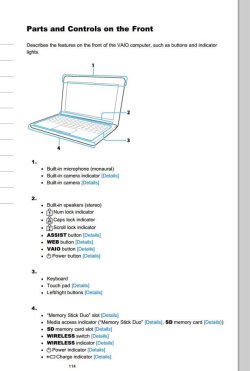
In addition do you have the wireless switch turned on. Most laptops have one though you may need to google your model + wireless switch, or read your Manual on the PC model's SUpport Downloads webpage to find out where.

Next what is shown in the bottom right System tray which is the place to start. Rightclick on the connection icon to Troubleshoot which can sort the problem for you.

What exactly makes you think it's disconnected?
 

Attachments

  • vaio.JPG
    vaio.JPG
    48.7 KB · Views: 0

My Computer My Computer

At a glance

Win 10 Pro x64Intel I5-2500K @3.3GHz16GB G.Skill Ripjaws X (4x4GB)EVGA GeForce 750 Ti SC 2GB
Computer type
PC/Desktop
Computer Manufacturer/Model Number
Self Built
OS
Win 10 Pro x64
CPU
Intel I5-2500K @3.3GHz
Motherboard
Asrock P67 Extreme4
Memory
16GB G.Skill Ripjaws X (4x4GB)
Graphics Card(s)
EVGA GeForce 750 Ti SC 2GB
Sound Card
ASUS Xonar DG 5.1 Channels 24-bit 96KHz PCI Interface Sound
Monitor(s) Displays
auria eq2367
Screen Resolution
1920 x 1080
Hard Drives
250GB Samsung 850 EVO SSD
1TB WD Blue
1TB Hitachi
PSU
SeaSonic X 650W 80 Plus Gold
Case
Corsair Obsidian 750D
Cooling
Corsair H60, Three 140mm case fans
Keyboard
Logitech Wireless Keyboard K520
Mouse
Logitech Wireless Mouse M310
Internet Speed
Wave Broadband ~ 100 dn 5 up
Antivirus
Windows Defender, Malwarebytes Premium
Browser
Edge, IE11, Chrome
Other Info
Laptop specs: HP g7-1365dx /
CPU: AMD A6-3420M APU with Radeon(tm) HD Graphics /
RAM: Crucial 8Gb (2x4Gb) /
SSD: Crucial M4-CT128M4SSD2 ATA Device/ FW 000F /
GFX: AMD Radeon HD 6520G /
OS: Windows 10 Pro x64
Back
Top