Stuck with probably the rarest Win7 keyboard problem ever saw ...

Hueyman

New member
Local time
10:26 PM
Messages
26
Location
France
Hello everyone,

I'm new on this forum, you are my last chance before placing some TNT in the heart of my machine :cry:

Ok, so I'll try to explain as good as I can my problem. I'm French and please excuse me for my bad English, thanks.

My keyboard do not work anymore for one week today. It is a Logitech K740 Illuminated Keyboard. It suddenly stopped working during I was using the PC. The symptoms are :

Every standard keys ( A,B,C...1,2,3 ... ) are not working
Every FN Function keys are working flawlessly

I did everything I had in mine on the first day, one week ago :

- In the device manager, I uninstalled EVERY USB drivers of EVERY devices I had, then I unplugged them
- Uninstalling of old ASMEDIA MoBo drivers and updating with new Asmedia USB3.0 Controller Driver V1.16.10.0 for Windows XP/Vista/7 32bit & 64bit.(WHQL)
- Reboot of Windows in " Clean Mode "
- Re-plugging of mouse and keyboard only
- Installation of latest drivers for mouse and keyboard
- Tried every USB ports ( 2.0 and 3.0 ) on the Mother Board, as well as front USB ports
- BIOS Update latest version ( 4804 )
- Windows Update updates
- Bit Defender Total Security Full scan

All this without the slightest success.

The keyboard works flawlessly in this computer BIOS and in another computer ( and old small laptop with WinXP on it, which I'm typing from right now )

So it became clear it was a software/drivers/OS/HID conflicts right now.

So I called Microsoft here in France, and I had the hardest times trying to explain them it has nothing to do with the " physical " keyboard... but they didn't helped cause I had a Logitech keyboard. After a long call with Logitech support people ( nice people BTW ), it was even clearer that the issue was in the software side, so I took the cheapest Microsoft keyboard, just to make them happy, and called back Microsoft. One of their technician took control of my PC remotely and during 2h and a half, tried many things, all of them failed. They said they would call me back today but they never did.

This is why I hope you guys are true Windows gurus, with deep knowledge of how things works together, in order to help me. I'm using the Windows built-in on screen keyboard, which is really a pain in the rear.

The fact that only the FN Keys ( like launching the music player, play/pause, next song etc ) works and not the " Standard " functions is really weird. I already saw that kind of issues over the forums, but only for Wireless keyboards, never for wired ones !

The ONLY weird things that happened, almost exactly when the keyboard stopped functioning, is related to another device :

The Thrustmaster HOTAS Warthog, a two parts Joystick assembly ( Throttle + Stick ) that is independently connected on the PC, then virtually " merged " via a software ( called " T.A.R.G.E.T ) for the OS recognize is as a single USB device. It stopped working, disconnected and more or less 5 min ( after or before can't remember ), the keyboard stopped working too.

After further investigations, I saw that inside the Joystick, 4 wires out of the 6 of an internal PS/2 connection got unsoldered ... This is why I made some crazy theories like " There was a general overheat in the circuit that feedbacks some bad things back to the PC ... " and things like that.

But nothing is physically or " hardwarly " damaged, as both ( Logitech and Microsoft ) keyboards works OK in the BIOS, but not once the OS is running ( even in safe mode )

My last cartridge was to restore Windows 7 back to a point everything was fine, but strangely, there was none prior to this date, the 21st of March

So, I'm desperate guys, you are my last hope before attempting to blow up the PC, typing with the on-screen keyboard for one week is really a hard experience lol,

My best regards,
Valentin
 

My Computer My Computer

At a glance

Windows 7 Pro x64Intel i7 3970X32GB, 2400 MHzASUS GTX Titan OC Windforce
Computer type
PC/Desktop
Computer Manufacturer/Model Number
My own built
OS
Windows 7 Pro x64
CPU
Intel i7 3970X
Motherboard
Asus Rampage IV Extreme
Memory
32GB, 2400 MHz
Graphics Card(s)
ASUS GTX Titan OC Windforce
Sound Card
Scarlett 2i2 USB Interface - Logitech Z906 5.1 500W System
Monitor(s) Displays
ASUS VG278HD 144Hz, 27" LCD Screen
Screen Resolution
1980 X 1080
Hard Drives
WDC 1TO
PSU
Corsair 850 W
Keyboard
Logitech K740 Illuminated Keyboard
Mouse
Logitech MX Performance

My Computer My Computer

At a glance

Windows 7 Pro x64Intel i7 3970X32GB, 2400 MHzASUS GTX Titan OC Windforce
Computer type
PC/Desktop
Computer Manufacturer/Model Number
My own built
OS
Windows 7 Pro x64
CPU
Intel i7 3970X
Motherboard
Asus Rampage IV Extreme
Memory
32GB, 2400 MHz
Graphics Card(s)
ASUS GTX Titan OC Windforce
Sound Card
Scarlett 2i2 USB Interface - Logitech Z906 5.1 500W System
Monitor(s) Displays
ASUS VG278HD 144Hz, 27" LCD Screen
Screen Resolution
1980 X 1080
Hard Drives
WDC 1TO
PSU
Corsair 850 W
Keyboard
Logitech K740 Illuminated Keyboard
Mouse
Logitech MX Performance
Welcome to the forum Mr Iroquois, I recall many years ago with XP a similar problem and I ended up doing a complete fresh install of the OS. It was the only solution I could find. I know that's not what you wanted to hear but it may be the fastest solution in the end.

Possible remove all USB drivers, all keyboard, mouse and joystick drivers, then reinstall them. From your description it certainly sounds like a driver issue. This may help.

http://www.sevenforums.com/tutorials/165554-usb-driver-general-fix-problems.html
 

My Computer My Computer

At a glance

Win8/8.1,Win7-U64, Vista U64, uncounted Linux...AMD and Intell, 9590, 8350, i5 3570kCorsair G SkillCrossfired Sapphire HD 7950 Vapor-X, ASUS R9 ...
Computer type
PC/Desktop
Computer Manufacturer/Model Number
Custom, Dell and Lenono LT's
OS
Win8/8.1,Win7-U64, Vista U64, uncounted Linux distor's
CPU
AMD and Intell, 9590, 8350, i5 3570k
Motherboard
CFVFZ, GA990FXA, Z77e-itx
Memory
Corsair G Skill
Graphics Card(s)
Crossfired Sapphire HD 7950 Vapor-X, ASUS R9 280X TOP
Sound Card
Realtek ALC889
Monitor(s) Displays
ViewSonic VX2770SMH 27" / ViewSonic VX2433 LCD 24"
Screen Resolution
1080i HD
Hard Drives
Samsung SSD 840 Pro
OCZ Agility 3's
OCZ Vector's
WD's Blue, red, green, Velociraptors
Seagate USB3 & Hybrid's
ASUS Blu-Ray
ASUS DVD
PSU
Corsair AX1200i, Seasonice 850 Gold
Case
Cooler Master HAF 922 & HAF 932, Lian Li Train case.
Cooling
Air, Glacer 240L expanded, custom EK loop with duel D5's
Keyboard
Microsoft SideWinder X4 USB Keyboard / Logitech 250 PS2
Mouse
Logitech G500 / MS wireless 5000
Internet Speed
Best of 5ms / 75+ dn / 12+ up More or less.
Antivirus
MS esentials-MalwareBytes
Browser
Firefox Chromebook

My Computer My Computer

At a glance

Desk1 7 Home Prem / Desk2 10 Pro / Main lap A...Desk1 i5 3750K / Laptop i7 GTX 860M / Desk2 i...Desk1 8GB (1866) / Desk2 16GB (1333) / Laptop...Desk 1& 2NVidia GTX 650 & Laptops on board Intel
Computer type
PC/Desktop
Computer Manufacturer/Model Number
Own build (new) Desk1 / Asus ROG Win 7 / Desk2 1st build
OS
Desk1 7 Home Prem / Desk2 10 Pro / Main lap Asus ROG 10 Pro 2 laptop Toshiba 7 Pro Asus P2520 7 & 10
CPU
Desk1 i5 3750K / Laptop i7 GTX 860M / Desk2 i5 2500
Motherboard
Desk1 Asus P877-V / Desk2 Gigabyte H67 UD3H / Laptop ?
Memory
Desk1 8GB (1866) / Desk2 16GB (1333) / Laptop 8Gb DDR3
Graphics Card(s)
Desk 1& 2NVidia GTX 650 & Laptops on board Intel
Sound Card
Desk 1 & 2 -XONAR DG Realtek High Def audio Laptop
Monitor(s) Displays
Desk 1 Benq HD 2450 / Desk2 Philips 24" / Laptop 17.5"
Screen Resolution
1920x1080 D1 & D2 & Laptop 1
Hard Drives
Desk1 Samsung 120GB 830 SSD
Asus ROG 256GB 850 Pro SSD
Desk2 Samsung 840 256 SSD
Toshiba 120GB EVO
PSU
Desk 1 Corsair HX 1050/ Laptop ? / Desk 2 Corsair HX 650
Case
Desk 1 Cooler HAF XM ? Toshiba laptop / Desk2 Coolermaster
Cooling
Fans on all Desk1 -2 Desk2 - all Coolermasters 5 Laptop ?
Keyboard
Desk 1 MS Sidewinder X6 Desk 2 MS Sidewinder X 4
Mouse
Desk 1&2 - Gigabyte MS 900 gamer - laptop - Logitec wireless
Internet Speed
ADSL2+
Other Info
One other Desktop (tester) and spare Toshba laptop both with SSD's
Running Kaspersky 2016 ISS on all machines config'd identically
Logitec audio stereo systems on each machine (x3)
Canon MG5250MFC
Router/modem TP-Link running WPA2SK
Hello guys and thanks for your replies !

I'll consider the restore option later this day when all will be saved on my ext. HDD

I tried three times the method you sent me links to, no success.

@ICit2lol :

Tried these too, no joy either ;-(

Logitech Set Point has nothing to do with, as even my simple MS keyboard doesn't work

Probably the restore will sort me out, but would like to know THE solution, as spending 3 days reinstalling 1200 Go of files, softwares etc is really catastrophic for such a stupid keyboard problem :mad:

I'm convinced there is another solution, if only the person who know it could stop here ... :party:

Thanks guys, keep hoping ! It's been 8 days I type with on-screen keyboard, really got mad
 

My Computer My Computer

At a glance

Windows 7 Pro x64Intel i7 3970X32GB, 2400 MHzASUS GTX Titan OC Windforce
Computer type
PC/Desktop
Computer Manufacturer/Model Number
My own built
OS
Windows 7 Pro x64
CPU
Intel i7 3970X
Motherboard
Asus Rampage IV Extreme
Memory
32GB, 2400 MHz
Graphics Card(s)
ASUS GTX Titan OC Windforce
Sound Card
Scarlett 2i2 USB Interface - Logitech Z906 5.1 500W System
Monitor(s) Displays
ASUS VG278HD 144Hz, 27" LCD Screen
Screen Resolution
1980 X 1080
Hard Drives
WDC 1TO
PSU
Corsair 850 W
Keyboard
Logitech K740 Illuminated Keyboard
Mouse
Logitech MX Performance
I have the feeling there is something terribly wrong in the drivers and HID stuff on my PC, some softs or malware probably put the mess in this fragile environment of drivers etc ( seeing all the new strange devices that appeared recently on the Device Manager ), I can't factory reset the PC for such an issue, it obviously has a solution !

I mean, I use this PC for so much versatile applications, such flight simming, Computer Assisted Music ( Reaper, Pro Tools ), CAD with Solid Works, 3D modeling with Blender, 2D editing/textures with Photoshop CS6 etc

It's truly a work station and re-installing ( and make the settings the way you used to like them ) everything is really a terrible thing ... ( Especially when I had to restore Win7 already three months ago for other Windows related issues )

I don't know if it's worth I hire some local PC technician, that will take me 35€/hour to make the exact same manipulations and trials I already did, but there is obviously someone on this planet who know how to recover the use of my " standard keys " in Windows 7 Pro x64, as it already works as it should in the BIOS, so nothing wrong in the hardware side.

Does the " HOTAS Warthog " issue I described above could be some kind of causes, doesn't this give you ideas on where to investigate ?


I'm not at all a PC expert, but I use a PC since 2004 ( started with XP, then Vista and now Seven ) and encountered countless issues since, like serious graphical issues, hardware conflicts, very bad viruses, total lost of internet connection, registry keys conflict etc ... but I always ended by solving these issues by myself, with the help of the specialized internet community of course.

I can't believe this crazy little keyboard problem will force me to make a hard reset of the whole system ;-(

If some of you guys have time and deep knowledge in this area, this user experienced the same problem I am ( but with a wireless keyboard ), and resolved it like this :

Logitech K360 Wireless keyboard only FN-key combin... - Logitech Forums

I don't think the keyboard brand has much importance in this issue, as every keyboard does that, when something is wrong on the OS side ...


Thank you very much guys !
Hueyman
 

My Computer My Computer

At a glance

Windows 7 Pro x64Intel i7 3970X32GB, 2400 MHzASUS GTX Titan OC Windforce
Computer type
PC/Desktop
Computer Manufacturer/Model Number
My own built
OS
Windows 7 Pro x64
CPU
Intel i7 3970X
Motherboard
Asus Rampage IV Extreme
Memory
32GB, 2400 MHz
Graphics Card(s)
ASUS GTX Titan OC Windforce
Sound Card
Scarlett 2i2 USB Interface - Logitech Z906 5.1 500W System
Monitor(s) Displays
ASUS VG278HD 144Hz, 27" LCD Screen
Screen Resolution
1980 X 1080
Hard Drives
WDC 1TO
PSU
Corsair 850 W
Keyboard
Logitech K740 Illuminated Keyboard
Mouse
Logitech MX Performance
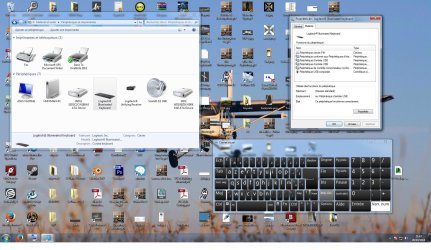
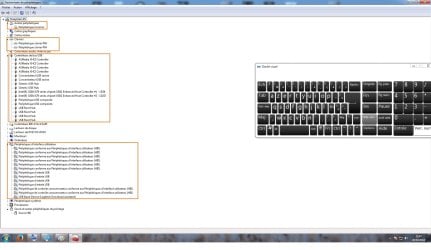
Here some screens if it can help :


I circled in orange what I think to be weird in the device manager, all those devices whereas I have only 3 HID currently connected : the mouse, the inactive keyboard and my USB audio interface
 

My Computer My Computer

At a glance

Windows 7 Pro x64Intel i7 3970X32GB, 2400 MHzASUS GTX Titan OC Windforce
Computer type
PC/Desktop
Computer Manufacturer/Model Number
My own built
OS
Windows 7 Pro x64
CPU
Intel i7 3970X
Motherboard
Asus Rampage IV Extreme
Memory
32GB, 2400 MHz
Graphics Card(s)
ASUS GTX Titan OC Windforce
Sound Card
Scarlett 2i2 USB Interface - Logitech Z906 5.1 500W System
Monitor(s) Displays
ASUS VG278HD 144Hz, 27" LCD Screen
Screen Resolution
1980 X 1080
Hard Drives
WDC 1TO
PSU
Corsair 850 W
Keyboard
Logitech K740 Illuminated Keyboard
Mouse
Logitech MX Performance
Huey mate try these

http://www.superantispyware.com/

http://www.malwarebytes.org/products/malwarebytes_free/

http://www.bleepingcomputer.com/download/adwcleaner/
downloadfrom bleeping computer – delete any rubbish these find

If these do not come up with anything try one of these
5 Bootable AntiVirus Rescue CD for Windows: Free Download

the Kaspersky is as good as the rest but you will need to make a bootable disk > set the BIOS to both from either the optical (my preferred way) or a USB stick - again as you are having problems there stay with the optical. The rest I haven't yet tested yet so am not sure how good they are and I run paid for Kaspersky on all my machines anyway.
What this will do is to scan from power on and check literally everything as it starts up.
Now it does take a fair while to run but just may pick some rubbish malware on it's way into the system.
 

My Computer My Computer

At a glance

Desk1 7 Home Prem / Desk2 10 Pro / Main lap A...Desk1 i5 3750K / Laptop i7 GTX 860M / Desk2 i...Desk1 8GB (1866) / Desk2 16GB (1333) / Laptop...Desk 1& 2NVidia GTX 650 & Laptops on board Intel
Computer type
PC/Desktop
Computer Manufacturer/Model Number
Own build (new) Desk1 / Asus ROG Win 7 / Desk2 1st build
OS
Desk1 7 Home Prem / Desk2 10 Pro / Main lap Asus ROG 10 Pro 2 laptop Toshiba 7 Pro Asus P2520 7 & 10
CPU
Desk1 i5 3750K / Laptop i7 GTX 860M / Desk2 i5 2500
Motherboard
Desk1 Asus P877-V / Desk2 Gigabyte H67 UD3H / Laptop ?
Memory
Desk1 8GB (1866) / Desk2 16GB (1333) / Laptop 8Gb DDR3
Graphics Card(s)
Desk 1& 2NVidia GTX 650 & Laptops on board Intel
Sound Card
Desk 1 & 2 -XONAR DG Realtek High Def audio Laptop
Monitor(s) Displays
Desk 1 Benq HD 2450 / Desk2 Philips 24" / Laptop 17.5"
Screen Resolution
1920x1080 D1 & D2 & Laptop 1
Hard Drives
Desk1 Samsung 120GB 830 SSD
Asus ROG 256GB 850 Pro SSD
Desk2 Samsung 840 256 SSD
Toshiba 120GB EVO
PSU
Desk 1 Corsair HX 1050/ Laptop ? / Desk 2 Corsair HX 650
Case
Desk 1 Cooler HAF XM ? Toshiba laptop / Desk2 Coolermaster
Cooling
Fans on all Desk1 -2 Desk2 - all Coolermasters 5 Laptop ?
Keyboard
Desk 1 MS Sidewinder X6 Desk 2 MS Sidewinder X 4
Mouse
Desk 1&2 - Gigabyte MS 900 gamer - laptop - Logitec wireless
Internet Speed
ADSL2+
Other Info
One other Desktop (tester) and spare Toshba laptop both with SSD's
Running Kaspersky 2016 ISS on all machines config'd identically
Logitec audio stereo systems on each machine (x3)
Canon MG5250MFC
Router/modem TP-Link running WPA2SK
Here some screens if it can help :


I circled in orange what I think to be weird in the device manager, all those devices whereas I have only 3 HID currently connected : the mouse, the inactive keyboard and my USB audio interface
Hum mate that is one strange looking KB I was under the impression the qwerty KB was a standard international set out.

Now for pics try this mate as your way is really very small to see and also lists a lot of pics in a library of yours.
http://www.sevenforums.com/tutorials/9733-screenshots-files-upload-post-seven-forums.html?ltr=S I like the snipping tool as you can get in close to certain areas of a shot of the screen.
 

My Computer My Computer

At a glance

Desk1 7 Home Prem / Desk2 10 Pro / Main lap A...Desk1 i5 3750K / Laptop i7 GTX 860M / Desk2 i...Desk1 8GB (1866) / Desk2 16GB (1333) / Laptop...Desk 1& 2NVidia GTX 650 & Laptops on board Intel
Computer type
PC/Desktop
Computer Manufacturer/Model Number
Own build (new) Desk1 / Asus ROG Win 7 / Desk2 1st build
OS
Desk1 7 Home Prem / Desk2 10 Pro / Main lap Asus ROG 10 Pro 2 laptop Toshiba 7 Pro Asus P2520 7 & 10
CPU
Desk1 i5 3750K / Laptop i7 GTX 860M / Desk2 i5 2500
Motherboard
Desk1 Asus P877-V / Desk2 Gigabyte H67 UD3H / Laptop ?
Memory
Desk1 8GB (1866) / Desk2 16GB (1333) / Laptop 8Gb DDR3
Graphics Card(s)
Desk 1& 2NVidia GTX 650 & Laptops on board Intel
Sound Card
Desk 1 & 2 -XONAR DG Realtek High Def audio Laptop
Monitor(s) Displays
Desk 1 Benq HD 2450 / Desk2 Philips 24" / Laptop 17.5"
Screen Resolution
1920x1080 D1 & D2 & Laptop 1
Hard Drives
Desk1 Samsung 120GB 830 SSD
Asus ROG 256GB 850 Pro SSD
Desk2 Samsung 840 256 SSD
Toshiba 120GB EVO
PSU
Desk 1 Corsair HX 1050/ Laptop ? / Desk 2 Corsair HX 650
Case
Desk 1 Cooler HAF XM ? Toshiba laptop / Desk2 Coolermaster
Cooling
Fans on all Desk1 -2 Desk2 - all Coolermasters 5 Laptop ?
Keyboard
Desk 1 MS Sidewinder X6 Desk 2 MS Sidewinder X 4
Mouse
Desk 1&2 - Gigabyte MS 900 gamer - laptop - Logitec wireless
Internet Speed
ADSL2+
Other Info
One other Desktop (tester) and spare Toshba laptop both with SSD's
Running Kaspersky 2016 ISS on all machines config'd identically
Logitec audio stereo systems on each machine (x3)
Canon MG5250MFC
Router/modem TP-Link running WPA2SK
Thanks for your replies mate

Will try your options tomorrow
 

Attachments

  • 1.jpg
    1.jpg
    276.6 KB · Views: 3
  • 2.jpg
    2.jpg
    163.5 KB · Views: 2

My Computer My Computer

At a glance

Windows 7 Pro x64Intel i7 3970X32GB, 2400 MHzASUS GTX Titan OC Windforce
Computer type
PC/Desktop
Computer Manufacturer/Model Number
My own built
OS
Windows 7 Pro x64
CPU
Intel i7 3970X
Motherboard
Asus Rampage IV Extreme
Memory
32GB, 2400 MHz
Graphics Card(s)
ASUS GTX Titan OC Windforce
Sound Card
Scarlett 2i2 USB Interface - Logitech Z906 5.1 500W System
Monitor(s) Displays
ASUS VG278HD 144Hz, 27" LCD Screen
Screen Resolution
1980 X 1080
Hard Drives
WDC 1TO
PSU
Corsair 850 W
Keyboard
Logitech K740 Illuminated Keyboard
Mouse
Logitech MX Performance
Ok, so I can't test this today I have to get away from the PC for a week for studies, but as soon as I'm back, I'll give all your ideas a try, and will report back the results of each of those tries, so please feel free to fill this thread while I'm away, I'll try every ideas you tell me mates !

Thank you very much,
Hueyman
 

My Computer My Computer

At a glance

Windows 7 Pro x64Intel i7 3970X32GB, 2400 MHzASUS GTX Titan OC Windforce
Computer type
PC/Desktop
Computer Manufacturer/Model Number
My own built
OS
Windows 7 Pro x64
CPU
Intel i7 3970X
Motherboard
Asus Rampage IV Extreme
Memory
32GB, 2400 MHz
Graphics Card(s)
ASUS GTX Titan OC Windforce
Sound Card
Scarlett 2i2 USB Interface - Logitech Z906 5.1 500W System
Monitor(s) Displays
ASUS VG278HD 144Hz, 27" LCD Screen
Screen Resolution
1980 X 1080
Hard Drives
WDC 1TO
PSU
Corsair 850 W
Keyboard
Logitech K740 Illuminated Keyboard
Mouse
Logitech MX Performance
Hello ICit2lol, how are you today ?

OK, I tried all your methods ( anti malwares etc ) with no luck, but the latest, the Kaspersky Rescue Disc seems to work ...

At least, I'm typing from my " victim " computer with my " victim " keyboard right now under the Rescue Disc operating system right now, with the minimal programs. So there is definitely something wrong when Windows 7 is starting up !

I've launched a full scan now, should take all night long, will get back to you soon !

Thanks,
Hueyman
 

My Computer My Computer

At a glance

Windows 7 Pro x64Intel i7 3970X32GB, 2400 MHzASUS GTX Titan OC Windforce
Computer type
PC/Desktop
Computer Manufacturer/Model Number
My own built
OS
Windows 7 Pro x64
CPU
Intel i7 3970X
Motherboard
Asus Rampage IV Extreme
Memory
32GB, 2400 MHz
Graphics Card(s)
ASUS GTX Titan OC Windforce
Sound Card
Scarlett 2i2 USB Interface - Logitech Z906 5.1 500W System
Monitor(s) Displays
ASUS VG278HD 144Hz, 27" LCD Screen
Screen Resolution
1980 X 1080
Hard Drives
WDC 1TO
PSU
Corsair 850 W
Keyboard
Logitech K740 Illuminated Keyboard
Mouse
Logitech MX Performance
Hello ICit2lol, how are you today ?

OK, I tried all your methods ( anti malwares etc ) with no luck, but the latest, the Kaspersky Rescue Disc seems to work ...

At least, I'm typing from my " victim " computer with my " victim " keyboard right now under the Rescue Disc operating system right now, with the minimal programs. So there is definitely something wrong when Windows 7 is starting up !

I've launched a full scan now, should take all night long, will get back to you soon !

Thanks,
Hueyman
Sorry really late reply Huey I have been away from home - anyway I am glad something is working.

Another one you can run and I have found good too is the Emsisoft Emergency Kit scanners a mate from here put me on to and it certainly got rid of a lot of rot from my main machine.

https://www.emsisoft.com/en/software/eek/ I found I only had to use the Emergency and Command line scans to sort out my stuff.
 

My Computer My Computer

At a glance

Desk1 7 Home Prem / Desk2 10 Pro / Main lap A...Desk1 i5 3750K / Laptop i7 GTX 860M / Desk2 i...Desk1 8GB (1866) / Desk2 16GB (1333) / Laptop...Desk 1& 2NVidia GTX 650 & Laptops on board Intel
Computer type
PC/Desktop
Computer Manufacturer/Model Number
Own build (new) Desk1 / Asus ROG Win 7 / Desk2 1st build
OS
Desk1 7 Home Prem / Desk2 10 Pro / Main lap Asus ROG 10 Pro 2 laptop Toshiba 7 Pro Asus P2520 7 & 10
CPU
Desk1 i5 3750K / Laptop i7 GTX 860M / Desk2 i5 2500
Motherboard
Desk1 Asus P877-V / Desk2 Gigabyte H67 UD3H / Laptop ?
Memory
Desk1 8GB (1866) / Desk2 16GB (1333) / Laptop 8Gb DDR3
Graphics Card(s)
Desk 1& 2NVidia GTX 650 & Laptops on board Intel
Sound Card
Desk 1 & 2 -XONAR DG Realtek High Def audio Laptop
Monitor(s) Displays
Desk 1 Benq HD 2450 / Desk2 Philips 24" / Laptop 17.5"
Screen Resolution
1920x1080 D1 & D2 & Laptop 1
Hard Drives
Desk1 Samsung 120GB 830 SSD
Asus ROG 256GB 850 Pro SSD
Desk2 Samsung 840 256 SSD
Toshiba 120GB EVO
PSU
Desk 1 Corsair HX 1050/ Laptop ? / Desk 2 Corsair HX 650
Case
Desk 1 Cooler HAF XM ? Toshiba laptop / Desk2 Coolermaster
Cooling
Fans on all Desk1 -2 Desk2 - all Coolermasters 5 Laptop ?
Keyboard
Desk 1 MS Sidewinder X6 Desk 2 MS Sidewinder X 4
Mouse
Desk 1&2 - Gigabyte MS 900 gamer - laptop - Logitec wireless
Internet Speed
ADSL2+
Other Info
One other Desktop (tester) and spare Toshba laptop both with SSD's
Running Kaspersky 2016 ISS on all machines config'd identically
Logitec audio stereo systems on each machine (x3)
Canon MG5250MFC
Router/modem TP-Link running WPA2SK
Hi ICit2lol mate !

That's fine !

The rescue disc scanned for 15 hours and got stuck at 61% for 3 hours so I cancelled it. At 61% not a single threat was detected, so I ran your last option, Emsisoft, and it's running for 7 hours, 75% now, and 22 threats detected, hope the bad boys are in there !

But I have hard times believeing at the end of the scan, I will reboot and recover my keyboard under Win 7 OS...

I had a question : does Windows can " failsafe " some USB functions when it detected something very unusual ( like over current ) from a USB device ? I ask this because the keyboard stopped responding two weeks ago, exactly when my Joystick got un-connected. As I said in the original message, after opening the joystick, some wires were unsoldered so I conclude a serious overheat ( maybe ) in this device, that may have altered others ( keyboard ... )

Thanks for helping me dude,

Hueyman
 

My Computer My Computer

At a glance

Windows 7 Pro x64Intel i7 3970X32GB, 2400 MHzASUS GTX Titan OC Windforce
Computer type
PC/Desktop
Computer Manufacturer/Model Number
My own built
OS
Windows 7 Pro x64
CPU
Intel i7 3970X
Motherboard
Asus Rampage IV Extreme
Memory
32GB, 2400 MHz
Graphics Card(s)
ASUS GTX Titan OC Windforce
Sound Card
Scarlett 2i2 USB Interface - Logitech Z906 5.1 500W System
Monitor(s) Displays
ASUS VG278HD 144Hz, 27" LCD Screen
Screen Resolution
1980 X 1080
Hard Drives
WDC 1TO
PSU
Corsair 850 W
Keyboard
Logitech K740 Illuminated Keyboard
Mouse
Logitech MX Performance
Valentin lets see what this last scan comes up with and if it clears a few more problems. now I can't remember asking if you have all your important data backed up if not do so as soon as.

The overload problem I am assuming now would have some overload protection because it makes sense that to have something like that built in.
The worry is of course those unsoldered wires you found and if they have in some way triggered a cascade of problems with the keyboard.

But at least do the back up http://www.sevenforums.com/tutorials/73828-imaging-free-macrium.html
 

My Computer My Computer

At a glance

Desk1 7 Home Prem / Desk2 10 Pro / Main lap A...Desk1 i5 3750K / Laptop i7 GTX 860M / Desk2 i...Desk1 8GB (1866) / Desk2 16GB (1333) / Laptop...Desk 1& 2NVidia GTX 650 & Laptops on board Intel
Computer type
PC/Desktop
Computer Manufacturer/Model Number
Own build (new) Desk1 / Asus ROG Win 7 / Desk2 1st build
OS
Desk1 7 Home Prem / Desk2 10 Pro / Main lap Asus ROG 10 Pro 2 laptop Toshiba 7 Pro Asus P2520 7 & 10
CPU
Desk1 i5 3750K / Laptop i7 GTX 860M / Desk2 i5 2500
Motherboard
Desk1 Asus P877-V / Desk2 Gigabyte H67 UD3H / Laptop ?
Memory
Desk1 8GB (1866) / Desk2 16GB (1333) / Laptop 8Gb DDR3
Graphics Card(s)
Desk 1& 2NVidia GTX 650 & Laptops on board Intel
Sound Card
Desk 1 & 2 -XONAR DG Realtek High Def audio Laptop
Monitor(s) Displays
Desk 1 Benq HD 2450 / Desk2 Philips 24" / Laptop 17.5"
Screen Resolution
1920x1080 D1 & D2 & Laptop 1
Hard Drives
Desk1 Samsung 120GB 830 SSD
Asus ROG 256GB 850 Pro SSD
Desk2 Samsung 840 256 SSD
Toshiba 120GB EVO
PSU
Desk 1 Corsair HX 1050/ Laptop ? / Desk 2 Corsair HX 650
Case
Desk 1 Cooler HAF XM ? Toshiba laptop / Desk2 Coolermaster
Cooling
Fans on all Desk1 -2 Desk2 - all Coolermasters 5 Laptop ?
Keyboard
Desk 1 MS Sidewinder X6 Desk 2 MS Sidewinder X 4
Mouse
Desk 1&2 - Gigabyte MS 900 gamer - laptop - Logitec wireless
Internet Speed
ADSL2+
Other Info
One other Desktop (tester) and spare Toshba laptop both with SSD's
Running Kaspersky 2016 ISS on all machines config'd identically
Logitec audio stereo systems on each machine (x3)
Canon MG5250MFC
Router/modem TP-Link running WPA2SK
Sorry to butt in at this stage, but if your Joy Stick has unsoldered wires then it is likely there was a heavy short circuit somewhere & this may have damaged the USB components on the motherboard. You may have to get this checked out by someone that understands the circuitry of motherboards & can test it.
Not good news but short circuits usually damage electronics & in a lot of cases, beyond repair.
 

My Computer My Computer

At a glance

Windows 7 Home Premium 64 bit sp1Intel i5 3570 3.4Ghz Ivy Bridge SKT 1155 quad...G-Skill Rip Jaws 16Gb (8x2) DDR3 -1600 PC3 12...Gigabyte NVIDIA GT610 1Gb DDR3 810/1200 PCI-E...
Computer type
PC/Desktop
Computer Manufacturer/Model Number
Self built using existing case
OS
Windows 7 Home Premium 64 bit sp1
CPU
Intel i5 3570 3.4Ghz Ivy Bridge SKT 1155 quad core
Motherboard
Gigabyte Z77-HD3 SKT 1155 2xSata 3, 4x USB 3.0
Memory
G-Skill Rip Jaws 16Gb (8x2) DDR3 -1600 PC3 12800 CL 10 red
Graphics Card(s)
Gigabyte NVIDIA GT610 1Gb DDR3 810/1200 PCI-E 2.0 Silent
Sound Card
NVIDIA High Definition & Realtech High Definition Audio
Monitor(s) Displays
2 x Philips 226V4L 16:9 aspect ratio
Screen Resolution
1920 x 1080 HD
Hard Drives
Samsung 840 Pro 256gb SSD, SATA 3.
Hitachi Touro Portable 1tb, USB 3.0 HDD used for image b/ups.
PSU
Corsair VS450
Case
Codeng
Cooling
PSU fan & CPU fan
Keyboard
Logitech
Mouse
Logitech Wireless trackball M570
Internet Speed
Wireless 3G. 3mg down & 550kb up.
Antivirus
Bitdefender Internet Security 2020
Browser
Opera (Current Version) & Firefox
Other Info
MS Office 2013 Pro. Davis weather station software. MGE Nova 600 avr UPS.
Sorry to butt in at this stage, but if your Joy Stick has unsoldered wires then it is likely there was a heavy short circuit somewhere & this may have damaged the USB components on the motherboard. You may have to get this checked out by someone that understands the circuitry of motherboards & can test it.
Not good news but short circuits usually damage electronics & in a lot of cases, beyond repair.
No mate you are welcome to hop in two heads better than one. The thought did cross my mind a while ago as I did think maybe the power to the USB port had shorted to the data leads as Valentin did say there was message to an over power to USB plus I did say at the time (post #15) that it may have been damage through the keyboard and well I was rather hoping it was an easy fix and not something drastic.
I can't think of any way to test the motherboard as such if there has been any hardware damage then it is easily tried out with the different tests for the hard drive RAM etc

Having said that the power to USB's if I am not mistaken is limited to 5 volts and hopefully has not damaged anything but the plug in devices.
 

My Computer My Computer

At a glance

Desk1 7 Home Prem / Desk2 10 Pro / Main lap A...Desk1 i5 3750K / Laptop i7 GTX 860M / Desk2 i...Desk1 8GB (1866) / Desk2 16GB (1333) / Laptop...Desk 1& 2NVidia GTX 650 & Laptops on board Intel
Computer type
PC/Desktop
Computer Manufacturer/Model Number
Own build (new) Desk1 / Asus ROG Win 7 / Desk2 1st build
OS
Desk1 7 Home Prem / Desk2 10 Pro / Main lap Asus ROG 10 Pro 2 laptop Toshiba 7 Pro Asus P2520 7 & 10
CPU
Desk1 i5 3750K / Laptop i7 GTX 860M / Desk2 i5 2500
Motherboard
Desk1 Asus P877-V / Desk2 Gigabyte H67 UD3H / Laptop ?
Memory
Desk1 8GB (1866) / Desk2 16GB (1333) / Laptop 8Gb DDR3
Graphics Card(s)
Desk 1& 2NVidia GTX 650 & Laptops on board Intel
Sound Card
Desk 1 & 2 -XONAR DG Realtek High Def audio Laptop
Monitor(s) Displays
Desk 1 Benq HD 2450 / Desk2 Philips 24" / Laptop 17.5"
Screen Resolution
1920x1080 D1 & D2 & Laptop 1
Hard Drives
Desk1 Samsung 120GB 830 SSD
Asus ROG 256GB 850 Pro SSD
Desk2 Samsung 840 256 SSD
Toshiba 120GB EVO
PSU
Desk 1 Corsair HX 1050/ Laptop ? / Desk 2 Corsair HX 650
Case
Desk 1 Cooler HAF XM ? Toshiba laptop / Desk2 Coolermaster
Cooling
Fans on all Desk1 -2 Desk2 - all Coolermasters 5 Laptop ?
Keyboard
Desk 1 MS Sidewinder X6 Desk 2 MS Sidewinder X 4
Mouse
Desk 1&2 - Gigabyte MS 900 gamer - laptop - Logitec wireless
Internet Speed
ADSL2+
Other Info
One other Desktop (tester) and spare Toshba laptop both with SSD's
Running Kaspersky 2016 ISS on all machines config'd identically
Logitec audio stereo systems on each machine (x3)
Canon MG5250MFC
Router/modem TP-Link running WPA2SK
Hi ICit2lol. I agree with you that the USB voltage is limited to about 5 volts, but the fact that his joystick has, what he described as melted solder, or serious overheating, then one would have to assume there has been some serious current flow short circuit across something to cause that.
I don't know what amperage limit there is in a USB circuit but I image it would be pretty low. Perhaps there been a short circuit on the motherboard that reach the USB & the joystick.
I think he will have to get an expert to look at the computer to see if there are any electrical faults or circuit failures.
 

My Computer My Computer

At a glance

Windows 7 Home Premium 64 bit sp1Intel i5 3570 3.4Ghz Ivy Bridge SKT 1155 quad...G-Skill Rip Jaws 16Gb (8x2) DDR3 -1600 PC3 12...Gigabyte NVIDIA GT610 1Gb DDR3 810/1200 PCI-E...
Computer type
PC/Desktop
Computer Manufacturer/Model Number
Self built using existing case
OS
Windows 7 Home Premium 64 bit sp1
CPU
Intel i5 3570 3.4Ghz Ivy Bridge SKT 1155 quad core
Motherboard
Gigabyte Z77-HD3 SKT 1155 2xSata 3, 4x USB 3.0
Memory
G-Skill Rip Jaws 16Gb (8x2) DDR3 -1600 PC3 12800 CL 10 red
Graphics Card(s)
Gigabyte NVIDIA GT610 1Gb DDR3 810/1200 PCI-E 2.0 Silent
Sound Card
NVIDIA High Definition & Realtech High Definition Audio
Monitor(s) Displays
2 x Philips 226V4L 16:9 aspect ratio
Screen Resolution
1920 x 1080 HD
Hard Drives
Samsung 840 Pro 256gb SSD, SATA 3.
Hitachi Touro Portable 1tb, USB 3.0 HDD used for image b/ups.
PSU
Corsair VS450
Case
Codeng
Cooling
PSU fan & CPU fan
Keyboard
Logitech
Mouse
Logitech Wireless trackball M570
Internet Speed
Wireless 3G. 3mg down & 550kb up.
Antivirus
Bitdefender Internet Security 2020
Browser
Opera (Current Version) & Firefox
Other Info
MS Office 2013 Pro. Davis weather station software. MGE Nova 600 avr UPS.
Hi ICit2lol. I agree with you that the USB voltage is limited to about 5 volts, but the fact that his joystick has, what he described as melted solder, or serious overheating, then one would have to assume there has been some serious current flow short circuit across something to cause that.
I don't know what amperage limit there is in a USB circuit but I image it would be pretty low. Perhaps there been a short circuit on the motherboard that reach the USB & the joystick.
I think he will have to get an expert to look at the computer to see if there are any electrical faults or circuit failures.
Yep well I agree that it does need checking out and as for the current in a USB circuit it depends on the type or version of the USB 1.0 2.0 or 3.0 as you can see from this How USB charging works, or how to avoid blowing up your smartphone | ExtremeTech
Given that the "rails" and system components PCB's of any of todays devices are extremely small I would be very suspicious if even 5v @ 0.5A were put through them let alone something over 1A.
Hopefully it hasn't come to that.
 

My Computer My Computer

At a glance

Desk1 7 Home Prem / Desk2 10 Pro / Main lap A...Desk1 i5 3750K / Laptop i7 GTX 860M / Desk2 i...Desk1 8GB (1866) / Desk2 16GB (1333) / Laptop...Desk 1& 2NVidia GTX 650 & Laptops on board Intel
Computer type
PC/Desktop
Computer Manufacturer/Model Number
Own build (new) Desk1 / Asus ROG Win 7 / Desk2 1st build
OS
Desk1 7 Home Prem / Desk2 10 Pro / Main lap Asus ROG 10 Pro 2 laptop Toshiba 7 Pro Asus P2520 7 & 10
CPU
Desk1 i5 3750K / Laptop i7 GTX 860M / Desk2 i5 2500
Motherboard
Desk1 Asus P877-V / Desk2 Gigabyte H67 UD3H / Laptop ?
Memory
Desk1 8GB (1866) / Desk2 16GB (1333) / Laptop 8Gb DDR3
Graphics Card(s)
Desk 1& 2NVidia GTX 650 & Laptops on board Intel
Sound Card
Desk 1 & 2 -XONAR DG Realtek High Def audio Laptop
Monitor(s) Displays
Desk 1 Benq HD 2450 / Desk2 Philips 24" / Laptop 17.5"
Screen Resolution
1920x1080 D1 & D2 & Laptop 1
Hard Drives
Desk1 Samsung 120GB 830 SSD
Asus ROG 256GB 850 Pro SSD
Desk2 Samsung 840 256 SSD
Toshiba 120GB EVO
PSU
Desk 1 Corsair HX 1050/ Laptop ? / Desk 2 Corsair HX 650
Case
Desk 1 Cooler HAF XM ? Toshiba laptop / Desk2 Coolermaster
Cooling
Fans on all Desk1 -2 Desk2 - all Coolermasters 5 Laptop ?
Keyboard
Desk 1 MS Sidewinder X6 Desk 2 MS Sidewinder X 4
Mouse
Desk 1&2 - Gigabyte MS 900 gamer - laptop - Logitec wireless
Internet Speed
ADSL2+
Other Info
One other Desktop (tester) and spare Toshba laptop both with SSD's
Running Kaspersky 2016 ISS on all machines config'd identically
Logitec audio stereo systems on each machine (x3)
Canon MG5250MFC
Router/modem TP-Link running WPA2SK
Hello guys and thanks for your input.

My fears were more about the fact that the joystick internal PS/2 plug caused some various " software " issues, feedback to the PC's OS and it's way of managing USB devices...

Physically, I don't think anything is damaged as I'm typing right now on the computer, and with the keyboard that was suspicious... I'm just typing from Kaspersky Rescue Disc lightweight integrated Operating System.

The keyboard works flawlessly on the same computer, with the same motherboard...

THE PROBLEM IS : AS SOON AS WINDOWS 7 IS RUNNING, NOTHING WORKS BUT THE FN KEYS

It's as simple as that ( and as frustratingt too !! )

Please guys, please make suggestions of anything that haven't been tried yet. To be clearly aware what have been tried, read carefully the original message, plus some others with ICit2lol ideas. I must add I also tried to shut down the PC, unplug the Power Supply and press the Power button for 50 secs, no success.

The Kaspersky Rescue Disc finally just finished its global system scan, with more than 15 000 000 files deeply scanned. Not a single threat was detected, they were all erased with previous other methods ( anti malware bytes etc ... )

My PC is now factory clean, and still suffer this crazy problem. So yes, please input any other idea you have in mind, just keep in mind this :

Before Win7 OS is running ( BIOS or other OS such Kaspersky Rescue Disc one ) : everything works fine
As soon as Win7 OS is running, all standard keys, everything but the FN Keys aren't working at all
The mouse ( Logitech USB MX 550with Unifying receiver ) and all other USB devices work flawlessly

I'm about to surrender guys ;-(

Thanks,
Hueyman
 

My Computer My Computer

At a glance

Windows 7 Pro x64Intel i7 3970X32GB, 2400 MHzASUS GTX Titan OC Windforce
Computer type
PC/Desktop
Computer Manufacturer/Model Number
My own built
OS
Windows 7 Pro x64
CPU
Intel i7 3970X
Motherboard
Asus Rampage IV Extreme
Memory
32GB, 2400 MHz
Graphics Card(s)
ASUS GTX Titan OC Windforce
Sound Card
Scarlett 2i2 USB Interface - Logitech Z906 5.1 500W System
Monitor(s) Displays
ASUS VG278HD 144Hz, 27" LCD Screen
Screen Resolution
1980 X 1080
Hard Drives
WDC 1TO
PSU
Corsair 850 W
Keyboard
Logitech K740 Illuminated Keyboard
Mouse
Logitech MX Performance
Back
Top