

Salamander
New member
- Local time
- 10:12 PM
- Messages
- 12
Hi  I found this place dedicated to windows 7 [so far the version of windows that I like the most]. I hope you can help me in this weird problem. It's hard to explain so I will try explain my myself the best as I can.
My laptop got a virus, so before erasing the entire hard drive I needed make a copy of my files. All my files are in a folder with many subfolders so it was easy to copy all of them. For making the copy I used Teracopy. The laptop was pretty unstable, it was randomly restarting after some hours. So, to make the copy of all of my files I used the safe mode. Today I finally finished erasing the hard drive, reinstalling all my drivers, programs and getting all my files back to the hard drive of the laptop.
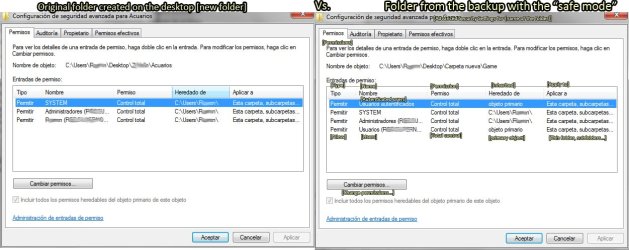
All seemed to be ok but after creating some new documents and downloading new ones, I place them into my big folder [with the files that were backed up]. And a small icon of a padlock appeared in one of the corners of the new file. After making a big research and trying several things I noticed that there was nothing wrong with the new files [or the old ones]. If I make a new folder replacing the folder that was made from the safe mode, the padlocks were no longer visible.
I spoke with a friend that told me that, all the folders created in the safe mode where created with the properties of the safe mode.
No matter what I do with the security options of the old folders, nothing happens. The only way, is to cut and paste the old files to a new folder made on the the desktop or on "My Documents" [for example] and deleting the old folder and replace it with the new folder I just created.
I don't want to replace one by one all the old folders by new ones, basically because I have hundreds of folders [almost 1T].
I really hope someone has a practical solution for this inconvenient situation that I'm experiencing.
Kind regards.
I found this place dedicated to windows 7 [so far the version of windows that I like the most]. I hope you can help me in this weird problem. It's hard to explain so I will try explain my myself the best as I can.My laptop got a virus, so before erasing the entire hard drive I needed make a copy of my files. All my files are in a folder with many subfolders so it was easy to copy all of them. For making the copy I used Teracopy. The laptop was pretty unstable, it was randomly restarting after some hours. So, to make the copy of all of my files I used the safe mode. Today I finally finished erasing the hard drive, reinstalling all my drivers, programs and getting all my files back to the hard drive of the laptop.
All seemed to be ok but after creating some new documents and downloading new ones, I place them into my big folder [with the files that were backed up]. And a small icon of a padlock appeared in one of the corners of the new file. After making a big research and trying several things I noticed that there was nothing wrong with the new files [or the old ones]. If I make a new folder replacing the folder that was made from the safe mode, the padlocks were no longer visible.
I spoke with a friend that told me that, all the folders created in the safe mode where created with the properties of the safe mode.
No matter what I do with the security options of the old folders, nothing happens. The only way, is to cut and paste the old files to a new folder made on the the desktop or on "My Documents" [for example] and deleting the old folder and replace it with the new folder I just created.
I don't want to replace one by one all the old folders by new ones, basically because I have hundreds of folders
[almost 1T].I really hope someone has a practical solution for this inconvenient situation that I'm experiencing.
Kind regards.
My Computer
At a glance
Windows 7 Ultimate x64i78gbNvidia
- Computer type
- Laptop
- Computer Manufacturer/Model Number
- Asus Republic of Gamers
- OS
- Windows 7 Ultimate x64
- CPU
- i7
- Memory
- 8gb
- Graphics Card(s)
- Nvidia
- Hard Drives
- 1T
- Antivirus
- Kapersky
- Browser
- Firefox and Chrome



 Surprisingly that also works as you said!
