Computer locks up during certain games, event viewer included

My Computer My Computer

At a glance

windows 7 Ultimate Service pack 1 x64intel i5 2500k8gb RamSapphire AMD 6950 2gb
Computer type
PC/Desktop
OS
windows 7 Ultimate Service pack 1 x64
CPU
intel i5 2500k
Motherboard
Asus p8z68-v motherboard
Memory
8gb Ram
Graphics Card(s)
Sapphire AMD 6950 2gb
Screen Resolution
1920x1080
Hard Drives
2x samsung hd103SJ
1x ST2000DL003-9VT166
PSU
Silverstone silver 850watt power supply (ST85F-P)
Case
silverstone raven RV02-E
Keyboard
microsoft side winder x4
Mouse
Razer death adder v2
Did they test the PSU under a load, that is with w7 booted?
Oh, never mind, you tested it back at post #57.:o

I know next to nothing about games and how they effect hardware. I have seen Steam, for one, cause issues though.

Have your tried disabling the other two audio devices, as an experiment?
 

My Computer My Computer

At a glance

Windows 7 Ultimate X64 SP1Intel i5-2550K, Differing ~4.4-4.8GHz No buil...16GB G.Skill Sniper 1866MHz @ 2133MHz 2x8GBASUS GTX650TIB-DC2OC-2GD5, (650TI Boost)
Computer type
PC/Desktop
Computer Manufacturer/Model Number
Home Built Desktop By DataTech
OS
Windows 7 Ultimate X64 SP1
CPU
Intel i5-2550K, Differing ~4.4-4.8GHz No built in GPU
Motherboard
ASUS P8Z68-V PRO/GEN3
Memory
16GB G.Skill Sniper 1866MHz @ 2133MHz 2x8GB
Graphics Card(s)
ASUS GTX650TIB-DC2OC-2GD5, (650TI Boost)
Sound Card
Onboard Realtek 5-1
Monitor(s) Displays
Samsung P2570HD
Screen Resolution
1920x1080
Hard Drives
Samsung 840 Pro 256GB SSD for OS, 500GB Seagate Constellation (Enterprise drive) for Data
PSU
Corsair HX650W
Case
Inwin Dragon Rider
Cooling
Hyper 212 EVO w/two Noctua fans, push-pull, @1300 RPM
Keyboard
E-Z Eyes, bright yellow keys with large characters
Mouse
steelseries SENSEI Laser Pro Gaming
Internet Speed
48-51Mbs Mbs down, 11 Mbs up Xfinity Cable
Antivirus
Norton Internet Security 2013
Browser
IE 10, Opera, Pale Moon if needed
Other Info
4 case fans, LG BluRay-RE, ASUS DVD-RW, Mr. Fusion power supply, 1.21 gigawatts.
Did they test the PSU under a load, that is with w7 booted?
Oh, never mind, you tested it back at post #57.:o

I know next to nothing about games and how they effect hardware. I have seen Steam, for one, cause issues though.

Have your tried disabling the other two audio devices, as an experiment?
No dice, honestly got no idea what to do now, bloody computer shop is gonna drain me dry and probably still not fix my issue
 

My Computer My Computer

At a glance

windows 7 Ultimate Service pack 1 x64intel i5 2500k8gb RamSapphire AMD 6950 2gb
Computer type
PC/Desktop
OS
windows 7 Ultimate Service pack 1 x64
CPU
intel i5 2500k
Motherboard
Asus p8z68-v motherboard
Memory
8gb Ram
Graphics Card(s)
Sapphire AMD 6950 2gb
Screen Resolution
1920x1080
Hard Drives
2x samsung hd103SJ
1x ST2000DL003-9VT166
PSU
Silverstone silver 850watt power supply (ST85F-P)
Case
silverstone raven RV02-E
Keyboard
microsoft side winder x4
Mouse
Razer death adder v2
Well mate I don't know what it may be. Without looking back, you have done these:

Checked HDDs with a test utility
Run memtest86+
Run Furmark to check the GPU
Disabled audio, each in turn, 3 of them
Checked out the PSU
Update GPU drivers
Swapped GPU for a test
Run Prime96 to test the CPU
Cleaned dust out
Run through Greg's troubleshooting steps

All I can think of, and it's just a shot in the dark, is too remove all PSU and data cables and reconnect them to confirm all are fully seated. You could even do that with the RAM sticks too.

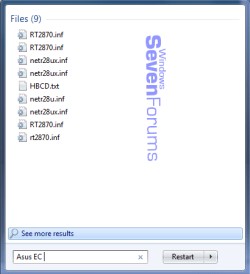
You mentioned ASUS EC, I had that come up on a Z77 board I'm testing. I installed some Corsair cooler software and it gave the option to disable it for the reasons you saw. Type ASUS EC in the start Search field and see what you get, I got this which seems to relate to wireless adapters.

ASUS EC.png
 

My Computer My Computer

At a glance

Windows 7 Ultimate X64 SP1Intel i5-2550K, Differing ~4.4-4.8GHz No buil...16GB G.Skill Sniper 1866MHz @ 2133MHz 2x8GBASUS GTX650TIB-DC2OC-2GD5, (650TI Boost)
Computer type
PC/Desktop
Computer Manufacturer/Model Number
Home Built Desktop By DataTech
OS
Windows 7 Ultimate X64 SP1
CPU
Intel i5-2550K, Differing ~4.4-4.8GHz No built in GPU
Motherboard
ASUS P8Z68-V PRO/GEN3
Memory
16GB G.Skill Sniper 1866MHz @ 2133MHz 2x8GB
Graphics Card(s)
ASUS GTX650TIB-DC2OC-2GD5, (650TI Boost)
Sound Card
Onboard Realtek 5-1
Monitor(s) Displays
Samsung P2570HD
Screen Resolution
1920x1080
Hard Drives
Samsung 840 Pro 256GB SSD for OS, 500GB Seagate Constellation (Enterprise drive) for Data
PSU
Corsair HX650W
Case
Inwin Dragon Rider
Cooling
Hyper 212 EVO w/two Noctua fans, push-pull, @1300 RPM
Keyboard
E-Z Eyes, bright yellow keys with large characters
Mouse
steelseries SENSEI Laser Pro Gaming
Internet Speed
48-51Mbs Mbs down, 11 Mbs up Xfinity Cable
Antivirus
Norton Internet Security 2013
Browser
IE 10, Opera, Pale Moon if needed
Other Info
4 case fans, LG BluRay-RE, ASUS DVD-RW, Mr. Fusion power supply, 1.21 gigawatts.
What were the results of the diagnostics install steps I took the time to write out for you, then never heard a word back?
 
What were the results of the diagnostics install steps I took the time to write out for you, then never heard a word back?

Ive done pretty much everything except sfc scandisk, the last time i did that it took me 3 weeks just to get my computer to reboot because it did something to the hard drive. I pretty much also did the last step with only the SSD was brand new and the other HDDS unplugged and still did the issue.
 

My Computer My Computer

At a glance

windows 7 Ultimate Service pack 1 x64intel i5 2500k8gb RamSapphire AMD 6950 2gb
Computer type
PC/Desktop
OS
windows 7 Ultimate Service pack 1 x64
CPU
intel i5 2500k
Motherboard
Asus p8z68-v motherboard
Memory
8gb Ram
Graphics Card(s)
Sapphire AMD 6950 2gb
Screen Resolution
1920x1080
Hard Drives
2x samsung hd103SJ
1x ST2000DL003-9VT166
PSU
Silverstone silver 850watt power supply (ST85F-P)
Case
silverstone raven RV02-E
Keyboard
microsoft side winder x4
Mouse
Razer death adder v2
There is no SFC in the steps I gave you here:

What I would do is a diagnostic install:

Test your hardware one more time from Troubleshooting Steps for Windows 7

Unplug all but the target HD, wipe the HD with Diskpart Clean Command. Now there is nothing carried over from the previous install that can affect it at all.

Following the steps to Clean Reinstall - Factory OEM Windows 7 after actual install to single partiiton, get online to enable Automatically deliver drivers via Windows Update (Step 3) then run all rounds of Important and Optional Windows Updates.

After each requested reboot, test performance to determine if the freezes are happening. Don't install any programs except those needed to test performance fully, e.g. Flash player, a game, etc.

If not then once all Updates are installed, install programs one at a time with time to test performance in between each. This may isolate what is causing the freezes.

If the problem recurs just after install then it is likely hardware related. Strip the machine down to just the HD, mobo, GPU and CPU to see if it goes away. If so it may be a component or cable.

Stress test the CPU with CPU - Stress Test with Prime95 - Windows 7 Forums and Video with Furmark.

Hardware experts may add more steps.

But there's no way SFC should affect your HDD and I've never seen it have the problems you suggest. If so then you have serious problems which may need to be resolved before continuiing. Is there a thread for this, where we were helping your resolve SFC issues for 3 weeks?
 
True, if any disk scan messed up the drive, the drive must be on its last legs as Suspected earlier. :(
 

My Computer My Computer

At a glance

Windows 7 Ultimate X64 SP1Intel i5-2550K, Differing ~4.4-4.8GHz No buil...16GB G.Skill Sniper 1866MHz @ 2133MHz 2x8GBASUS GTX650TIB-DC2OC-2GD5, (650TI Boost)
Computer type
PC/Desktop
Computer Manufacturer/Model Number
Home Built Desktop By DataTech
OS
Windows 7 Ultimate X64 SP1
CPU
Intel i5-2550K, Differing ~4.4-4.8GHz No built in GPU
Motherboard
ASUS P8Z68-V PRO/GEN3
Memory
16GB G.Skill Sniper 1866MHz @ 2133MHz 2x8GB
Graphics Card(s)
ASUS GTX650TIB-DC2OC-2GD5, (650TI Boost)
Sound Card
Onboard Realtek 5-1
Monitor(s) Displays
Samsung P2570HD
Screen Resolution
1920x1080
Hard Drives
Samsung 840 Pro 256GB SSD for OS, 500GB Seagate Constellation (Enterprise drive) for Data
PSU
Corsair HX650W
Case
Inwin Dragon Rider
Cooling
Hyper 212 EVO w/two Noctua fans, push-pull, @1300 RPM
Keyboard
E-Z Eyes, bright yellow keys with large characters
Mouse
steelseries SENSEI Laser Pro Gaming
Internet Speed
48-51Mbs Mbs down, 11 Mbs up Xfinity Cable
Antivirus
Norton Internet Security 2013
Browser
IE 10, Opera, Pale Moon if needed
Other Info
4 case fans, LG BluRay-RE, ASUS DVD-RW, Mr. Fusion power supply, 1.21 gigawatts.
Sorry for not being on guys, these last 2 months have been nothing but bad luck, now my car radiator is leaking and its gotta be replaced!
Anyway i think whoever said it could be audio drivers might be on to something, i did uninstall and reinstall the drivers after restarting my computer but the issue still persisted. While i went to my mums my dad did the same tests however they ended up going over 1 hour+!

It got me thinking that it could be out of 2 things now.
1. The USB sound card i use that i got from a plantronics headset to clear up static when i record videos or 2, the USB port i use from the motherboard could be damaged. I'm currently doing tests now to see if that's the case. If it is the sound card and its a hardware issue from that, i imagine i could get a replacement and if its software i could try seeing what might cause the crash because uninstalling didn't seem to help. But if it is the Motherboard USB port then i guess i can go get it sent off to be replaced. I will let you's know later
 

My Computer My Computer

At a glance

windows 7 Ultimate Service pack 1 x64intel i5 2500k8gb RamSapphire AMD 6950 2gb
Computer type
PC/Desktop
OS
windows 7 Ultimate Service pack 1 x64
CPU
intel i5 2500k
Motherboard
Asus p8z68-v motherboard
Memory
8gb Ram
Graphics Card(s)
Sapphire AMD 6950 2gb
Screen Resolution
1920x1080
Hard Drives
2x samsung hd103SJ
1x ST2000DL003-9VT166
PSU
Silverstone silver 850watt power supply (ST85F-P)
Case
silverstone raven RV02-E
Keyboard
microsoft side winder x4
Mouse
Razer death adder v2
What I meant was to run with only one audio driver for testing, disable two of them in rotation. You have 3 I think, Plantronics, Realtek, and maybe an HDMI one for the GPU card.
 

My Computer My Computer

At a glance

Windows 7 Ultimate X64 SP1Intel i5-2550K, Differing ~4.4-4.8GHz No buil...16GB G.Skill Sniper 1866MHz @ 2133MHz 2x8GBASUS GTX650TIB-DC2OC-2GD5, (650TI Boost)
Computer type
PC/Desktop
Computer Manufacturer/Model Number
Home Built Desktop By DataTech
OS
Windows 7 Ultimate X64 SP1
CPU
Intel i5-2550K, Differing ~4.4-4.8GHz No built in GPU
Motherboard
ASUS P8Z68-V PRO/GEN3
Memory
16GB G.Skill Sniper 1866MHz @ 2133MHz 2x8GB
Graphics Card(s)
ASUS GTX650TIB-DC2OC-2GD5, (650TI Boost)
Sound Card
Onboard Realtek 5-1
Monitor(s) Displays
Samsung P2570HD
Screen Resolution
1920x1080
Hard Drives
Samsung 840 Pro 256GB SSD for OS, 500GB Seagate Constellation (Enterprise drive) for Data
PSU
Corsair HX650W
Case
Inwin Dragon Rider
Cooling
Hyper 212 EVO w/two Noctua fans, push-pull, @1300 RPM
Keyboard
E-Z Eyes, bright yellow keys with large characters
Mouse
steelseries SENSEI Laser Pro Gaming
Internet Speed
48-51Mbs Mbs down, 11 Mbs up Xfinity Cable
Antivirus
Norton Internet Security 2013
Browser
IE 10, Opera, Pale Moon if needed
Other Info
4 case fans, LG BluRay-RE, ASUS DVD-RW, Mr. Fusion power supply, 1.21 gigawatts.
What I meant was to run with only one audio driver for testing, disable two of them in rotation. You have 3 I think, Plantronics, Realtek, and maybe an HDMI one for the GPU card.
2 months this problem could have solved so much faster lol. I played company of heroes 2 for an hour no lockups, counter strike global offensive 2 hours no lockups, put the usb sound card back into the original USB port, uninstalled the drivers, removed and put it back in same slot and reinstalled drvivers. Did the same tests and not a single lockup happened.

Thanks for everyones help. Although im wondering how it occurred in the first place... Can a BSOD corrupt drivers?

Also I still wish to test my hard drives too, out of the diagnostic tools on this page which ones should i use for my seagate and samsung hard drives?
Hard Drive Diagnostics Tools and Utilities (Storage) - TACKtech Corp.
 
Last edited:

My Computer My Computer

At a glance

windows 7 Ultimate Service pack 1 x64intel i5 2500k8gb RamSapphire AMD 6950 2gb
Computer type
PC/Desktop
OS
windows 7 Ultimate Service pack 1 x64
CPU
intel i5 2500k
Motherboard
Asus p8z68-v motherboard
Memory
8gb Ram
Graphics Card(s)
Sapphire AMD 6950 2gb
Screen Resolution
1920x1080
Hard Drives
2x samsung hd103SJ
1x ST2000DL003-9VT166
PSU
Silverstone silver 850watt power supply (ST85F-P)
Case
silverstone raven RV02-E
Keyboard
microsoft side winder x4
Mouse
Razer death adder v2
I think it's corrupt driver cause BSODs, however I don't know why they get that way.

For the HDD tests I would use the Sea Tools by Seagate, they now own Samsung's HDD division.
 

My Computer My Computer

At a glance

Windows 7 Ultimate X64 SP1Intel i5-2550K, Differing ~4.4-4.8GHz No buil...16GB G.Skill Sniper 1866MHz @ 2133MHz 2x8GBASUS GTX650TIB-DC2OC-2GD5, (650TI Boost)
Computer type
PC/Desktop
Computer Manufacturer/Model Number
Home Built Desktop By DataTech
OS
Windows 7 Ultimate X64 SP1
CPU
Intel i5-2550K, Differing ~4.4-4.8GHz No built in GPU
Motherboard
ASUS P8Z68-V PRO/GEN3
Memory
16GB G.Skill Sniper 1866MHz @ 2133MHz 2x8GB
Graphics Card(s)
ASUS GTX650TIB-DC2OC-2GD5, (650TI Boost)
Sound Card
Onboard Realtek 5-1
Monitor(s) Displays
Samsung P2570HD
Screen Resolution
1920x1080
Hard Drives
Samsung 840 Pro 256GB SSD for OS, 500GB Seagate Constellation (Enterprise drive) for Data
PSU
Corsair HX650W
Case
Inwin Dragon Rider
Cooling
Hyper 212 EVO w/two Noctua fans, push-pull, @1300 RPM
Keyboard
E-Z Eyes, bright yellow keys with large characters
Mouse
steelseries SENSEI Laser Pro Gaming
Internet Speed
48-51Mbs Mbs down, 11 Mbs up Xfinity Cable
Antivirus
Norton Internet Security 2013
Browser
IE 10, Opera, Pale Moon if needed
Other Info
4 case fans, LG BluRay-RE, ASUS DVD-RW, Mr. Fusion power supply, 1.21 gigawatts.
I think it's corrupt driver cause BSODs, however I don't know why they get that way.

For the HDD tests I would use the Sea Tools by Seagate, they now own Samsung's HDD division.

Hmm ok, well its been a few days and not a single lockup has occurred however i do get some annoying mouse cursor glitch when playing some games, like it either becomes some kind of weird jagged line or a half ripped mouse cursor. happens mostly with RTS games. Haven't run the HDD tests just yet
 

My Computer My Computer

At a glance

windows 7 Ultimate Service pack 1 x64intel i5 2500k8gb RamSapphire AMD 6950 2gb
Computer type
PC/Desktop
OS
windows 7 Ultimate Service pack 1 x64
CPU
intel i5 2500k
Motherboard
Asus p8z68-v motherboard
Memory
8gb Ram
Graphics Card(s)
Sapphire AMD 6950 2gb
Screen Resolution
1920x1080
Hard Drives
2x samsung hd103SJ
1x ST2000DL003-9VT166
PSU
Silverstone silver 850watt power supply (ST85F-P)
Case
silverstone raven RV02-E
Keyboard
microsoft side winder x4
Mouse
Razer death adder v2
Some good news at any rate, mate. The cursor issue may be USB driver, battery, if it's wireless, poor mouse pad or bad mouse. A dirty LED or laser lens too.
 

My Computer My Computer

At a glance

Windows 7 Ultimate X64 SP1Intel i5-2550K, Differing ~4.4-4.8GHz No buil...16GB G.Skill Sniper 1866MHz @ 2133MHz 2x8GBASUS GTX650TIB-DC2OC-2GD5, (650TI Boost)
Computer type
PC/Desktop
Computer Manufacturer/Model Number
Home Built Desktop By DataTech
OS
Windows 7 Ultimate X64 SP1
CPU
Intel i5-2550K, Differing ~4.4-4.8GHz No built in GPU
Motherboard
ASUS P8Z68-V PRO/GEN3
Memory
16GB G.Skill Sniper 1866MHz @ 2133MHz 2x8GB
Graphics Card(s)
ASUS GTX650TIB-DC2OC-2GD5, (650TI Boost)
Sound Card
Onboard Realtek 5-1
Monitor(s) Displays
Samsung P2570HD
Screen Resolution
1920x1080
Hard Drives
Samsung 840 Pro 256GB SSD for OS, 500GB Seagate Constellation (Enterprise drive) for Data
PSU
Corsair HX650W
Case
Inwin Dragon Rider
Cooling
Hyper 212 EVO w/two Noctua fans, push-pull, @1300 RPM
Keyboard
E-Z Eyes, bright yellow keys with large characters
Mouse
steelseries SENSEI Laser Pro Gaming
Internet Speed
48-51Mbs Mbs down, 11 Mbs up Xfinity Cable
Antivirus
Norton Internet Security 2013
Browser
IE 10, Opera, Pale Moon if needed
Other Info
4 case fans, LG BluRay-RE, ASUS DVD-RW, Mr. Fusion power supply, 1.21 gigawatts.
Unfortunately, the problem has returned with a vengeance, and reinstalling the audio driver does not seem to fix it so now its a new problem.
After running seagate tools only 2 of my 3 hdds passed the long generic test, i cant tell if which drive failed the test, its one of the samsung ones but i cant find its full name anywhere in device manager. Apparently its serial number is listed, is it also labelled somewhere on the HDD itself? What should i do from here if it IS causing my problem? (i dont think its my OS HDD)
 

My Computer My Computer

At a glance

windows 7 Ultimate Service pack 1 x64intel i5 2500k8gb RamSapphire AMD 6950 2gb
Computer type
PC/Desktop
OS
windows 7 Ultimate Service pack 1 x64
CPU
intel i5 2500k
Motherboard
Asus p8z68-v motherboard
Memory
8gb Ram
Graphics Card(s)
Sapphire AMD 6950 2gb
Screen Resolution
1920x1080
Hard Drives
2x samsung hd103SJ
1x ST2000DL003-9VT166
PSU
Silverstone silver 850watt power supply (ST85F-P)
Case
silverstone raven RV02-E
Keyboard
microsoft side winder x4
Mouse
Razer death adder v2
Google the serial number to determine which HD it is.

These drives should be tested while plugged in individually using Seagate Seatools extended CD test, followed by a full Disk Check. Replace any failing drives.
 
Google the serial number to determine which HD it is.

These drives should be tested while plugged in individually using Seagate Seatools extended CD test, followed by a full Disk Check. Replace any failing drives.

I ran a short and long generic tests but what cd test? Since its under warranty I can send it in but I wonder if they can clone the drive I really don't want to go through the hassle of copying 700gb of data back and forth. It also recommended on the drive that failed to use seatools Dos and to run recover sectors or something. So what does that do?
 

My Computer My Computer

At a glance

windows 7 Ultimate Service pack 1 x64intel i5 2500k8gb RamSapphire AMD 6950 2gb
Computer type
PC/Desktop
OS
windows 7 Ultimate Service pack 1 x64
CPU
intel i5 2500k
Motherboard
Asus p8z68-v motherboard
Memory
8gb Ram
Graphics Card(s)
Sapphire AMD 6950 2gb
Screen Resolution
1920x1080
Hard Drives
2x samsung hd103SJ
1x ST2000DL003-9VT166
PSU
Silverstone silver 850watt power supply (ST85F-P)
Case
silverstone raven RV02-E
Keyboard
microsoft side winder x4
Mouse
Razer death adder v2
Use the Seagate DOS download so that you boot to run the Extended test from CD.

Unplug all other HD's except the one being tested.

Back up all data and a Win7 image now. All data should always be backed up if it is valued at all.
 
Use the Seagate DOS download so that you boot to run the Extended test from CD.

Unplug all other HD's except the one being tested.

Back up all data and a Win7 image now. All data should always be backed up if it is valued at all.

Right, I guess ill do that. If it is the data hard drive and not the is HDD how is it causing the issue?Now I just need to copy 700gb of data to a portable HDD..
 

My Computer My Computer

At a glance

windows 7 Ultimate Service pack 1 x64intel i5 2500k8gb RamSapphire AMD 6950 2gb
Computer type
PC/Desktop
OS
windows 7 Ultimate Service pack 1 x64
CPU
intel i5 2500k
Motherboard
Asus p8z68-v motherboard
Memory
8gb Ram
Graphics Card(s)
Sapphire AMD 6950 2gb
Screen Resolution
1920x1080
Hard Drives
2x samsung hd103SJ
1x ST2000DL003-9VT166
PSU
Silverstone silver 850watt power supply (ST85F-P)
Case
silverstone raven RV02-E
Keyboard
microsoft side winder x4
Mouse
Razer death adder v2
Ok. The OS hard drive is the one failing the long test. However i did the previous tests with furmark n such arent freezing or anything so it could be the drive just going off.
Anyway i rang seagate, they can replace but they will give me a low format refurbrished one or something along those lines, and they cant clone my drive.
So i want to keep everything on this drive exactly the same, my registry,documents, web browsing history, etc.
Could i make an image and then install the image on the hard drive they send to me to make it exactly like this hard drive that im going to send off?
What app would you recommend for making an image? (the image would probably be about 400gb) because the OS hard drive has about 534/934 GB left
 

My Computer My Computer

At a glance

windows 7 Ultimate Service pack 1 x64intel i5 2500k8gb RamSapphire AMD 6950 2gb
Computer type
PC/Desktop
OS
windows 7 Ultimate Service pack 1 x64
CPU
intel i5 2500k
Motherboard
Asus p8z68-v motherboard
Memory
8gb Ram
Graphics Card(s)
Sapphire AMD 6950 2gb
Screen Resolution
1920x1080
Hard Drives
2x samsung hd103SJ
1x ST2000DL003-9VT166
PSU
Silverstone silver 850watt power supply (ST85F-P)
Case
silverstone raven RV02-E
Keyboard
microsoft side winder x4
Mouse
Razer death adder v2
Back
Top