Hi Jimmy, welcome to the Seven Forums.
Is there some reason you use Outlook ?
Why do you ask why I use Outlook 2000? I use it as it is the only mail program I know of and at 70 years of age I see no reason to change. This whole debacle is of my own doing.
I'm using Outlook too and it's bloody excellent program to do what is has been designed to do, never found or seen a better one. If you come here to ask help with an issue with Windows, responses like "Any reason you use Windows?" shouldn't be posted and you can (must) totally ignore them.
You have a good program there and your reasons to use it. That's so simple.
Then to your original post:

Hello,
Need some help to find out where Outlook went to, never gave it a second thought when I moved all my files from the C Drive to the F Drive,
I had to re-format the C Drive. I cannot find the outlook files anywhere and when
I did the format windows did make a windows old folder and Outlook is no where to be found. I have just purchased a new puter and would like to move all my outlook mail over or should I just chuck the hdd and chalk it up for experience???
Jim
Cushing, WI
You see those two statements I have highlighted in your post in above quote? They kind of contradict each other; If you format your C: drive, Windows will be totally wiped away, but when you simply reinstall without formatting, Windows moves the old Windows installation and all its files to the
Windows.old folder.
Let's say that you really formatted the C: drive before reinstalling Windows. In this case everything is gone if you do not have a backup. You must reinstall Outlook and every other application you are using. Then setup your email accounts again in Outlook and with some luck, you'll get your old email messages from the server.
Finding those old email messages and reading them to newly reinstalled Outlook mostly depends on what kind of email service you are using. Today a quite normal service type is a so called
IMAP email protocol. Another popular is
POP3 protocol.
If you have any luck, your email service was set up using
IMAP, in which case most of your old messages should still be stored on your mail provider's server and Outlook has no problems in getting them to your Outlook. However, if you were using
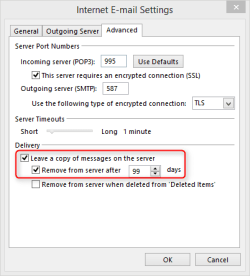
POP3 email, it all depends on how your Outlook was previously set up. A POP3 account deletes the messages from the server either every time they are read to Outlook, or after a certain period of time, depending on how user has set it up. Here's an example, POP3 settings in Outlook 2013 for one of my email accounts, asked to delete old messages from the server after 99 days:
Everything above being said, I am inclined to think you did in fact
not format your hard disk. The presence of the
Windows.old folder tells me that. If this is the case, simply reinstall
Outlook (that you have to do in any case), then import your old email messages and settings, they should be found in folder
Windows.old\Users\Your_Windows_Username\AppData\Local\Microsoft\Outlook. Please notice that the
AppData folder is a hidden folder so you need first enable showing hidden files and folders in
Folder Options (see tutorial here:
http://www.sevenforums.com/tutorials/394-hidden-files-folders-show-hide.html).
If you can find the folder in question inside
Windows.old folder, come back if you have any problems in importing your old messages to newly reinstalled Outlook.
Kari



