Solved How do I change the the .pdf file extensions icon? win7

Heretoask

New member
Local time
5:08 PM
Messages
7
Location
Australia
Hello, so I have tried to change the Adobe reader's file extension - .pdf and its icon to a custom one, but there is no 'folder options' tab in win7 to do that. I followed the tutorial here http://www.sevenforums.com/tutorials/57455-file-extension-icon-change-default-icon.html and also tried using the program Filestypeman to change the icon but both had no effect even with the correct path.
I have managed to locate what I believe are the icons for these darn .pdf files at:
C:\Program Files (x86)\Adobe\Reader 10.0\Reader\AcroRd32dll (and inside icongroup>2)

Any suggestions? :geek:
 

My Computer My Computer

At a glance

Windows 7 Home Premium 64bit
Computer type
Laptop
Computer Manufacturer/Model Number
HP
OS
Windows 7 Home Premium 64bit
Internet Speed
Slowmo
Antivirus
Avast Antivirus
Browser
Chrome
Changing the extension (portable document format; pdf) will not do anything but corrupt the file. the file will not be converted to anything else by changing the extension.

Also changing the icon for pdf (adobe reader/acrobat) is not impossible but toughmost. You are to enter into C:\Windows\installer. There you have to search foe Adobe's folder (the folders are arranged there not by name but by long numbers). The icons are stored as .exe files there (a feature of MSI based installers). You have to edit the .exe and change the icon using a program like resource hacker.

There may be other easier ways, but I dont know. If somebody can suggest, that will be nice :)
 

My Computer My Computer

At a glance

Microsoft Windows 10 Pro Insider Preview 64-bitIntel(R) Core(TM) i3-4130 CPU @ 3.40GHzCorsair Vengence 4GB x2 (8.00GB Dual-Channel ...2047MB GeForce GTS 450 (ZOTAC International)
Computer type
PC/Desktop
Computer Manufacturer/Model Number
Self Assembled
OS
Microsoft Windows 10 Pro Insider Preview 64-bit
CPU
Intel(R) Core(TM) i3-4130 CPU @ 3.40GHz
Motherboard
Gigabyte Technology Co., Ltd. B85M-D3H
Memory
Corsair Vengence 4GB x2 (8.00GB Dual-Channel DDR3 @ 798MHz)
Graphics Card(s)
2047MB GeForce GTS 450 (ZOTAC International)
Sound Card
Onboard (Realtek High Definition Audio)
Monitor(s) Displays
LG Flatron E2040T
Screen Resolution
1600x900
Hard Drives
Western Digital 1 TB
Seagate 500 GB
PSU
Corsair VS550
Case
Cooler Master K380
Cooling
Cooler Master Seidon 120V Plus
Keyboard
Logitech MK260r
Mouse
Logitech MK260r
Internet Speed
PMPL Broadband
Antivirus
Windows Defender + MBAM
Browser
Firefox
Other Info
Dell Studio 15" Laptop
Ops my bad not the file extension but the icon. :o I figured out that Filestypeman did work it was just the icon I was using didn't support the right size. Thanks for the help anyway! :) Im so dopey :confused:
 

My Computer My Computer

At a glance

Windows 7 Home Premium 64bit
Computer type
Laptop
Computer Manufacturer/Model Number
HP
OS
Windows 7 Home Premium 64bit
Internet Speed
Slowmo
Antivirus
Avast Antivirus
Browser
Chrome
Ops my bad not the file extension but the icon. :o I figured out that Filestypeman did work it was just the icon I was using didn't support the right size. Thanks for the help anyway! :) Im so dopey :confused:
Can you clarify your solution and post the icon you used? I am having no luck with the tutorial referenced above. I tried all the methods and options indicated, but the default Adobe icon remains fixed like an Alabama tick.
 

My Computer My Computer

At a glance

Microsoft Windows 7 Home Premium 64-bit 7601 ...Pentium(R) Dual-Core CPU E5300 @ 2.60GHz6.00 GBIntel(R) G33/G31 Express Chipset Family
Computer type
PC/Desktop
Computer Manufacturer/Model Number
HP (HP-P6212F)
OS
Microsoft Windows 7 Home Premium 64-bit 7601 Multiprocessor Free Service Pack 1
CPU
Pentium(R) Dual-Core CPU E5300 @ 2.60GHz
Motherboard
PEGATRON CORPORATION Benicia
Memory
6.00 GB
Graphics Card(s)
Intel(R) G33/G31 Express Chipset Family
Sound Card
Realtek High Definition Audio
Monitor(s) Displays
24'' HP WS LCD
Screen Resolution
1920 x 1080 x 32 bits (4294967296 colors) @ 60 Hz
Hard Drives
(1) ATA Hitachi HDT72106 SCSI Disk Device (2) Generic- Compact Flash USB Device (3) Generic- MS/MS-Pro USB Device (4) Generic- SD/MMC USB Device (5) Generic- SM/xD-Picture USB Device (6) Verbatim STORE N GO USB Device
Keyboard
Logitech G510s
Mouse
Logitech Trackball M570
Antivirus
Microsoft Security Essentials / Malwarebytes
Browser
IE / Firefox / Chrome
I don't mean to bump an old thread, but if you use FileTypesman, double click the file extension you want to change and hit the Browse button, you can find the directory in which the icons are located. From there, you can use ResourceHacker or replace the icons manually without Filetypesman forcing you to use 256x256 icons.
 

My Computer My Computer

At a glance

Windows 7 Starter Edition x861 GB
Computer type
PC/Desktop
Computer Manufacturer/Model Number
Dell
OS
Windows 7 Starter Edition x86
Memory
1 GB
I don't mean to bump an old thread, but if you use FileTypesman, double click the file extension you want to change and hit the Browse button, you can find the directory in which the icons are located. From there, you can use ResourceHacker or replace the icons manually without Filetypesman forcing you to use 256x256 icons.
Have you tried this solution for .pdf file extension in particular? Because, the icon management for such programs are different.

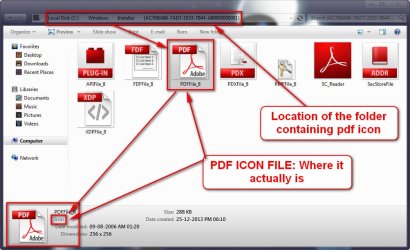
The actual location of .pdf file icon:

2014-04-06_111126.jpg

And where FileTypesman locates it:

2014-04-06_111559.jpg

The programs having a msi based installer stores its icon (as an exe file) and uninstaller in C:\Windows\Installer. It is difficult to change the icons for those programs. Some of those programs are:

VMWare
Corel Draw
Microsoft Office
Adobe Reader
Quick Time
Microsoft Securities Essentials
 

My Computer My Computer

At a glance

Microsoft Windows 10 Pro Insider Preview 64-bitIntel(R) Core(TM) i3-4130 CPU @ 3.40GHzCorsair Vengence 4GB x2 (8.00GB Dual-Channel ...2047MB GeForce GTS 450 (ZOTAC International)
Computer type
PC/Desktop
Computer Manufacturer/Model Number
Self Assembled
OS
Microsoft Windows 10 Pro Insider Preview 64-bit
CPU
Intel(R) Core(TM) i3-4130 CPU @ 3.40GHz
Motherboard
Gigabyte Technology Co., Ltd. B85M-D3H
Memory
Corsair Vengence 4GB x2 (8.00GB Dual-Channel DDR3 @ 798MHz)
Graphics Card(s)
2047MB GeForce GTS 450 (ZOTAC International)
Sound Card
Onboard (Realtek High Definition Audio)
Monitor(s) Displays
LG Flatron E2040T
Screen Resolution
1600x900
Hard Drives
Western Digital 1 TB
Seagate 500 GB
PSU
Corsair VS550
Case
Cooler Master K380
Cooling
Cooler Master Seidon 120V Plus
Keyboard
Logitech MK260r
Mouse
Logitech MK260r
Internet Speed
PMPL Broadband
Antivirus
Windows Defender + MBAM
Browser
Firefox
Other Info
Dell Studio 15" Laptop
Yep, I have tried that particular method. Unless you want my location of my PDF icon, I can't use PDF as an example because:
- I took the location Filestypeman showed at first, copied it and then pointed it to imageres.dll - but I decided I didn't want to use a imageres icon. So I pasted the location back in where Filestypeman would search for icons but for some odd reason It wouldn't show the Adobe icons in the location I pasted. I browsed to the location in Explorer, added the icon I wanted into the folder & replaced default
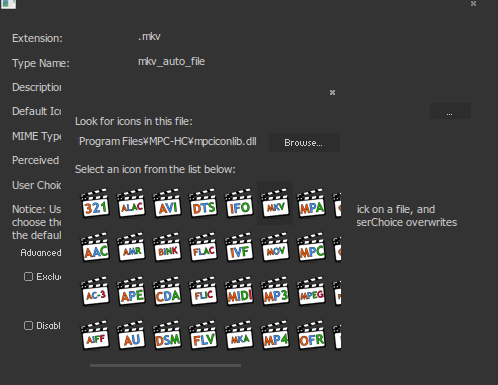
But I can show you my PDF icon folder with the added icons, and I can show you other extensios I haven't modded the icon:
4OhDbhV.png

By default, it shows me the location of my selected file extension's icons.

As for the exe files you were talking about, it doesn't do that for my Adobe Reader but puts it in the folder you showed me. MSI Installer however does put my Word extension icons in an exe file, so I used the location Filetypesman gave me and edited the exe file in Reshack. I think I should have been more clear, you must browse to the location that Filetypesman shows you and then use Reshack to edit the exe file in which the icon in stored, but it seems not to do so in your Filetypesman?
 

My Computer My Computer

At a glance

Windows 7 Starter Edition x861 GB
Computer type
PC/Desktop
Computer Manufacturer/Model Number
Dell
OS
Windows 7 Starter Edition x86
Memory
1 GB
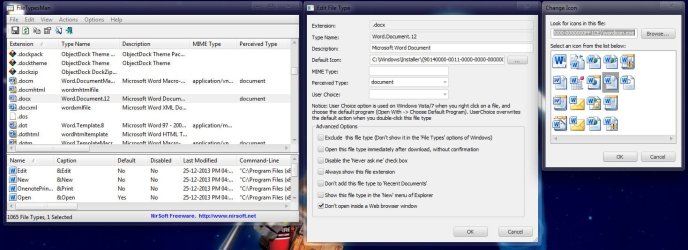
It works perfectly for word. Goes to the proper location directly.

word.jpg

But not for the PDF icon.
 

My Computer My Computer

At a glance

Microsoft Windows 10 Pro Insider Preview 64-bitIntel(R) Core(TM) i3-4130 CPU @ 3.40GHzCorsair Vengence 4GB x2 (8.00GB Dual-Channel ...2047MB GeForce GTS 450 (ZOTAC International)
Computer type
PC/Desktop
Computer Manufacturer/Model Number
Self Assembled
OS
Microsoft Windows 10 Pro Insider Preview 64-bit
CPU
Intel(R) Core(TM) i3-4130 CPU @ 3.40GHz
Motherboard
Gigabyte Technology Co., Ltd. B85M-D3H
Memory
Corsair Vengence 4GB x2 (8.00GB Dual-Channel DDR3 @ 798MHz)
Graphics Card(s)
2047MB GeForce GTS 450 (ZOTAC International)
Sound Card
Onboard (Realtek High Definition Audio)
Monitor(s) Displays
LG Flatron E2040T
Screen Resolution
1600x900
Hard Drives
Western Digital 1 TB
Seagate 500 GB
PSU
Corsair VS550
Case
Cooler Master K380
Cooling
Cooler Master Seidon 120V Plus
Keyboard
Logitech MK260r
Mouse
Logitech MK260r
Internet Speed
PMPL Broadband
Antivirus
Windows Defender + MBAM
Browser
Firefox
Other Info
Dell Studio 15" Laptop
That's peculiar. Mine automatically pointed to the PDF icons' location. What version of Adobe Reader do you have?
 

My Computer My Computer

At a glance

Windows 7 Starter Edition x861 GB
Computer type
PC/Desktop
Computer Manufacturer/Model Number
Dell
OS
Windows 7 Starter Edition x86
Memory
1 GB
Back
Top