Show tasks that are scheduled to run only when PC is idle

sethioz

New member
Local time
2:35 PM
Messages
5
Hey, well as title says. there's something that keeps spinning up my HDDs when PC has been idle for about 30 mins or so. I'm watching tv and then on background i hear PC spinning up my HDDs, its extremely annoying as i don't need this. If i want to defrag or scan my pc, i do it manually.

It's not my anti-virus (im using zonealarm and i've disabled all auto scans).
Also i've disabled search indexer and search completely (i'm using Agent Runsack).

but something still keeps doing it. i just want windows to leave my HDDs alone. I have 1 HDD specifically for games, so it should be spinned down while im not playing, but windows keeps spinning it up on its own (when pc is idle).
Same with other HDD, which I use for other general stuff.

Is there a way i can see all the tasks that run when PC is idle? I'm looking into task scheduler atm, but don't see anything there that might be causing this.


EDIT: Think i found the troublemaker > "Program Compatibility Assistant Service"

HOW?: I used Procmon (process monitor) and set the filter to "If Path Contains - F:" and "If Path Contains - G:", where F and G are drive letters for my HDDs.
After PC went idle, it popped up like 10000+ entries before i snapped pc out of idle and then it stopped automatically. From there i was able to see that it was rundll32.exe and command line for it was:
Code:
C:\Windows\system32\rundll32.exe aepdu.dll,AePduRunUpdate
So i looked it up in google and found what it belongs to. Then i disabled that junk via services.msc

but it's yet to be seen if this happens again when PC goes Idle.

Microsoft really needs to leave my PC alone and stop running all those secret tasks that do nothing but cause problems. First they add a function to spin down HDDs after idle (default value is 20 mins) and then after 1-2 min idle they spin them right back up, it makes no sense at all. at least they should add some sort of system, that if this dumb scan is scheduled, then windows won't spin down your HDDs, first it runs the scans and THEN spins down HDDs ....
honestly, brainless monkeys have made windows, they have no logical thinking at all.

anyone knows that spinning HDDs down and then up is not good at all, that's why i don't want some useless programs spinning my HDDs for no reason.
 

My Computer My Computer

At a glance

gaydows 7 64bitesFX8350 8-Core @ 4.1ghzCorsair Vengeance 16gb DDR3GTX 680 Phantom
Computer type
PC/Desktop
OS
gaydows 7 64bites
CPU
FX8350 8-Core @ 4.1ghz
Motherboard
Asus Crosshair V Formula-Z
Memory
Corsair Vengeance 16gb DDR3
Graphics Card(s)
GTX 680 Phantom
Hard Drives
Samsung SSD 250gb
SanDisk SSD 128gb
Samsung 2tb HDD 2x
Seagate 3tb External
Antivirus
ZoneAlarm Extreme Security
Browser
Chrome, Opera, Firefox
My PC is set up the same way... disabled search indexing, manual defrags, etc. (I use Locate32 and Defraggler)
It turned out that Windows was automatically defragging System Volume Information files.. the big multi-GB ones that get generated automatically at 1am every day by System Restore. If I move my mouse, the HDD activity stops.
 

My Computer My Computer

At a glance

Win10 Pro 64-bitAMD Ryzen 7 3800X32 GB Kingston DDR4-2666MSI nVidia GT 710 (2GB)
Computer type
PC/Desktop
Computer Manufacturer/Model Number
Self-Built
OS
Win10 Pro 64-bit
CPU
AMD Ryzen 7 3800X
Motherboard
Gigabyte X570 UD
Memory
32 GB Kingston DDR4-2666
Graphics Card(s)
MSI nVidia GT 710 (2GB)
Sound Card
Creative Audigy FX 5.1
Monitor(s) Displays
ViewSonic VG2439Smh 24"
Screen Resolution
1920x1080
Hard Drives
3xWD1TB; 1xSeagate 1TB... all spinning rust
PSU
EVGA 100-W1-0500-KR (500w)
Case
SilverStone PS10 (modified)
Cooling
CPU:AMD Wraith Prism. Case:3x Noctua 120mm
Keyboard
Compaq Professional PS/2
Mouse
Microsoft Basic Optical Mouse 2.0
Internet Speed
Fiber 1Gbit/sec down/up
Antivirus
Avast Free
Browser
FF, Chrome
Other Info
2x LG GH24NSC0 DVD burners, Mackie CR3 monitor speakers
I think that thing i turned off did the trick, PC has been idle since i made the post and didn't see anything in procmon. Can't say if HDDs spinned up or not, i wasn't near PC, but if there's no activity, i see no reason why they would spin up.

Yeah i hate all this gay stuff they put into windows. We're on SSDs and they don't need defragging ... microsoft just breaks your machines with all this unneccesary stuff.
 

My Computer My Computer

At a glance

gaydows 7 64bitesFX8350 8-Core @ 4.1ghzCorsair Vengeance 16gb DDR3GTX 680 Phantom
Computer type
PC/Desktop
OS
gaydows 7 64bites
CPU
FX8350 8-Core @ 4.1ghz
Motherboard
Asus Crosshair V Formula-Z
Memory
Corsair Vengeance 16gb DDR3
Graphics Card(s)
GTX 680 Phantom
Hard Drives
Samsung SSD 250gb
SanDisk SSD 128gb
Samsung 2tb HDD 2x
Seagate 3tb External
Antivirus
ZoneAlarm Extreme Security
Browser
Chrome, Opera, Firefox
By default Windows 7 turns off defrag to SSD's.
By default Windows 7 does not schedule anything.

If these things were happening on your computer someone or something changed the default settings.

You can check these things to make sure they are still set at default or where ever you want them.

You can also check programs like Adobe, anti virus, anti malware to make sure they are not set to auto check for updates. Many of these types of programs when installed set default to auto check for updates.
Indexing which is a good thing could be happening from time to time.
If you installed Microsoft Malicious Software Removal Tool can also start scanning when the computer is at low usage.

As you can see their are many things that can cause your drives to start working without you doing anything. With a little research you can learn how to stop this from happening if you so desire.

Another item is infection of various kinds can start things all by them selves.
 

My Computer My Computer

At a glance

Windows 10 Pro. 64/ version 1709 Windows 7 Pr...Intel i7-6800K @ 4.3Corsair Platinum 16 gig @2400EVGA GTX 1070 OC
Computer type
PC/Desktop
Computer Manufacturer/Model Number
Home made Desktop
OS
Windows 10 Pro. 64/ version 1709 Windows 7 Pro/64
CPU
Intel i7-6800K @ 4.3
Motherboard
ASUS X-99 Deluxe II
Memory
Corsair Platinum 16 gig @2400
Graphics Card(s)
EVGA GTX 1070 OC
Monitor(s) Displays
Asus 27" LED LCD/VE278Q
Screen Resolution
1920-1080 or 1280-720 HDMI
Hard Drives
INTEL SSD 730-240 Gb Sata 3.0/
PSU
EVGA Platium 1200W
Case
Phanteks Luxe Tempered Glass 8 fans/ one radiator
Cooling
XSPC/ Water Cooled CPU
Keyboard
Das 4 Professional
Mouse
Logitech M705/MX Anywhere 2-S
Internet Speed
100 mbits
Antivirus
Microsoft Security Essentials/ Malwarebytes Premium 3.0/ SAS
Browser
I.E. 11 default/Firefox/ ISP Time Warner Cable/Spectrum
Other Info
LG BluRay Burner/
Sound system-KLipsch-THX/
Icy Dock ssd Hot Swap bays.
By default Windows 7 does not schedule anything.

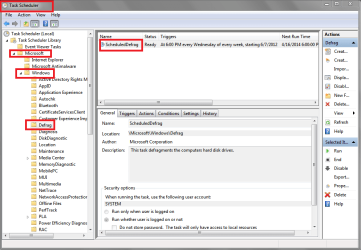
Hello LB, but I have to disagree with this ...
I didn't setup all the scheduled tasks I have ...

WSDSP01.PNG
 

My Computer My Computer

At a glance

Multi-Boot W7_Pro_x64 W8.1_Pro_x64 W10_Pro_x6...AMD Athlon II x4 6206GB GSkill DDR2 800AMD 4670 GPU + AMD 4200 IGP
Computer type
PC/Desktop
Computer Manufacturer/Model Number
home built
OS
Multi-Boot W7_Pro_x64 W8.1_Pro_x64 W10_Pro_x64 +Linux_VMs +Chromium_VM
CPU
AMD Athlon II x4 620
Motherboard
Gigabyte GA-MA785G-UD3H
Memory
6GB GSkill DDR2 800
Graphics Card(s)
AMD 4670 GPU + AMD 4200 IGP
Sound Card
on board Realtek ALC889A
Monitor(s) Displays
RCA 40" LCD TV, Insignia 32" LCD TV, HP 15" LCD monitor
Screen Resolution
1680 x 1050
Hard Drives
OCZ Vertex 3 120GB,
Samsung F3 1TB (3),
Several others - WD, Seagate, Hitachi, ...
PSU
Corsair 500 W
Case
Rosewill mid tower
Cooling
CM 90mm rifle
Keyboard
Gyration wireless, Logitech wireless, Dell USB wired
Mouse
Gyration wireless, Logitech wireless, V7 USB wired
Internet Speed
Spectrum - 100Mbps D / 10Mbps U
Antivirus
Avast, MBAM3, EMET, WinPatrol
Browser
Pale Moon, Firefox, IE
Other Info
2 multi-boot PC's
Mainly HTPC/Office/Gen purpose (no gaming).
Trendnet USB KVM.
LG DVD burner/Blue Ray Player.
Tray system for removable SATA backup drives.

Not currently OCd, under-volted.
I use Hybrid sleep, rarely re-boot or shutdown.

Hauppauge HD-PVR, Avermedia PCIe TV Tuner, Hauppauge PCI TV Tuner.
Maybe it's me but I have never had such a problem. Nothing on any of my Windows 7 system has ever had any schedule of any kind as default.
 

My Computer My Computer

At a glance

Windows 10 Pro. 64/ version 1709 Windows 7 Pr...Intel i7-6800K @ 4.3Corsair Platinum 16 gig @2400EVGA GTX 1070 OC
Computer type
PC/Desktop
Computer Manufacturer/Model Number
Home made Desktop
OS
Windows 10 Pro. 64/ version 1709 Windows 7 Pro/64
CPU
Intel i7-6800K @ 4.3
Motherboard
ASUS X-99 Deluxe II
Memory
Corsair Platinum 16 gig @2400
Graphics Card(s)
EVGA GTX 1070 OC
Monitor(s) Displays
Asus 27" LED LCD/VE278Q
Screen Resolution
1920-1080 or 1280-720 HDMI
Hard Drives
INTEL SSD 730-240 Gb Sata 3.0/
PSU
EVGA Platium 1200W
Case
Phanteks Luxe Tempered Glass 8 fans/ one radiator
Cooling
XSPC/ Water Cooled CPU
Keyboard
Das 4 Professional
Mouse
Logitech M705/MX Anywhere 2-S
Internet Speed
100 mbits
Antivirus
Microsoft Security Essentials/ Malwarebytes Premium 3.0/ SAS
Browser
I.E. 11 default/Firefox/ ISP Time Warner Cable/Spectrum
Other Info
LG BluRay Burner/
Sound system-KLipsch-THX/
Icy Dock ssd Hot Swap bays.
I don't have any problem(s) that I know of.
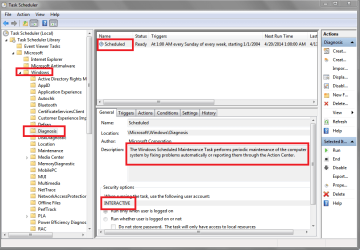
I'm just saying WINDOWS did install and schedule many tasks "by default" for me ...
My screen print shows another scheduled task I have ...
I don't know "how or why" to schedule such a task, so I know I didn't do it.

If I'm the only one with MICROSOFT/WINDOWS tasks such as this, maybe my PCs are really messed up ...
I'm showing screen prints ... what do you see in Scheduled Tasks for Windows and all the sub-folders ?

WSDSP02.PNG
 
Last edited:

My Computer My Computer

At a glance

Multi-Boot W7_Pro_x64 W8.1_Pro_x64 W10_Pro_x6...AMD Athlon II x4 6206GB GSkill DDR2 800AMD 4670 GPU + AMD 4200 IGP
Computer type
PC/Desktop
Computer Manufacturer/Model Number
home built
OS
Multi-Boot W7_Pro_x64 W8.1_Pro_x64 W10_Pro_x64 +Linux_VMs +Chromium_VM
CPU
AMD Athlon II x4 620
Motherboard
Gigabyte GA-MA785G-UD3H
Memory
6GB GSkill DDR2 800
Graphics Card(s)
AMD 4670 GPU + AMD 4200 IGP
Sound Card
on board Realtek ALC889A
Monitor(s) Displays
RCA 40" LCD TV, Insignia 32" LCD TV, HP 15" LCD monitor
Screen Resolution
1680 x 1050
Hard Drives
OCZ Vertex 3 120GB,
Samsung F3 1TB (3),
Several others - WD, Seagate, Hitachi, ...
PSU
Corsair 500 W
Case
Rosewill mid tower
Cooling
CM 90mm rifle
Keyboard
Gyration wireless, Logitech wireless, Dell USB wired
Mouse
Gyration wireless, Logitech wireless, V7 USB wired
Internet Speed
Spectrum - 100Mbps D / 10Mbps U
Antivirus
Avast, MBAM3, EMET, WinPatrol
Browser
Pale Moon, Firefox, IE
Other Info
2 multi-boot PC's
Mainly HTPC/Office/Gen purpose (no gaming).
Trendnet USB KVM.
LG DVD burner/Blue Ray Player.
Tray system for removable SATA backup drives.

Not currently OCd, under-volted.
I use Hybrid sleep, rarely re-boot or shutdown.

Hauppauge HD-PVR, Avermedia PCIe TV Tuner, Hauppauge PCI TV Tuner.
LB, do you log in with an Administrator account or a Standard (Limited) account?
 

My Computer My Computer

At a glance

Multi-Boot W7_Pro_x64 W8.1_Pro_x64 W10_Pro_x6...AMD Athlon II x4 6206GB GSkill DDR2 800AMD 4670 GPU + AMD 4200 IGP
Computer type
PC/Desktop
Computer Manufacturer/Model Number
home built
OS
Multi-Boot W7_Pro_x64 W8.1_Pro_x64 W10_Pro_x64 +Linux_VMs +Chromium_VM
CPU
AMD Athlon II x4 620
Motherboard
Gigabyte GA-MA785G-UD3H
Memory
6GB GSkill DDR2 800
Graphics Card(s)
AMD 4670 GPU + AMD 4200 IGP
Sound Card
on board Realtek ALC889A
Monitor(s) Displays
RCA 40" LCD TV, Insignia 32" LCD TV, HP 15" LCD monitor
Screen Resolution
1680 x 1050
Hard Drives
OCZ Vertex 3 120GB,
Samsung F3 1TB (3),
Several others - WD, Seagate, Hitachi, ...
PSU
Corsair 500 W
Case
Rosewill mid tower
Cooling
CM 90mm rifle
Keyboard
Gyration wireless, Logitech wireless, Dell USB wired
Mouse
Gyration wireless, Logitech wireless, V7 USB wired
Internet Speed
Spectrum - 100Mbps D / 10Mbps U
Antivirus
Avast, MBAM3, EMET, WinPatrol
Browser
Pale Moon, Firefox, IE
Other Info
2 multi-boot PC's
Mainly HTPC/Office/Gen purpose (no gaming).
Trendnet USB KVM.
LG DVD burner/Blue Ray Player.
Tray system for removable SATA backup drives.

Not currently OCd, under-volted.
I use Hybrid sleep, rarely re-boot or shutdown.

Hauppauge HD-PVR, Avermedia PCIe TV Tuner, Hauppauge PCI TV Tuner.
Administrator.
Without changing any settings do you notice anything running when you don't request it to run.
Your setting look like mine in your picture. Nothing runs unless I tell it to.

Something you could look at.
Ccleaner/ Tools and look under schedule.
 

My Computer My Computer

At a glance

Windows 10 Pro. 64/ version 1709 Windows 7 Pr...Intel i7-6800K @ 4.3Corsair Platinum 16 gig @2400EVGA GTX 1070 OC
Computer type
PC/Desktop
Computer Manufacturer/Model Number
Home made Desktop
OS
Windows 10 Pro. 64/ version 1709 Windows 7 Pro/64
CPU
Intel i7-6800K @ 4.3
Motherboard
ASUS X-99 Deluxe II
Memory
Corsair Platinum 16 gig @2400
Graphics Card(s)
EVGA GTX 1070 OC
Monitor(s) Displays
Asus 27" LED LCD/VE278Q
Screen Resolution
1920-1080 or 1280-720 HDMI
Hard Drives
INTEL SSD 730-240 Gb Sata 3.0/
PSU
EVGA Platium 1200W
Case
Phanteks Luxe Tempered Glass 8 fans/ one radiator
Cooling
XSPC/ Water Cooled CPU
Keyboard
Das 4 Professional
Mouse
Logitech M705/MX Anywhere 2-S
Internet Speed
100 mbits
Antivirus
Microsoft Security Essentials/ Malwarebytes Premium 3.0/ SAS
Browser
I.E. 11 default/Firefox/ ISP Time Warner Cable/Spectrum
Other Info
LG BluRay Burner/
Sound system-KLipsch-THX/
Icy Dock ssd Hot Swap bays.
I agree, you people are very badly misinformed about windows 7 behavior. It runs all sorts of automatic checks by default, defrag, disk checks, error checks ..etc ..etc ..etc ..etc ..etc ..etc and list goes on and on and on.
When i installed my win7, i turned off about 50 services and tasks that were set to run by default and they do nothing but cause problems for users.

Anyway, back to the issue, whatever i did, was not enough. that crap "aepdu.dll" still runs. Seems like there was another aepdu.dll in some amd folder.

I had enough of this crap, so i simply renamed the file to aepdu.dll.bak and create empty text.txt file and renamed it to aepdu.dll and made changed permission to "read only"...lets see if that junk still bothers my HDDs. I'm quite sure it won't bother me again, but will have to see.


oh yeah and speaking of win 7 turning off defrag for SSD? RIGHT ... windows 7 is still in the "floppy" era, how can you expect it to even know about SSDs??
What i mean, is that during installation, sometimes it gives error about some drivers (sometimes when DVD is corrupt or there's dust/scratches on it, it gives false error and says its about drivers, while all it is .. is disk read error). Anyone, it offers you option "insert floppy with drivers" .. so yeah, really...win7 and SSD? RIGHT!
It isn't defrag tho, it's that aepdu.dll that is doing it.
 

My Computer My Computer

At a glance

gaydows 7 64bitesFX8350 8-Core @ 4.1ghzCorsair Vengeance 16gb DDR3GTX 680 Phantom
Computer type
PC/Desktop
OS
gaydows 7 64bites
CPU
FX8350 8-Core @ 4.1ghz
Motherboard
Asus Crosshair V Formula-Z
Memory
Corsair Vengeance 16gb DDR3
Graphics Card(s)
GTX 680 Phantom
Hard Drives
Samsung SSD 250gb
SanDisk SSD 128gb
Samsung 2tb HDD 2x
Seagate 3tb External
Antivirus
ZoneAlarm Extreme Security
Browser
Chrome, Opera, Firefox
Administrator.
Without changing any settings do you notice anything running when you don't request it to run.
Your setting look like mine in your picture. Nothing runs unless I tell it to.

Something you could look at.
Ccleaner/ Tools and look under schedule.
So your tasks show they never run ...
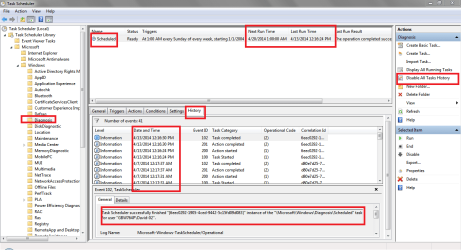
Can you Enable All Tasks History and show me screen prints like I've included ?
Below is another Screen Print - I have Enable All Tasks History set ... ALWAYS, so I can better see what happened.

Even without "All Tasks History", what does your task show for Last Run Time and Next Run Time ?
Please show me a screen print.

I don't notice most of these tasks running, and I certainly don't request them to run ...
But I believe they do run, or Task History is totally wrong !

WSDSP03.PNG
 

My Computer My Computer

At a glance

Multi-Boot W7_Pro_x64 W8.1_Pro_x64 W10_Pro_x6...AMD Athlon II x4 6206GB GSkill DDR2 800AMD 4670 GPU + AMD 4200 IGP
Computer type
PC/Desktop
Computer Manufacturer/Model Number
home built
OS
Multi-Boot W7_Pro_x64 W8.1_Pro_x64 W10_Pro_x64 +Linux_VMs +Chromium_VM
CPU
AMD Athlon II x4 620
Motherboard
Gigabyte GA-MA785G-UD3H
Memory
6GB GSkill DDR2 800
Graphics Card(s)
AMD 4670 GPU + AMD 4200 IGP
Sound Card
on board Realtek ALC889A
Monitor(s) Displays
RCA 40" LCD TV, Insignia 32" LCD TV, HP 15" LCD monitor
Screen Resolution
1680 x 1050
Hard Drives
OCZ Vertex 3 120GB,
Samsung F3 1TB (3),
Several others - WD, Seagate, Hitachi, ...
PSU
Corsair 500 W
Case
Rosewill mid tower
Cooling
CM 90mm rifle
Keyboard
Gyration wireless, Logitech wireless, Dell USB wired
Mouse
Gyration wireless, Logitech wireless, V7 USB wired
Internet Speed
Spectrum - 100Mbps D / 10Mbps U
Antivirus
Avast, MBAM3, EMET, WinPatrol
Browser
Pale Moon, Firefox, IE
Other Info
2 multi-boot PC's
Mainly HTPC/Office/Gen purpose (no gaming).
Trendnet USB KVM.
LG DVD burner/Blue Ray Player.
Tray system for removable SATA backup drives.

Not currently OCd, under-volted.
I use Hybrid sleep, rarely re-boot or shutdown.

Hauppauge HD-PVR, Avermedia PCIe TV Tuner, Hauppauge PCI TV Tuner.
I agree, you people are very badly misinformed about windows 7 behavior. It runs all sorts of automatic checks by default, defrag, disk checks, error checks ..etc ..etc ..etc ..etc ..etc ..etc and list goes on and on and on.
When i installed my win7, i turned off about 50 services and tasks that were set to run by default and they do nothing but cause problems for users.

Anyway, back to the issue, whatever i did, was not enough. that crap "aepdu.dll" still runs. Seems like there was another aepdu.dll in some amd folder.

I had enough of this crap, so i simply renamed the file to aepdu.dll.bak and create empty text.txt file and renamed it to aepdu.dll and made changed permission to "read only"...lets see if that junk still bothers my HDDs. I'm quite sure it won't bother me again, but will have to see.


oh yeah and speaking of win 7 turning off defrag for SSD? RIGHT ... windows 7 is still in the "floppy" era, how can you expect it to even know about SSDs??
What i mean, is that during installation, sometimes it gives error about some drivers (sometimes when DVD is corrupt or there's dust/scratches on it, it gives false error and says its about drivers, while all it is .. is disk read error). Anyone, it offers you option "insert floppy with drivers" .. so yeah, really...win7 and SSD? RIGHT!
It isn't defrag tho, it's that aepdu.dll that is doing it.

I apologize for taking your thread off track :(:o
I converted an OS from a HD to a SSD using Acronis Backup Imaging, and I was pleasantly surprised that "Scheduled Auto Defrag" removed the SSD from the schedule (for me).
It was one of the first things I checked after the conversion ...
I'll see if I can find anything about "aepdu.dll" that might help ... :)
 

My Computer My Computer

At a glance

Multi-Boot W7_Pro_x64 W8.1_Pro_x64 W10_Pro_x6...AMD Athlon II x4 6206GB GSkill DDR2 800AMD 4670 GPU + AMD 4200 IGP
Computer type
PC/Desktop
Computer Manufacturer/Model Number
home built
OS
Multi-Boot W7_Pro_x64 W8.1_Pro_x64 W10_Pro_x64 +Linux_VMs +Chromium_VM
CPU
AMD Athlon II x4 620
Motherboard
Gigabyte GA-MA785G-UD3H
Memory
6GB GSkill DDR2 800
Graphics Card(s)
AMD 4670 GPU + AMD 4200 IGP
Sound Card
on board Realtek ALC889A
Monitor(s) Displays
RCA 40" LCD TV, Insignia 32" LCD TV, HP 15" LCD monitor
Screen Resolution
1680 x 1050
Hard Drives
OCZ Vertex 3 120GB,
Samsung F3 1TB (3),
Several others - WD, Seagate, Hitachi, ...
PSU
Corsair 500 W
Case
Rosewill mid tower
Cooling
CM 90mm rifle
Keyboard
Gyration wireless, Logitech wireless, Dell USB wired
Mouse
Gyration wireless, Logitech wireless, V7 USB wired
Internet Speed
Spectrum - 100Mbps D / 10Mbps U
Antivirus
Avast, MBAM3, EMET, WinPatrol
Browser
Pale Moon, Firefox, IE
Other Info
2 multi-boot PC's
Mainly HTPC/Office/Gen purpose (no gaming).
Trendnet USB KVM.
LG DVD burner/Blue Ray Player.
Tray system for removable SATA backup drives.

Not currently OCd, under-volted.
I use Hybrid sleep, rarely re-boot or shutdown.

Hauppauge HD-PVR, Avermedia PCIe TV Tuner, Hauppauge PCI TV Tuner.
Back
Top