Solved Cannot view nor edit mp3 files in explorer.

41023

New member
Local time
1:37 PM
Messages
36
Usually when I click on a mp3 file it will show all the informations about that file in the bottom of the folder and I can edit them, like album, contributing artists, and track number. But recently when I clicked on them there are no in tags for me to view. I have k-lite codec pack 10.3.7 installed.
fZ9lY7Y.png


JE5YKeY.png


Thanks.
 

My Computer

Computer type
PC/Desktop
OS
Windows 7 Home Premium 64bit
Have you used a tagging application such as Mp3tag to take a look at them?
 

My Computer

Computer type
PC/Desktop
Computer Manufacturer/Model Number
Ignatz Special; 4 speed manual gearbox; factory air conditioning; one of one
OS
Windows 7 Home Premium SP1, 64-bit
CPU
Intel Skylake i5-6600K, not overclocked
Motherboard
AsRock Z170M Extreme 4, micro ATX
Memory
8 GB HyperX DDR4-2666 (2 x 4 GB)
Graphics Card(s)
none; graphics are integrated on CPU
Sound Card
onboard: Realtek ALC1150; external: USB Behringer UF0-202
Monitor(s) Displays
Dell S2340M 23 inch IPS
Screen Resolution
1600 x 900
Hard Drives
System: Crucial MX100 series SSD, 128 GB;
Data: Samsung Spinpoint 103SJ, 1 TB;
Backup: WD Caviar Green WD30EZRX-00D8PB0, 3 TB
PSU
Rosewill SilentNight 500 watt fanless, semi-modular
Case
Antec Solo II
Cooling
Noctua NH-U12S; Noctua F12 intake, Noctua S12A exhaust
Keyboard
Microsoft 200 6JH-00001 USB
Mouse
Dell or Microsoft optical wired; USB
Antivirus
Microsoft Security Essentials and Malwarebytes Premium
Browser
Pale Moon
Other Info
All fans PWM; speeds at idle: CPU circa 500 rpm; intake circa 600 rpm; exhaust circa 600 rpm; CPU temps 27 idle and 47 C load in a warm room (27 C/81 F) when running Intel Extreme Tuning Utility stress test.
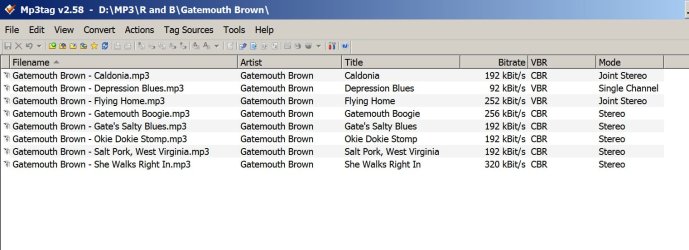
I can't say if it will help, but that app is generally regarded as the best tagging application out there. If it can't find tags, I don't know what to tell you--I have tens of thousands of mp3s and have never lost tags. BUT, I never try to edit them manually through the properties page as you are doing. I always use mp3tag. It can operate on thousands of songs at a time.

Mp3tag - the universal Tag Editor (ID3v2, MP4, OGG, FLAC, ...)

It has a learning curve like any other app. But you need something to determine easily if your tags are outright erased, or if this is just some peculiarity with Windows.

Here's a screenshot of what it looks like on a random folder in my collection:
 

Attachments

  • Untitled-1.jpg
    Untitled-1.jpg
    480.6 KB · Views: 3

My Computer

Computer type
PC/Desktop
Computer Manufacturer/Model Number
Ignatz Special; 4 speed manual gearbox; factory air conditioning; one of one
OS
Windows 7 Home Premium SP1, 64-bit
CPU
Intel Skylake i5-6600K, not overclocked
Motherboard
AsRock Z170M Extreme 4, micro ATX
Memory
8 GB HyperX DDR4-2666 (2 x 4 GB)
Graphics Card(s)
none; graphics are integrated on CPU
Sound Card
onboard: Realtek ALC1150; external: USB Behringer UF0-202
Monitor(s) Displays
Dell S2340M 23 inch IPS
Screen Resolution
1600 x 900
Hard Drives
System: Crucial MX100 series SSD, 128 GB;
Data: Samsung Spinpoint 103SJ, 1 TB;
Backup: WD Caviar Green WD30EZRX-00D8PB0, 3 TB
PSU
Rosewill SilentNight 500 watt fanless, semi-modular
Case
Antec Solo II
Cooling
Noctua NH-U12S; Noctua F12 intake, Noctua S12A exhaust
Keyboard
Microsoft 200 6JH-00001 USB
Mouse
Dell or Microsoft optical wired; USB
Antivirus
Microsoft Security Essentials and Malwarebytes Premium
Browser
Pale Moon
Other Info
All fans PWM; speeds at idle: CPU circa 500 rpm; intake circa 600 rpm; exhaust circa 600 rpm; CPU temps 27 idle and 47 C load in a warm room (27 C/81 F) when running Intel Extreme Tuning Utility stress test.
I can't say if it will help, but that app is generally regarded as the best tagging application out there. If it can't find tags, I don't know what to tell you--I have tens of thousands of mp3s and have never lost tags. BUT, I never try to edit them manually through the properties page as you are doing. I always use mp3tag. It can operate on thousands of songs at a time.

Mp3tag - the universal Tag Editor (ID3v2, MP4, OGG, FLAC, ...)

It has a learning curve like any other app. But you need something to determine easily if your tags are outright erased, or if this is just some peculiarity with Windows.

Here's a screenshot of what it looks like on a random folder in my collection:
Thanks, I'll use this program and wait for a solution to my problem as I feel more convenient editing them in the folder.
 

My Computer

Computer type
PC/Desktop
OS
Windows 7 Home Premium 64bit
Help?
 

My Computer

Computer type
PC/Desktop
OS
Windows 7 Home Premium 64bit
Help, still can't read or write in explorer.
 

My Computer

Computer type
PC/Desktop
OS
Windows 7 Home Premium 64bit
Did that occur since you installed K-lite - which in my book is malware.
 

My Computer

Computer Manufacturer/Model Number
HP, Dell, Gateway, Toshiba - 4 laptops and 2 desktops
OS
Vista, Windows7, Mint Mate, Zorin, Windows 8
CPU
from 1.6GHz Duo to i7
Monitor(s) Displays
2x HP w2207
Hard Drives
5x HDD, 7x SSD, 12x Externals
Keyboard
with trackball - no mices
Mouse
Trackball mice
Internet Speed
DSL 6000
Did that occur since you installed K-lite - which in my book is malware.
No, I installed k-lite much longer before, this just happened a week ago.
 

My Computer

Computer type
PC/Desktop
OS
Windows 7 Home Premium 64bit
A few questions and a possible fix

Is this true for all mp3 files? You cannot edit the property on all mp3 files. Or is it only a few (less than 500 ;)

Was MP3tag able to change the properties?

What media player do you use? Windows Media Player?

Are the affected files in the Windows Music Library? Where are you attempting to make changes - in the Library view or the actual folder? (shouldn't matter really)

Is the folder on a internal or external drive?

What is that shred icon? Any other software recently added?

The screen shot looks like a music folder - check the folder properties > customize > type=Music
Try resetting to General and then back to Music.

A few questions - less than 500 ;)

The first thing I would try would be to rebuild the Windows Index.
Control Panel > Indexing Options > Advanced > Delete and rebuild the index
 

My Computer

Computer type
Laptop
Computer Manufacturer/Model Number
HP Pavilion dv6-6c10us
OS
x64 (6.3.9600) Win8.1 Pro & soon dual boot x64 (6.1.7601) Win7_SP1 HomePrem
CPU
AMD A6-3420M APU with Radeon(tm) HD Graphics
Motherboard
Hewlett-Packard 1805
Memory
6.00 GB
Graphics Card(s)
AMD Radeon(TM) HD 6520G
Sound Card
(1) AMD High Definition Audio Device (2) IDT High Definiti
Monitor(s) Displays
HP W2072a 20" LCD (1600 x 900) @ 60 Hz
Screen Resolution
1366 x 768 x 32 bits (4294967296 colors) @ 60 Hz
Hard Drives
ST640LM0 00 HM641JI SATA Disk Device
Keyboard
Logitech k520 wireless KB
Mouse
Logitech m320 wireless mouse (bundled with KB)
Internet Speed
15/5 | 54 MB Wireless 'n'
Antivirus
Realtime: Defender or Avast | On-demand: Malwarebytes, ESET
Browser
IE 11 on Win8, IE 10 on win 7
Other Info
Media: [Gimp, Audacity, VLC] || Comm: [WEmail 2012, Skype] || Productivity: [OpenOffice,| Textpad] || Utils: [Sysinternals, cCleaner, Speccy, Defraggler]
A few questions and a possible fix

Is this true for all mp3 files? You cannot edit the property on all mp3 files. Or is it only a few (less than 500 ;)

Was MP3tag able to change the properties?

What media player do you use? Windows Media Player?

Are the affected files in the Windows Music Library? Where are you attempting to make changes - in the Library view or the actual folder? (shouldn't matter really)

Is the folder on a internal or external drive?

What is that shred icon? Any other software recently added?

The screen shot looks like a music folder - check the folder properties > customize > type=Music
Try resetting to General and then back to Music.

A few questions - less than 500 ;)

The first thing I would try would be to rebuild the Windows Index.
Control Panel > Indexing Options > Advanced > Delete and rebuild the index
-All the mo3 files are affected.
-Yes, mp3tag is able to change properties.
-Yes, I use windows media player.
-The affected files are in my E drive.
-The folder is on an internal drive.
-The shred icon is from Advanced Systemcare.

Tried resetting to general then back to Music, failed.

I will try to rebuild the index later today.
 

My Computer

Computer type
PC/Desktop
OS
Windows 7 Home Premium 64bit
Thanks for the feedback.

I would uninstall Advanced Systemcare - Windows 7 doesn't really need 3rd party tuneup / cleanup tools. Many times they do more damage than good. There was a time that extra utilties were handy, but that was before Vista.

If you have a paid version of Advanced Systemcare - make sure you have the license key before you uninstall it.

Piriform has a couple of good lightweight utilities that do no harm. All of the utilities are free.
  • cCleaner does a nice job and is very conservative in what it fixes.
  • Defragger has a few options (free space, individual file, folder defrag, etc) that Windows defrag lacks.
  • Speccy is a nice graphical System Information utility.
Since you're in the investigation stage, you should run a few quick malware scans:

Click here to download AdwCleaner (author: Xplode) from Bleepingcomputer
picture.php
save the application to your Desktop.
  • Right-click AdwCleaner.exe on your Desktop and select Run As Administrator to run the scanner with full privilege rights.
    : AdwCleaner is a standalone executable, there is no install.
    picture.php
  • Click on the Scan button.
    : AdwCleaner begins scanning your system. It might take some time to complete, be patient
    picture.php
  • Look through the tabs for any recognizable entries - if you know something is ok (you installed it or configured your system that way) remove the tick mark for that item. :info: I use Textpad on my system and AdwCleaner flags it as a possible threat because I configured Textpad to replace Notepad. AdwCleaner says "Hey, that's not quite right - you should take a look a this - did you make this change"
    picture.php
  • Click the Clean button.
    picture.php
  • If prompted, answer OK to the "close all programs", then follow the onscreen prompts.
    picture.php
  • If prompted, answer OK to the "restart the computer" prompt to complete the removal process.
    : The AdwCleaner[S#].txt log is opened in your default Text editor when the machine has restarted.
    : AdwCleaner logs are located in the C:\AdwCleaner folder if you need to reference them.
If AdwCleaner doesn't find anything, launch AdwCleaner a final time and click the Uninstall button.
If malware is detected, please attach the AdwCleaner logs to a new post on your thread.
See: http://www.sevenforums.com/tutorials/9733-screenshots-files-upload-post-seven-forums.html
 

My Computer

Computer type
Laptop
Computer Manufacturer/Model Number
HP Pavilion dv6-6c10us
OS
x64 (6.3.9600) Win8.1 Pro & soon dual boot x64 (6.1.7601) Win7_SP1 HomePrem
CPU
AMD A6-3420M APU with Radeon(tm) HD Graphics
Motherboard
Hewlett-Packard 1805
Memory
6.00 GB
Graphics Card(s)
AMD Radeon(TM) HD 6520G
Sound Card
(1) AMD High Definition Audio Device (2) IDT High Definiti
Monitor(s) Displays
HP W2072a 20" LCD (1600 x 900) @ 60 Hz
Screen Resolution
1366 x 768 x 32 bits (4294967296 colors) @ 60 Hz
Hard Drives
ST640LM0 00 HM641JI SATA Disk Device
Keyboard
Logitech k520 wireless KB
Mouse
Logitech m320 wireless mouse (bundled with KB)
Internet Speed
15/5 | 54 MB Wireless 'n'
Antivirus
Realtime: Defender or Avast | On-demand: Malwarebytes, ESET
Browser
IE 11 on Win8, IE 10 on win 7
Other Info
Media: [Gimp, Audacity, VLC] || Comm: [WEmail 2012, Skype] || Productivity: [OpenOffice,| Textpad] || Utils: [Sysinternals, cCleaner, Speccy, Defraggler]
Thanks for the feedback.

I would uninstall Advanced Systemcare - Windows 7 doesn't really need 3rd party tuneup / cleanup tools. Many times they do more damage than good. There was a time that extra utilties were handy, but that was before Vista.

If you have a paid version of Advanced Systemcare - make sure you have the license key before you uninstall it.

Piriform has a couple of good lightweight utilities that do no harm. All of the utilities are free.
  • cCleaner does a nice job and is very conservative in what it fixes.
  • Defragger has a few options (free space, individual file, folder defrag, etc) that Windows defrag lacks.
  • Speccy is a nice graphical System Information utility.
Since you're in the investigation stage, you should run a few quick malware scans:

Click here to download AdwCleaner (author: Xplode) from Bleepingcomputer
picture.php
save the application to your Desktop.
  • Right-click AdwCleaner.exe on your Desktop and select Run As Administrator to run the scanner with full privilege rights.
    : AdwCleaner is a standalone executable, there is no install.
    picture.php
  • Click on the Scan button.
    : AdwCleaner begins scanning your system. It might take some time to complete, be patient
    picture.php
  • Look through the tabs for any recognizable entries - if you know something is ok (you installed it or configured your system that way) remove the tick mark for that item. :info: I use Textpad on my system and AdwCleaner flags it as a possible threat because I configured Textpad to replace Notepad. AdwCleaner says "Hey, that's not quite right - you should take a look a this - did you make this change"
    picture.php
  • Click the Clean button.
    picture.php
  • If prompted, answer OK to the "close all programs", then follow the onscreen prompts.
    picture.php
  • If prompted, answer OK to the "restart the computer" prompt to complete the removal process.
    : The AdwCleaner[S#].txt log is opened in your default Text editor when the machine has restarted.
    : AdwCleaner logs are located in the C:\AdwCleaner folder if you need to reference them.
If AdwCleaner doesn't find anything, launch AdwCleaner a final time and click the Uninstall button.
If malware is detected, please attach the AdwCleaner logs to a new post on your thread.
See: http://www.sevenforums.com/tutorials/9733-screenshots-files-upload-post-seven-forums.html
I tried the index rebuild and it didn't work.
Here are the logs:
View attachment AdwCleaner[R0].txt

View attachment AdwCleaner[S0].txt
 

My Computer

Computer type
PC/Desktop
OS
Windows 7 Home Premium 64bit
Thanks, I'll look at the logs

Please elaborate on "Index Rebuild didn't work"
Any error msgs / codes?
Check the Event viewer, both for Index Rebuild and for entries related to the issue you're trying to solve (mp3 properties in Windows Explorer)

Do you know when this started? You could see if System Protection Restore Points (RP) can get you back to where you want to be.
See: http://www.sevenforums.com/tutorials/700-system-restore.html
Lots of people miss Step 7 and report that they only have one RP - look for more RPs as described in the tutorial.

Bill
.
 

My Computer

Computer type
Laptop
Computer Manufacturer/Model Number
HP Pavilion dv6-6c10us
OS
x64 (6.3.9600) Win8.1 Pro & soon dual boot x64 (6.1.7601) Win7_SP1 HomePrem
CPU
AMD A6-3420M APU with Radeon(tm) HD Graphics
Motherboard
Hewlett-Packard 1805
Memory
6.00 GB
Graphics Card(s)
AMD Radeon(TM) HD 6520G
Sound Card
(1) AMD High Definition Audio Device (2) IDT High Definiti
Monitor(s) Displays
HP W2072a 20" LCD (1600 x 900) @ 60 Hz
Screen Resolution
1366 x 768 x 32 bits (4294967296 colors) @ 60 Hz
Hard Drives
ST640LM0 00 HM641JI SATA Disk Device
Keyboard
Logitech k520 wireless KB
Mouse
Logitech m320 wireless mouse (bundled with KB)
Internet Speed
15/5 | 54 MB Wireless 'n'
Antivirus
Realtime: Defender or Avast | On-demand: Malwarebytes, ESET
Browser
IE 11 on Win8, IE 10 on win 7
Other Info
Media: [Gimp, Audacity, VLC] || Comm: [WEmail 2012, Skype] || Productivity: [OpenOffice,| Textpad] || Utils: [Sysinternals, cCleaner, Speccy, Defraggler]
AdwCleaner found and removed a number of malware. Mostly toolbars and Bowser hijacks. I'm looking a few that are not familiar to me.
Have you restarted the machine?

Next, run Old timer Temp file Cleaner
TFC Download
Usage Instructions:
1. Download TFC from the download link above and save the file on your desktop.
2. Close ALL running applications as TFC will terminate them before attempting to clean up the temporary files.
3. Double-click on the TFC icon.
4. When the program starts, click on the Start button. TFC will terminate the Explorer process and all running applications and then begin the process of cleaning out all of your temp folders.
5. When done, press OK to reboot your computer and finish the cleanup.

Note 1: Depending on how much data is currently stored in the Temp folders, this process can take quite a while to remove all of the files, so please be patient.

Note 2: This program will not delete your Cookies or Browser History.

Restart the machine after Old Timer TFC finishes


There is no log that I know of.
 

My Computer

Computer type
Laptop
Computer Manufacturer/Model Number
HP Pavilion dv6-6c10us
OS
x64 (6.3.9600) Win8.1 Pro & soon dual boot x64 (6.1.7601) Win7_SP1 HomePrem
CPU
AMD A6-3420M APU with Radeon(tm) HD Graphics
Motherboard
Hewlett-Packard 1805
Memory
6.00 GB
Graphics Card(s)
AMD Radeon(TM) HD 6520G
Sound Card
(1) AMD High Definition Audio Device (2) IDT High Definiti
Monitor(s) Displays
HP W2072a 20" LCD (1600 x 900) @ 60 Hz
Screen Resolution
1366 x 768 x 32 bits (4294967296 colors) @ 60 Hz
Hard Drives
ST640LM0 00 HM641JI SATA Disk Device
Keyboard
Logitech k520 wireless KB
Mouse
Logitech m320 wireless mouse (bundled with KB)
Internet Speed
15/5 | 54 MB Wireless 'n'
Antivirus
Realtime: Defender or Avast | On-demand: Malwarebytes, ESET
Browser
IE 11 on Win8, IE 10 on win 7
Other Info
Media: [Gimp, Audacity, VLC] || Comm: [WEmail 2012, Skype] || Productivity: [OpenOffice,| Textpad] || Utils: [Sysinternals, cCleaner, Speccy, Defraggler]
Thanks, I'll look at the logs

Please elaborate on "Index Rebuild didn't work"
Any error msgs / codes?
Check the Event viewer, both for Index Rebuild and for entries related to the issue you're trying to solve (mp3 properties in Windows Explorer)

Do you know when this started? You could see if System Protection Restore Points (RP) can get you back to where you want to be.
See: http://www.sevenforums.com/tutorials/700-system-restore.html
Lots of people miss Step 7 and report that they only have one RP - look for more RPs as described in the tutorial.

Bill
.
I ran the delete and rebuild process then I went to sleep. The next morning it was completed, I restarted and check on the mp3 files, nothing changed.
So far I have not try system restore yet, hoping that I could find a solution without having to do so.
 

My Computer

Computer type
PC/Desktop
OS
Windows 7 Home Premium 64bit
AdwCleaner found and removed a number of malware. Mostly toolbars and Bowser hijacks. I'm looking a few that are not familiar to me.
Have you restarted the machine?

Next, run Old timer Temp file Cleaner
TFC Download
Usage Instructions:
1. Download TFC from the download link above and save the file on your desktop.
2. Close ALL running applications as TFC will terminate them before attempting to clean up the temporary files.
3. Double-click on the TFC icon.
4. When the program starts, click on the Start button. TFC will terminate the Explorer process and all running applications and then begin the process of cleaning out all of your temp folders.
5. When done, press OK to reboot your computer and finish the cleanup.

Note 1: Depending on how much data is currently stored in the Temp folders, this process can take quite a while to remove all of the files, so please be patient.

Note 2: This program will not delete your Cookies or Browser History.

Restart the machine after Old Timer TFC finishes


There is no log that I know of.
Did this, problem still exists.
 

My Computer

Computer type
PC/Desktop
OS
Windows 7 Home Premium 64bit
Let's collect some data first:

Download DDS from here
Select Save on the download action bar - default location is Downloads

Select open folder on the download complete Action bar
Lauch DDS (dbl click)
Answer Yes (or Run) to any security prompts

on the dds options window
Tick
picture.php
attach.txt
Press Start

A command Prompt widow shows th DDS progress

When dds is done, two text files will open (dds and attach) - save these to your desktop if they are not already there.

Please attach both files to a new post on this thread.

Bill
.
 
Last edited:

My Computer

Computer type
Laptop
Computer Manufacturer/Model Number
HP Pavilion dv6-6c10us
OS
x64 (6.3.9600) Win8.1 Pro & soon dual boot x64 (6.1.7601) Win7_SP1 HomePrem
CPU
AMD A6-3420M APU with Radeon(tm) HD Graphics
Motherboard
Hewlett-Packard 1805
Memory
6.00 GB
Graphics Card(s)
AMD Radeon(TM) HD 6520G
Sound Card
(1) AMD High Definition Audio Device (2) IDT High Definiti
Monitor(s) Displays
HP W2072a 20" LCD (1600 x 900) @ 60 Hz
Screen Resolution
1366 x 768 x 32 bits (4294967296 colors) @ 60 Hz
Hard Drives
ST640LM0 00 HM641JI SATA Disk Device
Keyboard
Logitech k520 wireless KB
Mouse
Logitech m320 wireless mouse (bundled with KB)
Internet Speed
15/5 | 54 MB Wireless 'n'
Antivirus
Realtime: Defender or Avast | On-demand: Malwarebytes, ESET
Browser
IE 11 on Win8, IE 10 on win 7
Other Info
Media: [Gimp, Audacity, VLC] || Comm: [WEmail 2012, Skype] || Productivity: [OpenOffice,| Textpad] || Utils: [Sysinternals, cCleaner, Speccy, Defraggler]
I ran the delete and rebuild process then I went to sleep. The next morning it was completed, I restarted and check on the mp3 files, nothing changed.

So far I have not try system restore yet, hoping that I could find a solution without having to do so.

Ok, thanks - that's different... I thought the rebuild didn't work. The index was successfully rebuilt, but it did not change the issue.

AdwCleaner picked up and cleaned up some malware.
TFC cleaned out the temp files just in case something was lurking.
System protection Restore Points, not run.
Issue still exists.

I'm not sure if you uninstalled Advanced Care as I recommended - please advise.


The naming MS chose for some options throws a lot of people off. System Protection Restore Points only affect system stuff (registry and files). User data is not affected if you choose to do a Restore Point.

It is the fastest and safest way to resole issues. The only caveats are that if you installed something between then (RP chosen) and now, Windows doesn't know it was installed and you have to reinstall that app. Windows updates also need to be reinstalled (only the ones between then and now). The pgm files are still on the disk, windows just doesn't' know it.

Say that you know the problem started on April 5th and you have Restore Points from March 15th, March 28th, April 5th, and April 14th.

You should determine what pgms were installed between the set of possible RP dates (March 15, 28, and April 5th) and now by looking in control Panel Preograms and Features, sorted by install date. Make a note of any install between the RP you're going to try and when you actually try it. There shouldn't be too many, people normally don't do a whole bunch of installs at one time, more of an as needed basis. You can ignore any installs I asked you to do as part of this exercise.

As an example, on March 29th, Dinosours (a game) was installed and on April 6th you installed Muxik (a media player)

You could try the April 5th RP, if that solves the issue, great! In this case, only Muxik would have to be reinstalled.

If that RP doesn't solve the issue, go back one to March 28th, if that solves the issue, great! In this case, both Muxik and Dinosours would have to be reinstalled.

You would have to run Windows Update to pick up what is needed.


Your choice, but.... the other route is longer and might eventually end up back at system Protection Restore points. Keep in mind, this is NOT the same as restoring from backup, it's built in system protection that makes recovery much easier.

If you want to continue without running RP (it's your machine), the next step is another scanner

Follwo the instructions to run the ESET online scanner on this page:
Help: Free ESET Antivirus Online Scanner

ESET FAQ page: FAQ: Free ESET Antivirus Online Scanner

Please attach the ESET log to a new post
C:\Program Files\EsetOnlineScanner\log.txt

ESET online scanner takes a long time, it's very thorough.

After I see the ESET logs, there might be more scanners. There will be a system utility to check the system files and then either the issue is resolved or your back to trying a restore point.

Bill
.

 

My Computer

Computer type
Laptop
Computer Manufacturer/Model Number
HP Pavilion dv6-6c10us
OS
x64 (6.3.9600) Win8.1 Pro & soon dual boot x64 (6.1.7601) Win7_SP1 HomePrem
CPU
AMD A6-3420M APU with Radeon(tm) HD Graphics
Motherboard
Hewlett-Packard 1805
Memory
6.00 GB
Graphics Card(s)
AMD Radeon(TM) HD 6520G
Sound Card
(1) AMD High Definition Audio Device (2) IDT High Definiti
Monitor(s) Displays
HP W2072a 20" LCD (1600 x 900) @ 60 Hz
Screen Resolution
1366 x 768 x 32 bits (4294967296 colors) @ 60 Hz
Hard Drives
ST640LM0 00 HM641JI SATA Disk Device
Keyboard
Logitech k520 wireless KB
Mouse
Logitech m320 wireless mouse (bundled with KB)
Internet Speed
15/5 | 54 MB Wireless 'n'
Antivirus
Realtime: Defender or Avast | On-demand: Malwarebytes, ESET
Browser
IE 11 on Win8, IE 10 on win 7
Other Info
Media: [Gimp, Audacity, VLC] || Comm: [WEmail 2012, Skype] || Productivity: [OpenOffice,| Textpad] || Utils: [Sysinternals, cCleaner, Speccy, Defraggler]
Let's collect some data first:

Download DDS from here
Select Save on the download action bar - default location is Downloads

Select open folder on the download complete Action bar
Lauch DDS (dbl click)
Answer Yes (or Run) to any security prompts

on the dds options window
Tick
picture.php
attach.txt
Press Start

A command Prompt widow shows th DDS progress

When dds is done, two text files will open (dds and attach) - save these to your desktop if they are not already there.

Please attach both files to a new post on this thread.

Bill
.
Here:
View attachment dds.txt
View attachment attach.zip
 

My Computer

Computer type
PC/Desktop
OS
Windows 7 Home Premium 64bit
Back
Top